phone NISSAN MURANO 2010 Owner´s Manual
[x] Cancel search | Manufacturer: NISSAN, Model Year: 2010, Model line: MURANO, Model: NISSAN MURANO 2010Pages: 425, PDF Size: 3.62 MB
Page 286 of 425
Black plate (282,1)
Model "Z51-D" EDITED: 2009/ 8/ 3
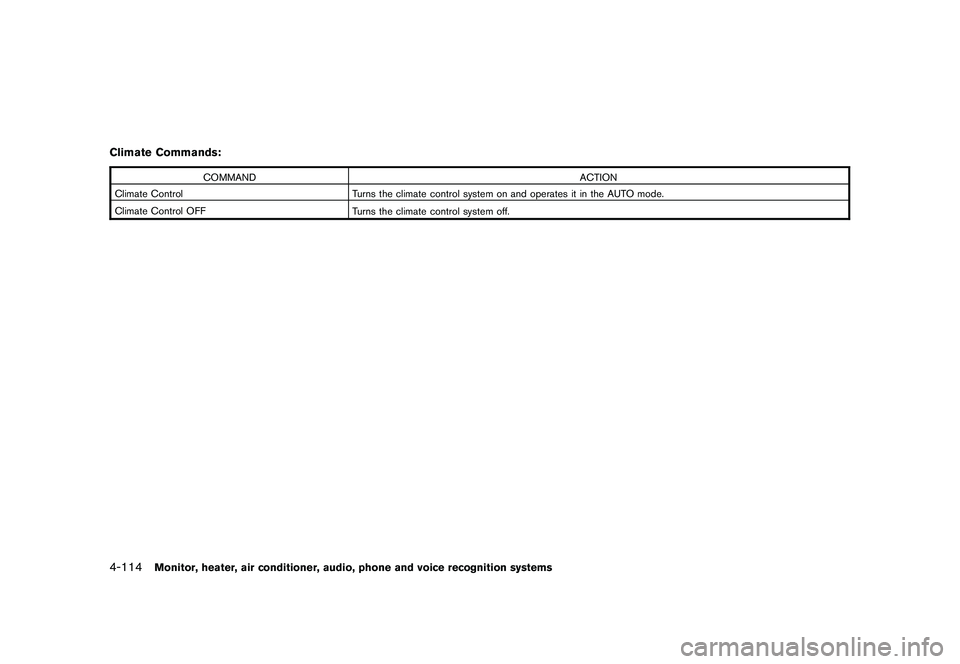
Climate Commands:
COMMANDACTION
Climate Control Turns the climate control system on and operates it in the AUTO mode.
Climate Control OFF Turns the climate control system off.
4-114
Monitor, heater, air conditioner, audio, phone and voice recognition systems
Page 287 of 425
Black plate (283,1)
Model "Z51-D" EDITED: 2009/ 8/ 3
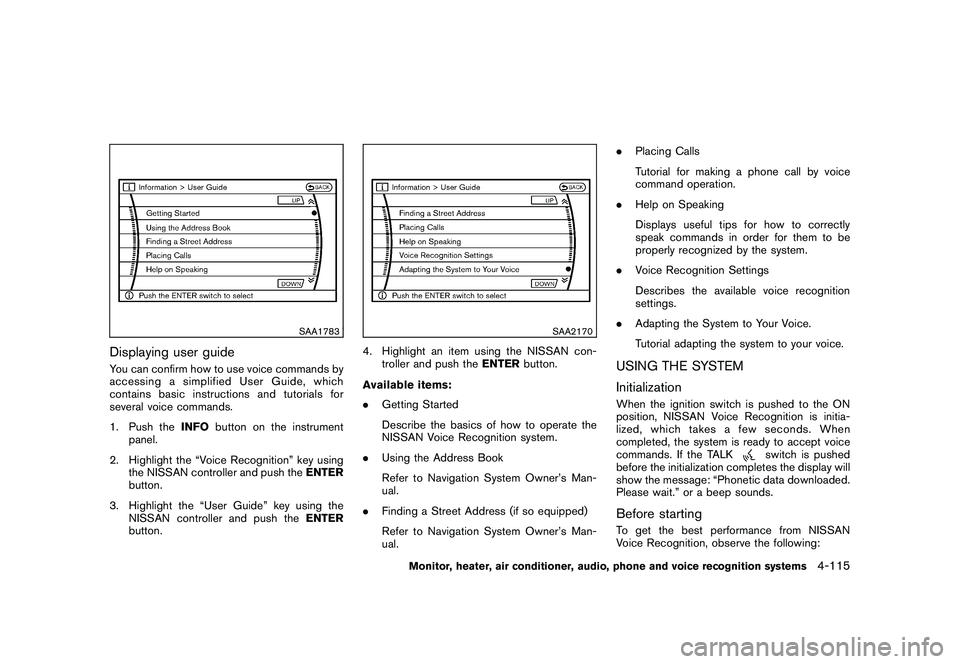
SAA1783
Displaying user guideYou can confirm how to use voice commands by
accessing a simplified User Guide, which
contains basic instructions and tutorials for
several voice commands.
1. Push theINFObutton on the instrument
panel.
2. Highlight the “Voice Recognition” key using the NISSAN controller and push the ENTER
button.
3. Highlight the “User Guide” key using the NISSAN controller and push the ENTER
button.
SAA2170
4. Highlight an item using the NISSAN con- troller and push the ENTERbutton.
Available items:
. Getting Started
Describe the basics of how to operate the
NISSAN Voice Recognition system.
. Using the Address Book
Refer to Navigation System Owner’s Man-
ual.
. Finding a Street Address (if so equipped)
Refer to Navigation System Owner’s Man-
ual. .
Placing Calls
Tutorial for making a phone call by voice
command operation.
. Help on Speaking
Displays useful tips for how to correctly
speak commands in order for them to be
properly recognized by the system.
. Voice Recognition Settings
Describes the available voice recognition
settings.
. Adapting the System to Your Voice.
Tutorial adapting the system to your voice.
USING THE SYSTEM
InitializationWhen the ignition switch is pushed to the ON
position, NISSAN Voice Recognition is initia-
lized, which takes a few seconds. When
completed, the system is ready to accept voice
commands. If the TALK
switch is pushed
before the initialization completes the display will
show the message: “Phonetic data downloaded.
Please wait.” or a beep sounds.
Before startingTo get the best performance from NISSAN
Voice Recognition, observe the following:
Monitor, heater, air conditioner, audio, phone and voice recognition systems
4-115
Page 288 of 425
Black plate (284,1)
Model "Z51-D" EDITED: 2009/ 8/ 3
.Keep the interior of the vehicle as quiet as
possible. Close the windows to eliminate the
surrounding noises (traffic noises, vibration
sounds, etc.) , which may prevent the system
from recognizing the voice commands cor-
rectly.
. When the air conditioner is in the AUTO
mode, the fan speed decreases automati-
cally for easy recognition.
. Wait until a tone sounds before speaking a
command.
. Speak in a natural voice without pausing
between words.
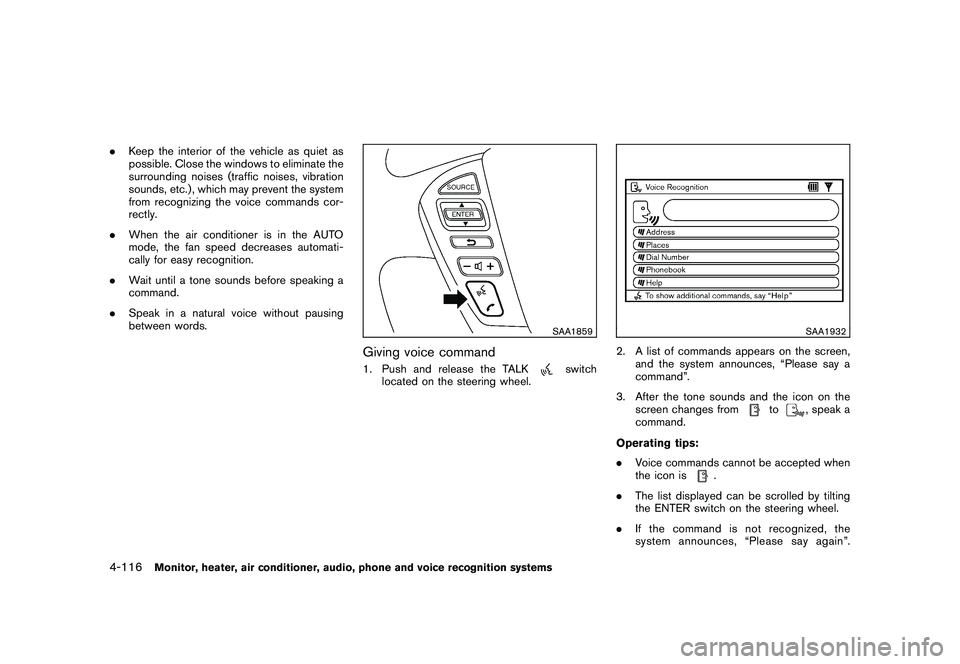
SAA1859
Giving voice command1. Push and release the TALK
switch
located on the steering wheel.
SAA1932
2. A list of commands appears on the screen, and the system announces, “Please say a
command”.
3. After the tone sounds and the icon on the screen changes from
to
, speak a
command.
Operating tips:
. Voice commands cannot be accepted when
the icon is
.
. The list displayed can be scrolled by tilting
the ENTER switch on the steering wheel.
. If the command is not recognized, the
system announces, “Please say again”.
4-116
Monitor, heater, air conditioner, audio, phone and voice recognition systems
Page 289 of 425
Black plate (285,1)
Model "Z51-D" EDITED: 2009/ 8/ 3
Repeat the command in a clear voice.
. Push the BACKbutton once to return to the
previous screen.
. If you want to cancel the command, push
and hold the TALK
switch for 1 second.
The message “Voice canceled” will be
announced.
. Push the TALKswitch again to pause
the operation. Push the TALK
switch to
restart the operation.
. If you want to adjust the volume of the
system feedback, push the volume control
buttons (+ or ) on the steering wheel or
use the audio system volume knob while the
system is making an announcement.
How to speak numbers:
NISSAN Voice Recognition requires a certain
way to speak numbers when giving voice
commands. Refer to the following examples.
General rule
Only single digits 0 (zero) to 9 can be used. (For
example, if you would like to say 500, “five zero
zero” can be used, but “five hundred” cannot.) Phone numbers
Speak phone numbers according to the follow-
ing examples:
.
1-800-662-6200
— “Dial one eight zero zero six six two zero zero.”
Note 1: For the best voice recognition phone
dialing results, say phone numbers as single
digits.
Note 2: You cannot say 555-6000 as “five five
five six thousands”.
Note 3: When speaking a house number, speak
the number “0” as “zero”. If the letter “o (Oh)” is
included in the house number, it will not be
recognized as the number “0 (zero)” even if you
speak “oh” instead of “zero”. You can only say
“zero” for “0 (Zero)”.
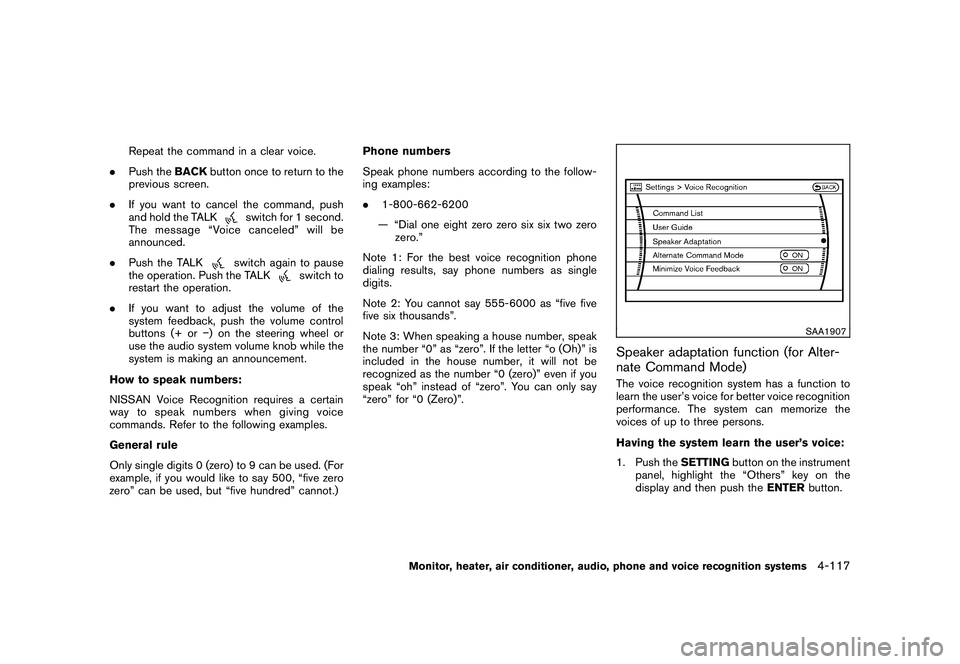
SAA1907
Speaker adaptation function (for Alter-
nate Command Mode)The voice recognition system has a function to
learn the user’s voice for better voice recognition
performance. The system can memorize the
voices of up to three persons.
Having the system learn the user’s voice:
1. Push the SETTINGbutton on the instrument
panel, highlight the “Others” key on the
display and then push the ENTERbutton.
Monitor, heater, air conditioner, audio, phone and voice recognition systems
4-117
Page 290 of 425
Black plate (286,1)
Model "Z51-D" EDITED: 2009/ 8/ 3
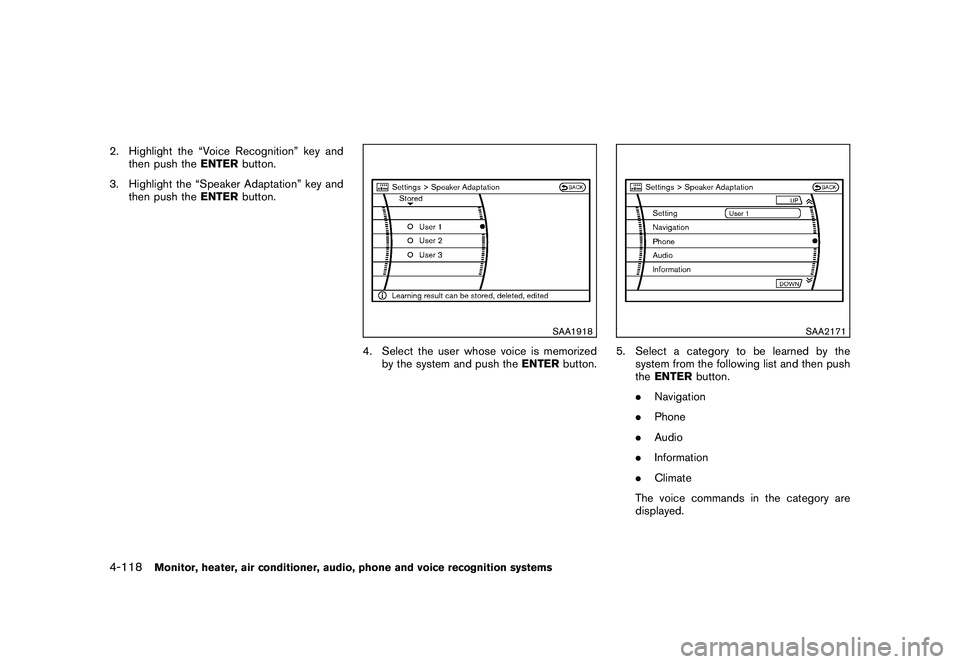
2. Highlight the “Voice Recognition” key andthen push the ENTERbutton.
3. Highlight the “Speaker Adaptation” key and then push the ENTERbutton.
SAA1918
4. Select the user whose voice is memorized
by the system and push the ENTERbutton.
SAA2171
5. Select a category to be learned by the
system from the following list and then push
theENTER button.
. Navigation
. Phone
. Audio
. Information
. Climate
The voice commands in the category are
displayed.
4-118
Monitor, heater, air conditioner, audio, phone and voice recognition systems
Page 291 of 425
Black plate (287,1)
Model "Z51-D" EDITED: 2009/ 8/ 3
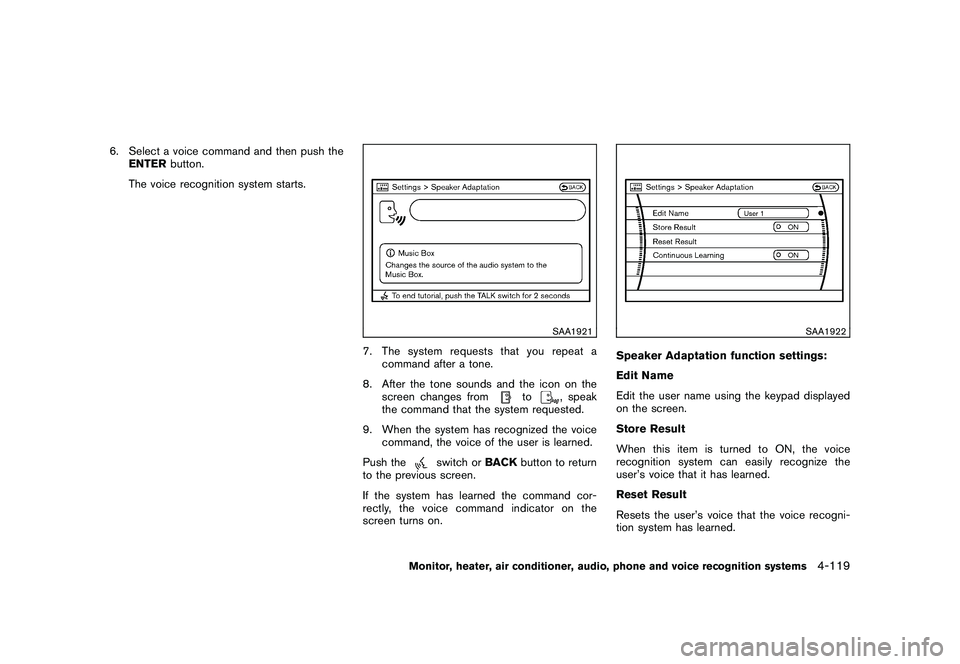
6. Select a voice command and then push theENTER button.
The voice recognition system starts.
SAA1921
7. The system requests that you repeat a command after a tone.
8. After the tone sounds and the icon on the screen changes from
to
, speak
the command that the system requested.
9. When the system has recognized the voice command, the voice of the user is learned.
Push the
switch or BACKbutton to return
to the previous screen.
If the system has learned the command cor-
rectly, the voice command indicator on the
screen turns on.
SAA1922
Speaker Adaptation function settings:
Edit Name
Edit the user name using the keypad displayed
on the screen.
Store Result
When this item is turned to ON, the voice
recognition system can easily recognize the
user’s voice that it has learned.
Reset Result
Resets the user’s voice that the voice recogni-
tion system has learned.
Monitor, heater, air conditioner, audio, phone and voice recognition systems
4-119
Page 292 of 425
Black plate (288,1)
Model "Z51-D" EDITED: 2009/ 8/ 3
Continuous Learning
When this item is turned to ON, you can have
the system learn the voice commands in
succession, without selecting commands one
by one.Minimize voice feedback (for Alternate
Command Mode)To minimize the voice feedback from the system,
perform the following steps.
1. Push theSETTINGbutton on the instrument
panel.
2. Highlight the “Others” key using the NISSAN controller and push the ENTER
button.
3. Highlight the “Voice Recognition” key and then push the ENTERbutton.
4. Highlight the “Minimize Voice Feedback” key and push the ENTERbutton.
5. The item is turned to ON and the vocal feedback is reduced if the voice recognition
system is activated.4-120
Monitor, heater, air conditioner, audio, phone and voice recognition systems
Page 293 of 425
Black plate (289,1)
Model "Z51-D" EDITED: 2009/ 8/ 3
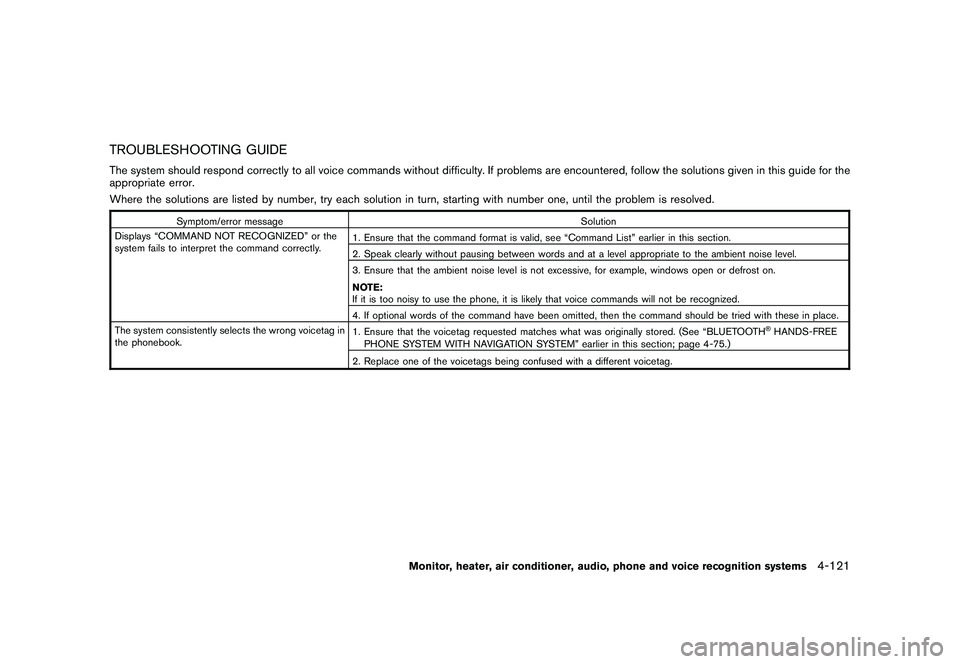
TROUBLESHOOTING GUIDEThe system should respond correctly to all voice commands without difficulty. If problems are encountered, follow the solutions given in this guide for the
appropriate error.
Where the solutions are listed by number, try each solution in turn, starting with number one, until the problem is resolved.
Symptom/error messageSolution
Displays “COMMAND NOT RECOGNIZED” or the
system fails to interpret the command correctly. 1. Ensure that the command format is valid, see “Command List” earlier in this section.
2. Speak clearly without pausing between words and at a level appropriate to the ambient noise level.
3. Ensure that the ambient noise level is not excessive, for example, windows open or defrost on.
NOTE:
If it is too noisy to use the phone, it is likely that voice commands will not be recognized.
4. If optional words of the command have been omitted, then the command should be tried with these in place.
The system consistently selects the wrong voicetag in
the phonebook. 1. Ensure that the voicetag requested matches what was originally stored. (See “BLUETOOTH
®HANDS-FREE
PHONE SYSTEM WITH NAVIGATION SYSTEM” earlier in this section; page 4-75.)
2. Replace one of the voicetags being confused with a different voicetag.
Monitor, heater, air conditioner, audio, phone and voice recognition systems
4-121
Page 294 of 425

Black plate (290,1)
Model "Z51-D" EDITED: 2009/ 8/ 3
MEMO4-122
Monitor, heater, air conditioner, audio, phone and voice recognition systems
Page 415 of 425
Black plate (415,1)
Model "Z51-D" EDITED: 2009/ 8/ 3
This vehicle is equipped with an Event Data
Recorder (EDR) . The main purpose of an EDR is
to record, in certain crash or near crash-like
situations, such as an air bag deployment or
hitting a road obstacle, data that will assist in
understanding how a vehicle’s systems per-
formed. The EDR is designed to record data
related to vehicle dynamics and safety systems
for a short period of time, typically 30 seconds
or less. The EDR in this vehicle is designed to
record such data as:
.How various systems in your vehicle were
operating;
. Whether or not the driver and passenger
safety belts were buckled/fastened;
. How far (if at all) the driver was depressing
the accelerator and/or brake pedal; and,
. How fast the vehicle was traveling.
. Sounds are not recorded.
These data can help provide a better under-
standing of the circumstances in which crashes
and injuries occur.
NOTE: EDR data are recorded by your vehicle
only if a nontrivial crash situation occurs; no data
are recorded by the EDR under normal driving
conditions and no personal data (e.g. name,
gender, age and crash location) are recorded.
However, other parties, such as law enforce- ment, could combine the EDR data with the type
of personally identifying data routinely acquired
during a crash investigation.
To read data recorded by an EDR, special
equipment is required and access to the vehicle
or the EDR is needed. In addition to the vehicle
manufacturer and NISSAN dealer, other parties,
such as law enforcement, that have the special
equipment, can read the information if they have
access to the vehicle or the EDR. EDR data will
only be accessed with the consent of the vehicle
owner or lessee or as otherwise required or
permitted by law.
A genuine NISSAN Service Manual is the best
source of service and repair information for your
vehicle. Filled with wiring diagrams, illustrations
and step-by-step diagnostic and adjustment
procedures, this manual is the same one used
by the factory trained technicians working at a
NISSAN dealer. Also available are genuine
NISSAN Owner’s Manuals, and genuine
NISSAN Service and Owner’s Manuals for older
NISSAN models.
In the USA:
For current pricing and availability of genuine
NISSAN Service Manuals
for the 2000 model
year and later, contact:
1-800-450-9491
www.nissan-techinfo.com
For current pricing and availability of genuine
NISSAN Service Manuals for the 1999 model
year and prior, see a NISSAN dealer, or contact:
1-800-247-5321
For current pricing and availability of genuine
NISSAN Owner’s Manuals for this model year
and prior, see a NISSAN dealer, or contact:
1-800-247-5321
In Canada:
To purchase a copy of a genuine NISSAN
Service Manual or Owner’s Manual please
contact a NISSAN dealer. For the phone numberEVENT DATA RECORDERS (EDR) OWNER’S MANUAL/SERVICE
MANUAL ORDER INFORMATION
Technical and consumer information
9-27