maintenance NISSAN MURANO 2010 Owner´s Manual
[x] Cancel search | Manufacturer: NISSAN, Model Year: 2010, Model line: MURANO, Model: NISSAN MURANO 2010Pages: 425, PDF Size: 3.62 MB
Page 98 of 425
Black plate (94,1)
Model "Z51-D" EDITED: 2009/ 8/ 3
11. Low washer fluid warningThis warning appears when the washer tank fluid
is at a low level. Add washer fluid as necessary.
(See “WINDOW WASHER FLUID” in the “8.
Maintenance and do-it-yourself” section.)12. Door/lift gate open warning (ignition
switch is in the ON position)This warning appears if any of the doors and/or
the lift gate are open or not closed securely. The
vehicle icon indicates which door is open on the
display.13. “Time to rest” indicatorThis indicator appears when the set “time to
rest” indicator activates. You can set the time for
up to 6 hours. (See “TRIP COMPUTER” later in
this section.)14. Low outside temperature warningThis warning appears if the outside temperature
is below 378F(3 8C) . The warning can be set not
to be displayed. (See “TRIP COMPUTER” later
in this section.)
SIC3578
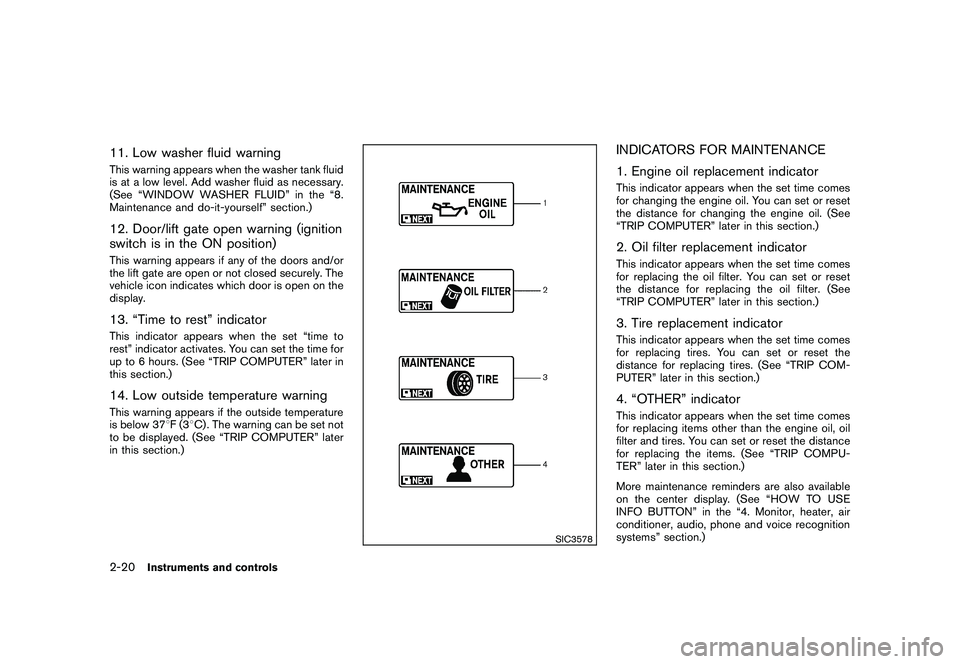
INDICATORS FOR MAINTENANCE
1. Engine oil replacement indicatorThis indicator appears when the set time comes
for changing the engine oil. You can set or reset
the distance for changing the engine oil. (See
“TRIP COMPUTER” later in this section.)2. Oil filter replacement indicatorThis indicator appears when the set time comes
for replacing the oil filter. You can set or reset
the distance for replacing the oil filter. (See
“TRIP COMPUTER” later in this section.)3. Tire replacement indicatorThis indicator appears when the set time comes
for replacing tires. You can set or reset the
distance for replacing tires. (See “TRIP COM-
PUTER” later in this section.)4. “OTHER” indicatorThis indicator appears when the set time comes
for replacing items other than the engine oil, oil
filter and tires. You can set or reset the distance
for replacing the items. (See “TRIP COMPU-
TER” later in this section.)
More maintenance reminders are also available
on the center display. (See “HOW TO USE
INFO BUTTON” in the “4. Monitor, heater, air
conditioner, audio, phone and voice recognition
systems” section.)
2-20
Instruments and controls
Page 102 of 425
Black plate (98,1)
Model "Z51-D" EDITED: 2009/ 8/ 3
SIC3678
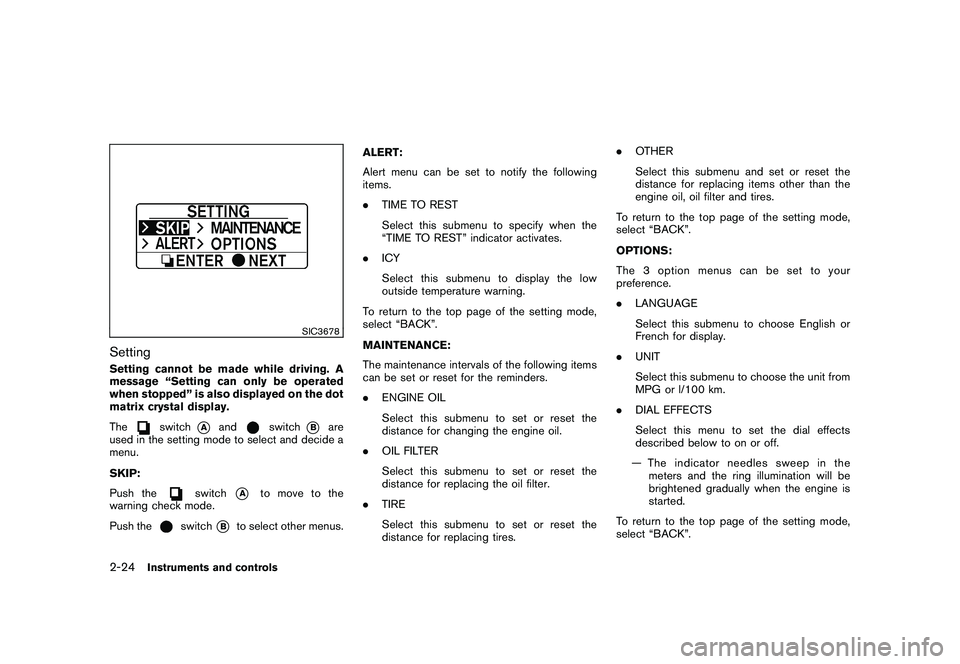
SettingSetting cannot be made while driving. A
message “Setting can only be operated
when stopped” is also displayed on the dot
matrix crystal display.
The
switch
*A
and
switch
*B
are
used in the setting mode to select and decide a
menu.
SKIP:
Push the
switch
*A
to move to the
warning check mode.
Push the
switch
*B
to select other menus. ALERT:
Alert menu can be set to notify the following
items.
.
TIME TO REST
Select this submenu to specify when the
“TIME TO REST” indicator activates.
. ICY
Select this submenu to display the low
outside temperature warning.
To return to the top page of the setting mode,
select “BACK”.
MAINTENANCE:
The maintenance intervals of the following items
can be set or reset for the reminders.
. ENGINE OIL
Select this submenu to set or reset the
distance for changing the engine oil.
. OIL FILTER
Select this submenu to set or reset the
distance for replacing the oil filter.
. TIRE
Select this submenu to set or reset the
distance for replacing tires. .
OTHER
Select this submenu and set or reset the
distance for replacing items other than the
engine oil, oil filter and tires.
To return to the top page of the setting mode,
select “BACK”.
OPTIONS:
The 3 option menus can be set to your
preference.
. LANGUAGE
Select this submenu to choose English or
French for display.
. UNIT
Select this submenu to choose the unit from
MPG or l/100 km.
. DIAL EFFECTS
Select this menu to set the dial effects
described below to on or off.
— The indicator needles sweep in the meters and the ring illumination will be
brightened gradually when the engine is
started.
To return to the top page of the setting mode,
select “BACK”.
2-24
Instruments and controls
Page 146 of 425
Black plate (142,1)
Model "Z51-D" EDITED: 2009/ 8/ 3
computer.
. When the vehicle is parked near a parking
meter.
In such cases, correct the operating conditions
before using the Intelligent Key function or use
the mechanical key.
Although the life of the battery varies depending
on the operating conditions, the battery’s life is
approximately 2 years. If the battery is dis-
charged, replace it with a new one.
Since the Intelligent Key is continuously receiv-
ing radio waves, if the key is left near equipment
which transmits strong radio waves, such as
signals from a TV and personal computer, the
battery life may become shorter.
For information regarding replacement of a
battery, see “BATTERY REPLACEMENT” in
the “8. Maintenance and do-it-yourself” section.
For models with a steering wheel lock mechan-
ism: Because the steering wheel is locked
electrically, unlocking the steering wheel with
the ignition switch in the LOCK position is
impossible when the vehicle battery is comple-
tely discharged. Pay special attention that the
vehicle battery is not completely discharged.
As many as 4 Intelligent Keys can be registered
and used with one vehicle. For information about
the purchase and use of additional Intelligent Keys, contact a NISSAN dealer.
CAUTION
.
Do not allow the Intelligent Key,
which contains electrical compo-
nents, to come into contact with
water or salt water. This could affect
the system function.
. Do not drop the Intelligent Key.
. Do not strike the Intelligent Key
sharply against another object.
. Do not change or modify the Intel-
ligent Key.
. Wetting may damage the Intelligent
Key. If the Intelligent Key gets wet,
immediately wipe until it is comple-
tely dry.
. Do not place the Intelligent Key for
an extended period in an area where
temperatures exceed 140 8F (60 8C) .
. Do not attach the Intelligent Key
with a key holder that contains a
magnet.
. Do not place the Intelligent Key near
equipment that produces a mag-
netic field, such as a TV, audio
equipment, personal computer or cellular phone.
If an Intelligent Key is lost or stolen, NISSAN
recommends erasing the ID code of that
Intelligent Key from the vehicle. This may prevent
the unauthorized use of the Intelligent Key to
operate the vehicle. For information regarding
the erasing procedure, contact a NISSAN deal-
er.
3-8
Pre-driving checks and adjustments
Page 173 of 425
Black plate (14,1)
Model "Z51-D" EDITED: 2009/ 8/ 3
Care and maintenance.................................. 4-73
Car phone or CB radio ...................................... 4-74
Bluetooth
®Hands-Free Phone System with
navigation system ............................................. 4-75
Regulatory information ................................... 4-76
Voice commands. ......................................... 4-76
Control buttons ........................................... 4-77
Pairing procedure ......................................... 4-77
Phonebook registration .................................. 4-78
Making a call ............................................... 4-80
Receiving a call ........................................... 4-81
During a call ............................................... 4-81
Phone setting .............................................. 4-82
Troubleshooting guide ................................... 4-84
Bluetooth®Hands-Free Phone System without
navigation system (if so equipped) ....................... 4-85
Regulatory information ................................... 4-86
Initialization ................................................. 4-86
Operating tips ............................................. 4-86
Giving voice commands ................................. 4-86
Control buttons ........................................... 4-88 Getting started
............................................ 4-88
Choosing a language .................................... 4-88
Pairing procedure ......................................... 4-88
Making a call by entering a phone number ......... 4-89
Receiving a call ........................................... 4-89
List of voice commands ................................. 4-90
Call ........................................................... 4-90
Phone book ................................................ 4-92
Memo pad .................................................. 4-94
Setup ........................................................ 4-94
Speaker Adaptation (SA) mode ....................... 4-96
Troubleshooting guide ................................... 4-98
NISSAN Voice Recognition System
(models with navigation system) .......................... 4-99
NISSAN voice recognition standard mode .......... 4-99
Using the system ....................................... 4-102
NISSAN voice recognition alternate command
mode ...................................................... 4-109
Using the system ....................................... 4-115
Troubleshooting guide ................................. 4-121
Page 177 of 425
Black plate (173,1)
Model "Z51-D" EDITED: 2009/ 8/ 3
SAA1543
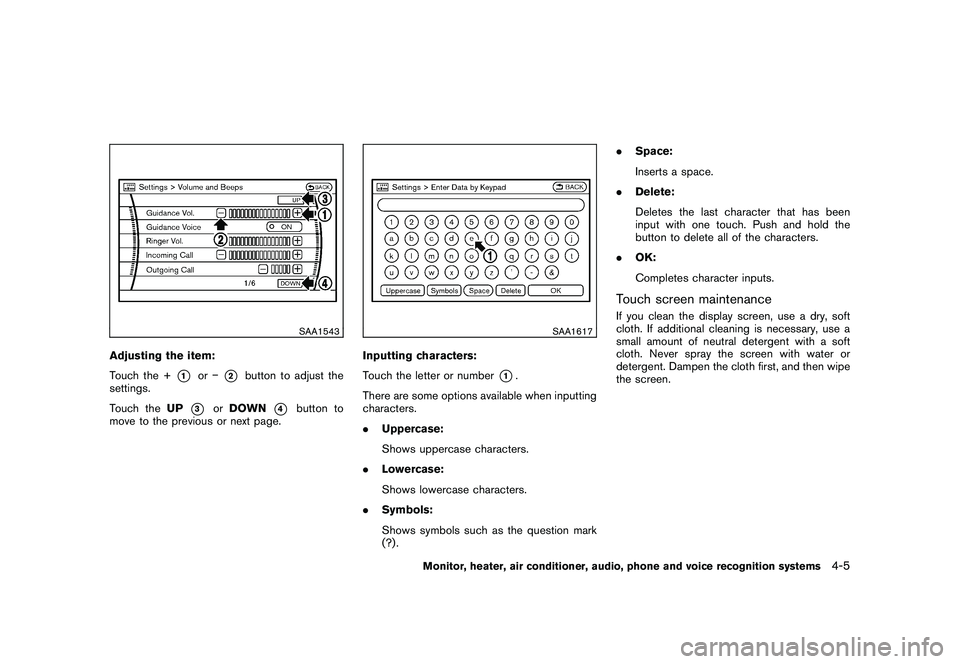
Adjusting the item:
Touch the +
*1
or
*2
button to adjust the
settings.
Touch the UP
*3
orDOWN
*4
button to
move to the previous or next page.
SAA1617
Inputting characters:
Touch the letter or number
*1.
There are some options available when inputting
characters.
. Uppercase:
Shows uppercase characters.
. Lowercase:
Shows lowercase characters.
. Symbols:
Shows symbols such as the question mark
(?) . .
Space:
Inserts a space.
. Delete:
Deletes the last character that has been
input with one touch. Push and hold the
button to delete all of the characters.
. OK:
Completes character inputs.
Touch screen maintenanceIf you clean the display screen, use a dry, soft
cloth. If additional cleaning is necessary, use a
small amount of neutral detergent with a soft
cloth. Never spray the screen with water or
detergent. Dampen the cloth first, and then wipe
the screen.
Monitor, heater, air conditioner, audio, phone and voice recognition systems
4-5
Page 182 of 425
Black plate (178,1)
Model "Z51-D" EDITED: 2009/ 8/ 3
SAA1554
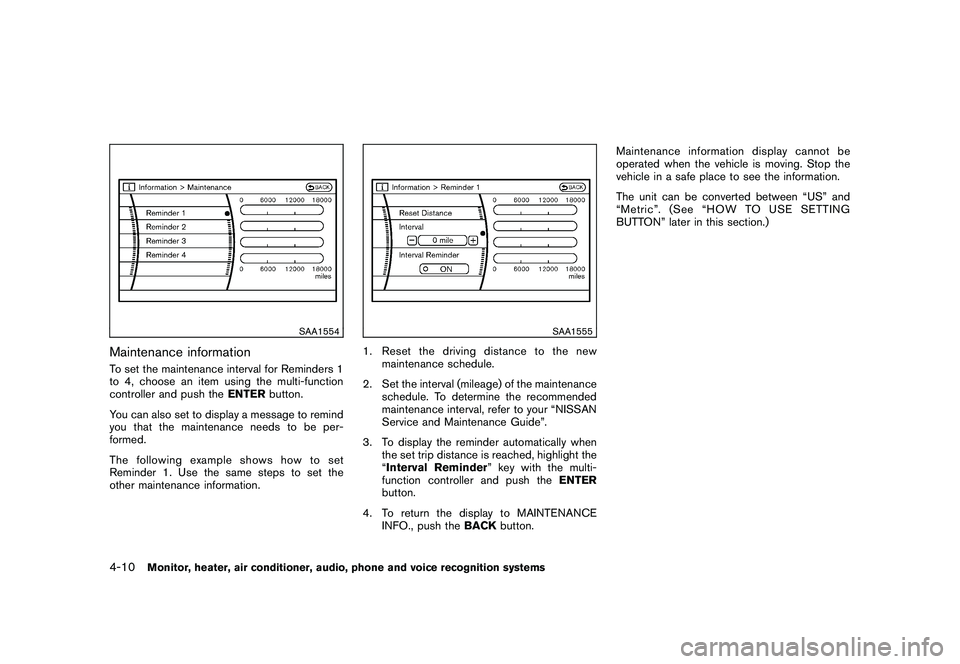
Maintenance informationTo set the maintenance interval for Reminders 1
to 4, choose an item using the multi-function
controller and push theENTERbutton.
You can also set to display a message to remind
you that the maintenance needs to be per-
formed.
The following example shows how to set
Reminder 1. Use the same steps to set the
other maintenance information.
SAA1555
1. Reset the driving distance to the new maintenance schedule.
2. Set the interval (mileage) of the maintenance schedule. To determine the recommended
maintenance interval, refer to your “NISSAN
Service and Maintenance Guide”.
3. To display the reminder automatically when the set trip distance is reached, highlight the
“Interval Reminder ” key with the multi-
function controller and push the ENTER
button.
4. To return the display to MAINTENANCE INFO., push the BACKbutton. Maintenance information display cannot be
operated when the vehicle is moving. Stop the
vehicle in a safe place to see the information.
The unit can be converted between “US” and
“Metric”. (See “HOW TO USE SETTING
BUTTON” later in this section.)
4-10
Monitor, heater, air conditioner, audio, phone and voice recognition systems
Page 183 of 425
Black plate (179,1)
Model "Z51-D" EDITED: 2009/ 8/ 3
SAA1611
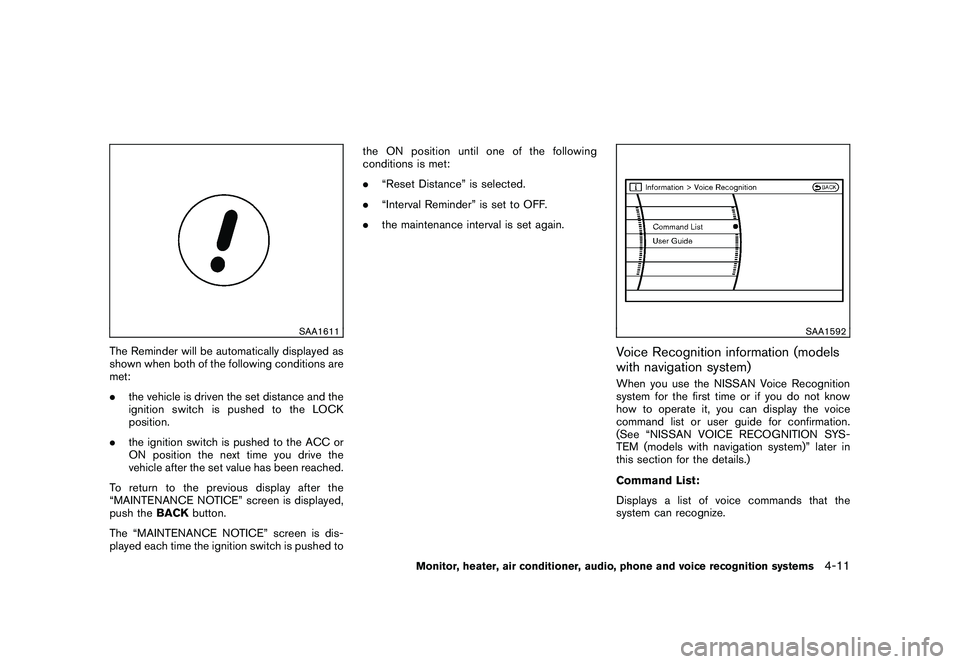
The Reminder will be automatically displayed as
shown when both of the following conditions are
met:
.the vehicle is driven the set distance and the
ignition switch is pushed to the LOCK
position.
. the ignition switch is pushed to the ACC or
ON position the next time you drive the
vehicle after the set value has been reached.
To return to the previous display after the
“MAINTENANCE NOTICE” screen is displayed,
push the BACKbutton.
The “MAINTENANCE NOTICE” screen is dis-
played each time the ignition switch is pushed to the ON position until one of the following
conditions is met:
.
“Reset Distance” is selected.
. “Interval Reminder” is set to OFF.
. the maintenance interval is set again.
SAA1592
Voice Recognition information (models
with navigation system)When you use the NISSAN Voice Recognition
system for the first time or if you do not know
how to operate it, you can display the voice
command list or user guide for confirmation.
(See “NISSAN VOICE RECOGNITION SYS-
TEM (models with navigation system)” later in
this section for the details.)
Command List:
Displays a list of voice commands that the
system can recognize.
Monitor, heater, air conditioner, audio, phone and voice recognition systems
4-11
Page 202 of 425
Black plate (198,1)
Model "Z51-D" EDITED: 2009/ 8/ 3
TO TURN THE SYSTEM ON/OFFPush the “OFF” or “ON·OFF” button when the
heater and air conditioner is off. The system will
turn on with the settings that were used
immediately before the system was turned off.
SAA1989
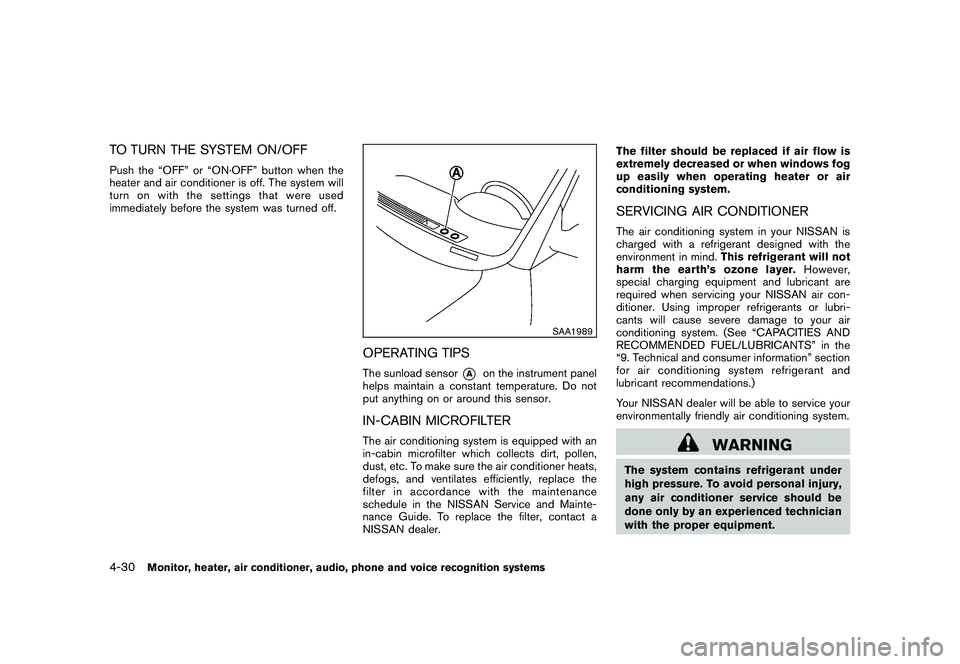
OPERATING TIPSThe sunload sensor
*A
on the instrument panel
helps maintain a constant temperature. Do not
put anything on or around this sensor.
IN-CABIN MICROFILTERThe air conditioning system is equipped with an
in-cabin microfilter which collects dirt, pollen,
dust, etc. To make sure the air conditioner heats,
defogs, and ventilates efficiently, replace the
filter in accordance with the maintenance
schedule in the NISSAN Service and Mainte-
nance Guide. To replace the filter, contact a
NISSAN dealer. The filter should be replaced if air flow is
extremely decreased or when windows fog
up easily when operating heater or air
conditioning system.
SERVICING AIR CONDITIONERThe air conditioning system in your NISSAN is
charged with a refrigerant designed with the
environment in mind.
This refrigerant will not
harm the earth’s ozone layer. However,
special charging equipment and lubricant are
required when servicing your NISSAN air con-
ditioner. Using improper refrigerants or lubri-
cants will cause severe damage to your air
conditioning system. (See “CAPACITIES AND
RECOMMENDED FUEL/LUBRICANTS” in the
“9. Technical and consumer information” section
for air conditioning system refrigerant and
lubricant recommendations.)
Your NISSAN dealer will be able to service your
environmentally friendly air conditioning system.
WARNING
The system contains refrigerant under
high pressure. To avoid personal injury,
any air conditioner service should be
done only by an experienced technician
with the proper equipment.
4-30
Monitor, heater, air conditioner, audio, phone and voice recognition systems
Page 230 of 425
Black plate (226,1)
Model "Z51-D" EDITED: 2009/ 8/ 3
SAA1616
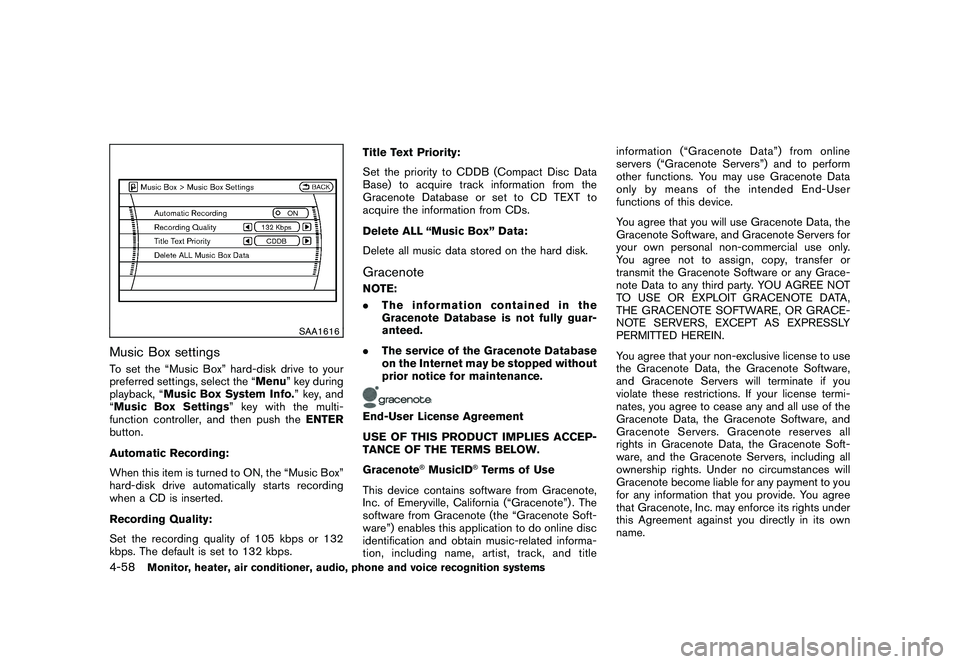
Music Box settingsTo set the “Music Box” hard-disk drive to your
preferred settings, select the “Menu” key during
playback, “Music Box System Info. ” key, and
“Music Box Settings ” key with the multi-
function controller, and then push the ENTER
button.
Automatic Recording:
When this item is turned to ON, the “Music Box”
hard-disk drive automatically starts recording
when a CD is inserted.
Recording Quality:
Set the recording quality of 105 kbps or 132
kbps. The default is set to 132 kbps. Title Text Priority:
Set the priority to CDDB (Compact Disc Data
Base) to acquire track information from the
Gracenote Database or set to CD TEXT to
acquire the information from CDs.
Delete ALL “Music Box” Data:
Delete all music data stored on the hard disk.
GracenoteNOTE:
.
The information contained in the
Gracenote Database is not fully guar-
anteed.
. The service of the Gracenote Database
on the Internet may be stopped without
prior notice for maintenance.End-User License Agreement
USE OF THIS PRODUCT IMPLIES ACCEP-
TANCE OF THE TERMS BELOW.
Gracenote
®MusicID
®Terms of Use
This device contains software from Gracenote,
Inc. of Emeryville, California (“Gracenote”) . The
software from Gracenote (the “Gracenote Soft-
ware”) enables this application to do online disc
identification and obtain music-related informa-
tion, including name, artist, track, and title information (“Graceno
te Data”) from online
servers (“Gracenote Servers”) and to perform
other functions. You may use Gracenote Data
only by means of the intended End-User
functions of this device.
You agree that you will use Gracenote Data, the
Gracenote Software, and Gracenote Servers for
your own personal non-commercial use only.
You agree not to assign, copy, transfer or
transmit the Gracenote Software or any Grace-
note Data to any third party. YOU AGREE NOT
TO USE OR EXPLOIT GRACENOTE DATA,
THE GRACENOTE SOFTWARE, OR GRACE-
NOTE SERVERS, EXCEPT AS EXPRESSLY
PERMITTED HEREIN.
You agree that your non-exclusive license to use
the Gracenote Data, the Gracenote Software,
and Gracenote Servers will terminate if you
violate these restrictions. If your license termi-
nates, you agree to cease any and all use of the
Gracenote Data, the Gracenote Software, and
Gracenote Servers. Gracenote reserves all
rights in Gracenote Data, the Gracenote Soft-
ware, and the Gracenote Servers, including all
ownership rights. Under no circumstances will
Gracenote become liable for any payment to you
for any information that you provide. You agree
that Gracenote, Inc. may enforce its rights under
this Agreement against you directly in its own
name.
4-58
Monitor, heater, air conditioner, audio, phone and voice recognition systems
Page 245 of 425
Black plate (241,1)
Model "Z51-D" EDITED: 2009/ 8/ 3
Volume:
To control the volume level, push the “VOL”
button
or
.
Display:
Press to adjust the rear display screen bright-
ness, tint, contrast, etc.
Aspect:
To change the display size, push the “ASPECT”
button. Each time the button is pushed, the
display size will change to “Cinema”, “Wide”,
“Full” or “Normal”.
Sound:
To change the language, push the “SOUND”
button. Each time the button is pushed, the
language will change to each language stored in
the DVD.
Headphones:
The DVD sound can be heard through the
headphones.
Push the “
” button. Each time the button is
pushed the mode will switch to ON or OFF.
To control the volume of sound from the
headphones, use the VOLUME CONTROL
knob attached to the headphones. Track/Channel:
Press to skip to the previous or next DVD scene
selection.
Keypad:
: PLAY/PAUSE button: STOP button: FORWARD button: REWIND button: FORWARD button for still images (for
DVD-AUDIO): REWIND button for still images (for DVD-AUDIO)
CARE AND MAINTENANCEUse a lightly dampened, lint free cloth to clean
the surfaces of your Mobile Entertainment
System. (DVD player face, screen, remote
controller, etc.)
CAUTION
. Do not use any solvents or cleaning
solutions when cleaning the video
system.
. Do not use excessive force on the
monitor screen. .
Avoid touching or scratching the
monitor screen as it may become
dirty or damaged.
. Do not attempt to operate the
system in extreme temperature con-
ditions [below 48F( 208 C) and
above 158 8F (70 8C)].
. Do not attempt to operate the
system in extreme humidity condi-
tions (less than 10% or more than
75%) .
Monitor, heater, air conditioner, audio, phone and voice recognition systems
4-73