seat adjustment NISSAN MURANO 2010 Owner´s Manual
[x] Cancel search | Manufacturer: NISSAN, Model Year: 2010, Model line: MURANO, Model: NISSAN MURANO 2010Pages: 425, PDF Size: 3.62 MB
Page 30 of 425
Black plate (26,1)
Model "Z51-D" EDITED: 2009/ 8/ 3
Adjust the Active Head Restraints properly as
described earlier in this section.ADJUSTABLE HEADREST
WARNING
The adjustable headrests supplement
the other vehicle safety systems. They
may provide additional protection
against injury in certain rear end colli-
sions. Adjust the headrests properly, as
specifiedinthissection.Checkthe
adjustment after someone else uses
the seat. Do not attach anything to the
adjustable headrest stalks or remove
the adjustable headrests. Do not use
the seat if the adjustable headrests
have been removed. If the headrest
was removed, reinstall and properly
adjust the headrest before an occupant
uses the seating position. Failure to
follow these instructions can reduce the
effectiveness of the adjustable head-
rests. This may increase the risk of
serious injury or death in a collision.
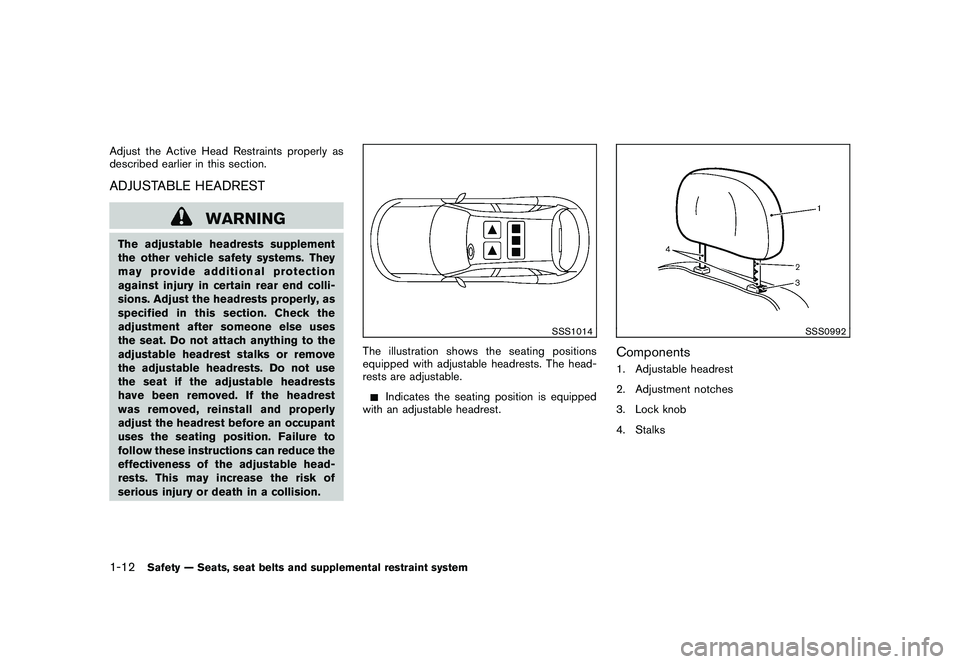
SSS1014
The illustration shows the seating positions
equipped with adjustable headrests. The head-
rests are adjustable.
Indicates the seating position is equipped
with an adjustable headrest.
SSS0992
Components1. Adjustable headrest
2. Adjustment notches
3. Lock knob
4. Stalks
1-12
Safety — Seats, seat belts and supplemental restraint system
Page 31 of 425
Black plate (27,1)
Model "Z51-D" EDITED: 2009/ 8/ 3
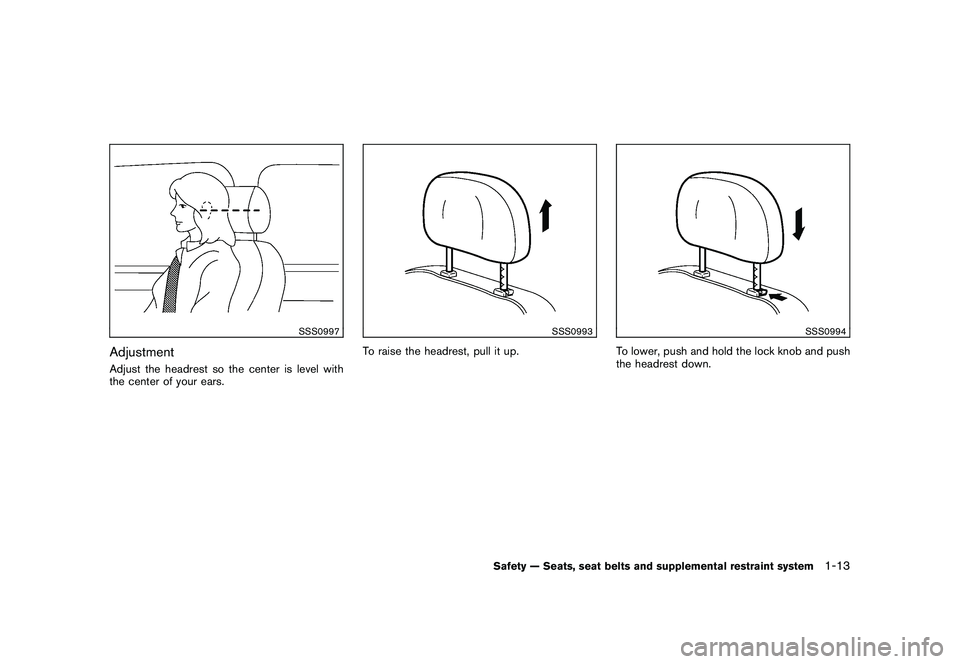
SSS0997
AdjustmentAdjust the headrest so the center is level with
the center of your ears.
SSS0993
To raise the headrest, pull it up.
SSS0994
To lower, push and hold the lock knob and push
the headrest down.
Safety — Seats, seat belts and supplemental restraint system
1-13
Page 32 of 425
Black plate (28,1)
Model "Z51-D" EDITED: 2009/ 8/ 3
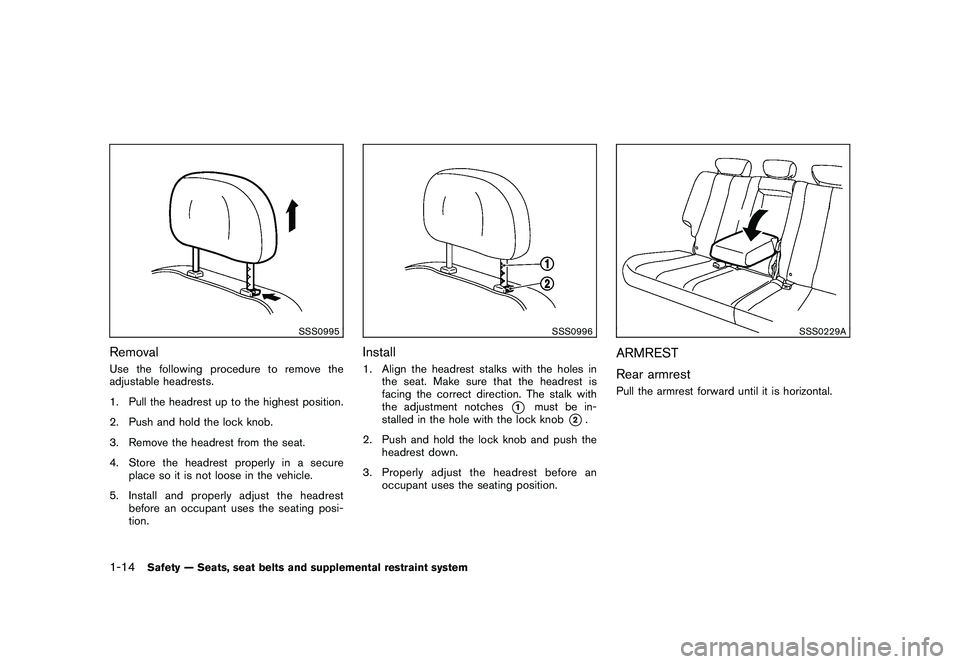
SSS0995
RemovalUse the following procedure to remove the
adjustable headrests.
1. Pull the headrest up to the highest position.
2. Push and hold the lock knob.
3. Remove the headrest from the seat.
4. Store the headrest properly in a secureplace so it is not loose in the vehicle.
5. Install and properly adjust the headrest before an occupant uses the seating posi-
tion.
SSS0996
Install1. Align the headrest stalks with the holes inthe seat. Make sure that the headrest is
facing the correct direction. The stalk with
the adjustment notches
*1
must be in-
stalled in the hole with the lock knob
*2.
2. Push and hold the lock knob and push the headrest down.
3. Properly adjust the headrest before an occupant uses the seating position.
SSS0229A
ARMREST
Rear armrestPull the armrest forward until it is horizontal.
1-14
Safety — Seats, seat belts and supplemental restraint system
Page 39 of 425
Black plate (35,1)
Model "Z51-D" EDITED: 2009/ 8/ 3
restrict further belt movement.
If the retractor does not lock during this check or
if you have any question about seat belt
operation, see a NISSAN dealer.
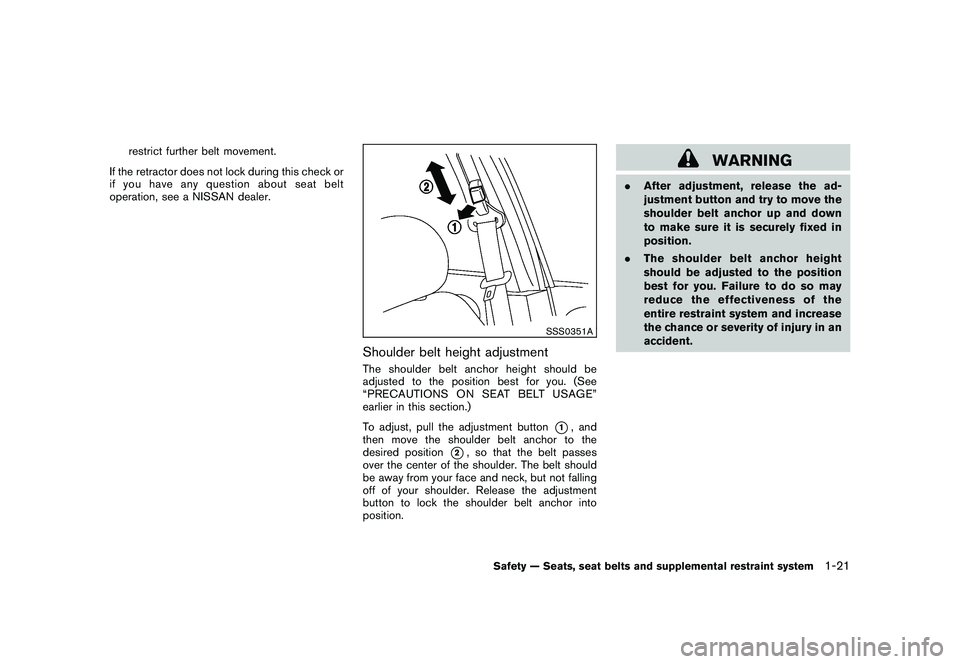
SSS0351A
Shoulder belt height adjustmentThe shoulder belt anchor height should be
adjusted to the position best for you. (See
“PRECAUTIONS ON SEAT BELT USAGE”
earlier in this section.)
To adjust, pull the adjustment button
*1, and
then move the shoulder belt anchor to the
desired position
*2, so that the belt passes
over the center of the shoulder. The belt should
be away from your face and neck, but not falling
off of your shoulder. Release the adjustment
button to lock the shoulder belt anchor into
position.
WARNING
. After adjustment, release the ad-
justment button and try to move the
shoulder belt anchor up and down
to make sure it is securely fixed in
position.
. The shoulder belt anchor height
should be adjusted to the position
best for you. Failure to do so may
reduce the effectiveness of the
entire restraint system and increase
the chance or severity of injury in an
accident.
Safety — Seats, seat belts and supplemental restraint system
1-21
Page 46 of 425
Black plate (42,1)
Model "Z51-D" EDITED: 2009/ 8/ 3
Vehicle Safety Standard 213.
. Check the child restraint in your vehicle to
be sure it is compatible with the vehicle’s
seat and seat belt system.
. If the child restraint is compatible with your
vehicle, place your child in the child restraint
and check the various adjustments to be
sure the child restraint is compatible with
your child. Choose a child restraint that is
designed for your child’s height and weight.
Always follow all recommended procedures.
All U.S. states and Canadian provinces or
territories require that infants and small
children be restrained in an approved child
restraint at all times while the vehicle is
being operated. Canadian law requires the
top tether strap on front-facing child
restraints to be secured to the designated
anchor point on the vehicle.
Lower Anchors and Tethers for CHildren
System (LATCH)Your vehicle is equipped with special anchor
points that are used with Lower Anchors and
Tethers for CHildren System (LATCH) compa-
tible child restraints. This system may also be
referred to as the ISOFIX or ISOFIX compatible
system. With this system, you do not have to use
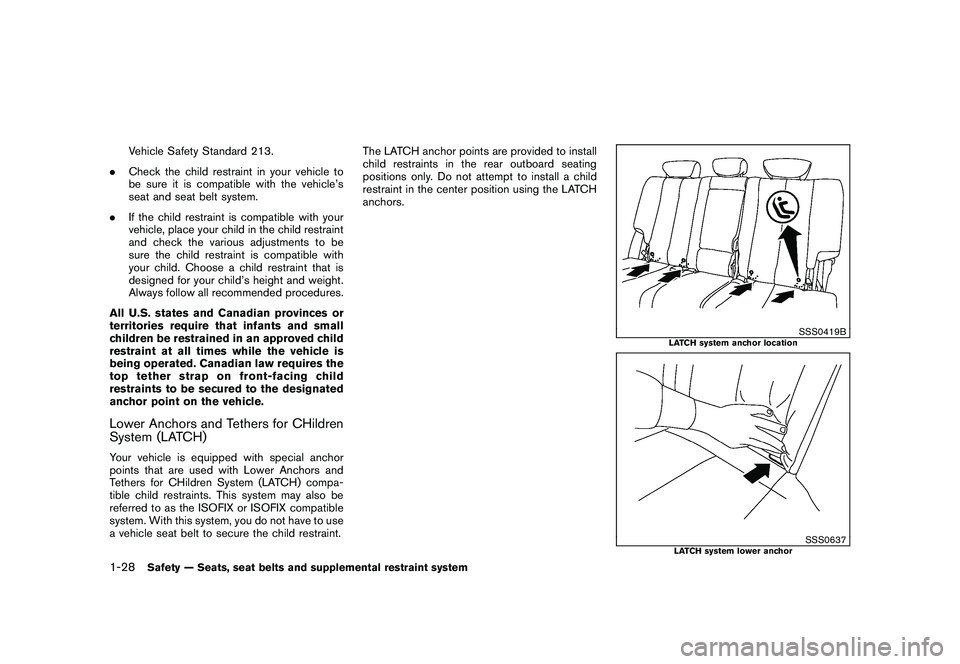
a vehicle seat belt to secure the child restraint. The LATCH anchor points are provided to install
child restraints in the rear outboard seating
positions only. Do not attempt to install a child
restraint in the center position using the LATCH
anchors.
SSS0419B
LATCH system anchor location
SSS0637
LATCH system lower anchor
1-28
Safety — Seats, seat belts and supplemental restraint system
Page 61 of 425
Black plate (57,1)
Model "Z51-D" EDITED: 2009/ 8/ 3
LRS0453
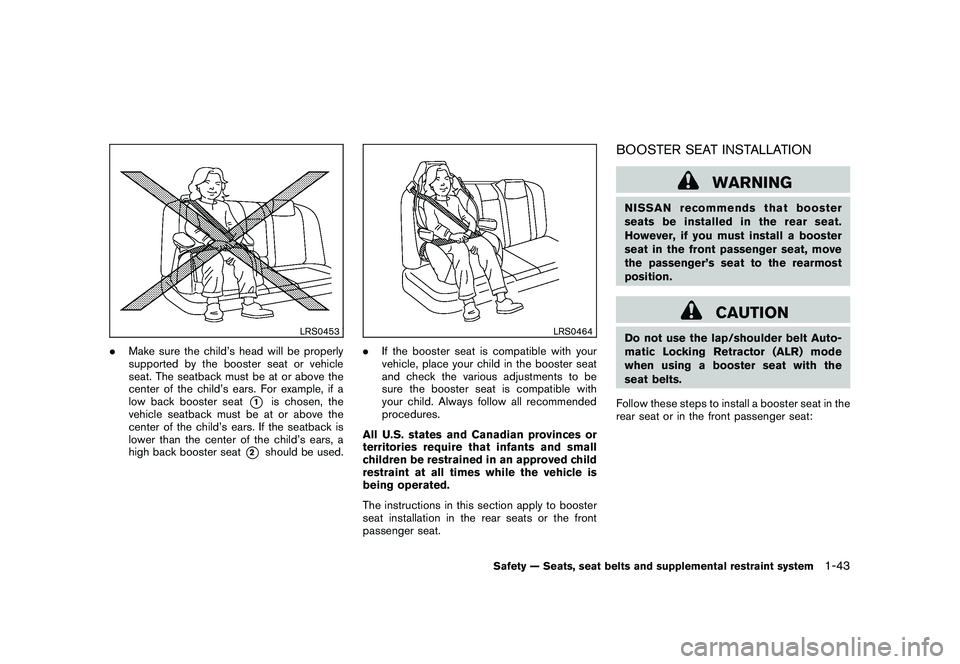
.Make sure the child’s head will be properly
supported by the booster seat or vehicle
seat. The seatback must be at or above the
center of the child’s ears. For example, if a
low back booster seat
*1
is chosen, the
vehicle seatback must be at or above the
center of the child’s ears. If the seatback is
lower than the center of the child’s ears, a
high back booster seat
*2
should be used.
LRS0464
. If the booster seat is compatible with your
vehicle, place your child in the booster seat
and check the various adjustments to be
sure the booster seat is compatible with
your child. Always follow all recommended
procedures.
All U.S. states and Canadian provinces or
territories require that infants and small
children be restrained in an approved child
restraint at all times while the vehicle is
being operated.
The instructions in this section apply to booster
seat installation in the rear seats or the front
passenger seat.
BOOSTER SEAT INSTALLATION
WARNING
NISSAN recommends that booster
seats be installed in the rear seat.
However, if you must install a booster
seat in the front passenger seat, move
the passenger’s seat to the rearmost
position.
CAUTION
Do not use the lap/shoulder belt Auto-
matic Locking Retractor (ALR) mode
when using a booster seat with the
seat belts.
Follow these steps to install a booster seat in the
rear seat or in the front passenger seat:
Safety — Seats, seat belts and supplemental restraint system
1-43
Page 95 of 425
Black plate (91,1)
Model "Z51-D" EDITED: 2009/ 8/ 3
Light reminder chimeA chime will sound when the driver side door is
opened with the light switch in the
or
position and the ignition switch in the ACC
or OFF position.
Turn the light switch off when you leave the
vehicle.
Parking brake reminder chimeThe chime will sound if the vehicle is driven with
the parking brake applied. Stop the vehicle and
release the parking brake.Seat belt warning chimeThe chime will sound for about 6 seconds
unless the driver’s seat belt is securely fastened.Brake pad wear warningThe disc brake pads have audible wear warn-
ings. When a brake pad requires replacement, it
will make a high pitched scraping sound when
the vehicle is in motion. This scraping sound will
first occur only when the brake pedal is
depressed. After more wear of the brake pad,
the sound will always be heard even if the brake
pedal is not depresse d. Have the brakes
checked as soon as possible if the warning
sound is heard.
SIC3576
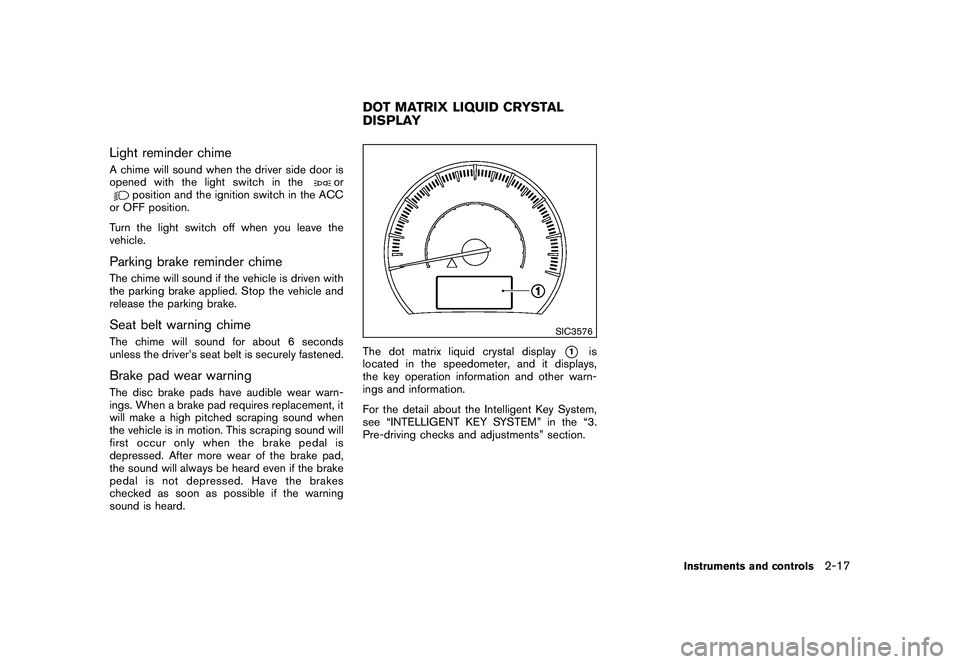
The dot matrix liquid crystal display
*1
is
located in the speedometer, and it displays,
the key operation information and other warn-
ings and information.
For the detail about the Intelligent Key System,
see “INTELLIGENT KEY SYSTEM” in the “3.
Pre-driving checks and adjustments” section.
DOT MATRIX LIQUID CRYSTAL
DISPLAY
Instruments and controls
2-17
Page 121 of 425
Black plate (117,1)
Model "Z51-D" EDITED: 2009/ 8/ 3
SIC3590
GLOVE BOX
WARNING
Keep glove box lid closed while driving
to help prevent injury in an accident or a
sudden stop.
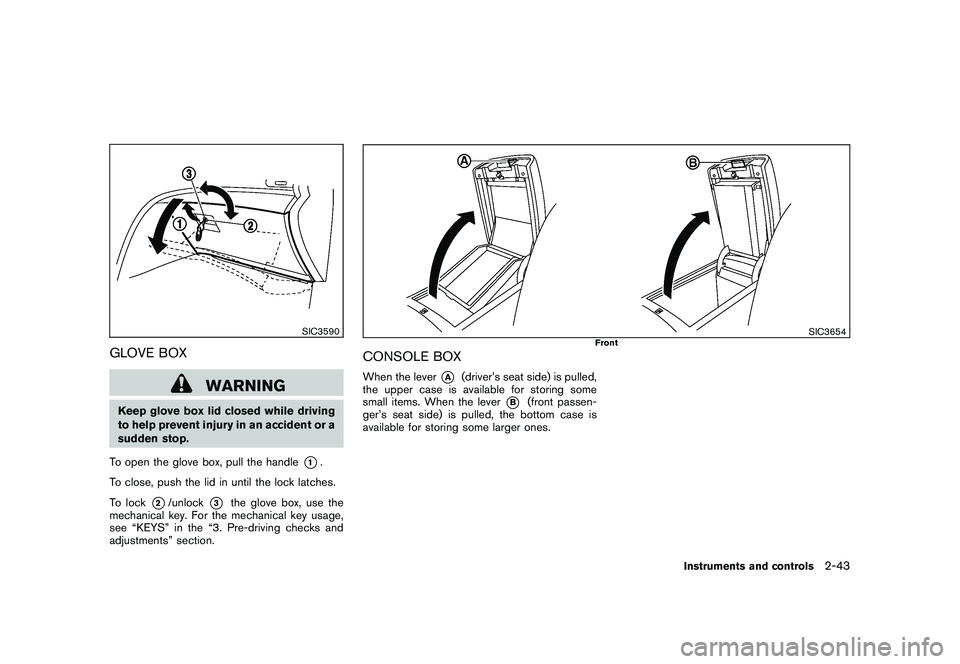
To open the glove box, pull the handle
*1.
To close, push the lid in until the lock latches.
To lock
*2/unlock
*3
the glove box, use the
mechanical key. For the mechanical key usage,
see “KEYS” in the “3. Pre-driving checks and
adjustments” section.
SIC3654
Front
CONSOLE BOXWhen the lever
*A
(driver’s seat side) is pulled,
the upper case is available for storing some
small items. When the lever
*B
(front passen-
ger’s seat side) is pulled, the bottom case is
available for storing some larger ones.
Instruments and controls
2-43
Page 142 of 425
Black plate (138,1)
Model "Z51-D" EDITED: 2009/ 8/ 3
SPA2033
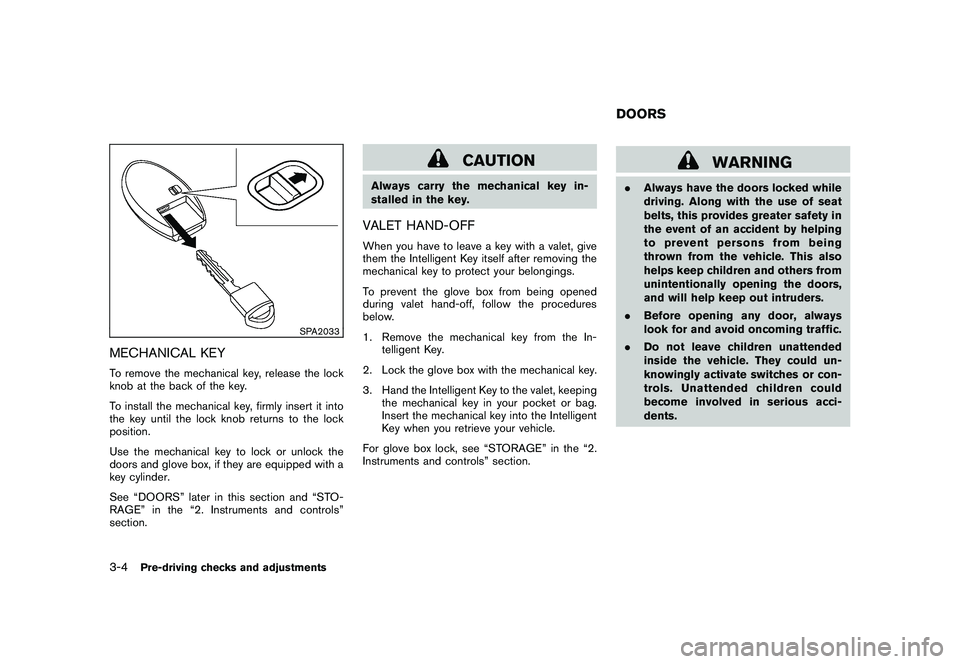
MECHANICAL KEYTo remove the mechanical key, release the lock
knob at the back of the key.
To install the mechanical key, firmly insert it into
the key until the lock knob returns to the lock
position.
Use the mechanical key to lock or unlock the
doors and glove box, if they are equipped with a
key cylinder.
See “DOORS” later in this section and “STO-
RAGE” in the “2. Instruments and controls”
section.
CAUTION
Always carry the mechanical key in-
stalled in the key.VALET HAND-OFFWhen you have to leave a key with a valet, give
them the Intelligent Key itself after removing the
mechanical key to protect your belongings.
To prevent the glove box from being opened
during valet hand-off, follow the procedures
below.
1. Remove the mechanical key from the In-telligent Key.
2. Lock the glove box with the mechanical key.
3. Hand the Intelligent Key to the valet, keeping the mechanical key in your pocket or bag.
Insert the mechanical key into the Intelligent
Key when you retrieve your vehicle.
For glove box lock, see “STORAGE” in the “2.
Instruments and controls” section.
WARNING
. Always have the doors locked while
driving. Along with the use of seat
belts, this provides greater safety in
the event of an accident by helping
to prevent persons from being
thrown from the vehicle. This also
helps keep children and others from
unintentionally opening the doors,
and will help keep out intruders.
. Before opening any door, always
look for and avoid oncoming traffic.
. Do not leave children unattended
inside the vehicle. They could un-
knowingly activate switches or con-
trols. Unattended children could
become involved in serious acci-
dents.DOORS
3-4
Pre-driving checks and adjustments
Page 163 of 425
Black plate (159,1)
Model "Z51-D" EDITED: 2009/ 8/ 3
SPA2442
The fuel-filler cap is a ratcheting type. Turn the
cap counterclockwise to remove. To tighten, turn
the cap clockwise until ratcheting clicks are
heard.
Put the fuel-filler cap on the cap holder
*A
while refueling.
WARNING
.Do not adjust the steering wheel
while driving. You could lose control
of your vehicle and cause an acci-
dent.
. Do not adjust the steering wheel
any closer to you than is necessary
for proper steering operation and
comfort. The driver’s air bag inflates
with great force. If you are unrest-
rained, leaning forward, sitting side-
ways or out of position in any way,
you are at greater risk of injury or
death in a crash. You may also
receive serious or fatal injuries from
the air bag if you are up against it
when it inflates. Always sit back
against the seatback and as far
away as practical from the steering
wheel. Always use the seat belts.
SPA2443
MANUAL OPERATION
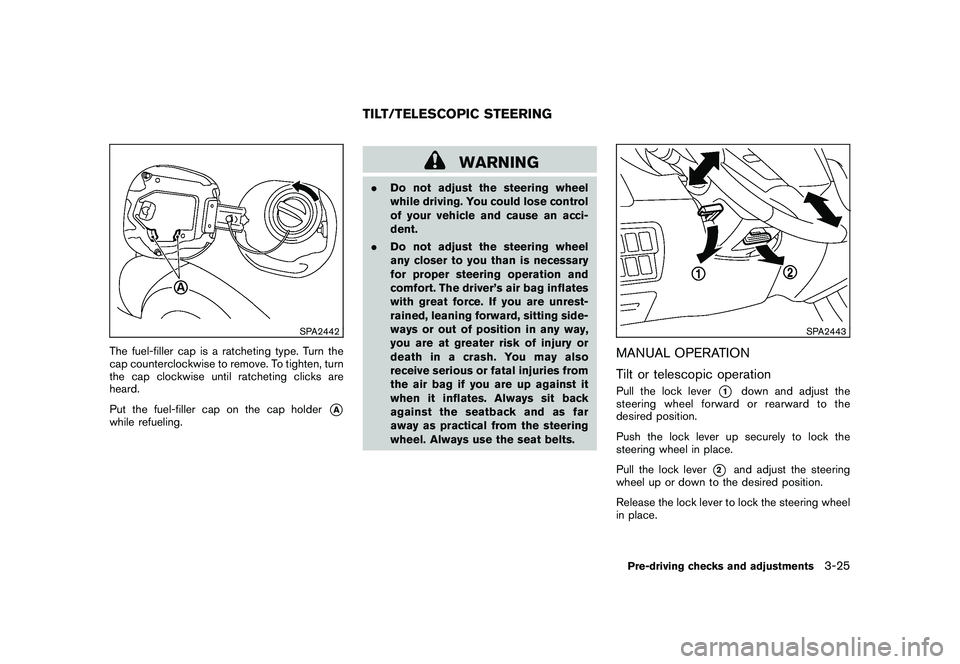
Tilt or telescopic operationPull the lock lever
*1
down and adjust the
steering wheel forward or rearward to the
desired position.
Push the lock lever up securely to lock the
steering wheel in place.
Pull the lock lever
*2
and adjust the steering
wheel up or down to the desired position.
Release the lock lever to lock the steering wheel
in place.
TILT/TELESCOPIC STEERING
Pre-driving checks and adjustments
3-25