lock NISSAN MURANO 2010 Owner´s Manual
[x] Cancel search | Manufacturer: NISSAN, Model Year: 2010, Model line: MURANO, Model: NISSAN MURANO 2010Pages: 425, PDF Size: 3.62 MB
Page 121 of 425
Black plate (117,1)
Model "Z51-D" EDITED: 2009/ 8/ 3
SIC3590
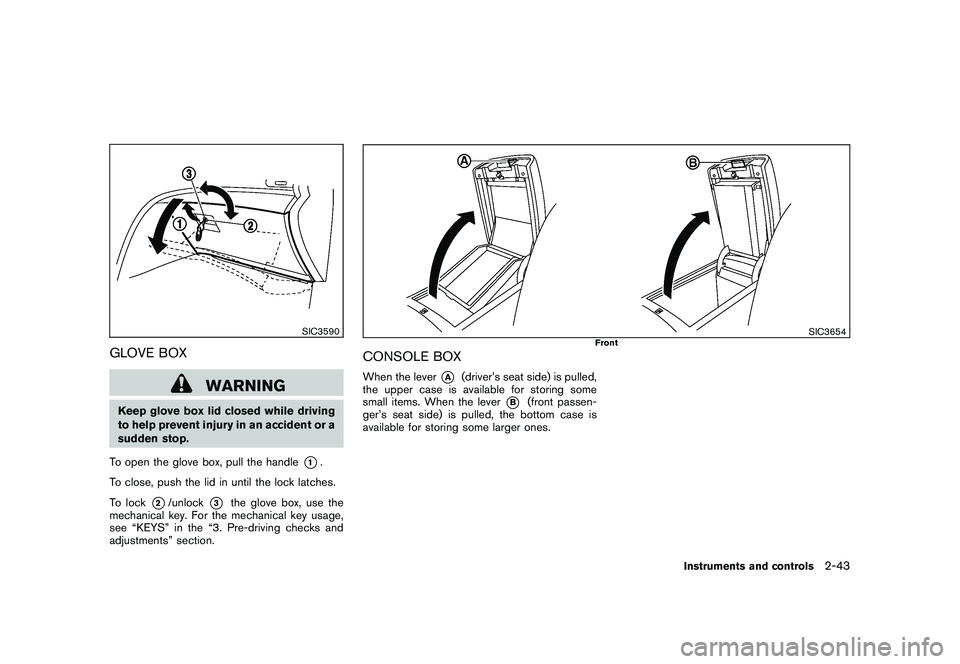
GLOVE BOX
WARNING
Keep glove box lid closed while driving
to help prevent injury in an accident or a
sudden stop.
To open the glove box, pull the handle
*1.
To close, push the lid in until the lock latches.
To lock
*2/unlock
*3
the glove box, use the
mechanical key. For the mechanical key usage,
see “KEYS” in the “3. Pre-driving checks and
adjustments” section.
SIC3654
Front
CONSOLE BOXWhen the lever
*A
(driver’s seat side) is pulled,
the upper case is available for storing some
small items. When the lever
*B
(front passen-
ger’s seat side) is pulled, the bottom case is
available for storing some larger ones.
Instruments and controls
2-43
Page 123 of 425
Black plate (119,1)
Model "Z51-D" EDITED: 2009/ 8/ 3
CARGO FLOOR BOX
Type A1. To open the cargo floor box, pull the strap
*A
.
2. Remove the strap
*B
from the back side of
the board and hang it on the opening of the
lift gate.
Type BTo open the cargo floor box, push
*A
. To close,
push the lid until the lock latches.
The net partitions can be removed*B
to make
a larger storage space.
The cargo floor box needs to be removed when
you need a spare tire. (See “FLAT TIRE” in the
“6. In case of emergency” section.)
CAUTION
To avoid damage, do not load more
than 22 lbs (10 kg) of cargo into the
cargo floor box.
SIC3594
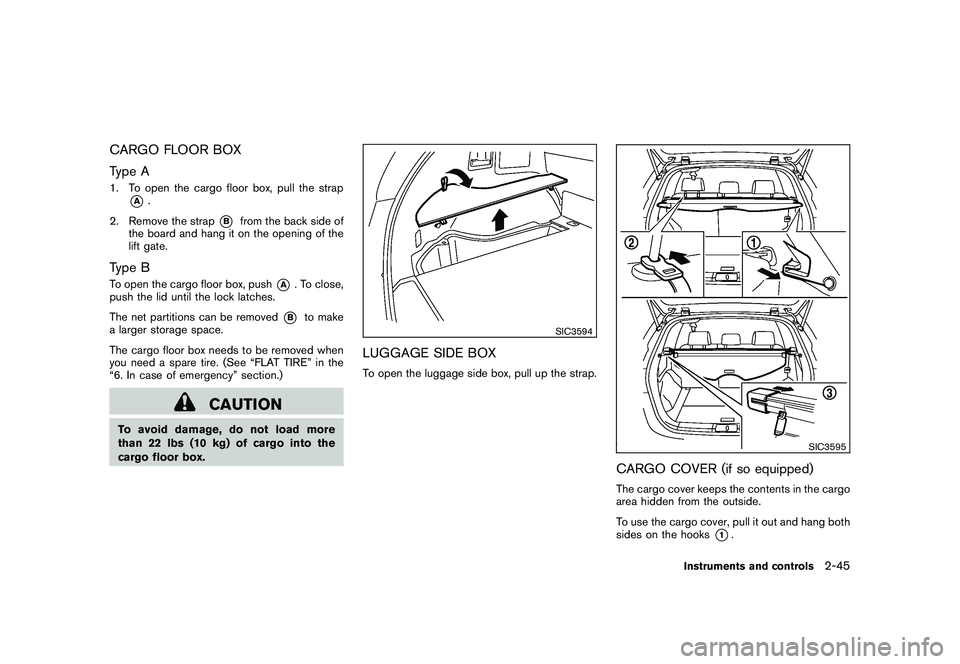
LUGGAGE SIDE BOXTo open the luggage side box, pull up the strap.
SIC3595
CARGO COVER (if so equipped)The cargo cover keeps the contents in the cargo
area hidden from the outside.
To use the cargo cover, pull it out and hang both
sides on the hooks
*1.
Instruments and controls
2-45
Page 126 of 425
Black plate (122,1)
Model "Z51-D" EDITED: 2009/ 8/ 3
rack from the ground, use a ladder or
stool.
SIC3505
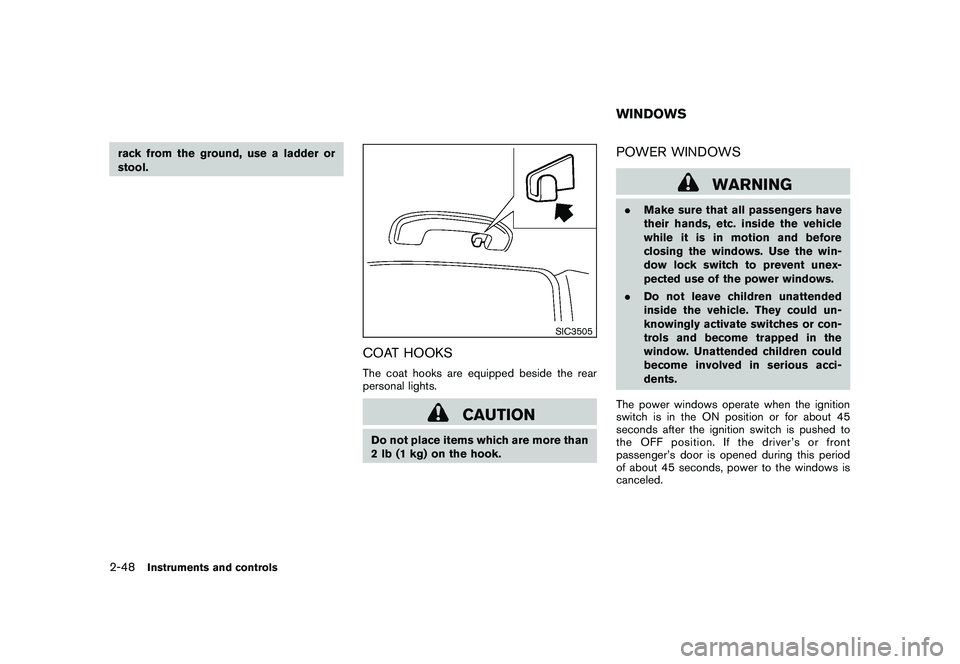
COAT HOOKSThe coat hooks are equipped beside the rear
personal lights.
CAUTION
Do not place items which are more than
2 lb (1 kg) on the hook.
POWER WINDOWS
WARNING
.Make sure that all passengers have
their hands, etc. inside the vehicle
while it is in motion and before
closing the windows. Use the win-
dow lock switch to prevent unex-
pected use of the power windows.
. Do not leave children unattended
inside the vehicle. They could un-
knowingly activate switches or con-
trols and become trapped in the
window. Unattended children could
become involved in serious acci-
dents.
The power windows operate when the ignition
switch is in the ON position or for about 45
seconds after the ignition switch is pushed to
the OFF position. If the driver’s or front
passenger’s door is opened during this period
of about 45 seconds, power to the windows is
canceled.WINDOWS
2-48
Instruments and controls
Page 127 of 425
Black plate (123,1)
Model "Z51-D" EDITED: 2009/ 8/ 3
SIC3283A
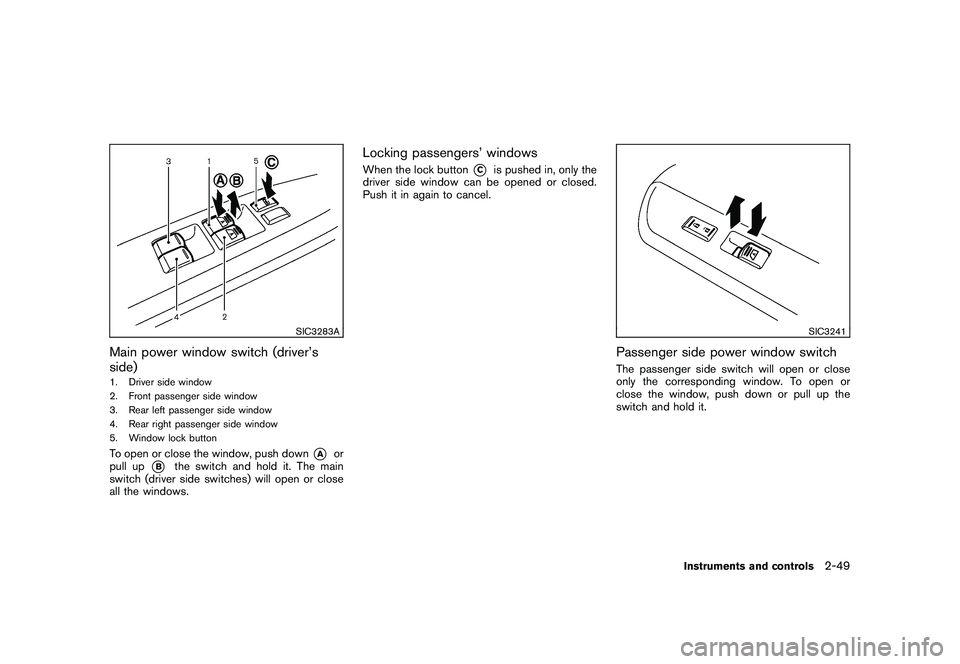
Main power window switch (driver’s
side)1. Driver side window
2. Front passenger side window
3. Rear left passenger side window
4. Rear right passenger side window
5. Window lock buttonTo open or close the window, push down
*A
or
pull up
*B
the switch and hold it. The main
switch (driver side switches) will open or close
all the windows.
Locking passengers’ windowsWhen the lock button
*C
is pushed in, only the
driver side window can be opened or closed.
Push it in again to cancel.
SIC3241
Passenger side power window switchThe passenger side switch will open or close
only the corresponding window. To open or
close the window, push down or pull up the
switch and hold it.
Instruments and controls
2-49
Page 131 of 425
Black plate (127,1)
Model "Z51-D" EDITED: 2009/ 8/ 3
SIC3249
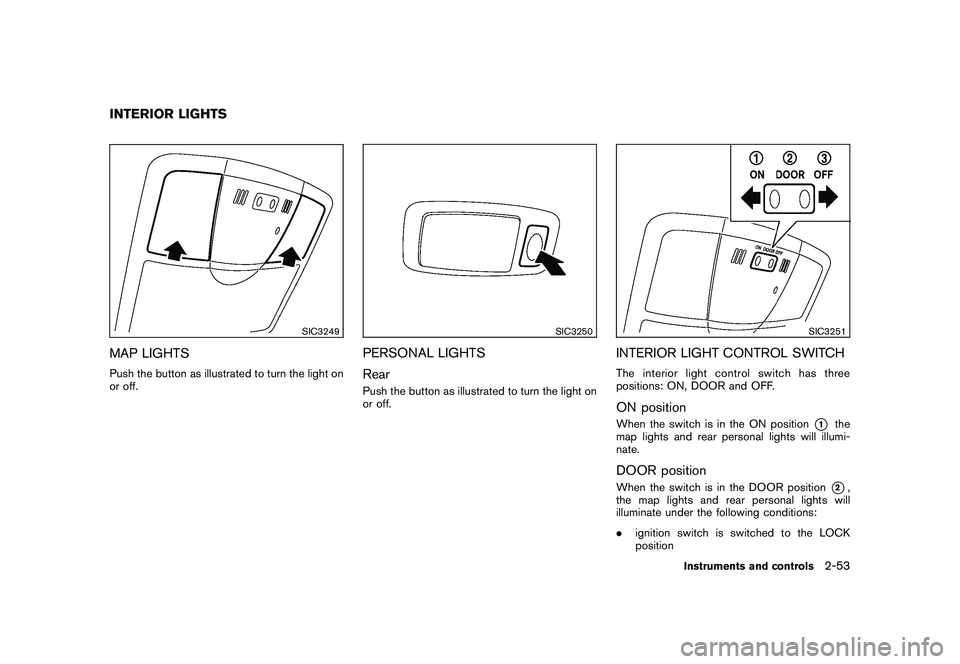
MAP LIGHTSPush the button as illustrated to turn the light on
or off.
SIC3250
PERSONAL LIGHTS
RearPush the button as illustrated to turn the light on
or off.
SIC3251
INTERIOR LIGHT CONTROL SWITCHThe interior light control switch has three
positions: ON, DOOR and OFF.ON positionWhen the switch is in the ON position
*1
the
map lights and rear personal lights will illumi-
nate.
DOOR positionWhen the switch is in the DOOR position
*2,
the map lights and rear personal lights will
illuminate under the following conditions:
. ignition switch is switched to the LOCK
position
INTERIOR LIGHTS
Instruments and controls
2-53
Page 132 of 425
Black plate (128,1)
Model "Z51-D" EDITED: 2009/ 8/ 3
— remain on for about 15 seconds.
. doors are unlocked by pushing the UN-
LOCK button on the Intelligent Key or door
handle request switch with the ignition
switch in the LOCK position
— remain on for about 15 seconds.
. any door is opened and then closed with the
ignition switch in the LOCK position
— remain on for about 15 seconds.
. any door is opened with the ignition switch
in the ACC or ON position
— remain on while the door is opened. When the door is closed, the lights go off.
The lights will also turn off after 30
minutes when the lights remain illumi-
nated after the ignition switch has been
pushed to the OFF or LOCK position to
prevent the battery from becoming dis-
charged.
When the auto interior illumination is set to the
OFF position (see “VEHICLE INFORMATION
AND SETTINGS” in the “4. Monitor, heater, air
conditioner, audio, phone and voice recognition
systems” section) , the lights will illuminate under
the following condition:
. any door is opened with the ignition switch
in any position — remain on while the door is opened.
When the door is closed, the lights go off.
OFF positionWhen the switch is in the OFF position
*3, the
lights will not illuminate, regardless of the
condition.
CAUTION
Do not use for extended periods of time
with the engine stopped. This could
result in a discharged battery.
SIC3599
Map lights
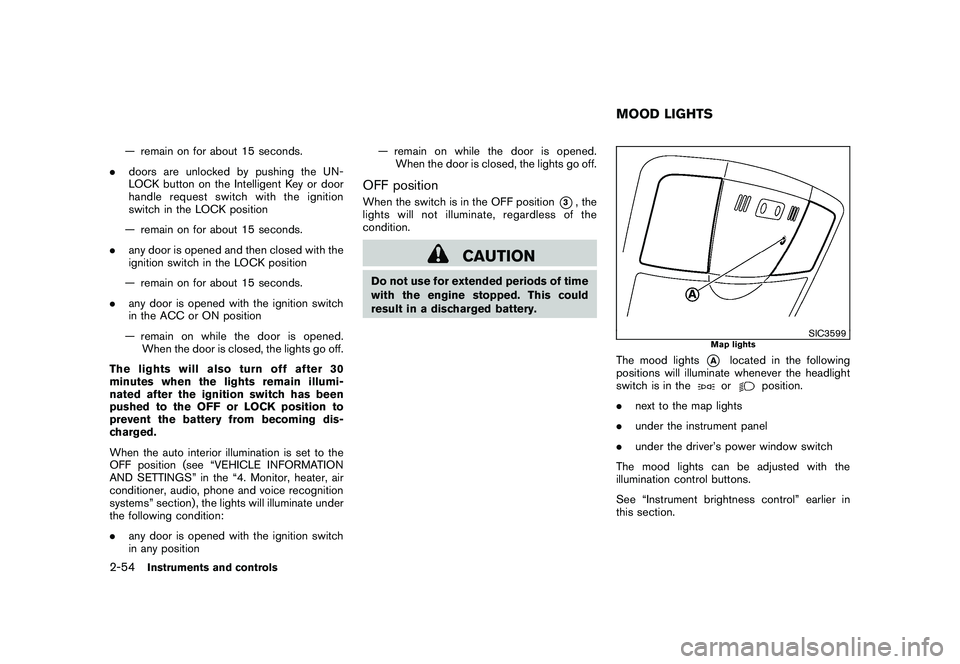
The mood lights
*A
located in the following
positions will illuminate whenever the headlight
switch is in theor
position.
. next to the map lights
. under the instrument panel
. under the driver’s power window switch
The mood lights can be adjusted with the
illumination control buttons.
See “Instrument brightness control” earlier in
this section.
MOOD LIGHTS
2-54
Instruments and controls
Page 133 of 425
Black plate (129,1)
Model "Z51-D" EDITED: 2009/ 8/ 3
SIC2064
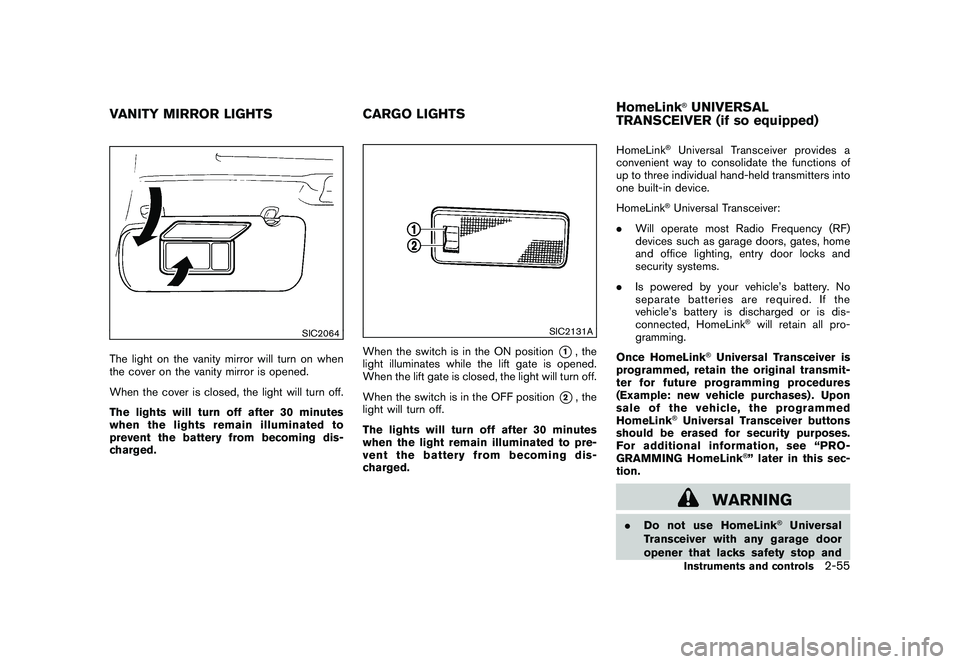
The light on the vanity mirror will turn on when
the cover on the vanity mirror is opened.
When the cover is closed, the light will turn off.
The lights will turn off after 30 minutes
when the lights remain illuminated to
prevent the battery from becoming dis-
charged.
SIC2131A
When the switch is in the ON position
*1, the
light illuminates while the lift gate is opened.
When the lift gate is closed, the light will turn off.
When the switch is in the OFF position
*2, the
light will turn off.
The lights will turn off after 30 minutes
when the light remain illuminated to pre-
vent the battery from becoming dis-
charged. HomeLink
®Universal Transceiver provides a
convenient way to consolidate the functions of
up to three individual hand-held transmitters into
one built-in device.
HomeLink®Universal Transceiver:
. Will operate most Radio Frequency (RF)
devices such as garage doors, gates, home
and office lighting, entry door locks and
security systems.
. Is powered by your vehicle’s battery. No
separate batteries are required. If the
vehicle’s battery is discharged or is dis-
connected, HomeLink
®will retain all pro-
gramming.
Once HomeLink
®Universal Transceiver is
programmed, retain the original transmit-
ter for future programming procedures
(Example: new vehicle purchases) . Upon
sale of the vehicle, the programmed
HomeLink
®Universal Transceiver buttons
should be erased for security purposes.
For additional information, see “PRO-
GRAMMING HomeLink
®” later in this sec-
tion.
WARNING
. Do not use HomeLink
®Universal
Transceiver with any garage door
opener that lacks safety stop and
VANITY MIRROR LIGHTS CARGO LIGHTSHomeLink
®UNIVERSAL
TRANSCEIVER (if so equipped)Instruments and controls
2-55
Page 139 of 425
Black plate (10,1)
3 Pre-driving checks and adjustments
Model "Z51-D" EDITED: 2009/ 8/ 3
Keys ............................................................... 3-2NISSAN Vehicle Immobilizer System keys ............ 3-2
Intelligent Key system ...................................... 3-3
Mechanical key .............................................. 3-4
Valet hand-off ................................................ 3-4
Doors .............................................................. 3-4
Locking with mechanical key ............................. 3-5
Opening and closing windows with the
mechanical key .............................................. 3-5
Locking with inside lock knob ........................... 3-5
Locking with power door lock switch .................. 3-6
Automatic door locks ...................................... 3-6
Child safety rear door lock ............................... 3-7
Intelligent Key system .......................................... 3-7
Intelligent Key operating range .......................... 3-9
Door locks/unlocks precaution .......................... 3-9
Intelligent Key operation ................................. 3-10
Battery saver system ..................................... 3-13
Warning signals ........................................... 3-13
Troubleshooting guide ................................... 3-14
Remote keyless entry system .............................. 3-15
How to use remote keyless entry system ........... 3-16Hood
............................................................ 3-18
Lift gate ......................................................... 3-19
Operating manual lift gate .............................. 3-19
Operating power lift gate (if so equipped) .......... 3-19
Auto closure ............................................... 3-22
Lift gate release ........................................... 3-23
Fuel-filler door ................................................. 3-23
Opening fuel-filler door .................................. 3-23
Fuel-filler cap .............................................. 3-24
Tilt/telescopic steering ...................................... 3-25
Manual operation ......................................... 3-25
Electric operation ......................................... 3-26
Sun visors ...................................................... 3-26
Mirrors ........................................................... 3-27
Inside mirror ................................................ 3-27
Outside mirrors ............................................ 3-29
Vanity mirror ................................................ 3-30
Automatic drive positioner (if so equipped) ............. 3-30
Entry/exit function ......................................... 3-30
Memory storage ........................................... 3-31
System operation ......................................... 3-32
Page 141 of 425
Black plate (137,1)
Model "Z51-D" EDITED: 2009/ 8/ 3
CAUTION
Do not allow the NISSAN Vehicle Im-
mobilizer System key, which contains
an electrical transponder, to come in
contactwithsaltwater.Thiscould
cause the system to malfunction.INTELLIGENT KEY SYSTEMYour vehicle can only be driven with the
Intelligent Keys which are registered to your
vehicle’s Intelligent Key system components and
NISSAN Vehicle Immobilizer System compo-
nents. As many as 4 Intelligent Keys can be
registered and used with one vehicle. The new
keys must be registered by a NISSAN dealer
prior to use with the Intelligent Key system and
NISSAN Vehicle Immobilizer System of your
vehicle. Since the registration process requires
erasing all memory in the Intelligent Key compo-
nents when registering new keys, be sure to take
all Intelligent Keys that you have to the NISSAN
dealer.
CAUTION
.Be sure to carry the Intelligent Key
with you when driving. The Intelli-
gent Key is a precision device with a
built-in transmitter. To avoid dama- ging it, please note the following.
— The Intelligent Key is water
resistant; however, wetting may
damage the Intelligent Key. If
the Intelligent Key gets wet,
immediately wipe until it is com-
pletely dry.
— Do not bend, drop or strike it against another object.
— Do not place the Intelligent Key foranextendedperiodina
place where temperatures ex-
ceed 140 8F (60 8C) .
— Do not change or modify the Intelligent Key.
— Do not use a magnet key holder.
— Do not place the Intelligent Key near an electric appliance such
as a television set, personal
computer or cellular phone.
— Do not allow the Intelligent Key to come into contact with water
or salt water, and do not wash it
in a washing machine. This
could affect the system function.
. If an Intelligent Key is lost or stolen,
NISSAN recommends erasing the ID
code of that Intelligent Key. This will prevent the Intelligent Key from
unauthorized use to unlock the
vehicle. For information regarding
the erasing procedure, please con-
tact a NISSAN dealer.
Pre-driving checks and adjustments
3-3
Page 142 of 425
Black plate (138,1)
Model "Z51-D" EDITED: 2009/ 8/ 3
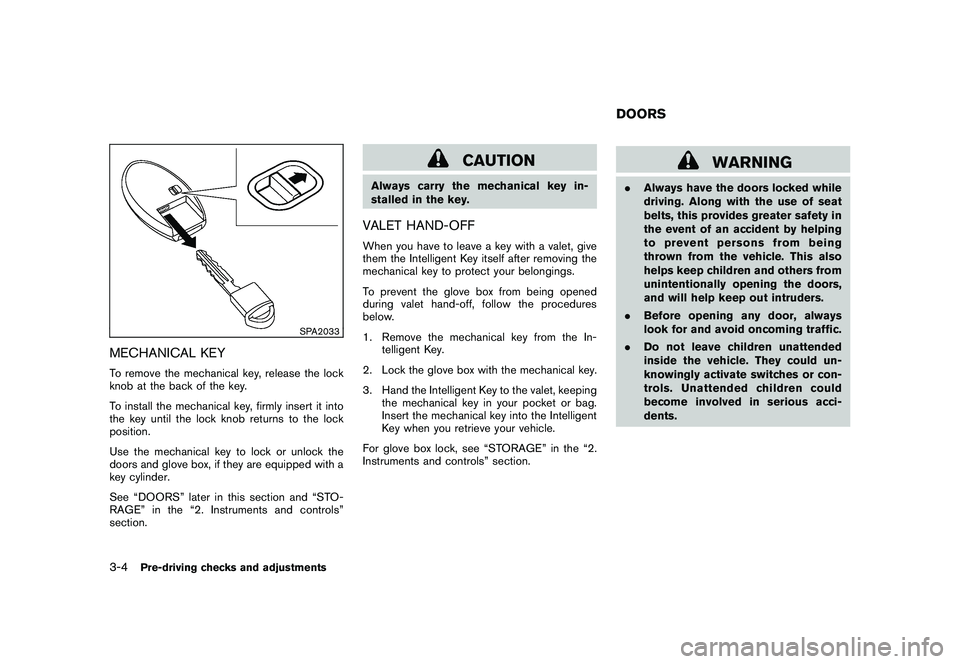
SPA2033
MECHANICAL KEYTo remove the mechanical key, release the lock
knob at the back of the key.
To install the mechanical key, firmly insert it into
the key until the lock knob returns to the lock
position.
Use the mechanical key to lock or unlock the
doors and glove box, if they are equipped with a
key cylinder.
See “DOORS” later in this section and “STO-
RAGE” in the “2. Instruments and controls”
section.
CAUTION
Always carry the mechanical key in-
stalled in the key.VALET HAND-OFFWhen you have to leave a key with a valet, give
them the Intelligent Key itself after removing the
mechanical key to protect your belongings.
To prevent the glove box from being opened
during valet hand-off, follow the procedures
below.
1. Remove the mechanical key from the In-telligent Key.
2. Lock the glove box with the mechanical key.
3. Hand the Intelligent Key to the valet, keeping the mechanical key in your pocket or bag.
Insert the mechanical key into the Intelligent
Key when you retrieve your vehicle.
For glove box lock, see “STORAGE” in the “2.
Instruments and controls” section.
WARNING
. Always have the doors locked while
driving. Along with the use of seat
belts, this provides greater safety in
the event of an accident by helping
to prevent persons from being
thrown from the vehicle. This also
helps keep children and others from
unintentionally opening the doors,
and will help keep out intruders.
. Before opening any door, always
look for and avoid oncoming traffic.
. Do not leave children unattended
inside the vehicle. They could un-
knowingly activate switches or con-
trols. Unattended children could
become involved in serious acci-
dents.DOORS
3-4
Pre-driving checks and adjustments