key NISSAN MURANO 2010 Owner´s Manual
[x] Cancel search | Manufacturer: NISSAN, Model Year: 2010, Model line: MURANO, Model: NISSAN MURANO 2010Pages: 425, PDF Size: 3.62 MB
Page 9 of 425
Black plate (5,1)
Model "Z51-D" EDITED: 2009/ 8/ 3
SSI0373
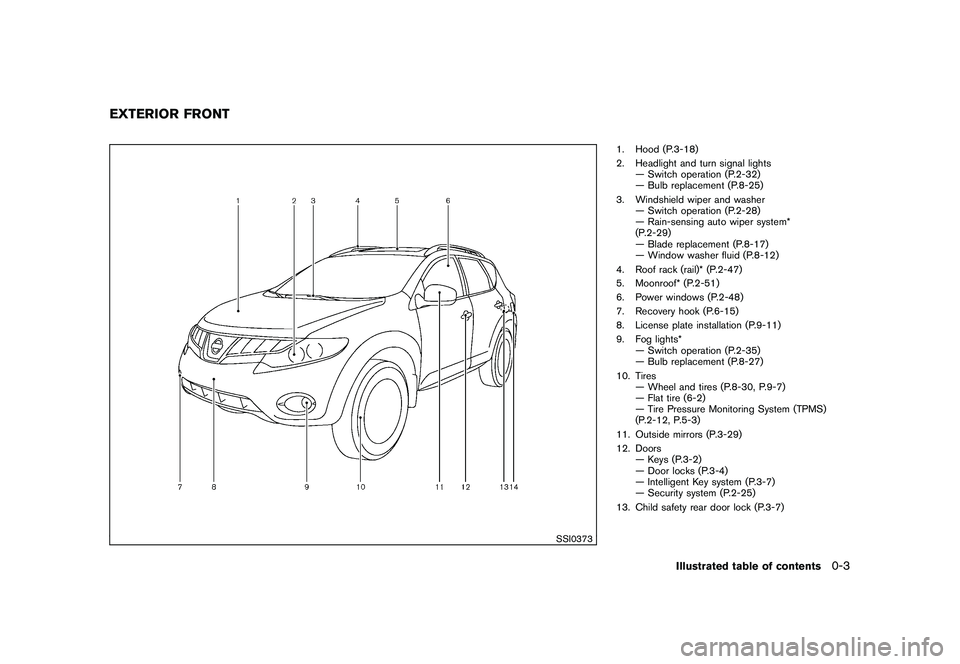
1. Hood (P.3-18)
2. Headlight and turn signal lights— Switch operation (P.2-32)
— Bulb replacement (P.8-25)
3. Windshield wiper and washer — Switch operation (P.2-28)
— Rain-sensing auto wiper system*
(P.2-29)
— Blade replacement (P.8-17)
— Window washer fluid (P.8-12)
4. Roof rack (rail)* (P.2-47)
5. Moonroof* (P.2-51)
6. Power windows (P.2-48)
7. Recovery hook (P.6-15)
8. License plate installation (P.9-11)
9. Fog lights* — Switch operation (P.2-35)
— Bulb replacement (P.8-27)
10. Tires — Wheel and tires (P.8-30, P.9-7)
— Flat tire (6-2)
— Tire Pressure Monitoring System (TPMS)
(P.2-12, P.5-3)
11. Outside mirrors (P.3-29)
12. Doors — Keys (P.3-2)
— Door locks (P.3-4)
— Intelligent Key system (P.3-7)
— Security system (P.2-25)
13. Child safety rear door lock (P.3-7)
EXTERIOR FRONT
Illustrated table of contents
0-3
Page 11 of 425
Black plate (7,1)
Model "Z51-D" EDITED: 2009/ 8/ 3
SSI0374
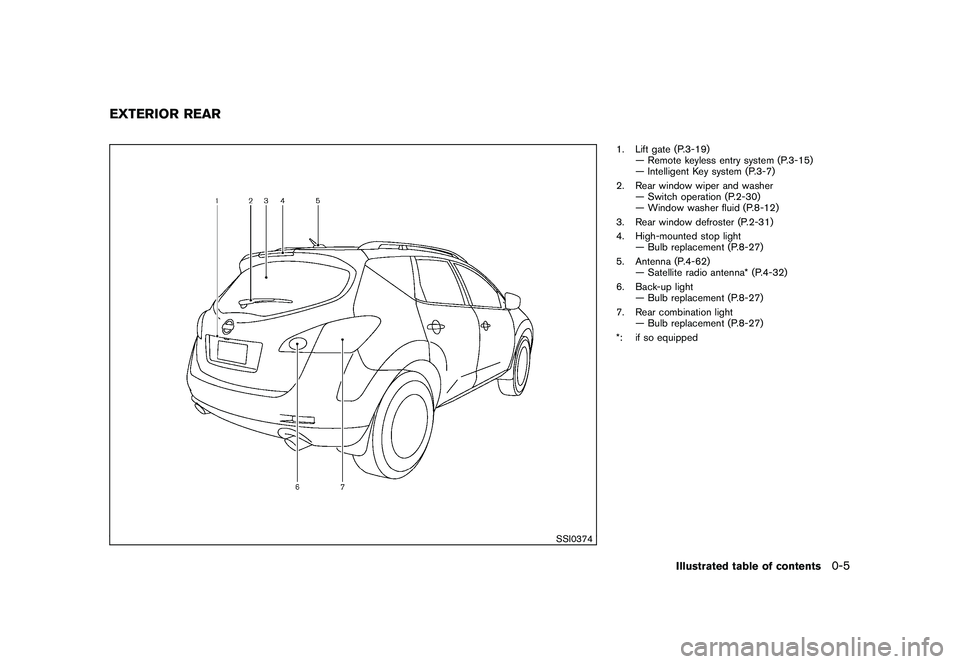
1. Lift gate (P.3-19)— Remote keyless entry system (P.3-15)
— Intelligent Key system (P.3-7)
2. Rear window wiper and washer — Switch operation (P.2-30)
— Window washer fluid (P.8-12)
3. Rear window defroster (P.2-31)
4. High-mounted stop light — Bulb replacement (P.8-27)
5. Antenna (P.4-62) — Satellite radio antenna* (P.4-32)
6. Back-up light — Bulb replacement (P.8-27)
7. Rear combination light — Bulb replacement (P.8-27)
*: if so equipped
EXTERIOR REAR
Illustrated table of contents
0-5
Page 13 of 425
Black plate (9,1)
Model "Z51-D" EDITED: 2009/ 8/ 3
SSI0627
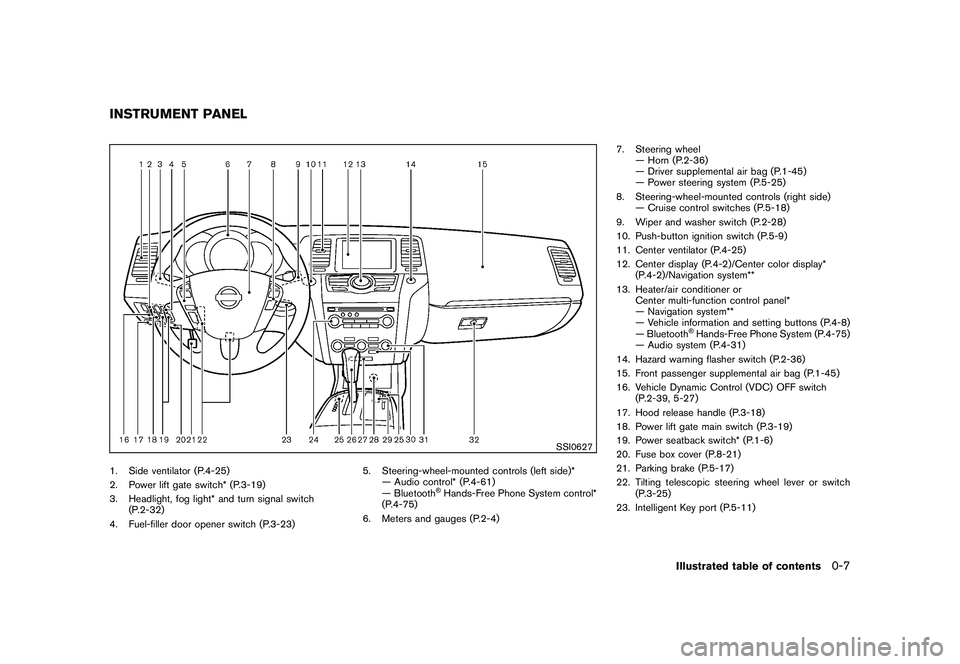
1. Side ventilator (P.4-25)
2. Power lift gate switch* (P.3-19)
3. Headlight, fog light* and turn signal switch(P.2-32)
4. Fuel-filler door opener switch (P.3-23) 5. Steering-wheel-mounted controls (left side)*
— Audio control* (P.4-61)
— Bluetooth
®Hands-Free Phone System control*
(P.4-75)
6. Meters and gauges (P.2-4) 7. Steering wheel
— Horn (P.2-36)
— Driver supplemental air bag (P.1-45)
— Power steering system (P.5-25)
8. Steering-wheel-mounted controls (right side) — Cruise control switches (P.5-18)
9. Wiper and washer switch (P.2-28)
10. Push-button ignition switch (P.5-9)
11. Center ventilator (P.4-25)
12. Center display (P.4-2)/Center color display* (P.4-2)/Navigation system**
13. Heater/air conditioner or Center multi-function control panel*
— Navigation system**
— Vehicle information and setting buttons (P.4-8)
— Bluetooth
®Hands-Free Phone System (P.4-75)
— Audio system (P.4-31)
14. Hazard warning flasher switch (P.2-36)
15. Front passenger supplemental air bag (P.1-45)
16. Vehicle Dynamic Control (VDC) OFF switch (P.2-39, 5-27)
17. Hood release handle (P.3-18)
18. Power lift gate main switch (P.3-19)
19. Power seatback switch* (P.1-6)
20. Fuse box cover (P.8-21)
21. Parking brake (P.5-17)
22. Tilting telescopic steering wheel lever or switch (P.3-25)
23. Intelligent Key port (P.5-11)
INSTRUMENT PANEL
Illustrated table of contents
0-7
Page 17 of 425
Black plate (13,1)
Model "Z51-D" EDITED: 2009/ 8/ 3
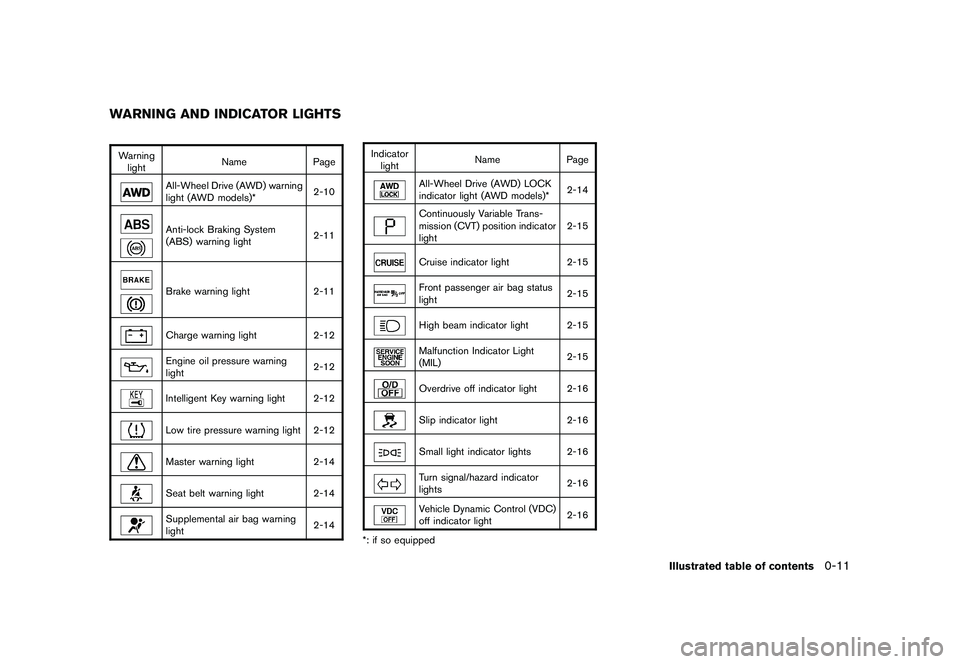
Warninglight Name
Page
All-Wheel Drive (AWD) warning
light (AWD models)* 2-10Anti-lock Braking System
(ABS) warning light2-11Brake warning light
2-11Charge warning light2-12Engine oil pressure warning
light 2-12Intelligent Key warning light 2-12Low tire pressure warning light 2-12Master warning light
2-14Seat belt warning light 2-14Supplemental air bag warning
light 2-14Indicator
light Name
Page
All-Wheel Drive (AWD) LOCK
indicator light (AWD models)* 2-14Continuously Variable Trans-
mission (CVT) position indicator
light2-15Cruise indicator light
2-15Front passenger air bag status
light 2-15High beam indicator light 2-15Malfunction Indicator Light
(MIL)2-15Overdrive off indicator light 2-16Slip indicator light
2-16Small light indicator lights 2-16Turn signal/hazard indicator
lights 2-16Vehicle Dynamic Control (VDC)
off indicator light
2-16
*: if so equipped
WARNING AND INDICATOR LIGHTS
Illustrated table of contents
0-11
Page 41 of 425
Black plate (37,1)
Model "Z51-D" EDITED: 2009/ 8/ 3
SSS0703
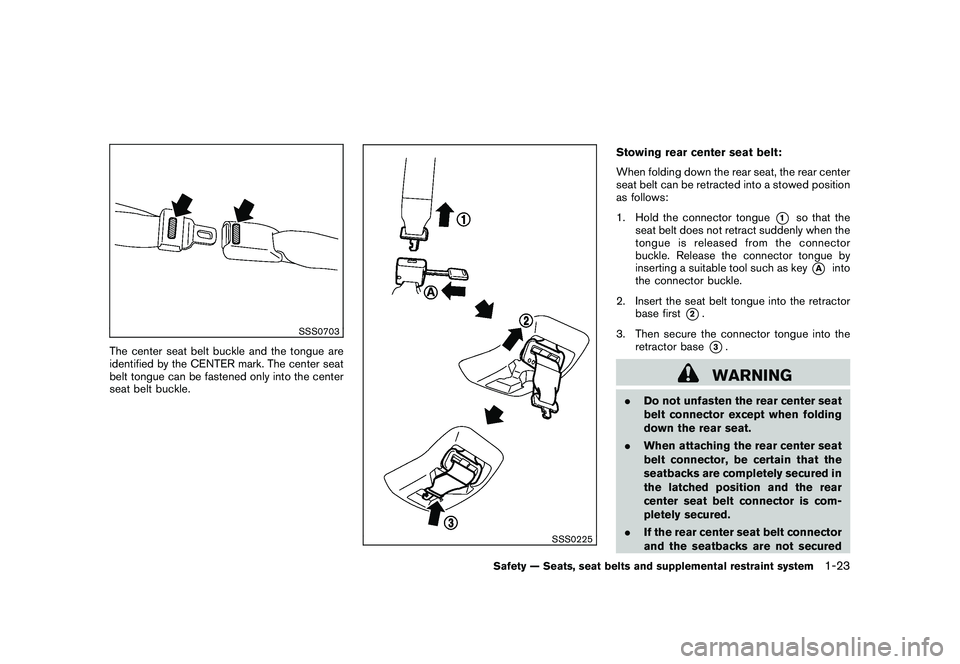
The center seat belt buckle and the tongue are
identified by the CENTER mark. The center seat
belt tongue can be fastened only into the center
seat belt buckle.
SSS0225
Stowing rear center seat belt:
When folding down the rear seat, the rear center
seat belt can be retracted into a stowed position
as follows:
1. Hold the connector tongue
*1
so that the
seat belt does not retract suddenly when the
tongue is released from the connector
buckle. Release the connector tongue by
inserting a suitable tool such as key
*A
into
the connector buckle.
2. Insert the seat belt tongue into the retractor base first
*2.
3. Then secure the connector tongue into the retractor base*3.WARNING
.Do not unfasten the rear center seat
belt connector except when folding
down the rear seat.
. When attaching the rear center seat
belt connector, be certain that the
seatbacks are completely secured in
the latched position and the rear
center seat belt connector is com-
pletely secured.
. If the rear center seat belt connector
and the seatbacks are not secured
Safety — Seats, seat belts and supplemental restraint system
1-23
Page 80 of 425
Black plate (76,1)
Model "Z51-D" EDITED: 2009/ 8/ 3
SSI0627
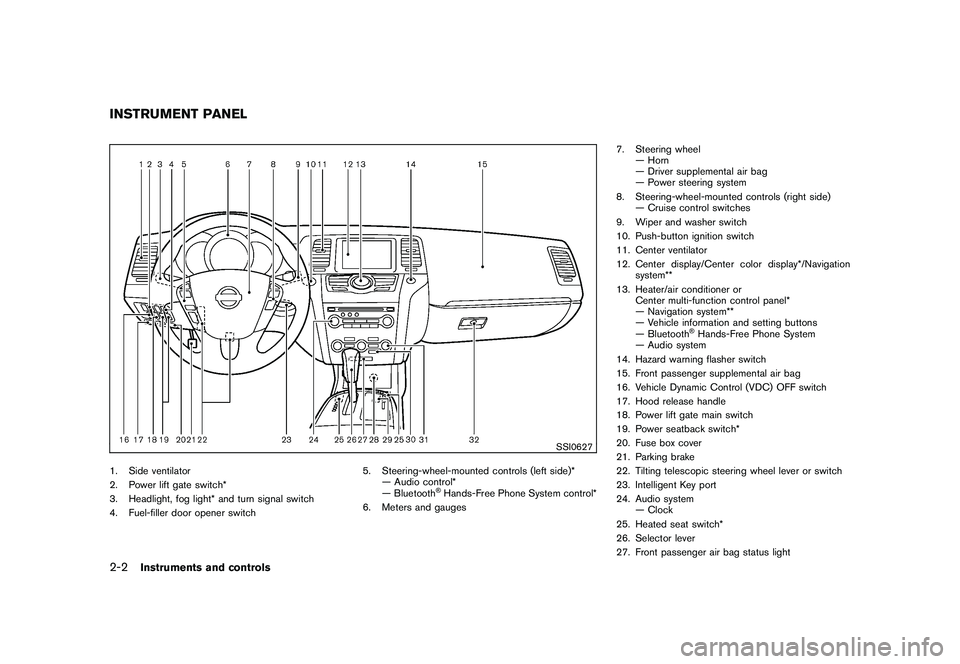
1. Side ventilator
2. Power lift gate switch*
3. Headlight, fog light* and turn signal switch
4. Fuel-filler door opener switch5. Steering-wheel-mounted controls (left side)*
— Audio control*
— Bluetooth
®Hands-Free Phone System control*
6. Meters and gauges 7. Steering wheel
— Horn
— Driver supplemental air bag
— Power steering system
8. Steering-wheel-mounted controls (right side) — Cruise control switches
9. Wiper and washer switch
10. Push-button ignition switch
11. Center ventilator
12. Center display/Center color display*/Navigation system**
13. Heater/air conditioner or Center multi-function control panel*
— Navigation system**
— Vehicle information and setting buttons
— Bluetooth
®Hands-Free Phone System
— Audio system
14. Hazard warning flasher switch
15. Front passenger supplemental air bag
16. Vehicle Dynamic Control (VDC) OFF switch
17. Hood release handle
18. Power lift gate main switch
19. Power seatback switch*
20. Fuse box cover
21. Parking brake
22. Tilting telescopic steering wheel lever or switch
23. Intelligent Key port
24. Audio system — Clock
25. Heated seat switch*
26. Selector lever
27. Front passenger air bag status light
INSTRUMENT PANEL2-2
Instruments and controls
Page 88 of 425
Black plate (84,1)
Model "Z51-D" EDITED: 2009/ 8/ 3
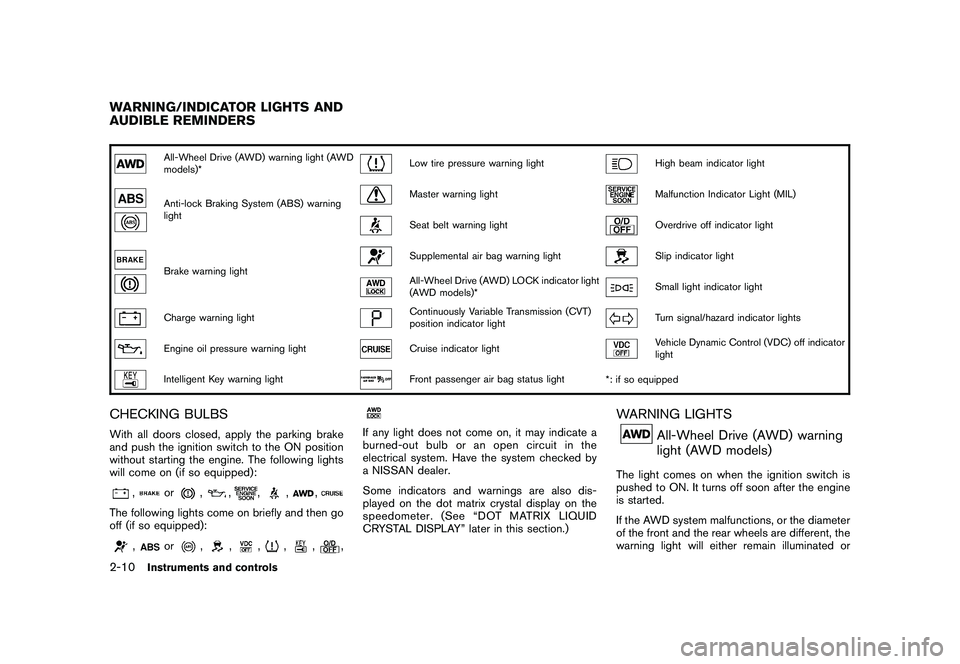
All-Wheel Drive (AWD) warning light (AWD
models)*
Low tire pressure warning light
High beam indicator light
Anti-lock Braking System (ABS) warning
light
Master warning light
Malfunction Indicator Light (MIL)
Seat belt warning light
Overdrive off indicator light
Brake warning light
Supplemental air bag warning light
Slip indicator light
All-Wheel Drive (AWD) LOCK indicator light
(AWD models)*
Small light indicator light
Charge warning light
Continuously Variable Transmission (CVT)
position indicator light
Turn signal/hazard indicator lights
Engine oil pressure warning light
Cruise indicator light
Vehicle Dynamic Control (VDC) off indicator
light
Intelligent Key warning light
Front passenger air bag status light*: if so equipped
CHECKING BULBSWith all doors closed, apply the parking brake
and push the ignition switch to the ON position
without starting the engine. The following lights
will come on (if so equipped):
,
or
,
,
,
,
,
The following lights come on briefly and then go
off (if so equipped):
,
or
,
,
,
,
,
,
If any light does not come on, it may indicate a
burned-out bulb or an open circuit in the
electrical system. Have the system checked by
a NISSAN dealer.
Some indicators and warnings are also dis-
played on the dot matrix crystal display on the
speedometer. (See “DOT MATRIX LIQUID
CRYSTAL DISPLAY” later in this section.)
WARNING LIGHTS
All-Wheel Drive (AWD) warning
light (AWD models)
The light comes on when the ignition switch is
pushed to ON. It turns off soon after the engine
is started.
If the AWD system malfunctions, or the diameter
of the front and the rear wheels are different, the
warning light will either remain illuminated or
WARNING/INDICATOR LIGHTS AND
AUDIBLE REMINDERS2-10
Instruments and controls
Page 90 of 425
Black plate (86,1)
Model "Z51-D" EDITED: 2009/ 8/ 3
WARNING
.Your brake system may not be
working properly if the warning light
is on. Driving could be dangerous. If
you judge it to be safe, drive care-
fully to the nearest service station
for repairs. Otherwise, have your
vehicle towed because driving it
could be dangerous.
. Pressing the brake pedal with the
engine stopped and/or low brake
fluid level may increase your stop-
ping distance and braking will re-
quire greater pedal effort as well as
pedal travel.
. If the brake fluid level is below the
minimum or MIN mark on the brake
fluid reservoir, do not drive until the
brake system has been checked at a
NISSAN dealer.
Charge warning light
If the light comes on while the engine is running,
it may indicate the charging system is not
functioning properly. Turn the engine off and
check the alternator belt. If the belt is loose,
broken, missing or if the light remains on, see a NISSAN dealer immediately.
CAUTION
Do not continue driving if the alternator
belt is loose, broken or missing.
Engine oil pressure warning light
This light warns of low engine oil pressure. If the
light flickers or comes on during normal driving,
pull off the road in a safe area, stop the engine
immediately
and call a NISSAN dealer or other
authorized repair shop.
The engine oil pressure warning light is
not designed to indicate a low oil level.
Use the dipstick to check the oil level. (See
“ENGINE OIL” in the “8. Maintenance and do-it-
yourself” section.)
CAUTION
Running the engine with the engine oil
pressure warning light on could cause
serious damage to the engine almost
immediately. Such damage is not cov-
ered by warranty. Turn off the engine as
soon as it is safe to do so.
Intelligent Key warning light
After the ignition switch is pushed to the ON
position, this light comes on for about 2 seconds
and then turns off.
This light warns of a malfunction with the
electrical steering lock system (if so equipped)
or the Intelligent Key system.
If the light comes on while the engine is
stopped, it may be impossible to free the
steering lock (if so equipped) or to start the
engine. If the light comes on while the engine is
running, you can drive the vehicle. However in
these cases, contact a NISSAN dealer for repair
as soon as possible.
Low tire pressure warning light
Your vehicle is equipped with a Tire Pressure
Monitoring System (TPMS) that monitors the tire
pressure of all tires except the spare.
The low tire pressure warning light warns of low
tire pressure or indicates that the TPMS is not
functioning properly.
After the ignition switch is pushed ON, this light
illuminates for about 1 second and turns off.
2-12
Instruments and controls
Page 92 of 425
Black plate (88,1)
Model "Z51-D" EDITED: 2009/ 8/ 3
wheels.Master warning light
When the ignition switch is in the ON position,
the master warning light illuminates if any of the
following are displayed on the dot matrix liquid
crystal display:
.No key warning
. Low fuel warning
. Low washer fluid warning
. Parking brake release warning
. Door/lift gate open warning
See “DOT MATRIX LIQUID CRYSTAL DIS-
PLAY” later in this section.
Seat belt warning light
The light and chime remind you to fasten seat
belts. The light illuminates whenever the ignition
switch is pushed to the ON position, and will
remain illuminated until the driver’s seat belt is
fastened.
The seat belt warning light for the front
passenger will illuminate if the seat belt is not
fastened when the front passenger’s seat is
occupied. For 6 seconds after the ignition switch is in the ON position, the system does
not activate the warning light for the front
passenger.
See “SEAT BELTS” in the “1. Safety — Seats,
seat belts and supplemental restraint system”
section for precautions on seat belt usage.
Supplemental air bag warning light
After pushing the ignition switch to the ON
position, the supplemental air bag warning light
will illuminate. The supplemental air bag warning
light will turn off after about 7 seconds if the
supplemental front air bag and supplemental
side air bag, curtain side-impact air bag systems
and/or pretensioner seat belt are operational.
If any of the following conditions occur, the front
air bag, side air bag, curtain and rollover air bag
and pretensioner systems needs servicing and
your vehicle must be taken to your nearest
NISSAN dealer.
.
The supplemental air bag warning light
remains on after approximately 7 seconds.
. The supplemental air bag warning light
flashes intermittently.
. The supplemental air bag warning light does
not come on at all.
Unless checked and repaired, the Supplemental Restraint Systems (air bag systems) and/or the
pretensioners may not function properly.
For additional information, see “SUPPLEMEN-
TAL RESTRAINT SYSTEM” in the “1. Safety —
Seats, seat belts and supplemental restraint
system” section.
WARNING
If the supplemental air bag warning
light is on, it could mean that the front
air bag, side air bag, curtain and roll-
over air bag and/or pretensioner sys-
tems will not operate in an accident. To
help avoid injury to yourself or others,
have your vehicle checked by a NISSAN
dealer as soon as possible.INDICATOR LIGHTS
All-Wheel Drive (AWD) LOCK
indicator light (AWD models)
This light illuminates when the ignition switch is
turned to the ON position, and turns off within 1
second.
When selecting the LOCK mode while the
engine is running, this light will illuminate. (See
“ALL-WHEEL DRIVE (AWD)” in the “5. Starting
and driving” section.)
2-14
Instruments and controls
Page 94 of 425
Black plate (90,1)
Model "Z51-D" EDITED: 2009/ 8/ 3
damage the emission control system.
To reduce or avoid emission control system
damage:a) Do not drive at speeds above 45 MPH (72 km/h) .
b) Avoid hard acceleration or deceleration.
c) Avoid steep uphill grades.
d) If possible, reduce the amount of cargo being hauled or towed.
The malfunction indicator light may stop
blinking and remain on.
Have the vehicle inspected by a NISSAN
dealer. You do not need to have your vehicle
towed to the dealer.
CAUTION
Continued vehicle operation without
having the emission control system
and/or CVT system checked and re-
paired as necessary could lead to poor
driveability, reduced fuel economy, and
possible damage to the emission con-
trol system.
Overdrive off indicator light
The overdrive off indicator light illuminates when
the overdrive off mode is selected.
For additional information, see ““CONTINU-
OUSLY VARIABLE TRANSMISSION (CVT)” in
the “5. Starting and driving” section of this
manual.
Slip indicator light
This light will blink when the Vehicle Dynamic
Control (VDC) system is operating, thus alerting
the driver that the vehicle is nearing its traction
limits. The road surface may be slippery.
Small light indicator light
The light comes on when the front park, side
marker, tail and license plate lights are on.
Turn signal/hazard indicator lights
The light flashes when the turn signal switch
lever or hazard switch is turned on.
Vehicle Dynamic Control (VDC) off
indicator light
The light comes on when the Vehicle Dynamic
Control (VDC) off switch is pushed to OFF. This
indicates that the VDC system is not operating.
When the VDC off indicator light and slip
indicator light come on with the VDC system
turned on, this light alerts the driver to the fact
that the VDC system’s fail-safe mode is operat-
ing, for example the VDC system may not be
functioning properly. Have the system checked
by a NISSAN dealer. If a malfunction occurs in
the system, the VDC system function will be
canceled but the vehicle is still driveable. For
additional information, see “VEHICLE DYNAMIC
CONTROL (VDC) SYSTEM” in the “5. Starting
and driving” section of this manual.AUDIBLE REMINDERS
Key reminder chimeA chime will sound if the driver side door is
opened while the ignition switch is pushed to
the ACC position or pushed to the OFF or
LOCK position with the Intelligent Key left in the
Intelligent Key port. Make sure the ignition
switch is pushed to the OFF position, and take
the Intelligent Key with you when leaving the
vehicle.
2-16
Instruments and controls