reset feature NISSAN MURANO 2010 Owner´s Manual
[x] Cancel search | Manufacturer: NISSAN, Model Year: 2010, Model line: MURANO, Model: NISSAN MURANO 2010Pages: 425, PDF Size: 3.62 MB
Page 22 of 425
Black plate (18,1)
Model "Z51-D" EDITED: 2009/ 8/ 3
SSS0684
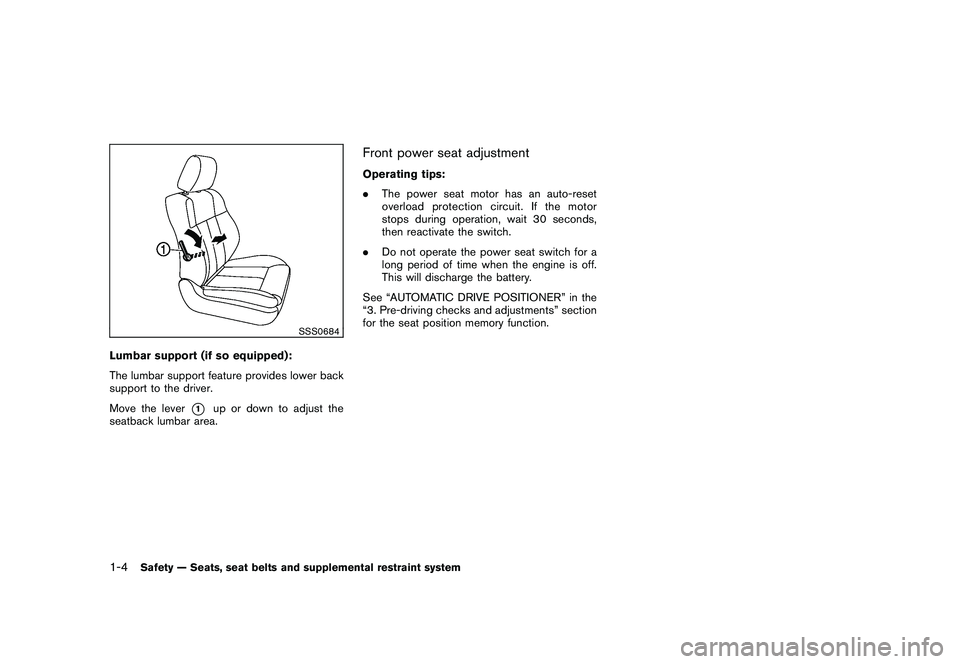
Lumbar support (if so equipped):
The lumbar support feature provides lower back
support to the driver.
Move the lever
*1
up or down to adjust the
seatback lumbar area.
Front power seat adjustmentOperating tips:
. The power seat motor has an auto-reset
overload protection circuit. If the motor
stops during operation, wait 30 seconds,
then reactivate the switch.
. Do not operate the power seat switch for a
long period of time when the engine is off.
This will discharge the battery.
See “AUTOMATIC DRIVE POSITIONER” in the
“3. Pre-driving checks and adjustments” section
for the seat position memory function.
1-4
Safety — Seats, seat belts and supplemental restraint system
Page 263 of 425
Black plate (259,1)
Model "Z51-D" EDITED: 2009/ 8/ 3
Onceyouhaveconfirmedthenameand
location, the system begins the call.
When prompted by the system, say the number
you wish to call. (See “How to say numbers”
earlier in this section and “MAKING A CALL BY
ENTERING A PHONE NUMBER” earlier in this
section for more details.)
“Redial”
Use the Redial command to call the last number
that was dialed within the vehicle.
NOTE:
The system will not redial the last number
dialed by the handset keypad.
The system acknowledges the command, re-
peats the number and begins dialing.
If a redial number does not exist, the system
announces, “There is no number to redial” and
ends the VR session.
“Callback”
Use the Call Back command to dial the number
of the last incoming call within the vehicle.
The system acknowledges the command, re-
peats the number and begins dialing. If a call
back number does not exist, the system
announces, “There is no number to call back”and ends the VR session.
International
For dialing more than 10 digits or any special
characters, please say “Call International”.
When the system acknowledges the command,
the system will prompt you to speak the number.
During a call
During a call there are several command options
available. Press the
button on the steering
wheel to mute the receiving voice and enter
commands.
. “Help” — The system announces the avail-
able commands.
. “Go back/Correction” — The system an-
nounces “Go back,” ends the VR session
and returns to the call.
. “Cancel/Quit” — The system announces
“Cancel,” ends the VR session and returns
to the call.
. “Send/Enter/Call/Dial” — Use the Send
command to enter numbers during a call.
For example, if you were directed to dial an
extension by an automated system:
Say: “Send one two three four.”
The system acknowledges the command
and sends the tones associated with the numbers. The system then ends the VR
session and returns to the call.
. “Transfer Call” — Use the Transfer Call
command to transfer the call from the
Bluetooth
®Hands-Free Phone System to
the cellular phone when privacy is desired.
The system announces, “Transfer call. Call
transferred to privacy mode.” The system
then ends the VR session.
You can also issue the Transfer Call
command again to return to a hands-free
call through the vehicle.
. “Mute” — Use the Mute command to mute
your voice so the other party cannot hear it.
Use the mute command again to unmute
your voice.
NOTE:
If the other party ends the call or the
cellular phone network connection is lost
while the Mute feature is on, the Mute
feature may need to be reset to “off.”
Monitor, heater, air conditioner, audio, phone and voice recognition systems
4-91
Page 322 of 425
Black plate (318,1)
Model "Z51-D" EDITED: 2009/ 8/ 3
The VDC OFF switch is used to turn off the VDC
system. The VDC off indicator illuminates to
indicate the VDC system is off. When the VDC
switch is used to turn off the system, the VDC
system still operates to prevent one drive wheel
from slipping by transferring power to a non
slipping drive wheel. The
indicator flashes
if this occurs. All other VDC functions are off and
the Slip indicator will not flash. The VDC System
is automatically reset to on when the ignition
switch is placed in the off position then back to
the on position.
The VDC system computer has a built-in
diagnostic feature that tests the system each
time you start the engine and move the vehicle at
a low speed forward or backward. When the
self-test occurs, you may hear a “clunk” noise
and/or feel a pulsation in the brake pedal. This is
normal and is not an indication of a malfunction.
WARNING
. The VDC system is designed to help
improve driving stability but does
not prevent accidents due to abrupt
steering operation at high speeds or
due to careless or dangerous driv-
ing techniques. Reduce vehicle
speed and be especially careful
when driving and cornering on slip-
pery surfaces and always drive care- fully.
. If engine control related parts are
not standard equipment or are ex-
tremely deteriorated, both the
and
indicator lights may illumi-
nate.
. Do not modify the vehicle’s suspen-
sion. If suspension parts such as
shock absorbers, struts, springs,
stabilizer bars, bushings and
wheels are not NISSAN approved
for your vehicle or are extremely
deteriorated the VDC system may
not operate properly. This could
adversely affect vehicle handling
performance, and the
indicator
may flash or bothand
indicator lights may illuminate.
. If brake related parts such as brake
pads, rotors and calipers are not
standard equipment or are extre-
mely deteriorated, the VDC system
may not operate properly and both
and
indicator lights may
illuminate.
. When driving on extremely inclined
surfaces such as higher banked
corners, the VDC system may not operate properly and the
in-
dicator may flash or bothand
indicator lights may illuminate.
Do not drive on these types of
roads.
. When driving on an unstable sur-
face such as a turntable, ferry,
elevator or ramp, the
indicator
may flash or bothand
indicator lights may illuminate. This
is not a malfunction. Restart the
engine after driving onto a stable
surface.
. If wheels or tires other than the
recommended ones are used, the
VDC system may not operate prop-
erly and the
indicator may flash
or bothand
indicator
lights may illuminate.
. The VDC system is not a substitute
for winter tires or tire chains on a
snow covered road.
. The ABLS system helps provide
increased traction, but will not pre-
vent accidents due to abrupt steer-
ing operation or by careless driving
or dangerous driving practices. Re-
duce vehicle speed and be espe-
5-28
Starting and driving