washer fluid NISSAN MURANO 2010 Owner´s Manual
[x] Cancel search | Manufacturer: NISSAN, Model Year: 2010, Model line: MURANO, Model: NISSAN MURANO 2010Pages: 425, PDF Size: 3.62 MB
Page 9 of 425
Black plate (5,1)
Model "Z51-D" EDITED: 2009/ 8/ 3
SSI0373
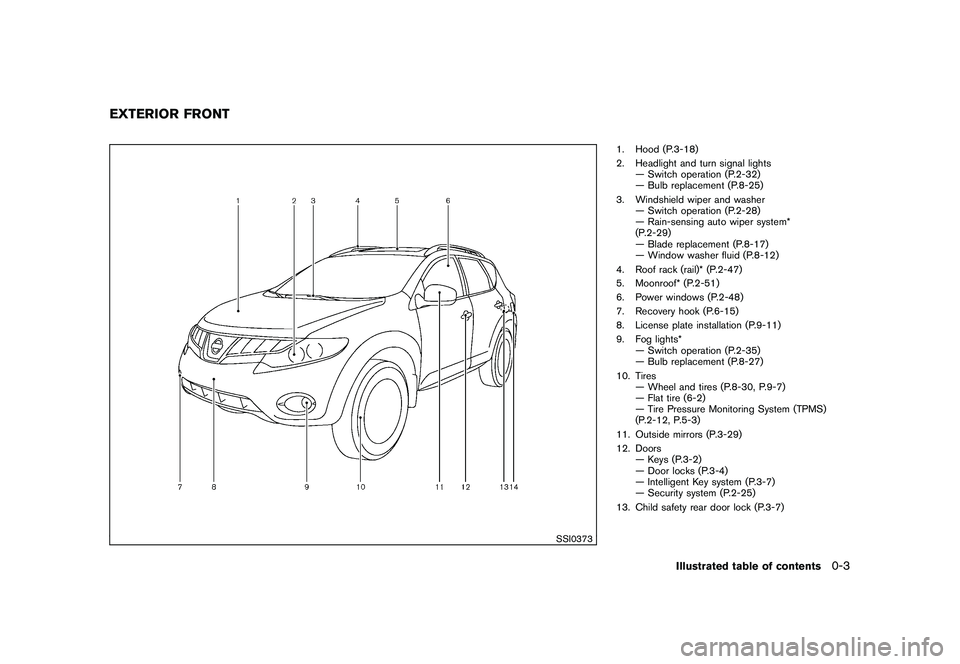
1. Hood (P.3-18)
2. Headlight and turn signal lights— Switch operation (P.2-32)
— Bulb replacement (P.8-25)
3. Windshield wiper and washer — Switch operation (P.2-28)
— Rain-sensing auto wiper system*
(P.2-29)
— Blade replacement (P.8-17)
— Window washer fluid (P.8-12)
4. Roof rack (rail)* (P.2-47)
5. Moonroof* (P.2-51)
6. Power windows (P.2-48)
7. Recovery hook (P.6-15)
8. License plate installation (P.9-11)
9. Fog lights* — Switch operation (P.2-35)
— Bulb replacement (P.8-27)
10. Tires — Wheel and tires (P.8-30, P.9-7)
— Flat tire (6-2)
— Tire Pressure Monitoring System (TPMS)
(P.2-12, P.5-3)
11. Outside mirrors (P.3-29)
12. Doors — Keys (P.3-2)
— Door locks (P.3-4)
— Intelligent Key system (P.3-7)
— Security system (P.2-25)
13. Child safety rear door lock (P.3-7)
EXTERIOR FRONT
Illustrated table of contents
0-3
Page 11 of 425
Black plate (7,1)
Model "Z51-D" EDITED: 2009/ 8/ 3
SSI0374
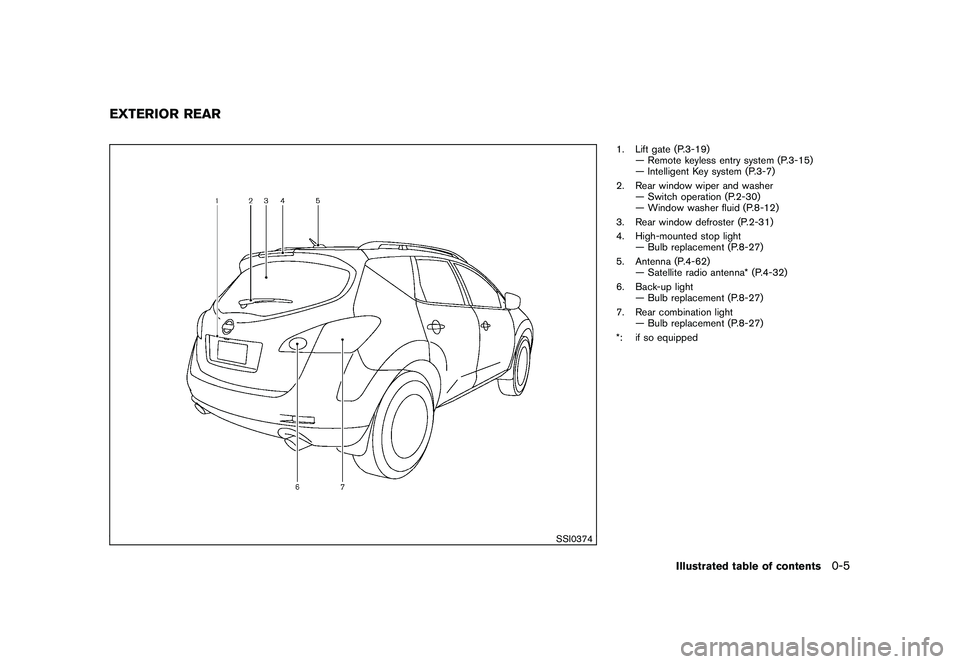
1. Lift gate (P.3-19)— Remote keyless entry system (P.3-15)
— Intelligent Key system (P.3-7)
2. Rear window wiper and washer — Switch operation (P.2-30)
— Window washer fluid (P.8-12)
3. Rear window defroster (P.2-31)
4. High-mounted stop light — Bulb replacement (P.8-27)
5. Antenna (P.4-62) — Satellite radio antenna* (P.4-32)
6. Back-up light — Bulb replacement (P.8-27)
7. Rear combination light — Bulb replacement (P.8-27)
*: if so equipped
EXTERIOR REAR
Illustrated table of contents
0-5
Page 16 of 425
Black plate (12,1)
Model "Z51-D" EDITED: 2009/ 8/ 3
SDI2172
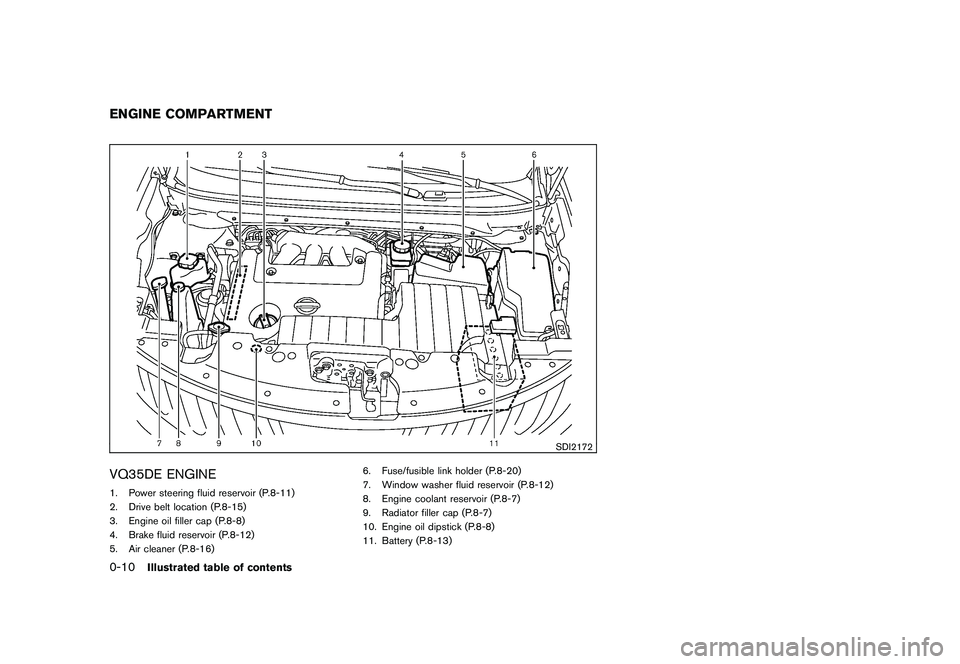
VQ35DE ENGINE1. Power steering fluid reservoir (P.8-11)
2. Drive belt location (P.8-15)
3. Engine oil filler cap (P.8-8)
4. Brake fluid reservoir (P.8-12)
5. Air cleaner (P.8-16)6. Fuse/fusible link holder (P.8-20)
7. Window washer fluid reservoir (P.8-12)
8. Engine coolant reservoir (P.8-7)
9. Radiator filler cap (P.8-7)
10. Engine oil dipstick (P.8-8)
11. Battery (P.8-13)ENGINE COMPARTMENT0-10
Illustrated table of contents
Page 92 of 425
Black plate (88,1)
Model "Z51-D" EDITED: 2009/ 8/ 3
wheels.Master warning light
When the ignition switch is in the ON position,
the master warning light illuminates if any of the
following are displayed on the dot matrix liquid
crystal display:
.No key warning
. Low fuel warning
. Low washer fluid warning
. Parking brake release warning
. Door/lift gate open warning
See “DOT MATRIX LIQUID CRYSTAL DIS-
PLAY” later in this section.
Seat belt warning light
The light and chime remind you to fasten seat
belts. The light illuminates whenever the ignition
switch is pushed to the ON position, and will
remain illuminated until the driver’s seat belt is
fastened.
The seat belt warning light for the front
passenger will illuminate if the seat belt is not
fastened when the front passenger’s seat is
occupied. For 6 seconds after the ignition switch is in the ON position, the system does
not activate the warning light for the front
passenger.
See “SEAT BELTS” in the “1. Safety — Seats,
seat belts and supplemental restraint system”
section for precautions on seat belt usage.
Supplemental air bag warning light
After pushing the ignition switch to the ON
position, the supplemental air bag warning light
will illuminate. The supplemental air bag warning
light will turn off after about 7 seconds if the
supplemental front air bag and supplemental
side air bag, curtain side-impact air bag systems
and/or pretensioner seat belt are operational.
If any of the following conditions occur, the front
air bag, side air bag, curtain and rollover air bag
and pretensioner systems needs servicing and
your vehicle must be taken to your nearest
NISSAN dealer.
.
The supplemental air bag warning light
remains on after approximately 7 seconds.
. The supplemental air bag warning light
flashes intermittently.
. The supplemental air bag warning light does
not come on at all.
Unless checked and repaired, the Supplemental Restraint Systems (air bag systems) and/or the
pretensioners may not function properly.
For additional information, see “SUPPLEMEN-
TAL RESTRAINT SYSTEM” in the “1. Safety —
Seats, seat belts and supplemental restraint
system” section.
WARNING
If the supplemental air bag warning
light is on, it could mean that the front
air bag, side air bag, curtain and roll-
over air bag and/or pretensioner sys-
tems will not operate in an accident. To
help avoid injury to yourself or others,
have your vehicle checked by a NISSAN
dealer as soon as possible.INDICATOR LIGHTS
All-Wheel Drive (AWD) LOCK
indicator light (AWD models)
This light illuminates when the ignition switch is
turned to the ON position, and turns off within 1
second.
When selecting the LOCK mode while the
engine is running, this light will illuminate. (See
“ALL-WHEEL DRIVE (AWD)” in the “5. Starting
and driving” section.)
2-14
Instruments and controls
Page 98 of 425
Black plate (94,1)
Model "Z51-D" EDITED: 2009/ 8/ 3
11. Low washer fluid warningThis warning appears when the washer tank fluid
is at a low level. Add washer fluid as necessary.
(See “WINDOW WASHER FLUID” in the “8.
Maintenance and do-it-yourself” section.)12. Door/lift gate open warning (ignition
switch is in the ON position)This warning appears if any of the doors and/or
the lift gate are open or not closed securely. The
vehicle icon indicates which door is open on the
display.13. “Time to rest” indicatorThis indicator appears when the set “time to
rest” indicator activates. You can set the time for
up to 6 hours. (See “TRIP COMPUTER” later in
this section.)14. Low outside temperature warningThis warning appears if the outside temperature
is below 378F(3 8C) . The warning can be set not
to be displayed. (See “TRIP COMPUTER” later
in this section.)
SIC3578
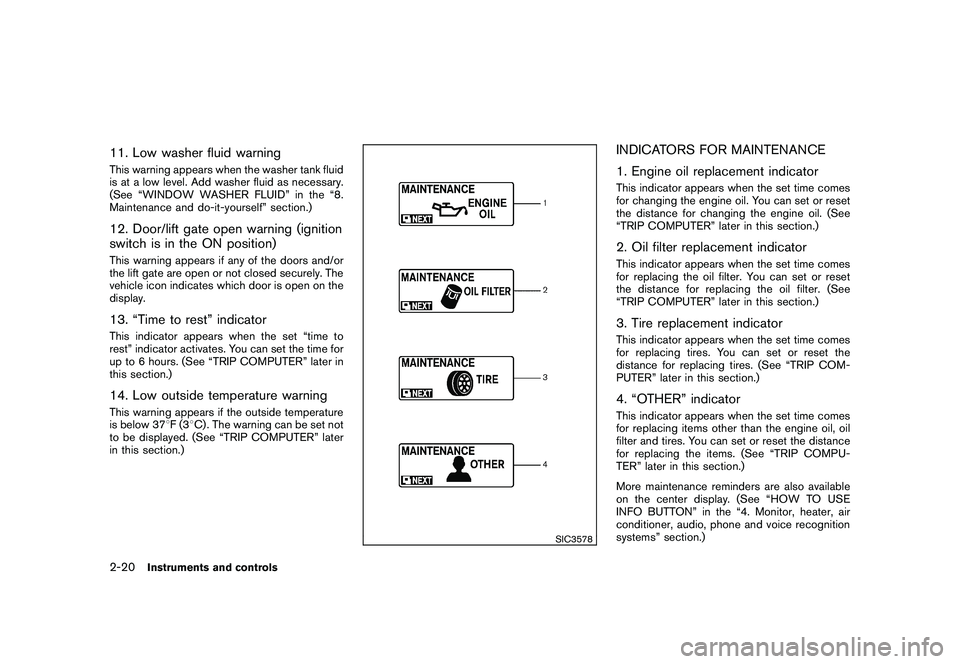
INDICATORS FOR MAINTENANCE
1. Engine oil replacement indicatorThis indicator appears when the set time comes
for changing the engine oil. You can set or reset
the distance for changing the engine oil. (See
“TRIP COMPUTER” later in this section.)2. Oil filter replacement indicatorThis indicator appears when the set time comes
for replacing the oil filter. You can set or reset
the distance for replacing the oil filter. (See
“TRIP COMPUTER” later in this section.)3. Tire replacement indicatorThis indicator appears when the set time comes
for replacing tires. You can set or reset the
distance for replacing tires. (See “TRIP COM-
PUTER” later in this section.)4. “OTHER” indicatorThis indicator appears when the set time comes
for replacing items other than the engine oil, oil
filter and tires. You can set or reset the distance
for replacing the items. (See “TRIP COMPU-
TER” later in this section.)
More maintenance reminders are also available
on the center display. (See “HOW TO USE
INFO BUTTON” in the “4. Monitor, heater, air
conditioner, audio, phone and voice recognition
systems” section.)
2-20
Instruments and controls
Page 103 of 425
Black plate (99,1)
Model "Z51-D" EDITED: 2009/ 8/ 3
SIC3679
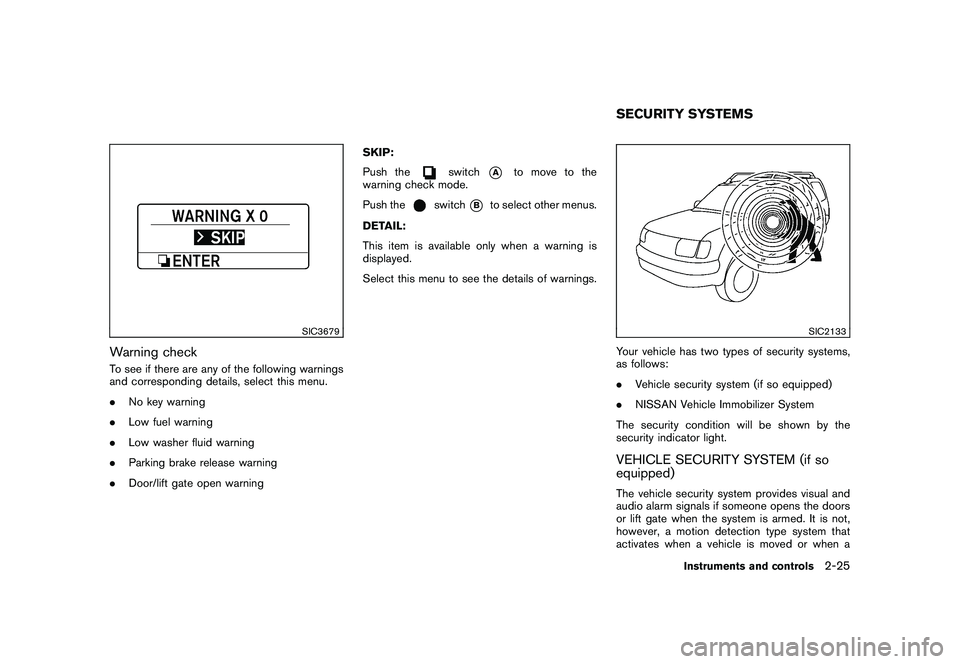
Warning checkTo see if there are any of the following warnings
and corresponding details, select this menu.
.No key warning
. Low fuel warning
. Low washer fluid warning
. Parking brake release warning
. Door/lift gate open warning SKIP:
Push the
switch
*A
to move to the
warning check mode.
Push the
switch
*B
to select other menus.
DETAIL:
This item is available only when a warning is
displayed.
Select this menu to see the details of warnings.
SIC2133
Your vehicle has two types of security systems,
as follows:
. Vehicle security system (if so equipped)
. NISSAN Vehicle Immobilizer System
The security condition will be shown by the
security indicator light.VEHICLE SECURITY SYSTEM (if so
equipped)The vehicle security system provides visual and
audio alarm signals if someone opens the doors
or lift gate when the system is armed. It is not,
however, a motion detection type system that
activates when a vehicle is moved or when aSECURITY SYSTEMS
Instruments and controls
2-25
Page 106 of 425
Black plate (102,1)
Model "Z51-D" EDITED: 2009/ 8/ 3
service as soon as possible. Please bring
all registered keys that you have when
visiting a NISSAN dealer for service.
WARNING
In freezing temperatures the washer
solution may freeze on the windshield
and obscure your vision which may lead
to an accident. Warm windshield with
the defroster before you wash the
windshield.
CAUTION
.Do not operate the washer continu-
ously for more than 30 seconds.
. Do not operate the washer if the
reservoir tank is empty.
. Do not fill the window washer
reservoir tank with washer fluid
concentrates at full strength. Some
methyl alcohol based washer fluid
concentrates may permanently stain
the grille if spilled while filling the
window washer reservoir tank.
. Pre-mix washer fluid concentrates
with water to the manufacturer’s
recommended levels before pouring
the fluid into the window washer
reservoir tank. Do not use the
window washer reservoir tank to mix the washer fluid concentrate
and water.WINDSHIELD WIPER AND WASHER
SWITCH
2-28
Instruments and controls
Page 108 of 425
Black plate (104,1)
Model "Z51-D" EDITED: 2009/ 8/ 3
.High — High sensitive operation
. Low — Low sensitive operation
To turn the rain-sensing auto wiper system off,
push up the lever to the OFF position, or pull
down the lever to the LO or HI position.
CAUTION
Do not touch the rain sensor and
around it when the wiper switch is in
the INT position and the ignition switch
is in the ON position. The wipers may
operate unexpectedly and cause to an
injury or a wiper damage.
. The rain-sensing auto wipers are in-
tended for use during rain. If the switch
is left in the INT position, the wipers
may operate unexpectedly when dirt,
fingerprints, oil film or insects are stuck
on or around the sensor. The wipers
may also operate when exhaust gas or
moisture affect the rain sensor.
. The rain-sensing auto wipers may not
operate if rain does not hit the rain
sensor even if it is raining.
WARNING
In freezing temperatures the washer
solution may freeze on the rear window
glass and obscure your vision. Warm
the rear window with the defroster
before you wash the rear window.
CAUTION
.Do not operate the washer continu-
ously for more than 30 seconds.
. Do not operate the washer if the
reservoir tank is empty.
. Do not fill the window washer
reservoir tank with washer fluid
concentrates at full strength. Some
methyl alcohol based washer fluid
concentrates may permanently stain
the grille if spilled while filling the
window washer reservoir tank.
. Pre-mix washer fluid concentrates
with water to the manufacturer’s
recommended levels before pouring
the fluid into the window washer
reservoir tank. Do not use the
window washer reservoir tank to
mix the washer fluid concentrate and water.
If the rear window wiper operation is
interrupted by snow or ice, the wiper may
stop moving to protect its motor. If this
occurs, turn the wiper switch to the OFF
position and remove the snow or ice that is
on and around the wiper arms. In approxi-
mately 1 minute, turn the switch on again
to operate the wiper.REAR WINDOW WIPER AND
WASHER SWITCH
2-30
Instruments and controls
Page 306 of 425
Black plate (302,1)
Model "Z51-D" EDITED: 2009/ 8/ 3
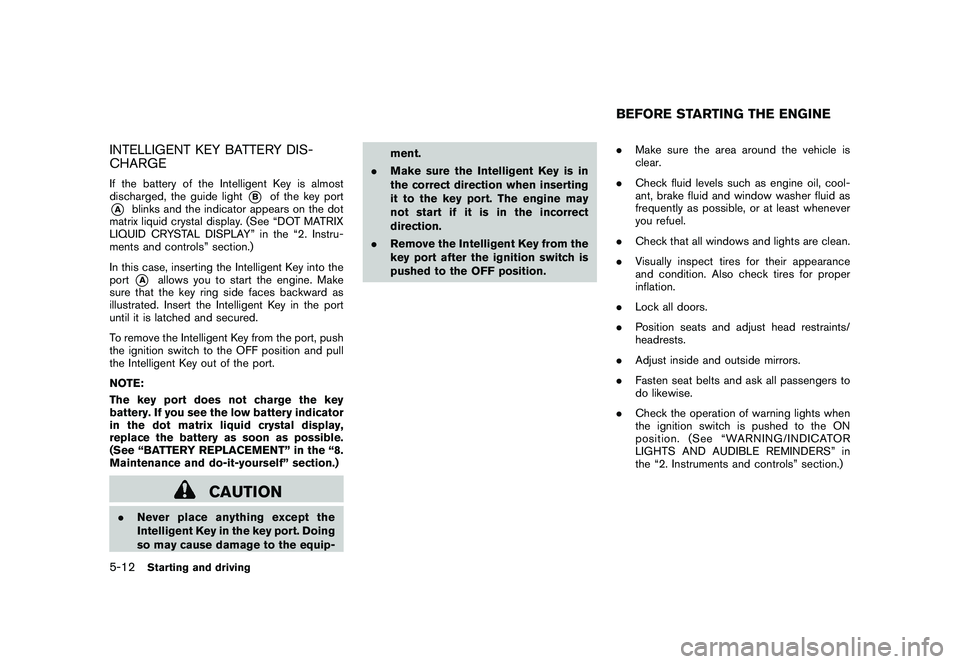
INTELLIGENT KEY BATTERY DIS-
CHARGEIf the battery of the Intelligent Key is almost
discharged, the guide light
*B
of the key port
*A
blinks and the indicator appears on the dot
matrix liquid crystal display. (See “DOT MATRIX
LIQUID CRYSTAL DISPLAY” in the “2. Instru-
ments and controls” section.)
In this case, inserting the Intelligent Key into the
port*A
allows you to start the engine. Make
sure that the key ring side faces backward as
illustrated. Insert the Intelligent Key in the port
until it is latched and secured.
To remove the Intelligent Key from the port, push
the ignition switch to the OFF position and pull
the Intelligent Key out of the port.
NOTE:
The key port does not charge the key
battery. If you see the low battery indicator
in the dot matrix liquid crystal display,
replace the battery as soon as possible.
(See “BATTERY REPLACEMENT” in the “8.
Maintenance and do-it-yourself” section.)
CAUTION
. Never place anything except the
Intelligent Key in the key port. Doing
so may cause damage to the equip- ment.
. Make sure the Intelligent Key is in
the correct direction when inserting
it to the key port. The engine may
not start if it is in the incorrect
direction.
. Remove the Intelligent Key from the
key port after the ignition switch is
pushed to the OFF position. .
Make sure the area around the vehicle is
clear.
. Check fluid levels such as engine oil, cool-
ant, brake fluid and window washer fluid as
frequently as possible, or at least whenever
you refuel.
. Check that all windows and lights are clean.
. Visually inspect tires for their appearance
and condition. Also check tires for proper
inflation.
. Lock all doors.
. Position seats and adjust head restraints/
headrests.
. Adjust inside and outside mirrors.
. Fasten seat belts and ask all passengers to
do likewise.
. Check the operation of warning lights when
the ignition switch is pushed to the ON
position. (See “WARNING/INDICATOR
LIGHTS AND AUDIBLE REMINDERS” in
the “2. Instruments and controls” section.)
BEFORE STARTING THE ENGINE
5-12
Starting and driving
Page 324 of 425
Black plate (320,1)
Model "Z51-D" EDITED: 2009/ 8/ 3
SPECIAL WINTER EQUIPMENTIt is recommended that the following items be
carried in the vehicle during winter:
.A scraper and stiff-bristled brush to remove
ice and snow from the windows and wiper
blades.
. A sturdy, flat board to be placed under the
jack to give it firm support.
. A shovel to dig the vehicle out of snow-
drifts.
. Extra window washer fluid to refill the
reservoir tank.DRIVING ON SNOW OR ICE
WARNING
.Wet ice (32 8F, 0 8C and freezing rain) ,
very cold snow or ice can be slick
and very hard to drive on. The
vehicle will have much less traction
or “grip” under these conditions. Try
to avoid driving on wet ice until the
road is salted or sanded.
. Whatever the condition, drive with
caution. Accelerate and slow down
with care. If accelerating or down-
shifting too fast, the drive wheels will lose even more traction.
. Allow more stopping distance under
these conditions. Braking should be
started sooner than on dry pave-
ment.
. Allow greater following distances
on slippery roads.
. Watch for slippery spots (glare ice) .
These may appear on an otherwise
clear road in shaded areas. If a
patch of ice is seen ahead, brake
before reaching it. Try not to brake
while on the ice, and avoid any
sudden steering maneuvers.
. Do not use cruise control on slip-
pery roads.
. Snow can trap dangerous exhaust
gases under your vehicle. Keep
snow clear of the exhaust pipe and
from around your vehicle.
ENGINE BLOCK HEATER (if so
equipped)Engine block heaters are used to assist with
cold temperature starting.
The engine block heater should be used when
the outside temperature is 20 8F( 7 8C) or lower.
To use the engine block heater1. Turn the engine off.
2. Open the hood and unwrap the engine
block heater cord.
3. Plug the engine block heater cord into a grounded 3-wire, 3-pronged extension cord.
4. Plug the extension cord into a Ground Fault Interrupt (GFI) protected, grounded 110-
volt AC (VAC) outlet.
5. The engine block heater must be plugged in for at least 2 - 4 hours, depending on
outside temperatures, to properly warm the
engine coolant. Use an appropriate timer to
turn the engine block heater on.
6. Before starting the engine, unplug and properly store the cord to keep it away from
moving parts.
WARNING
.Do not use your engine block heater
with an ungrounded electrical sys-
tem or a 2-pronged adapter. You can
be seriously injured by an electrical
shock if you use an ungrounded
connection.
. Disconnect and properly store the
engine block heater cord before
5-30
Starting and driving