brake NISSAN MURANO 2011 Owner´s Manual
[x] Cancel search | Manufacturer: NISSAN, Model Year: 2011, Model line: MURANO, Model: NISSAN MURANO 2011Pages: 433, PDF Size: 3.7 MB
Page 93 of 433
Black plate (91,1)
Model "Z51-D" EDITED: 2010/ 7/ 23
wheel right and left.3. Key insertion indicatorThis indicator appears when the key needs to be
inserted into the key port. (For example, the
Intelligent Key battery is discharged.)
If this indicator appears, insert the key into the
key port in the correct direction. (See “PUSH-
BUTTON IGNITION SWITCH” in the “5. Start-
ing and driving” section.)4. Key removal indicatorThis indicator appears when the driver’s door is
opened with the ignition switch in the OFF or
LOCK position and the key placed in the key
port. A key reminder chime also sounds.
If this indicator appears, remove the key from the
key port and take it with you when leaving the
vehicle.5. NO KEY warningThis warning appears in either of the following
conditions.
No key inside the vehicle:
The warning appears when the door is closed
with the Intelligent Key left outside the vehicle
and the ignition switch in the ACC or ON
position. Make sure that the Intelligent Key is
inside the vehicle.Unregistered key:
The warning appears when the ignition switch is
pushed from the LOCK position and the key
cannot be recognized by the system. You cannot
start the engine with an unregistered key. Use
the registered key.
See “INTELLIGENT KEY SYSTEM” in the “3.
Pre-driving checks and adjustments” section for
more details.
6. SHIFT “P” warningThis warning appears when the ignition switch is
pushed to stop the engine with the selector lever
in any position except the P (Park) position.
If this warning appears, move the selector lever
to the P (Park) position or push the ignition
switch to the ON position.
An inside warning chime will also sound. (See
“INTELLIGENT KEY SYSTEM” in the “3. Pre-
driving checks and adjustments” section.)7. “PUSH” warningThis warning appears when the selector lever is
moved to the P (Park) position with the ignition
switch in the ACC position after the SHIFT “P”
warning appears.
To push the ignition switch to the OFF position,
perform the following procedure:
SHIFT “P” warning
?(Move the selector
lever to “P”) ?PUSH warning ?(Push
the ignition switch ?ignition switch position
is turned to ON) ?PUSH warning ?
(Push the ignition switch ?ignition switch
position is turned to OFF)
8. Key battery discharge indicatorThis indicator appears when the key battery is
running out of power.
If this indicator appears, replace the battery with
a new one. (See “INTELLIGENT KEY BATTERY
REPLACEMENT” in the “8. Maintenance and
do-it-yourself” section.)9. Parking brake release warningThis warning appears when the vehicle speed is
above 4 MPH (7 km/h) and the parking brake is
applied. Stop the vehicle and release the
parking brake.10. Low fuel warningThis warning appears when the fuel level in the
tank is getting low. Refuel as soon as it is
convenient, preferably before the fuel gauge
reaches the empty (E) position.
There is a small reserve of fuel remaining
in the tank when the fuel gauge reaches
the empty (E) position.
Instruments and controls
2-19
Page 99 of 433
Black plate (97,1)
Model "Z51-D" EDITED: 2010/ 9/ 28
.OTHER
Select this submenu and set or reset the
distance for replacing items other than the
engine oil, oil filter and tires.
To return to the top page of the setting mode,
select “BACK”.
OPTIONS:
The 3 option menus can be set to your
preference.
. LANGUAGE
Select this submenu to choose English,
French or Spanish for display.
. UNIT
Select this submenu to choose the unit from
MPG or l/100 km.
. EFFECTS
Select this menu to set the dial effects
described below to on or off.
— The indicator needles sweep in the meters and the ring illumination will be
brightened gradually when the engine is
started.
To return to the top page of the setting mode,
select “BACK”.
SIC3679
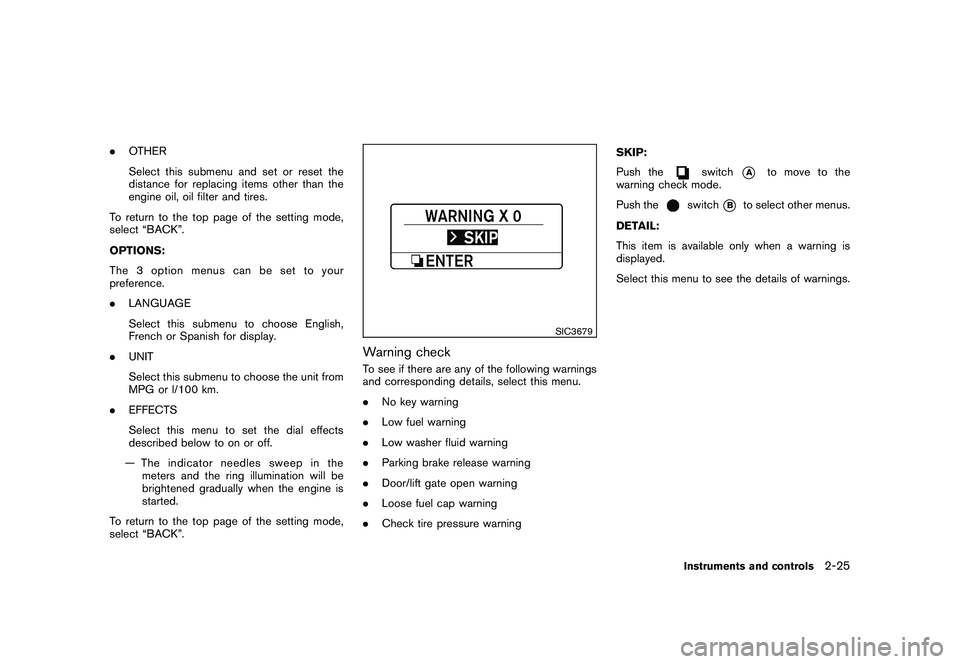
Warning checkTo see if there are any of the following warnings
and corresponding details, select this menu.
. No key warning
. Low fuel warning
. Low washer fluid warning
. Parking brake release warning
. Door/lift gate open warning
. Loose fuel cap warning
. Check tire pressure warning SKIP:
Push the
switch
*A
to move to the
warning check mode.
Push the
switch
*B
to select other menus.
DETAIL:
This item is available only when a warning is
displayed.
Select this menu to see the details of warnings.
Instruments and controls
2-25
Page 109 of 433
Black plate (107,1)
Model "Z51-D" EDITED: 2010/ 7/ 23
SIC3670
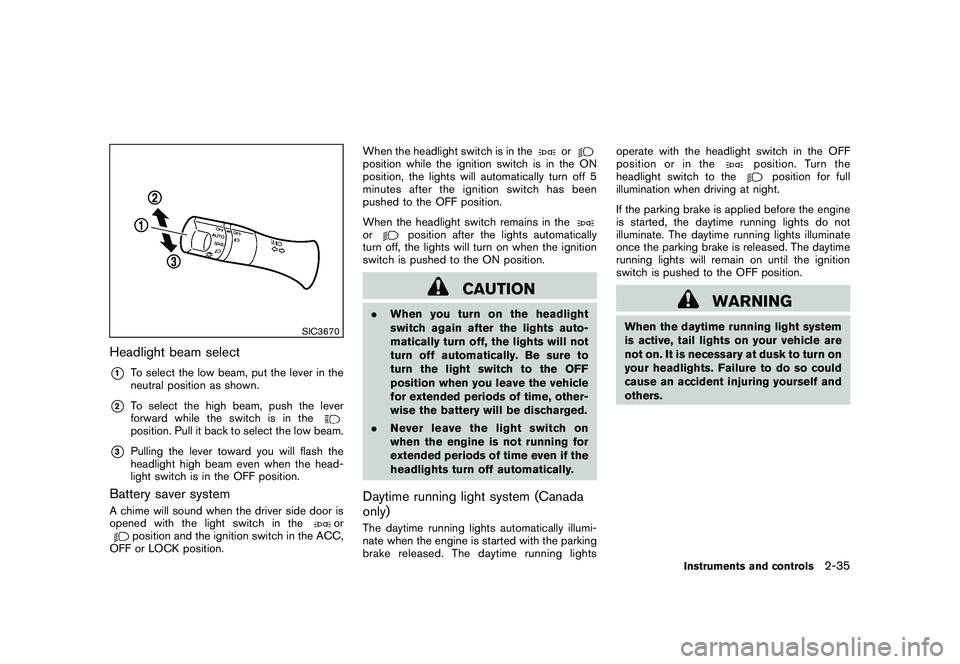
Headlight beam select*1
To select the low beam, put the lever in the
neutral position as shown.
*2
To select the high beam, push the lever
forward while the switch is in theposition. Pull it back to select the low beam.
*3
Pulling the lever toward you will flash the
headlight high beam even when the head-
light switch is in the OFF position.
Battery saver systemA chime will sound when the driver side door is
opened with the light switch in the
or
position and the ignition switch in the ACC,
OFF or LOCK position. When the headlight switch is in the
or
position while the ignition switch is in the ON
position, the lights will automatically turn off 5
minutesaftertheignitionswitchhasbeen
pushed to the OFF position.
When the headlight switch remains in theor
position after the lights automatically
turn off, the lights will turn on when the ignition
switch is pushed to the ON position.
CAUTION
. When you turn on the headlight
switch again after the lights auto-
matically turn off, the lights will not
turn off automatically. Be sure to
turn the light switch to the OFF
position when you leave the vehicle
for extended periods of time, other-
wise the battery will be discharged.
. Never leave the light switch on
when the engine is not running for
extended periods of time even if the
headlights turn off automatically.Daytime running light system (Canada
only)The daytime running lights automatically illumi-
nate when the engine is started with the parking
brake released. The daytime running lights operate with the headlight switch in the OFF
position or in the
position. Turn the
headlight switch to the
position for full
illumination when driving at night.
If the parking brake is applied before the engine
is started, the daytime running lights do not
illuminate. The daytime running lights illuminate
once the parking brake is released. The daytime
running lights will remain on until the ignition
switch is pushed to the OFF position.
WARNING
When the daytime running light system
is active, tail lights on your vehicle are
not on. It is necessary at dusk to turn on
your headlights. Failure to do so could
cause an accident injuring yourself and
others.
Instruments and controls
2-35
Page 114 of 433
Black plate (112,1)
Model "Z51-D" EDITED: 2010/ 7/ 23
MODELS WITH COLOR DISPLAYTo adjust the clock on the front color display, use
the SETTING button on the center multi-
function control panel. See “HOW TO USE
SETTING BUTTON” in the “4. Center display,
heater, air conditioner, audio, phone and voice
recognition systems” section.
The clock settings display cannot be operated
while driving. Stop the vehicle in a safe place
and apply the parking brake before setting the
clock.
SIC3802
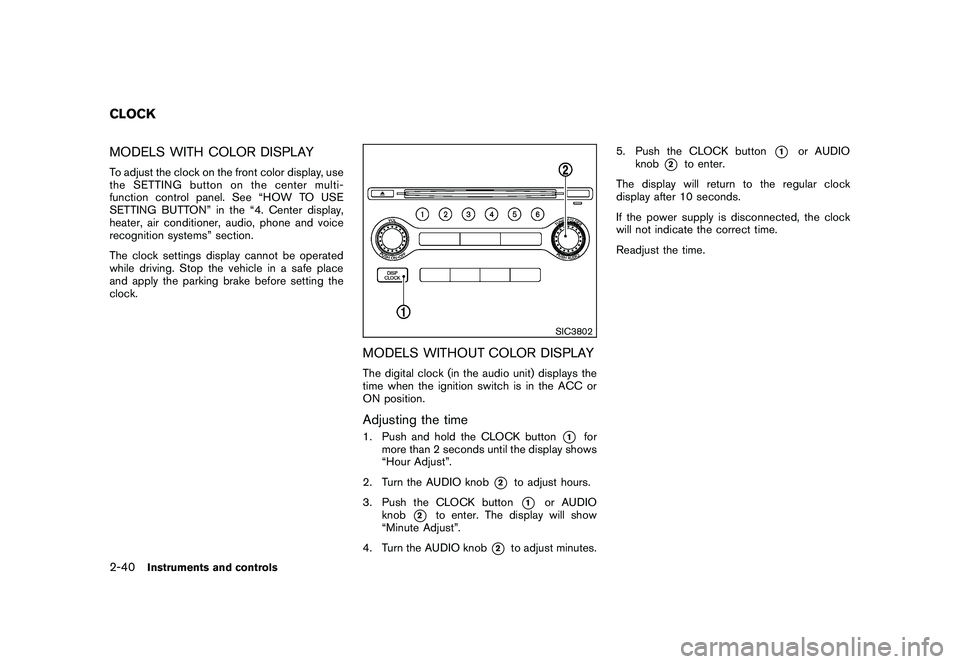
MODELS WITHOUT COLOR DISPLAYThe digital clock (in the audio unit) displays the
time when the ignition switch is in the ACC or
ON position.Adjusting the time1. Push and hold the CLOCK button
*1
for
more than 2 seconds until the display shows
“Hour Adjust”.
2. Turn the AUDIO knob
*2
to adjust hours.
3. Push the CLOCK button*1
or AUDIO
knob
*2
to enter. The display will show
“Minute Adjust”.
4. Turn the AUDIO knob
*2
to adjust minutes. 5. Push the CLOCK button
*1
or AUDIO
knob
*2
to enter.
The display will return to the regular clock
display after 10 seconds.
If the power supply is disconnected, the clock
will not indicate the correct time.
Readjust the time.
CLOCK2-40
Instruments and controls
Page 172 of 433
Black plate (170,1)
Model "Z51-D" EDITED: 2010/ 7/ 23
WARNING
.Do not disassemble or modify this
system. If you do, it may result in
accidents, fire, or electric shock.
. Do not use this system if you notice
any abnormality, such as a frozen
screen or lack of sound. Continued
use of the system may result in
accident, fire or electric shock.
. In case you notice any foreign
object in the system hardware, spill
liquid on it, or notice smoke or smell
coming from it, stop using the
system immediately and contact
your nearest NISSAN dealer. Ignor-
ing such conditions may lead to
accidents, fire, or electric shock.
. Park the vehicle in a safe location
and apply the parking brake to view
the images on the front center dis-
play screen using devices connected
to the auxiliary input jacks.
Do not attempt to operate the system in
extreme temperature conditions [below
48F( 208 C) and above 158 8F(70 8C)].
Operating this system under these condi-
tions may result in system malfunctions.
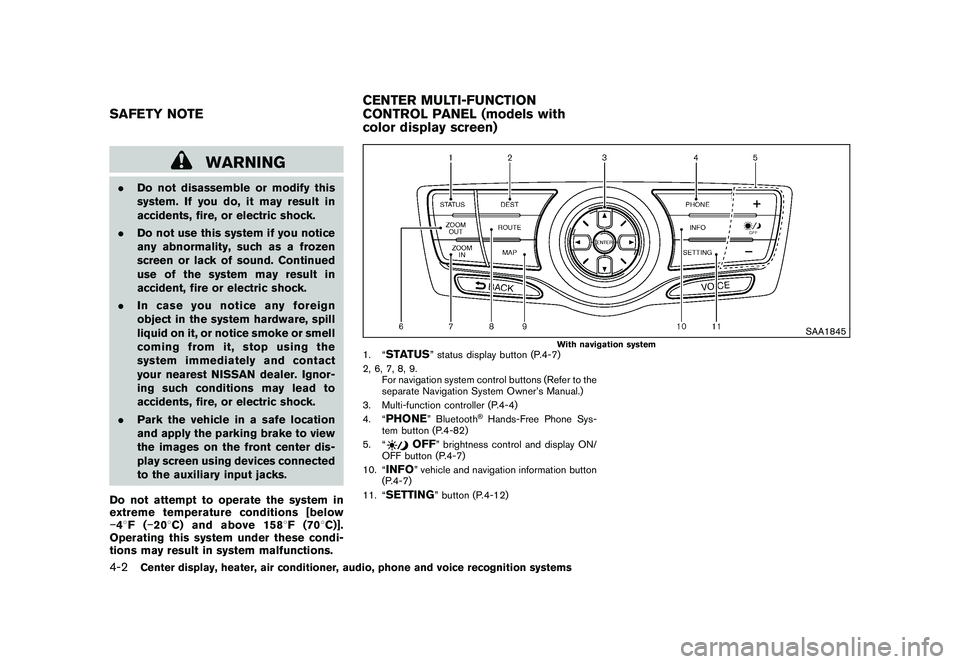
SAA1845
With navigation system
1. “
STATUS
” status display button (P.4-7)
2, 6, 7, 8, 9. For navigation system control buttons (Refer to the
separate Navigation System Owner’s Manual.)
3. Multi-function controller (P.4-4)
4. “
PHONE
” Bluetooth
®Hands-Free Phone Sys-
tem button (P.4-82)
5. “
OFF
” brightness control and display ON/
OFF button (P.4-7)
10. “
INFO
” vehicle and navigation information button
(P.4-7)
11. “
SETTING
” button (P.4-12)
SAFETY NOTE CENTER MULTI-FUNCTION
CONTROL PANEL (models with
color display screen)4-2
Center display, heater, air conditioner, audio, phone and voice recognition systems
Page 186 of 433
Black plate (184,1)
Model "Z51-D" EDITED: 2010/ 7/ 23
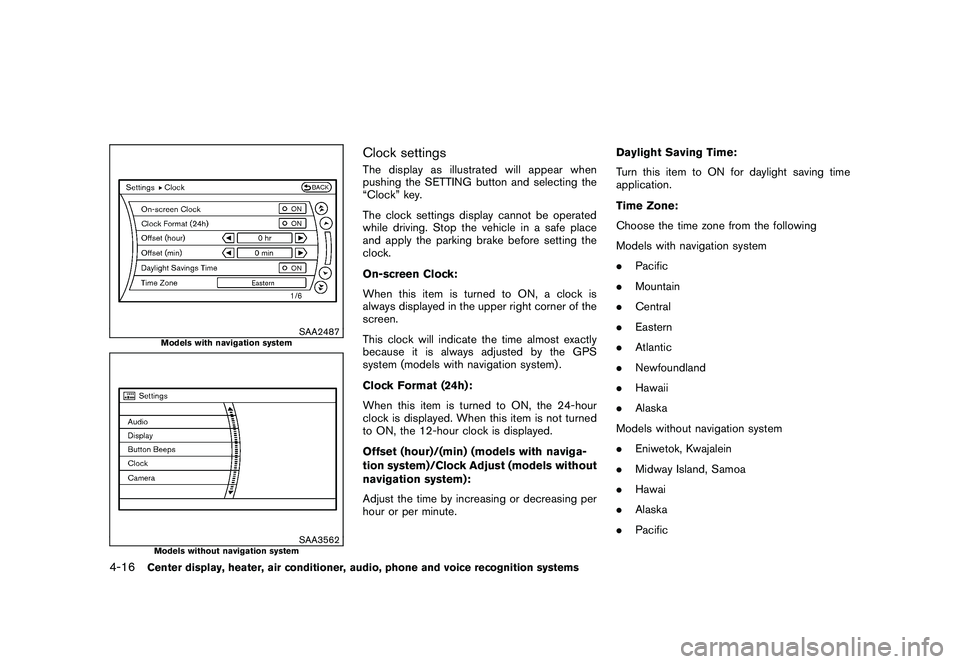
SAA2487
Models with navigation system
SAA3562
Models without navigation system
Clock settingsThe display as illustrated will appear when
pushing the SETTING button and selecting the
“Clock” key.
The clock settings display cannot be operated
while driving. Stop the vehicle in a safe place
and apply the parking brake before setting the
clock.
On-screen Clock:
When this item is turned to ON, a clock is
always displayed in the upper right corner of the
screen.
This clock will indicate the time almost exactly
because it is always adjusted by the GPS
system (models with navigation system) .
Clock Format (24h):
When this item is turned to ON, the 24-hour
clock is displayed. When this item is not turned
to ON, the 12-hour clock is displayed.
Offset (hour)/(min) (models with naviga-
tion system)/Clock Adjust (models without
navigation system):
Adjust the time by increasing or decreasing per
hour or per minute.Daylight Saving Time:
Turn this item to ON for daylight saving time
application.
Time Zone:
Choose the time zone from the following
Models with navigation system
.
Pacific
. Mountain
. Central
. Eastern
. Atlantic
. Newfoundland
. Hawaii
. Alaska
Models without navigation system
. Eniwetok, Kwajalein
. Midway Island, Samoa
. Hawai
. Alaska
. Pacific
4-16
Center display, heater, air conditioner, audio, phone and voice recognition systems
Page 190 of 433
Black plate (188,1)
Model "Z51-D" EDITED: 2010/ 7/ 23
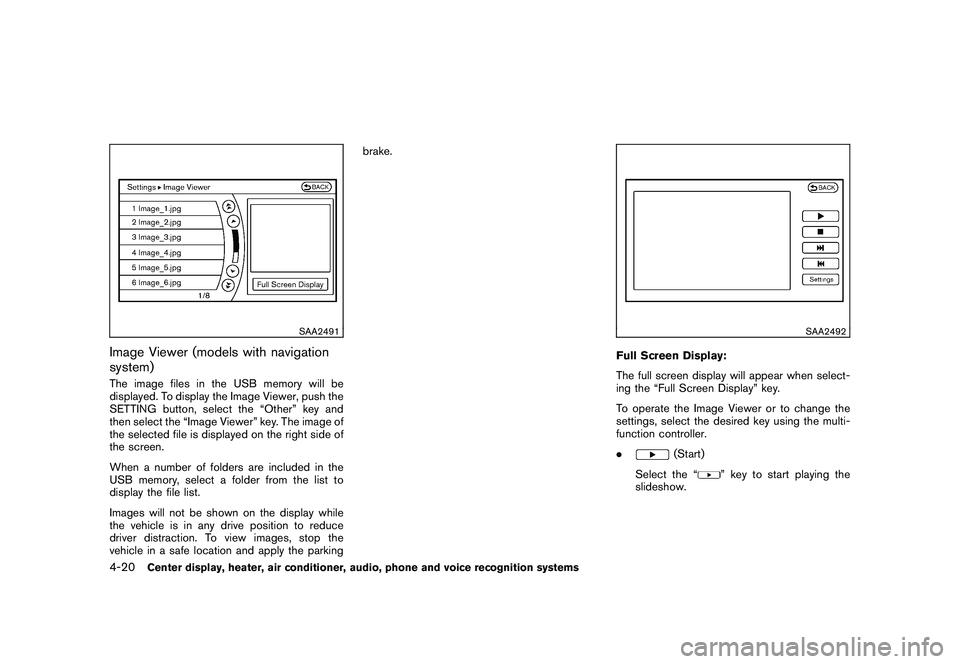
SAA2491
Image Viewer (models with navigation
system)The image files in the USB memory will be
displayed. To display the Image Viewer, push the
SETTING button, select the “Other” key and
then select the “Image Viewer” key. The image of
the selected file is displayed on the right side of
the screen.
When a number of folders are included in the
USB memory, select a folder from the list to
display the file list.
Images will not be shown on the display while
the vehicle is in any drive position to reduce
driver distraction. To view images, stop the
vehicle in a safe location and apply the parkingbrake.
SAA2492
Full Screen Display:
The full screen display will appear when select-
ing the “Full Screen Display” key.
To operate the Image Viewer or to change the
settings, select the desired key using the multi-
function controller.
.
(Start)
Select the “
” key to start playing the
slideshow.
4-20
Center display, heater, air conditioner, audio, phone and voice recognition systems
Page 194 of 433
Black plate (192,1)
Model "Z51-D" EDITED: 2010/ 7/ 23
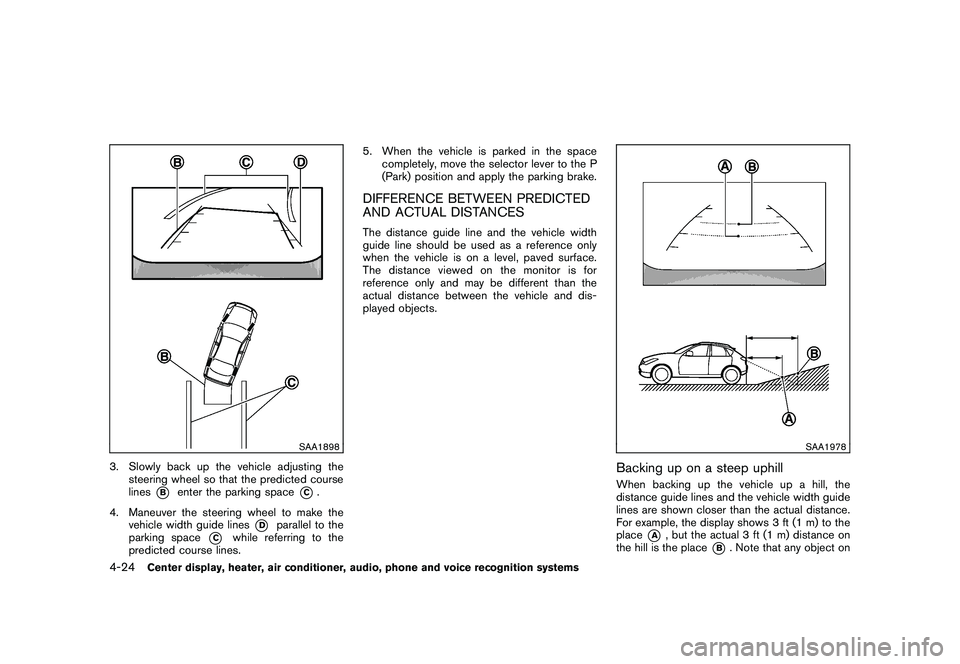
SAA1898
3. Slowly back up the vehicle adjusting thesteering wheel so that the predicted course
lines
*B
enter the parking space
*C.
4. Maneuver the steering wheel to make the vehicle width guide lines
*D
parallel to the
parking space
*C
while referring to the
predicted course lines. 5. When the vehicle is parked in the space
completely, move the selector lever to the P
(Park) position and apply the parking brake.
DIFFERENCE BETWEEN PREDICTED
AND ACTUAL DISTANCESThe distance guide line and the vehicle width
guide line should be used as a reference only
when the vehicle is on a level, paved surface.
The distance viewed on the monitor is for
reference only and may be different than the
actual distance between the vehicle and dis-
played objects.
SAA1978
Backing up on a steep uphillWhen backing up the vehicle up a hill, the
distance guide lines and the vehicle width guide
lines are shown closer than the actual distance.
For example, the display shows 3 ft (1 m) to the
place
*A
, but the actual 3 ft (1 m) distance on
the hill is the place
*B. Note that any object on
4-24
Center display, heater, air conditioner, audio, phone and voice recognition systems
Page 196 of 433
Black plate (194,1)
Model "Z51-D" EDITED: 2010/ 7/ 23
SAA1923
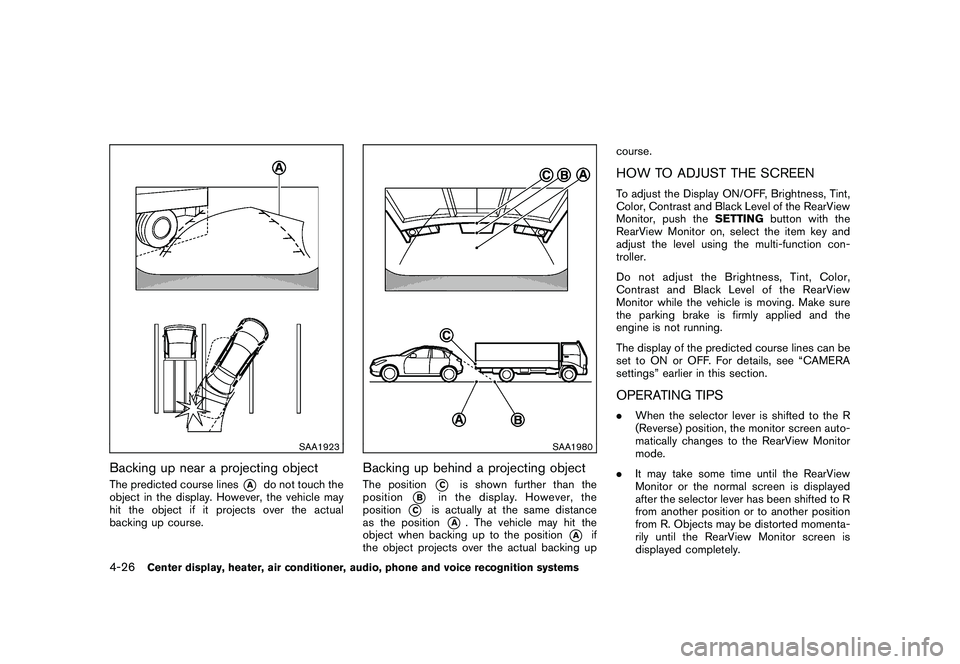
Backing up near a projecting objectThe predicted course lines
*A
do not touch the
object in the display. However, the vehicle may
hit the object if it projects over the actual
backing up course.
SAA1980
Backing up behind a projecting objectThe position
*C
is shown further than the
position
*B
in the display. However, the
position
*C
is actually at the same distance
as the position
*A
. The vehicle may hit the
object when backing up to the position
*A
if
the object projects over the actual backing up course.
HOW TO ADJUST THE SCREENTo adjust the Display ON/OFF, Brightness, Tint,
Color, Contrast and Black Level of the RearView
Monitor, push the
SETTINGbutton with the
RearView Monitor on, select the item key and
adjust the level using the multi-function con-
troller.
Do not adjust the Brightness, Tint, Color,
Contrast and Black Level of the RearView
Monitor while the vehicle is moving. Make sure
the parking brake is firmly applied and the
engine is not running.
The display of the predicted course lines can be
set to ON or OFF. For details, see “CAMERA
settings” earlier in this section.OPERATING TIPS. When the selector lever is shifted to the R
(Reverse) position, the monitor screen auto-
matically changes to the RearView Monitor
mode.
. It may take some time until the RearView
Monitor or the normal screen is displayed
after the selector lever has been shifted to R
from another position or to another position
from R. Objects may be distorted momenta-
rily until the RearView Monitor screen is
displayed completely.
4-26
Center display, heater, air conditioner, audio, phone and voice recognition systems
Page 225 of 433
Black plate (223,1)
Model "Z51-D" EDITED: 2010/ 7/ 23
CD:
.Disc title
. Track title
CD with compressed audio files:
. Folder title
. File title
. Song title
. Album title
. Artist
Next/Previous Track and Fast
Forward/Rewind:
When the(fast forward) or
(rewind)
button is pushed for more than 1.5 seconds
while the CD is being played, the CD will play
while fast forwarding or rewinding. When the
button is released, the CD will return to normal
play speed.
When the
or
button is pushed for less
than 1.5 seconds while the CD is being played,
the next track or the beginning of the current
track on the CD will be played.
REPEAT (RPT) , RANDOM (RDM):
When the RPT button is pushed while the CD is
played, the play pattern can be changed as
follows:
(CD)
(CD with compressed audio files)
CD EJECT:
When the CD EJECT button is pushed with the
CD loaded, the CD will be ejected.
When this button is pushed while the CD is
being played, the CD will be ejected.
If the CD comes out and is not removed, it
will be pulled back into the slot to protect
it.
DVD (Digital Versatile Disc) PLAYER
OPERATION (models with navigation
system)
PrecautionsStart the engine when using the DVD entertain-
ment system.
Movies will not be shown on the front display
while the vehicle is in any drive position to
reduce driver distraction. Audio is available
when a movie is played. To view movies in the
front display, stop the vehicle in a safe location,
move the selector lever to the P (Park) position
and apply the parking brake.
WARNING
. The driver must not attempt to
operate the DVD system or wear
the headphones while the vehicle is
in motion so that full attention may
be given to vehicle operation.
. Do not attempt to modify the system
to display a movie on the front
screen while the vehicle is being
driven. Doing so may distract the
driver and may cause a collision and
serious personal injury or death.
Center display, heater, air conditioner, audio, phone and voice recognition systems
4-55