maintenance NISSAN MURANO 2011 Owner´s Manual
[x] Cancel search | Manufacturer: NISSAN, Model Year: 2011, Model line: MURANO, Model: NISSAN MURANO 2011Pages: 433, PDF Size: 3.7 MB
Page 94 of 433
Black plate (92,1)
Model "Z51-D" EDITED: 2010/ 9/ 28
11. Low washer fluid warningThis warning appears when the washer tank fluid
is at a low level. Add washer fluid as necessary.
(See “WINDOW WASHER FLUID” in the “8.
Maintenance and do-it-yourself” section.)12. Door/lift gate open warning (ignition
switch is in the ON position)This warning appears if any of the doors and/or
the lift gate are open or not closed securely. The
vehicle icon indicates which door is open on the
display.13. Loose fuel cap warningThis warning appears when the fuel-filler cap is
not tightened correctly after the vehicle has
been refueled. (See “FUEL-FILLER CAP” in the
“3. Pre-driving checks and adjustments” sec-
tion.)14. Check tire pressure warningThis warning appears when the low tire pressure
warning light in the meter illuminates and low tire
pressure is detected. If this warning appears,
stop the vehicle and adjust the tire pressure to
the recommended COLD tire pressure shown
on the Tire and Loading Information label. (See
“Low tire pressure warning light” earlier in this
section and “TIRE PRESSURE MONITORING
SYSTEM (TPMS)” in the “5. Starting and
driving” section.)
15. “TIMER” indicatorThis indicator appears when the set “TIMER”
indicator activates. You can set the time for up to
6 hours. (See “TRIP COMPUTER” later in this
section.)16. Low outside temperature warningThis warning appears if the outside temperature
is below 378F(3 8C) . The warning can be set not
to be displayed. (See “TRIP COMPUTER” later
in this section.)
SIC4237
2-20
Instruments and controls
Page 95 of 433
Black plate (93,1)
Model "Z51-D" EDITED: 2010/ 7/ 23
INDICATORS FOR MAINTENANCE
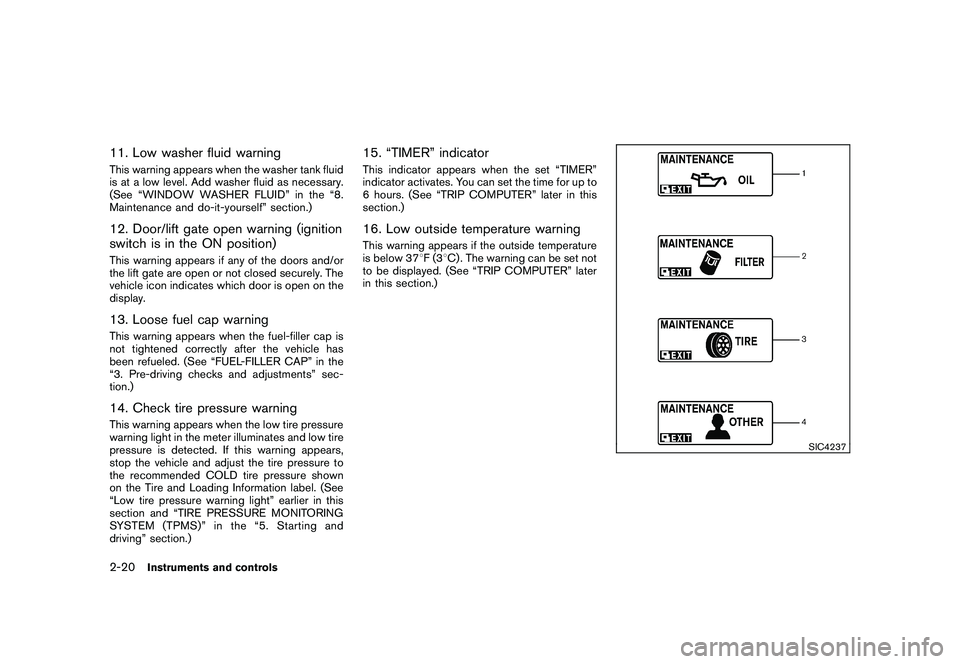
1. Engine oil replacement indicatorThis indicator appears when the set time comes
for changing the engine oil. You can set or reset
the distance for changing the engine oil. (See
“TRIP COMPUTER” later in this section.)2. Oil filter replacement indicatorThis indicator appears when the set time comes
for replacing the oil filter. You can set or reset
the distance for replacing the oil filter. (See
“TRIP COMPUTER” later in this section.)3. Tire replacement indicatorThis indicator appears when the set time comes
for replacing tires. You can set or reset the
distance for replacing tires. (See “TRIP COM-
PUTER” later in this section.)4. “OTHER” indicatorThis indicator appears when the set time comes
for replacing items other than the engine oil, oil
filter and tires. You can set or reset the distance
for replacing the items. (See “TRIP COMPU-
TER” later in this section.)
More maintenance reminders are also available
on the center display. (See “HOW TO USE
INFO BUTTON” in the “4. Center display,
heater, air conditioner, audio, phone and voice
recognition systems” section.)
SIC3580
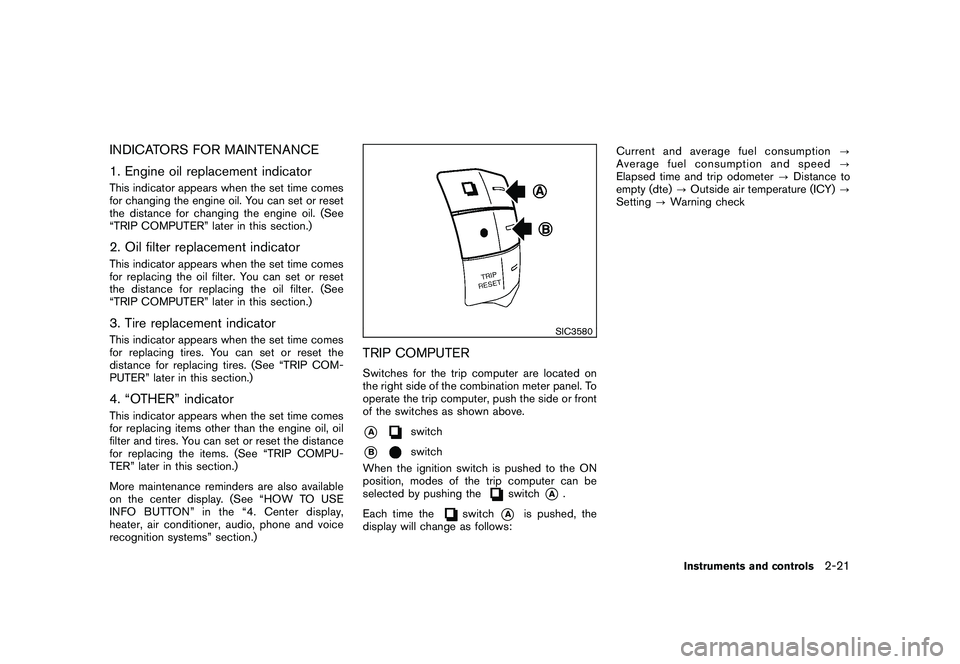
TRIP COMPUTERSwitches for the trip computer are located on
the right side of the combination meter panel. To
operate the trip computer, push the side or front
of the switches as shown above.*A
switch
*B
switch
When the ignition switch is pushed to the ON
position, modes of the trip computer can be
selected by pushing the
switch
*A
.
Each time the
switch
*A
is pushed, the
display will change as follows: Current and average fuel consumption
?
Average fuel consumption and speed ?
Elapsed time and trip odometer ?Distance to
empty (dte) ?Outside air temperature (ICY) ?
Setting ?Warning check
Instruments and controls
2-21
Page 98 of 433
Black plate (96,1)
Model "Z51-D" EDITED: 2010/ 9/ 28
SIC4703
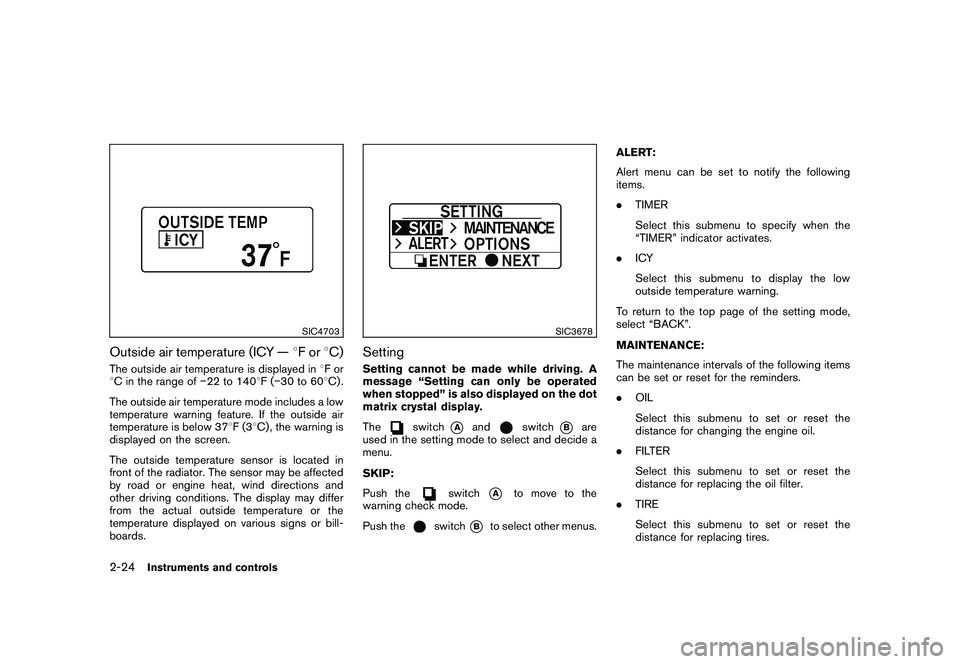
Outside air temperature (ICY —8For 8C)The outside air temperature is displayed in 8For
8 C in the range of 22 to 140 8F( 30 to 60 8C) .
The outside air temperature mode includes a low
temperature warning feature. If the outside air
temperature is below 37 8F(3 8C) , the warning is
displayed on the screen.
The outside temperature sensor is located in
front of the radiator. The sensor may be affected
by road or engine heat, wind directions and
other driving conditions. The display may differ
from the actual outside temperature or the
temperature displayed on various signs or bill-
boards.
SIC3678
SettingSetting cannot be made while driving. A
message “Setting can only be operated
when stopped” is also displayed on the dot
matrix crystal display.
The
switch
*A
and
switch
*B
are
used in the setting mode to select and decide a
menu.
SKIP:
Push the
switch
*A
to move to the
warning check mode.
Push the
switch
*B
to select other menus. ALERT:
Alert menu can be set to notify the following
items.
.
TIMER
Select this submenu to specify when the
“TIMER” indicator activates.
. ICY
Select this submenu to display the low
outside temperature warning.
To return to the top page of the setting mode,
select “BACK”.
MAINTENANCE:
The maintenance intervals of the following items
can be set or reset for the reminders.
. OIL
Select this submenu to set or reset the
distance for changing the engine oil.
. FILTER
Select this submenu to set or reset the
distance for replacing the oil filter.
. TIRE
Select this submenu to set or reset the
distance for replacing tires.
2-24
Instruments and controls
Page 104 of 433
Black plate (102,1)
Model "Z51-D" EDITED: 2010/ 7/ 23
SIC4017
RAIN-SENSING AUTO WIPER SYS-
TEM (if so equipped)The rain-sensing auto wiper system can auto-
matically turn on the wipers and adjust the wiper
speed depending on the rainfall and the vehicle
speed by using the rain sensor located on the
upper part of the windshield.
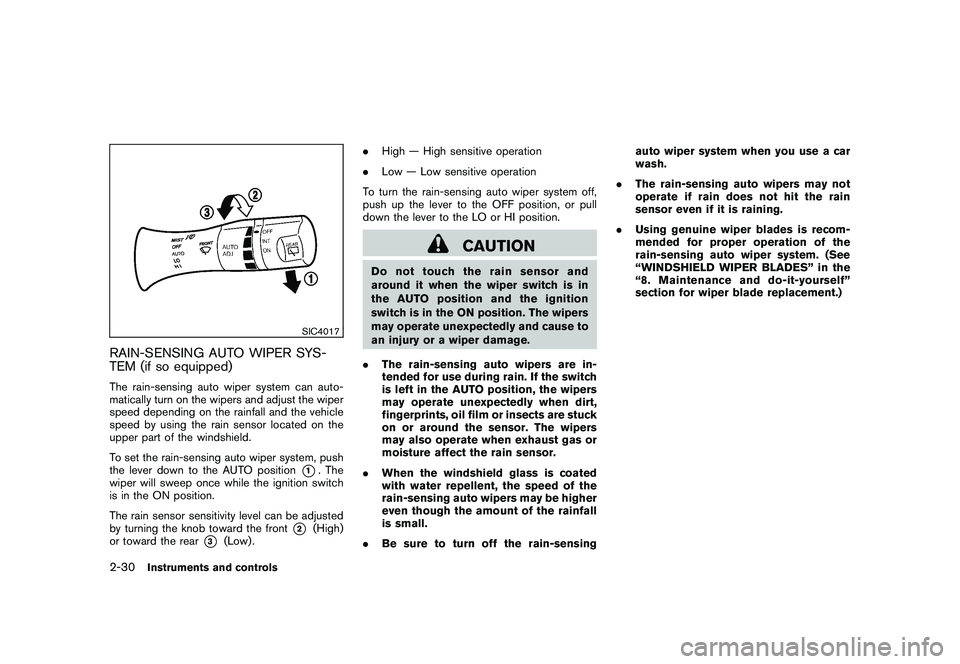
To set the rain-sensing auto wiper system, push
the lever down to the AUTO position
*1. The
wiper will sweep once while the ignition switch
is in the ON position.
The rain sensor sensitivity level can be adjusted
by turning the knob toward the front
*2
(High)
or toward the rear
*3
(Low) . .
High — High sensitive operation
. Low — Low sensitive operation
To turn the rain-sensing auto wiper system off,
push up the lever to the OFF position, or pull
down the lever to the LO or HI position.
CAUTION
Do not touch the rain sensor and
around it when the wiper switch is in
the AUTO position and the ignition
switch is in the ON position. The wipers
may operate unexpectedly and cause to
an injury or a wiper damage.
. The rain-sensing auto wipers are in-
tended for use during rain. If the switch
is left in the AUTO position, the wipers
may operate unexpectedly when dirt,
fingerprints, oil film or insects are stuck
on or around the sensor. The wipers
may also operate when exhaust gas or
moisture affect the rain sensor.
. When the windshield glass is coated
with water repellent, the speed of the
rain-sensing auto wipers may be higher
even though the amount of the rainfall
is small.
. Be sure to turn off the rain-sensing auto wiper system when you use a car
wash.
. The rain-sensing auto wipers may not
operate if rain does not hit the rain
sensor even if it is raining.
. Using genuine wiper blades is recom-
mended for proper operation of the
rain-sensing auto wiper system. (See
“WINDSHIELD WIPER BLADES” in the
“8. Maintenance and do-it-yourself”
section for wiper blade replacement.)
2-30
Instruments and controls
Page 144 of 433
Black plate (142,1)
Model "Z51-D" EDITED: 2010/ 7/ 23
computer.
. When the vehicle is parked near a parking
meter.
In such cases, correct the operating conditions
before using the Intelligent Key function or use
the mechanical key.
Although the life of the battery varies depending
on the operating conditions, the battery’s life is
approximately 2 years. If the battery is dis-
charged, replace it with a new one.
When the Intelligent Key battery is almost
discharged, insert the Intelligent Key into the
Intelligent Key port to start the engine. Replace
the discharged battery with a new one as soon
as possible. For more details, see “PUSH-
BUTTON IGNITION SWITCH” in the “5. Start-
ing and driving” section.
Since the Intelligent Key is continuously receiv-
ing radio waves, if the key is left near equipment
which transmits strong radio waves, such as
signals from a TV and personal computer, the
battery life may become shorter.
For information regarding replacement of a
battery, see “INTELLIGENT KEY BATTERY
REPLACEMENT” in the “8. Maintenance and
do-it-yourself” section.
As many as 4 Intelligent Keys can be registered
and used with one vehicle. For information about the purchase and use of additional Intelligent
Keys, contact a NISSAN dealer.
CAUTION
.
Do not allow the Intelligent Key,
which contains electrical compo-
nents, to come into contact with
water or salt water. This could affect
the system function.
. Do not drop the Intelligent Key.
. Do not strike the Intelligent Key
sharply against another object.
. Do not change or modify the Intel-
ligent Key.
. Wetting may damage the Intelligent
Key. If the Intelligent Key gets wet,
immediately wipe until it is comple-
tely dry.
. If the outside temperature is below
148F( 10 8C) degrees, the battery of
the Intelligent Key may not function
properly.
. Do not place the Intelligent Key for
an extended period in an area where
temperatures exceed 140 8F (60 8C) .
. Do not attach the Intelligent Key
with a key holder that contains a magnet.
. Do not place the Intelligent Key near
equipment that produces a mag-
netic field, such as a TV, audio
equipment, personal computer or
cellular phone.
If an Intelligent Key is lost or stolen, NISSAN
recommends erasing the ID code of that
Intelligent Key from the vehicle. This may prevent
the unauthorized use of the Intelligent Key to
operate the vehicle. For information regarding
the erasing procedure, contact a NISSAN deal-
er.
The Intelligent Key function can be disabled. For
information about disabling the Intelligent Key
function, contact a NISSAN dealer.
3-8
Pre-driving checks and adjustments
Page 175 of 433
Black plate (173,1)
Model "Z51-D" EDITED: 2010/ 7/ 23
SAA2474
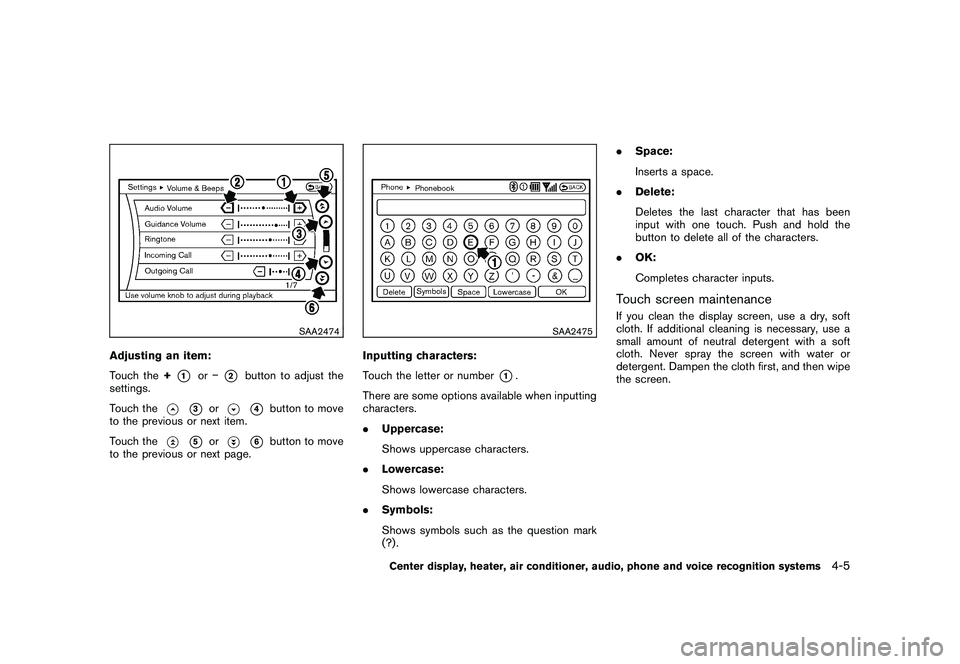
Adjusting an item:
Touch the+
*1
or
*2
button to adjust the
settings.
Touch the
*3
or
*4
button to move
to the previous or next item.
Touch the
*5
or
*6
button to move
to the previous or next page.
SAA2475
Inputting characters:
Touch the letter or number
*1.
There are some options available when inputting
characters.
. Uppercase:
Shows uppercase characters.
. Lowercase:
Shows lowercase characters.
. Symbols:
Shows symbols such as the question mark
(?) . .
Space:
Inserts a space.
. Delete:
Deletes the last character that has been
input with one touch. Push and hold the
button to delete all of the characters.
. OK:
Completes character inputs.
Touch screen maintenanceIf you clean the display screen, use a dry, soft
cloth. If additional cleaning is necessary, use a
small amount of neutral detergent with a soft
cloth. Never spray the screen with water or
detergent. Dampen the cloth first, and then wipe
the screen.
Center display, heater, air conditioner, audio, phone and voice recognition systems
4-5
Page 180 of 433
Black plate (178,1)
Model "Z51-D" EDITED: 2010/ 7/ 23
SAA2481
Models with navigation system
SAA2830
Models without navigation system
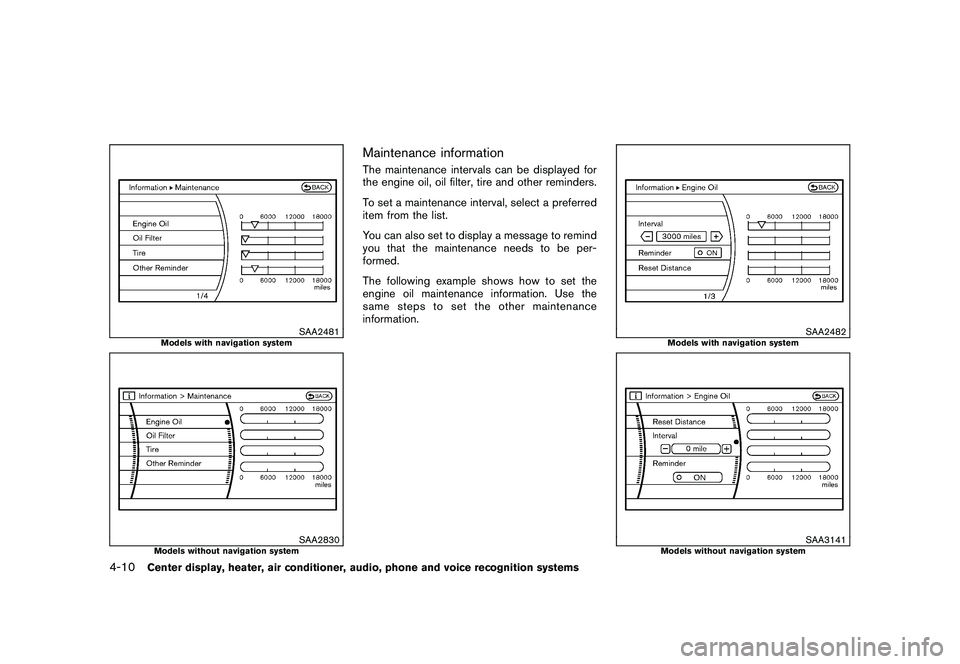
Maintenance informationThe maintenance intervals can be displayed for
the engine oil, oil filter, tire and other reminders.
To set a maintenance interval, select a preferred
item from the list.
You can also set to display a message to remind
you that the maintenance needs to be per-
formed.
The following example shows how to set the
engine oil maintenance information. Use the
same steps to set the other maintenance
information.
SAA2482
Models with navigation system
SAA3141
Models without navigation system
4-10
Center display, heater, air conditioner, audio, phone and voice recognition systems
Page 181 of 433
Black plate (179,1)
Model "Z51-D" EDITED: 2010/ 7/ 23
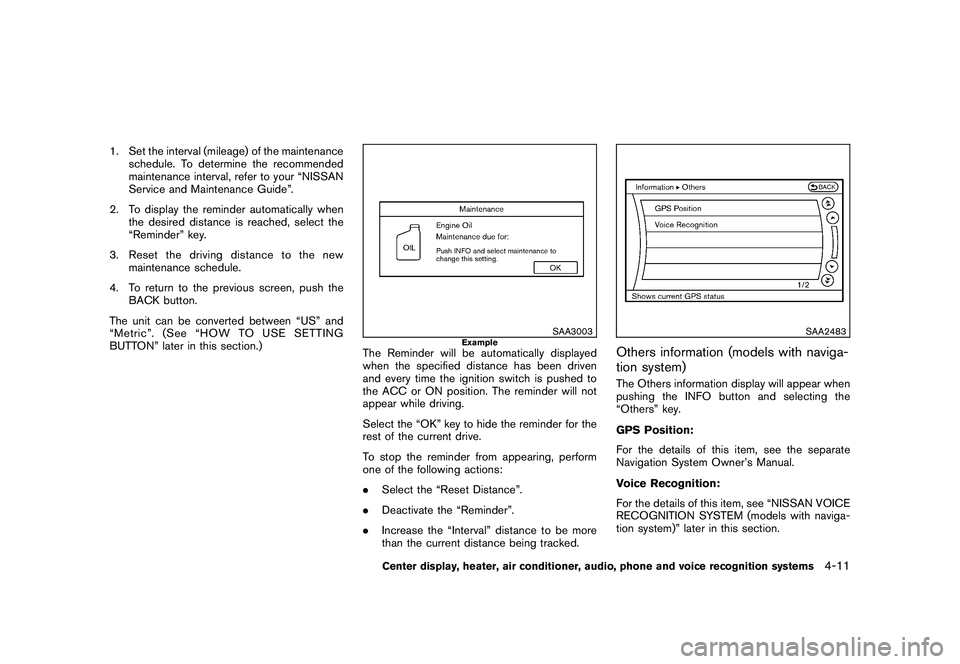
1. Set the interval (mileage) of the maintenanceschedule. To determine the recommended
maintenance interval, refer to your “NISSAN
Service and Maintenance Guide”.
2. To display the reminder automatically when the desired distance is reached, select the
“Reminder” key.
3. Reset the driving distance to the new maintenance schedule.
4. To return to the previous screen, push the BACK button.
The unit can be converted between “US” and
“Metric”. (See “HOW TO USE SETTING
BUTTON” later in this section.)
SAA3003
Example
The Reminder will be automatically displayed
when the specified distance has been driven
and every time the ignition switch is pushed to
the ACC or ON position. The reminder will not
appear while driving.
Select the “OK” key to hide the reminder for the
rest of the current drive.
To stop the reminder from appearing, perform
one of the following actions:
. Select the “Reset Distance”.
. Deactivate the “Reminder”.
. Increase the “Interval” distance to be more
than the current distance being tracked.
SAA2483
Others information (models with naviga-
tion system)The Others information display will appear when
pushing the INFO button and selecting the
“Others” key.
GPS Position:
For the details of this item, see the separate
Navigation System Owner’s Manual.
Voice Recognition:
For the details of this item, see “NISSAN VOICE
RECOGNITION SYSTEM (models with naviga-
tion system)” later in this section.
Center display, heater, air conditioner, audio, phone and voice recognition systems
4-11
Page 202 of 433
Black plate (200,1)
Model "Z51-D" EDITED: 2010/ 7/ 23
TO TURN THE SYSTEM ON/OFFPush the “OFF” or “ON·OFF” button when the
heater and air conditioner is off. The system will
turn on with the settings that were used
immediately before the system was turned off.
SAA1989
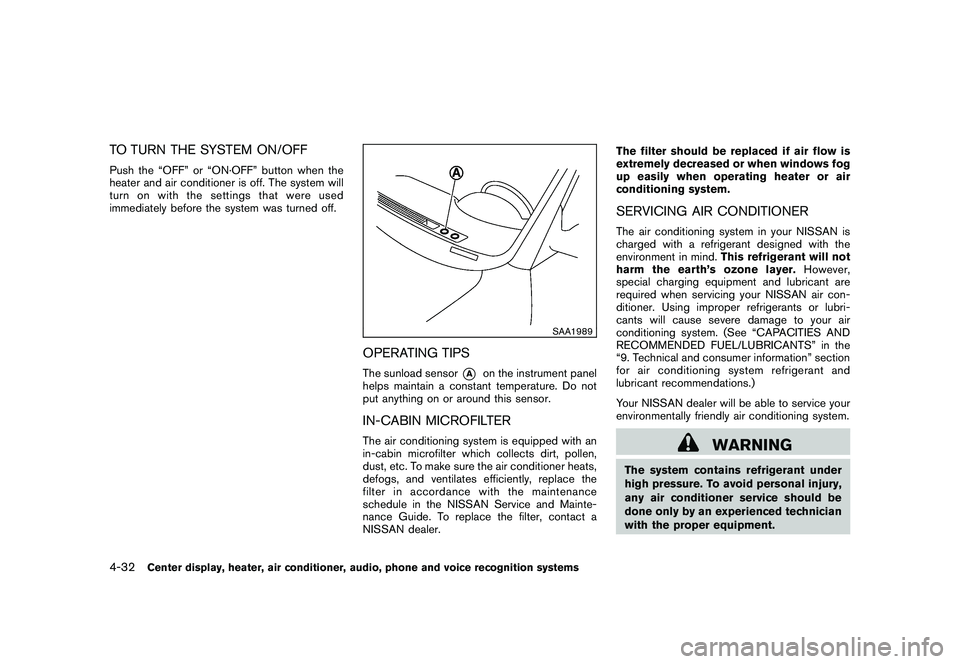
OPERATING TIPSThe sunload sensor
*A
on the instrument panel
helps maintain a constant temperature. Do not
put anything on or around this sensor.
IN-CABIN MICROFILTERThe air conditioning system is equipped with an
in-cabin microfilter which collects dirt, pollen,
dust, etc. To make sure the air conditioner heats,
defogs, and ventilates efficiently, replace the
filter in accordance with the maintenance
schedule in the NISSAN Service and Mainte-
nance Guide. To replace the filter, contact a
NISSAN dealer. The filter should be replaced if air flow is
extremely decreased or when windows fog
up easily when operating heater or air
conditioning system.
SERVICING AIR CONDITIONERThe air conditioning system in your NISSAN is
charged with a refrigerant designed with the
environment in mind.
This refrigerant will not
harm the earth’s ozone layer. However,
special charging equipment and lubricant are
required when servicing your NISSAN air con-
ditioner. Using improper refrigerants or lubri-
cants will cause severe damage to your air
conditioning system. (See “CAPACITIES AND
RECOMMENDED FUEL/LUBRICANTS” in the
“9. Technical and consumer information” section
for air conditioning system refrigerant and
lubricant recommendations.)
Your NISSAN dealer will be able to service your
environmentally friendly air conditioning system.
WARNING
The system contains refrigerant under
high pressure. To avoid personal injury,
any air conditioner service should be
done only by an experienced technician
with the proper equipment.
4-32
Center display, heater, air conditioner, audio, phone and voice recognition systems
Page 245 of 433
Black plate (243,1)
Model "Z51-D" EDITED: 2010/ 7/ 23
SAA2517
Models with navigation system
SAA2438
Models without navigation system
Music Box
®settings
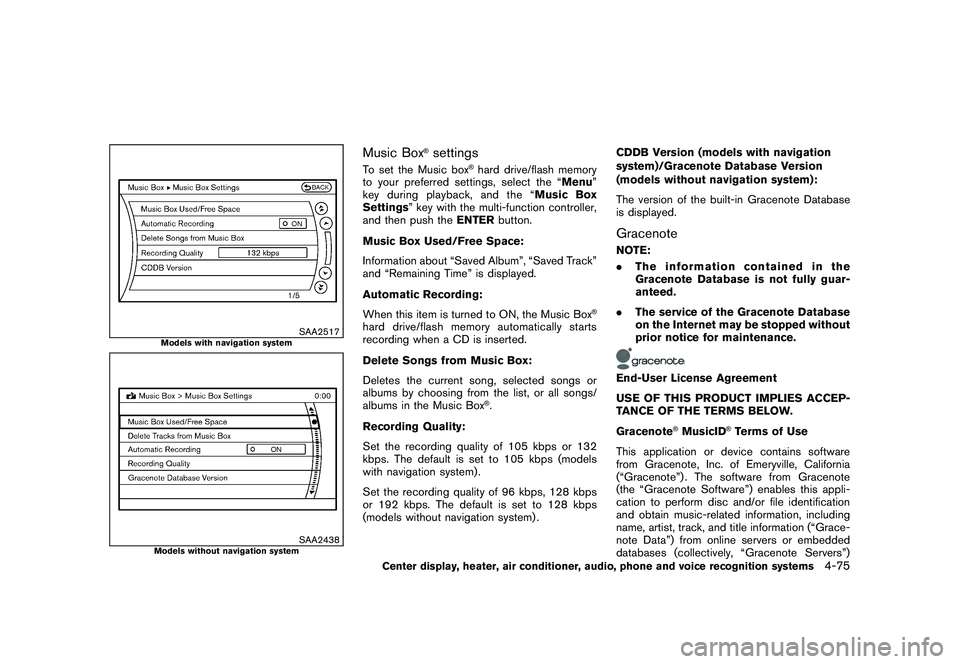
To set the Music box
®hard drive/flash memory
to your preferred settings, select the “Menu ”
key during playback, and the “ Music Box
Settings ” key with the multi-function controller,
and then push the ENTERbutton.
Music Box Used/Free Space:
Information about “Saved Album”, “Saved Track”
and “Remaining Time” is displayed.
Automatic Recording:
When this item is turned to ON, the Music Box
®
hard drive/flash memory automatically starts
recording when a CD is inserted.
Delete Songs from Music Box:
Deletes the current song, selected songs or
albums by choosing from the list, or all songs/
albums in the Music Box
®.
Recording Quality:
Set the recording quality of 105 kbps or 132
kbps. The default is set to 105 kbps (models
with navigation system) .
Set the recording quality of 96 kbps, 128 kbps
or 192 kbps. The default is set to 128 kbps
(models without navigation system) . CDDB Version (models with navigation
system)/Gracenote Database Version
(models without navigation system):
The version of the built-in Gracenote Database
is displayed.
GracenoteNOTE:
.
The information contained in the
Gracenote Database is not fully guar-
anteed.
. The service of the Gracenote Database
on the Internet may be stopped without
prior notice for maintenance.End-User License Agreement
USE OF THIS PRODUCT IMPLIES ACCEP-
TANCE OF THE TERMS BELOW.
Gracenote
®MusicID
®Terms of Use
This application or device contains software
from Gracenote, Inc. of Emeryville, California
(“Gracenote”) . The software from Gracenote
(the “Gracenote Software”) enables this appli-
cation to perform disc and/or file identification
and obtain music-related information, including
name, artist, track, and title information (“Grace-
note Data”) from online servers or embedded
databases (collectively, “Gracenote Servers”)
Center display, heater, air conditioner, audio, phone and voice recognition systems
4-75