remove seats NISSAN MURANO 2011 Owner´s Manual
[x] Cancel search | Manufacturer: NISSAN, Model Year: 2011, Model line: MURANO, Model: NISSAN MURANO 2011Pages: 433, PDF Size: 3.7 MB
Page 53 of 433
Black plate (51,1)
Model "Z51-D" EDITED: 2010/ 7/ 23
turer’s instructions.
The back of the child restraint should be
secured against the vehicle seatback.
If necessary, adjust or remove the head
restraint or headrest to obtain the correct
child restraint fit. If the head restraint or
headrest is removed, store it in a secure
place.Be sure to reinstall the head
restraint or headrest when the child
restraint is removed. See “HEAD RE-
STRAINTS” earlier in this section or “AD-
JUSTABLE HEADREST” earlier in this
section for head restraint or headrest
adjustment, removal and installation informa-
tion.
If the seating position does not have an
adjustable head restraint or headrest and it
is interfering with the proper child restraint
fit, try another seating position or a different
child restraint.
SSS0360B
Forward-facing — step 3
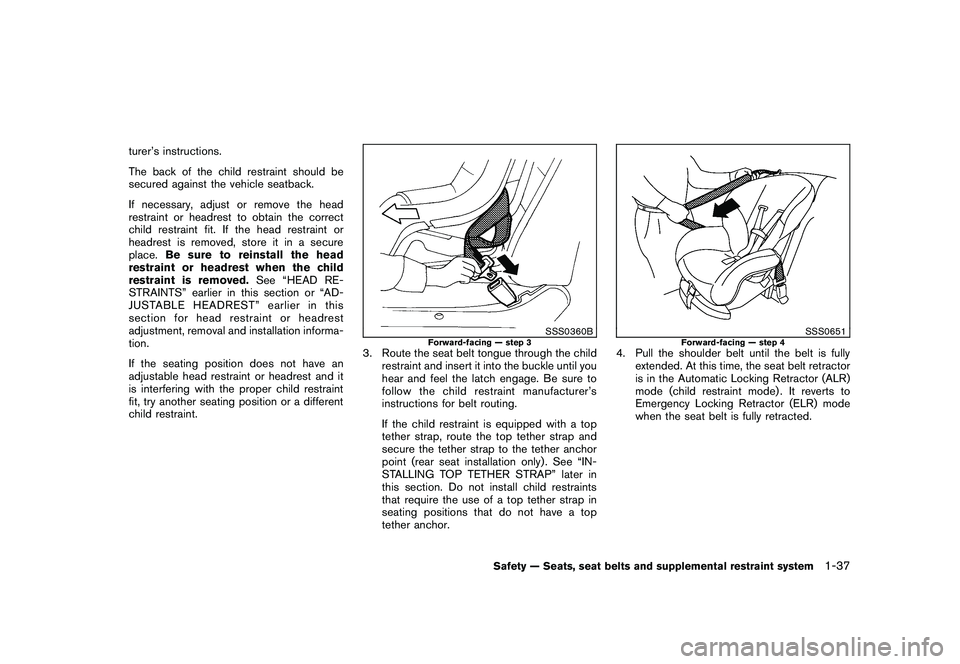
3. Route the seat belt tongue through the child restraint and insert it into the buckle until you
hear and feel the latch engage. Be sure to
follow the child restraint manufacturer’s
instructions for belt routing.
If the child restraint is equipped with a top
tether strap, route the top tether strap and
secure the tether strap to the tether anchor
point (rear seat installation only) . See “IN-
STALLING TOP TETHER STRAP” later in
this section. Do not install child restraints
that require the use of a top tether strap in
seating positions that do not have a top
tether anchor.
SSS0651
Forward-facing — step 4
4. Pull the shoulder belt until the belt is fullyextended. At this time, the seat belt retractor
is in the Automatic Locking Retractor (ALR)
mode (child restraint mode) . It reverts to
Emergency Locking Retractor (ELR) mode
when the seat belt is fully retracted.
Safety — Seats, seat belts and supplemental restraint system
1-37
Page 54 of 433
Black plate (52,1)
Model "Z51-D" EDITED: 2010/ 7/ 23
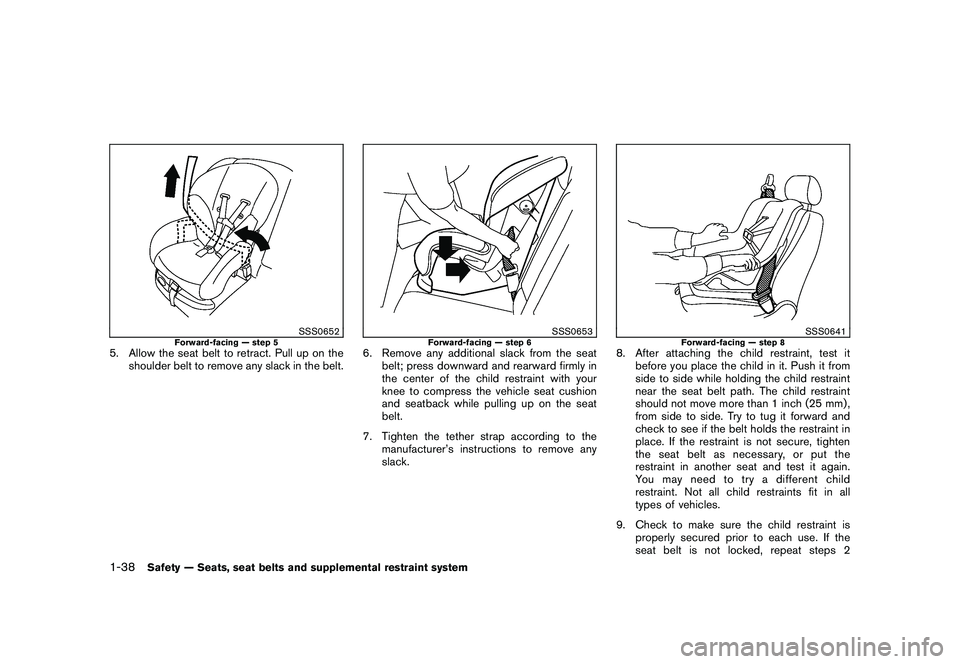
SSS0652
Forward-facing — step 5
5. Allow the seat belt to retract. Pull up on theshoulder belt to remove any slack in the belt.
SSS0653
Forward-facing — step 6
6. Remove any additional slack from the seatbelt; press downward and rearward firmly in
the center of the child restraint with your
knee to compress the vehicle seat cushion
and seatback while pulling up on the seat
belt.
7. Tighten the tether strap according to the manufacturer’s instructions to remove any
slack.
SSS0641
Forward-facing — step 8
8. After attaching the child restraint, test itbefore you place the child in it. Push it from
side to side while holding the child restraint
near the seat belt path. The child restraint
should not move more than 1 inch (25 mm) ,
from side to side. Try to tug it forward and
check to see if the belt holds the restraint in
place. If the restraint is not secure, tighten
the seat belt as necessary, or put the
restraint in another seat and test it again.
You may need to try a different child
restraint. Not all child restraints fit in all
types of vehicles.
9. Check to make sure the child restraint is properly secured prior to each use. If the
seat belt is not locked, repeat steps 2
1-38
Safety — Seats, seat belts and supplemental restraint system
Page 55 of 433
Black plate (53,1)
Model "Z51-D" EDITED: 2010/ 7/ 23
through 8.
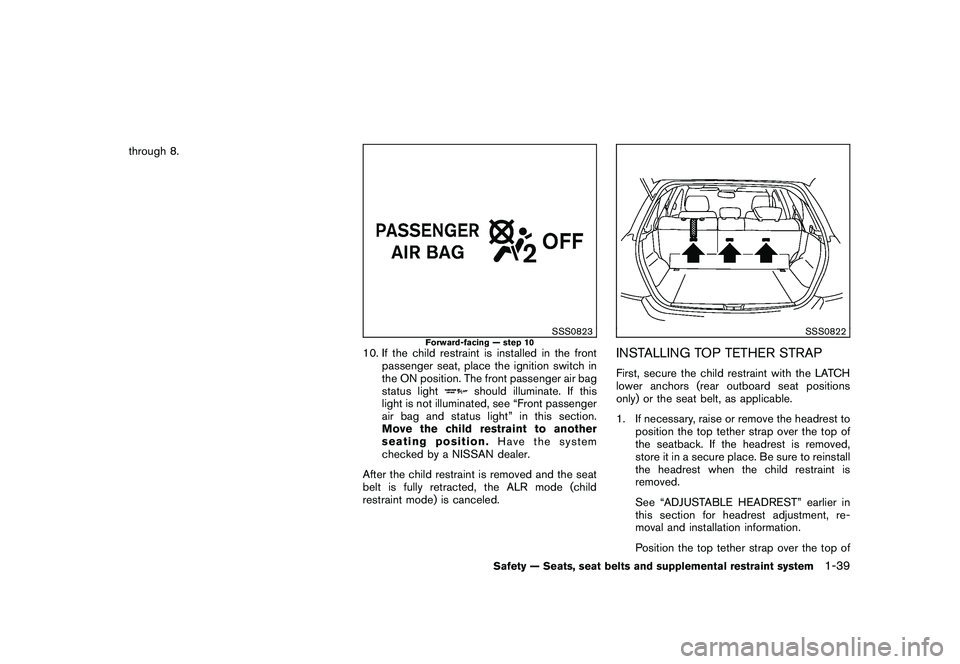
SSS0823
Forward-facing — step 10
10. If the child restraint is installed in the frontpassenger seat, place the ignition switch in
the ON position. The front passenger air bag
status light
should illuminate. If this
light is not illuminated, see “Front passenger
air bag and status light” in this section.
Move the child restraint to another
seating position. Have the system
checked by a NISSAN dealer.
After the child restraint is removed and the seat
belt is fully retracted, the ALR mode (child
restraint mode) is canceled.
SSS0822
INSTALLING TOP TETHER STRAPFirst, secure the child restraint with the LATCH
lower anchors (rear outboard seat positions
only) or the seat belt, as applicable.
1. If necessary, raise or remove the headrest to position the top tether strap over the top of
the seatback. If the headrest is removed,
store it in a secure place. Be sure to reinstall
the headrest when the child restraint is
removed.
See “ADJUSTABLE HEADREST” earlier in
this section for headrest adjustment, re-
moval and installation information.
Position the top tether strap over the top of
Safety — Seats, seat belts and supplemental restraint system
1-39
Page 58 of 433
Black plate (56,1)
Model "Z51-D" EDITED: 2010/ 7/ 23
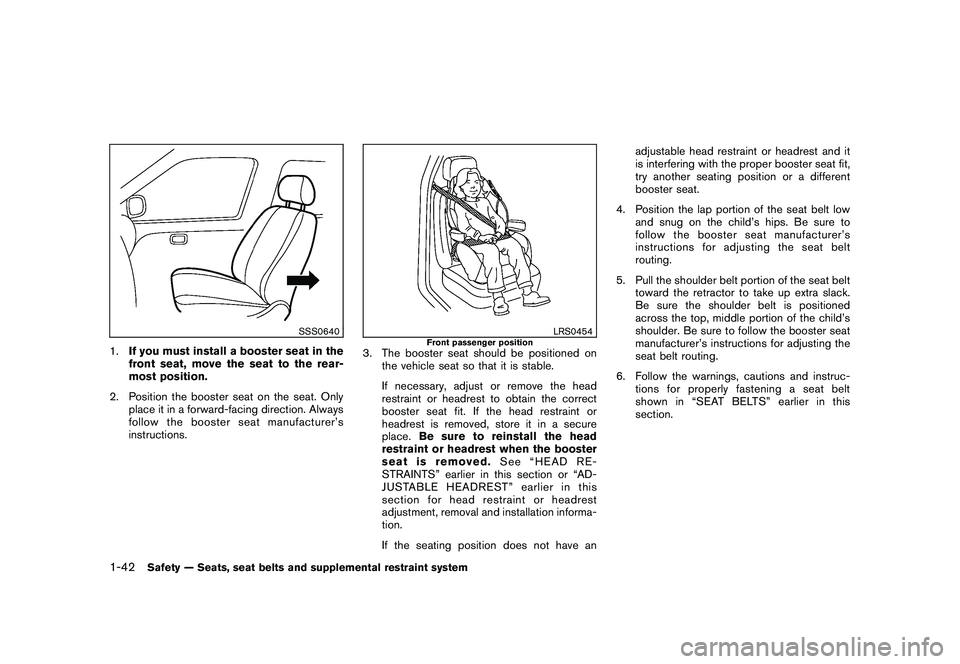
SSS0640
1.If you must install a booster seat in the
front seat, move the seat to the rear-
most position.
2. Position the booster seat on the seat. Only place it in a forward-facing direction. Always
follow the booster seat manufacturer’s
instructions.
LRS0454
Front passenger position
3. The booster seat should be positioned onthe vehicle seat so that it is stable.
If necessary, adjust or remove the head
restraint or headrest to obtain the correct
booster seat fit. If the head restraint or
headrest is removed, store it in a secure
place. Be sure to reinstall the head
restraint or headrest when the booster
seat is removed. See “HEAD RE-
STRAINTS” earlier in this section or “AD-
JUSTABLE HEADREST” earlier in this
section for head restraint or headrest
adjustment, removal and installation informa-
tion.
If the seating position does not have an adjustable head restraint or headrest and it
is interfering with the proper booster seat fit,
try another seating position or a different
booster seat.
4. Position the lap portion of the seat belt low and snug on the child’s hips. Be sure to
follow the booster seat manufacturer’s
instructions for adjusting the seat belt
routing.
5. Pull the shoulder belt portion of the seat belt toward the retractor to take up extra slack.
Be sure the shoulder belt is positioned
across the top, middle portion of the child’s
shoulder. Be sure to follow the booster seat
manufacturer’s instructions for adjusting the
seat belt routing.
6. Follow the warnings, cautions and instruc- tions for properly fastening a seat belt
shownin“SEATBELTS”earlierinthis
section.
1-42
Safety — Seats, seat belts and supplemental restraint system
Page 113 of 433
Black plate (111,1)
Model "Z51-D" EDITED: 2010/ 7/ 23
.Any liquid spilled on the heated seat
should be removed immediately
with a dry cloth.
. When cleaning the seat, never use
gasoline, thinner, or any similar
materials.
. If any malfunctions are found or the
heated seat does not operate, turn
the switch off and have the system
checked by a NISSAN dealer.
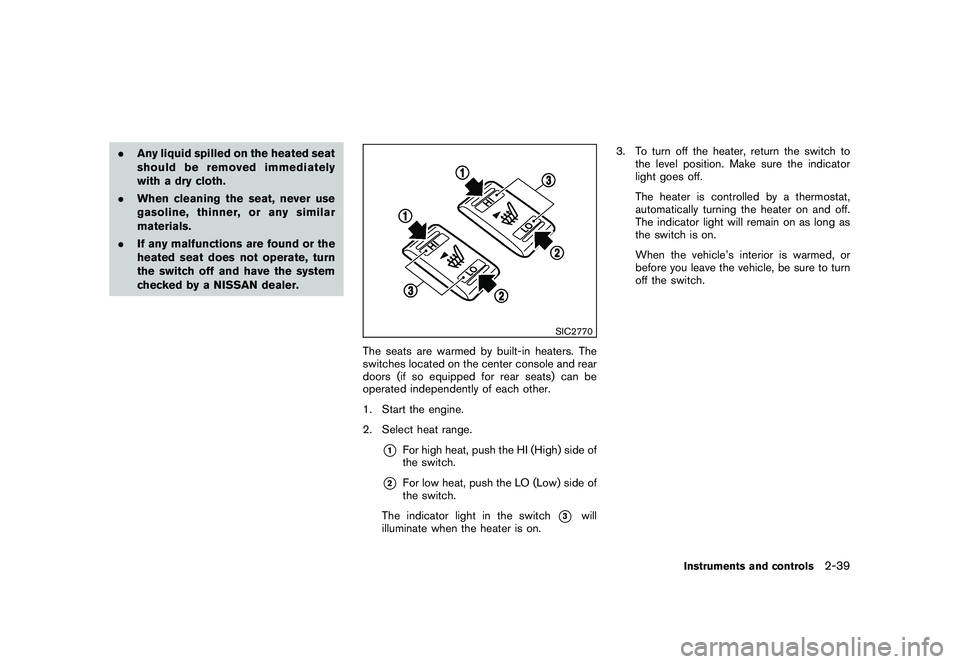
SIC2770
The seats are warmed by built-in heaters. The
switches located on the center console and rear
doors (if so equipped for rear seats) can be
operated independently of each other.
1. Start the engine.
2. Select heat range.
*1
For high heat, push the HI (High) side of
the switch.
*2
For low heat, push the LO (Low) side of
the switch.
The indicator light in the switch
*3
will
illuminate when the heater is on. 3. To turn off the heater, return the switch to
the level position. Make sure the indicator
light goes off.
The heater is controlled by a thermostat,
automatically turning the heater on and off.
The indicator light will remain on as long as
the switch is on.
When the vehicle’s interior is warmed, or
before you leave the vehicle, be sure to turn
off the switch.
Instruments and controls
2-39
Page 315 of 433
Black plate (313,1)
Model "Z51-D" EDITED: 2010/ 7/ 23
so may cause damage to the equip-
ment.
. Make sure the Intelligent Key is in
the correct direction when inserting
it to the key port. The engine may
not start if it is in the incorrect
direction.
. Remove the Intelligent Key from the
key port after the ignition switch is
pushed to the OFF position. .
Make sure the area around the vehicle is
clear.
. Check fluid levels such as engine oil, cool-
ant, brake fluid and window washer fluid as
frequently as possible, or at least whenever
you refuel.
. Check that all windows and lights are clean.
. Visually inspect tires for their appearance
and condition. Also check tires for proper
inflation.
. Lock all doors.
. Position seats and adjust head restraints/
headrests.
. Adjust inside and outside mirrors.
. Fasten seat belts and ask all passengers to
do likewise.
. Check the operation of warning lights when
the ignition switch is pushed to the ON
position. (See “WA RNING/INDICATOR
LIGHTS AND AUDIBLE REMINDERS” in
the “2. Instruments and controls” section.) 1. Apply the parking brake.
2. Move the selector lever to the P (Park) or N
(Neutral) position. (P is recommended.)
The starter is designed not to operate unless
the selector lever is in either of the above
positions.
3. Push the ignition switch to the ON position. Depress the brake pedal and push the
ignition switch to start the engine.
To start the engine immediately, push and
release the ignition switch while depressing
the brake pedal with the ignition switch in
any position.
.If the engine is very hard to start in
extremely cold weather or when restart-
ing, depress the accelerator pedal a little
(approximately 1/3 to the floor) and
while holding, crank the engine. Release
the accelerator pedal when the engine
starts.
. If the engine is very hard to start
because it is flooded, depress the
accelerator pedal all the way to the floor
and hold it. Push the ignition switch to
the ON position to start cranking the
engine. After 5 or 6 seconds, stop
cranking by pushing the ignition switch
to OFF. After cranking the engine,
release the accelerator pedal. Crank
BEFORE STARTING THE ENGINE STARTING THE ENGINE
Starting and driving
5-13
Page 354 of 433
Black plate (354,1)
Model "Z51-D" EDITED: 2010/ 7/ 23
Occasionally remove loose dust from the interior
trim, plastic parts and seats using a vacuum
cleaner or soft bristled brush. Wipe the vinyl and
leather surfaces with a clean, soft cloth dam-
pened in mild soap solution, then wipe clean
with a dry soft cloth.
Regular care and cleaning is required in order to
maintain the appearance of the leather.
Before using any fabric protector, read the
manufacturer’s recommendations. Some fabric
protectors contain chemicals that may stain or
bleach the seat material.
Use a cloth dampened only with water, to clean
the meter and gauge lens.
WARNING
Do not use water or acidic cleaners (hot
steam cleaners) on the seat. This can
damage the seat or occupant classifica-
tion sensor. This can also affect the
operation of the air bag system and
result in serious personal injury.
CAUTION
.Never use benzine, thinner, or any
similar material.
. Small dirt particles can be abrasive and damaging to the leather sur-
faces and should be removed
promptly. Do not use saddle soap,
car waxes, polishes, oils, cleaning
fluids, solvents, detergents or am-
monia-based cleaners as they may
damage the leather’s natural finish.
. Only use fabric protectors approved
by NISSAN.
. Do not use glass or plastic cleaner
on meter or gauge lens covers. It
may damage the lens cover.
AIR FRESHENERSMost air fresheners use a solvent that could
affect the vehicle interior. If you use an air
freshener, take the following precautions:
.Hanging-type air fresheners can cause
permanent discoloration when they contact
vehicle interior surfaces. Place the air
freshener in a location that allows it to hang
free and not contact an interior surface.
. Liquid-type air fresheners typically clip on
the ventilators. These products can cause
immediate damage and discoloration when
spilled on interior surfaces.
Carefully read and follow the manufacturer’s
instructions before using air fresheners.
FLOOR MATS
WARNING
To avoid potential pedal interference
that may result in a collision or injury:
. NEVER place a floor mat on top of
another floor mat in the driver front
position.
. Use only genuine NISSAN floor
mats specifically designed for use
in your vehicle model. See your
NISSAN dealer for more informa-
tion.
. Properly position the mats in the
floorwell using the floor mat posi-
tioning aid. See “Floor mat posi-
tioning aid” later in this section.
The use of genuine NISSAN floor mats can
extend the life of your vehicle carpet and make it
easier to clean the interior. Mats should be
maintained with regular cleaning and replaced if
they become excessively worn.
CLEANING INTERIOR7-4
Appearance and care
Page 355 of 433
Black plate (355,1)
Model "Z51-D" EDITED: 2010/ 7/ 23
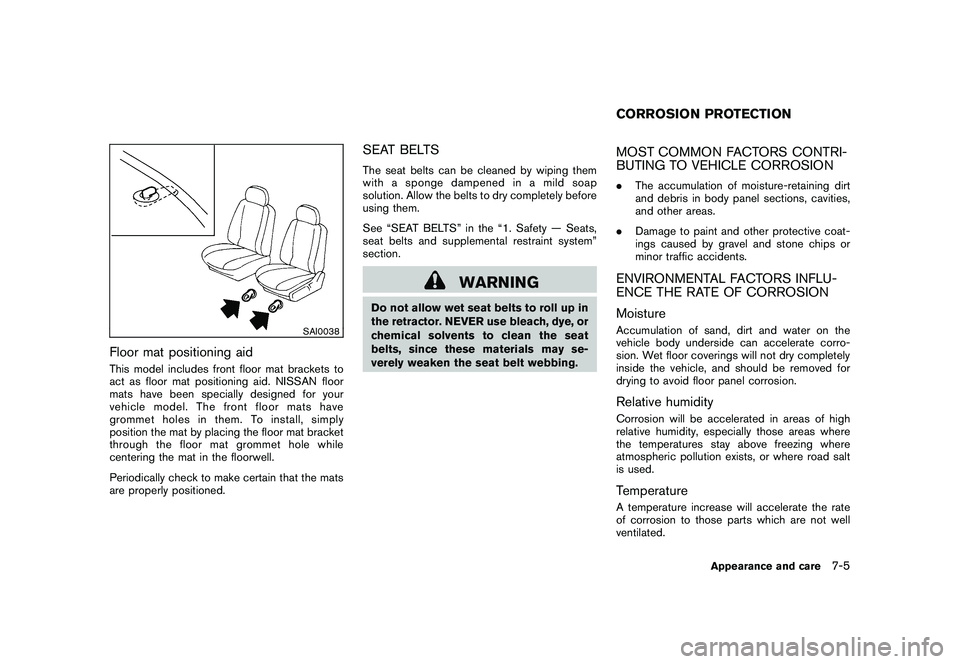
SAI0038
Floor mat positioning aidThis model includes front floor mat brackets to
act as floor mat positioning aid. NISSAN floor
mats have been specially designed for your
vehicle model. The front floor mats have
grommet holes in them. To install, simply
position the mat by placing the floor mat bracket
through the floor mat grommet hole while
centering the mat in the floorwell.
Periodically check to make certain that the mats
are properly positioned.
SEAT BELTSThe seat belts can be cleaned by wiping them
with a sponge dampened in a mild soap
solution. Allow the belts to dry completely before
using them.
See “SEAT BELTS” in the “1. Safety — Seats,
seat belts and supplemental restraint system”
section.
WARNING
Do not allow wet seat belts to roll up in
the retractor. NEVER use bleach, dye, or
chemical solvents to clean the seat
belts, since these materials may se-
verely weaken the seat belt webbing.
MOST COMMON FACTORS CONTRI-
BUTING TO VEHICLE CORROSION.The accumulation of moisture-retaining dirt
and debris in body panel sections, cavities,
and other areas.
. Damage to paint and other protective coat-
ings caused by gravel and stone chips or
minor traffic accidents.ENVIRONMENTAL FACTORS INFLU-
ENCE THE RATE OF CORROSION
MoistureAccumulation of sand, dirt and water on the
vehicle body underside can accelerate corro-
sion. Wet floor coverings will not dry completely
inside the vehicle, and should be removed for
drying to avoid floor panel corrosion.Relative humidityCorrosion will be accelerated in areas of high
relative humidity, especially those areas where
the temperatures stay above freezing where
atmospheric pollution exists, or where road salt
is used.TemperatureA temperature increase will accelerate the rate
of corrosion to those parts which are not well
ventilated.CORROSION PROTECTION
Appearance and care
7-5