navigation system NISSAN MURANO 2011 Owner´s Manual
[x] Cancel search | Manufacturer: NISSAN, Model Year: 2011, Model line: MURANO, Model: NISSAN MURANO 2011Pages: 433, PDF Size: 3.7 MB
Page 262 of 433
Black plate (260,1)
Model "Z51-D" EDITED: 2010/ 7/ 23
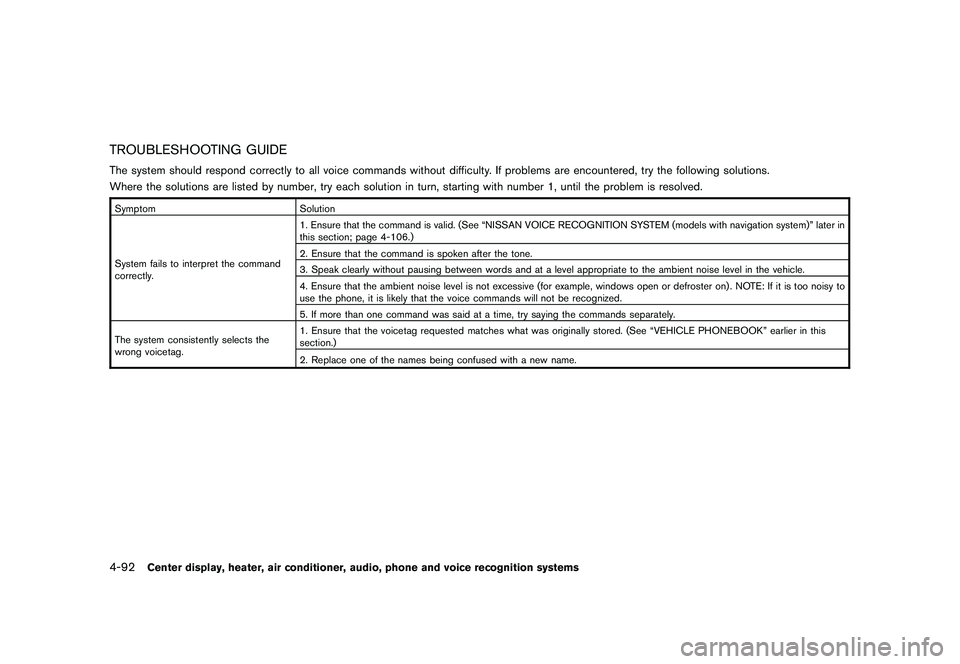
TROUBLESHOOTING GUIDEThe system should respond correctly to all voice commands without difficulty. If problems are encountered, try the following solutions.
Where the solutions are listed by number, try each solution in turn, starting with number 1, until the problem is resolved.SymptomSolution
System fails to interpret the command
correctly. 1. Ensure that the command is valid. (See “NISSAN VOICE RECOGNITION SYSTEM (models with navigation system)” later in
this section; page 4-106.)
2. Ensure that the command is spoken after the tone.
3. Speak clearly without pausing between words and at a level appropriate to the ambient noise level in the vehicle.
4. Ensure that the ambient noise level is not excessive (for example, windows open or defroster on) . NOTE: If it is too noisy to
use the phone, it is likely that the voice commands will not be recognized.
5. If more than one command was said at a time, try saying the commands separately.
The system consistently selects the
wrong voicetag. 1. Ensure that the voicetag requested matches what was originally stored. (See “VEHICLE PHONEBOOK” earlier in this
section.)
2. Replace one of the names being confused with a new name.4-92
Center display, heater, air conditioner, audio, phone and voice recognition systems
Page 263 of 433
Black plate (261,1)
Model "Z51-D" EDITED: 2010/ 7/ 23
WARNING
.Use a phone after stopping your
vehicle in a safe location. If you
have to use a phone while driving,
exercise extreme caution at all
times so full attention may be given
to vehicle operation.
. If you find yourself unable to devote
full attention to vehicle operation
while talking on the phone, pull off
the road to a safe location and stop
your vehicle before doing so.
CAUTION
To avoid draining the vehicle battery,
use a phone after starting the engine.
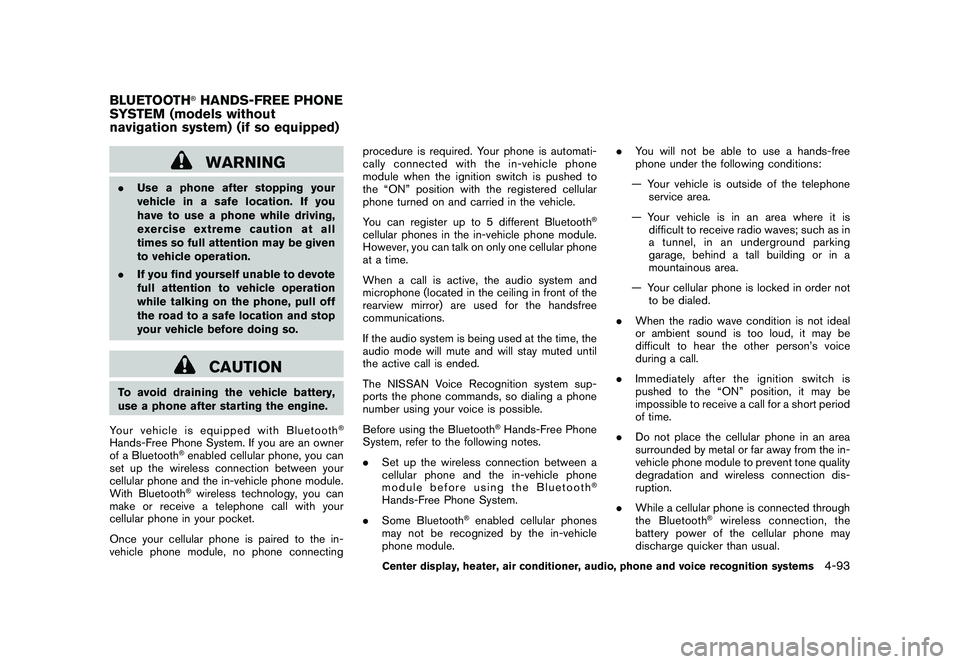
Your vehicle is equipped with Bluetooth
®
Hands-Free Phone System. If you are an owner
of a Bluetooth
®enabled cellular phone, you can
set up the wireless connection between your
cellular phone and the in-vehicle phone module.
With Bluetooth®wireless technology, you can
make or receive a telephone call with your
cellular phone in your pocket.
Once your cellular phone is paired to the in-
vehicle phone module, no phone connecting procedure is required. Your phone is automati-
cally connected with the in-vehicle phone
module when the ignition switch is pushed to
the “ON” position with the registered cellular
phone turned on and carried in the vehicle.
You can register up to 5 different Bluetooth
®
cellular phones in the in-vehicle phone module.
However, you can talk on only one cellular phone
at a time.
When a call is active, the audio system and
microphone (located in the ceiling in front of the
rearview mirror) are used for the handsfree
communications.
If the audio system is being used at the time, the
audio mode will mute and will stay muted until
the active call is ended.
The NISSAN Voice Recognition system sup-
ports the phone commands, so dialing a phone
number using your voice is possible.
Before using the Bluetooth
®Hands-Free Phone
System, refer to the following notes.
. Set up the wireless connection between a
cellular phone and the in-vehicle phone
module before using the Bluetooth
®
Hands-Free Phone System.
. Some Bluetooth
®enabled cellular phones
may not be recognized by the in-vehicle
phone module. .
You will not be able to use a hands-free
phone under the following conditions:
— Your vehicle is outside of the telephone service area.
— Your vehicle is in an area where it is difficult to receive radio waves; such as in
a tunnel, in an underground parking
garage, behind a tall building or in a
mountainous area.
— Your cellular phone is locked in order not to be dialed.
. When the radio wave condition is not ideal
or ambient sound is too loud, it may be
difficult to hear the other person’s voice
during a call.
. Immediately after the ignition switch is
pushed to the “ON” position, it may be
impossible to receive a call for a short period
of time.
. Do not place the cellular phone in an area
surrounded by metal or far away from the in-
vehicle phone module to prevent tone quality
degradation and wireless connection dis-
ruption.
. While a cellular phone is connected through
the Bluetooth
®wireless connection, the
battery power of the cellular phone may
discharge quicker than usual.
BLUETOOTH
®HANDS-FREE PHONE
SYSTEM (models without
navigation system) (if so equipped)
Center display, heater, air conditioner, audio, phone and voice recognition systems
4-93
Page 276 of 433
Black plate (274,1)
Model "Z51-D" EDITED: 2010/ 7/ 23
.The vehicle is driven during voice adaptation
mode.
. The ignition switch is placed in the OFF or
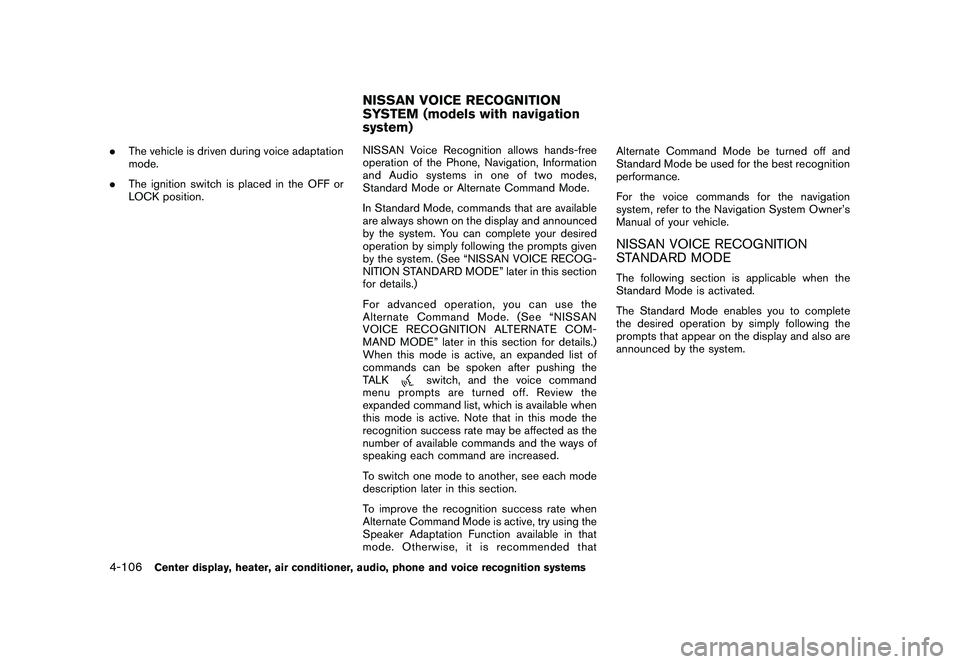
LOCK position. NISSAN Voice Recognition allows hands-free
operation of the Phone, Navigation, Information
and Audio systems in one of two modes,
Standard Mode or Alternate Command Mode.
In Standard Mode, commands that are available
are always shown on the display and announced
by the system. You can complete your desired
operation by simply following the prompts given
by the system. (See “NISSAN VOICE RECOG-
NITION STANDARD MODE” later in this section
for details.)
For advanced operation, you can use the
Alternate Command Mode. (See “NISSAN
VOICE RECOGNITION ALTERNATE COM-
MAND MODE” later in this section for details.)
When this mode is active, an expanded list of
commands can be spoken after pushing the
TALK
switch, and the voice command
menu prompts are turned off. Review the
expanded command list, which is available when
this mode is active. Note that in this mode the
recognition success rate may be affected as the
number of available commands and the ways of
speaking each command are increased.
To switch one mode to another, see each mode
description later in this section.
To improve the recognition success rate when
Alternate Command Mode is active, try using the
Speaker Adaptation Function available in that
mode. Otherwise, it is recommended that Alternate Command Mode be turned off and
Standard Mode be used for the best recognition
performance.
For the voice commands for the navigation
system, refer to the Navigation System Owner’s
Manual of your vehicle.
NISSAN VOICE RECOGNITION
STANDARD MODEThe following section is applicable when the
Standard Mode is activated.
The Standard Mode enables you to complete
the desired operation by simply following the
prompts that appear on the display and also are
announced by the system.
NISSAN VOICE RECOGNITION
SYSTEM (models with navigation
system)
4-106
Center display, heater, air conditioner, audio, phone and voice recognition systems
Page 280 of 433
Black plate (278,1)
Model "Z51-D" EDITED: 2010/ 7/ 23
SAA2535
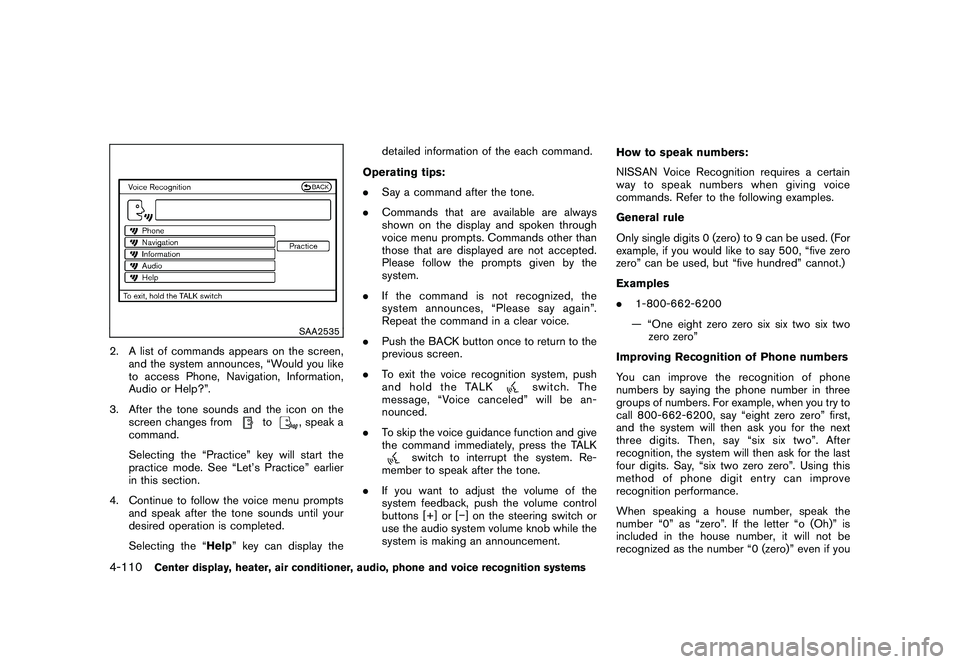
2. A list of commands appears on the screen,and the system announces, “Would you like
to access Phone, Navigation, Information,
Audio or Help?”.
3. After the tone sounds and the icon on the screen changes from
to
, speak a
command.
Selecting the “Practice” key will start the
practice mode. See “Let’s Practice” earlier
in this section.
4. Continue to follow the voice menu prompts and speak after the tone sounds until your
desired operation is completed.
Selecting the “Help ” key can display the detailed information of the each command.
Operating tips:
. Say a command after the tone.
. Commands that are available are always
shown on the display and spoken through
voice menu prompts. Commands other than
those that are displayed are not accepted.
Please follow the prompts given by the
system.
. If the command is not recognized, the
system announces, “Please say again”.
Repeat the command in a clear voice.
. Push the BACK button once to return to the
previous screen.
. To exit the voice recognition system, push
and hold the TALK
switch. The
message, “Voice canceled” will be an-
nounced.
. To skip the voice guidance function and give
the command immediately, press the TALK
switch to interrupt the system. Re-
member to speak after the tone.
. If you want to adjust the volume of the
system feedback, push the volume control
buttons [+] or [ ] on the steering switch or
use the audio system volume knob while the
system is making an announcement. How to speak numbers:
NISSAN Voice Recognition requires a certain
way to speak numbers when giving voice
commands. Refer to the following examples.
General rule
Only single digits 0 (zero) to 9 can be used. (For
example, if you would like to say 500, “five zero
zero” can be used, but “five hundred” cannot.)
Examples
.
1-800-662-6200
— “One eight zero zero six six two six two zero zero”
Improving Recognition of Phone numbers
You can improve the recognition of phone
numbers by saying the phone number in three
groups of numbers. For example, when you try to
call 800-662-6200, say “eight zero zero” first,
and the system will then ask you for the next
three digits. Then, say “six six two”. After
recognition, the system will then ask for the last
four digits. Say, “six two zero zero”. Using this
method of phone digit entry can improve
recognition performance.
When speaking a house number, speak the
number “0” as “zero”. If the letter “o (Oh)” is
included in the house number, it will not be
recognized as the number “0 (zero)” even if you
4-110
Center display, heater, air conditioner, audio, phone and voice recognition systems
Page 282 of 433
Black plate (280,1)
Model "Z51-D" EDITED: 2010/ 7/ 23
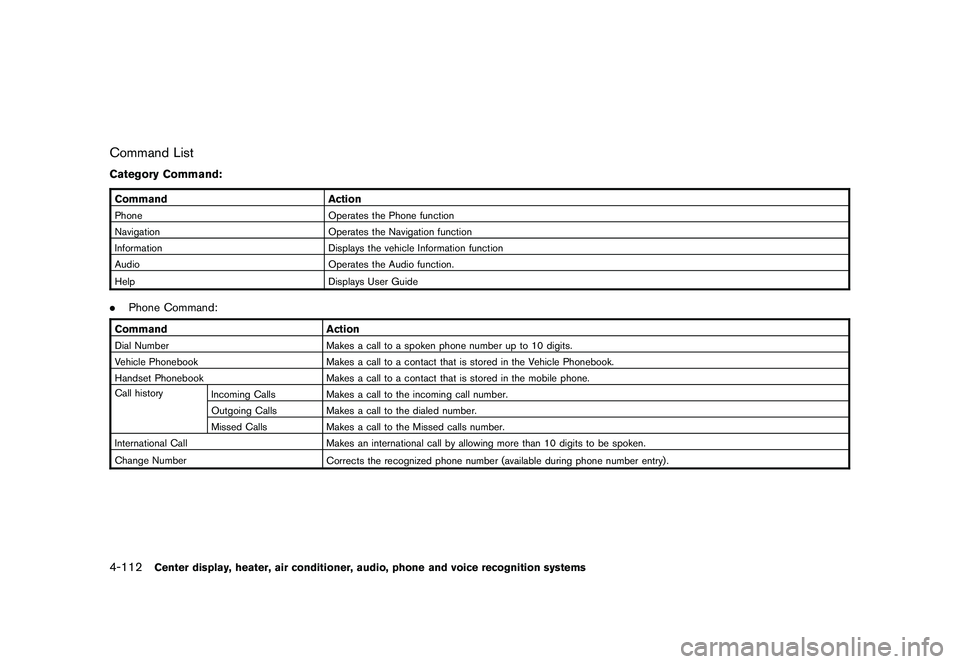
Command ListCategory Command:CommandActionPhone Operates the Phone function
Navigation Operates the Navigation function
Information Displays the vehicle Information function
Audio Operates the Audio function.
Help Displays User Guide.Phone Command:Command ActionDial Number Makes a call to a spoken phone number up to 10 digits.
Vehicle Phonebook Makes a call to a contact that is stored in the Vehicle Phonebook.
Handset Phonebook Makes a call to a contact that is stored in the mobile phone.
Call history Incoming Calls Makes a call to the incoming call number.
Outgoing Calls Makes a call to the dialed number.
Missed Calls Makes a call to the Missed calls number.
International Call Makes an international call by allowing more than 10 digits to be spoken.
Change Number Corrects the recognized phone number (available during phone number entry) .4-112
Center display, heater, air conditioner, audio, phone and voice recognition systems
Page 283 of 433
Black plate (281,1)
Model "Z51-D" EDITED: 2010/ 7/ 23
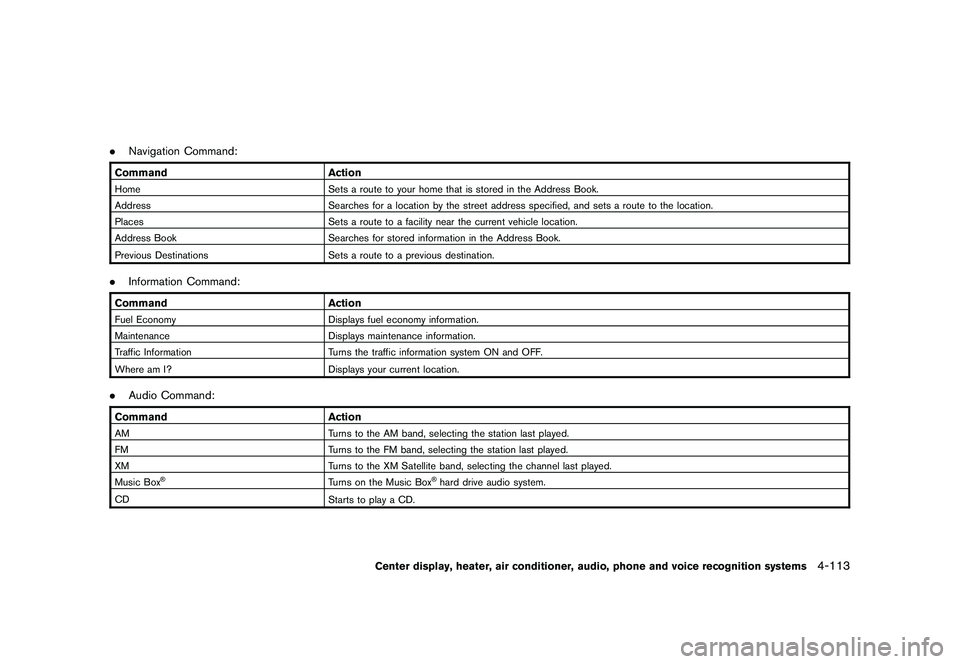
.Navigation Command:Command ActionHome Sets a route to your home that is stored in the Address Book.
Address Searches for a location by the street address specified, and sets a route to the location.
Places Sets a route to a facility near the current vehicle location.
Address Book Searches for stored information in the Address Book.
Previous Destinations Sets a route to a previous destination..Information Command:Command ActionFuel Economy Displays fuel economy information.
Maintenance Displays maintenance information.
Traffic Information Turns the traffic information system ON and OFF.
Where am I? Displays your current location..Audio Command:Command ActionAM Turns to the AM band, selecting the station last played.
FM Turns to the FM band, selecting the station last played.
XM Turns to the XM Satellite band, selecting the channel last played.
Music Box
®
Turns on the Music Box
®hard drive audio system.
CD Starts to play a CD.
Center display, heater, air conditioner, audio, phone and voice recognition systems
4-113
Page 285 of 433
Black plate (283,1)
Model "Z51-D" EDITED: 2010/ 7/ 23
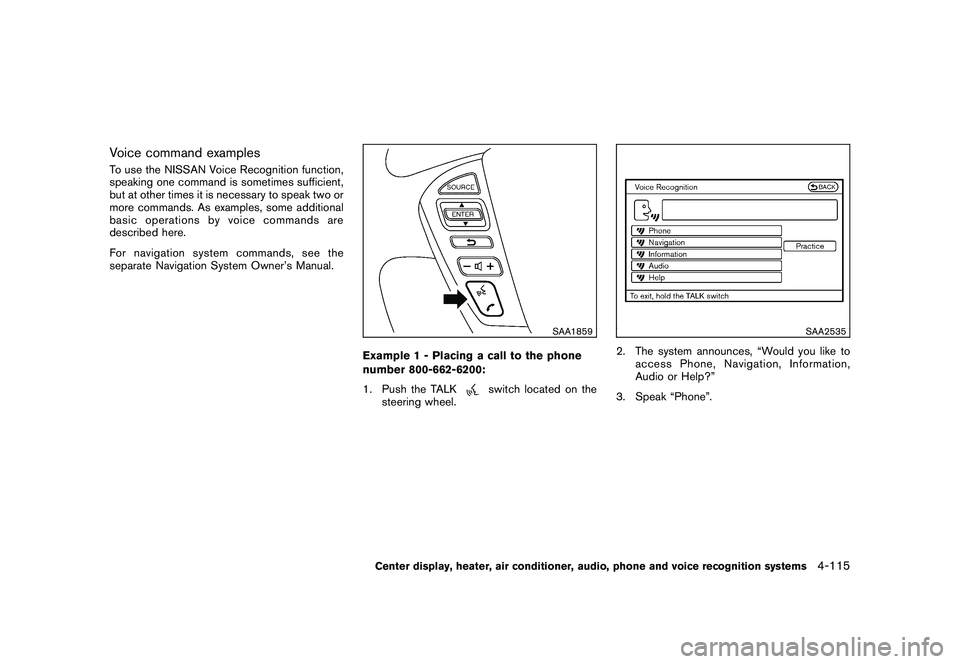
Voice command examplesTo use the NISSAN Voice Recognition function,
speaking one command is sometimes sufficient,
but at other times it is necessary to speak two or
more commands. As examples, some additional
basic operations by voice commands are
described here.
For navigation system commands, see the
separate Navigation System Owner’s Manual.
SAA1859
Example 1 - Placing a call to the phone
number 800-662-6200:
1. Push the TALK
switch located on the
steering wheel.
SAA2535
2. The system announces, “Would you like to access Phone, Navigation, Information,
Audio or Help?”
3. Speak “Phone”.
Center display, heater, air conditioner, audio, phone and voice recognition systems
4-115
Page 288 of 433
Black plate (286,1)
Model "Z51-D" EDITED: 2010/ 7/ 23
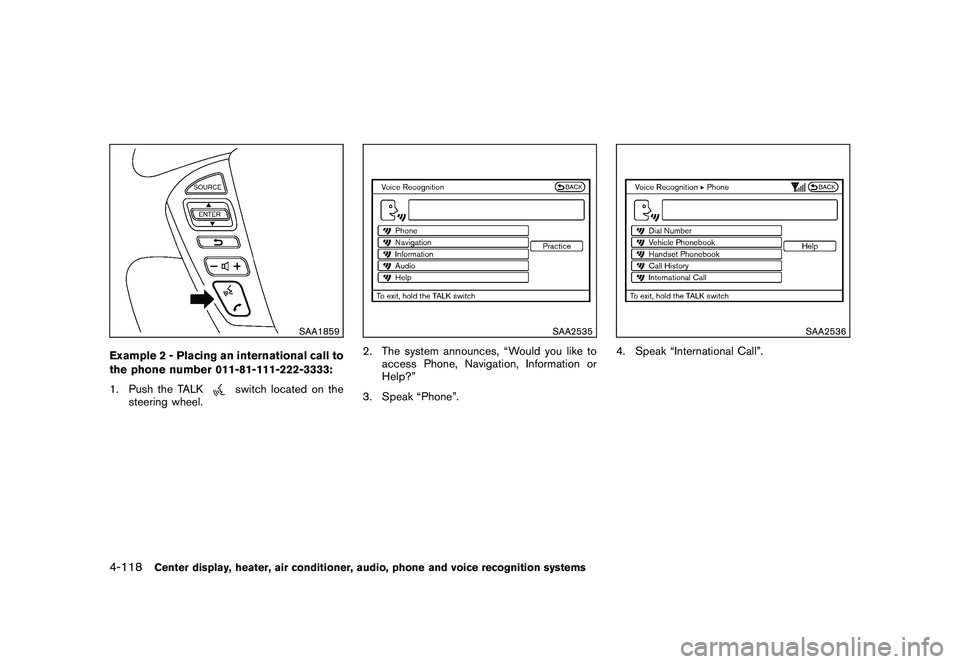
SAA1859
Example 2 - Placing an international call to
the phone number 011-81-111-222-3333:
1. Push the TALK
switch located on the
steering wheel.
SAA2535
2. The system announces, “Would you like to access Phone, Navigation, Information or
Help?”
3. Speak “Phone”.
SAA2536
4. Speak “International Call”.
4-118
Center display, heater, air conditioner, audio, phone and voice recognition systems
Page 292 of 433
Black plate (290,1)
Model "Z51-D" EDITED: 2010/ 7/ 23
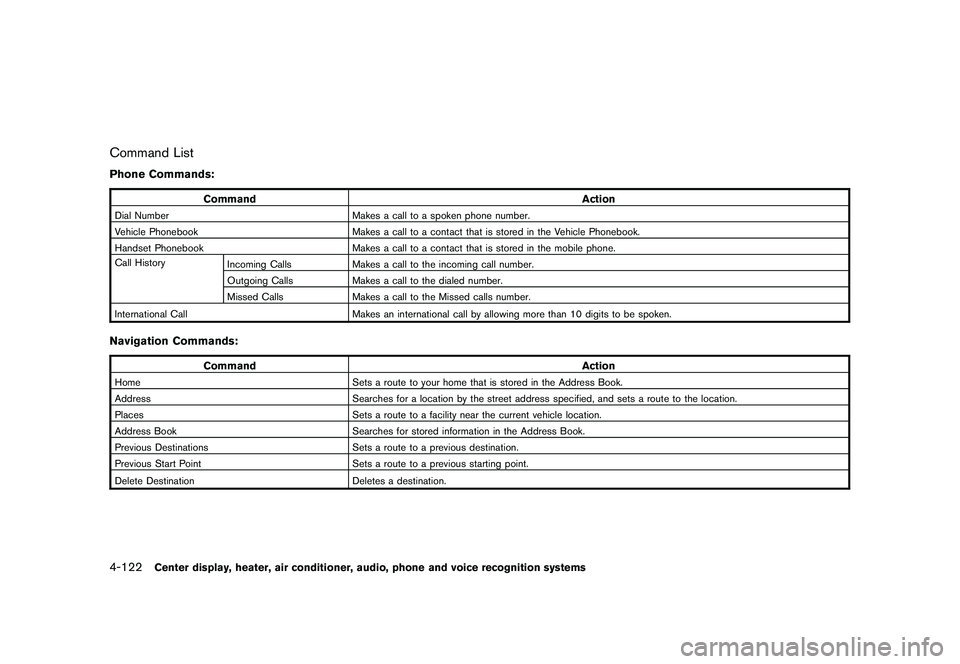
Command ListPhone Commands:
CommandAction
Dial NumberMakes a call to a spoken phone number.
Vehicle Phonebook Makes a call to a contact that is stored in the Vehicle Phonebook.
Handset Phonebook Makes a call to a contact that is stored in the mobile phone.
Call History Incoming Calls Makes a call to the incoming call number.
Outgoing Calls Makes a call to the dialed number.
Missed Calls Makes a call to the Missed calls number.
International Call Makes an international call by allowing more than 10 digits to be spoken.Navigation Commands:
Command Action
HomeSets a route to your home that is stored in the Address Book.
Address Searches for a location by the street address specified, and sets a route to the location.
Places Sets a route to a facility near the current vehicle location.
Address Book Searches for stored information in the Address Book.
Previous Destinations Sets a route to a previous destination.
Previous Start Point Sets a route to a previous starting point.
Delete Destination Deletes a destination.4-122
Center display, heater, air conditioner, audio, phone and voice recognition systems
Page 294 of 433
Black plate (292,1)
Model "Z51-D" EDITED: 2010/ 7/ 23
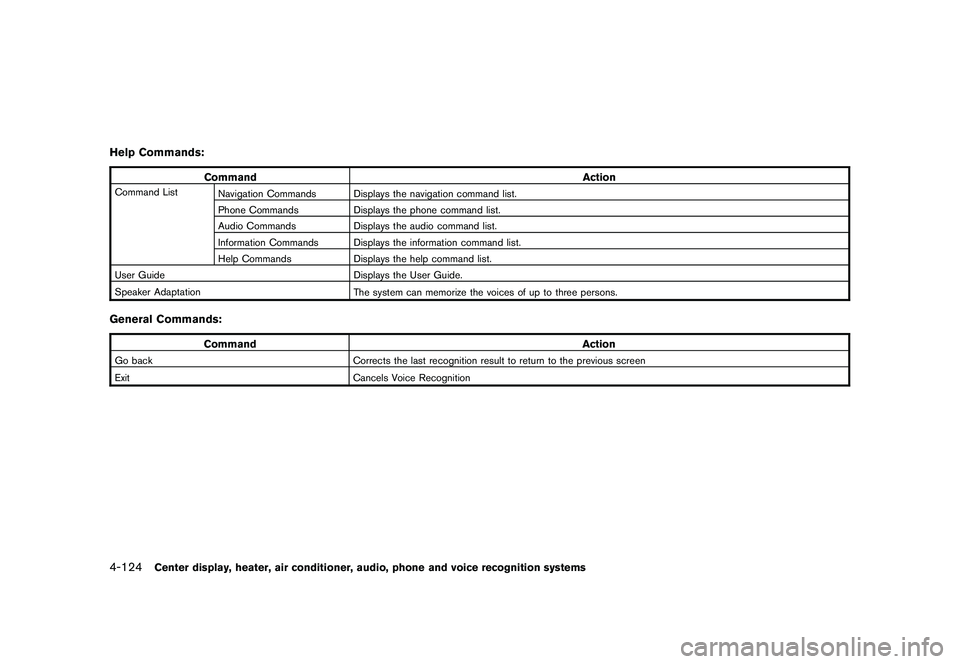
Help Commands:
CommandAction
Command List
Navigation Commands Displays the navigation command list.
Phone Commands Displays the phone command list.
Audio Commands Displays the audio command list.
Information Commands Displays the information command list.
Help Commands Displays the help command list.
User Guide Displays the User Guide.
Speaker Adaptation The system can memorize the voices of up to three persons.General Commands:
Command Action
Go backCorrects the last recognition result to return to the previous screen
Exit Cancels Voice Recognition4-124
Center display, heater, air conditioner, audio, phone and voice recognition systems