heater NISSAN MURANO 2011 Owner´s Manual
[x] Cancel search | Manufacturer: NISSAN, Model Year: 2011, Model line: MURANO, Model: NISSAN MURANO 2011Pages: 433, PDF Size: 3.7 MB
Page 6 of 433
Black plate (1,1)
Table of
Contents
Model "Z51-D" Edited: 2010/ 7/ 23
Illustrated table of contents
0
Safety — Seats, seat belts and supplemental
restraint system
1
Instruments and controls
2
Pre-driving checks and adjustments
3
Monitor, heater, air conditioner, audio, phone and
voice recognition systems
4
Starting and driving
5
In case of emergency
6
Appearance and care
7
Maintenance and do-it-yourself
8
Technical and consumer information
9
Index
10
Page 12 of 433
Black plate (8,1)
Model "Z51-D" EDITED: 2010/ 7/ 23
SSI0805
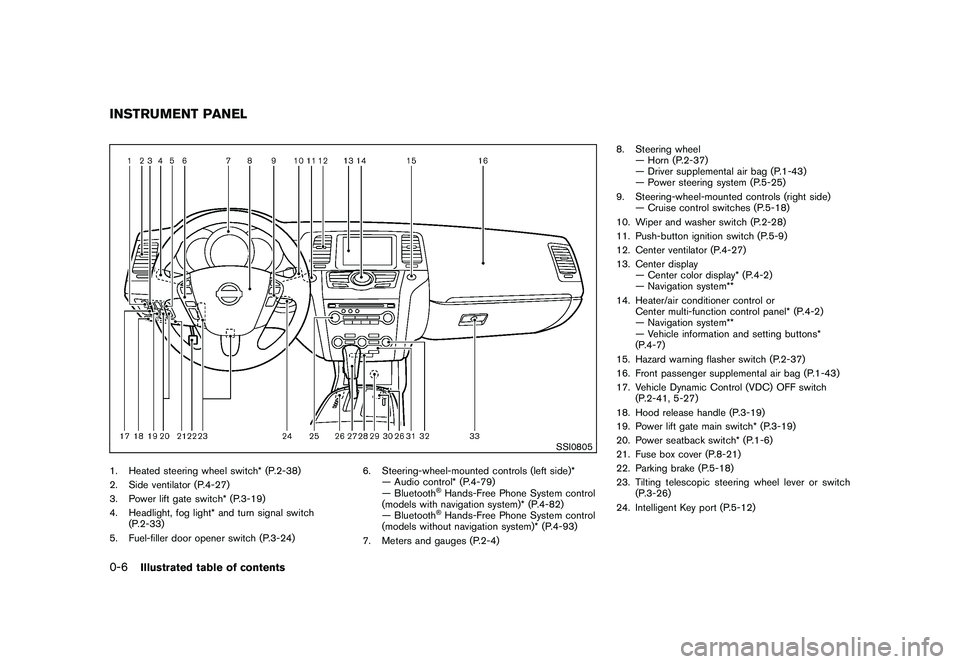
1. Heated steering wheel switch* (P.2-38)
2. Side ventilator (P.4-27)
3. Power lift gate switch* (P.3-19)
4. Headlight, fog light* and turn signal switch(P.2-33)
5. Fuel-filler door opener switch (P.3-24) 6. Steering-wheel-mounted controls (left side)*
— Audio control* (P.4-79)
— Bluetooth
®Hands-Free Phone System control
(models with navigation system)* (P.4-82)
— Bluetooth®Hands-Free Phone System control
(models without navigation system)* (P.4-93)
7. Meters and gauges (P.2-4) 8. Steering wheel
— Horn (P.2-37)
— Driver supplemental air bag (P.1-43)
— Power steering system (P.5-25)
9. Steering-wheel-mounted controls (right side) — Cruise control switches (P.5-18)
10. Wiper and washer switch (P.2-28)
11. Push-button ignition switch (P.5-9)
12. Center ventilator (P.4-27)
13. Center display — Center color display* (P.4-2)
— Navigation system**
14. Heater/air conditioner control or Center multi-function control panel* (P.4-2)
— Navigation system**
— Vehicle information and setting buttons*
(P.4-7)
15. Hazard warning flasher switch (P.2-37)
16. Front passenger supplemental air bag (P.1-43)
17. Vehicle Dynamic Control (VDC) OFF switch (P.2-41, 5-27)
18. Hood release handle (P.3-19)
19. Power lift gate main switch* (P.3-19)
20. Power seatback switch* (P.1-6)
21. Fuse box cover (P.8-21)
22. Parking brake (P.5-18)
23. Tilting telescopic steering wheel lever or switch (P.3-26)
24. Intelligent Key port (P.5-12)
INSTRUMENT PANEL0-6
Illustrated table of contents
Page 13 of 433
Black plate (9,1)
Model "Z51-D" EDITED: 2010/ 7/ 23
25. Audio system (P.4-33)— Clock* (P.2-40)
26. Heated seat switch* (P.2-38)
27. Selector lever (P.5-14)
28. Front passenger air bag status light (P.1-50)
29. Power outlet (P.2-41)
30. All-Wheel Drive (AWD) LOCK switch* (P.5-21)
31. Rear window and outside mirror* defroster switch (P.2-32)
32. Heater/air conditioner control (P.4-28) or Audio system (P.4-33)
33. Glove box (P.2-45)
*: if so equipped
**: Refer to the separate Navigation System Owner’s Manual (if so equipped) .
Illustrated table of contents
0-7
Page 76 of 433
Black plate (74,1)
Model "Z51-D" EDITED: 2010/ 7/ 23
SSI0805
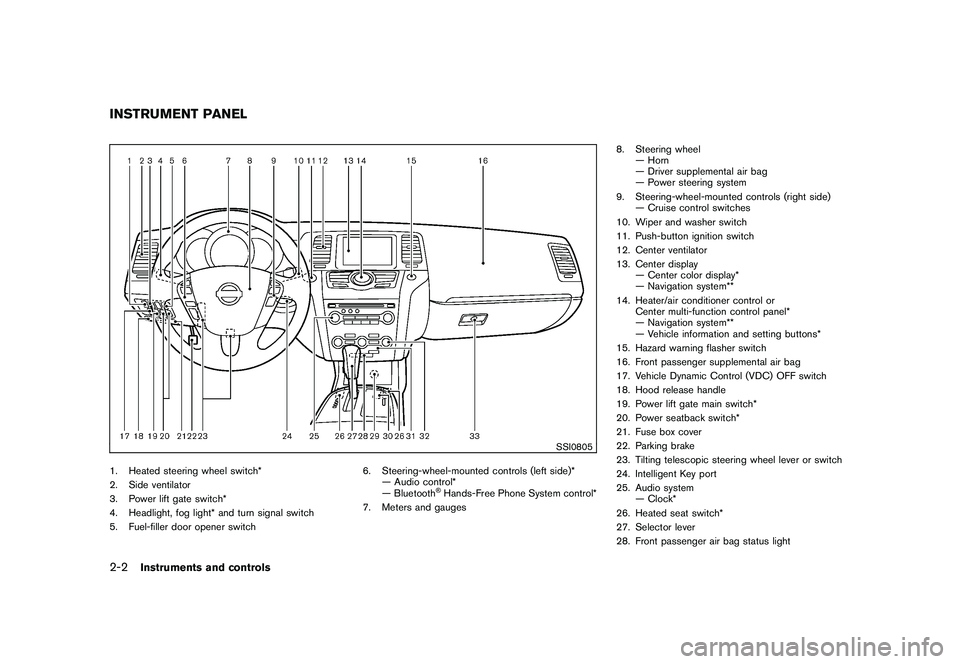
1. Heated steering wheel switch*
2. Side ventilator
3. Power lift gate switch*
4. Headlight, fog light* and turn signal switch
5. Fuel-filler door opener switch6. Steering-wheel-mounted controls (left side)*
— Audio control*
— Bluetooth
®Hands-Free Phone System control*
7. Meters and gauges 8. Steering wheel
— Horn
— Driver supplemental air bag
— Power steering system
9. Steering-wheel-mounted controls (right side) — Cruise control switches
10. Wiper and washer switch
11. Push-button ignition switch
12. Center ventilator
13. Center display — Center color display*
— Navigation system**
14. Heater/air conditioner control or Center multi-function control panel*
— Navigation system**
— Vehicle information and setting buttons*
15. Hazard warning flasher switch
16. Front passenger supplemental air bag
17. Vehicle Dynamic Control (VDC) OFF switch
18. Hood release handle
19. Power lift gate main switch*
20. Power seatback switch*
21. Fuse box cover
22. Parking brake
23. Tilting telescopic steering wheel lever or switch
24. Intelligent Key port
25. Audio system — Clock*
26. Heated seat switch*
27. Selector lever
28. Front passenger air bag status light
INSTRUMENT PANEL2-2
Instruments and controls
Page 77 of 433
Black plate (75,1)
Model "Z51-D" EDITED: 2010/ 7/ 23
29. Power outlet
30. All-Wheel Drive (AWD) LOCK switch*
31. Rear window and outside mirror* defroster switch
32. Heater/air conditioner control or Audio system
33. Glove box
*: if so equipped
**: Refer to the separate Navigation System Owner’sManual (if so equipped) .
Instruments and controls
2-3
Page 95 of 433
Black plate (93,1)
Model "Z51-D" EDITED: 2010/ 7/ 23
INDICATORS FOR MAINTENANCE
1. Engine oil replacement indicatorThis indicator appears when the set time comes
for changing the engine oil. You can set or reset
the distance for changing the engine oil. (See
“TRIP COMPUTER” later in this section.)2. Oil filter replacement indicatorThis indicator appears when the set time comes
for replacing the oil filter. You can set or reset
the distance for replacing the oil filter. (See
“TRIP COMPUTER” later in this section.)3. Tire replacement indicatorThis indicator appears when the set time comes
for replacing tires. You can set or reset the
distance for replacing tires. (See “TRIP COM-
PUTER” later in this section.)4. “OTHER” indicatorThis indicator appears when the set time comes
for replacing items other than the engine oil, oil
filter and tires. You can set or reset the distance
for replacing the items. (See “TRIP COMPU-
TER” later in this section.)
More maintenance reminders are also available
on the center display. (See “HOW TO USE
INFO BUTTON” in the “4. Center display,
heater, air conditioner, audio, phone and voice
recognition systems” section.)
SIC3580
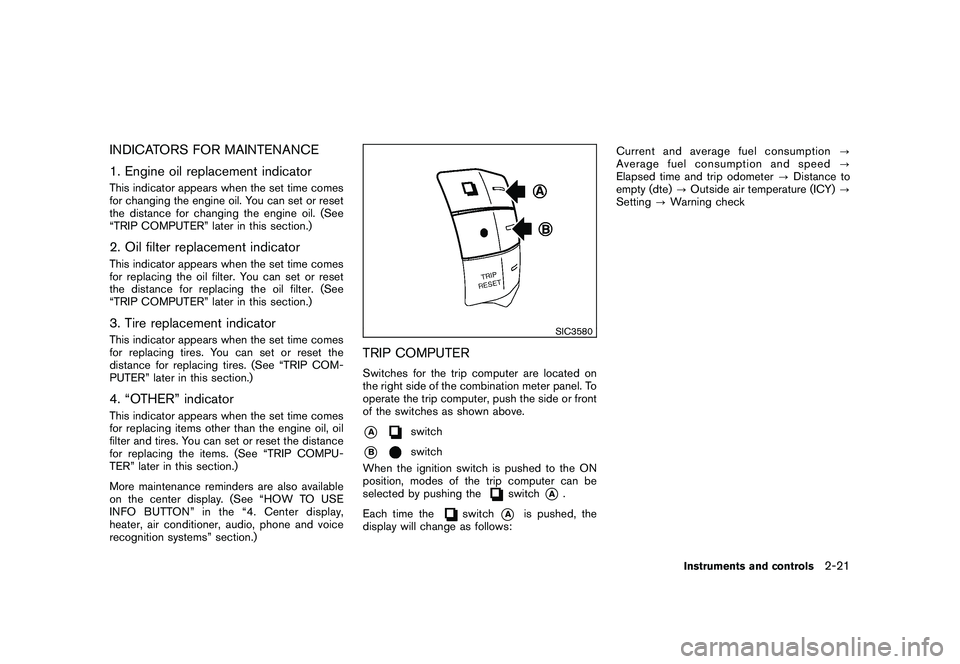
TRIP COMPUTERSwitches for the trip computer are located on
the right side of the combination meter panel. To
operate the trip computer, push the side or front
of the switches as shown above.*A
switch
*B
switch
When the ignition switch is pushed to the ON
position, modes of the trip computer can be
selected by pushing the
switch
*A
.
Each time the
switch
*A
is pushed, the
display will change as follows: Current and average fuel consumption
?
Average fuel consumption and speed ?
Elapsed time and trip odometer ?Distance to
empty (dte) ?Outside air temperature (ICY) ?
Setting ?Warning check
Instruments and controls
2-21
Page 108 of 433
Black plate (106,1)
Model "Z51-D" EDITED: 2010/ 7/ 23
SIC3669
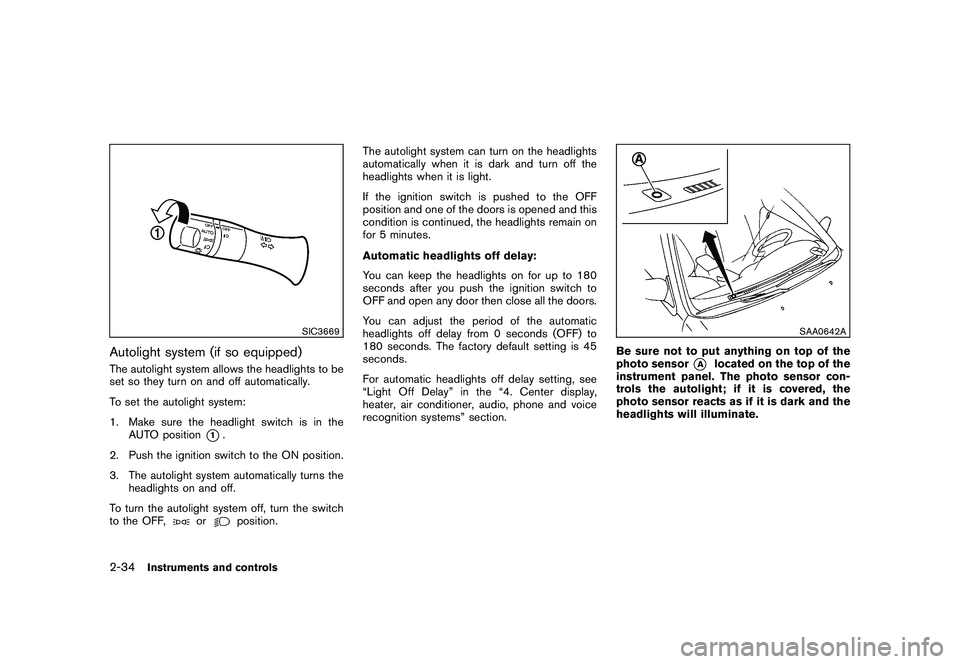
Autolight system (if so equipped)The autolight system allows the headlights to be
set so they turn on and off automatically.
To set the autolight system:
1. Make sure the headlight switch is in theAUTO position
*1.
2. Push the ignition switch to the ON position.
3. The autolight system automatically turns the headlights on and off.
To turn the autolight system off, turn the switch
to the OFF,
or
position. The autolight system can turn on the headlights
automatically when it is dark and turn off the
headlights when it is light.
If the ignition switch is pushed to the OFF
position and one of the doors is opened and this
condition is continued, the headlights remain on
for 5 minutes.
Automatic headlights off delay:
You can keep the headlights on for up to 180
seconds after you push the ignition switch to
OFF and open any door then close all the doors.
You can adjust the period of the automatic
headlights off delay from 0 seconds (OFF) to
180 seconds. The factory default setting is 45
seconds.
For automatic headlights off delay setting, see
“Light Off Delay” in the “4. Center display,
heater, air conditioner, audio, phone and voice
recognition systems” section.
SAA0642A
Be sure not to put anything on top of the
photo sensor
*A
located on the top of the
instrument panel. The photo sensor con-
trols the autolight; if it is covered, the
photo sensor reacts as if it is dark and the
headlights will illuminate.
2-34
Instruments and controls
Page 112 of 433
Black plate (110,1)
Model "Z51-D" EDITED: 2010/ 7/ 23
SIC4401
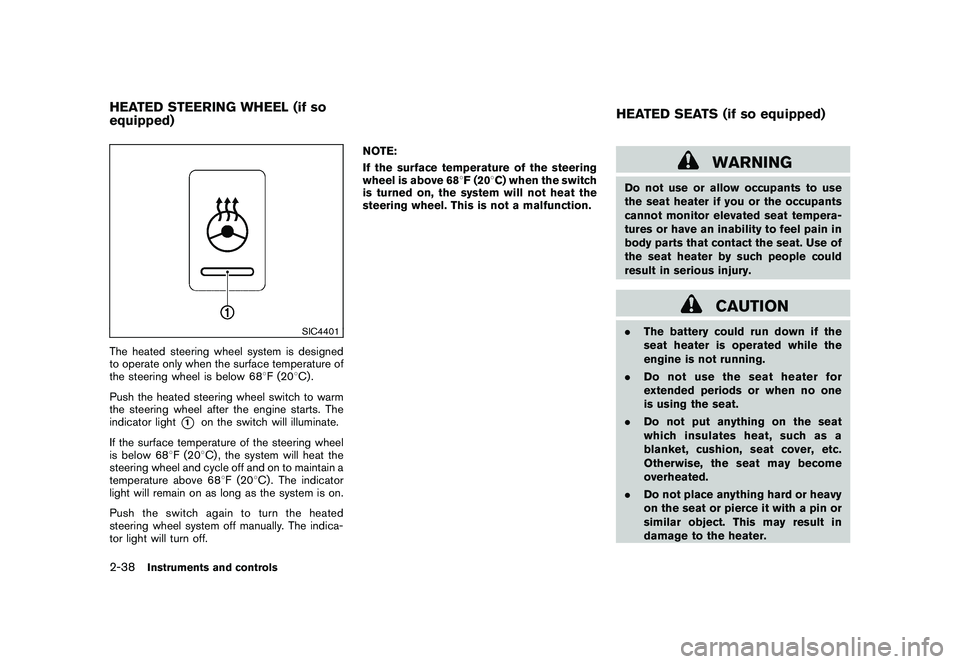
The heated steering wheel system is designed
to operate only when the surface temperature of
the steering wheel is below 688F (20 8C) .
Push the heated steering wheel switch to warm
the steering wheel after the engine starts. The
indicator light
*1
on the switch will illuminate.
If the surface temperature of the steering wheel
is below 68 8F (20 8C) , the system will heat the
steering wheel and cycle off and on to maintain a
temperature above 68 8F (20 8C) . The indicator
light will remain on as long as the system is on.
Push the switch again to turn the heated
steering wheel system off manually. The indica-
tor light will turn off. NOTE:
If the surface temperature of the steering
wheel is above 68
8F (20 8C) when the switch
is turned on, the system will not heat the
steering wheel. This is not a malfunction.
WARNING
Do not use or allow occupants to use
the seat heater if you or the occupants
cannot monitor elevated seat tempera-
tures or have an inability to feel pain in
body parts that contact the seat. Use of
the seat heater by such people could
result in serious injury.
CAUTION
. The battery could run down if the
seat heater is operated while the
engine is not running.
. Do not use the seat heater for
extended periods or when no one
is using the seat.
. Do not put anything on the seat
which insulates heat, such as a
blanket, cushion, seat cover, etc.
Otherwise, the seat may become
overheated.
. Do not place anything hard or heavy
on the seat or pierce it with a pin or
similar object. This may result in
damage to the heater.
HEATED STEERING WHEEL (if so
equipped) HEATED SEATS (if so equipped)2-38
Instruments and controls
Page 113 of 433
Black plate (111,1)
Model "Z51-D" EDITED: 2010/ 7/ 23
.Any liquid spilled on the heated seat
should be removed immediately
with a dry cloth.
. When cleaning the seat, never use
gasoline, thinner, or any similar
materials.
. If any malfunctions are found or the
heated seat does not operate, turn
the switch off and have the system
checked by a NISSAN dealer.
SIC2770
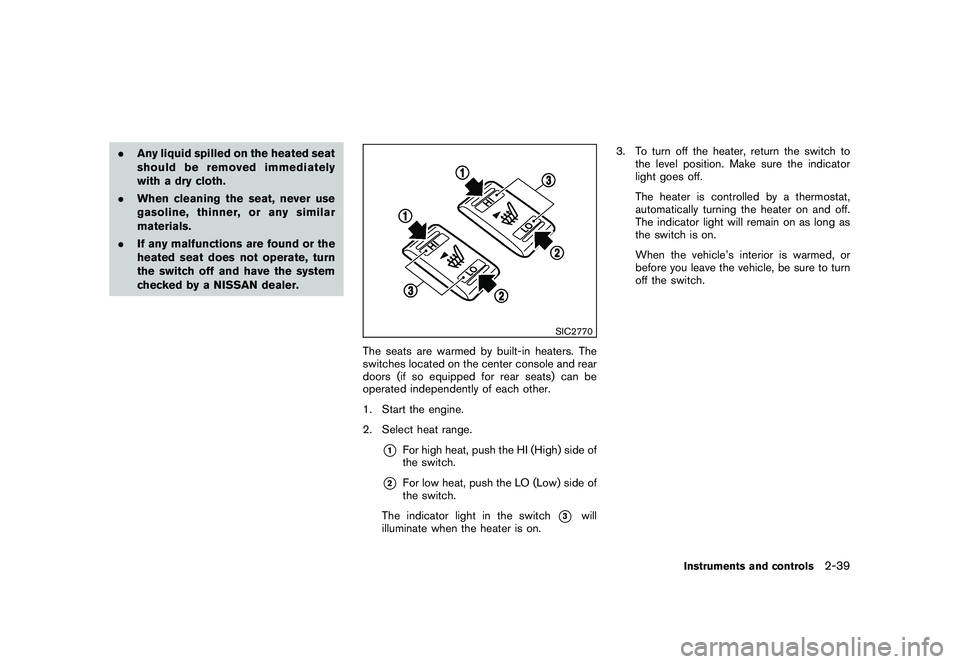
The seats are warmed by built-in heaters. The
switches located on the center console and rear
doors (if so equipped for rear seats) can be
operated independently of each other.
1. Start the engine.
2. Select heat range.
*1
For high heat, push the HI (High) side of
the switch.
*2
For low heat, push the LO (Low) side of
the switch.
The indicator light in the switch
*3
will
illuminate when the heater is on. 3. To turn off the heater, return the switch to
the level position. Make sure the indicator
light goes off.
The heater is controlled by a thermostat,
automatically turning the heater on and off.
The indicator light will remain on as long as
the switch is on.
When the vehicle’s interior is warmed, or
before you leave the vehicle, be sure to turn
off the switch.
Instruments and controls
2-39
Page 114 of 433
Black plate (112,1)
Model "Z51-D" EDITED: 2010/ 7/ 23
MODELS WITH COLOR DISPLAYTo adjust the clock on the front color display, use
the SETTING button on the center multi-
function control panel. See “HOW TO USE
SETTING BUTTON” in the “4. Center display,
heater, air conditioner, audio, phone and voice
recognition systems” section.
The clock settings display cannot be operated
while driving. Stop the vehicle in a safe place
and apply the parking brake before setting the
clock.
SIC3802
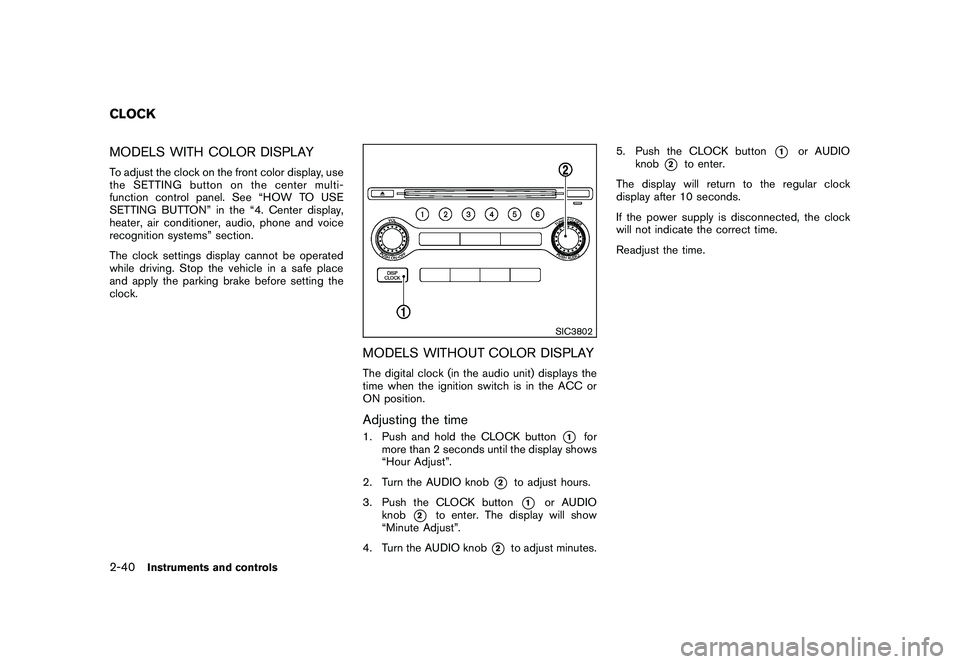
MODELS WITHOUT COLOR DISPLAYThe digital clock (in the audio unit) displays the
time when the ignition switch is in the ACC or
ON position.Adjusting the time1. Push and hold the CLOCK button
*1
for
more than 2 seconds until the display shows
“Hour Adjust”.
2. Turn the AUDIO knob
*2
to adjust hours.
3. Push the CLOCK button*1
or AUDIO
knob
*2
to enter. The display will show
“Minute Adjust”.
4. Turn the AUDIO knob
*2
to adjust minutes. 5. Push the CLOCK button
*1
or AUDIO
knob
*2
to enter.
The display will return to the regular clock
display after 10 seconds.
If the power supply is disconnected, the clock
will not indicate the correct time.
Readjust the time.
CLOCK2-40
Instruments and controls