open hood NISSAN MURANO 2011 Owner´s Manual
[x] Cancel search | Manufacturer: NISSAN, Model Year: 2011, Model line: MURANO, Model: NISSAN MURANO 2011Pages: 433, PDF Size: 3.7 MB
Page 12 of 433
Black plate (8,1)
Model "Z51-D" EDITED: 2010/ 7/ 23
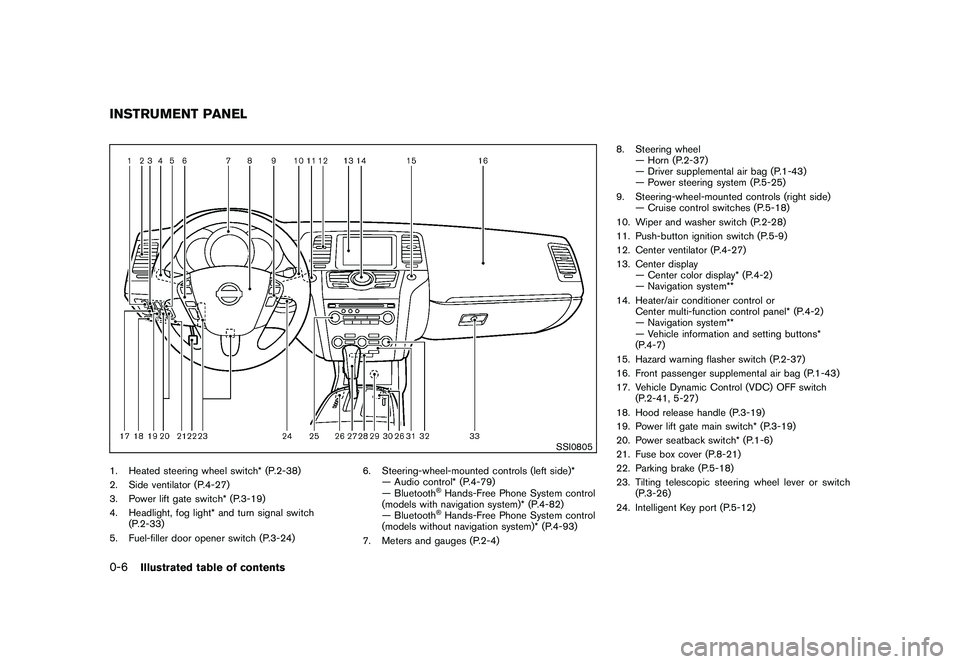
SSI0805
1. Heated steering wheel switch* (P.2-38)
2. Side ventilator (P.4-27)
3. Power lift gate switch* (P.3-19)
4. Headlight, fog light* and turn signal switch(P.2-33)
5. Fuel-filler door opener switch (P.3-24) 6. Steering-wheel-mounted controls (left side)*
— Audio control* (P.4-79)
— Bluetooth
®Hands-Free Phone System control
(models with navigation system)* (P.4-82)
— Bluetooth®Hands-Free Phone System control
(models without navigation system)* (P.4-93)
7. Meters and gauges (P.2-4) 8. Steering wheel
— Horn (P.2-37)
— Driver supplemental air bag (P.1-43)
— Power steering system (P.5-25)
9. Steering-wheel-mounted controls (right side) — Cruise control switches (P.5-18)
10. Wiper and washer switch (P.2-28)
11. Push-button ignition switch (P.5-9)
12. Center ventilator (P.4-27)
13. Center display — Center color display* (P.4-2)
— Navigation system**
14. Heater/air conditioner control or Center multi-function control panel* (P.4-2)
— Navigation system**
— Vehicle information and setting buttons*
(P.4-7)
15. Hazard warning flasher switch (P.2-37)
16. Front passenger supplemental air bag (P.1-43)
17. Vehicle Dynamic Control (VDC) OFF switch (P.2-41, 5-27)
18. Hood release handle (P.3-19)
19. Power lift gate main switch* (P.3-19)
20. Power seatback switch* (P.1-6)
21. Fuse box cover (P.8-21)
22. Parking brake (P.5-18)
23. Tilting telescopic steering wheel lever or switch (P.3-26)
24. Intelligent Key port (P.5-12)
INSTRUMENT PANEL0-6
Illustrated table of contents
Page 76 of 433
Black plate (74,1)
Model "Z51-D" EDITED: 2010/ 7/ 23
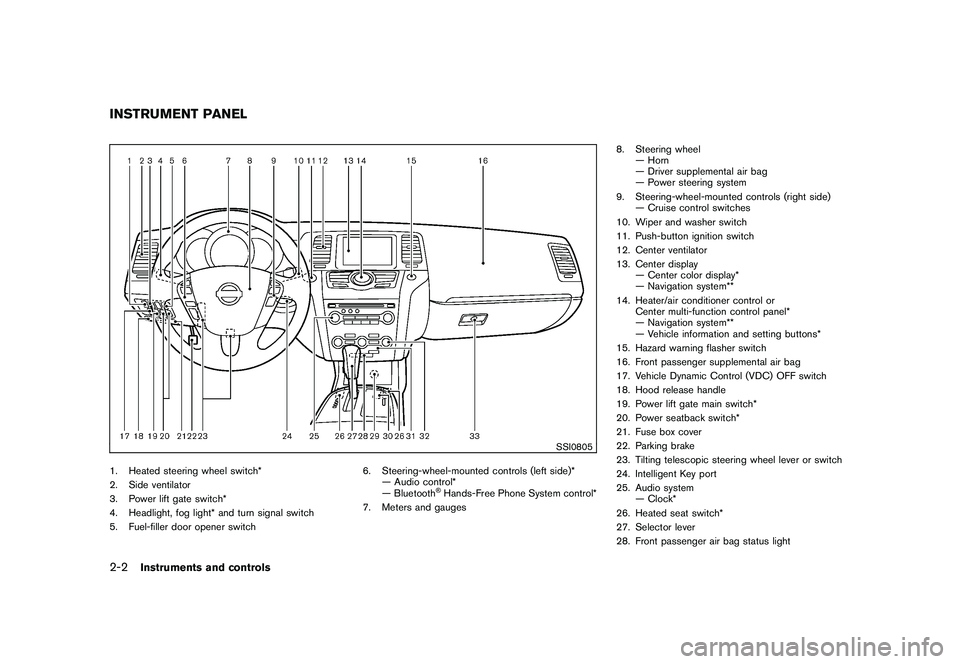
SSI0805
1. Heated steering wheel switch*
2. Side ventilator
3. Power lift gate switch*
4. Headlight, fog light* and turn signal switch
5. Fuel-filler door opener switch6. Steering-wheel-mounted controls (left side)*
— Audio control*
— Bluetooth
®Hands-Free Phone System control*
7. Meters and gauges 8. Steering wheel
— Horn
— Driver supplemental air bag
— Power steering system
9. Steering-wheel-mounted controls (right side) — Cruise control switches
10. Wiper and washer switch
11. Push-button ignition switch
12. Center ventilator
13. Center display — Center color display*
— Navigation system**
14. Heater/air conditioner control or Center multi-function control panel*
— Navigation system**
— Vehicle information and setting buttons*
15. Hazard warning flasher switch
16. Front passenger supplemental air bag
17. Vehicle Dynamic Control (VDC) OFF switch
18. Hood release handle
19. Power lift gate main switch*
20. Power seatback switch*
21. Fuse box cover
22. Parking brake
23. Tilting telescopic steering wheel lever or switch
24. Intelligent Key port
25. Audio system — Clock*
26. Heated seat switch*
27. Selector lever
28. Front passenger air bag status light
INSTRUMENT PANEL2-2
Instruments and controls
Page 100 of 433
Black plate (98,1)
Model "Z51-D" EDITED: 2010/ 7/ 23
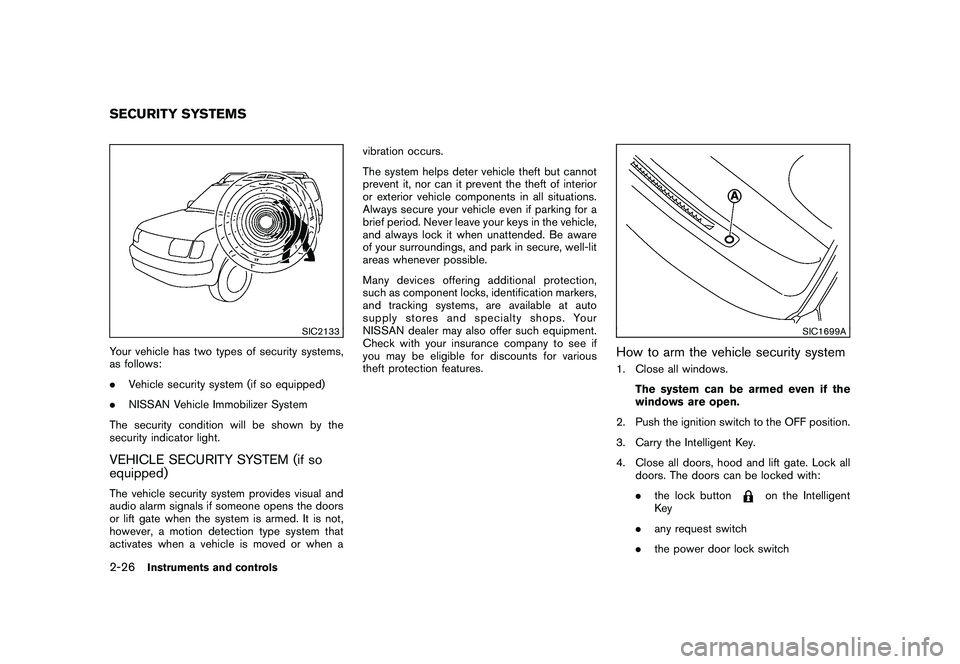
SIC2133
Your vehicle has two types of security systems,
as follows:
.Vehicle security system (if so equipped)
. NISSAN Vehicle Immobilizer System
The security condition will be shown by the
security indicator light.VEHICLE SECURITY SYSTEM (if so
equipped)The vehicle security system provides visual and
audio alarm signals if someone opens the doors
or lift gate when the system is armed. It is not,
however, a motion detection type system that
activates when a vehicle is moved or when a vibration occurs.
The system helps deter vehicle theft but cannot
prevent it, nor can it prevent the theft of interior
or exterior vehicle components in all situations.
Always secure your vehicle even if parking for a
brief period. Never leave your keys in the vehicle,
and always lock it when unattended. Be aware
of your surroundings, and park in secure, well-lit
areas whenever possible.
Many devices offering additional protection,
such as component locks, identification markers,
and tracking systems, are available at auto
supply stores and specialty shops. Your
NISSAN dealer may also offer such equipment.
Check with your insurance company to see if
you may be eligible for discounts for various
theft protection features.
SIC1699A
How to arm the vehicle security system1. Close all windows.
The system can be armed even if the
windows are open.
2. Push the ignition switch to the OFF position.
3. Carry the Intelligent Key.
4. Close all doors, hood and lift gate. Lock all doors. The doors can be locked with:
.the lock button
on the Intelligent
Key
. any request switch
. the power door lock switch
SECURITY SYSTEMS2-26
Instruments and controls
Page 101 of 433
Black plate (99,1)
Model "Z51-D" EDITED: 2010/ 7/ 23
.the key — master or mechanical
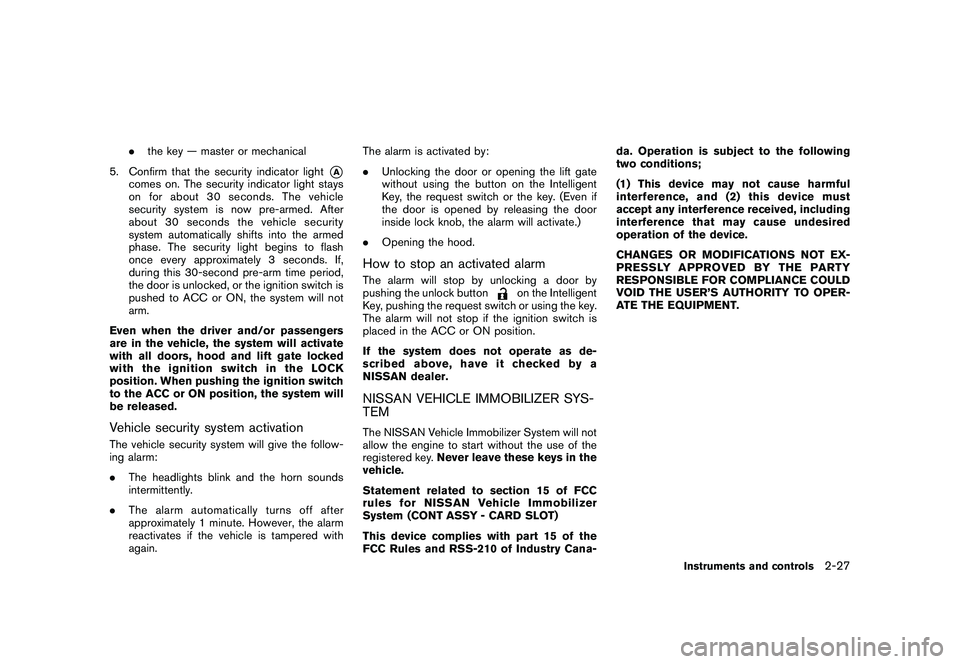
5. Confirm that the security indicator light
*A
comes on. The security indicator light stays
on for about 30 seconds. The vehicle
security system is now pre-armed. After
about 30 seconds the vehicle security
system automatically shifts into the armed
phase. The security light begins to flash
once every approximately 3 seconds. If,
during this 30-second pre-arm time period,
the door is unlocked, or the ignition switch is
pushed to ACC or ON, the system will not
arm.
Even when the driver and/or passengers
are in the vehicle, the system will activate
with all doors, hood and lift gate locked
withtheignitionswitchintheLOCK
position. When pushing the ignition switch
to the ACC or ON position, the system will
be released.
Vehicle security system activationThe vehicle security system will give the follow-
ing alarm:
. The headlights blink and the horn sounds
intermittently.
. The alarm automatica lly turns off after
approximately 1 minute. However, the alarm
reactivates if the vehicle is tampered with
again. The alarm is activated by:
.
Unlocking the door or opening the lift gate
without using the button on the Intelligent
Key, the request switch or the key. (Even if
the door is opened by releasing the door
inside lock knob, the alarm will activate.)
. Opening the hood.
How to stop an activated alarmThe alarm will stop by unlocking a door by
pushing the unlock button
on the Intelligent
Key, pushing the request switch or using the key.
The alarm will not stop if the ignition switch is
placed in the ACC or ON position.
If the system does not operate as de-
scribed above, have it checked by a
NISSAN dealer.
NISSAN VEHICLE IMMOBILIZER SYS-
TEMThe NISSAN Vehicle Immobilizer System will not
allow the engine to start without the use of the
registered key. Never leave these keys in the
vehicle.
Statement related to section 15 of FCC
rules for NISSAN Vehicle Immobilizer
System (CONT ASSY - CARD SLOT)
This device complies with part 15 of the
FCC Rules and RSS-210 of Industry Cana- da. Operation is subject to the following
two conditions;
(1) This device may not cause harmful
interference, and (2) this device must
accept any interference received, including
interference that may cause undesired
operation of the device.
CHANGES OR MODIFICATIONS NOT EX-
PRESSLY APPROVED BY THE PARTY
RESPONSIBLE FOR COMPLIANCE COULD
VOID THE USER’S AUTHORITY TO OPER-
ATE THE EQUIPMENT.
Instruments and controls
2-27
Page 137 of 433
Black plate (10,1)
3 Pre-driving checks and adjustments
Model "Z51-D" EDITED: 2010/ 7/ 23
Keys ............................................................... 3-2NISSAN Vehicle Immobilizer System keys ............ 3-2
Intelligent Key system ...................................... 3-3
Mechanical key .............................................. 3-4
Valet hand-off ................................................ 3-4
Doors .............................................................. 3-4
Locking with mechanical key ............................. 3-5
Opening and closing windows with the
mechanical key .............................................. 3-5
Locking with inside lock knob ........................... 3-5
Locking with power door lock switch .................. 3-6
Automatic door locks ...................................... 3-6
Child safety rear door lock ............................... 3-7
Intelligent Key system .......................................... 3-7
Intelligent Key operating range .......................... 3-9
Door locks/unlocks precaution .......................... 3-9
Intelligent Key operation ................................. 3-10
Battery saver system ..................................... 3-13
Warning signals ........................................... 3-13
Troubleshooting guide ................................... 3-14
Remote keyless entry system .............................. 3-15
How to use remote keyless entry system ........... 3-16Hood
............................................................ 3-19
Lift gate ......................................................... 3-19
Operating manual lift gate .............................. 3-20
Operating power lift gate (if so equipped) .......... 3-20
Auto closure ............................................... 3-23
Lift gate release ........................................... 3-24
Fuel-filler door ................................................. 3-24
Opening fuel-filler door .................................. 3-24
Fuel-filler cap .............................................. 3-24
Tilt/telescopic steering ...................................... 3-26
Manual operation ......................................... 3-26
Electric operation ......................................... 3-27
Sun visors ...................................................... 3-27
Mirrors ........................................................... 3-28
Inside mirror ................................................ 3-28
Outside mirrors ............................................ 3-30
Vanity mirror ................................................ 3-31
Automatic drive positioner (if so equipped) ............. 3-31
Entry/exit function ......................................... 3-31
Memory storage ........................................... 3-32
System operation ......................................... 3-33
Page 155 of 433
Black plate (153,1)
Model "Z51-D" EDITED: 2010/ 7/ 23
SPA2437
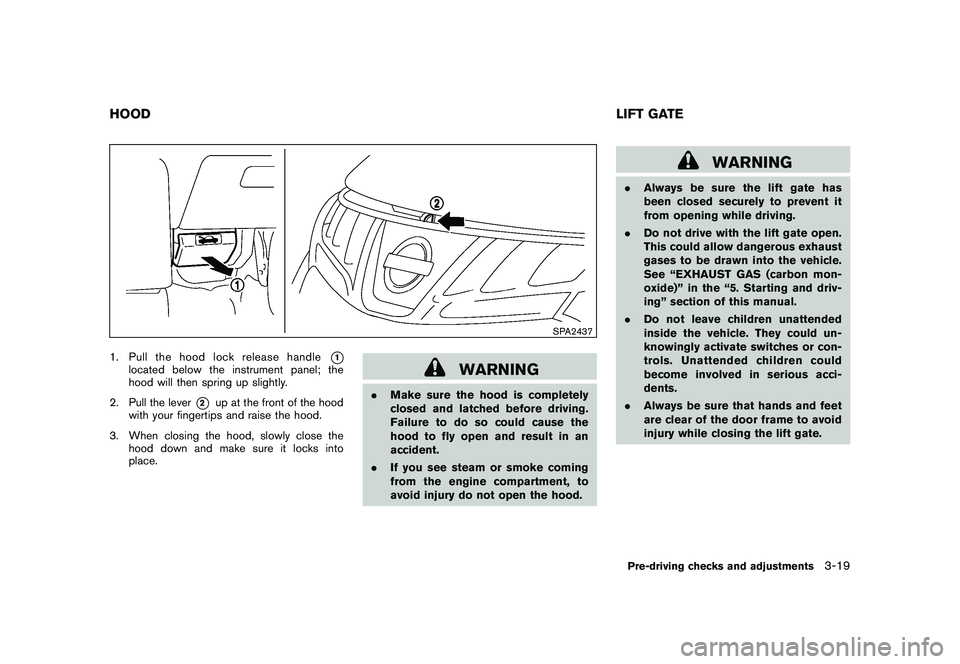
1. Pull the hood lock release handle
*1
located below the instrument panel; the
hood will then spring up slightly.
2. Pull the lever
*2
up at the front of the hood
with your fingertips and raise the hood.
3. When closing the hood, slowly close the hood down and make sure it locks into
place.
WARNING
.Make sure the hood is completely
closed and latched before driving.
Failure to do so could cause the
hood to fly open and result in an
accident.
. If you see steam or smoke coming
from the engine compartment, to
avoid injury do not open the hood.
WARNING
.Always be sure the lift gate has
been closed securely to prevent it
from opening while driving.
. Do not drive with the lift gate open.
This could allow dangerous exhaust
gases to be drawn into the vehicle.
See “EXHAUST GAS (carbon mon-
oxide)” in the “5. Starting and driv-
ing” section of this manual.
. Do not leave children unattended
inside the vehicle. They could un-
knowingly activate switches or con-
trols. Unattended children could
become involved in serious acci-
dents.
. Always be sure that hands and feet
are clear of the door frame to avoid
injury while closing the lift gate.
HOOD LIFT GATE
Pre-driving checks and adjustments
3-19
Page 332 of 433
Black plate (330,1)
Model "Z51-D" EDITED: 2010/ 7/ 23
SPECIAL WINTER EQUIPMENTIt is recommended that the following items be
carried in the vehicle during winter:
.A scraper and stiff-bristled brush to remove
ice and snow from the windows and wiper
blades.
. A sturdy, flat board to be placed under the
jack to give it firm support.
. A shovel to dig the vehicle out of snow-
drifts.
. Extra window washer fluid to refill the
reservoir tank.DRIVING ON SNOW OR ICE
WARNING
.Wet ice (32 8F, 0 8C and freezing rain) ,
very cold snow or ice can be slick
and very hard to drive on. The
vehicle will have much less traction
or “grip” under these conditions. Try
to avoid driving on wet ice until the
road is salted or sanded.
. Whatever the condition, drive with
caution. Accelerate and slow down
with care. If accelerating or down-
shifting too fast, the drive wheels will lose even more traction.
. Allow more stopping distance under
these conditions. Braking should be
started sooner than on dry pave-
ment.
. Allow greater following distances
on slippery roads.
. Watch for slippery spots (glare ice) .
These may appear on an otherwise
clear road in shaded areas. If a
patch of ice is seen ahead, brake
before reaching it. Try not to brake
while on the ice, and avoid any
sudden steering maneuvers.
. Do not use cruise control on slip-
pery roads.
. Snow can trap dangerous exhaust
gases under your vehicle. Keep
snow clear of the exhaust pipe and
from around your vehicle.
ENGINE BLOCK HEATER (if so
equipped)Engine block heaters are used to assist with
cold temperature starting.
The engine block heater should be used when
the outside temperature is 20 8F( 7 8C) or lower.
To use the engine block heater1. Turn the engine off.
2. Open the hood and unwrap the engine
block heater cord.
3. Plug the engine block heater cord into a grounded 3-wire, 3-pronged extension cord.
4. Plug the extension cord into a Ground Fault Interrupt (GFI) protected, grounded 110-
volt AC (VAC) outlet.
5. The engine block heater must be plugged in for at least 2 - 4 hours, depending on
outside temperatures, to properly warm the
engine coolant. Use an appropriate timer to
turn the engine block heater on.
6. Before starting the engine, unplug and properly store the cord to keep it away from
moving parts.
WARNING
.Do not use your engine block heater
with an ungrounded electrical sys-
tem or a 2-pronged adapter. You can
be seriously injured by an electrical
shock if you use an ungrounded
connection.
. Disconnect and properly store the
engine block heater cord before
5-30
Starting and driving
Page 345 of 433
Black plate (343,1)
Model "Z51-D" EDITED: 2010/ 7/ 23
Do not attempt to start the engine by pushing.
CAUTION
Continuously Variable Transmission
(CVT) models cannot be push-started
or tow-started. Attempting to do so may
cause transmission damage.
CAUTION
.Do not continue to drive if your
vehicle overheats. Doing so could
cause engine damage or a vehicle
fire.
. To avoid the danger of being
scalded, never remove the radiator
cap while the engine is still hot.
When the radiator cap is removed,
pressurized hot water will spurt out,
possibly causing serious injury.
. Do not open the hood if steam is
coming out.
If your vehicle is overheating (indicated by an
extremely high temperature gauge reading) , or if
you feel a lack of engine power, detect abnormal
noise, etc., take the following steps:
1. Move the vehicle safely off the road, apply the parking brake and move the selector
lever to the P (Park) position.
Do not stop the engine.
2. Turn off the air conditioner. Open all the windows, move the heater or air conditioner
temperature control to maximum hot and fan
control to high speed. 3. Get out of the vehicle. Look and listen for
steam or coolant escaping from the radiator
before opening the hood. (If steam or
coolant is escaping, turn off the engine.)
Do not open the hood further until no steam
or coolant can be seen.
4. Open the engine hood.
WARNING
If steam or water is coming from the
engine, stand clear to prevent getting
burned.
5. Visually check drive belts for damage or looseness. Also check if the cooling fan is
running. The radiator hoses and radiator
should not leak water. If coolant is leaking,
the water pump belt is missing or loose, or
the cooling fan does not run, stop the
engine.
WARNING
Be careful not to allow your hands, hair,
jewelry or clothing to come into contact
with, or get caught in, engine belts or
the engine cooling fan. The engine
cooling fan can start at any time.
PUSH STARTING IF YOUR VEHICLE OVERHEATS
In case of emergency
6-11
Page 352 of 433
Black plate (352,1)
Model "Z51-D" EDITED: 2010/ 7/ 23
In order to maintain the appearance of your
vehicle, it is important to take proper care of it.
To protect the paint surface, wash your vehicle
as soon as you can:
.after a rainfall to prevent possible damage
from acid rain
. after driving on coastal roads
. when contaminants such as soot, bird
droppings, tree sap, metal particles or bugs
get on the paint surface
. when dust or mud builds up on the surface
Whenever possible, store or park your vehicle
inside a garage or in a covered area.
When it is necessary to park outside, park in a
shady area or protect the vehicle with a body
cover.
Be careful not to scratch the paint surface
when putting on or removing the body
cover.WASHINGWash dirt off the vehicle with a wet sponge and
plenty of water. Clean the vehicle thoroughly
using a mild soap, a special vehicle soap or
general purpose dishwashing liquid mixed with
clean, lukewarm (never hot) water.
CAUTION
. Do not use car washes that use acid
in the detergent. Some car washes,
especially brushless ones, use some
acid for cleaning. The acid may react
with some plastic vehicle compo-
nents, causing them to crack. This
could affect their appearance, and
also could cause them not to func-
tion properly. Always check with
your car wash to confirm that acid
is not used.
. Do not wash the vehicle with strong
household soap, strong chemical
detergents, gasoline or solvents.
. Do not wash the vehicle in direct
sunlight or while the vehicle body is
hot, as the surface may become
water-spotted.
. Avoid using tight-napped or rough
cloths, such as washing mitts. Care
must be taken when removing
caked-on dirt or other foreign sub-
stances so the paint surface is not
scratched or damaged.
Rinse the vehicle again with plenty of clean
water. Inside flanges, seams and folds on the doors,
hatches and hood are particularly vulnerable to
the effects of road salt. Therefore, these areas
must be regularly cleaned. Make sure that the
drain holes in the lower edge of the door are
open. Spray water under the body and in the
wheel wells to loosen the dirt and wash away
road salt.
Avoid leaving water spots on the paint surface
by using a damp chamois to dry the vehicle.
WAXINGRegular waxing protects the paint surface and
helps retain new vehicle appearance. Polishing
is recommended to remove built-up wax residue
and to avoid a weathered appearance before
reapplying wax.
A NISSAN dealer can assist you in choosing the
proper product.
.
Wax your vehicle only after a thorough
washing. Follow the instructions supplied
with the wax.
. Do not use a wax containing any abrasives,
cutting compounds or cleaners that may
damage the vehicle finish.
Machine compound or aggressive polishing on a
base coat/clear coat paint finish may dull the
finish or leave swirl marks.
CLEANING EXTERIOR7-2
Appearance and care
Page 358 of 433
Black plate (360,1)
Model "Z51-D" EDITED: 2010/ 7/ 23
Your new NISSAN has been designed to have
minimum maintenance requirements with long
service intervals to save you both time and
money. However, some day-to-day and regular
maintenance is essential to maintain your
NISSAN’s fine mechanical condition, as well
as its emission and engine performance.
It is the owner’s responsibility to make sure that
the scheduled maintenance, as well as general
maintenance, is performed.
As the vehicle owner, you are the only one who
can ensure that your vehicle receives the proper
maintenance. You are a vital link in the main-
tenance chain.SCHEDULED MAINTENANCEFor your convenience, both required and op-
tional scheduled maintenance items are de-
scribed and listed in your “NISSAN Service and
Maintenance Guide”. You must refer to that
guide to ensure that necessary maintenance is
performed on your NISSAN at regular intervals.GENERAL MAINTENANCEGeneral maintenance includes those items
which should be checked during normal day-
to-day operation. They are essential for proper
vehicle operation. It is your responsibility to
perform these procedures regularly as pre-
scribed.Performing general maintenance checks re-
quires minimal mechanical skill and only a few
general automotive tools.
These checks or inspections can be done by
yourself, a qualified technician or, if you prefer, a
NISSAN dealer.
WHERE TO GO FOR SERVICEIf maintenance service is required or your vehicle
appears to malfunction, have the systems
checked and serviced by a NISSAN dealer.
NISSAN technicians are well-trained specialists
and are kept up-to-date with the latest service
information through technical bulletins, service
tips, and in-dealership information systems.
They are completely qualified to work on
NISSAN vehicles
beforework begins.
You can be confident that a NISSAN dealer’s
service department performs the best job to
meet the maintenance requirements on your
vehicle — in a reliable and economical way. During the normal day-to-day operation of the
vehicle, general maintenance should be per-
formed regularly as prescribed in this section. If
you detect any unusual sounds, vibrations or
smell, be sure to check for the cause or have a
NISSAN dealer do it promptly. In addition, you
should notify a NISSAN dealer if you think that
repairs are required.
When performing any checks or maintenance
work, see “MAINTENANCE PRECAUTIONS”
later in this section.
EXPLANATION OF MAINTENANCE
ITEMSAdditional information on the following
items with “*” is found later in this section.Outside the vehicleThe maintenance items listed here should be
performed from time to time, unless otherwise
specified.
Doors and engine hood:
Check that all doors
and the engine hood operate properly. Also
ensure that all latches lock securely. Lubricate
hinges, latches, latch pins, rollers and links if
necessary. Make sure that the secondary latch
keeps the hood from opening when the primary
latch is released.
When driving in areas using road salt or other
corrosive materials, check lubrication frequently.
MAINTENANCE REQUIREMENT GENERAL MAINTENANCE8-2
Maintenance and do-it-yourself