phone NISSAN MURANO 2014 2.G Quick Reference Guide
[x] Cancel search | Manufacturer: NISSAN, Model Year: 2014, Model line: MURANO, Model: NISSAN MURANO 2014 2.GPages: 28, PDF Size: 1.54 MB
Page 3 of 28
Please see your Owner’s Manual for important safety
information, and system operation limitations.
• A cellular telephone should not be used for any purpose while
driving so full attention may be given to vehicle operation.
• Always wear your seat belt.
• Supplemental air bags do not replace proper seat belt usage.
•
Children 12 and under should always ride in the rear seat
properly secured in child restraints or seat belts according to
their age and weight.
• Do not drink and drive.
For more information, refer to the “Safety –– Seats, seat belts and
supplemental restraint system (section 1)”, the “Monitor, heater, air
conditioner, audio, phone and voice recognition systems (section 4)”
and the “Starting and driving (section 5)” of your Owner’s Manual.
TABLE OF CONTENTS
Additional information about your vehicle is also available in your Owner’s Manual, Navigation System Owner’s Manual and at www.nissanusa.com. To view detailed
instructional videos, go to
www.nissanownersinfo.mobi/ 2014/murano
or snap this barcode with an appropriate barcode reader.
NEW SYSTEM FEATURES
Heated Steering Wheel (if so equipped) ............................2
Moving Object Detection (MOD) (if so equipped) ....................2
Blind Spot Warning (BSW) System (if so equipped) ................. 2
Lane Departure Warning (LDW) System (if so equipped) ..............3
RearView Monitor (if so equipped) ................................. 3
ESSENTIAL INFORMATION
Tire Pressure Monitoring System (TPMS) ...........................4
Loose Fuel Cap ................................................ 4
Fuel-filler Door ................................................. 4
Towing Your Vehicle ............................................. 5
Clock Set/Adjustment ........................................... 5
Automatic Power Windows (CrossCabriolet models) .................5
FIRST DRIVE FEATURES
NISSAN Intelligent Key
® System .................................. 6
Power Liftgate Release (Hardtop models - if so equipped) ............ 7
Trunk Lid Release (CrossCabriolet models) .........................7
Soft Top Operation (CrossCabriolet models) ........................8
Front Seat Adjustments .......................................... 9
Automatic Drive Positioner (if so equipped) ......................... 9
Rear Seat Adjustments (Hardtop models) ......................... 10
Rear Seat Entry/Exit (CrossCabriolet models) ......................10
Outside Mirror Control Switch ................................... 11
Starting/Stopping the Engine .................................... 11
Headlight Control Switch ....................................... 12
Windshield Wiper and Washer Switch ............................ 13
Automatic Climate Controls (if so equipped) ....................... 14
FM/AM/SiriusXM
® Satellite Radio with CD/DVD Player (if so equipped) . 16
USB/iPod® Interface (if so equipped) ............................. 17
Cruise Control . . . . . . . . . . . . . . . . . . . . . . . . . . . . . . . . . . . .\
. . . . . . . . . . . . 17
Front Armrest/Center Console Storage Box ........................17
SYSTEM GUIDE
Trip Computer ................................................ 18
Bluetooth
® Hands-free Phone System (if so equipped) ..............19
System Operating Tips ...................................... 19
Bluetooth
® System with Navigation (if so equipped) .................20
Bluetooth® System without Navigation (if so equipped) .............. 21
Bluetooth® Streaming Audio (with Navigation System - if so equipped) ....22
Navigation System (if so equipped) ............................... 23
HomeLink
® Universal Transceiver (if so equipped) ...................24
1591421_14d_Murano_QRG_012714b.indd 41/27/14 3:11 PM
Page 4 of 28
2
NEW SYSTEM FEATURES
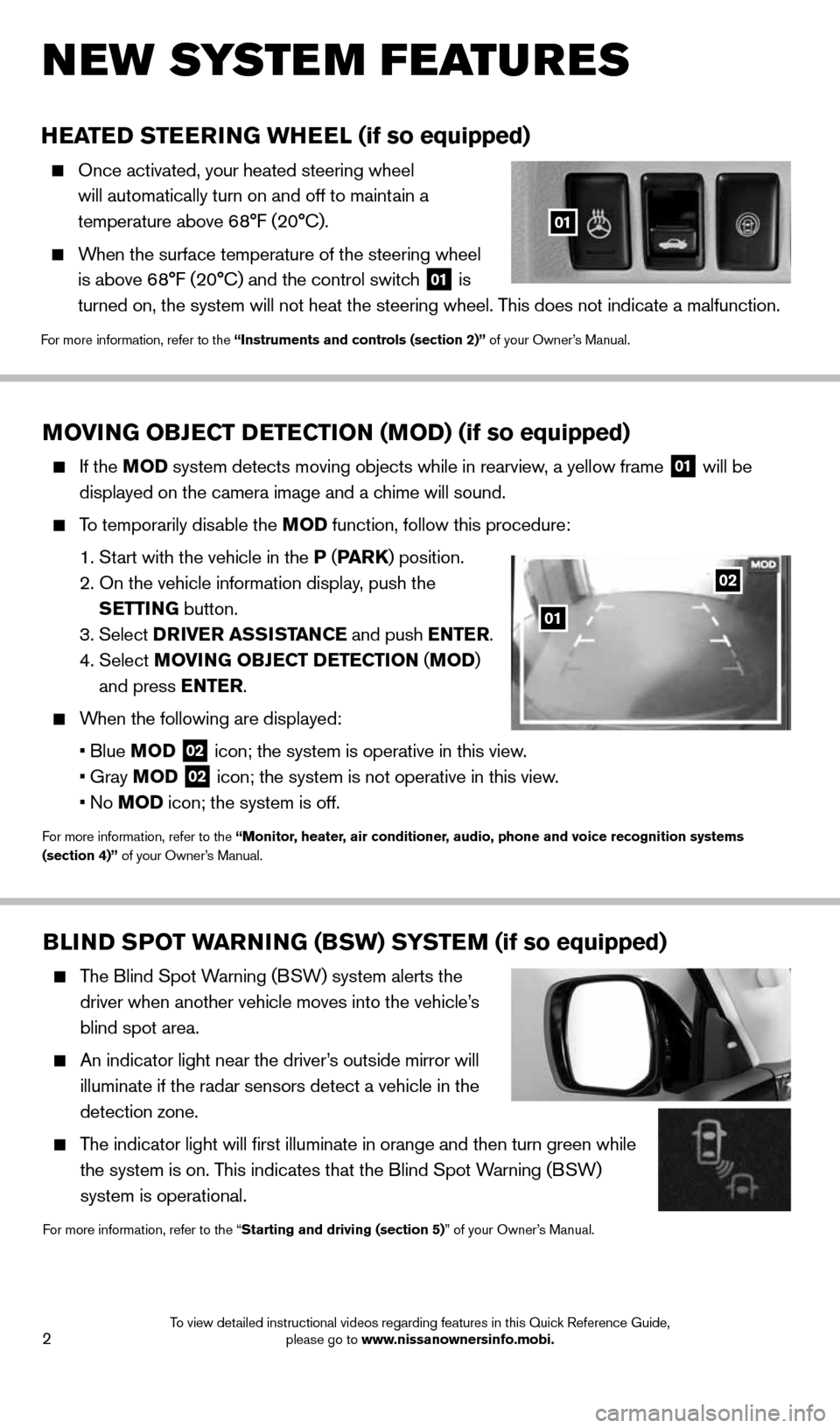
HEATED STEERING WHEEL (if so equipped)
Once activated, your heated steering wheel
will automatically turn on and off to maintain a
temperature above 68°F (20°C).
When the surface temperature of the steering wheel
is above 68°F (20°C) and the control switch
01 is
turned on, the system will not heat the steering wheel. This does not indicate a malfunction.
For more information, refer to the “Instruments and controls (section 2)” of your Owner’s Manual.
01
MOVING OBJECT DETECTION (MOD) (if so equipped)
If the MOD system detects moving objects while in rearview, a yellow frame
01 will be
displayed on the camera image and a chime will sound.
To temporarily disable the MOD function, follow this procedure:
1. Start with the vehicle in the P (PA R K ) position.
2. On the vehicle information display, push the
SETTING button.
3. Select DRIVER ASSISTANCE and push ENTER.
4. Select MOVING OBJECT DETECTION ( MOD)
and press ENTER.
When the following are displayed:
• Blue MOD
02 icon; the system is operative in this view.
• Gray MOD
02 icon; the system is not operative in this view.
• No MOD icon; the system is off.
For more information, refer to the “Monitor, heater, air conditioner, audio, phone and voice recognition systems
(section 4)” of your Owner’s Manual.
02
01
BLIND SPOT WARNING (BSW) SYSTEM (if so equipped)
The Blind Spot Warning (BSW) system alerts the
driver when another vehicle moves into the vehicle’s
blind spot area.
An indicator light near the driver’s outside mirror will
illuminate if the radar sensors detect a vehicle in the
detection zone.
The indicator light will first illuminate in orange and then turn green\
while
the system is on. This indicates that the Blind Spot Warning (BSW)
system is operational.
For more information, refer to the “Starting and driving (section 5)” of your Owner’s Manual.
1591421_14d_Murano_QRG_012714b.indd 21/27/14 3:11 PM
To view detailed instructional videos regarding features in this Quick Reference Guide, please go to www.nissanownersinfo.mobi.
Page 5 of 28
 SYSTEM (if so equipped)
The LANE DEPARTURE WARNING ( LDW) system alerts the driver
when the vehicle moves close to either the left or the right of a clearl\
y
mark")
3
LANE DEPARTURE WARNING (LDW) SYSTEM (if so equipped)
The LANE DEPARTURE WARNING ( LDW) system alerts the driver
when the vehicle moves close to either the left or the right of a clearl\
y
marked traveling lane.
When the vehicle approaches either the left or right of the clearly marked
traveling lane, a chime will sound and the LDW light
01 (orange) on the
instrument panel will blink.
For more information, refer to the “Starting and driving (section 5)” of your Owner’s Manual.
01
REARVIEW MONITOR (if so equipped)
When the shift lever is shifted into the R (REVERSE)
position, the monitor display shows a rearward view
from the vehicle.
The colored guide lines on the display screen indicate
vehicle width and approximate distances to objects
with reference to the vehicle body line:
• Red 1.5 ft (0.5 m); Yellow 3 ft (1 m); Green 7 ft
(2 m) and 10 ft (3 m).
For more information, refer to the “Monitor, climate, audio, phone and voice recognition systems (section 4)” of your
Owner’s Manual.
1591421_14d_Murano_QRG_012714b.indd 31/27/14 3:11 PM
To view detailed instructional videos regarding these and other features, please go to www.nissanownersinfo.mobi.
Page 7 of 28
5
AUTOMATIC POWER WINDOWS
(CrossCabriolet models)
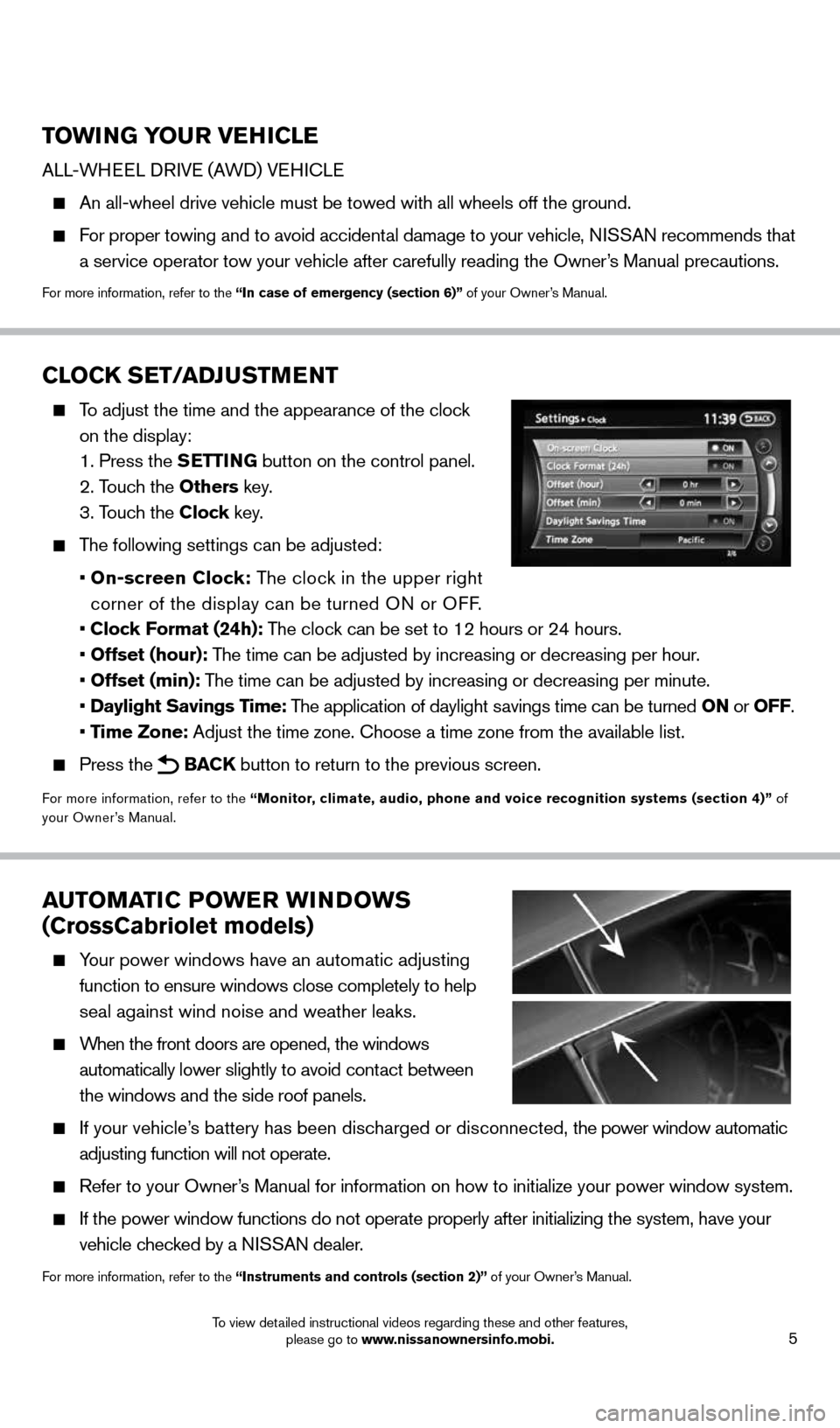
Your power windows have an automatic adjusting
function to ensure windows close completely to help
seal against wind noise and weather leaks.
When the front doors are opened, the windows
automatically lower slightly to avoid contact between
the windows and the side roof panels.
If your vehicle’s battery has been discharged or disconnected, the power window automatic
adjusting function will not operate.
Refer to your Owner’s Manual for information on how to initialize your power window system.
If the power window functions do not operate properly after initializing\
the system, have your
vehicle checked by a NISSAN dealer.
For more information, refer to the “Instruments and controls (section 2)” of your Owner’s Manual.
TOWING YOUR VEHICLE
ALL-WHEEL DRIVE (AWD) VEHICLE
An all-wheel drive vehicle must be towed with all wheels off the ground.\
For proper towing and to avoid accidental damage to your vehicle, NISSAN recommends that
a service operator tow your vehicle after carefully reading the Owner’s Manual precautions.
For more information, refer to the “In case of emergency (section 6)” of your Owner’s Manual.
CLOCK SET/ADJUSTMENT
To adjust the time and the appearance of the clock
on the display:
1. Press the SETTING button on the control panel.
2. Touch the Others key.
3. Touch the Clock key.
The following settings can be adjusted:
• On-screen Clock: The clock in the upper right
corner of the display can be turned ON or OFF.
• Clock Format (24h): The clock can be set to 12 hours or 24 hours.
• Offset (hour): The time can be adjusted by increasing or decreasing per hour.
• Offset (min): The time can be adjusted by increasing or decreasing per minute.
• Daylight Savings Time: The application of daylight savings time can be turned ON or OFF.
• Time Zone: Adjust the time zone. Choose a time zone from the available list.
Press the BACK button to return to the previous screen.
For more information, refer to the “Monitor, climate, audio, phone and voice recognition systems (section 4)” of
your Owner’s Manual.
1591421_14d_Murano_QRG_012714b.indd 51/27/14 3:11 PM
To view detailed instructional videos regarding these and other features, please go to www.nissanownersinfo.mobi.
Page 17 of 28

15
06 UPPER VENT BUTTON
When the upper vent button
is pressed, the air flow against the driver’s or passenger’s
upper body becomes gentle. The indicator light on the button will illuminate.
In this mode, air from the upper ventilator flows to control the cabin\
temperature without
blowing air directly on the occupants.
07 DEFROSTING/DEFOGGING FRONT AND SIDE WINDOWS
Press the defroster control button to turn the system on. The A/C automatically turns
on when the defroster mode is selected. This feature removes humidity from the air.
Turn the temperature control dial 01 to set the desired temperature.
To defrost the front and side windows quickly, set the temperature controls and fan speed
controls to their maximum settings.
08 DEFROSTING REAR WINDOW AND OUTSIDE MIRRORS (if so equipped)
Press the rear window defroster switch
REAR
to turn the system on or off.
This function automatically turns off after approximately 15 minutes.
09 A/C BUTTON
Press the A/C button to turn the air conditioner system on or off. This system helps cool
and dehumidify the air inside the cabin and defog the windows.
For more information, refer to the “Instruments and controls (section 2)” and the “Monitor, heater, air conditioner, audio,
phone and voice recognition systems (section 4)” of your Owner’s Manual.
1591421_14d_Murano_QRG_012714b.indd 151/27/14 3:11 PM
To view detailed instructional videos regarding these and other features, please go to www.nissanownersinfo.mobi.
Page 18 of 28
16
FIRST DRIVE FEATURES
03
0506
02
01
FM/AM/SiriusXM®* SATELLITE RADIO WITH CD/DVD PLAYER
(if so equipped)
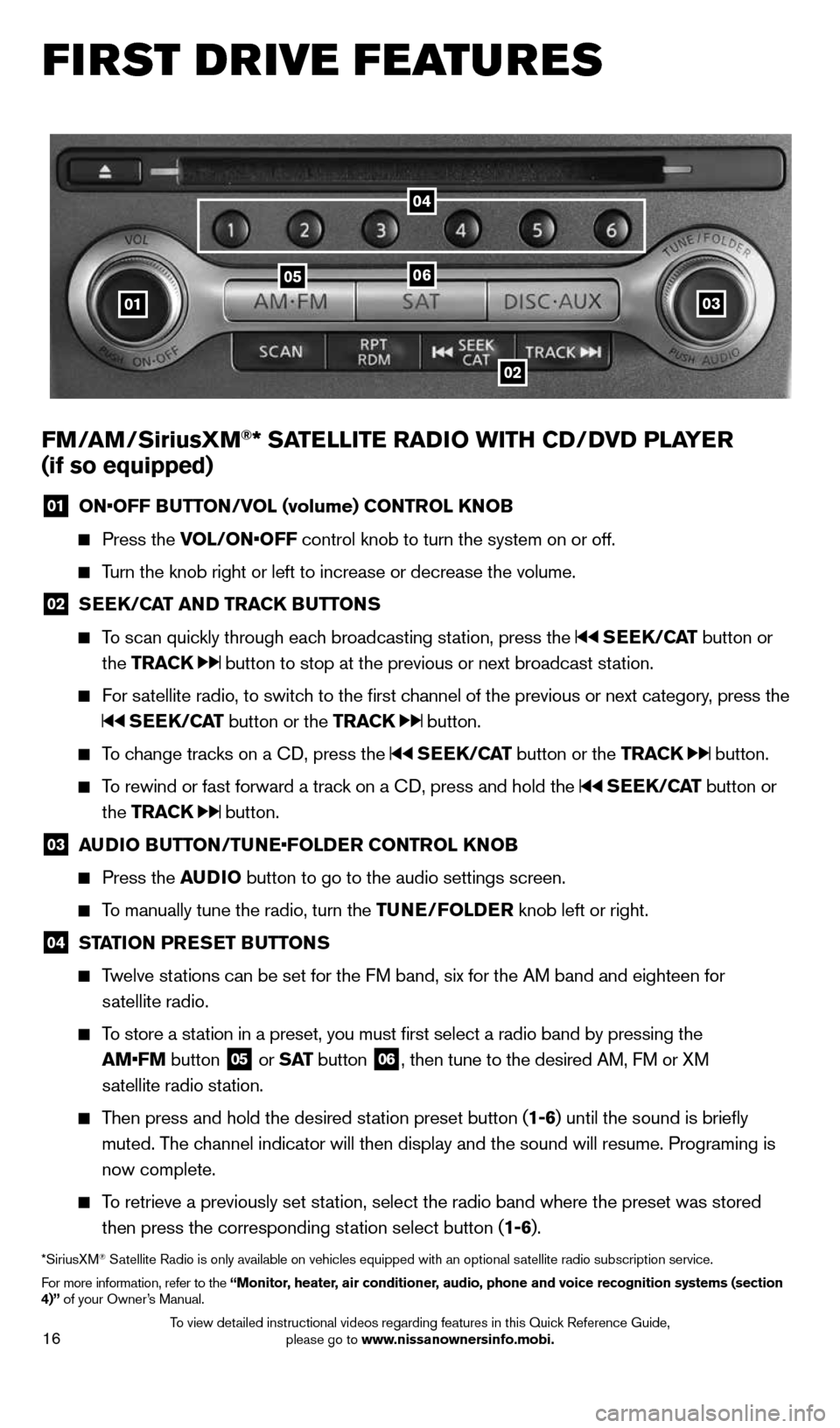
01 ON•OFF BUTTON/VOL (volume) CONTROL KNOB
Press the VOL/ON•OFF control knob to turn the system on or off.
Turn the knob right or left to increase or decrease the volume.
02 SEEK/CAT AND TRACK BUTTONS
To scan quickly through each broadcasting station, press the SEEK/CAT button or
the TRACK
button to stop at the previous or next broadcast station.
For satellite radio, to switch to the first channel of the previous or next category, press the
SEEK/CAT button or the TRACK button.
To change tracks on a CD, press the SEEK/CAT button or the TRACK button.
To rewind or fast forward a track on a CD, press and hold the SEEK/CAT button or
the TRACK
button.
03 AUDIO BUTTON/TUNE•FOLDER CONTROL KNOB
Press the AUDIO button to go to the audio settings screen.
To manually tune the radio, turn the TUNE/FOLDER knob left or right.
04 STATION PRESET BUTTONS
Twelve stations can be set for the FM band, six for the AM band and eighteen for
satellite radio.
To store a station in a preset, you must first select a radio band by pressing the
AM•FM button
05 or
S AT button
06, then tune to the desired AM, FM or XM
satellite radio station.
Then press and hold the desired station preset button (1-6) until the sound is briefly
muted. The channel indicator will then display and the sound will resume. Programing\
is
now complete.
To retrieve a previously set station, select the radio band where the preset was stored
then press the corresponding station select button (1-6).
*SiriusXM® Satellite Radio is only available on vehicles equipped with an optional s\
atellite radio subscription service.
For more information, refer to the “Monitor, heater, air conditioner, audio, phone and voice recognition systems (section
4)” of your Owner’s Manual.
04
1591421_14d_Murano_QRG_012714b.indd 161/27/14 3:11 PM
To view detailed instructional videos regarding features in this Quick Reference Guide, please go to www.nissanownersinfo.mobi.
Page 19 of 28
17
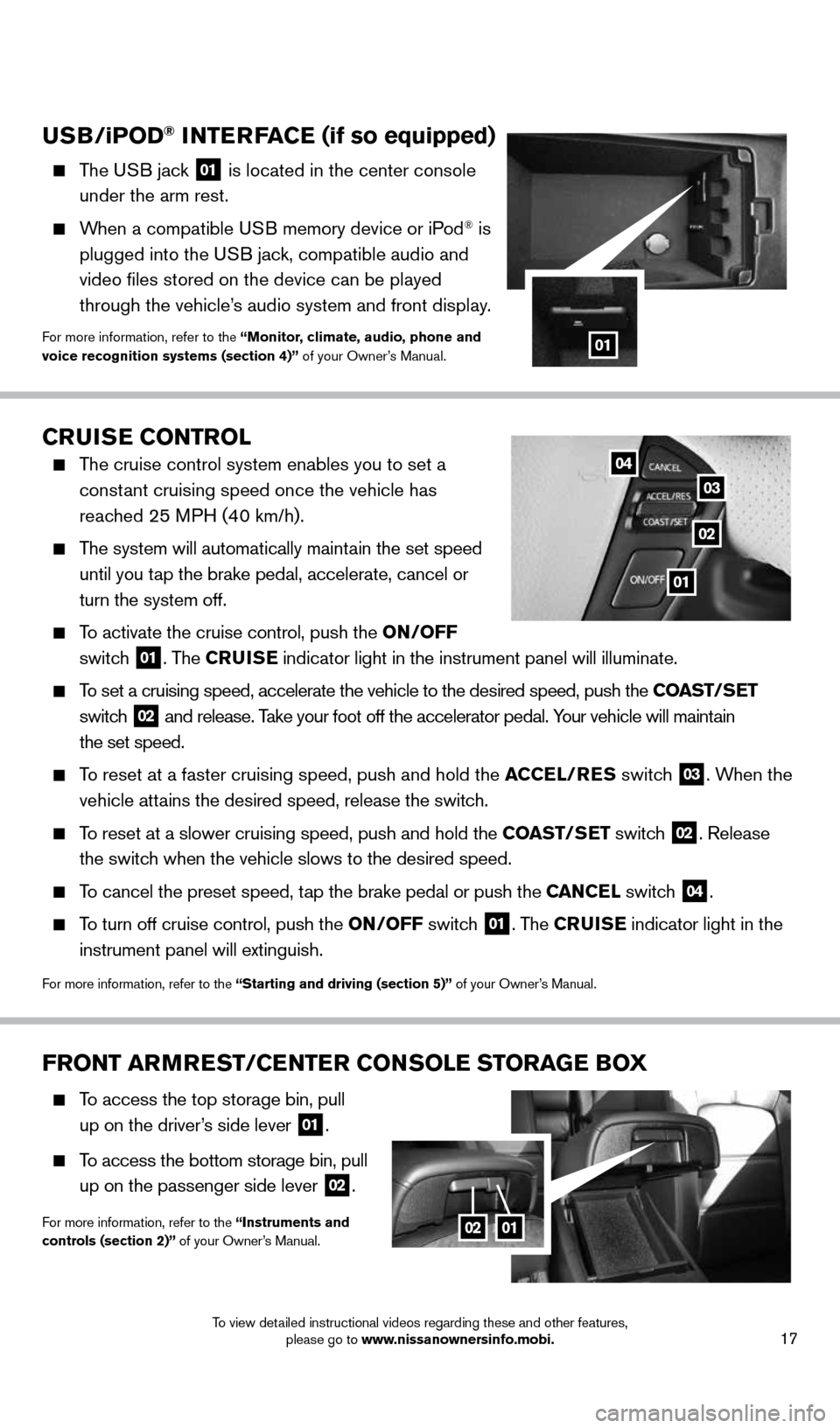
FRONT ARMREST/CENTER CONSOLE STORAGE BOX
To access the top storage bin, pull
up on the driver’s side lever
01.
To access the bottom storage bin, pull
up on the passenger side lever
02.
For more information, refer to the “Instruments and
controls (section 2)” of your Owner’s Manual.0201
CRUISE CONTROL
The cruise control system enables you to set a
constant cruising speed once the vehicle has
reached 25 MPH (40 km/h).
The system will automatically maintain the set speed
until you tap the brake pedal, accelerate, cancel or
turn the system off.
To activate the cruise control, push the ON/OFF
switch
01. The CRUISE indicator light in the instrument panel will illuminate.
To set a cruising speed, accelerate the vehicle to the desired speed, pus\
h the COAST/SET
switch
02 and release. Take your foot off the accelerator pedal. Your vehicle will maintain
the set speed.
To reset at a faster cruising speed, push and hold the ACCEL/RES switch 03. When the
vehicle attains the desired speed, release the switch.
To reset at a slower cruising speed, push and hold the COAST/SET switch 02. Release
the switch when the vehicle slows to the desired speed.
To cancel the preset speed, tap the brake pedal or push the CANCEL switch 04.
To turn off cruise control, push the ON/OFF switch 01. The CRUISE indicator light
in the
instrument panel will extinguish.
For more information, refer to the “Starting and driving (section 5)” of your Owner’s Manual.
01
02
03
04
USB/ iP OD® INTERFACE (if so equipped)
The USB jack 01 is located in the center console
under the arm rest.
When a compatible USB memory device or iPod® is
plugged into the USB jack, compatible audio and
video files stored on the device can be played
through the vehicle’s audio system and front display.
For more information, refer to the “Monitor, climate, audio, phone and
voice recognition systems (section 4)” of your Owner’s Manual.01
1591421_14d_Murano_QRG_012714b.indd 171/27/14 3:11 PM
To view detailed instructional videos regarding these and other features, please go to www.nissanownersinfo.mobi.
Page 21 of 28
19
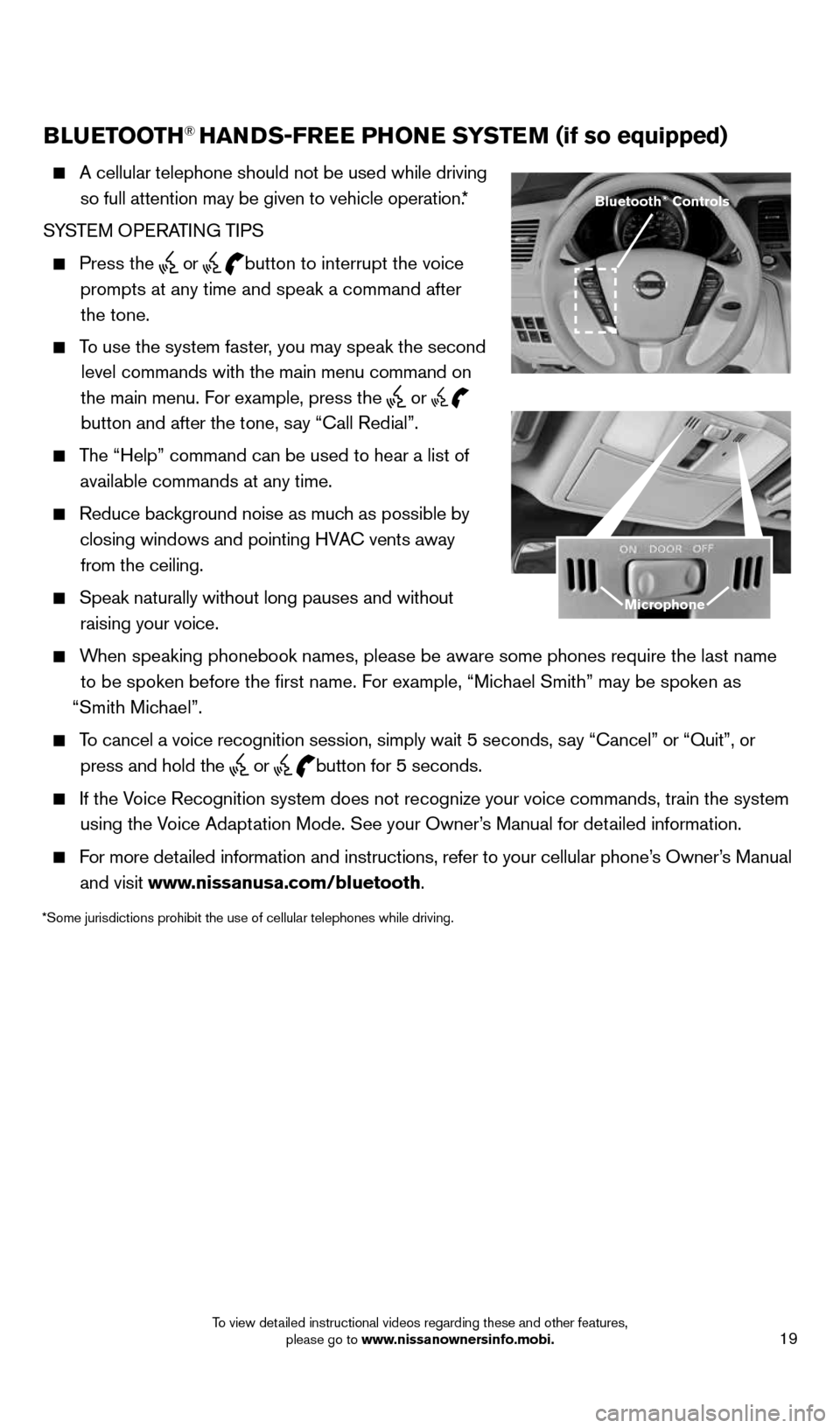
BLUETOOTH® HANDS-FREE PHONE SYSTEM (if so equipped)
A cellular telephone should not be used while driving
so full attention may be given to vehicle operation.*
SYSTEM OPERATING TIPS
Press the or button to interrupt the voice
prompts at any time and speak a command after the tone.
To use the system faster, you may speak the second
level commands with the main menu command on
the main menu. For example, press the
or
button and after the tone, say “Call Redial”.
The “Help” command can be used to hear a list of
available commands at any time.
Reduce background noise as much as possible by
closing windows and pointing HVAC vents away from the ceiling.
Speak naturally without long pauses and without
raising your voice.
When speaking phonebook names, please be aware some phones require the la\
st name
to be spoken before the first name. For example, “Michael Smith” may be spoken as
“Smith Michael”.
To cancel a voice recognition session, simply wait 5 seconds, say “Cancel” or “Quit”, or
press and hold the
or
button for 5 seconds.
If the Voice Recognition system does not recognize your voice commands, train th\
e system
using the Voice Adaptation Mode. See your Owner’s Manual for detailed information.
For more detailed information and instructions, refer to your cellular phone’s Owner’s Manual
and visit www.nissanusa.com/bluetooth.
Bluetooth® Controls
Microphone
*Some jurisdictions prohibit the use of cellular telephones while drivin\
g.
1591421_14d_Murano_QRG_012714b.indd 191/27/14 3:12 PM
To view detailed instructional videos regarding these and other features, please go to www.nissanownersinfo.mobi.
Page 22 of 28
20
SYSTEM GUIDE
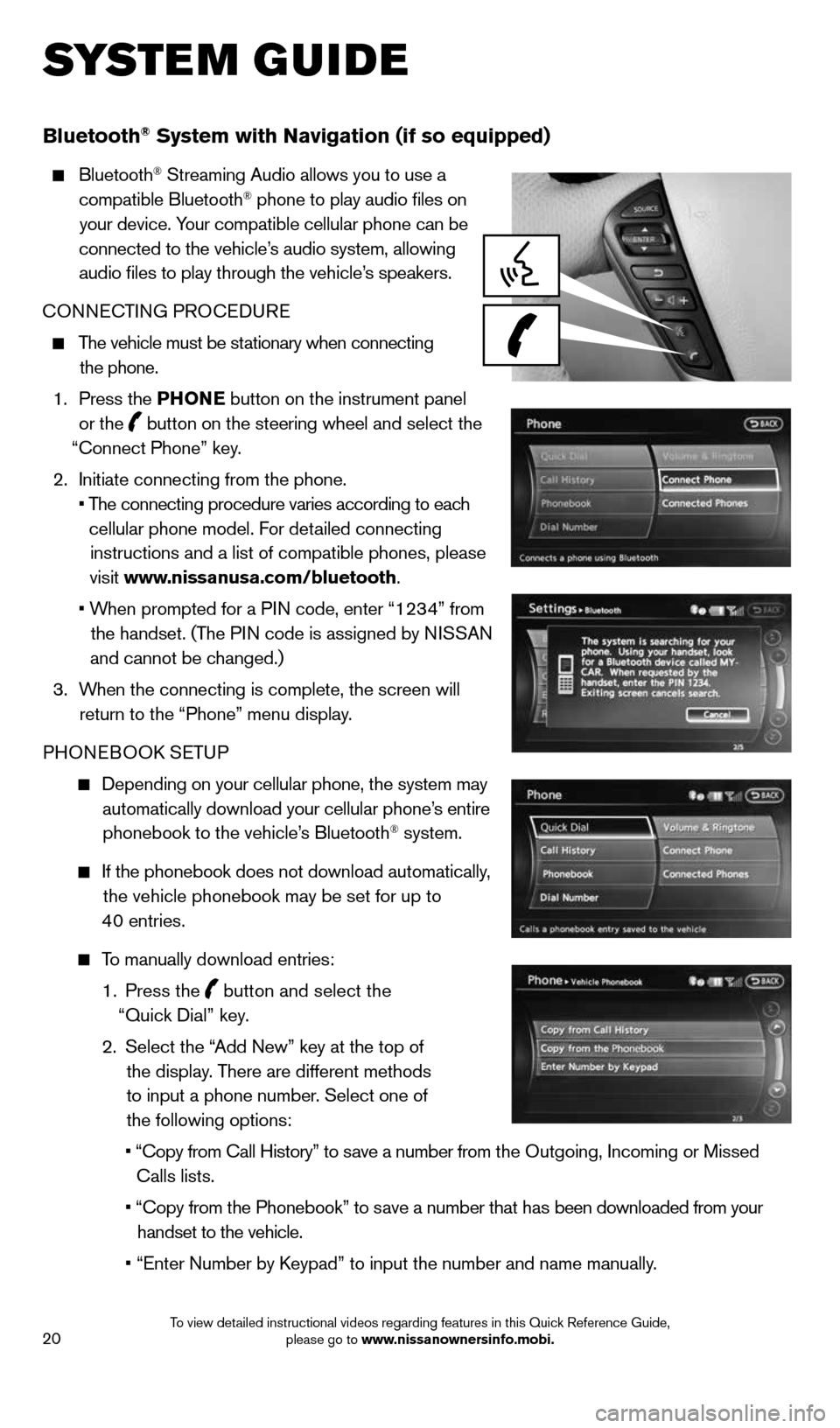
Bluetooth® System with Navigation (if so equipped)
Bluetooth® Streaming Audio allows you to use a
compatible Bluetooth® phone to play audio files on
your device. Your compatible cellular phone can be
connected to the vehicle’s audio system, allowing audio files to play through the vehicle’s speakers.
CONNECTING PROCEDURE
The vehicle must be stationary when connecting
the phone.
1. Press the PHONE button on the instrument panel
or the
button on the steering wheel and select the
“Connect Phone” key.
2. Initiate connecting from the phone.
• The connecting procedure varies according to each
cellular phone model. For detailed connecting instructions and a list of compatible phones, please
visit www.nissanusa.com/bluetooth.
• When prompted for a PIN code, enter “1234” from
the handset. (The PIN code is assigned by NISSAN
and cannot be changed.)
3. When the connecting is complete, the screen will
return to the “Phone” menu display.
PHONEBOOK SETUP
Depending on your cellular phone, the system may
automatically download your cellular phone’s entire phonebook to the vehicle’s Bluetooth
® system.
If the phonebook does not download automatically,
the vehicle phonebook may be set for up to
40 entries.
To manually download entries:
1. Press the
button and select the
“Quick Dial” key.
2. Select the “Add New” key at the top of
the display. There are different methods
to input a phone number. Select one of
the following options:
•
“Copy from Call History” to save a number from the Outgoing, Incoming or Missed
Calls lists.
• “Copy from the Phonebook” to save a number that has been downloaded from your
handset to the vehicle.
•
“Enter Number by Keypad” to input the number and name manually.
1591421_14d_Murano_QRG_012714b.indd 201/27/14 3:12 PM
To view detailed instructional videos regarding features in this Quick Reference Guide, please go to www.nissanownersinfo.mobi.
Page 23 of 28
21
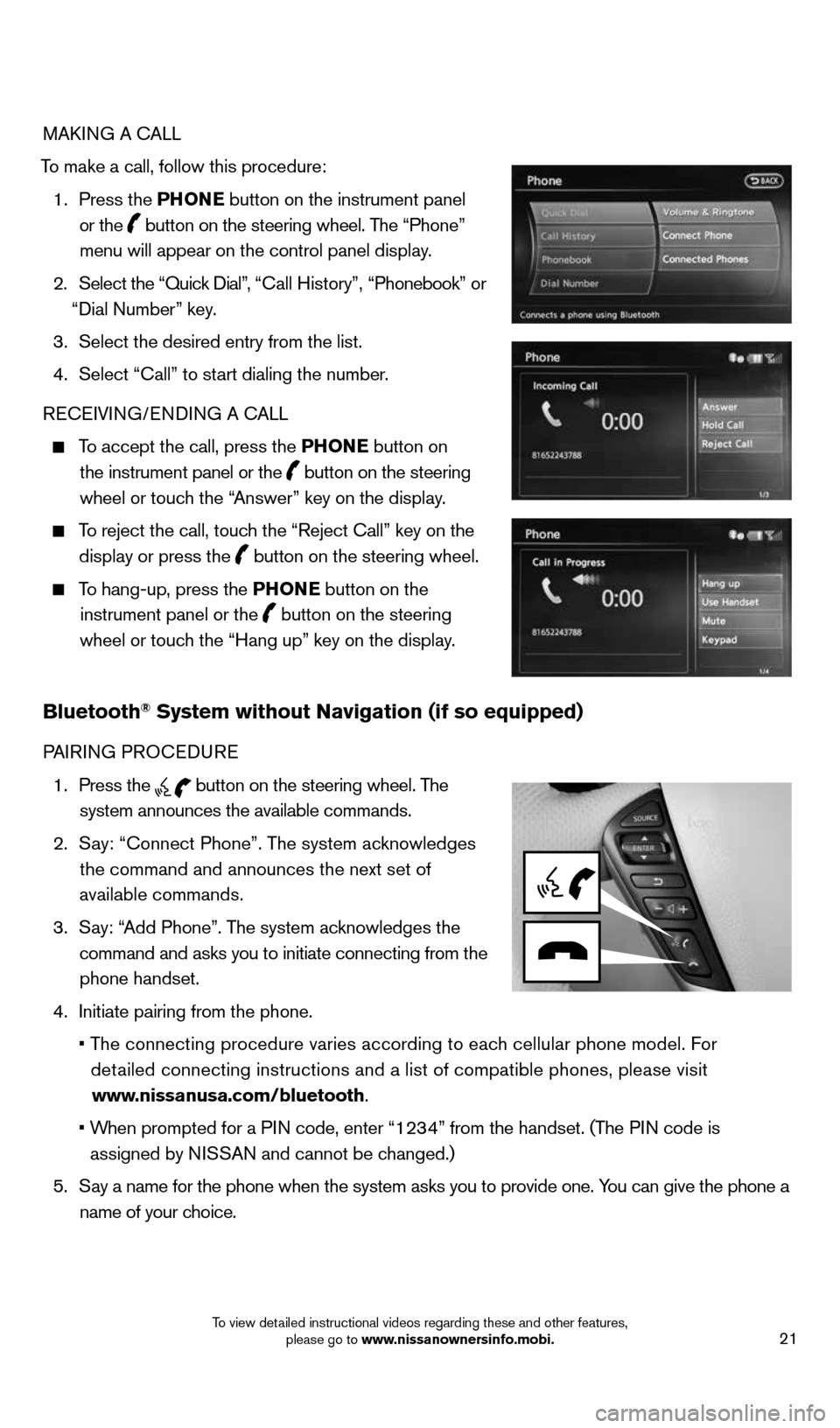
MAKING A CALL
To make a call, follow this procedure: 1. Press the PHONE button on the instrument panel
or the
button on the steering wheel. The “Phone”
menu will appear on the control panel display.
2. Select the “Quick Dial”, “Call History”, “Phonebook” or
“Dial Number” key.
3. Select the desired entry from the list.
4. Select “Call” to start dialing the number.
RECEIVING/ENDING A CALL
To accept the call, press the PHONE button on
the instrument panel or the
button on the steering
wheel or touch the “Answer” key on the display.
To reject the call, touch the “Reject Call” key on the
display or press the
button on the steering wheel.
To hang-up, press the PHONE button on the
instrument panel or the
button on the steering
wheel or touch the “Hang up” key on the display.
Bluetooth® System without Navigation (if so equipped)
PAIRING PROCEDURE
1. Press the
button on the steering wheel. The
system announces the available commands.
2. Say: “Connect Phone”. The system acknowledges
the command and announces the next set of
available commands.
3. Say: “Add Phone”. The system acknowledges the
command and asks you to initiate connecting from the phone handset.
4. Initiate pairing from the phone.
• The connecting procedure varies according to each cellular phone model. For
detailed connecting instructions and a list of compatible phones, please vi\
sit
www.nissanusa.com/bluetooth.
• When prompted for a PIN code, enter “1234” from the handset. (The PIN code is
assigned by NISSAN and cannot be changed.)
5. Say a name for the phone when the system asks you to provide one. You can give the phone a
name of your choice.
1591421_14d_Murano_QRG_012714b.indd 211/27/14 3:12 PM
To view detailed instructional videos regarding these and other features, please go to www.nissanownersinfo.mobi.