USB port NISSAN MURANO 2015 3.G LC2 Kai Navigation Manual
[x] Cancel search | Manufacturer: NISSAN, Model Year: 2015, Model line: MURANO, Model: NISSAN MURANO 2015 3.GPages: 203, PDF Size: 1.12 MB
Page 60 of 203
![NISSAN MURANO 2015 3.G LC2 Kai Navigation Manual 3. Audio system
BT Menu
Touch [BT Menu] on the BluetoothŠaudio
screen to display the BluetoothŠaudio menu
screen.
The following items are available.
[Now Play-
ing] Touch to display the Bluetooth](/img/5/436/w960_436-59.png "NISSAN MURANO 2015 3.G LC2 Kai Navigation Manual 3. Audio system
BT Menu
Touch [BT Menu] on the BluetoothŠaudio
screen to display the BluetoothŠaudio menu
screen.
The following items are available.
[Now Play-
ing] Touch to display the Bluetooth")
3. Audio system
BT Menu
Touch [BT Menu] on the BluetoothŠaudio
screen to display the BluetoothŠaudio menu
screen.
The following items are available.
[Now Play-
ing] Touch to display the BluetoothŠ
audio screen.
[Bluetooth
Settings] Touch to display the BluetoothŠ
settings screen.“BluetoothŠsettings”
(page 2-17)
[Folder List]* Touch to display the folder list. Touch an item on the list to select
the folder.
Track List A list of the tracks is displayed. Touch an item on the list to select
the track.
*: Displayed only when available.
AUXILIARY (AUX) DEVICES
Connecting auxiliary devices
The auxiliary input jack is located in the media
pocket.
“USB (Universal Serial Bus) Connection
Ports and AUX (auxiliary) input jack”
(page 2-5)
The auxiliary input jack accepts any standard
analog audio input such as from a portable
cassette player, CD player or MP3 player.
INFO:
Insert a 1/4 in (3.5 mm) stereo mini plug in the
audio input jack. If a cable with a mono plug is
used, the audio output may not function normally.
How to view AUX screen
*1[Source]:
Touch to switch to the source list screen.
“Selecting audio source” (page 3-11)
*2Audio source indicator:
Indicates that an AUX device is currently
selected among other sources.
*3Turn direction indicator:
When a route to the destination is set, the
turn direction and the distance to the next
turn are displayed.
*4Volume Setting keys:
Touch one of the keys to select the sound
output gain from [Low], [Medium] and
[High].
3-30
Page 62 of 203
3. Audio system
AUDIO ADJUSTMENTS WHEN MAP,
AUDIO OR HOME MENU IS DIS-
PLAYED
When Map, Audio or HOME MENU screen is
displayed, some audio settings can be adjusted
with
selected setting item will change as follows.
[Bass] ?[Treble] ?[Balance] ?[Fade]
Rotate
the level of the selected setting item.
CD/USB MEMORY DEVICE
CARE AND CLEANING
CD
. Handle a CD by its edges. Never touch the
surface of the disc. Do not bend the disc.
. Always place the discs in the storage case
when they are not being used.
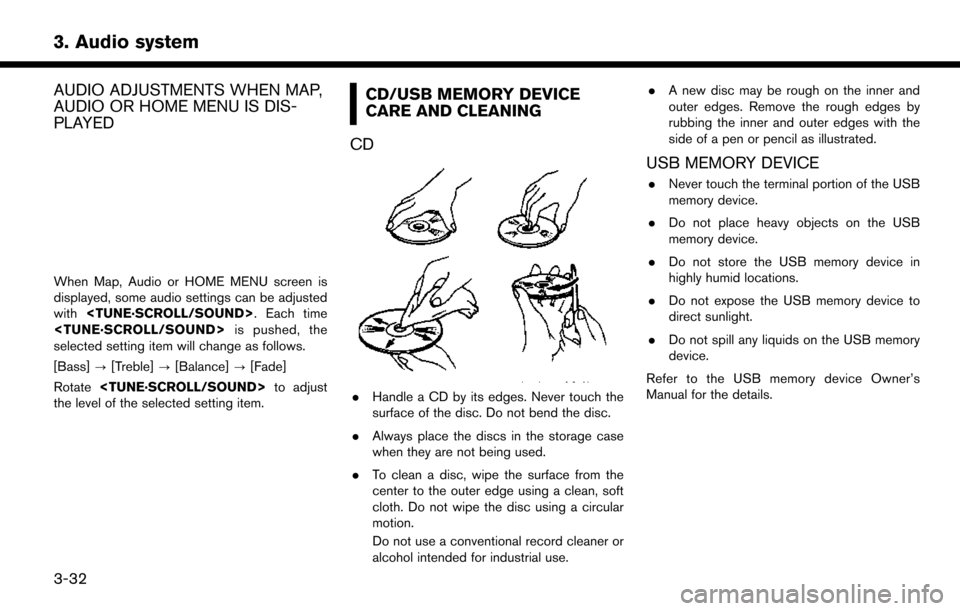
. To clean a disc, wipe the surface from the
center to the outer edge using a clean, soft
cloth. Do not wipe the disc using a circular
motion.
Do not use a conventional record cleaner or
alcohol intended for industrial use. .
A new disc may be rough on the inner and
outer edges. Remove the rough edges by
rubbing the inner and outer edges with the
side of a pen or pencil as illustrated.
USB MEMORY DEVICE
.Never touch the terminal portion of the USB
memory device.
. Do not place heavy objects on the USB
memory device.
. Do not store the USB memory device in
highly humid locations.
. Do not expose the USB memory device to
direct sunlight.
. Do not spill any liquids on the USB memory
device.
Refer to the USB memory device Owner’s
Manual for the details.
3-32
Page 80 of 203
5. Information
NISSANCONNECTSMMOBILE
APPS
NISSANCONNECT
SMMOBILE APPS
SMARTPHONE INTEGRATION
This vehicle is equipped with smartphone
integration technology. This allows many com-
patible smartphone applications to be displayed
and easily controlled through the vehicle’s touch
screen display.
Laws in some jurisdictions may restrict the use of
some of the applications and features, such as
social networking and texting. Check local
regulations for any requirements.
INFO:
A compatible smartphone and registration is
required to use mobile applications or to access
connected features of certain vehicle applica-
tions.
REGISTERING WITH NISSANCON-
NECTSMMOBILE APPS
To use the smartphone integration feature, it is
necessary for the user to register. In order to
register, visit the NissanConnect
SMwebsite for
more information and to sign up. Once regis-
tered, download the NissanConnect
SMApp from your compatible phone’s application download
source and then log into the application.
For more information about this technology, visit
the website at:
For U.S. customers:
www.nissanusa.com/connect
For Canadian customers:
www.nissan.ca/nissanconnect (English)
www.nissan.ca/nissanconnect/fr (French)
CONNECTING PHONE
To use this feature, a compatible smartphone
must be connected via BluetoothŠor USB to the
vehicle.
“Connecting BluetoothŠdevice”
(page 2-17)
“USB (Universal Serial Bus) Connection
Ports and AUX (auxiliary) input jack”
(page 2-5)
INFO:
. For Apple iPhone
Š, NissanConnectSMMo-
bile Apps REQUIRES the phone to be
plugged in via USB after the Bluetooth
Š
connection is established.
. For Android phones, NissanConnect
SMMo-
bil Apps REQUIRES the phone to be paired via Bluetooth
Š.
APPLICATION DOWNLOAD
Once connected, the NissanConnectSMApp will
search your phone to determine which compa-
tible applications are currently installed. The
vehicle will then download the in-vehicle inter-
face for each of these compatible applications.
Once downloaded, the user can access many
smartphone Applications through the vehicle
touch screen display with the following oper-
ataion.
1. Touch [Info] on the Launch Bar.
2. Touch [NissanConnect Apps].
For more information on application availability
visit the NissanConnect
SMweb site.
For U.S. customers:
www.nissanusa.com/connect
For Canadian customers:
www.nissan.ca/nissanconnect (English)
www.nissan.ca/nissanconnect/fr (French)
5-6
Page 136 of 203
![NISSAN MURANO 2015 3.G LC2 Kai Navigation Manual 6. Navigation
Deleting stored item individually
1. Touch [Settings] on the Launch Bar.
2. Touch [Navigation] and touch [Address Book].
3. Touch [Delete Stored Items].Select the preferred item and touc](/img/5/436/w960_436-135.png "NISSAN MURANO 2015 3.G LC2 Kai Navigation Manual 6. Navigation
Deleting stored item individually
1. Touch [Settings] on the Launch Bar.
2. Touch [Navigation] and touch [Address Book].
3. Touch [Delete Stored Items].Select the preferred item and touc")
6. Navigation
Deleting stored item individually
1. Touch [Settings] on the Launch Bar.
2. Touch [Navigation] and touch [Address Book].
3. Touch [Delete Stored Items].Select the preferred item and touch [Yes] to complete the deleting operation.
Step 1 Step2 Action
[Delete Home Location] Deletes home location.
[Delete Address
Book] [Delete All]
Deletes all stored locations.
[Delete one] Deletes a selected stored location.
[Delete Stored
Routes] [Delete All]
Deletes all stored routes.
[Delete one] Deletes selected stored routes.
[Delete Avoid
Areas] [Delete All]
Deletes all Avoid Areas.
[Delete one] Deletes a selected Avoid Area.
[Delete Pre-
vious Destina-
tions] [Delete All Previous Destinations] Deletes all of the previous destinations.
[Delete Previous Destination] Deletes a selected previous destination.
[Delete Previous Start Point] Deletes a previous start point.
[Delete Learned Routes] Deletes all system learned routes.
Deleting individual item on map
1. Align the cross pointer over the preferred
stored location for deletion by moving on the
map, and then touch [
].
2. Touch [Delete].
3. A confirmation message is displayed. Con-firm the contents of the message and touch
[Yes].
The stored item is deleted from the Address
Book.
TRANSFERRING INFORMATION TO/
FROM ADDRESS BOOK
The information of the stored home and ad-
dresses can be exported and imported using a
USB memory device.
“USB (Universal Serial Bus) Connection
Ports and AUX (auxiliary) input jack”
(page 2-5)
6-52
Page 137 of 203
![NISSAN MURANO 2015 3.G LC2 Kai Navigation Manual INFO:
1. Touch [Settings] on the Launch Bar.
2. Touch [Navigation].
3. Touch [Address Book].
4. Touch [Transfer Address Book].
5. Touch [Export] or [Import].
6. Touch [Home Location] or [Stored Loca-t](/img/5/436/w960_436-136.png "NISSAN MURANO 2015 3.G LC2 Kai Navigation Manual INFO:
1. Touch [Settings] on the Launch Bar.
2. Touch [Navigation].
3. Touch [Address Book].
4. Touch [Transfer Address Book].
5. Touch [Export] or [Import].
6. Touch [Home Location] or [Stored Loca-t")
INFO:
1. Touch [Settings] on the Launch Bar.
2. Touch [Navigation].
3. Touch [Address Book].
4. Touch [Transfer Address Book].
5. Touch [Export] or [Import].
6. Touch [Home Location] or [Stored Loca-tions].
7. Touch [Download].
NOTE:
Do not remove the USB memory device
until the system completely imports or
exports the data.
INFO:
. If the USB memory device already has the
data for a stored address, a confirmation
message will be displayed. Once overwrit-
ten, the original data cannot be recovered.
. Either of the two USB ports can be used for
information transfer.
. A USB memory device can be used to
transfer data but it is not possible to edit the
data using a personal computer, etc.
6. Navigation
6-53
Page 168 of 203
7. Voice recognition
.The Voice Recognition system may not function when the song information is too long (artist names, album titles, song titles and play lists, etc.) .
. The SXM function will not operate without a subscription to SiriusXM Satellite Radio.
. When playing USB files with the voice recognition system, do not pronounce the extension attached to the file name (such as “.mp3”) .
. Song titles registered in ID3 tags cannot be pronounced for voice recognition operation.
Information Command
1st Command 2nd Command Action
Information Where am I?
Displays information of the current position.
SXM Weather Map Displays the SXM Weather map.
SXM Current Weather Displays the nearby weather (current weather).
SXM Weather Forecast Displays the weather forecast.
SXM Fuel Prices Displays fuel prices.
SXM Movie Listings Displays SXM Movie Listings.
SXM Stocks Displays SXM stock information.
SXM Sports Scores Displays sports scores.
SXM Traffic Turns the traffic information system on or off.
INFO:
A SiriusXM Travel Link or SiriusXM Traffic subscription is necessary to receive SXM information services.
“SiriusXM Travel Link” (page 5-7)
7-16
Page 169 of 203
![NISSAN MURANO 2015 3.G LC2 Kai Navigation Manual VOICE RECOGNITION SETTINGS
The voice recognition settings can be changed.
1. Touch [Setting] on the Launch Bar.
2. Touch [Voice Recognition].
3. Touch the item you would like to set.
Available setting](/img/5/436/w960_436-168.png "NISSAN MURANO 2015 3.G LC2 Kai Navigation Manual VOICE RECOGNITION SETTINGS
The voice recognition settings can be changed.
1. Touch [Setting] on the Launch Bar.
2. Touch [Voice Recognition].
3. Touch the item you would like to set.
Available setting")
VOICE RECOGNITION SETTINGS
The voice recognition settings can be changed.
1. Touch [Setting] on the Launch Bar.
2. Touch [Voice Recognition].
3. Touch the item you would like to set.
Available settings. [Minimum Voice Feedback]:
Turns the minimum voice feedback function
on/off. When this item is turned on, short and
minimized voice feedback will be provided.
. [Audio device setting]:
Select an audio device to be operated via the
Voice Recognition system from the audio
devices connected to the USB ports. A
device with an indicator light illuminated can
be operated with the Voice Recognition
system.
7. Voice recognition
7-17
Page 178 of 203
8. Troubleshooting guide
iPodŠPLAYER
SymptomPossible cause Possible solution
The system does not recognize an iPodŠ. A connector cable is not correctly connected, or the
iPodŠdoes not correctly operate. Connect the connector cable again. If the system
does not recognize the iPodŠafter performing this
procedure above, reset the iPodŠ.
The iPodŠthat is to be connected is not compatible
with the system. Check the iPodŠmodel and firmware versions
available for the system.
A USB extension cable is not correctly connected. Do not use a USB extension cable.
The cable is rapidly connected to or disconnected
from the USB port. Slowly connect or disconnect the USB cable.
An iPod
Šcannot be operated. The iPodŠis connected to the in-vehicle audio
system while headsets, etc. are connected to the
iPod
Š. Remove all equipment from the iPod
Šafter discon-
necting the iPodŠfrom the system, and then connect
it to the system again.
The iPod
Šis not operating normally. Disconnect the iPodŠfrom the in-vehicle audio
system, and then connect it to the system again.
The system plays back an album/file that includes a
particular album art. Disconnect the iPod
Šfrom the in-vehicle audio
system, and then reset the iPodŠ. Disable the album
art, and then connect the iPodŠto the system.“iPodŠMenu” (page 3-26)
An iPodŠdoes not respond. There are too many files in a category. Decrease the number of files in a category (less than
65500 files).
The shuffle function is turned on. Turn off the shuffle function if many files are stored on
the iPod
Š.
Music cannot be played back. A connector is not connected to the iPodŠ. Firmly connect the connector to the iPodŠ.
Playback cuts out. The sound cuts due to vibration resulting from an
unstable location of the iPod
Š. Place the iPod
Šon a stable location where it does not
roll over.
Distorted sound occurs. The EQ (equalizer) function of the iPod
Šis turned on. Turn off the EQ (equalizer) function on your iPodŠ.
8-8
Page 180 of 203
8. Troubleshooting guide
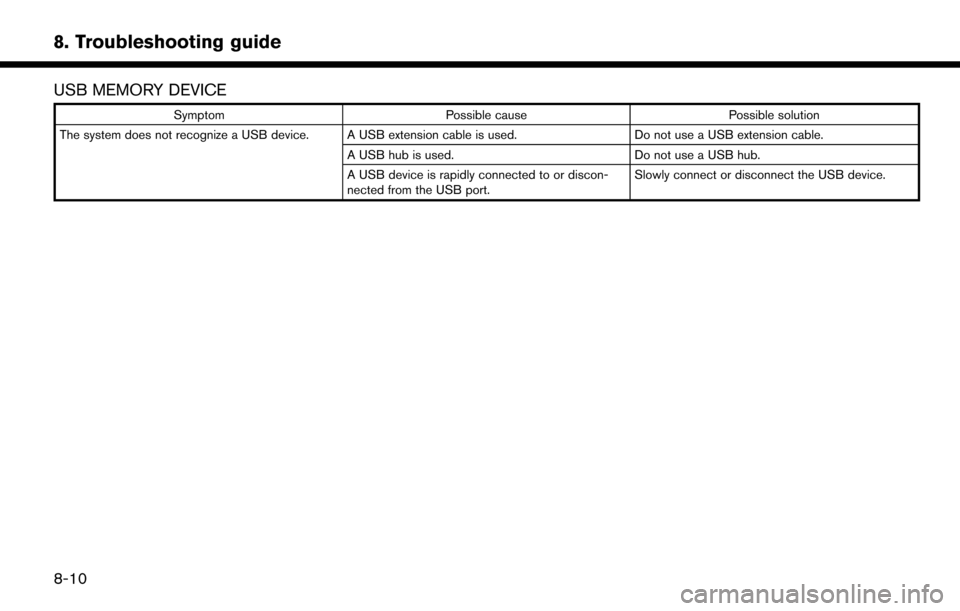
USB MEMORY DEVICE
SymptomPossible cause Possible solution
The system does not recognize a USB device. A USB extension cable is used. Do not use a USB extension cable.
A USB hub is used. Do not use a USB hub.
A USB device is rapidly connected to or discon-
nected from the USB port. Slowly connect or disconnect the USB device.
8-10
Page 193 of 203
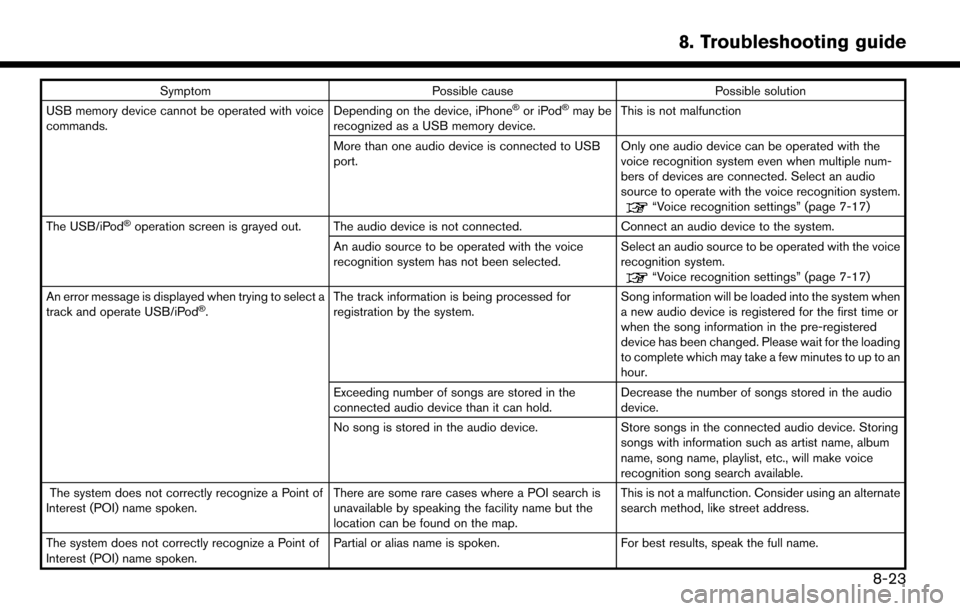
SymptomPossible cause Possible solution
USB memory device cannot be operated with voice
commands. Depending on the device, iPhoneŠor iPodŠmay be
recognized as a USB memory device. This is not malfunction
More than one audio device is connected to USB
port. Only one audio device can be operated with the
voice recognition system even when multiple num-
bers of devices are connected. Select an audio
source to operate with the voice recognition system.
“Voice recognition settings” (page 7-17)
The USB/iPodŠoperation screen is grayed out. The audio device is not connected. Connect an audio device to the system.
An audio source to be operated with the voice
recognition system has not been selected. Select an audio source to be operated with the voice
recognition system.
“Voice recognition settings” (page 7-17)
An error message is displayed when trying to select a
track and operate USB/iPod
Š. The track information is being processed for
registration by the system. Song information will be loaded into the system when
a new audio device is registered for the first time or
when the song information in the pre-registered
device has been changed. Please wait for the loading
to complete which may take a few minutes to up to an
hour.
Exceeding number of songs are stored in the
connected audio device than it can hold. Decrease the number of songs stored in the audio
device.
No song is stored in the audio device. Store songs in the connected audio device. Storing
songs with information such as artist name, album
name, song name, playlist, etc., will make voice
recognition song search available.
The system does not correctly recognize a Point of
Interest (POI) name spoken. There are some rare cases where a POI search is
unavailable by speaking the facility name but the
location can be found on the map.This is not a malfunction. Consider using an alternate
search method, like street address.
The system does not correctly recognize a Point of
Interest (POI) name spoken. Partial or alias name is spoken.
For best results, speak the full name.
8. Troubleshooting guide
8-23