cruise control NISSAN MURANO 2018 Owner´s Manual
[x] Cancel search | Manufacturer: NISSAN, Model Year: 2018, Model line: MURANO, Model: NISSAN MURANO 2018Pages: 460, PDF Size: 5.06 MB
Page 17 of 460
16. Push-button ignition switch(P. 5-13)
17. Cruise control switches
(if so equipped) (P. 5-43)
Intelligent Cruise Control (ICC)
switches (if so equipped) (P. 5-44)
18. Driver supplemental knee air bag
(P. 1-49)
19. Bluetooth® Hands-Free Phone
System/Audio control switches
(P. 4-2)
20. Hood release (P. 3-22) Fuel door release (P. 3-31)
Powered rear seatback switch
(P. 1-2)
21. Fuse box (P. 8-20)
22. Power lif tgate main switch
(if so equipped) (P. 3-22)
Heated steering wheel switch
(if so equipped) (P. 2-45)
Vehicle Dynamic Control (VDC) OFF
switch (P. 2-46)
23. Instrument brightness control
(P. 2-37)
Twin trip odometer reset switch
(P. 2-4)*: Refer to the separate NissanConnect®
Owner’s Manual.
Refer to the page number indicated in
parentheses for operating details.
Illustrated table of contents0-7
Page 95 of 460
16. Push-button ignition switch(P. 5-13)
17. Cruise control switches
(if so equipped) (P. 5-43)
Intelligent Cruise Control (ICC)
switches (if so equipped) (P. 5-44)
18. Driver supplemental knee air bag
(P. 1-49)
19. Bluetooth® Hands-Free Phone
System/Audio control switches
(P. 4-2)
20. Hood release (P. 3-22) Fuel door release (P. 3-31)
Powered rear seatback switch
(P. 1-2)
21. Fuse box (P. 8-20)
22. Power lif tgate main switch
(if so equipped) (P. 3-22)
Heated steering wheel switch
(if so equipped) (P. 2-45)
Vehicle Dynamic Control (VDC) OFF
switch (P. 2-46)
23. Instrument brightness control
(P. 2-37)
Twin trip odometer reset switch
(P. 2-4)*: Refer to the separate NissanConnect®
Owner’s Manual.
Refer to the page number indicated in
parentheses for operating details.
Instruments and controls2-3
Page 109 of 460
∙ Vehicle and meter display settings
∙ Cruise control status
∙ Odometer/twin trip odometer
∙ Gear position information (P, R, N, D)
∙ Distance To Empty and fuel indicator
The display will be interrupted when a
phone call is received. Phone calls can be
answered or rejected through the steering
wheel controls.
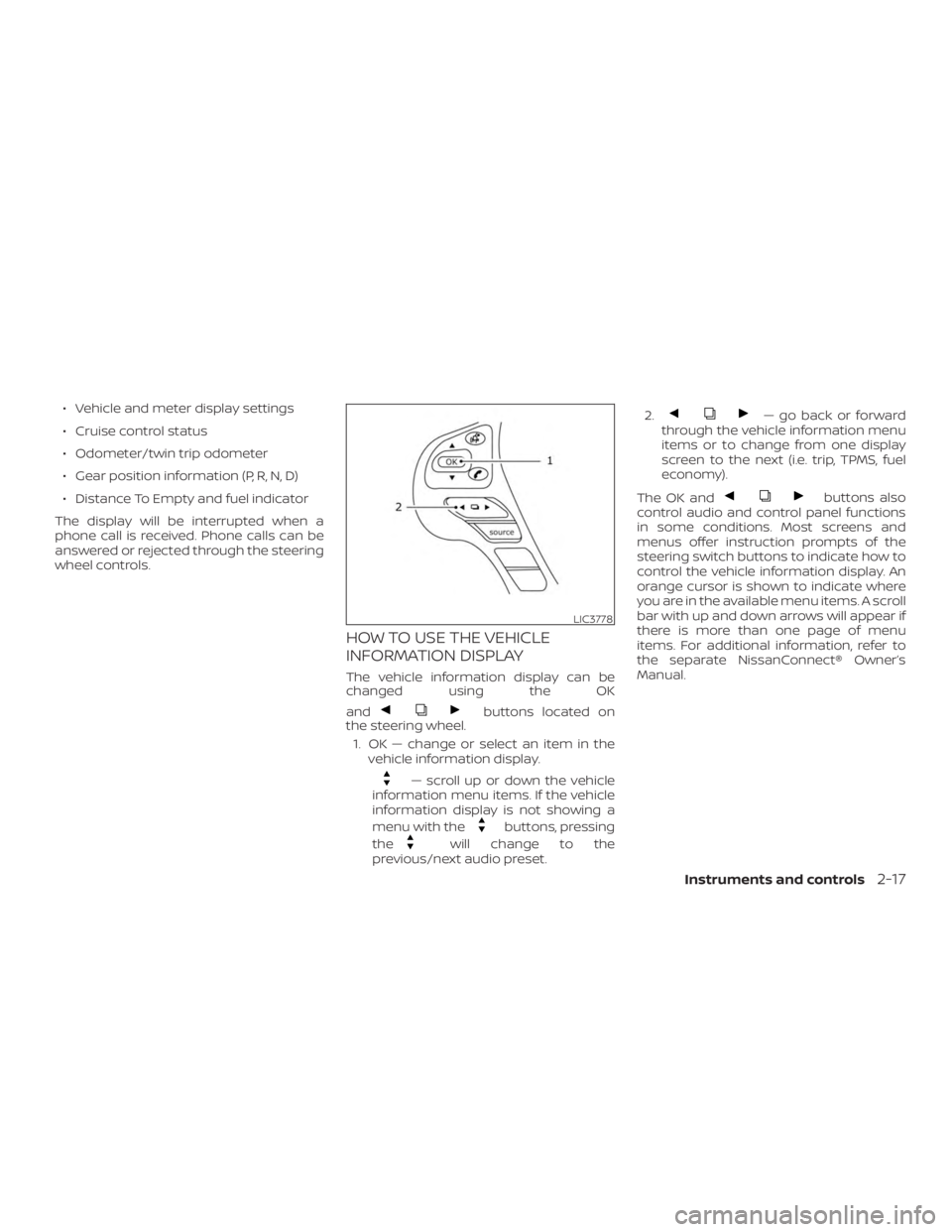
HOW TO USE THE VEHICLE
INFORMATION DISPLAY
The vehicle information display can be
changed using the OK
and
buttons located on
the steering wheel.
1. OK — change or select an item in the vehicle information display.
— scroll up or down the vehicle
information menu items. If the vehicle
information display is not showing a
menu with the
buttons, pressing
the
will change to the
previous/next audio preset. 2.
— go back or forward
through the vehicle information menu
items or to change from one display
screen to the next (i.e. trip, TPMS, fuel
economy).
The OK and
buttons also
control audio and control panel functions
in some conditions. Most screens and
menus offer instruction prompts of the
steering switch buttons to indicate how to
control the vehicle information display. An
orange cursor is shown to indicate where
you are in the available menu items. A scroll
bar with up and down arrows will appear if
there is more than one page of menu
items. For additional information, refer to
the separate NissanConnect® Owner’s
Manual.
LIC3778
Instruments and controls2-17
Page 119 of 460
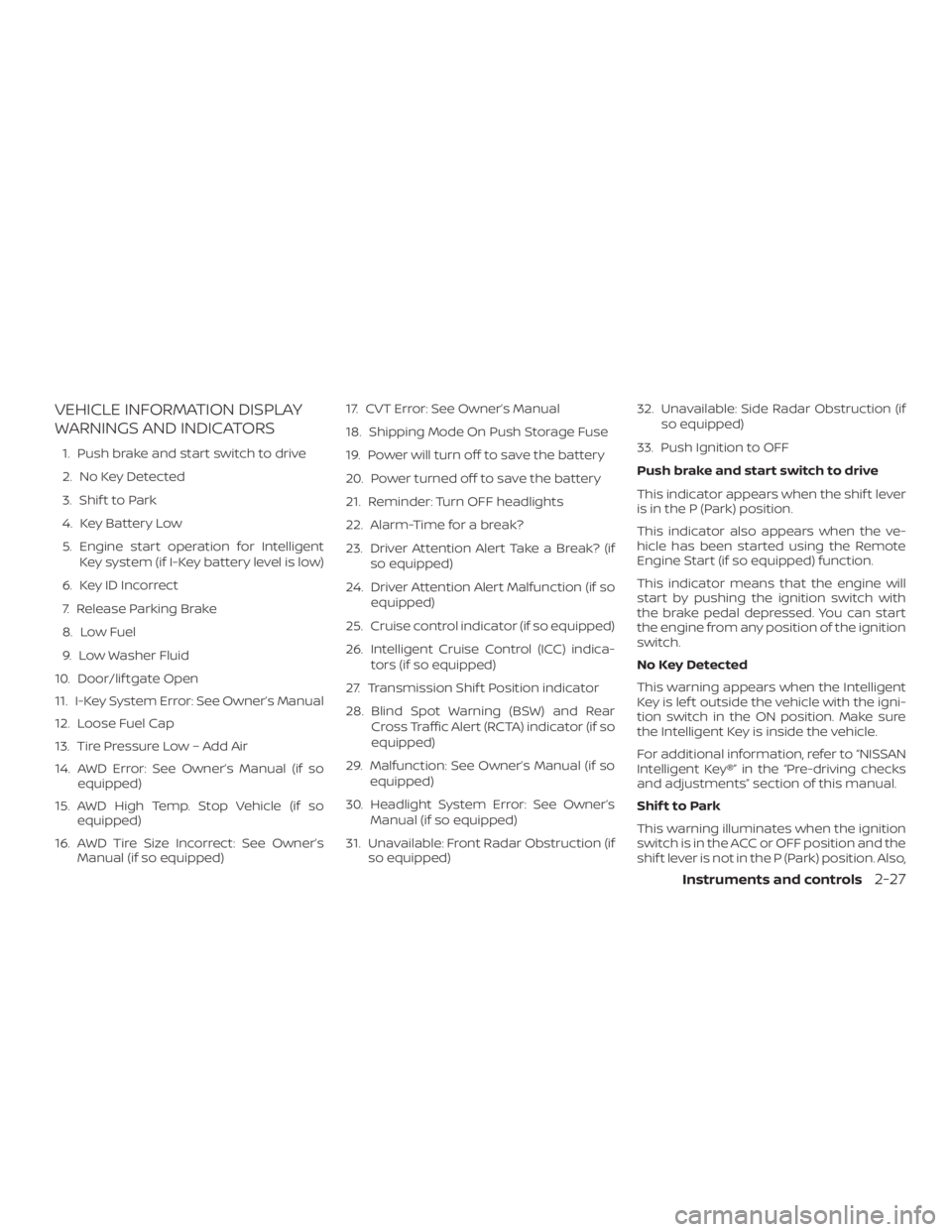
VEHICLE INFORMATION DISPLAY
WARNINGS AND INDICATORS
1. Push brake and start switch to drive
2. No Key Detected
3. Shif t to Park
4. Key Battery Low
5. Engine start operation for IntelligentKey system (if I-Key battery level is low)
6. Key ID Incorrect
7. Release Parking Brake
8. Low Fuel
9. Low Washer Fluid
10. Door/lif tgate Open
11. I-Key System Error: See Owner’s Manual
12. Loose Fuel Cap
13. Tire Pressure Low – Add Air
14. AWD Error: See Owner’s Manual (if so equipped)
15. AWD High Temp. Stop Vehicle (if so equipped)
16. AWD Tire Size Incorrect: See Owner’s Manual (if so equipped) 17. CVT Error: See Owner’s Manual
18. Shipping Mode On Push Storage Fuse
19. Power will turn off to save the battery
20. Power turned off to save the battery
21. Reminder: Turn OFF headlights
22. Alarm-Time for a break?
23. Driver Attention Alert Take a Break? (if
so equipped)
24. Driver Attention Alert Malfunction (if so equipped)
25. Cruise control indicator (if so equipped)
26. Intelligent Cruise Control (ICC) indica- tors (if so equipped)
27. Transmission Shif t Position indicator
28. Blind Spot Warning (BSW) and Rear Cross Traffic Alert (RCTA) indicator (if so
equipped)
29. Malfunction: See Owner’s Manual (if so equipped)
30. Headlight System Error: See Owner’s Manual (if so equipped)
31. Unavailable: Front Radar Obstruction (if so equipped) 32. Unavailable: Side Radar Obstruction (if
so equipped)
33. Push Ignition to OFF
Push brake and start switch to drive
This indicator appears when the shif t lever
is in the P (Park) position.
This indicator also appears when the ve-
hicle has been started using the Remote
Engine Start (if so equipped) function.
This indicator means that the engine will
start by pushing the ignition switch with
the brake pedal depressed. You can start
the engine from any position of the ignition
switch.
No Key Detected
This warning appears when the Intelligent
Key is lef t outside the vehicle with the igni-
tion switch in the ON position. Make sure
the Intelligent Key is inside the vehicle.
For additional information, refer to “NISSAN
Intelligent Key®” in the “Pre-driving checks
and adjustments” section of this manual.
Shif t to Park
This warning illuminates when the ignition
switch is in the ACC or OFF position and the
shif t lever is not in the P (Park) position. Also,
Instruments and controls2-27
Page 122 of 460
set time is expired. The time is based on
ignition on time and can be set up to six
hours.
Driver Attention Alert - Take a Break? (if
so equipped)
This alert appears when the system has
detected that the driver may be displaying
fatigue or a lack of attention.
Driver Attention Alert Malfunction (if so
equipped)
This warning appears when the Intelligent
Driver Alertness (I-DA) system is not func-
tioning properly. For additional information,
refer to “Intelligent Driver Alertness (I-DA)” in
the “Starting and driving” section of this
manual.
Cruise control indicator (if so equipped)
These indicators show the cruise control
system status.
For additional information, refer to “Cruise
control” in the “Starting and driving” section
of this manual.
Intelligent Cruise Control (ICC) indica-
tors (if so equipped)
These indicators show the Intelligent
Cruise Control (ICC) system status. For ad-ditional information, refer to “Intelligent
Cruise Control (ICC)” in the “Starting and
driving” section of this manual.
Transmission Shif t Position indicator
This indicator shows the transmission shif t
position.
Blind Spot Warning (BSW) and Rear
Cross Traffic Alert (RCTA) indicator (if so
equipped)
This indicator shows when the BSW and
RCTA systems are engaged.
For additional information, refer to “Blind
Spot Warning (BSW)” and “Rear Cross Traffic
Alert (RCTA)” in the “Starting and driving”
section of this manual.
Malfunction: See Owner’s Manual
This warning appears when one or more of
the following systems (if so equipped) is
not functioning properly:
∙ Automatic Emergency Braking (AEB)
∙ Blind Spot Warning (BSW)
∙ Rear Cross Traffic Alert (RCTA)
∙ Intelligent Forward Collision Warning (I- FCW) If one or more of these warning appears,
have the system checked. It is recom-
mended that you visit an NISSAN dealer for
this service.
Headlight System Error: See Owner’s
Manual (if so equipped)
This warning appears when the LED head-
lights are not functioning properly.
If this warning appears, have your system
checked. It is recommended that you visit a
NISSAN dealer for this service.
Unavailable: Front Radar Obstruction (if
so equipped)
This message appears when the Intelligent
Cruise Control (ICC), Automatic Emergency
Braking (AEB), or Intelligent Forward Colli-
sion Warning (I-FCW) systems become un-
available because the front radar is ob-
structed. For additional information, refer
to “Intelligent Cruise Control (ICC)”, “Auto-
matic Emergency Braking (AEB)”, or “Intelli-
gent Forward Collision Warning (I-FCW)” in
the “Starting and driving” section of this
manual.
2-30Instruments and controls
Page 239 of 460
5 Starting and driving
Precautions when starting and driving..........5-4
Exhaust gas (carbon monoxide) ..............5-4
Three-way catalyst ...........................5-5
Tire Pressure Monitoring System
(TPMS)........................................5-5
On-pavement and off-road driving
precautions ..................................5-9
Avoiding collision and rollover ................5-9
Off-roadrecovery ............................5-9
Rapid air pressure loss ......................5-10
Drinking alcohol/drugs and driving ...........5-11
Driving safety precautions ....................5-11
Push-button ignition switch ....................5-13
Operating range ............................. 5-14
Push-button ignition switch positions .......5-14
Emergency engine shut off ..................5-15
NISSAN Intelligent Key® battery
discharge ................................... 5-16
NISSAN Vehicle Immobilizer System .........5-16
Before starting the engine ......................5-17
Starting the engine ............................. 5-17
Remote Engine Start (if so equipped) ........5-18 Driving the vehicle
.............................. 5-18
Continuously Variable Transmission
(CVT) ........................................ 5-18
Parking brake .................................. 5-24
Blind Spot Warning (BSW) (if so equipped) .......5-24
BSW system operation ......................5-26
How to enable/disable the BSW system .....5-27
BSW system limitations ......................5-28
BSW driving situations .......................5-29
System temporarily unavailable .............5-32
System maintenance ........................ 5-33
Rear Cross Traffic Alert (RCTA) (if so equipped) . . 5-34 RCTA system operation ......................5-35
How to enable/disable the RCTA
system ...................................... 5-37
RCTA system limitations .....................5-38
System temporarily unavailable .............5-41
System maintenance ........................ 5-41
Cruise control (if so equipped) ..................5-43
Precautions on cruise control ................5-43
Cruise
control operations .................... 5-43
Page 240 of 460
Intelligent Cruise Control (ICC) (if so equipped) . . 5-44ICC system operation .......................5-46
The ICC switch ..............................5-47
ICC system limitations .......................5-53
System temporarily unavailable .............5-56
System maintenance ........................ 5-58
Automatic Emergency Braking (AEB) ...........5-59
AEB system operation ....................... 5-61
Turning the AEB system on/off ..............5-62
AEB system limitations ......................5-63
System temporarily unavailable .............5-64
System malfunction ......................... 5-65
System maintenance ........................ 5-65
Intelligent Forward Collision Warning (I-FCW) ....5-66
I-FCW system operation .....................5-68
Turning the I-FCW system on/off ............5-69
I-FCW system limitations ....................5-70
System temporarily unavailable .............5-75
System malfunction ......................... 5-76
System maintenance ........................ 5-76
Intelligent Driver Alertness (I-DA)
(if so equipped) ................................. 5-78
Intelligent Driver Alertness system
operation .................................... 5-78How to enable/disable the Intelligent
Driver Alertness (I-DA) system
...............5-79
Intelligent Driver Alertness (I-DA)
system limitations ........................... 5-79
Break-in schedule .............................. 5-80
Fuel efficient driving tips ........................5-81
Increasing fuel economy .......................5-82
All-Wheel Drive (AWD) (if so equipped) ...........5-82
Parking/parking on hills ........................5-85
Power steering ................................. 5-86
Brake system ................................... 5-87
Brake precautions ........................... 5-87
Anti-lock Braking System (ABS) ..............5-87
Brake Assist ................................. 5-88
V
ehicle Dynamic Control (VDC) system .........5-89
Rise-up and build-up ........................ 5-91
Brake force distribution ......................5-91
Hill start assist system .......................... 5-92
Cold weather driving ........................... 5-92
Freeing a frozen door lock ...................5-92
Antifreeze ................................... 5-92
Battery...................................... 5-92
Draining of coolant water ....................5-93
Tire equipment .............................. 5-93
Page 281 of 460
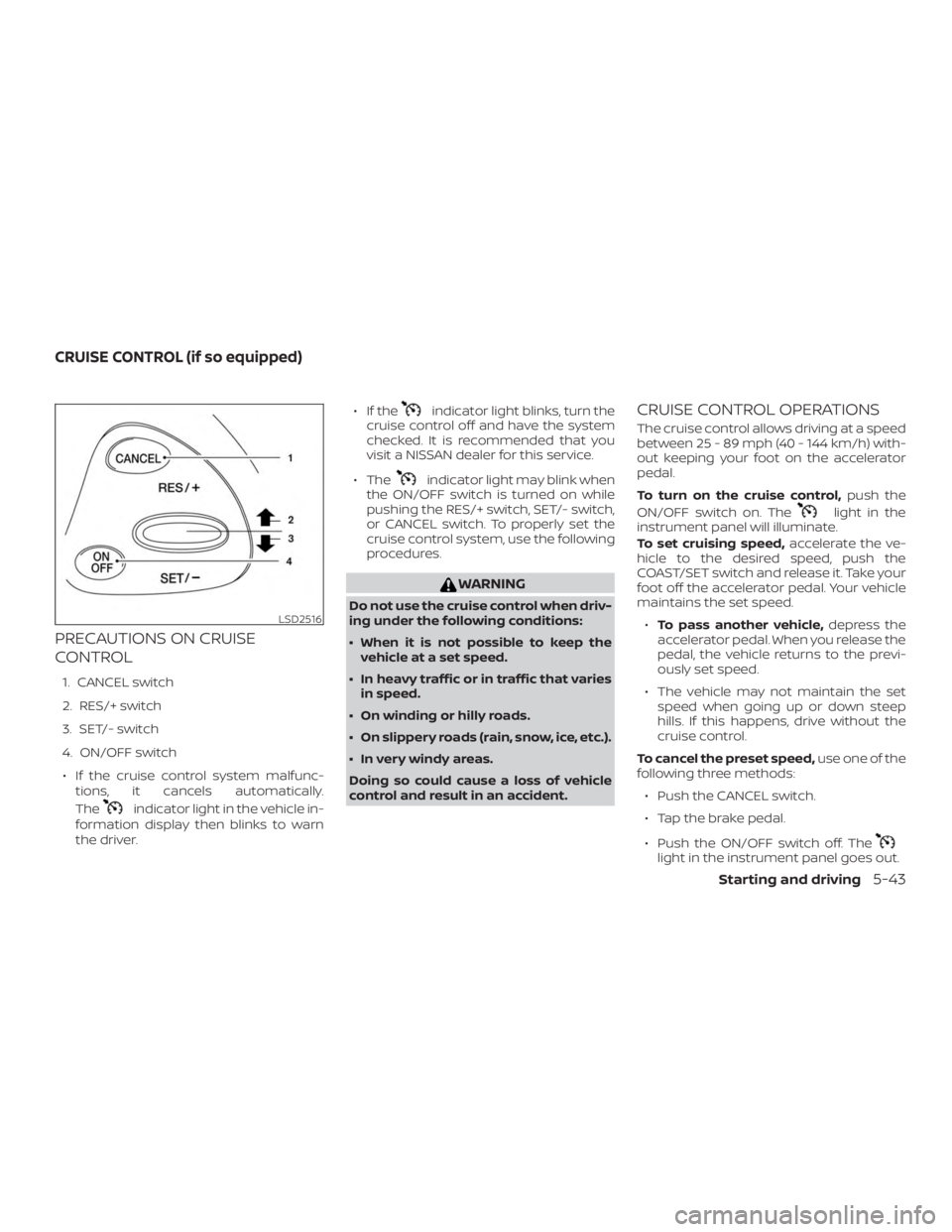
PRECAUTIONS ON CRUISE
CONTROL
1. CANCEL switch
2. RES/+ switch
3. SET/- switch
4. ON/OFF switch∙ If the cruise control system malfunc- tions, it cancels automatically.
The
indicator light in the vehicle in-
formation display then blinks to warn
the driver. ∙ If the
indicator light blinks, turn the
cruise control off and have the system
checked. It is recommended that you
visit a NISSAN dealer for this service.
∙ The
indicator light may blink when
the ON/OFF switch is turned on while
pushing the RES/+ switch, SET/- switch,
or CANCEL switch. To properly set the
cruise control system, use the following
procedures.
WARNING
Do not use the cruise control when driv-
ing under the following conditions:
∙ When it is not possible to keep the vehicle at a set speed.
∙ In heavy traffic or in traffic that varies in speed.
∙ On winding or hilly roads.
∙ On slippery roads (rain, snow, ice, etc.).
∙ In very windy areas.
Doing so could cause a loss of vehicle
control and result in an accident.
CRUISE CONTROL OPERATIONS
The cruise control allows driving at a speed
between 25 - 89 mph (40 - 144 km/h) with-
out keeping your foot on the accelerator
pedal.
To turn on the cruise control, push the
ON/OFF switch on. The
light in the
instrument panel will illuminate.
To set cruising speed, accelerate the ve-
hicle to the desired speed, push the
COAST/SET switch and release it. Take your
foot off the accelerator pedal. Your vehicle
maintains the set speed.
∙ To pass another vehicle, depress the
accelerator pedal. When you release the
pedal, the vehicle returns to the previ-
ously set speed.
∙ The vehicle may not maintain the set speed when going up or down steep
hills. If this happens, drive without the
cruise control.
To cancel the preset speed, use one of the
following three methods:
∙ Push the CANCEL switch.
∙ Tap the brake pedal.
∙ Push the ON/OFF switch off. The
light in the instrument panel goes out.
LSD2516
CRUISE CONTROL (if so equipped)
Starting and driving5-43
Page 282 of 460
The cruise control is automatically can-
celed if:∙ You depress the brake pedal while pushing the ACCEL/RES or SET/COAST
switch. The preset speed is deleted
from memory.
∙ The vehicle slows down more than 8 mph (13 km/h) below the set speed.
∙ You move the shif t lever to N (Neutral).
To reset at a faster cruising speed, use
one of the following three methods:
∙ Depress the accelerator pedal. When the vehicle attains the desired speed,
push and release the COAST/SET
switch.
∙ Push and hold the ACCEL/RES switch. When the vehicle attains the speed you
desire, release the switch.
∙ Push and release the ACCEL/RES switch. Each time you do this, the set
speed increases by about 1 mph
(1.6 km/h). To reset at a slower cruising speed,
use
one of the following three methods:
∙ Lightly tap the brake pedal. When the vehicle attains the desired speed, push
the COAST/SET switch and release it.
∙ Push and hold the COAST/SET switch. Release the switch when the vehicle
slows to the desired speed.
∙ Push and release the COAST/SET switch. Each time you do this, the set
speed decreases by about 1 mph
(1.6 km/h).
To resume the preset speed, push and
release the ACCEL/RES switch. The vehicle
returns to the last set cruising speed when
the vehicle speed is over 25 mph (40 km/h).
To turn off the cruise control, use one of
the following three methods:
∙ Push the CANCEL switch.
∙ Tap the brake pedal.
∙ Push the ON/OFF switch off. The
light in the instrument panel goes out.
WARNING
Failure to follow the warnings and in-
structions for proper use of the ICC sys-
tem could result in serious injury or
death.
∙ The ICC system is only an aid to assist the driver and is not a collision warn-
ing or avoidance device. It is the driv-
er’s responsibility to stay alert, drive
safely and be in control of the vehicle
at all times.
∙ Always observe posted speed limits and do not set the speed over them.
∙ Always drive carefully and attentively when using the ICC system. Read and
understand the Owner’s Manual thor-
oughly before using the ICC system.
To avoid serious injury or death, do
not rely on the system to prevent ac-
cidents or to control the vehicle’s
speed in emergency situations. Do
not use the ICC system except in ap-
propriate road and traffic conditions.
INTELLIGENT CRUISE CONTROL (ICC)
(if so equipped)
5-44Starting and driving
Page 285 of 460
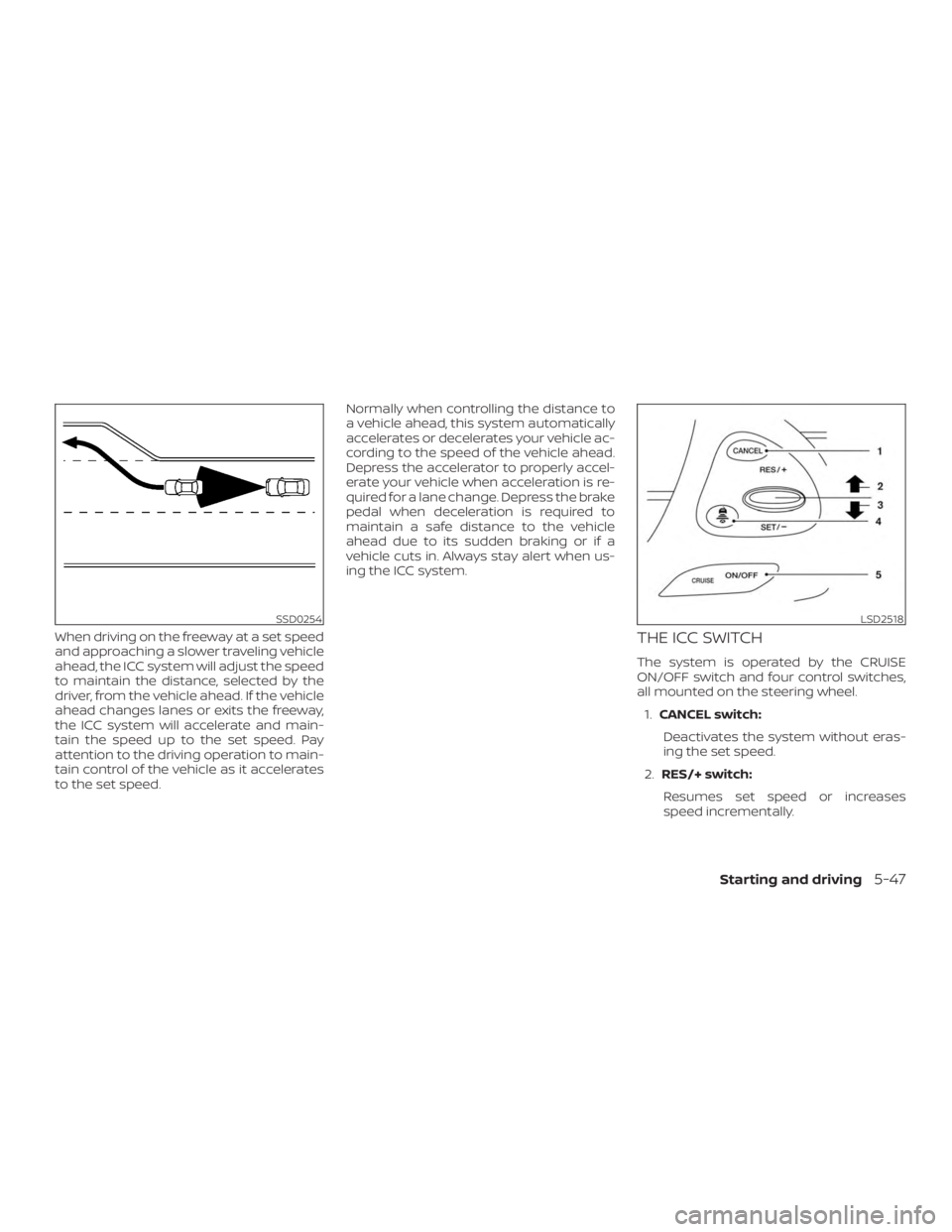
When driving on the freeway at a set speed
and approaching a slower traveling vehicle
ahead, the ICC system will adjust the speed
to maintain the distance, selected by the
driver, from the vehicle ahead. If the vehicle
ahead changes lanes or exits the freeway,
the ICC system will accelerate and main-
tain the speed up to the set speed. Pay
attention to the driving operation to main-
tain control of the vehicle as it accelerates
to the set speed.Normally when controlling the distance to
a vehicle ahead, this system automatically
accelerates or decelerates your vehicle ac-
cording to the speed of the vehicle ahead.
Depress the accelerator to properly accel-
erate your vehicle when acceleration is re-
quired for a lane change. Depress the brake
pedal when deceleration is required to
maintain a safe distance to the vehicle
ahead due to its sudden braking or if a
vehicle cuts in. Always stay alert when us-
ing the ICC system.THE ICC SWITCH
The system is operated by the CRUISE
ON/OFF switch and four control switches,
all mounted on the steering wheel.
1. CANCEL switch:
Deactivates the system without eras-
ing the set speed.
2. RES/+ switch:
Resumes set speed or increases
speed incrementally.
SSD0254LSD2518
Starting and driving5-47