change wheel NISSAN MURANO 2019 Owner´s Manual
[x] Cancel search | Manufacturer: NISSAN, Model Year: 2019, Model line: MURANO, Model: NISSAN MURANO 2019Pages: 507, PDF Size: 6.1 MB
Page 287 of 507
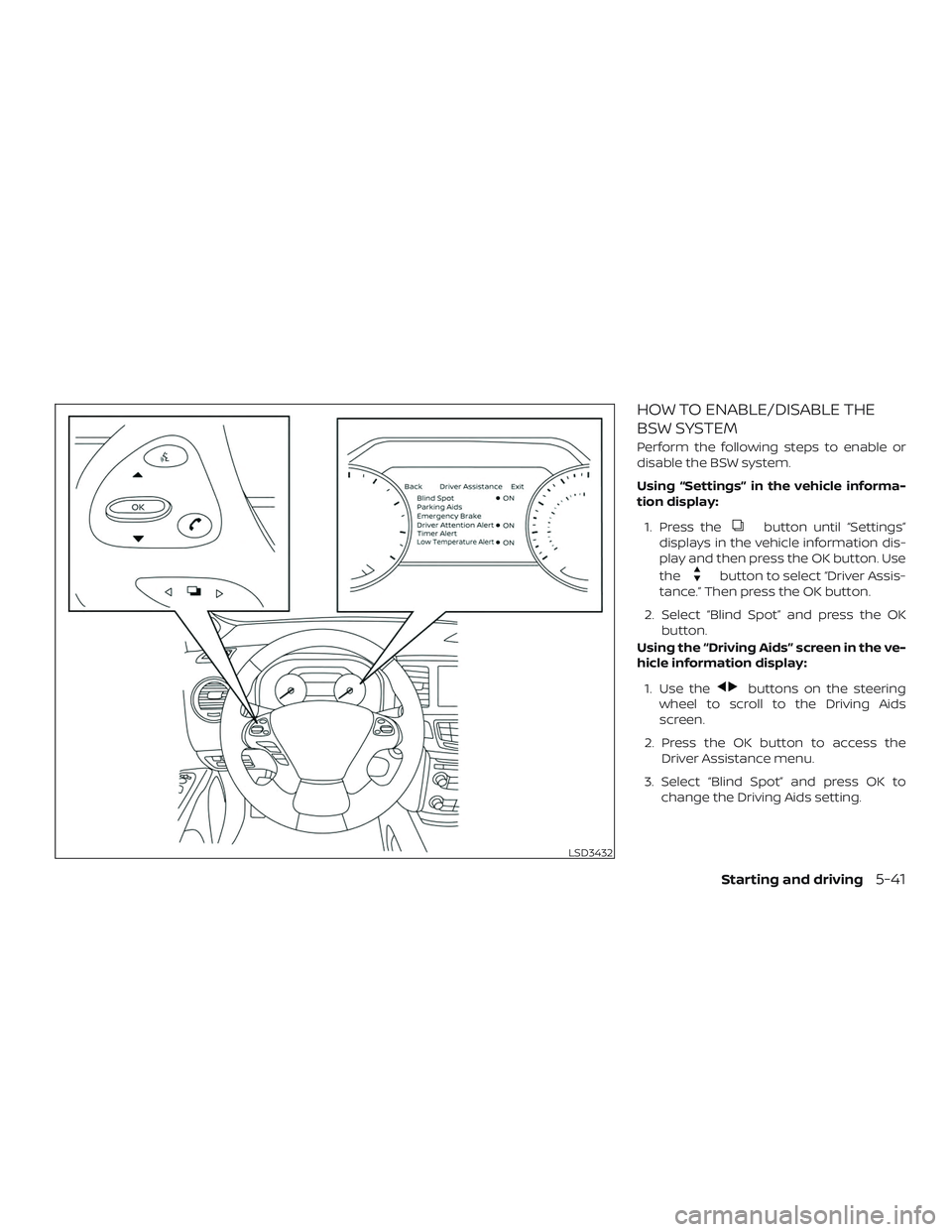
HOW TO ENABLE/DISABLE THE
BSW SYSTEM
Perform the following steps to enable or
disable the BSW system.
Using “Settings” in the vehicle informa-
tion display:1. Press the
button until “Settings”
displays in the vehicle information dis-
play and then press the OK button. Use
the
button to select “Driver Assis-
tance.” Then press the OK button.
2. Select “Blind Spot” and press the OK button.
Using the “Driving Aids” screen in the ve-
hicle information display:
1. Use the
buttons on the steering
wheel to scroll to the Driving Aids
screen.
2. Press the OK button to access the Driver Assistance menu.
3. Select “Blind Spot” and press OK to change the Driving Aids setting.
LSD3432
Starting and driving5-41
Page 298 of 507
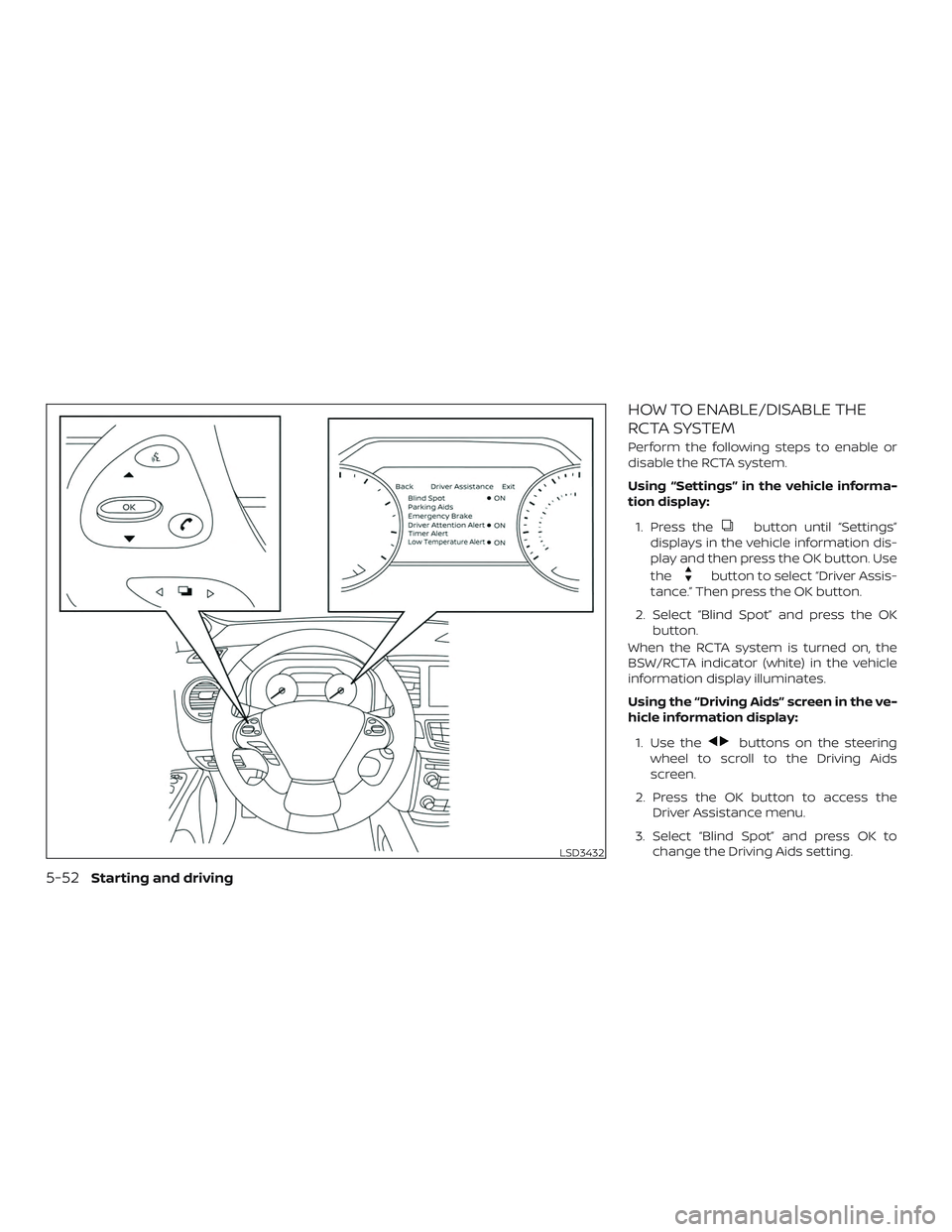
HOW TO ENABLE/DISABLE THE
RCTA SYSTEM
Perform the following steps to enable or
disable the RCTA system.
Using “Settings” in the vehicle informa-
tion display:1. Press the
button until “Settings”
displays in the vehicle information dis-
play and then press the OK button. Use
the
button to select “Driver Assis-
tance.” Then press the OK button.
2. Select “Blind Spot” and press the OK button.
When the RCTA system is turned on, the
BSW/RCTA indicator (white) in the vehicle
information display illuminates.
Using the “Driving Aids” screen in the ve-
hicle information display:
1. Use the
buttons on the steering
wheel to scroll to the Driving Aids
screen.
2. Press the OK button to access the Driver Assistance menu.
3. Select “Blind Spot” and press OK to change the Driving Aids setting.
LSD3432
5-52Starting and driving
Page 312 of 507
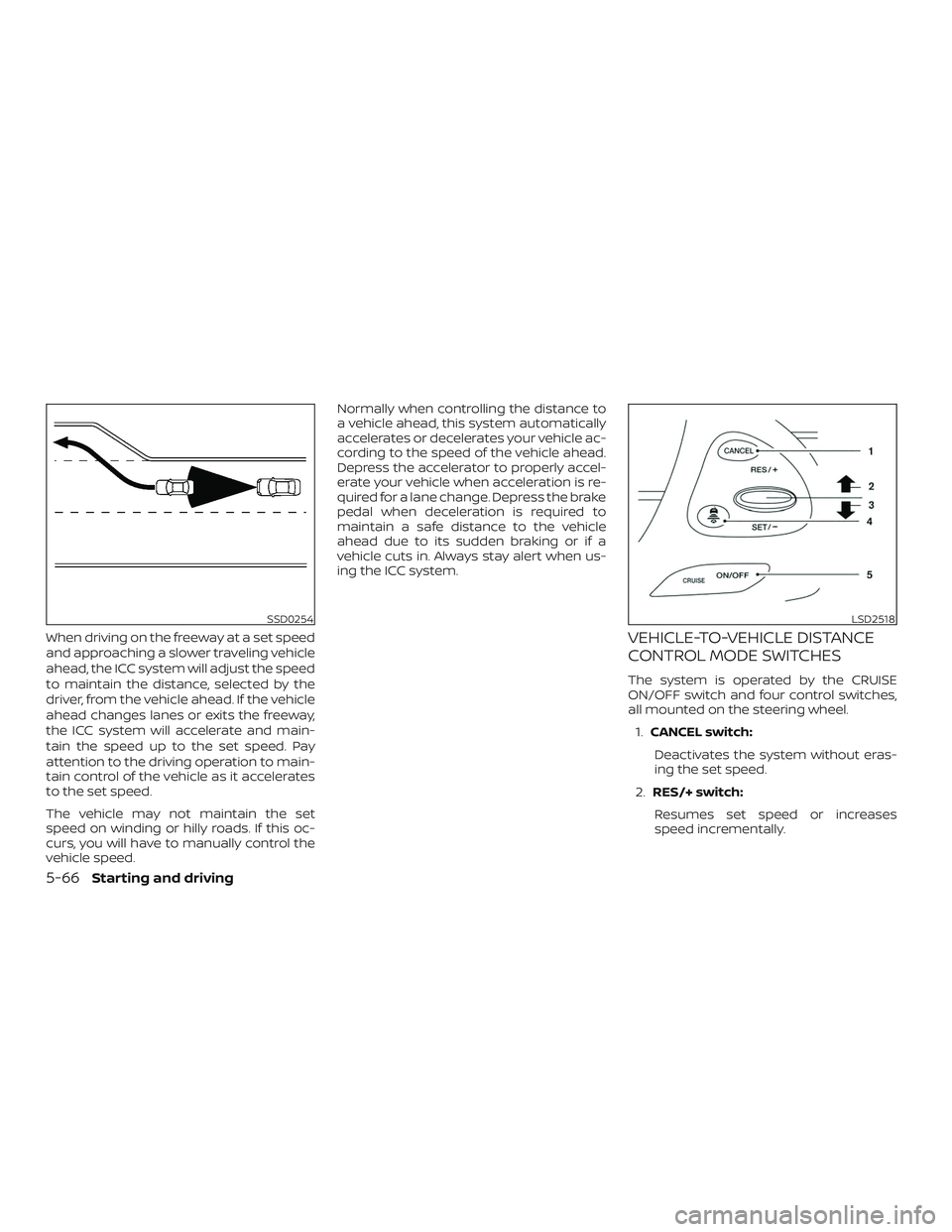
When driving on the freeway at a set speed
and approaching a slower traveling vehicle
ahead, the ICC system will adjust the speed
to maintain the distance, selected by the
driver, from the vehicle ahead. If the vehicle
ahead changes lanes or exits the freeway,
the ICC system will accelerate and main-
tain the speed up to the set speed. Pay
attention to the driving operation to main-
tain control of the vehicle as it accelerates
to the set speed.
The vehicle may not maintain the set
speed on winding or hilly roads. If this oc-
curs, you will have to manually control the
vehicle speed.Normally when controlling the distance to
a vehicle ahead, this system automatically
accelerates or decelerates your vehicle ac-
cording to the speed of the vehicle ahead.
Depress the accelerator to properly accel-
erate your vehicle when acceleration is re-
quired for a lane change. Depress the brake
pedal when deceleration is required to
maintain a safe distance to the vehicle
ahead due to its sudden braking or if a
vehicle cuts in. Always stay alert when us-
ing the ICC system.VEHICLE-TO-VEHICLE DISTANCE
CONTROL MODE SWITCHES
The system is operated by the CRUISE
ON/OFF switch and four control switches,
all mounted on the steering wheel.
1. CANCEL switch:
Deactivates the system without eras-
ing the set speed.
2. RES/+ switch:
Resumes set speed or increases
speed incrementally.
SSD0254LSD2518
5-66Starting and driving
Page 330 of 507
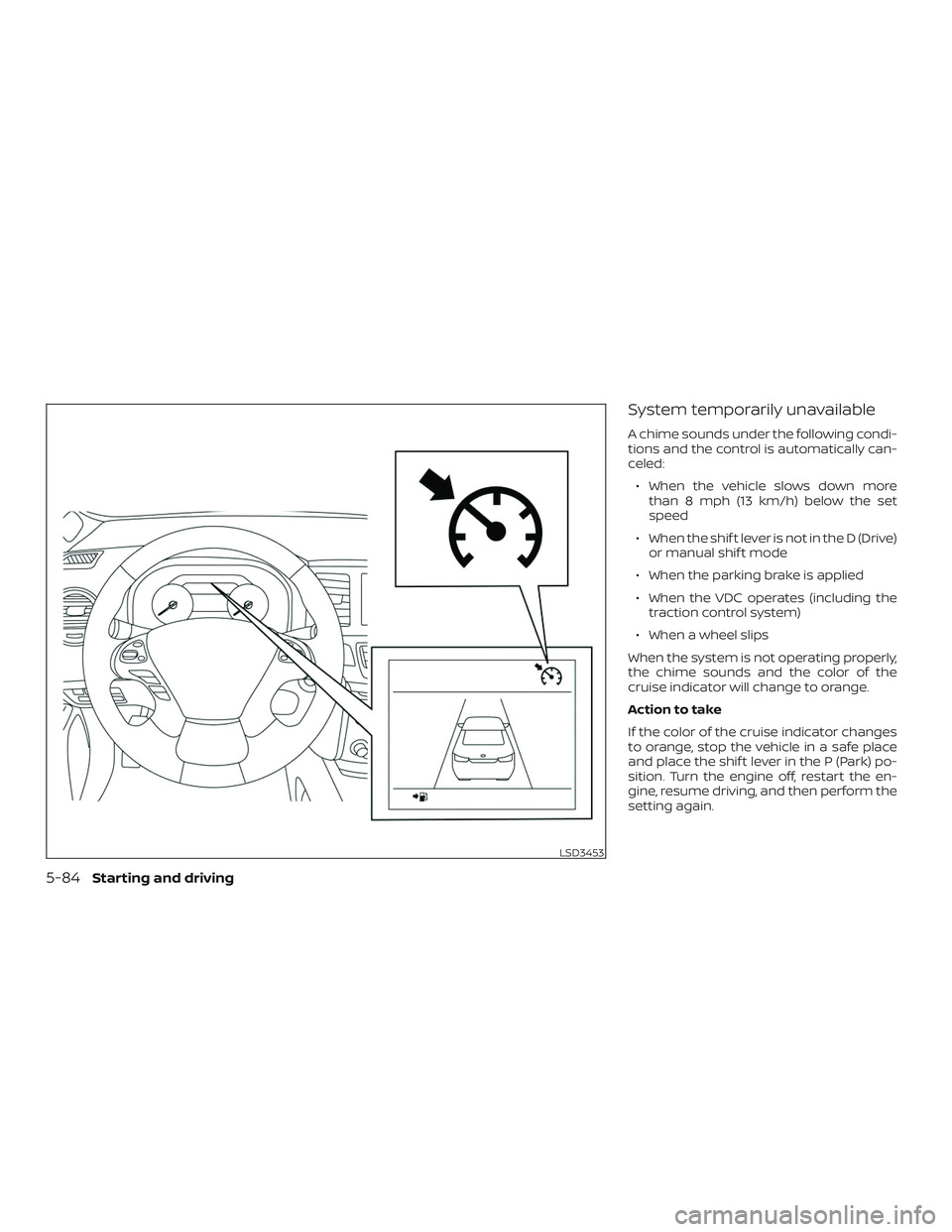
System temporarily unavailable
A chime sounds under the following condi-
tions and the control is automatically can-
celed:∙ When the vehicle slows down more than 8 mph (13 km/h) below the set
speed
∙ When the shif t lever is not in the D (Drive) or manual shif t mode
∙ When the parking brake is applied
∙ When the VDC operates (including the traction control system)
∙ When a wheel slips
When the system is not operating properly,
the chime sounds and the color of the
cruise indicator will change to orange.
Action to take
If the color of the cruise indicator changes
to orange, stop the vehicle in a safe place
and place the shif t lever in the P (Park) po-
sition. Turn the engine off, restart the en-
gine, resume driving, and then perform the
setting again.
LSD3453
5-84Starting and driving
Page 335 of 507
∙ The RAB system may not operate inthe following conditions:
– There is rain, snow, ice, dirt, etc., at- tached to the sonar sensors.
– A loud sound is heard in the area around the vehicle.
– The surface of the obstacle is di- agonal to the rear of the vehicle.
∙ The RAB system may unintentionally operate in the following conditions:
– There is overgrown grass in the area around the vehicle.
– There is a structure (e.g., a wall, toll gate equipment, a narrow tunnel, a
parking lot gate) near the side of
the vehicle.
– There are bumps, protrusions, or manhole covers on the road
surface.
– The vehicle drives through a draped flag or a curtain.
– There is an accumulation of snow or ice behind the vehicle. – An ultrasonic wave source, such as
another vehicle’s sonar, is near the
vehicle.
∙ Once the automatic brake control op- erates, it does not operate again if the
vehicle approaches the same
obstacle.
∙ The automatic brake control can only operate for a short period of time.
Therefore, the driver must depress
the brake pedal.
∙ In the following situations, the RAB system may not operate properly or
may not function sufficiently:
– The vehicle is driven in bad weather (rain, fog, snow, etc.).
– The vehicle is driven on a steep hill.
– The vehicle’s posture is changed (e.g., when driving over a bump).
– The vehicle is driven on a slippery road.
– The vehicle is turned sharply by turning the steering wheel fully.
– Snow chains are used. – Wheels or tires other than NISSAN
recommended are used.
– The brakes are cold at low ambient temperatures or immediately af ter
driving has started.
– The braking force becomes poor due to wet brakes af ter driving
through a puddle or washing the
vehicle.
∙ Turn the RAB system off in the follow- ing conditions to prevent the occur-
rence of an unexpected accident re-
sulting from sudden system
operation:
– The vehicle is towed.
– The vehicle is carried on a flatbed truck.
– The vehicle is on the chassis dynamometer.
– The vehicle drives on an uneven road surface.
Starting and driving5-89
Page 372 of 507
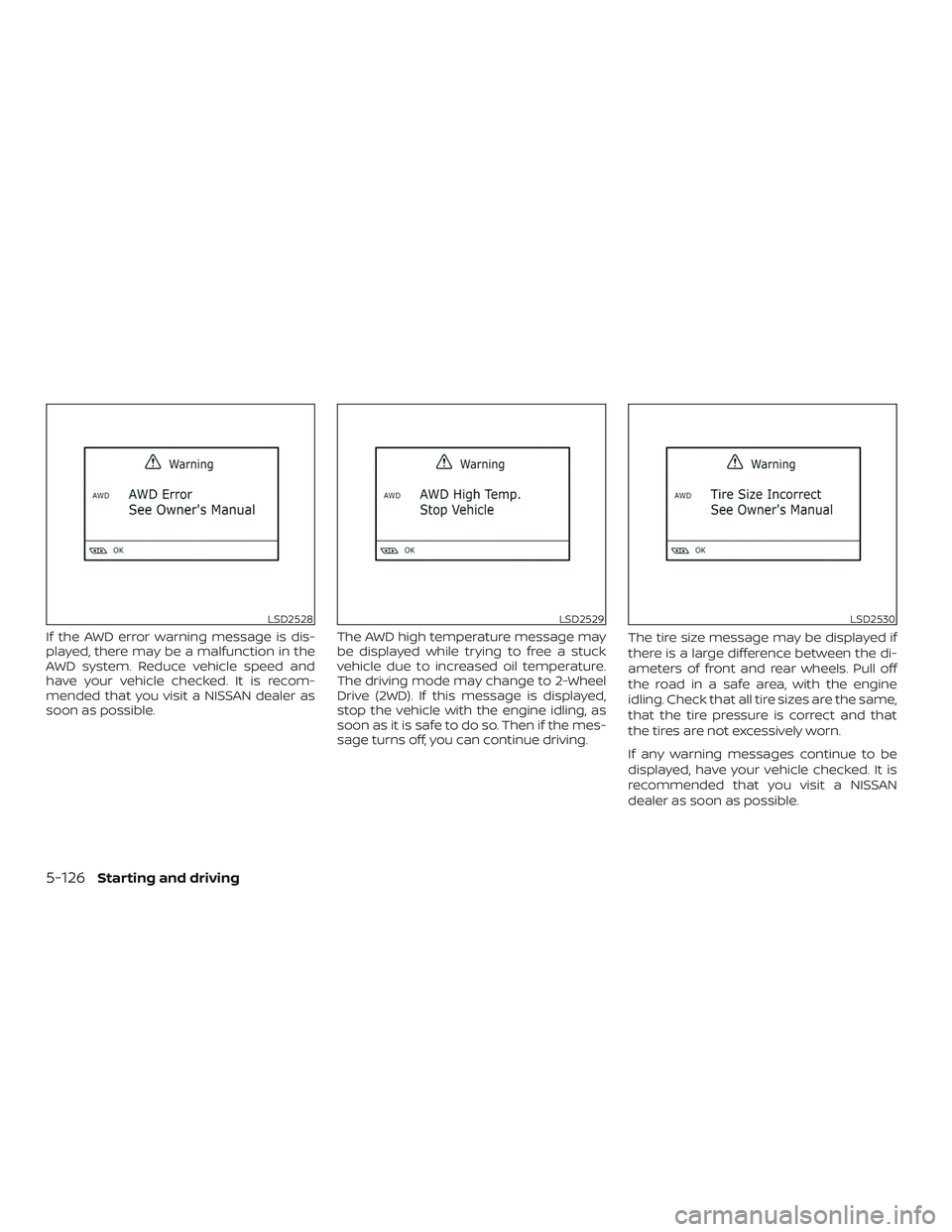
If the AWD error warning message is dis-
played, there may be a malfunction in the
AWD system. Reduce vehicle speed and
have your vehicle checked. It is recom-
mended that you visit a NISSAN dealer as
soon as possible.The AWD high temperature message may
be displayed while trying to free a stuck
vehicle due to increased oil temperature.
The driving mode may change to 2-Wheel
Drive (2WD). If this message is displayed,
stop the vehicle with the engine idling, as
soon as it is safe to do so. Then if the mes-
sage turns off, you can continue driving.The tire size message may be displayed if
there is a large difference between the di-
ameters of front and rear wheels. Pull off
the road in a safe area, with the engine
idling. Check that all tire sizes are the same,
that the tire pressure is correct and that
the tires are not excessively worn.
If any warning messages continue to be
displayed, have your vehicle checked. It is
recommended that you visit a NISSAN
dealer as soon as possible.
LSD2528LSD2529LSD2530
5-126Starting and driving
Page 373 of 507
WARNING
∙ Do not drive beyond the performancecapability of the tires. Accelerating
quickly, sharp steering maneuvers or
sudden braking may cause loss of
control, even with AWD engaged.
∙ For AWD equipped vehicles, do not at- tempt to raise two wheels off the
ground and shif t the transmission to
any drive or reverse position with the
engine running. Doing so may result
in drivetrain damage or unexpected
vehicle movement which could result
in serious personal injury or vehicle
damage. ∙ Do not attempt to test an AWD
equipped vehicle on a 2-wheel dyna-
mometer (such as the dynamometers
used by some states for emissions
testing) or similar equipment even if
the other two wheels are raised off the
ground. Make sure that you inform
the test facility personnel that your
vehicle is equipped with AWD before it
is placed on a dynamometer. Using
the wrong test equipment may result
in drivetrain damage or unexpected
vehicle movement which could result
in serious personal injury or vehicle
damage.
CAUTION
∙ Do not operate the engine on a freeroller when any of the wheels are
raised.
∙ If you use the free roller, rotate four wheels with the same speed without
raising any wheels. ∙ If an AWD warning message is dis-
played while driving there may be a
malfunction in the AWD system. Re-
duce the vehicle speed immediately
and have your vehicle checked. It is
recommended that you visit a NISSAN
dealer as soon as possible.
∙ The powertrain may be damaged if you continue driving when the AWD
temperature or tire size incorrect
messages are displayed
∙ If the AWD high temperature message is displayed while you are driving, pull
off the road in a safe area, and idle the
engine. The driving mode will change
to 2WD to prevent the AWD system
from malfunctioning. If the warning
message turns off, you can drive
again.
∙ If the tire size incorrect message is displayed while you are driving, pull
off the road in a safe area with the
engine idling. Check that all tire sizes
are the same, that the tire pressure is
correct and that the tires are not ex-
cessively worn.
Starting and driving5-127
Page 390 of 507
3. Park on a level surface and apply theparking brake. Move the shif t lever to P
(Park).
4. Turn off the engine.
5. Raise the hood to warn other traffic and to signal professional road assis-
tance personnel that you need assis-
tance.
6. Have all passengers get out of the ve- hicle and stand in a safe place, away
from traffic and clear of the vehicle.
WARNING
∙ Make sure the parking brake is se-curely applied and the shif t lever is
shif ted into P (Park).
∙ Never change tires when the vehicle is on a slope, ice or slippery areas. This is
hazardous.
∙ Never change tires if oncoming traffic is close to your vehicle. Wait for pro-
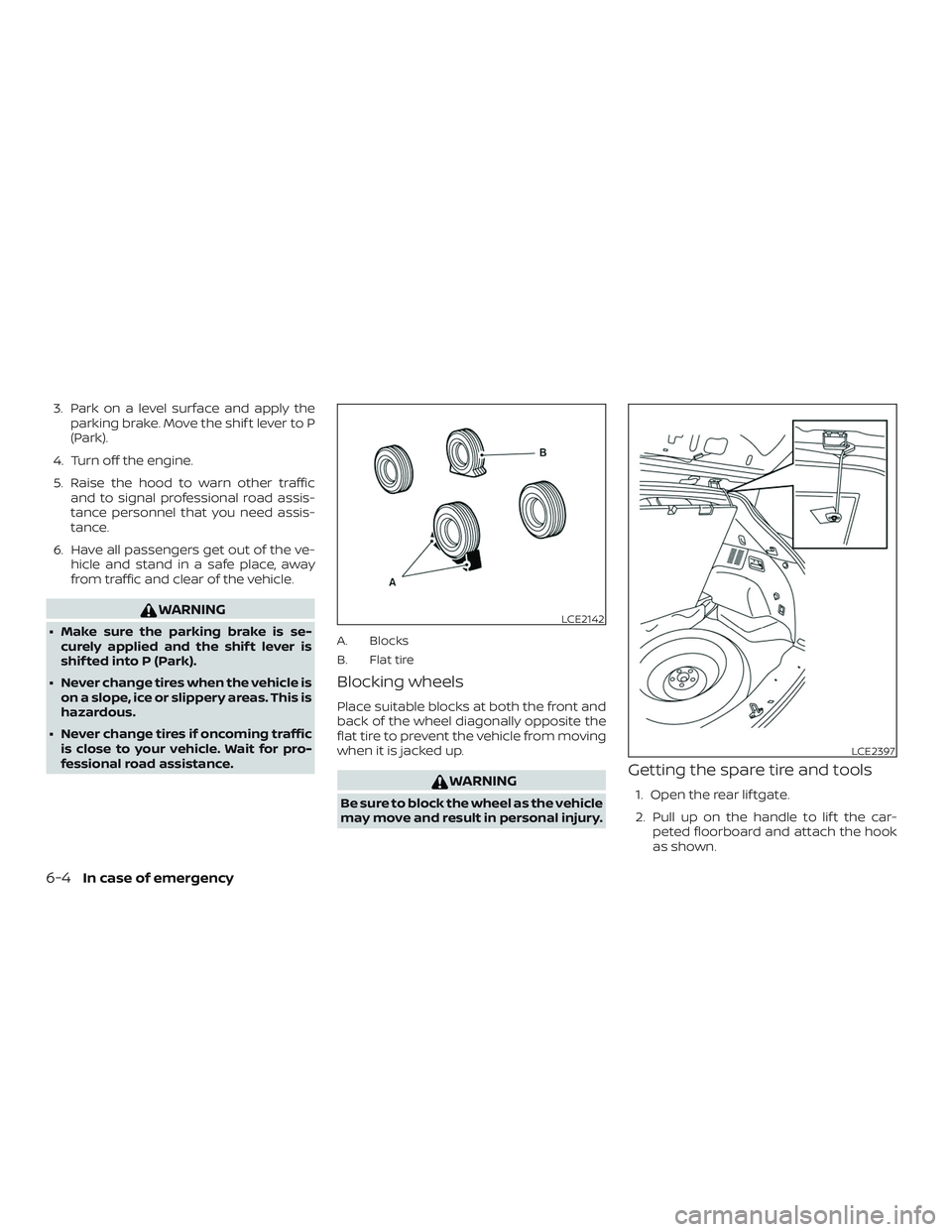
fessional road assistance.A. Blocks
B. Flat tire
Blocking wheels
Place suitable blocks at both the front and
back of the wheel diagonally opposite the
flat tire to prevent the vehicle from moving
when it is jacked up.
WARNING
Be sure to block the wheel as the vehicle
may move and result in personal injury.
Getting the spare tire and tools
1. Open the rear lif tgate.
2. Pull up on the handle to lif t the car- peted floorboard and attach the hook
as shown.
LCE2142
LCE2397
6-4In case of emergency
Page 392 of 507
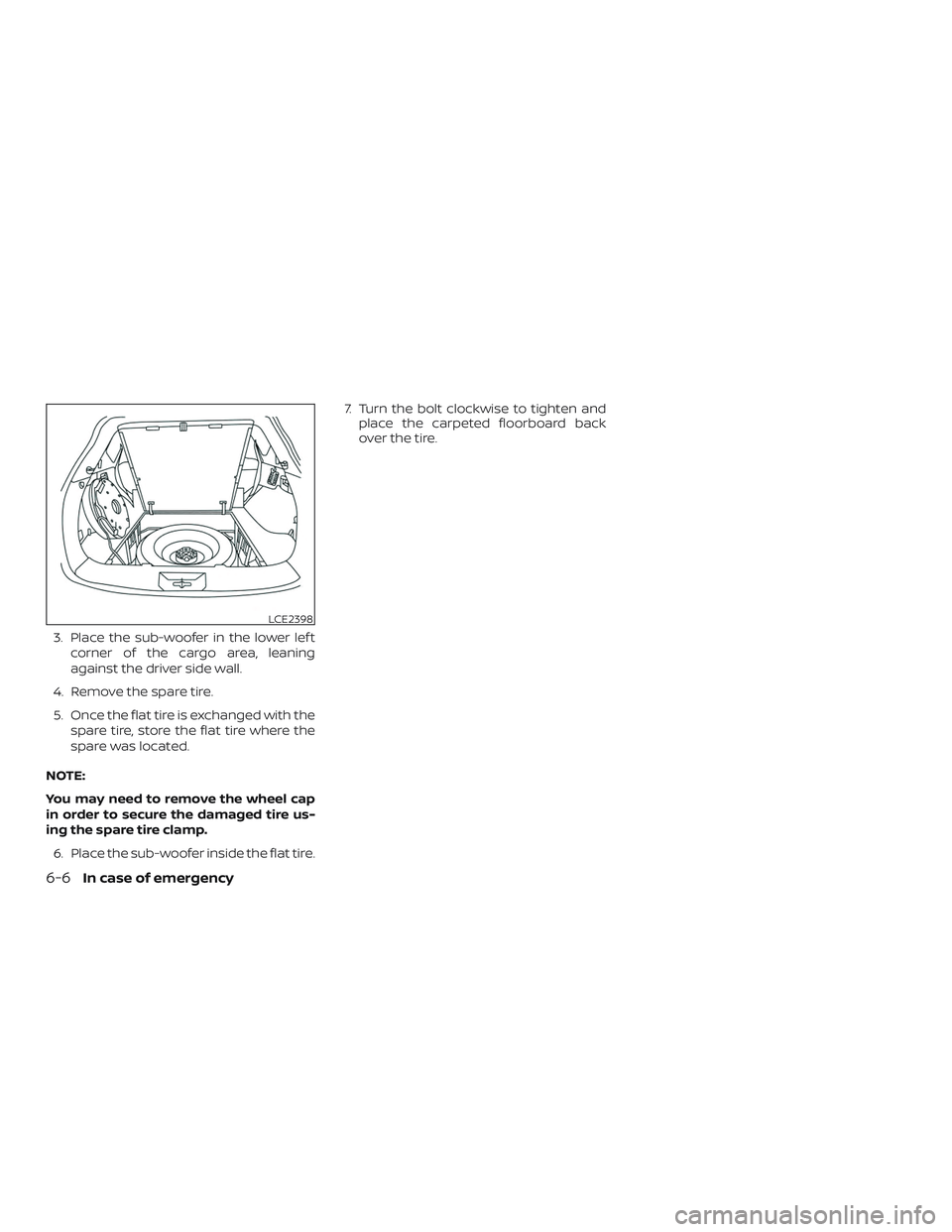
3. Place the sub-woofer in the lower lef tcorner of the cargo area, leaning
against the driver side wall.
4. Remove the spare tire.
5. Once the flat tire is exchanged with the spare tire, store the flat tire where the
spare was located.
NOTE:
You may need to remove the wheel cap
in order to secure the damaged tire us-
ing the spare tire clamp. 6. Place the sub-woofer inside the flat tire. 7. Turn the bolt clockwise to tighten and
place the carpeted floorboard back
over the tire.
LCE2398
6-6In case of emergency
Page 393 of 507
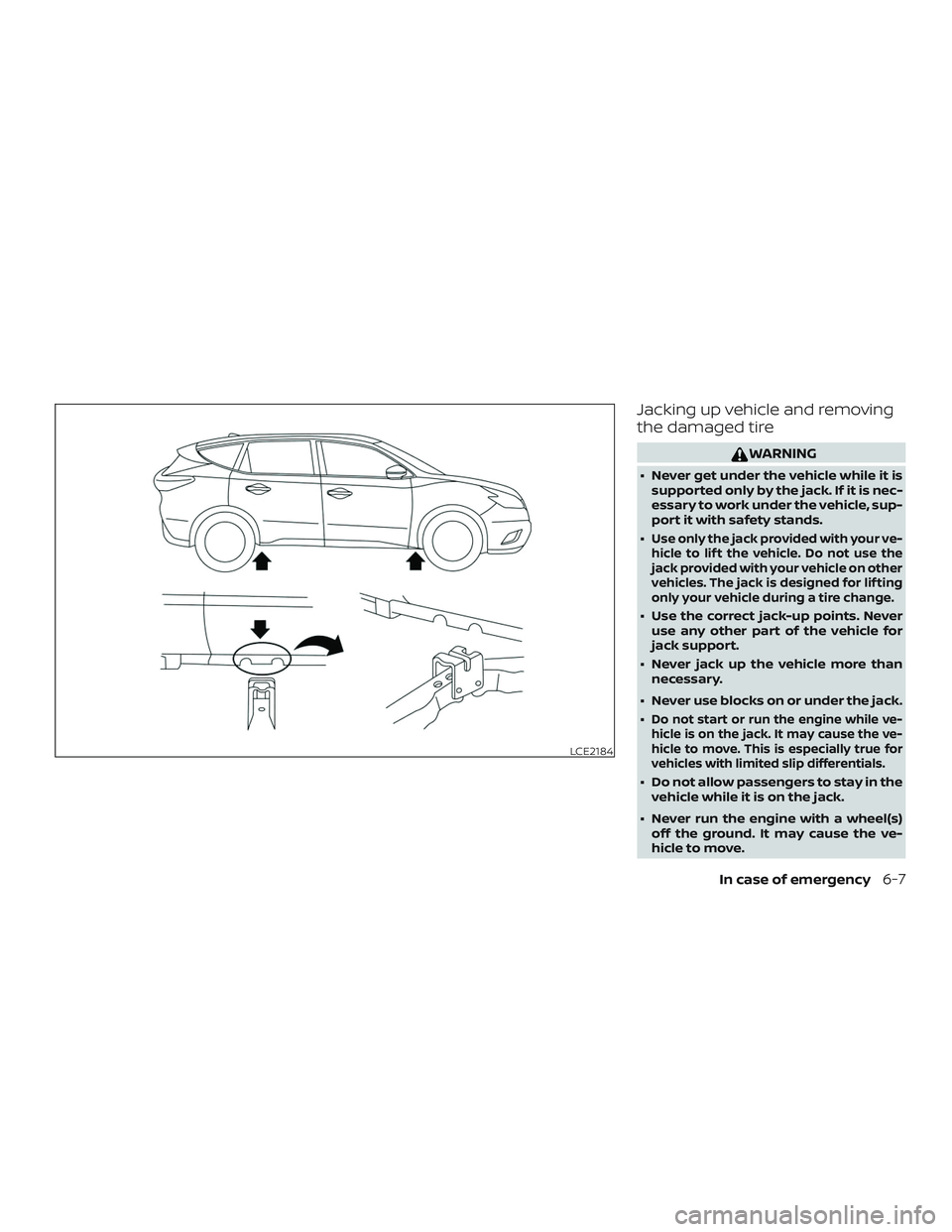
Jacking up vehicle and removing
the damaged tire
WARNING
∙ Never get under the vehicle while it issupported only by the jack. If it is nec-
essary to work under the vehicle, sup-
port it with safety stands.
∙
Use only the jack provided with your ve-
hicle to lif t the vehicle. Do not use the
jack provided with your vehicle on other
vehicles. The jack is designed for lif ting
only your vehicle during a tire change.
∙ Use the correct jack-up points. Never use any other part of the vehicle for
jack support.
∙ Never jack up the vehicle more than necessary.
∙ Never use blocks on or under the jack.
∙
Do not start or run the engine while ve-
hicle is on the jack. It may cause the ve-
hicle to move. This is especially true for
vehicles with limited slip differentials.
∙ Do not allow passengers to stay in the vehicle while it is on the jack.
∙ Never run the engine with a wheel(s) off the ground. It may cause the ve-
hicle to move.
LCE2184
In case of emergency6-7