horn NISSAN MURANO 2019 Owner´s Manual
[x] Cancel search | Manufacturer: NISSAN, Model Year: 2019, Model line: MURANO, Model: NISSAN MURANO 2019Pages: 507, PDF Size: 6.1 MB
Page 183 of 507
handle, push the door handle request
switch to unlock the door.
All doors will be locked automatically un-
less one of the following operations is per-
formed within 1 minute af ter pushing the
request switch.∙ Opening any door.
∙ Pushing the ignition switch.
The interior light timer illuminates for a pe-
riod of time when a door is unlocked and
the room light switch is in the DOOR posi-
tion.
The interior light can be turned off without
waiting by performing one of the following
operations: ∙ Placing the ignition switch in the ON po- sition.
∙ Locking the doors with the remote con- trol.
∙ Switching the room light switch to the OFF position. ∙ Switching the Auto Room Lamp to the
OFF position in “Vehicle Settings” of the
vehicle information display. For addi-
tional information, refer to “Vehicle in-
formation display” in the “Instruments
and controls” section of this manual.
HOW TO USE THE REMOTE
KEYLESS ENTRY FUNCTION
The remote keyless entry function can op-
erate all door locks using the remote key-
less function of the Intelligent Key. The re-
mote keyless function can operate at a
distance of 33 f t (10 m) away from the ve-
hicle. The operating distance depends
upon the conditions around the vehicle.
The remote keyless entry function will not
function under the following conditions:
∙ When the Intelligent Key is not within the operational range.
∙ When the Intelligent Key battery is dis- charged.
CAUTION
When locking the doors using the Intel-
ligent Key, be sure not to leave the key in
the vehicle.
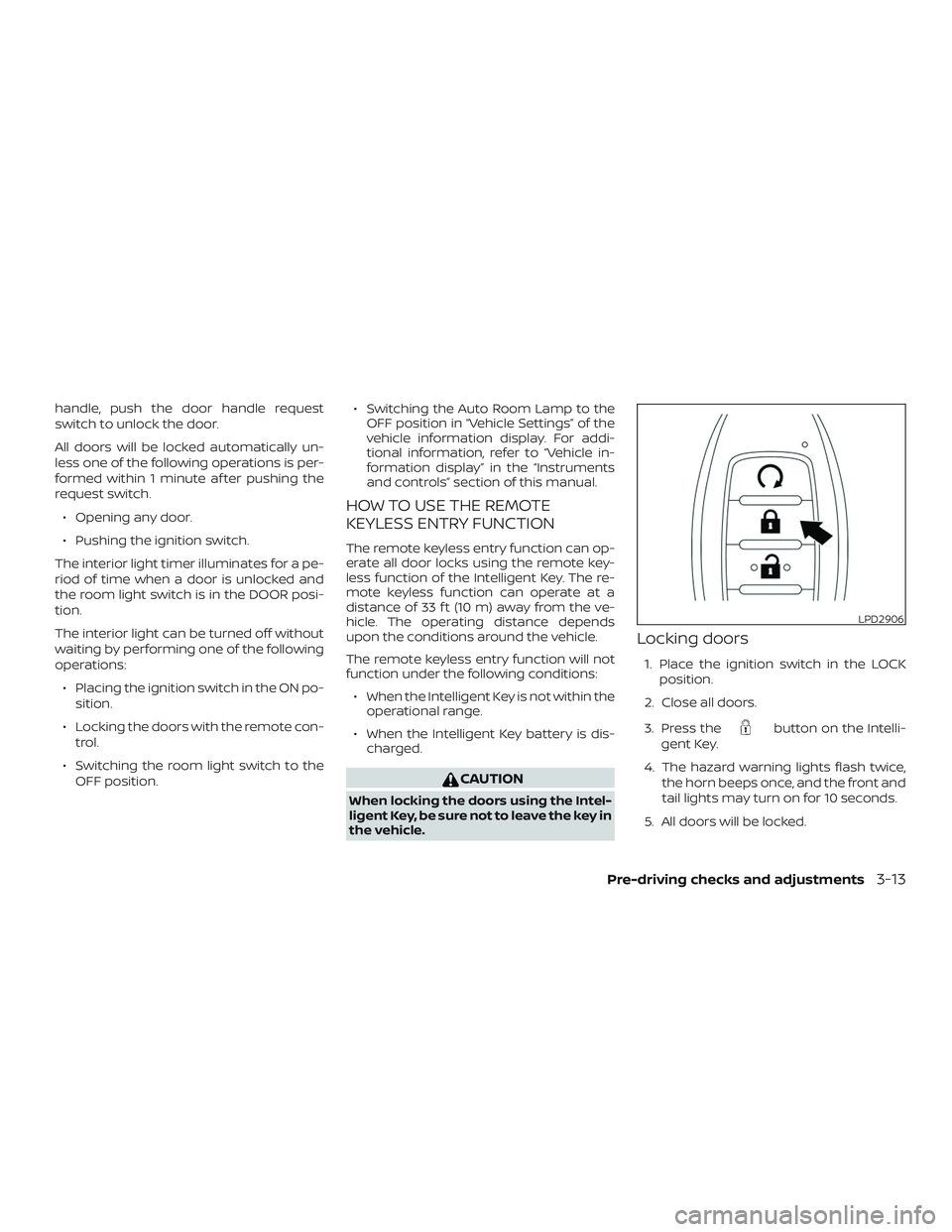
Locking doors
1. Place the ignition switch in the LOCK
position.
2. Close all doors.
3. Press the
button on the Intelli-
gent Key.
4. The hazard warning lights flash twice, the horn beeps once, and the front and
tail lights may turn on for 10 seconds.
5. All doors will be locked.
LPD2906
Pre-driving checks and adjustments3-13
Page 186 of 507
∙ The request switch on the driver or pas-senger door is pushed and the Intelli-
gent Key is in range of the door handle.
∙ The lif tgate request switch is pushed with the Intelligent Key in range of the
lif tgate area.
Using the interior light
Press thebutton on the Intelligent
Key once to turn on the interior lights.
For additional information, refer to “Interior
lights” in the “Instruments and controls”
section of this manual.
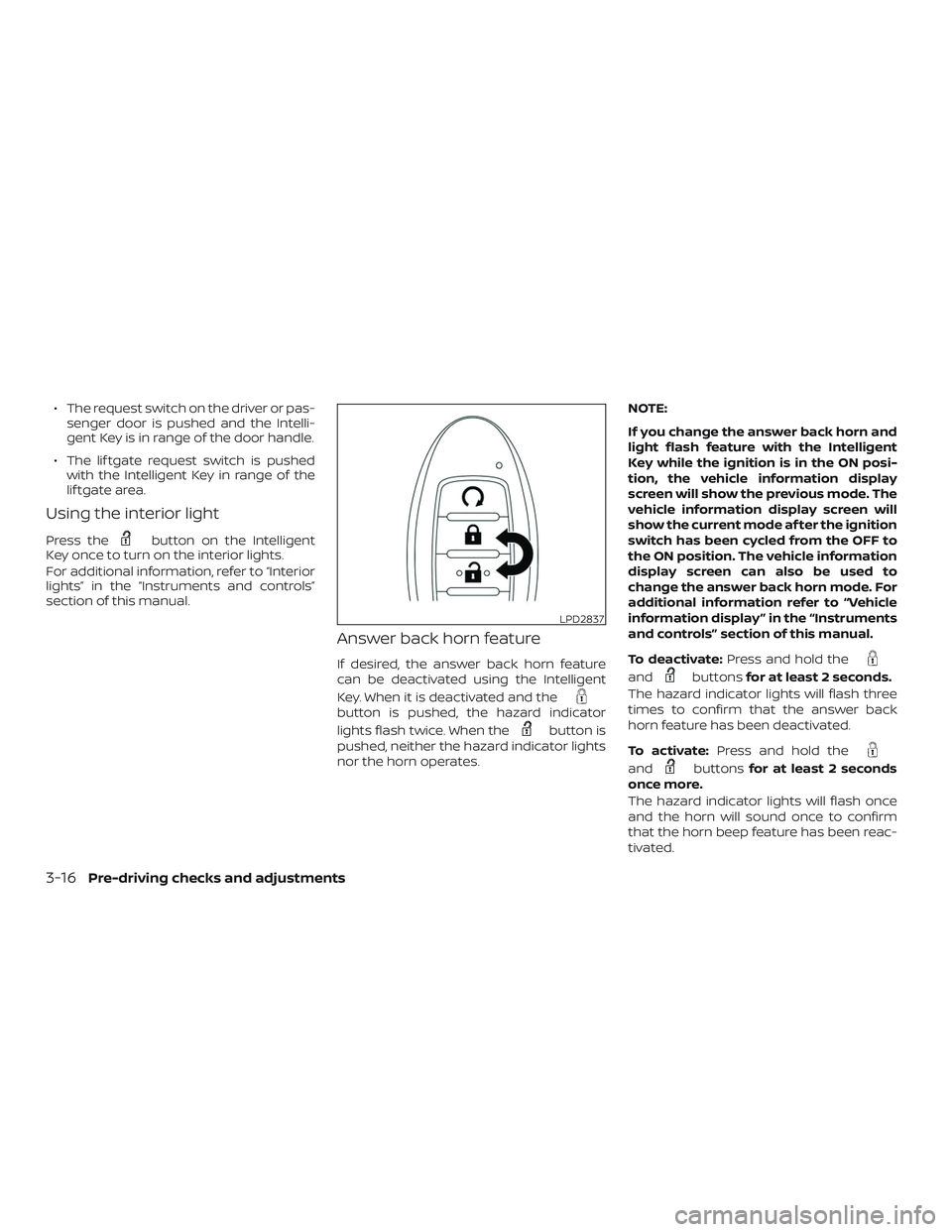
Answer back horn feature
If desired, the answer back horn feature
can be deactivated using the Intelligent
Key. When it is deactivated and the
button is pushed, the hazard indicator
lights flash twice. When the
button is
pushed, neither the hazard indicator lights
nor the horn operates. NOTE:
If you change the answer back horn and
light flash feature with the Intelligent
Key while the ignition is in the ON posi-
tion, the vehicle information display
screen will show the previous mode. The
vehicle information display screen will
show the current mode af ter the ignition
switch has been cycled from the OFF to
the ON position. The vehicle information
display screen can also be used to
change the answer back horn mode. For
additional information refer to “Vehicle
information display ” in the “Instruments
and controls” section of this manual.
To deactivate:
Press and hold the
andbuttonsfor at least 2 seconds.
The hazard indicator lights will flash three
times to confirm that the answer back
horn feature has been deactivated.
To activate: Press and hold the
andbuttonsfor at least 2 seconds
once more.
The hazard indicator lights will flash once
and the horn will sound once to confirm
that the horn beep feature has been reac-
tivated.
LPD2837
3-16Pre-driving checks and adjustments
Page 187 of 507
Deactivating the horn beep feature does
not silence the horn if the alarm is trig-
gered.
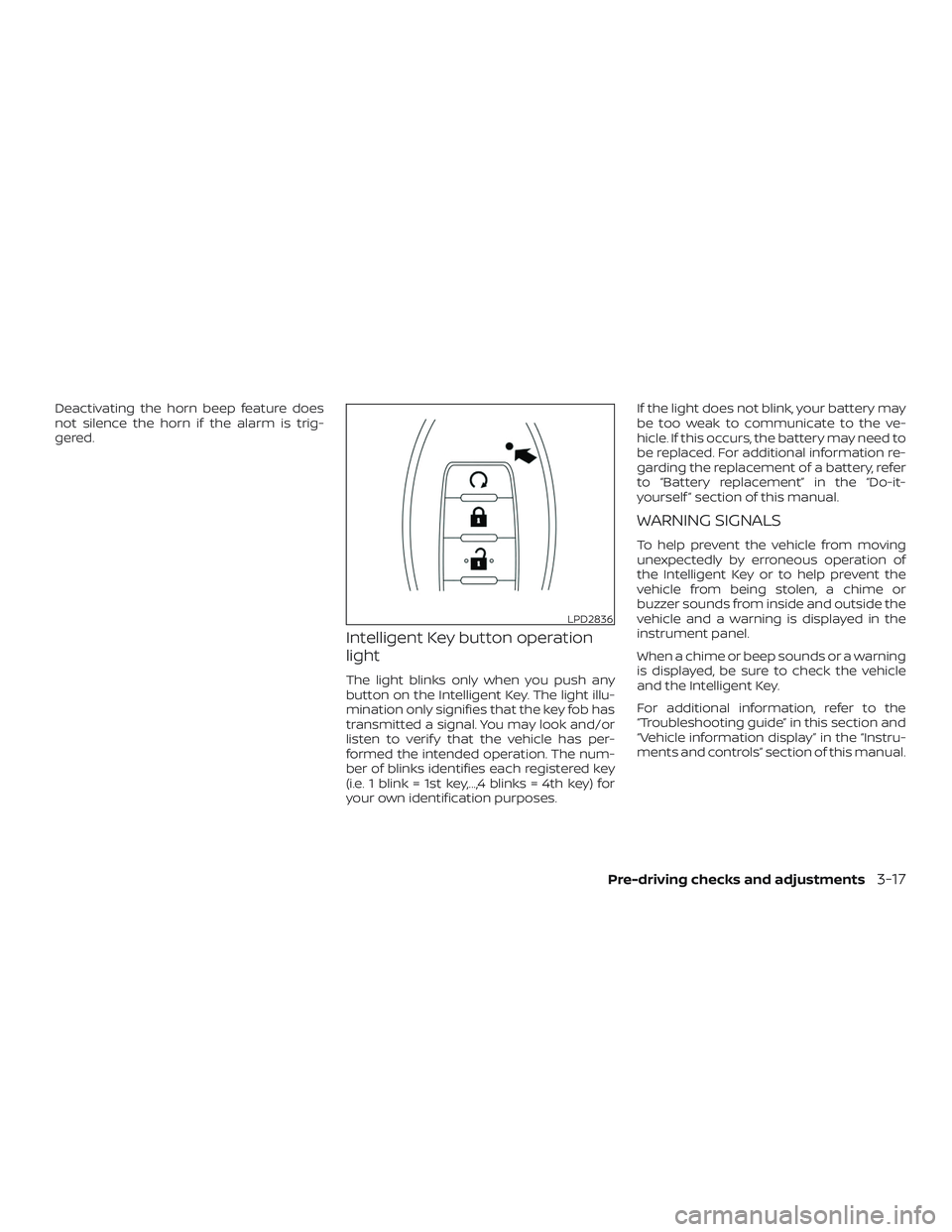
Intelligent Key button operation
light
The light blinks only when you push any
button on the Intelligent Key. The light illu-
mination only signifies that the key fob has
transmitted a signal. You may look and/or
listen to verif y that the vehicle has per-
formed the intended operation. The num-
ber of blinks identifies each registered key
(i.e. 1 blink = 1st key,...,4 blinks = 4th key) for
your own identification purposes.If the light does not blink, your battery may
be too weak to communicate to the ve-
hicle. If this occurs, the battery may need to
be replaced. For additional information re-
garding the replacement of a battery, refer
to “Battery replacement” in the “Do-it-
yourself ” section of this manual.
WARNING SIGNALS
To help prevent the vehicle from moving
unexpectedly by erroneous operation of
the Intelligent Key or to help prevent the
vehicle from being stolen, a chime or
buzzer sounds from inside and outside the
vehicle and a warning is displayed in the
instrument panel.
When a chime or beep sounds or a warning
is displayed, be sure to check the vehicle
and the Intelligent Key.
For additional information, refer to the
“Troubleshooting guide” in this section and
“Vehicle information display” in the “Instru-
ments and controls” section of this manual.
LPD2836
Pre-driving checks and adjustments3-17
Page 188 of 507
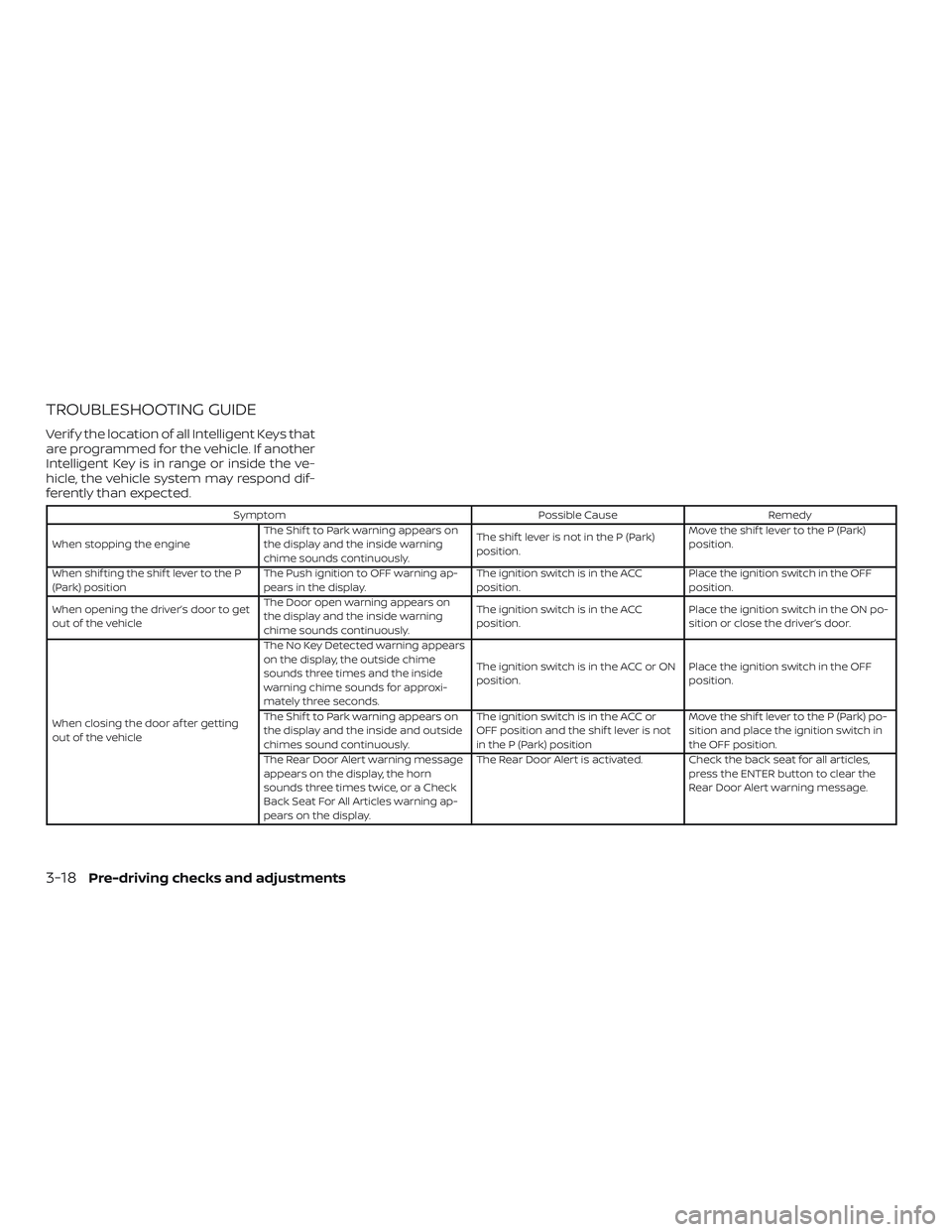
TROUBLESHOOTING GUIDE
Verif y the location of all Intelligent Keys that
are programmed for the vehicle. If another
Intelligent Key is in range or inside the ve-
hicle, the vehicle system may respond dif-
ferently than expected.
SymptomPossible CauseRemedy
When stopping the engine The Shif t to Park warning appears on
the display and the inside warning
chime sounds continuously. The shif t lever is not in the P (Park)
position.Move the shif t lever to the P (Park)
position.
When shif ting the shif t lever to the P
(Park) position The Push ignition to OFF warning ap-
pears in the display. The ignition switch is in the ACC
position.Place the ignition switch in the OFF
position.
When opening the driver’s door to get
out of the vehicle The Door open warning appears on
the display and the inside warning
chime sounds continuously. The ignition switch is in the ACC
position.
Place the ignition switch in the ON po-
sition or close the driver’s door.
When closing the door af ter getting
out of the vehicle The No Key Detected warning appears
on the display, the outside chime
sounds three times and the inside
warning chime sounds for approxi-
mately three seconds.
The ignition switch is in the ACC or ON
position.
Place the ignition switch in the OFF
position.
The Shif t to Park warning appears on
the display and the inside and outside
chimes sound continuously. The ignition switch is in the ACC or
OFF position and the shif t lever is not
in the P (Park) positionMove the shif t lever to the P (Park) po-
sition and place the ignition switch in
the OFF position.
The Rear Door Alert warning message
appears on the display, the horn
sounds three times twice, or a Check
Back Seat For All Articles warning ap-
pears on the display. The Rear Door Alert is activated. Check the back seat for all articles,
press the ENTER button to clear the
Rear Door Alert warning message.
3-18Pre-driving checks and adjustments
Page 254 of 507
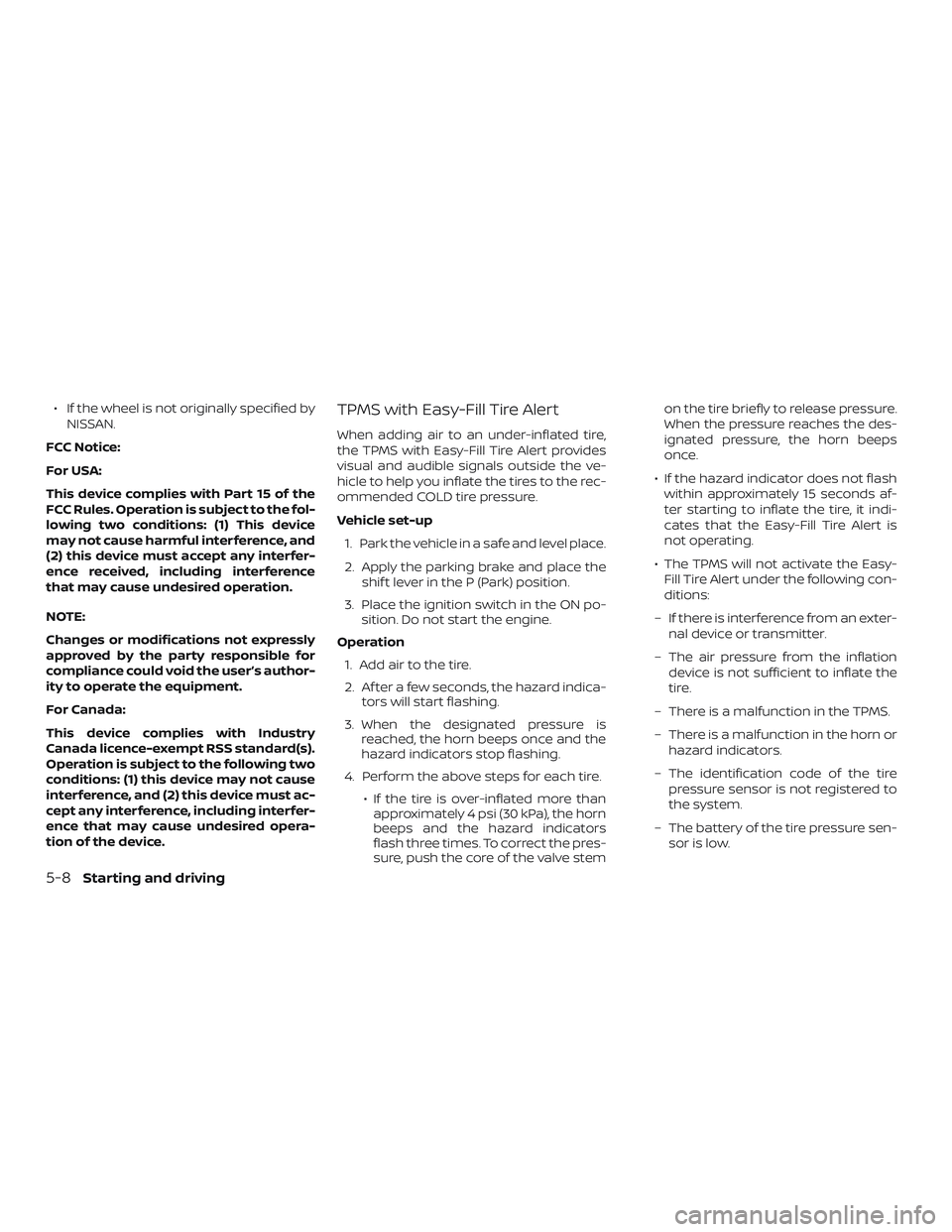
∙ If the wheel is not originally specified byNISSAN.
FCC Notice:
For USA:
This device complies with Part 15 of the
FCC Rules. Operation is subject to the fol-
lowing two conditions: (1) This device
may not cause harmful interference, and
(2) this device must accept any interfer-
ence received, including interference
that may cause undesired operation.
NOTE:
Changes or modifications not expressly
approved by the party responsible for
compliance could void the user’s author-
ity to operate the equipment.
For Canada:
This device complies with Industry
Canada licence-exempt RSS standard(s).
Operation is subject to the following two
conditions: (1) this device may not cause
interference, and (2) this device must ac-
cept any interference, including interfer-
ence that may cause undesired opera-
tion of the device.TPMS with Easy-Fill Tire Alert
When adding air to an under-inflated tire,
the TPMS with Easy-Fill Tire Alert provides
visual and audible signals outside the ve-
hicle to help you inflate the tires to the rec-
ommended COLD tire pressure.
Vehicle set-up 1. Park the vehicle in a safe and level place.
2. Apply the parking brake and place the shif t lever in the P (Park) position.
3. Place the ignition switch in the ON po- sition. Do not start the engine.
Operation 1. Add air to the tire.
2. Af ter a few seconds, the hazard indica- tors will start flashing.
3. When the designated pressure is reached, the horn beeps once and the
hazard indicators stop flashing.
4. Perform the above steps for each tire. ∙ If the tire is over-inflated more thanapproximately 4 psi (30 kPa), the horn
beeps and the hazard indicators
flash three times. To correct the pres-
sure, push the core of the valve stem on the tire briefly to release pressure.
When the pressure reaches the des-
ignated pressure, the horn beeps
once.
∙ If the hazard indicator does not flash within approximately 15 seconds af-
ter starting to inflate the tire, it indi-
cates that the Easy-Fill Tire Alert is
not operating.
∙ The TPMS will not activate the Easy- Fill Tire Alert under the following con-
ditions:
– If there is interference from an exter- nal device or transmitter.
– The air pressure from the inflation device is not sufficient to inflate the
tire.
– There is a malfunction in the TPMS.
– There is a malfunction in the horn or hazard indicators.
– The identification code of the tire pressure sensor is not registered to
the system.
– The battery of the tire pressure sen- sor is low.
5-8Starting and driving
Page 501 of 507
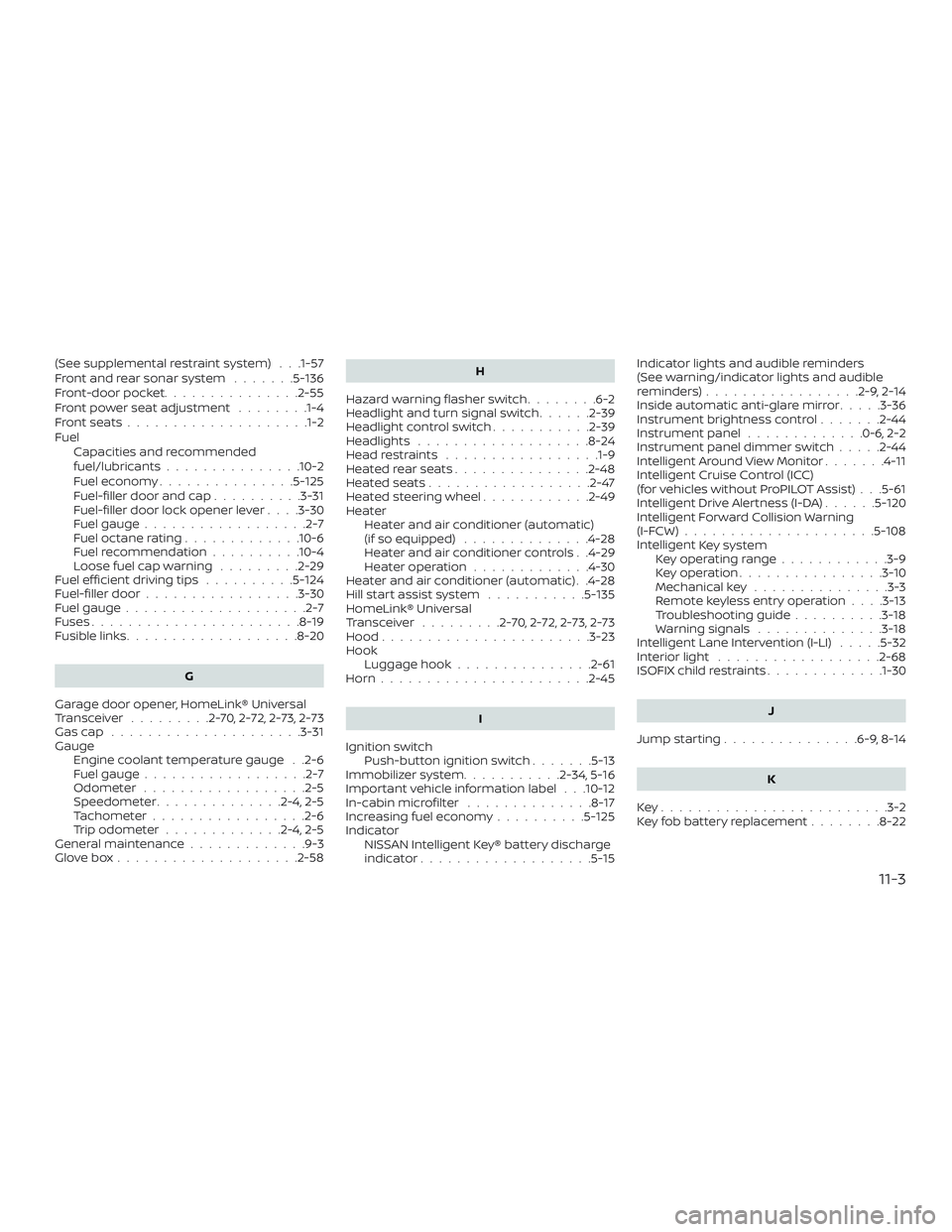
(See supplemental restraint system) . . .1-57
Front and rear sonar system.......5-136
Front-door pocket ...............2-55
Front power seat adjustment ........1-4
Frontseats................... .1-2
Fuel Capacities and recommended
fuel/lubricants...............10-2
Fuel economy ...............5-125
Fuel-filler door and cap ..........3-31
Fuel-filler door lock opener lever ....3-30
Fuel gauge ..................2-7
Fueloctanerating.............10-6
Fuel recommendation ..........10-4
Loose fuel cap warning .........2-29
Fuelefficientdrivingtips ..........5-124
Fuel-filler door .................3-30
Fuel gauge ....................2-7
Fuses .......................8-19
Fusiblelinks...................8-20
G
Garage door opener, HomeLink® Universal
Transceiver .........2-70,2-72,2-73,2-73
Gascap .....................3-31
Gauge Engine coolant temperature gauge . .2-6
Fuel gauge ..................2-7
Odometer ..................2-5
Speedometer ..............2-4,2-5
Tachometer .................2-6
Trip odometer .............2-4,2-5
General maintenance .............9-3
Glovebox....................2-58 H
Hazard warning flasher switch ........6-2
Headlight and turn signal switch ......2-39
Headlightcontrolswitch...........2-39
Headlights ...................8-24
Headrestraints ................ .1-9
Heatedrearseats...............2-48
Heatedseats..................2-47
Heated steering wheel ............2-49
Heater Heater and air conditioner (automatic)
(if so equipped) ..............4-28
Heater and air conditioner controls . .4-29
Heater operation .............4-30
Heater and air conditioner (automatic) . .4-28
Hill start assist system ...........5-135
HomeLink® Universal
Transceiver .........2-70,2-72,2-73,2-73
Hood .......................3-23
Hook Luggage hook ...............2-61
Horn.......................2-45
I
Ignition switch Push-button ignition switch .......5-13
Immobilizer system ...........2-34,5-16
Important vehicle information label . . .10-12
In-cabinmicrofilter ..............8-17
Increasing fuel economy ..........5-125
Indicator NISSAN Intelligent Key® battery discharge
indicator...................5-15 Indicator lights and audible reminders
(See warning/indicator lights and audible
reminders)
.................2-9,2-14
Inside automatic anti-glare mirror .....3-36
Instrument brightness control .......2-44
Instrument panel .............0-6,2-2
Instrument panel dimmer switch .....2-44
Intelligent Around View Monitor .......4-11
Intelligent Cruise Control (ICC)
(for vehicles without ProPILOT Assist) . . .5-61
Intelligent Drive Alertness (I-DA) ......5-120
Intelligent Forward Collision Warning
(I-FCW).....................5-108
Intelligent
Key system
Key operating range ............3-9
Key operation ................3-10
Mechanical key ...............3-3
Remote keyless entry operation ....3-13
Troubleshooting guide ..........3-18
Warning signals ..............3-18
Intelligent Lane Intervention (I-LI) .....5-32
Interiorlight ..................2-68
ISOFIX child restraints .............1-30
J
Jumpstarting...............6-9,8-14
K
Key........................ .3-2
Key fob battery replacement ........8-22
11-3