air conditioning NISSAN MURANO 2019 Owner´s Manual
[x] Cancel search | Manufacturer: NISSAN, Model Year: 2019, Model line: MURANO, Model: NISSAN MURANO 2019Pages: 507, PDF Size: 6.1 MB
Page 17 of 507
15. Heater and air conditioningcontrols (P. 4-28)
16. Shif t lever (P. 5-18)
17. Push-button ignition switch
(P. 5-13)
18. Cruise control switches
(if so equipped) (P. 5-58)
Intelligent Cruise Control (ICC)
switches (if so equipped) (P. 5-61)
19. Driver supplemental knee air bag
(P. 1-49)
20. Bluetooth® Hands-Free Phone
System/Audio control switches*
21. Hood release (P. 3-23) Fuel door release (P. 3-30)
22. Fuse box (P. 8-19)
23. Heated steering wheel switch
(if so equipped) (P. 2-49)
Dynamic driver assistance switch
(if so equipped) (P. 2-50)
Lif tgate instrument panel switch
(if so equipped) (P. 3-23)
24. Instrument brightness control
(P. 2-39)
Twin trip odometer reset switch
(P. 2-4)
*: Refer to the separate NissanConnect®
Owner’s Manual. Refer to the page number indicated in
parentheses for operating details.
Illustrated table of contents0-7
Page 97 of 507
15. Heater and air conditioningcontrols (P. 4-28)
16. Shif t lever (P. 5-18)
17. Push-button ignition switch
(P. 5-13)
18. Cruise control switches
(if so equipped) (P. 5-58)
Intelligent Cruise Control (ICC)
switches (if so equipped) (P. 5-61)
19. Driver supplemental knee air bag
(P. 1-49)
20. Bluetooth® Hands-Free Phone
System/Audio control switches*
21. Hood release (P. 3-23) Fuel door release (P. 3-30)
22. Fuse box (P. 8-19)
23. Heated steering wheel switch
(if so equipped) (P. 2-49)
Dynamic driver assistance switch
(if so equipped) (P. 2-50)
Lif tgate instrument panel switch
(if so equipped) (P. 3-23)
24. Instrument brightness control
(P. 2-39)
Twin trip odometer reset switch
(P. 2-4)
*: Refer to the separate NissanConnect®
Owner’s Manual. Refer to the page number indicated in
parentheses for operating details.
Instruments and controls2-3
Page 242 of 507
∙ When thefront defroster button
is pressed, the air conditioner will auto-
matically be turned on at outside tem-
peratures above 36°F (2°C). The air recir-
culate mode automatically turns off,
allowing outside air to be drawn into the
passenger compartment to further im-
prove the defogging performance.
When the air recirculate mode auto-
matically turns off, the air fresh mode
will automatically turn on.
Remote Engine Start with
Intelligent Climate Control (if so
equipped)
Vehicles equipped with automatic climate
controls and Remote Engine Start function
may go into automatic heating or cooling
mode when Remote Engine Start is acti-
vated depending on outside and cabin
temperatures. During this period, the cli-
mate control display and buttons will be
inoperable until the ignition switch is
turned on. In Remote Engine Start defrost-
ing mode, the rear window defroster and
heated steering wheel (if so equipped) may
be activated automatically.
MANUAL OPERATION
Fan speed control
Press thefan speed control buttons
to manually control the fan speed.
Press the AUTO button to return to auto-
matic control of the fan speed.
Temperature control dial
The temperature control dial allows you to
adjust the temperature of the outlet air. To
lower the temperature, turn the dial to the
lef t. To increase the temperature, turn the
dial to the right. Temperature can be ad-
justed on the driver’s and passenger’s side.
Air recirculation
Press theair recirculation button to
recirculate interior air inside the vehicle.
The
indicator light on the button will
come on.
The air recirculation cannot be activated
when the air conditioner is in the
front defrosting mode. When the outside temperature exceeds
70°F (21°C), the air conditioning system may
default to air recirculation mode automati-
cally to reduce overall power consumption.
To exit air recirculation mode, select the
fresh air intake button to enter fresh air
mode.
Fresh air intake
Press thefresh air intake button to
draw outside air into the passenger com-
partment.
A/C (air conditioner) button
Start the engine, press thefan speed
control buttons to the desired position and
press the
button to turn on the air
conditioner. To turn off the air conditioner,
press the
button again.
The air conditioner cooling function op-
erates only when the engine is running.
4-30Monitor, climate, audio, phone and voice recognition systems
Page 370 of 507
Follow these easy-to-use Fuel Efficient
Driving Tips to help you achieve the most
fuel economy from your vehicle.1. Use Smooth Accelerator and Brake
Pedal Application
∙ Avoid rapid starts and stops.
∙ Use smooth, gentle accelerator and brake application whenever possible.
∙ Maintain constant speed while com- muting and coast whenever pos-
sible.
2. Maintain Constant Speed
∙ Look ahead to try and anticipate and minimize stops.
∙ Synchronizing your speed with traffic lights allows you to reduce your num-
ber of stops.
∙ Maintaining a steady speed can mini- mize red light stops and improve fuel
efficiency.
3. Use Air Conditioning (A/C) at Higher
Vehicle Speeds
∙ Below 40 mph (64 km/h), it is more efficient to open windows to cool the
vehicle due to reduced engine load. ∙ Above 40 mph (64 km/h), it is more
efficient to use A/C to cool the vehicle
due to increased aerodynamic drag.
∙ Recirculating the cool air in the cabin when the A/C is on reduces cooling
load.
4. Drive at Economical Speeds and Dis-
tances
∙ Observing the speed limit and not exceeding 60 mph (97 km/h) (where
legally allowed) can improve fuel effi-
ciency due to reduced aerodynamic
drag.
∙ Maintaining a safe following distance behind other vehicles reduces un-
necessary braking.
∙ Safely monitoring traffic to anticipate changes in speed permits reduced
braking and smooth acceleration
changes.
∙ Select a gear range suitable to road conditions.
5. Use Cruise Control
∙ Using cruise control during highway driving helps maintain a steady
speed. ∙ Cruise control is particularly effective
in providing fuel savings when driving
on flat terrains.
6. Plan for the Shortest Route
∙ Utilize a map or navigation system to determine the best route to save
time.
7. Avoid Idling
∙ Shutting off your engine when safe for stops exceeding 30–60 seconds
saves fuel and reduces emissions.
8.
Buy an Automated Pass for Toll Roads
∙ Automated passes permit drivers to use special lanes to maintain cruis-
ing speed through the toll and avoid
stopping and starting.
9. Winter Warm Up
∙ Limit idling time to minimize impact to fuel economy.
∙ Vehicles typically need no more than 30 seconds of idling at start-up to
effectively circulate the engine oil be-
fore driving.
∙ Your vehicle will reach its ideal oper- ating temperature more quickly
while driving versus idling.
FUEL EFFICIENT DRIVING TIPS
5-124Starting and driving
Page 469 of 507
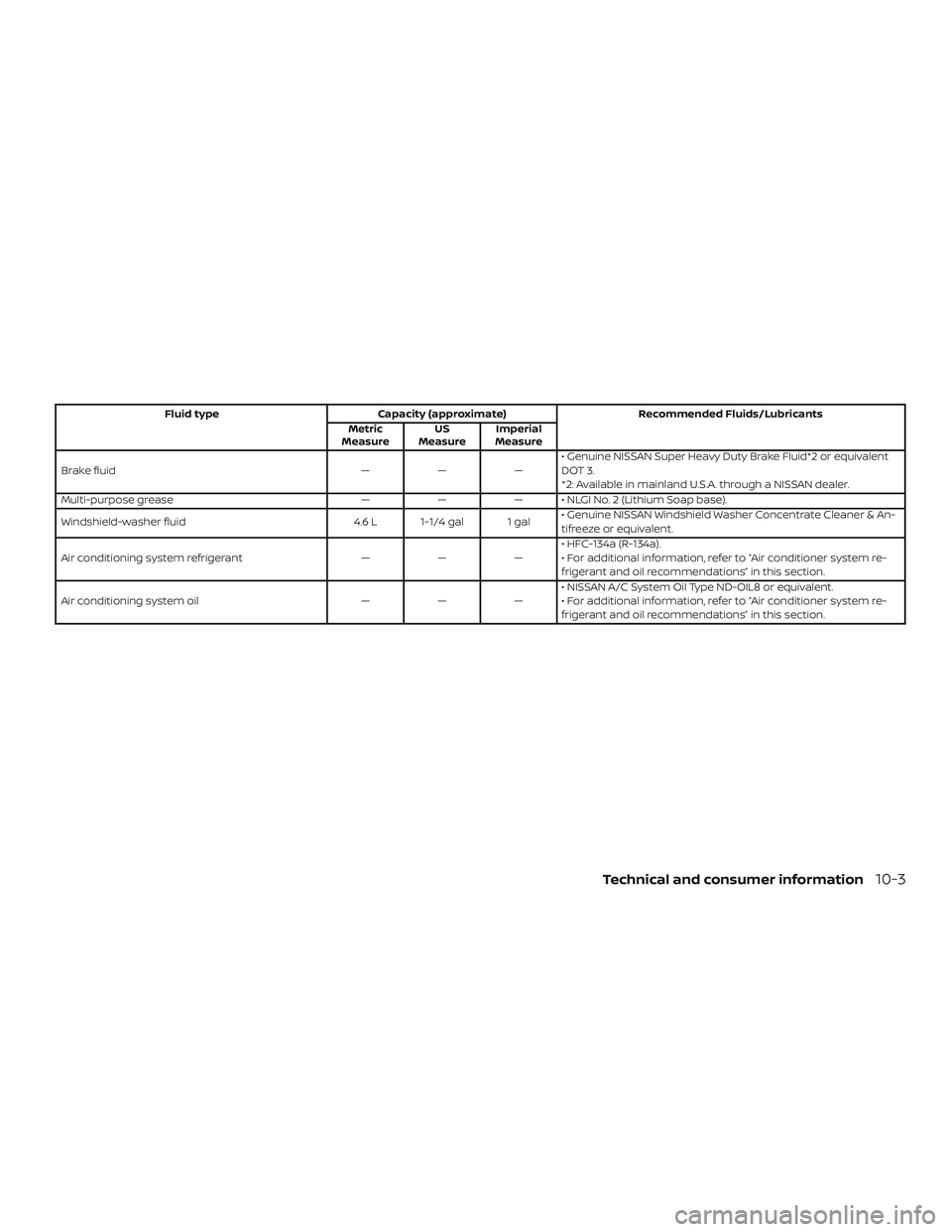
Fluid typeCapacity (approximate) Recommended Fluids/Lubricants
Metric
Measure US
Measure Imperial
Measure
Brake fluid ———• Genuine NISSAN Super Heavy Duty Brake Fluid*2 or equivalent
DOT 3.
*2: Available in mainland U.S.A. through a NISSAN dealer.
Multi-purpose grease ——— • NLGI No. 2 (Lithium Soap base).
Windshield-washer fluid 4.6 L 1-1/4 gal 1 gal• Genuine NISSAN Windshield Washer Concentrate Cleaner & An-
tifreeze or equivalent.
Air conditioning system refrigerant ———• HFC-134a (R-134a).
• For additional information, refer to “Air conditioner system re-
frigerant and oil recommendations” in this section.
Air conditioning system oil ———• NISSAN A/C System Oil Type ND-OIL8 or equivalent.
• For additional information, refer to “Air conditioner system re-
frigerant and oil recommendations” in this section.
Technical and consumer information10-3