heater NISSAN MURANO 2019 Owner´s Manual
[x] Cancel search | Manufacturer: NISSAN, Model Year: 2019, Model line: MURANO, Model: NISSAN MURANO 2019Pages: 507, PDF Size: 6.1 MB
Page 17 of 507
15. Heater and air conditioningcontrols (P. 4-28)
16. Shif t lever (P. 5-18)
17. Push-button ignition switch
(P. 5-13)
18. Cruise control switches
(if so equipped) (P. 5-58)
Intelligent Cruise Control (ICC)
switches (if so equipped) (P. 5-61)
19. Driver supplemental knee air bag
(P. 1-49)
20. Bluetooth® Hands-Free Phone
System/Audio control switches*
21. Hood release (P. 3-23) Fuel door release (P. 3-30)
22. Fuse box (P. 8-19)
23. Heated steering wheel switch
(if so equipped) (P. 2-49)
Dynamic driver assistance switch
(if so equipped) (P. 2-50)
Lif tgate instrument panel switch
(if so equipped) (P. 3-23)
24. Instrument brightness control
(P. 2-39)
Twin trip odometer reset switch
(P. 2-4)
*: Refer to the separate NissanConnect®
Owner’s Manual. Refer to the page number indicated in
parentheses for operating details.
Illustrated table of contents0-7
Page 97 of 507
15. Heater and air conditioningcontrols (P. 4-28)
16. Shif t lever (P. 5-18)
17. Push-button ignition switch
(P. 5-13)
18. Cruise control switches
(if so equipped) (P. 5-58)
Intelligent Cruise Control (ICC)
switches (if so equipped) (P. 5-61)
19. Driver supplemental knee air bag
(P. 1-49)
20. Bluetooth® Hands-Free Phone
System/Audio control switches*
21. Hood release (P. 3-23) Fuel door release (P. 3-30)
22. Fuse box (P. 8-19)
23. Heated steering wheel switch
(if so equipped) (P. 2-49)
Dynamic driver assistance switch
(if so equipped) (P. 2-50)
Lif tgate instrument panel switch
(if so equipped) (P. 3-23)
24. Instrument brightness control
(P. 2-39)
Twin trip odometer reset switch
(P. 2-4)
*: Refer to the separate NissanConnect®
Owner’s Manual. Refer to the page number indicated in
parentheses for operating details.
Instruments and controls2-3
Page 141 of 507
∙ If any malfunctions are found or theclimate controlled seat does not oper-
ate, turn the switch off and have the
system checked. It is recommended
that you visit a NISSAN dealer for this
service.WARNING
Do not use or allow occupants to use
the seat heater if you or the occupants
cannot monitor elevated seat tempera-
tures or have an inability to feel pain in
those body parts in contact with the
seat. Use of the seat heater by such
people could result in serious injury.
CAUTION
∙ The battery could run down if the seatheater is operated while the engine is
not running.
∙ Do not use the seat heater for ex- tended periods or when no one is us-
ing the seat.
∙ Do not put anything on the seat which insulates heat, such as a blanket,
cushion, seat cover, etc. Otherwise,
the seat may become overheated.
∙ Do not place anything hard or heavy on the seat or pierce it with a pin or
similar object. This may result in dam-
age to the heater.
∙ Any liquid spilled on the heated seat should be removed immediately with
a dry cloth. ∙ When cleaning the seat, never use
gasoline, benzine, thinner, or any
similar materials.
∙ If any malfunctions are found or the heated seat does not operate, turn
the switch off and have the system
checked. It is recommended that you
visit a NISSAN dealer for this service.
HEATED SEAT SWITCHES (if so
equipped)
Instruments and controls2-47
Page 142 of 507
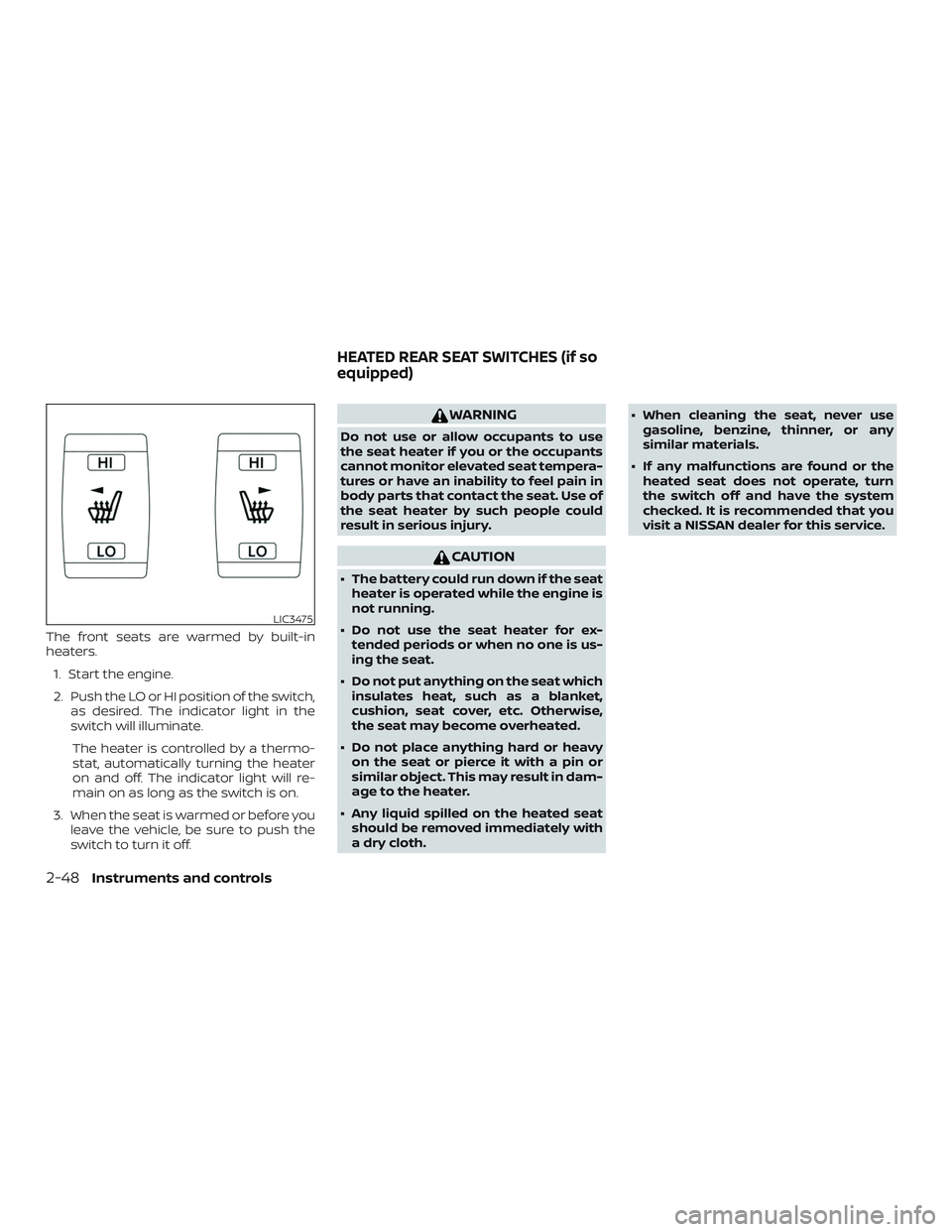
The front seats are warmed by built-in
heaters.1. Start the engine.
2. Push the LO or HI position of the switch, as desired. The indicator light in the
switch will illuminate.
The heater is controlled by a thermo-
stat, automatically turning the heater
on and off. The indicator light will re-
main on as long as the switch is on.
3. When the seat is warmed or before you leave the vehicle, be sure to push the
switch to turn it off.
WARNING
Do not use or allow occupants to use
the seat heater if you or the occupants
cannot monitor elevated seat tempera-
tures or have an inability to feel pain in
body parts that contact the seat. Use of
the seat heater by such people could
result in serious injury.
CAUTION
∙ The battery could run down if the seatheater is operated while the engine is
not running.
∙ Do not use the seat heater for ex- tended periods or when no one is us-
ing the seat.
∙ Do not put anything on the seat which insulates heat, such as a blanket,
cushion, seat cover, etc. Otherwise,
the seat may become overheated.
∙ Do not place anything hard or heavy on the seat or pierce it with a pin or
similar object. This may result in dam-
age to the heater.
∙ Any liquid spilled on the heated seat should be removed immediately with
a dry cloth. ∙ When cleaning the seat, never use
gasoline, benzine, thinner, or any
similar materials.
∙ If any malfunctions are found or the heated seat does not operate, turn
the switch off and have the system
checked. It is recommended that you
visit a NISSAN dealer for this service.
LIC3475
HEATED REAR SEAT SWITCHES (if so
equipped)
2-48Instruments and controls
Page 143 of 507
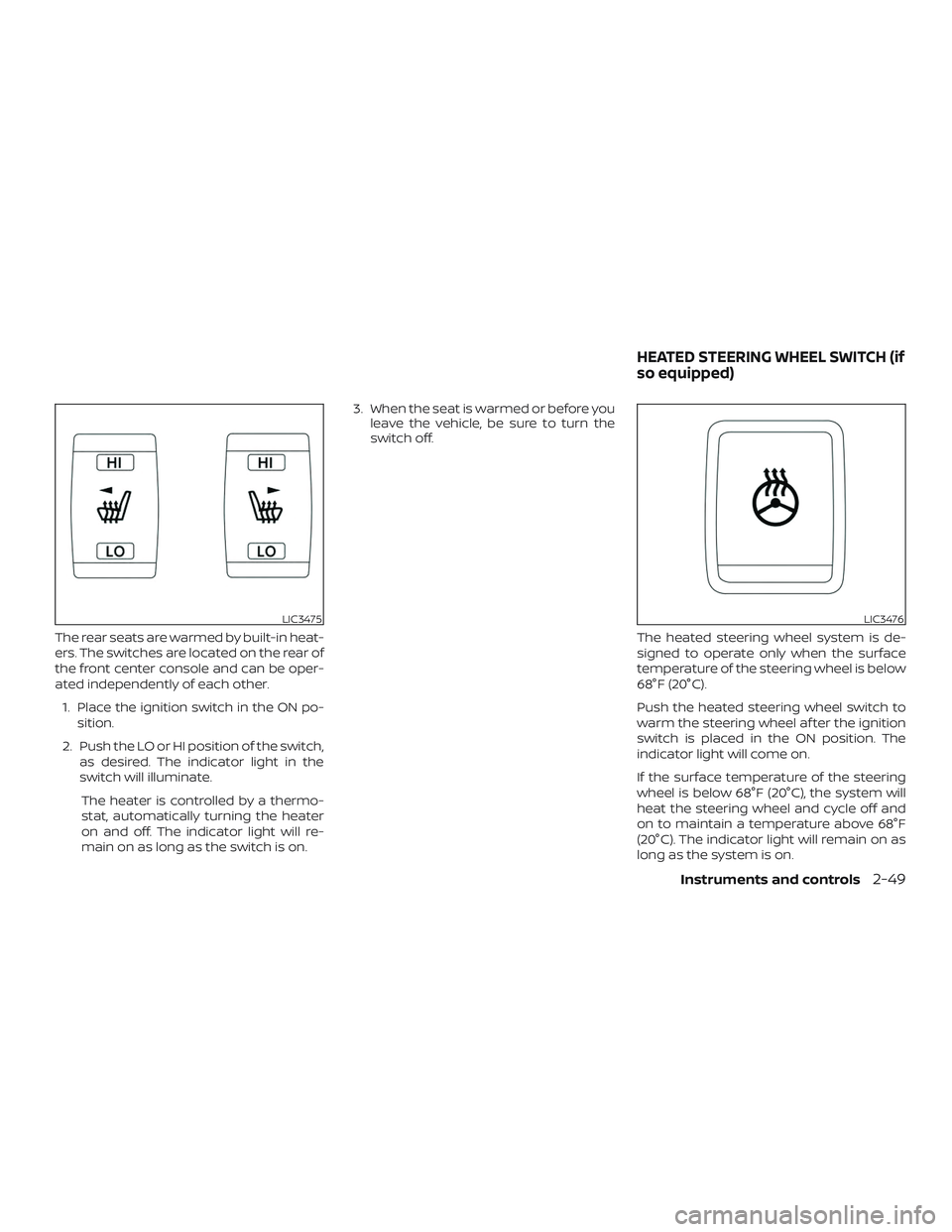
The rear seats are warmed by built-in heat-
ers. The switches are located on the rear of
the front center console and can be oper-
ated independently of each other.1. Place the ignition switch in the ON po- sition.
2. Push the LO or HI position of the switch, as desired. The indicator light in the
switch will illuminate.
The heater is controlled by a thermo-
stat, automatically turning the heater
on and off. The indicator light will re-
main on as long as the switch is on. 3. When the seat is warmed or before you
leave the vehicle, be sure to turn the
switch off.
The heated steering wheel system is de-
signed to operate only when the surface
temperature of the steering wheel is below
68°F (20°C).
Push the heated steering wheel switch to
warm the steering wheel af ter the ignition
switch is placed in the ON position. The
indicator light will come on.
If the surface temperature of the steering
wheel is below 68°F (20°C), the system will
heat the steering wheel and cycle off and
on to maintain a temperature above 68°F
(20°C). The indicator light will remain on as
long as the system is on.
LIC3475LIC3476
HEATED STEERING WHEEL SWITCH (if
so equipped)
Instruments and controls2-49
Page 213 of 507
4 Monitor, climate, audio, phone and
voice recognition systems
NissanConnect® Owner’s Manual................4-2
RearView Monitor (if so equipped) ...............4-3
RearView Monitor system operation ..........4-4
How to read the displayed lines ...............4-5
Difference between predicted and
actual distances ..............................4-5
How to park with predicted course
lines ..........................................4-7
Adjusting the screen .........................4-8
How to turn on and off predicted
course lines ..................................4-9
RearView Monitor system limitations .........4-9
System maintenance ........................ 4-10
Intelligent Around View Monitor
(if so equipped) .................................. 4-11
Intelligent Around View Monitor system
operation .................................... 4-12
Difference between predicted and
actual distances ............................. 4-15
How to park with predicted course
lines ......................................... 4-17How to switch the display
...................4-18
Adjusting the screen ........................ 4-19
Intelligent Around View Monitor system
limitations ................................... 4-19
System maintenance ........................ 4-21
Moving Object Detection (MOD)
(if so equipped) ................................. 4-22
MOD system operation ......................4-23
Turning MOD on and off .....................4-25
MOD system limitations .....................4-25
System maintenance ........................ 4-26
Vents ........................................... 4-26
Heater and Air Conditioner (automatic) .........4-28
Automatic operation ........................ 4-29
Manual operation ........................... 4-30
Operating tips ............................... 4-31
Servicing air conditioner ........................4-32
USB/iPod® charging port .......................4-32
Antenna ........................................ 4-33
Car phone or CB radio .......................... 4-33
Page 240 of 507
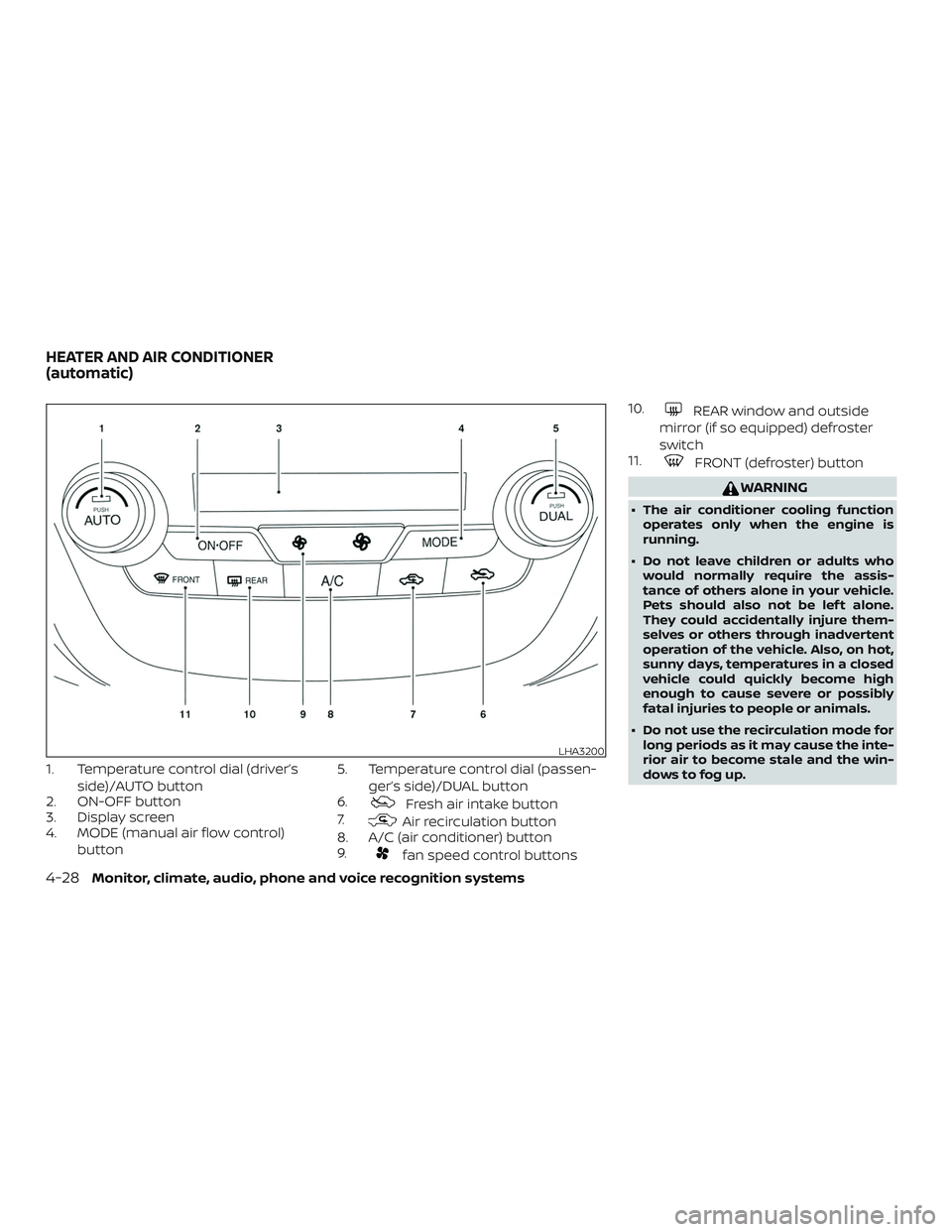
1. Temperature control dial (driver’sside)/AUTO button
2. ON-OFF button
3. Display screen
4. MODE (manual air flow control)
button 5. Temperature control dial (passen-
ger’s side)/DUAL button
6.
Fresh air intake button
7.
Air recirculation button
8. A/C (air conditioner) button
9.
fan speed control buttons 10.
REAR window and outside
mirror (if so equipped) defroster
switch
11.
FRONT (defroster) button
WARNING
∙ The air conditioner cooling function
operates only when the engine is
running.
∙ Do not leave children or adults who would normally require the assis-
tance of others alone in your vehicle.
Pets should also not be lef t alone.
They could accidentally injure them-
selves or others through inadvertent
operation of the vehicle. Also, on hot,
sunny days, temperatures in a closed
vehicle could quickly become high
enough to cause severe or possibly
fatal injuries to people or animals.
∙ Do not use the recirculation mode for long periods as it may cause the inte-
rior air to become stale and the win-
dows to fog up.
LHA3200
HEATER AND AIR CONDITIONER
(automatic)
4-28Monitor, climate, audio, phone and voice recognition systems
Page 241 of 507
NOTE:∙ Odors from inside and outside the ve-
hicle can build up in the air condi-
tioner unit. Odor can enter the pas-
senger compartment through the
vents.
∙ When parking, set the heater and air
conditioner controls to turn off air re-
circulation to allow fresh air into the
passenger compartment. This should
help reduce odors inside the vehicle.
AUTOMATIC OPERATION
Cooling and/or dehumidified
heating (AUTO)
This mode may be used all year round as
the system automatically works to keep a
constant temperature. Air flow distribution
and fan speed are also controlled auto-
matically.
1. Press the AUTO button on. The indica- tor on the button will illuminate.
2. Turn the temperature control dial to the lef t or right to set the desired tem-
perature. ∙ The temperature of the passenger
compartment will be maintained auto-
matically. Air flow distribution and fan
speed are also controlled automatically.
∙ A visible mist may be seen coming from the vents in hot, humid conditions as
the air is cooled rapidly. This does not
indicate a malfunction.
3. You can individually set driver’s and front passenger’s side temperature us-
ing each temperature control dial.
When the DUAL button is pressed or
passenger’s side temperature dial is
turned, the DUAL indicator will come
on. To turn off the passenger’s side
temperature control, press the DUAL
button.
Heating (A/C OFF)
The air conditioner does not activate. When
you need to heat only, use this mode.
1. Press the AUTO button.
2. Turn the temperature control dial to set the desired temperature.
∙ The temperature of the passenger compartment will be maintained auto-
matically. Air flow distribution and fan
speed are also controlled automatically. ∙ Do not set the temperature lower than
the outside air temperature. Otherwise,
the system may not work properly.
∙ Not recommended if windows fog up.
Dehumidified defrosting or
defogging
1. Press thefront defroster button
on. The indicator light on the button will
come on.
2. Turn the temperature control dial to set the maximum temperature to aid in
defrosting or defogging.
∙ To quickly remove ice from the outside of the windows, use the
fan speed
control buttons to set the fan speed to
maximum.
∙ As soon as possible af ter the wind- shield is clean, press the AUTO button to
return to the automatic mode.
Monitor, climate, audio, phone and voice recognition systems4-29
Page 249 of 507
Battery.....................................5-138
Draining of coolant water ...................5-138
Tire equipment ............................. 5-138Special winter equipment
..................5-138
Driving on snow or ice ......................5-139
Engine block heater (if so equipped) ........5-139
Page 385 of 507
DRIVING ON SNOW OR ICE
WARNING
∙Wet ice (32°F, 0°C and freezing rain), very
cold snow or ice can be slick and very
hard to drive on. The vehicle will have
much less traction or “grip” under these
conditions. Try to avoid driving on wet
ice until the road is salted or sanded.
∙ Whatever the condition, drive with caution. Accelerate and slow down
with care. If accelerating or down-
shif ting too fast, the drive wheels will
lose even more traction.
∙ Allow more stopping distance under these conditions. Braking should be
started sooner than on dry pavement.
∙ Allow greater following distances on slippery roads.
∙ Watch for slippery spots (glare ice). These may appear on an otherwise
clear road in shaded areas. If a patch
of ice is seen ahead, brake before
reaching it. Try not to brake while on
the ice, and avoid any sudden steering
maneuvers.
∙ Do not use the cruise control on slip- pery roads. ∙ Snow can trap dangerous exhaust
gases under your vehicle. Keep snow
clear of the exhaust pipe and from
around your vehicle.
ENGINE BLOCK HEATER (if so
equipped)
Engine block heaters are used to assist
with cold temperature starting.
The engine block heater should be used
when the outside temperature is 20°F (-7°C)
or lower.
WARNING
∙ Do not use your engine block heaterwith an ungrounded electrical system
or a 2-pronged adapter. You can be
seriously injured by an electrical
shock if you use an ungrounded
connection.
∙ Disconnect and properly store the en- gine block heater cord before starting
the engine. Damage to the cord could
result in an electrical shock and can
cause serious injury. ∙
Use a heavy-duty 3-wire, 3-pronged ex-
tension cord rated for at least 10 A. Plug
the extension cord into a Ground Fault
Interrupt (GFI) protected, grounded
110-VAC outlet. Failure to use the proper
extension cord or a grounded outlet
can result in a fire or electrical shock
and cause serious personal injury.
To use the engine block heater:
1. Turn the engine off.
2. Open the hood and unwrap the engine block heater cord.
3. Plug the engine block heater cord into a grounded 3-wire, 3-pronged exten-
sion cord.
4. Plug the extension cord into a Ground Fault Interrupt (GFI) protected,
grounded 110-volt AC (VAC) outlet.
5. The engine block heater must be plugged in for at least 2 to 4 hours,
depending on outside temperatures,
to properly warm the engine coolant.
Use an appropriate timer to turn the
engine block heater on.
6. Before starting the engine, unplug and properly store the cord to keep it away
from moving parts.
Starting and driving5-139