child lock NISSAN MURANO 2020 Owner´s Manual
[x] Cancel search | Manufacturer: NISSAN, Model Year: 2020, Model line: MURANO, Model: NISSAN MURANO 2020Pages: 518, PDF Size: 3.52 MB
Page 98 of 518
NOTE:
This vehicle’s occupant classification
sensor system generally keeps the clas-
sification locked during driving, so it is
important that you confirm that the
front passenger is properly classified
prior to driving. However, the occupant
classification sensor may recalculate the
weight of the occupant under some con-
ditions (both while driving and when
stopped), so front passenger seat occu-
pants should continue to remain seated
as outlined above.
Troubleshooting
If you think the front passenger air bag
status light is incorrect:
1. If the light is ON with an adult occupyingthe front passenger seat:
• Occupant is a small adult — the air bag light is functioning as intended. The front
passenger air bag and passenger knee
air bag are suppressed.
However, if the occupant is not a small
adult, then this may be due to the following
conditions that may be interfering with the
weight sensors: • Occupant is not sitting upright, leaning
against the seatback, and centered on
the seat cushion with his/her feet com-
fortably extended to the floor.
• A child restraint or other object pressing against the rear of the seatback.
• A rear passenger pushing or pulling on the back of the front passenger seat.
• Forcing the front seat or seatback against an object on the seat or floor be-
hind it.
• An object placed under the front passen- ger seat.
• An object placed between the seat cush- ion and center console or between the
seat cushion and the door.
If the vehicle is moving, please come to a
stop when it is safe to do so. Check and
correct any of the above conditions. Re-
start the vehicle and wait 1 minute.
NOTE:
A system check will be performed during
which the front passenger air bag status
light will remain lit for about 7 seconds
initially.
If the light is still ON af ter this, the person
should be advised not to ride in the front
passenger seat and the vehicle should be checked as soon as possible. It is recom-
mended that you visit a NISSAN dealer for
this service.
2. If the light is OFF with a small adult, child
or child restraint occupying the front
passenger seat.
This may be due to the following condi-
tions that may be interfering with the
weight sensors:
• Small adult or child is not sitting upright, leaning against the seatback, and cen-
tered on the seat cushion with his/her
feet comfortably extended to the floor.
• The child restraint is not properly in- stalled, as outlined in the “Child restraints”
section of this manual.
• An object weighing over 9.1 lbs. (4 kg) hanging on the seat or placed in the seat-
back pocket.
• A child restraint or other object pressing against the rear of the seatback.
• A rear passenger pushing or pulling on the back of the front passenger seat.
• Forcing the front seat or seatback against an object on the seat or floor be-
hind it.
• An object placed under the front passen- ger seat.
1-62Safety-Seats, seat belts and supplemental restraint system
Page 170 of 518
POWER WINDOWS
WARNING
• Make sure that all passengers have
their hands, etc., inside the vehicle
while it is in motion and before clos-
ing the windows. Use the window
lock switch to prevent unexpected
use of the power windows.
• To help avoid risk of injury or death
through unintended operation of the
vehicle and/or its systems, including
entrapment in windows or inadver-
tent door lock activation, do not
leave children, people who require
the assistance of others or pets unat-
tended in your vehicle. Additionally,
the temperature inside a closed ve-
hicle on a warm day can quickly be-
come high enough to cause a signifi-
cant risk of injury or death to people
and pets.
The power windows operate when the ig-
nition switch is placed in the ON position or
for a period of time af ter the ignition switch
is placed in the OFF position. If the driver's
or passenger's door is opened during this
period of time, the power to the windows is
canceled.
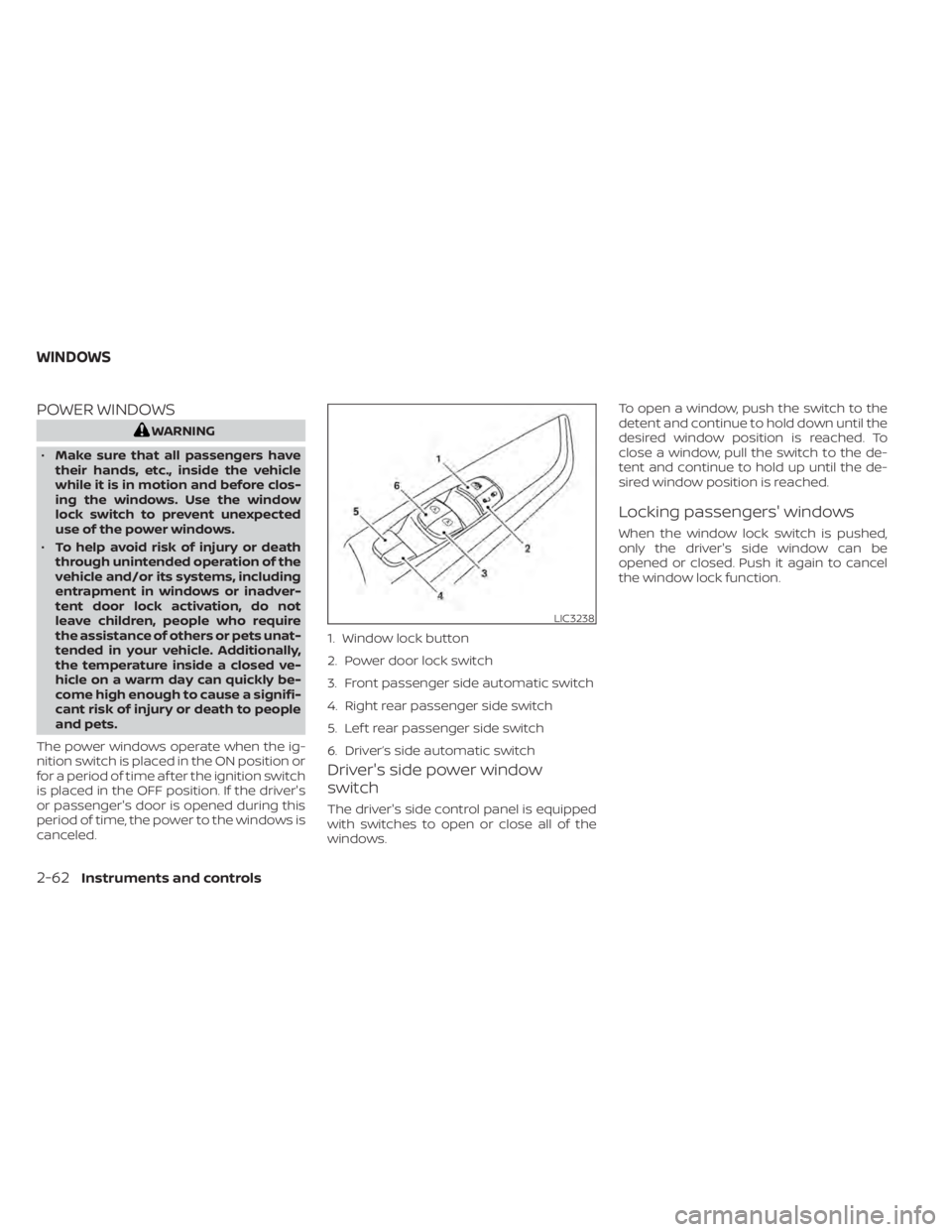
Driver's side power window
switch
The driver's side control panel is equipped
with switches to open or close all of the
windows. To open a window, push the switch to the
detent and continue to hold down until the
desired window position is reached. To
close a window, pull the switch to the de-
tent and continue to hold up until the de-
sired window position is reached.
Locking passengers' windows
When the window lock switch is pushed,
only the driver's side window can be
opened or closed. Push it again to cancel
the window lock function.
LIC3238
1. Window lock button
2. Power door lock switch
3. Front passenger side automatic switch
4. Right rear passenger side switch
5. Lef t rear passenger side switch
6. Driver’s side automatic switch
WINDOWS
2-62Instruments and controls
Page 182 of 518
3 Pre-driving checks and adjustments
Keys.............................................3-2NISSAN Intelligent Key® .......................3-2
NISSAN Vehicle Immobilizer System
keys..........................................3-4
Doors ...........................................3-5
Locking with key .............................3-5
Locking with inside lock knob ................3-6
Locking with power door lock switch .........3-6
Automatic door locks ........................ 3-7
Child safety rear door lock .................... 3-7
NISSAN Intelligent Key® .......................... 3-7
Operating range .............................3-8
Door locks/unlocks precaution ...............3-9
NISSAN Intelligent Key® Operation ...........3-10
How to use the remote keyless entry
function ..................................... 3-13
Warning signals ............................. 3-16
Troubleshooting guide ......................3-16
Remote Engine Start (if so equipped) ...........3-19
Remote Engine Start operating range .......3-19
Remote starting the vehicle .................3-19
Extending engine run time ..................3-20
Canceling a Remote Engine Start ...........3-20
Conditions the Remote Engine Start will
notwork .................................... 3-21
Hood ........................................... 3-22Lif tgate
........................................ 3-22
Operating the manual lif tgate
(if so equipped) .............................. 3-23
Operating the power lif tgate
(if so equipped) .............................. 3-23
Motion-Activated Lif tgate
(if so equipped) .............................. 3-26
Lif tgate release ............................. 3-27
Lif tgate position setting
(if so equipped) .............................. 3-29
Fuel-filler door .................................. 3-29
Opener operation ........................... 3-29
Fuel-filler cap ................................ 3-30
Steering wheel ................................. 3-32
Manual operation (if so equipped) ...........3-32
Automatic operation (if so equipped) ........3-33
Sun visors ...................................... 3-34
Vanity mirrors ............................... 3-34
Card holder ................................. 3-35
Mirrors .........................................
3-35
Manual
anti-glare rearview mirror
(if so equipped) .............................. 3-35
Automatic anti-glare rearview mirror
(if so equipped) .............................. 3-35
Outside mirrors ............................. 3-36
Page 187 of 518
When the doors are locked using one of the
following methods, the doors cannot be
opened using the inside or outside door
handles. The doors must be unlocked to
open the doors.
WARNING
• Always have the doors locked while
driving. Along with the use of seat
belts, this provides greater safety in
the event of an accident by helping to
prevent persons from being thrown
from the vehicle. This also helps keep
children and others from uninten-
tionally opening the doors, and will
help keep out intruders.
• Before opening any door, always look
for and avoid oncoming traffic. •
To help avoid risk of injury or death
through unintended operation of the
vehicle and/or its systems, including
entrapment in windows or inadver-
tent door lock activation, do not
leave children, people who require
the assistance of others or pets unat-
tended in your vehicle. Additionally,
the temperature inside a closed ve-
hicle on a warm day can quickly be-
come high enough to cause a signifi-
cant risk of injury or death to people
and pets.
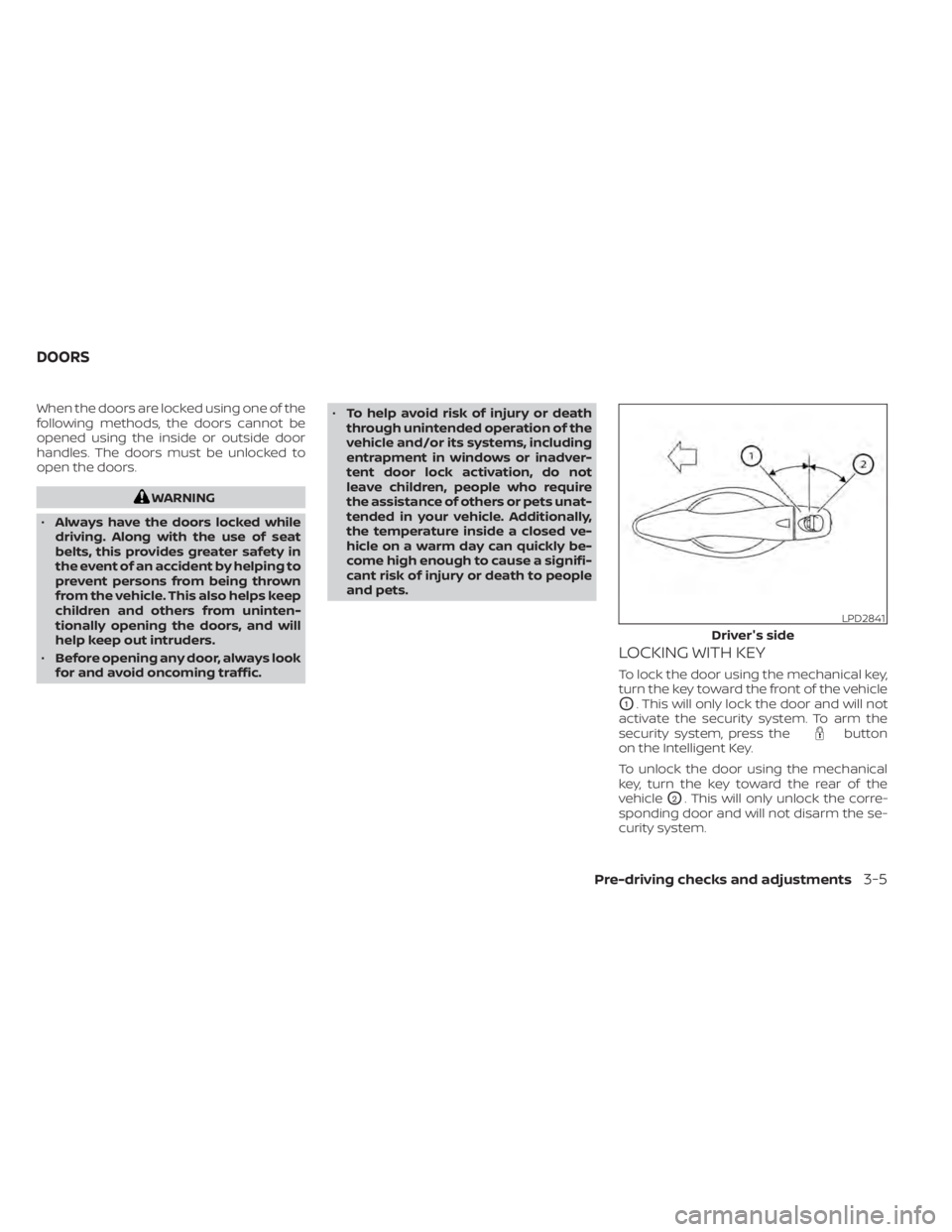
LOCKING WITH KEY
To lock the door using the mechanical key,
turn the key toward the front of the vehicle
O1. This will only lock the door and will not
activate the security system. To arm the
security system, press the
button
on the Intelligent Key.
To unlock the door using the mechanical
key, turn the key toward the rear of the
vehicle
O2. This will only unlock the corre-
sponding door and will not disarm the se-
curity system.
LPD2841
Driver's side
DOORS
Pre-driving checks and adjustments3-5
Page 189 of 518
AUTOMATIC DOOR LOCKS
• All doors lock automatically when the ve-hicle speed reaches 15 mph (24 km/h).
• All doors unlock automatically when the transmission is placed in the P (Park) po-
sition or when the ignition switch is
placed in the OFF position, depending on
the option selected in the “Vehicle Set-
tings” menu.
NOTE:The Auto Door Unlock (if so equipped)
feature can be changed using the “Ve-
hicle Settings” menu on the vehicle in-
formation display. For additional infor-
mation, refer to “Vehicle information
display ” in the “Instruments and con-
trols” section of this manual.
CHILD SAFETY REAR DOOR LOCK
Child safety locks help prevent the rear
doors from being opened accidentally, es-
pecially when small children are in the ve-
hicle.
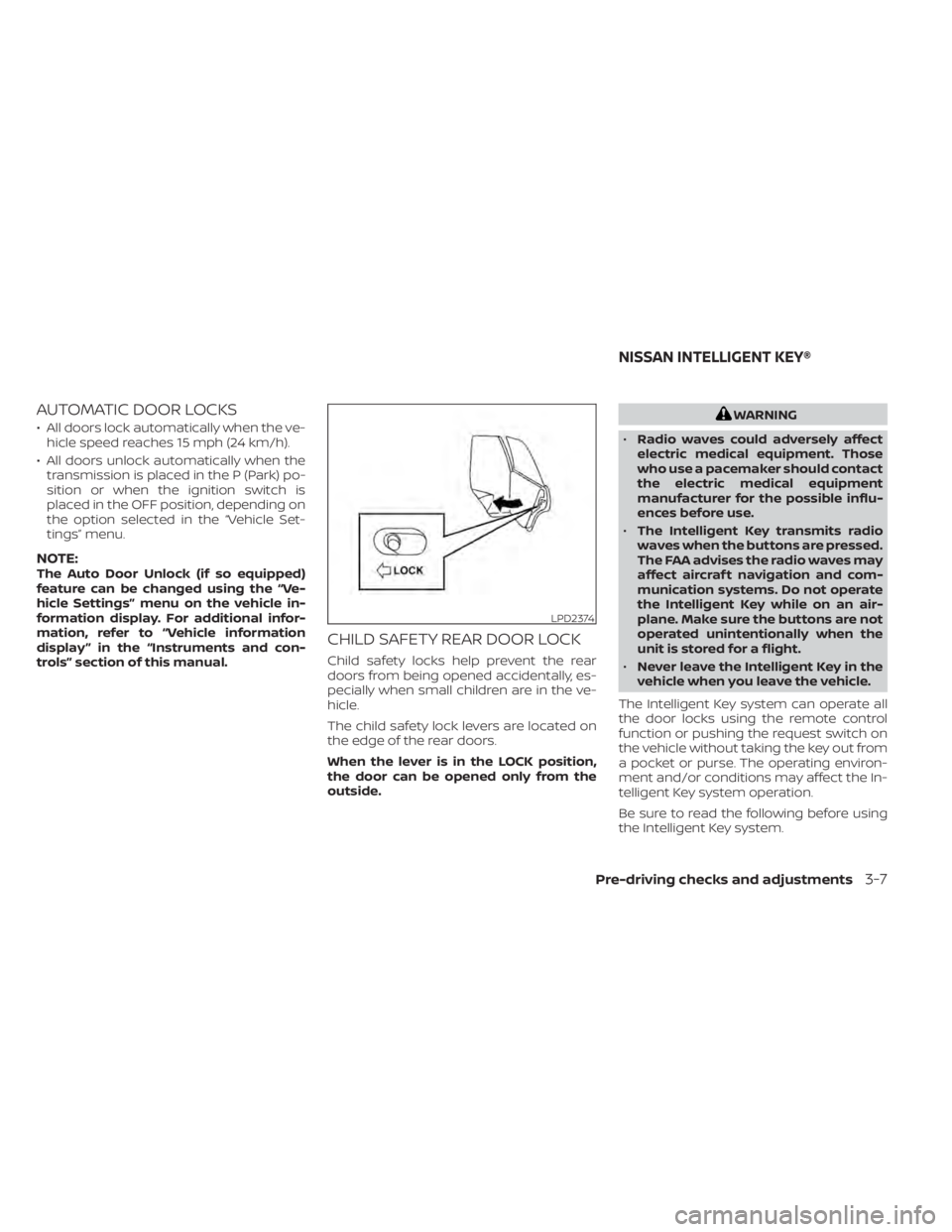
The child safety lock levers are located on
the edge of the rear doors.
When the lever is in the LOCK position,
the door can be opened only from the
outside.
WARNING
• Radio waves could adversely affect
electric medical equipment. Those
who use a pacemaker should contact
the electric medical equipment
manufacturer for the possible influ-
ences before use.
• The Intelligent Key transmits radio
waves when the buttons are pressed.
The FAA advises the radio waves may
affect aircraf t navigation and com-
munication systems. Do not operate
the Intelligent Key while on an air-
plane. Make sure the buttons are not
operated unintentionally when the
unit is stored for a flight.
• Never leave the Intelligent Key in the
vehicle when you leave the vehicle.
The Intelligent Key system can operate all
the door locks using the remote control
function or pushing the request switch on
the vehicle without taking the key out from
a pocket or purse. The operating environ-
ment and/or conditions may affect the In-
telligent Key system operation.
Be sure to read the following before using
the Intelligent Key system.
LPD2374
NISSAN INTELLIGENT KEY®
Pre-driving checks and adjustments3-7
Page 204 of 518
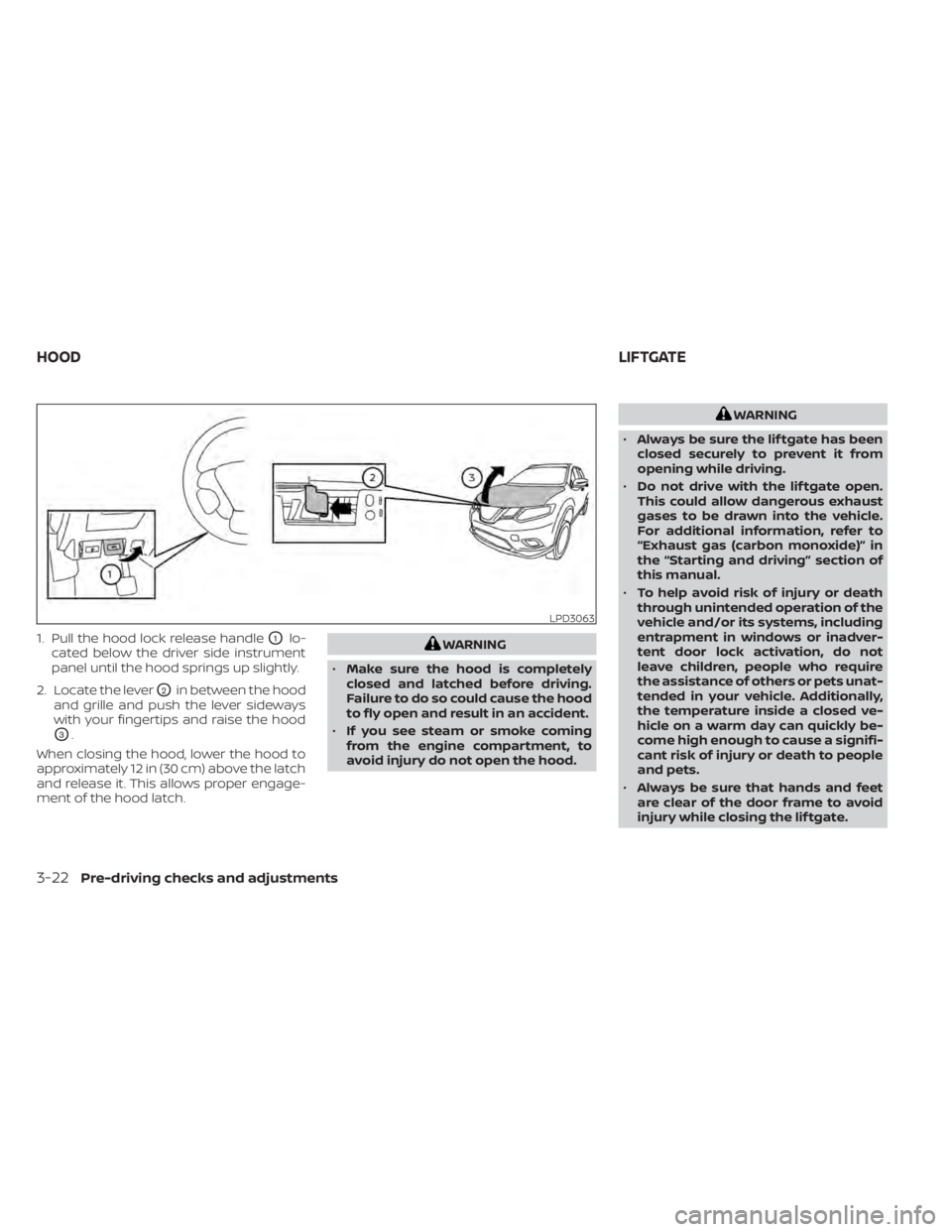
1. Pull the hood lock release handleO1lo-
cated below the driver side instrument
panel until the hood springs up slightly.
2. Locate the lever
O2in between the hood
and grille and push the lever sideways
with your fingertips and raise the hood
O3.
When closing the hood, lower the hood to
approximately 12 in (30 cm) above the latch
and release it. This allows proper engage-
ment of the hood latch.
WARNING
• Make sure the hood is completely
closed and latched before driving.
Failure to do so could cause the hood
to fly open and result in an accident.
• If you see steam or smoke coming
from the engine compartment, to
avoid injury do not open the hood.
WARNING
• Always be sure the lif tgate has been
closed securely to prevent it from
opening while driving.
• Do not drive with the lif tgate open.
This could allow dangerous exhaust
gases to be drawn into the vehicle.
For additional information, refer to
“Exhaust gas (carbon monoxide)” in
the “Starting and driving” section of
this manual.
• To help avoid risk of injury or death
through unintended operation of the
vehicle and/or its systems, including
entrapment in windows or inadver-
tent door lock activation, do not
leave children, people who require
the assistance of others or pets unat-
tended in your vehicle. Additionally,
the temperature inside a closed ve-
hicle on a warm day can quickly be-
come high enough to cause a signifi-
cant risk of injury or death to people
and pets.
• Always be sure that hands and feet
are clear of the door frame to avoid
injury while closing the lif tgate.
LPD3063
HOOD LIFTGATE
3-22Pre-driving checks and adjustments
Page 205 of 518
CAUTION
Do not use accessory carriers that at-
tach to the lif tgate. Doing so will cause
damage to the vehicle.
OPERATING THE MANUAL
LIFTGATE (if so equipped)
The power door lock system allows you to
lock or unlock all doors including the lif t-
gate simultaneously.
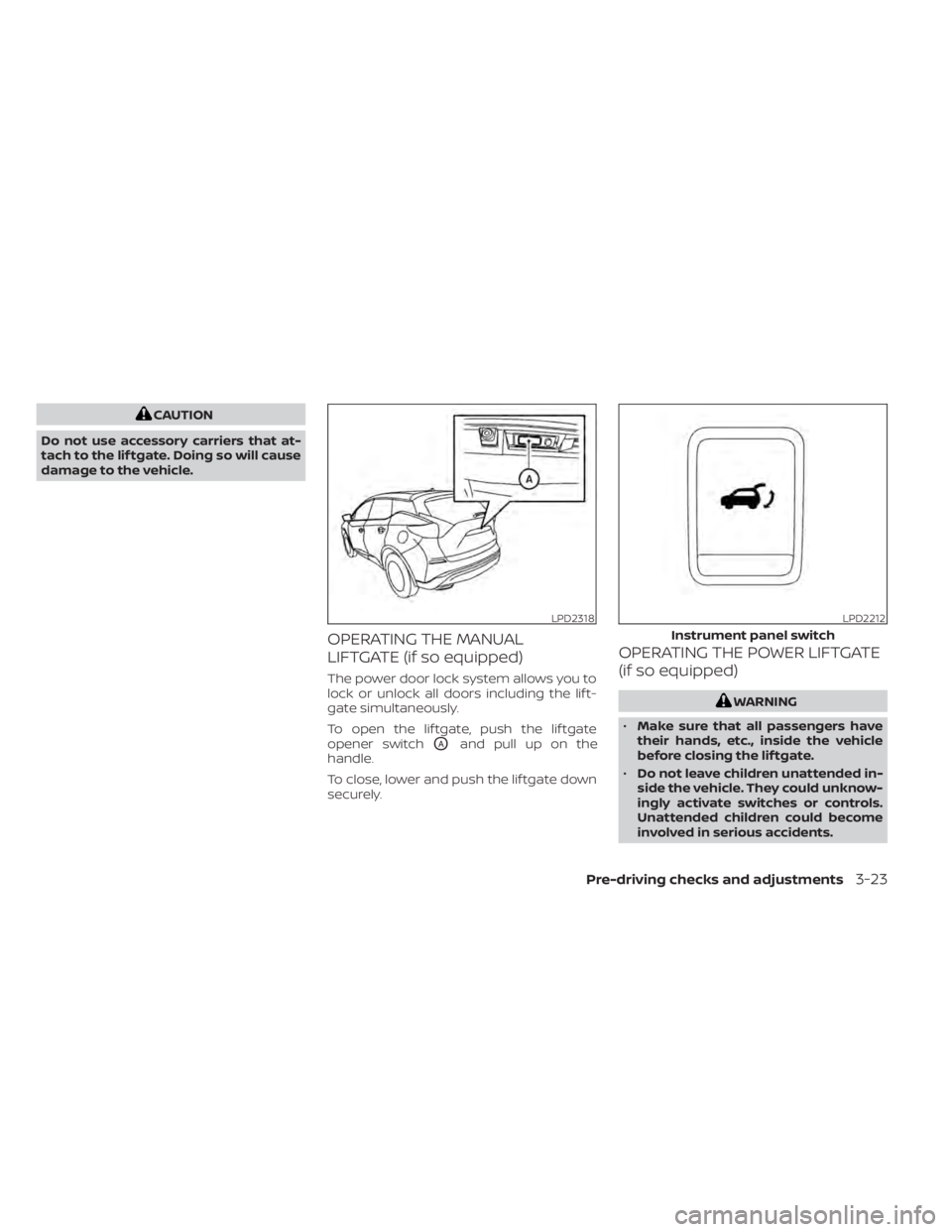
To open the lif tgate, push the lif tgate
opener switch
OAand pull up on the
handle.
To close, lower and push the lif tgate down
securely.
OPERATING THE POWER LIFTGATE
(if so equipped)
WARNING
• Make sure that all passengers have
their hands, etc., inside the vehicle
before closing the lif tgate.
• Do not leave children unattended in-
side the vehicle. They could unknow-
ingly activate switches or controls.
Unattended children could become
involved in serious accidents.
LPD2318LPD2212
Instrument panel switch
Pre-driving checks and adjustments3-23
Page 427 of 518
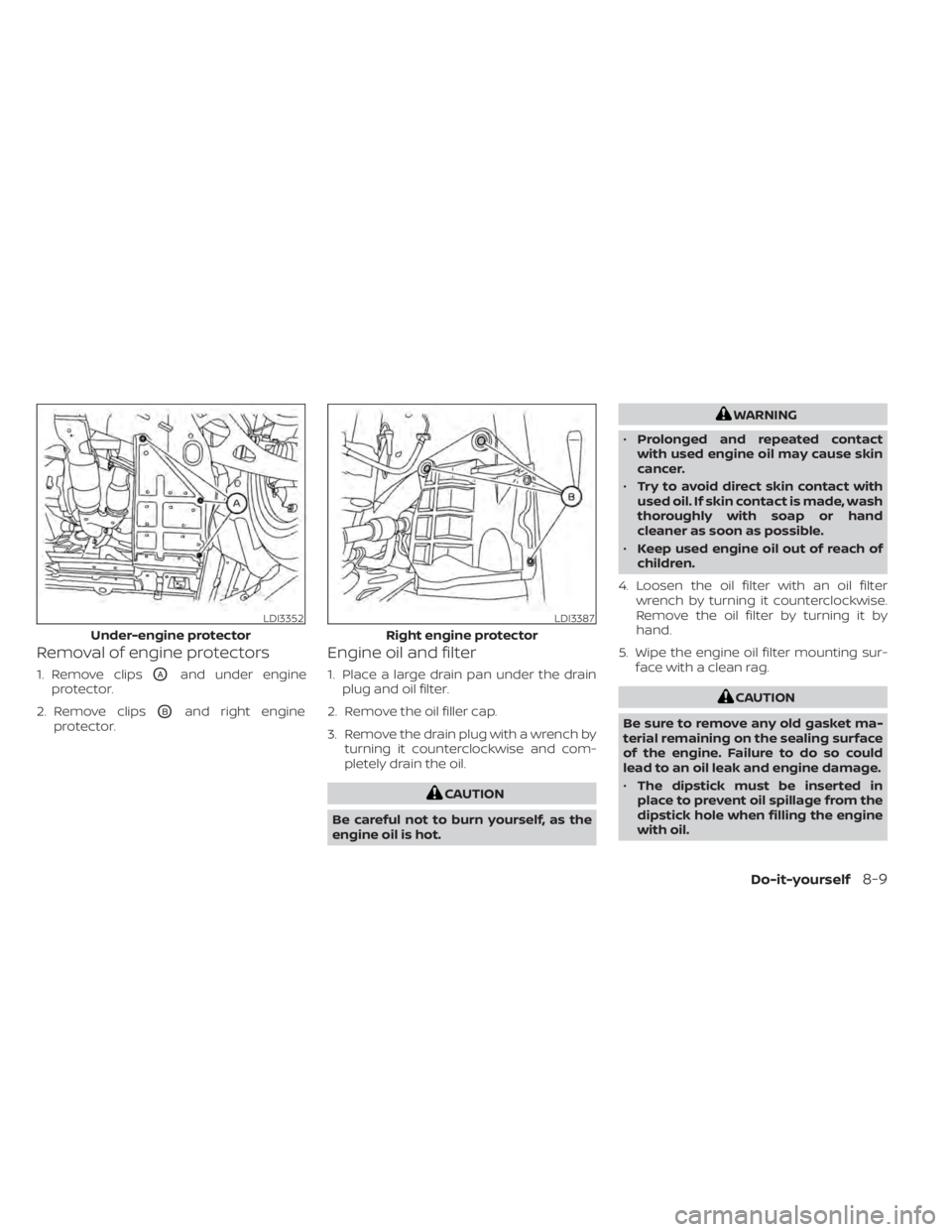
Removal of engine protectors
1. Remove clipsOAand under engine
protector.
2. Remove clips
OBand right engine
protector.
Engine oil and filter
1. Place a large drain pan under the drain plug and oil filter.
2. Remove the oil filler cap.
3. Remove the drain plug with a wrench by turning it counterclockwise and com-
pletely drain the oil.
CAUTION
Be careful not to burn yourself, as the
engine oil is hot.
WARNING
• Prolonged and repeated contact
with used engine oil may cause skin
cancer.
• Try to avoid direct skin contact with
used oil. If skin contact is made, wash
thoroughly with soap or hand
cleaner as soon as possible.
• Keep used engine oil out of reach of
children.
4. Loosen the oil filter with an oil filter wrench by turning it counterclockwise.
Remove the oil filter by turning it by
hand.
5. Wipe the engine oil filter mounting sur- face with a clean rag.
CAUTION
Be sure to remove any old gasket ma-
terial remaining on the sealing surface
of the engine. Failure to do so could
lead to an oil leak and engine damage.
• The dipstick must be inserted in
place to prevent oil spillage from the
dipstick hole when filling the engine
with oil.
LDI3352
Under-engine protector
LDI3387
Right engine protector
Do-it-yourself8-9
Page 507 of 518
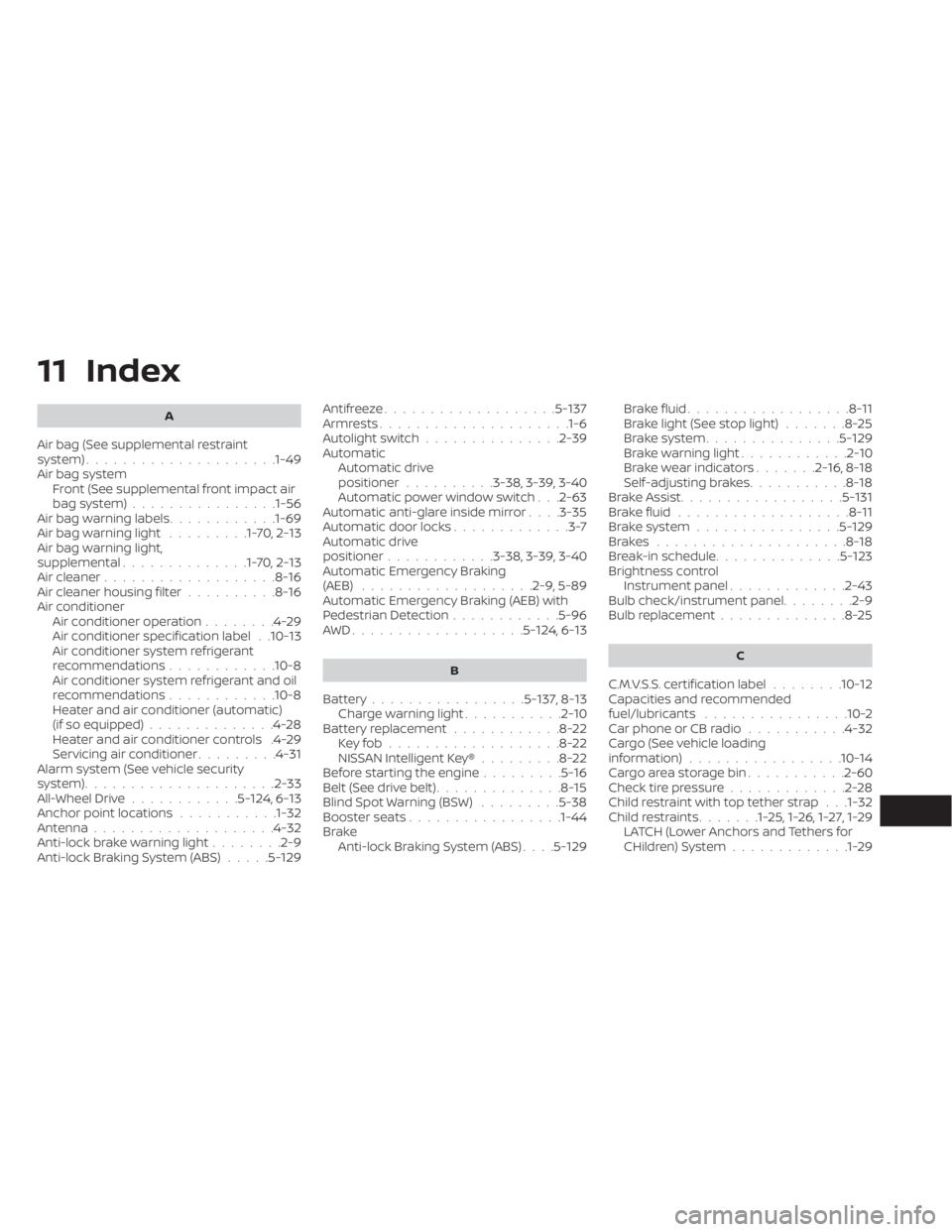
11 Index
A
Air bag (See supplemental restraint
system).....................1-49Air bag system
Front (See supplemental front impact air
bag system)
................1-56Air bag warning labels............1-69Air bag warning light.........1-70,2-13Air bag warning light,
supplemental..............1-70,2-13Air cleaner...................8-16Air cleaner housing filter..........8-16Air conditionerAir conditioner operation........4-29Air conditioner specification label. .10-13Air conditioner system refrigerant
recommendations............10-8Air conditioner system refrigerant and oil
recommendations............10-8Heater and air conditioner (automatic)
(if so equipped)..............4-28Heater and air conditioner controls.4-29Servicing air conditioner.........4-31Alarm system (See vehicle security
system).................... .2-33All-Wheel Drive............5-124, 6-13Anchor point locations...........1-32Antenna................... .4-32Anti-lock brake warning light........2-9Anti-lock Braking System (ABS).....5-129
Antifreeze...................5-137Armrests.................... .1-6Autolight switch...............2-39Automatic
Automatic drive
positioner
..........3-38, 3-39, 3-40Automatic power window switch. . .2-63Automatic anti-glare inside mirror. . . .3-35Automatic door locks.............3-7Automatic drive
positioner............3-38, 3-39, 3-40Automatic Emergency Braking
(AEB).................. .2-9, 5-89Automatic Emergency Braking (AEB) with
Pedestrian Detection............5-96AWD...................5- 124, 6-13
B
Battery.................5-137, 8-13Charge warning light...........2-10Battery replacement............8-22Key fob...................8-22NISSAN Intelligent Key®.........8-22Before starting the engine.........5-16Belt (See drive belt)..............8-15Blind Spot Warning (BSW).........5-38Booster seats.................1-44Brake
Anti-lock Braking System (ABS). . . .5-129
Brake fluid..................8-11Brake light (See stop light).......8-25Brake system...............5-129Brake warning light............2-10Brake wear indicators.......2-16,8-18Self-adjusting brakes...........8-18Brake Assist..................5-131Brake fluid...................8-11Brake system................5-129Brakes.....................8-18Break-in schedule..............5-123Brightness controlInstrument panel.............2-43Bulb check/instrument panel........2-9Bulb replacement..............8-25
C
C.M.V.S.S. certification label........10-12Capacities and recommended
fuel/lubricants................10-2Car phone or CB radio...........4-32Cargo (See vehicle loading
information)................ .10-14Cargo area storage bin...........2-60Check tire pressure.............2-28Child restraint with top tether strap. . .1-32Child restraints.......1-25,1-26,1-27,1-29LATCH (Lower Anchors and Tethers for
CHildren) System.............1-29
Page 508 of 518
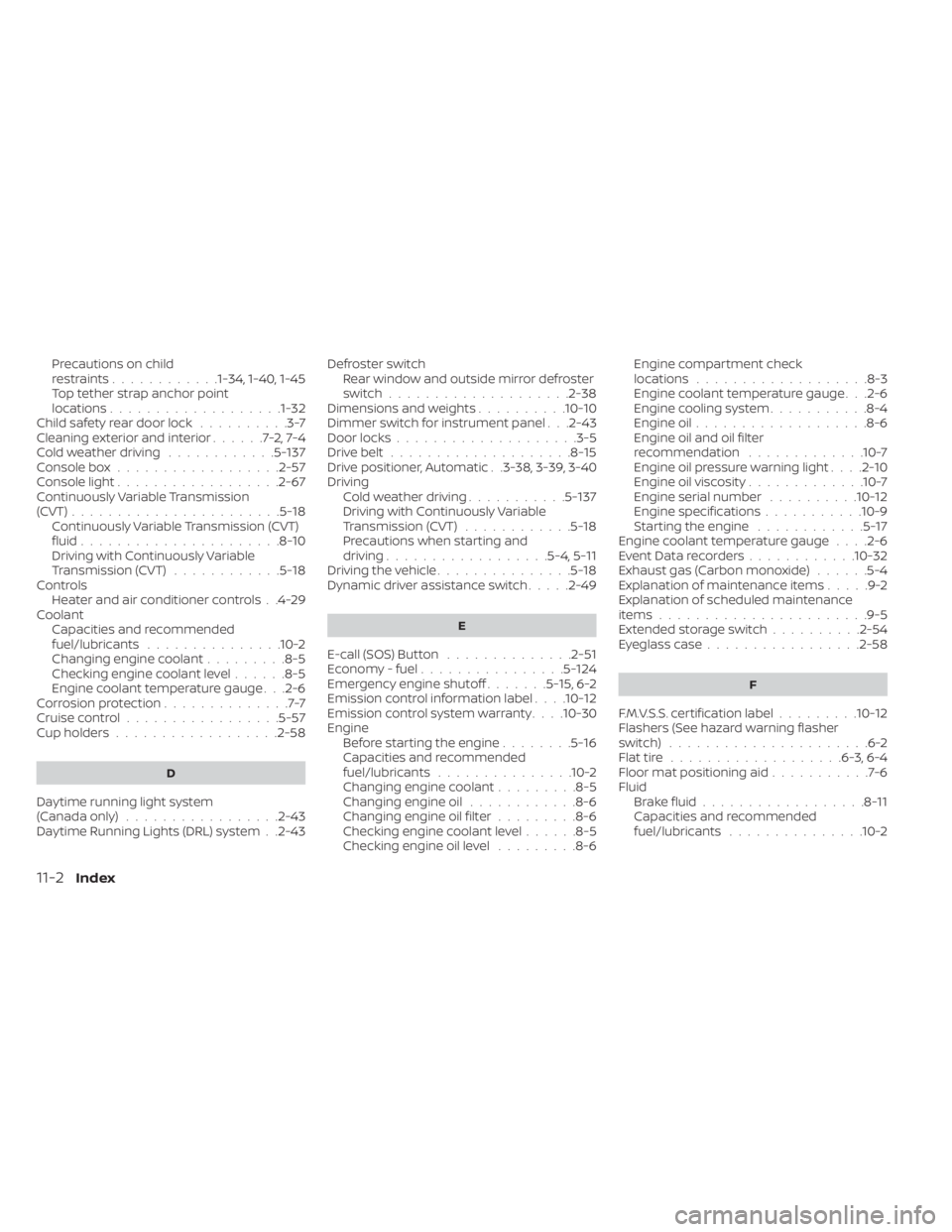
Precautions on child
restraints............1-34, 1-40, 1-45Top tether strap anchor point
locations...................1-32Child safety rear door lock..........3-7Cleaning exterior and interior......7-2,7-4Cold weather driving............5-137Console box..................2-57Console light..................2-67Continuously Variable Transmission
(CVT).......................5-18Continuously Variable Transmission (CVT)
fluid......................8-10Driving with Continuously Variable
Transmission (CVT)............5-18Controls
Heater and air conditioner controls. .4-29CoolantCapacities and recommended
fuel/lubricants
...............10-2Changing engine coolant.........8-5Checking engine coolant level......8-5Engine coolant temperature gauge. . .2-6Corrosion protection..............7-7Cruise control................ .5-57Cup holders................. .2-58
D
Daytime running light system
(Canada only).................2-43Daytime Running Lights (DRL) system. .2-43
Defroster switch
Rear window and outside mirror defroster
switch
................... .2-38Dimensions and weights..........10-10Dimmer switch for instrument panel. . .2-43Door locks....................3-5Drive belt....................8-15Drive positioner, Automatic. .3-38, 3-39, 3-40Driving
Cold weather driving...........5-137Driving with Continuously Variable
Transmission (CVT)............5-18Precautions when starting and
driving................. .5-4, 5-11Driving the vehicle...............5-18Dynamic driver assistance switch.....2-49
E
E-call (SOS) Button..............2-51Economy - fuel................5-124Emergency engine shutoff.......5-15,6-2Emission control information label. . . .10-12Emission control system warranty. . . .10-30Engine
Before starting the engine........5-16Capacities and recommended
fuel/lubricants...............10-2Changing engine coolant.........8-5Changing engine oil............8-6Changing engine oil filter.........8-6Checking engine coolant level......8-5Checking engine oil level.........8-6
Engine compartment check
locations.................. .8-3Engine coolant temperature gauge. . .2-6Engine cooling system...........8-4Engine oil...................8-6Engine oil and oil filter
recommendation.............10-7Engine oil pressure warning light. . . .2-10Engine oil viscosity.............10-7Engine serial number..........10-12Engine specifications...........10-9Starting the engine............5-17Engine coolant temperature gauge. . . .2-6Event Data recorders............10-32Exhaust gas (Carbon monoxide)......5-4Explanation of maintenance items.....9-2Explanation of scheduled maintenance
items...................... .9-5Extended storage switch..........2-54Eyeglass case.................2-58
F
F.M.V.S.S. certification label.........10-12Flashers (See hazard warning flasher
switch)......................6-2Flat tire.................. .6-3, 6-4Floor mat positioning aid...........7-6Fluid
Brake fluid..................8-11Capacities and recommended
fuel/lubricants...............10-2
11-2Index