stop start NISSAN MURANO 2020 Owner´s Manual
[x] Cancel search | Manufacturer: NISSAN, Model Year: 2020, Model line: MURANO, Model: NISSAN MURANO 2020Pages: 518, PDF Size: 3.52 MB
Page 119 of 518
CAUTION
Running the engine with the engine oil
pressure warning light on could cause
serious damage to the engine almost
immediately. Such damage is not cov-
ered by the NISSAN New Vehicle Limited
Warranty. Turn off the engine as soon
as it is safe to do so.
Low tire pressure warning
light
Your vehicle is equipped with a Tire Pres-
sure Monitoring System (TPMS) that moni-
tors the tire pressure of all tires except the
spare.
The low tire pressure warning light warns
of low tire pressure or indicates that the
TPMS is not functioning properly.
Af ter the ignition switch is placed in the ON
position, this light illuminates for about 1
second and turns off.
Low tire pressure warning
If the vehicle is being driven with low tire
pressure, the warning light will illumi-
nate. A “Tire Pressure Low - Add Air”
warning also appears in the vehicle in-
formation display. When the low tire pressure warning light
illuminates, you should stop and adjust
the tire pressure of all four tires to the
recommended COLD tire pressure shown
on the Tire and Loading Information la-
bel located in the driver's door opening.
The low tire pressure warning light does
not automatically turn off when the tire
pressure is adjusted. Af ter the tire is in-
flated to the recommended pressure,
the vehicle must be driven at speeds
above 16 mph (25 km/h) to activate the
TPMS and turn off the low tire pressure
warning light. Use a tire pressure gauge
to check the tire pressure.
The “Tire Pressure Low - Add Air” warning
appears each time the ignition switch is
placed in the ON position as long as the low
tire pressure warning light remains illumi-
nated.
For additional information, refer to “Vehicle
information display” in the “Instruments
and controls” section and “Tire Pressure
Monitoring System (TPMS)” in the “Starting
and driving” section and in the “In case of
emergency” section of this manual.
TPMS malfunction
If the TPMS is not functioning properly, the
low tire pressure warning light will flash for
approximately 1 minute when the ignition
switch is placed in the ON position. The
light will remain on af ter 1 minute. Have the
system checked. It is recommended that
you visit a NISSAN dealer for this service.
The "Tire Pressure Low — Add Air" warning
does not appear if the low tire pressure
warning light illuminates to indicate a
TPMS malfunction.
For additional information, refer to “Tire
Pressure Monitoring System (TPMS)” in the
“Starting and driving” section and “Tire
pressure” in the “Do-it-yourself ” section of
this manual.
WARNING
• Radio waves could adversely affect
electric medical equipment. Those
who use a pacemaker should contact
the electric medical equipment
manufacturer for the possible influ-
ences before use.
Instruments and controls2-11
Page 120 of 518
•If the light does not illuminate with the
ignition switch placed in the ON posi-
tion, have the vehicle checked as soon
as possible. It is recommended that you
visit a NISSAN dealer for this service.
•If the light illuminates while driving,
avoid sudden steering maneuvers or
abrupt braking, reduce vehicle speed,
pull off the road to a safe location and
stop the vehicle as soon as possible.
Driving with under-inflated tires may
permanently damage the tires and in-
crease the likelihood of tire failure. Seri-
ous vehicle damage could occur and
may lead to an accident and could result
in serious personal injury or death.
Check the tire pressure for all four tires.
Adjust the tire pressure to the recom-
mended COLD tire pressure shown on
the Tire and Loading Information label
located in the driver’s door opening to
turn the low tire pressure warning light
off. If the light still illuminates while driv-
ing af ter adjusting the tire pressure, a
tire may be flat or the TPMS may be mal-
functioning. If you have a flat tire, re-
place it with a spare tire as soon as pos-
sible. If no tire is flat and all tires are
properly inflated, have the vehicle
checked. It is recommended that you
visit a NISSAN dealer for this service.
• When replacing a wheel without the
TPMS such as the spare tire, the TPMS
will not function and the low tire
pressure warning light will flash for
approximately 1 minute. The light will
remain on af ter 1 minute. Have your
tires replaced and/or TPMS system
reset as soon as possible. It is recom-
mended that you visit a NISSAN
dealer for these services.
• Replacing tires with those not origi-
nally specified by NISSAN could af-
fect the proper operation of the
TPMS.
CAUTION
• The TPMS is not a substitute for the
regular tire pressure check. Be sure
to check the tire pressure regularly.
• If the vehicle is being driven at
speeds of less than 16 mph (25 km/h),
the TPMS may not operate correctly.
• Be sure to install the specified size of
tires to the four wheels correctly.
Master warning light
When the ignition switch is in the ON posi-
tion, the master warning light illuminates if
any of the following are displayed on the
vehicle information display:
• No Key Detected
• Low fuel warning
• Low washer fluid warning
• Parking brake release warning
• Door open warning
• Low tire pressure warning
• Shif t into Park warning
• Loose Fuel Cap warning
• Traffic Sign Recognition system fault (see owner’s manual) (if so equipped)
• Driver Attention Alert system fault (if so equipped)
• Push Engine Start Lock warning
• Incorrect Key warning
• I-Key System Fault
• CVT warning
• Sonar Parking Sensor Error
• LED Headlight Failure warning
• Chassis Control warning
For additional information, refer to “Vehicle
information display” in this section.
2-12Instruments and controls
Page 134 of 518
1. Push brake and start switch to drive
2. No Key Detected
3. Shif t to Park
4. Key Battery Low
5. Engine start operation for Intelligent Keysystem (if I-Key battery level is low)
6. Key ID Incorrect
7. Release Parking Brake
8. Low Fuel
9. Low Washer Fluid
10. Door/lif tgate Open
11. Key System Fault See Owner's Manual
12. Loose Fuel Cap
13. Tire Pressure Low – Add Air
14. AWD Error: See Owner's Manual (if so equipped)
15. AWD High Temp. Stop Vehicle (if so equipped)
16. AWD Tire Size Incorrect: See Owner’s Manual (if so equipped)
17. CVT Error: See Owner’s Manual
18. Shipping Mode On Push Storage Fuse 19. Power will turn off to save the battery
20. Power turned off to save the battery
21. Reminder: Turn OFF Headlights
22. Driver Attention Alert Take a Break?
23. Driver Attention Alert Malfunction
24. Cruise control indicator (if so equipped)
25. Intelligent Cruise Control (ICC) indica-
tors (if so equipped)
26. Transmission Shif t Position indicator
27. Blind Spot Warning (BSW) and Rear Cross Traffic Alert (RCTA) indicator (if so
equipped)
28. Headlight System Error: See Owner’s Manual (if so equipped)
29. Unavailable: Front Radar Obstruction (if so equipped) or
Forward Driving Aids temporarily dis-
abled. Front Sensor blocked. See Own-
er’s Manual (if so equipped)
30. Unavailable: Side Radar Obstruction (if so equipped)
31. Push Ignition to OFF
32. Rear Door Alert is activated 33. Check Rear Seat for All Articles
34. Speed Limit Sign indicator (if so
equipped)
35. Lane Departure Warning (LDW)/ Intelli- gent Lane Intervention (I-LI) indicator (if
so equipped)
36. Unavailable High Cabin Temperature (if so equipped)
37. Currently Unavailable (if so equipped)
38. Unavailable Road is Slippery (if so equipped)
39. Rear Automatic Braking (RAB) indicator (if so equipped)
40. Vehicle ahead detection indicator
41. Automatic Emergency Braking (AEB) emergency warning indicator
42. Cruise ON (if so equipped)
43. Cruise Target Speed SET (if so equipped)
44. Intelligent Cruise ON (if so equipped)
45. Target Speed SET with Intelligent Dis- tance Control (if so equipped)
46. Parking Sensor (if so equipped)
47. Alarm - Time for a break?
2-26Instruments and controls
Page 136 of 518
Door/lif tgate Open
This warning illuminates when a door or
the lif tgate has been opened.
Key System Fault See Owner’s Manual
Af ter the ignition switch is pushed to the
ON position, this light comes on for a period
of time and then turns off.
The Key System Fault message warns of a
malfunction with the Intelligent Key sys-
tem. If the light comes on while the engine
is stopped, it may be impossible to start
the engine.
If the light comes on while the engine is
running, you can drive the vehicle. However,
in these cases, have the system checked. It
is recommended that you visit a NISSAN
dealer for this service.
Loose Fuel Cap
This warning appears when the fuel-filler
cap is not tightened correctly af ter the ve-
hicle has been refueled. For additional in-
formation, refer to “Fuel-filler cap” in the
“Pre-driving checks and adjustments” sec-
tion of this manual.
Tire Pressure Low - Add Air
This warning appears when the low tire
pressure warning light in the meter illumi-
nates and low tire pressure is detected. The
warning appears each time the ignition
switch is placed in the ON position as long
as the low tire pressure warning light re-
mains illuminated. If this warning appears,
stop the vehicle and adjust the tire pres-
sures of all four tires to the recommended
COLD tire pressure shown on the Tire and
Loading Information label. For additional
information, refer to “Low tire pressure
warning light” in this section and “Tire Pres-
sure Monitoring System (TPMS)” in the
“Starting and driving” section of this
manual.
AWD Error: See Owner’s Manual (if so
equipped)
This warning appears when the all-wheel
drive system is not functioning properly
while the engine is running.
AWD High Temp. Stop Vehicle (if so
equipped)
This warning may appear while trying to
free a stuck vehicle due to increased oil
temperature. The driving mode may
change to 2-Wheel Drive (2WD). If this warn-
ing is displayed, stop the vehicle with theengine idling, as soon as it is safe to do so.
Then if the warning turns off, you can con-
tinue driving.
AWD Tire Size Incorrect: See Owner’s
Manual (if so equipped)
This warning may appear if there is a large
difference between the diameters of the
front and rear wheels. Pull off the road in a
safe area, with the engine idling. Check that
all the tire sizes are the same, that the tire
pressure is correct and that the tires are
not excessively worn.
CVT Error: See Owner's Manual
This warning illuminates when the there is
a problem with the CVT system. If this
warning comes on, have the system
checked. It is recommended that you visit a
NISSAN dealer for this service.
Shipping Mode On Push Storage Fuse
This warning may appear if the extended
storage switch is not pushed in. When this
warning appears, push in the extended
storage switch to turn off the warning. For
additional information, refer to “Extended
storage switch” in this section.
2-28Instruments and controls
Page 138 of 518
• Intelligent Forward Collision Warning (I-FCW)
For additional information, refer to the
“Starting and driving” section of this
manual.
Forward Driving Aids temporarily
disabled. Front Sensor blocked. See
Owner’s Manual (if so equipped)
This message appears when the front ra-
dar sensor may be obstructed due to:
• mud, dirt, snow, ice, etc.
• inclement weather (rain, fog, snow, etc.)
All forward driving aids are temporarily dis-
abled until the system detects that the
front radar sensor is no longer obstructed.
For additional information, refer to the fol-
lowing (if so equipped) in the “Starting and
driving” section of this manual:
• Automatic Emergency Braking (AEB)
• Automatic Emergency Braking (AEB) with Pedestrian Detection
• Intelligent Cruise Control (ICC)
• Intelligent Forward Collision Warning (I- FCW)
Unavailable: Side Radar Obstruction
(if so equipped)
This message appears when one of the
following systems (if so equipped) be-
comes unavailable because a radar block-
age is detected.
• Blind Spot Warning (BSW)
• Rear Cross Traffic Alert (RCTA)
For additional information, refer to the
“Starting and driving” section of this
manual.
Push Ignition to OFF
Af ter the Push Ignition to OFF warning illu-
minates, the warning will illuminate if the
ignition switch is placed in the ACC position
when the shif t lever is moved to the P (Park)
position.
To turn off the Push warning, place the ig-
nition switch in the ON position and then in
the LOCK position.
Rear Door Alert is activated
When the system is enabled, this message
appears when the Rear Door Alert system
is active and can remind the driver to check
the back seat. • Using the steering wheel switch, a driver
can select “Dismiss Message” to clear the
display for a period of time. If no selection
is made, this message automatically
turns off af ter a period of time.
• Using the steering wheel switch, a driver can select “Disable Alert” to disable the
horn alert for the remainder of the cur-
rent trip.
WARNING
Selecting “Dismiss Message” during a
stop within a trip temporarily dis-
misses the message for that stop with-
out turning the system off. Alerts can
be provided for other stops during the
trip. Selecting “Disable Alert” turns off
the Rear Door Alert system for the re-
mainder of a trip and no audible alert
will be provided.
NOTE:
This system is disabled until a driver en-
ables it using the vehicle information
display. For additional information, refer
to “How to use the vehicle information
display ” in this section.
For additional information, refer to “Rear
Door Alert” in this section.
2-30Instruments and controls
Page 139 of 518
Check Rear Seat For All Articles
When the system is enabled, this message
appears when the vehicle comes to a com-
plete stop, the vehicle is transitioned from
the D (Drive) position to P (Park) position,
and the driver exits the vehicle. This mes-
sage alerts the driver, af ter a period of time,
to check for items in the rear seat af ter the
audible alert has been provided.
NOTE:
This system is disabled until a driver en-
ables it using the vehicle information
display. For additional information, refer
to “How to use the vehicle information
display ” in this section.
For additional information, refer to “Rear
Door Alert” in this section.
Speed Limit Sign indicator (if so
equipped)
This message may appear when the Traffic
Sign Recognition system is engaged.
For additional information, refer to “Traffic
Sign Recognition (TSR)” in the “Starting and
driving” section of this manual.
Lane Departure Warning (LDW)/
Intelligent Lane Intervention (I-LI)
indicator (if so equipped)
This indicator shows when the LDW and/or
Intelligent Lane Intervention (I-LI) systems
are engaged.
For additional information, refer to “Lane
Departure Warning (LDW) system” and “In-
telligent Lane Intervention (I-LI)” in the
“Starting and driving” section of this
manual.
Unavailable: High Cabin Temperature
(if so equipped)
This message appears when the camera
detects an interior temperature of more
than 104°F (40°C). For additional informa-
tion, refer to “Automatic Emergency Brak-
ing (AEB)” , “Automatic Emergency Braking
(AEB) with Pedestrian Detection” , “Intelli-
gent Cruise Control (ICC)” , “Intelligent Lane
Intervention (I-LI)” , “Lane Departure Warn-
ing (LDW)” or “Traffic Sign Recognition (TSR)”
in the “Starting and driving” section of this
manual.
Currently Unavailable (if so equipped)
This message appears when the Vehicle
Dynamic Control (VDC) system is turned
off. The Intelligent Lane Intervention (I-LI)
system will be turned off automatically. For
additional information, refer to “Vehicle Dy-
namic Control (VDC)” and “Intelligent Lane
Intervention (I-LI)” in the “Starting and driv-
ing” section of this manual.
Unavailable: Road is Slippery (if so
equipped)
This message appears when the Intelligent
Cruise Control (ICC) or the Intelligent Lane
Intervention (I-LI) systems become un-
available because the road is slippery. For
additional information, refer to “Intelligent
Cruise Control (ICC)” or “Intelligent Lane In-
tervention (I-LI)” in the “Starting and driving”
section of this manual.
Rear Automatic Braking (RAB)
indicator (if so equipped)
This indicator illuminates to indicate the
status of the Rear Automatic Braking (RAB)
system. For additional information, refer to
“Rear Automatic Braking (RAB) system” in
the “Starting and driving” section of this
manual.
Instruments and controls2-31
Page 142 of 518
•Even when the driver and/or passen-
gers are in the vehicle, the system will
activate when all the doors, hood and
lif tgate are locked with the ignition
switch placed in the LOCK position.
When placing the ignition switch in the
ACC or ON position, the system will be
released.
Vehicle security system activation
The vehicle security system will give the
following alarm:
• The turn signals blink and the horn sounds intermittently.
• The alarm automatically turns off af ter a period of time. However, the alarm reacti-
vates if the vehicle is tampered with
again. The alarm can be shut off by un-
locking the driver's door or lif tgate by
pressing the
button on the Intelli-
gent Key.
The alarm is activated by:
• Opening the door or lif tgate without us- ing the Intelligent Key (even if the door is
unlocked by releasing the door inside
lock switch).
How to stop an activated alarm
The alarm stops only by unlocking the driv-
er’s door or the lif tgate by pressing the
button on the Intelligent Key or push-
ing the request switch on the driver's or
passenger's door with the Intelligent Key in
range of the door handle.
NISSAN VEHICLE IMMOBILIZER
SYSTEM
The NISSAN Vehicle Immobilizer System
will not allow the engine to start without
the use of a registered key.
Never leave these keys in the vehicle.
FCC Notice:
For USA:
This device complies with Part 15 of the
FCC Rules. Operation is subject to the fol-
lowing two conditions: (1) This device
may not cause harmful interference, and
(2) this device must accept any interfer-
ence received, including interference
that may cause undesired operation.
NOTE:
Changes or modifications not expressly
approved by the party responsible for
compliance could void the user's author-
ity to operate the equipment.
For Canada:
This device complies with Industry
Canada licence-exempt RSS standard(s).
Operation is subject to the following two
conditions: (1) this device may not cause
interference, and (2) this device must ac-
cept any interference received, including
interference that may cause undesired
operation of the device.
2-34Instruments and controls
Page 172 of 518
Auto-reverse function
The auto-reverse function can be acti-
vated when a window is closed by auto-
matic operation.
Depending on the environment or driv-
ing conditions, the auto-reverse func-
tion may be activated if an impact or
load similar to something being caught
in the window occurs.
WARNING
There are some small distances imme-
diately before the closed position
which cannot be detected. Make sure
that all passengers have their hands,
etc., inside the vehicle before closing
the window.
If the vehicle's battery is disconnected, re-
placed, or jump started, the power window
auto-reverse function may not operate
properly. Have the power window auto-
reverse system re-initialized. It is recom-
mended that you visit a NISSAN dealer for
this service. If the control unit detects something
caught in a window equipped with auto-
matic operation as it is closing, the window
will be immediately lowered.
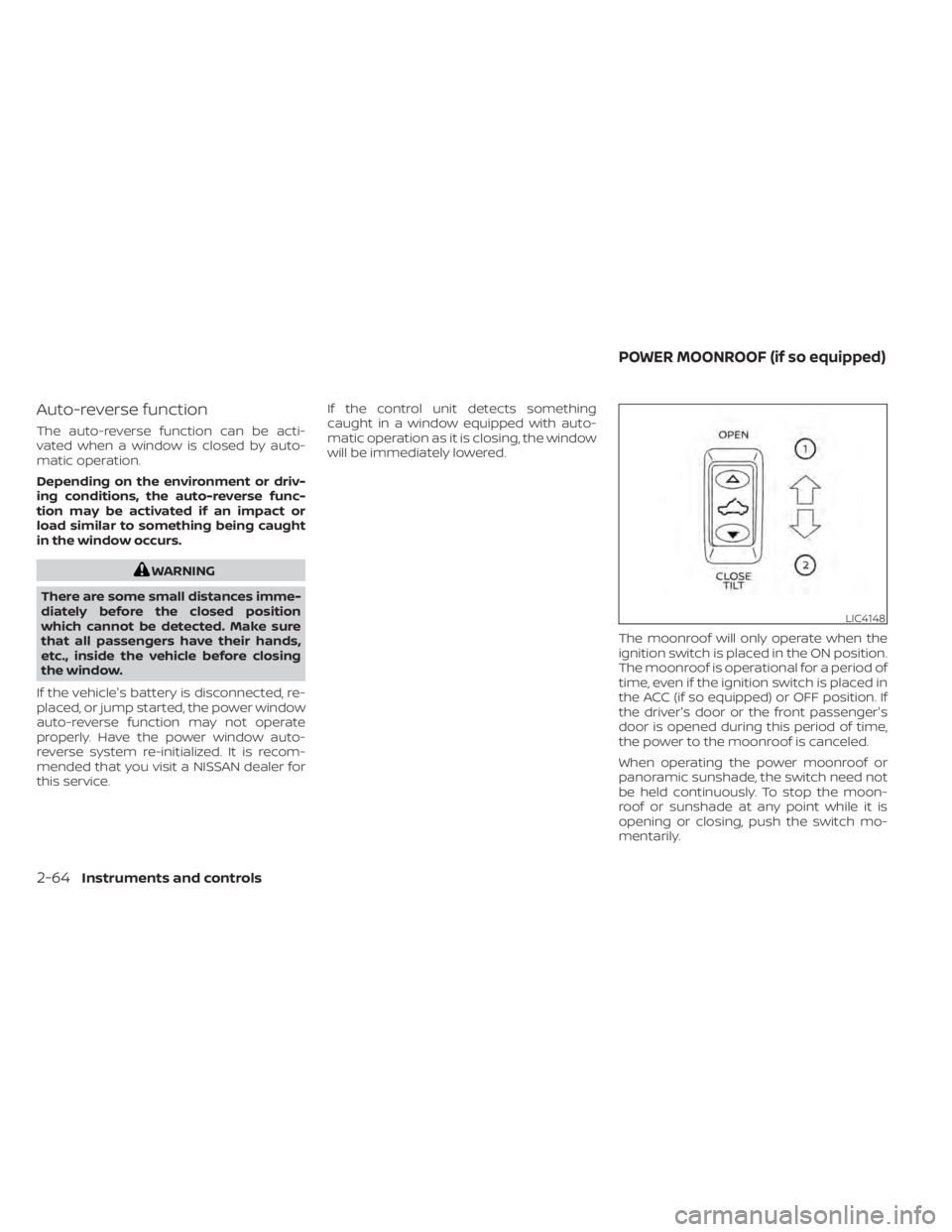
The moonroof will only operate when the
ignition switch is placed in the ON position.
The moonroof is operational for a period of
time, even if the ignition switch is placed in
the ACC (if so equipped) or OFF position. If
the driver's door or the front passenger's
door is opened during this period of time,
the power to the moonroof is canceled.
When operating the power moonroof or
panoramic sunshade, the switch need not
be held continuously. To stop the moon-
roof or sunshade at any point while it is
opening or closing, push the switch mo-
mentarily.
LIC4148
POWER MOONROOF (if so equipped)
2-64Instruments and controls
Page 177 of 518
WARNING
• Your vehicle's engine should be
turned off while programming the
HomeLink® Universal Transceiver. For
additional information, refer to
“Push-button ignition switch” in the
“Starting and driving” section of this
manual. Do not breathe exhaust
gases; they contain colorless and
odorless carbon monoxide. Carbon
monoxide is dangerous. It can cause
unconsciousness or death.
• Do not use the HomeLink® Universal
Transceiver with any garage door
opener that lacks safety stop and re-
verse features as required by federal
safety standards. (These standards
became effective for opener models
manufactured af ter April 1, 1982.) A
garage door opener which cannot
detect an object in the path of a clos-
ing garage door and then automati-
cally stop and reverse does not meet
current federal safety standards. Us-
ing a garage door opener without
these features increases the risk of
serious injury or death. •
During the programming procedure
your garage door or security gate will
open and close (if the transmitter is
within range). Make sure that people
or objects are clear of the garage
door, gate, etc., that you are
programming.
PROGRAMMING HOMELINK®
If you have any questions or are having
difficulty programming your HomeLink®
buttons, refer to the HomeLink® web site at:
www.homelink.com or call 1-800-355-3515.
NOTE:
Place the ignition switch in the ON or ACC
position (without starting the engine)
when programming HomeLink®. It is also
recommended that a new battery be
placed in the hand-held transmitter of
the device being programmed to
HomeLink® for quicker programming
and accurate transmission of the radio
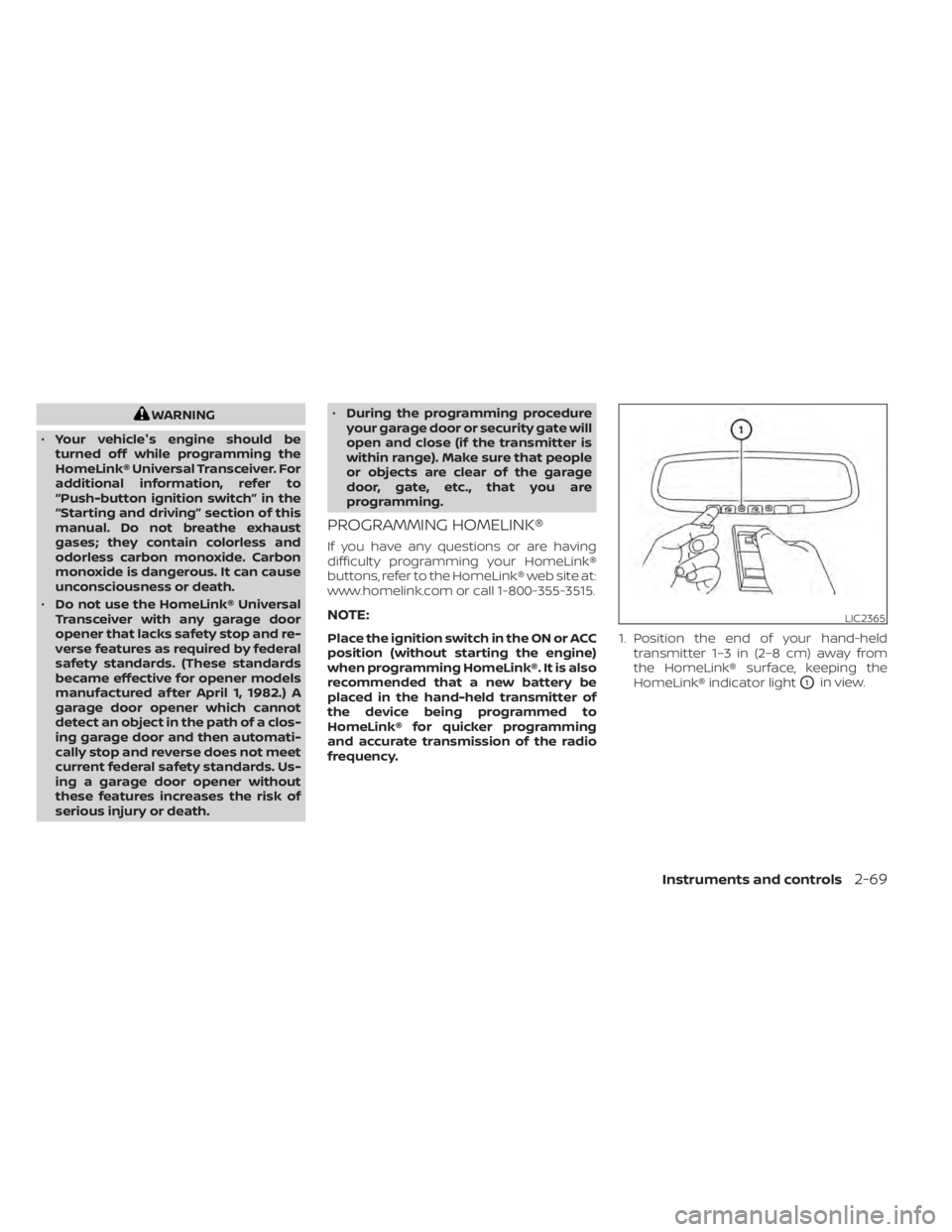
frequency. 1. Position the end of your hand-held
transmitter 1–3 in (2–8 cm) away from
the HomeLink® surface, keeping the
HomeLink® indicator light
O1in view.
LIC2365
Instruments and controls2-69
Page 203 of 518
CONDITIONS THE REMOTE ENGINE
START WILL NOT WORK
The Remote Engine Start will not operate if
any of the following conditions are present:
• The ignition switch is placed in the ONposition.
• The hood is not securely closed.
• The hazard indicator lights are on.
• The engine is still running. The engine must be completely stopped. Wait at
least 6 seconds if the engine goes from
running to off. This is not applicable when
extending engine run time.
• The
button is not pressed and held
for at least 2 seconds.
• The
button is not pressed and held
within 5 seconds of pressing the lock but-
ton.
• The brake is pressed.
• The doors are not closed and locked.
• The lif tgate is open.
• The Key System Fault warning light re- mains solid is in the vehicle information
display.
• The alarm sounds due to illegal entry into the vehicle. • Two Remote Engine Starts, or a single
Remote Engine Start with an extension,
have already been used.
• The vehicle is not in P (Park).
• There is a detected registered key already inside of the vehicle.
• The Remote Engine Start function has been switched to the OFF position in Ve-
hicle Settings of the vehicle information
display. For additional information, refer
to “Vehicle information display” in the “In-
struments and controls” section of this
manual.
The Remote Engine Start may display a
warning or indicator in the vehicle informa-
tion display. For additional information, re-
fer to “Vehicle information display” in the
“Instruments and controls” section of this
manual.
Pre-driving checks and adjustments3-21