mirror NISSAN MURANO 2020 Owner´s Manual
[x] Cancel search | Manufacturer: NISSAN, Model Year: 2020, Model line: MURANO, Model: NISSAN MURANO 2020Pages: 518, PDF Size: 3.52 MB
Page 294 of 518
• Do not place reflective materials, such aswhite paper or a mirror, on the instru-
ment panel. The reflection of sunlight
may adversely affect the camera unit’s
capability of detecting the lane markers.
• Do not strike or damage the areas around the camera unit. Do not touch the
camera lens or remove the screw located
on the camera unit. If the camera unit is
damaged due to an accident, it is recom-
mended that you visit a NISSAN dealer.
WARNING
Failure to follow the warnings and in-
structions for proper use of the BSW
system could result in serious injury or
death.
• The BSW system is not a replacement
for proper driving procedures and is
not designed to prevent contact with
vehicles or objects. When changing
lanes, always use the side and rear
mirrors and turn and look in the di-
rection your vehicle will move to en-
sure it is safe to change lanes. Never
rely solely on the BSW system. The BSW system helps alert the driver of
other vehicles in adjacent lanes when
changing lanes.
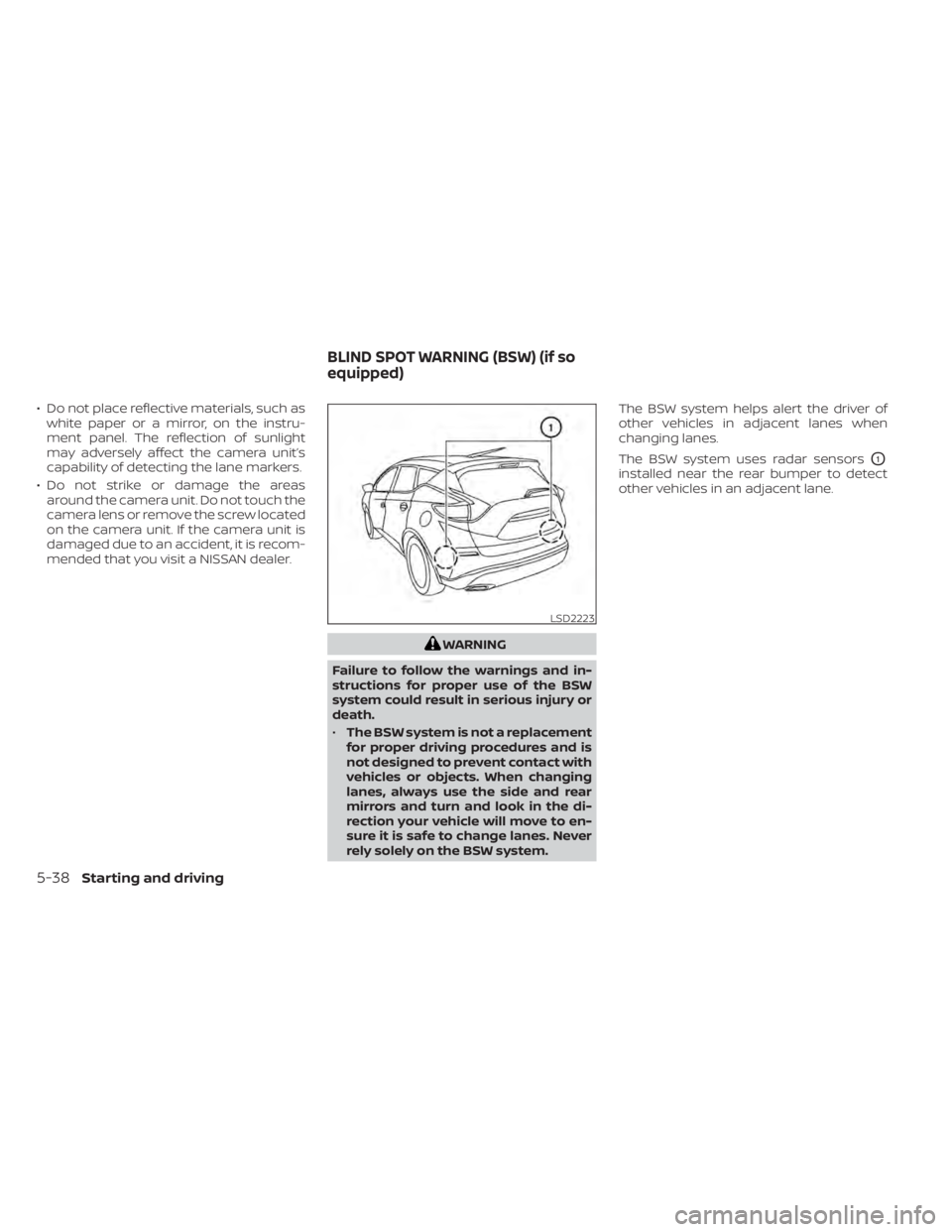
The BSW system uses radar sensors
O1
installed near the rear bumper to detect
other vehicles in an adjacent lane.
LSD2223
BLIND SPOT WARNING (BSW) (if so
equipped)
5-38Starting and driving
Page 295 of 518
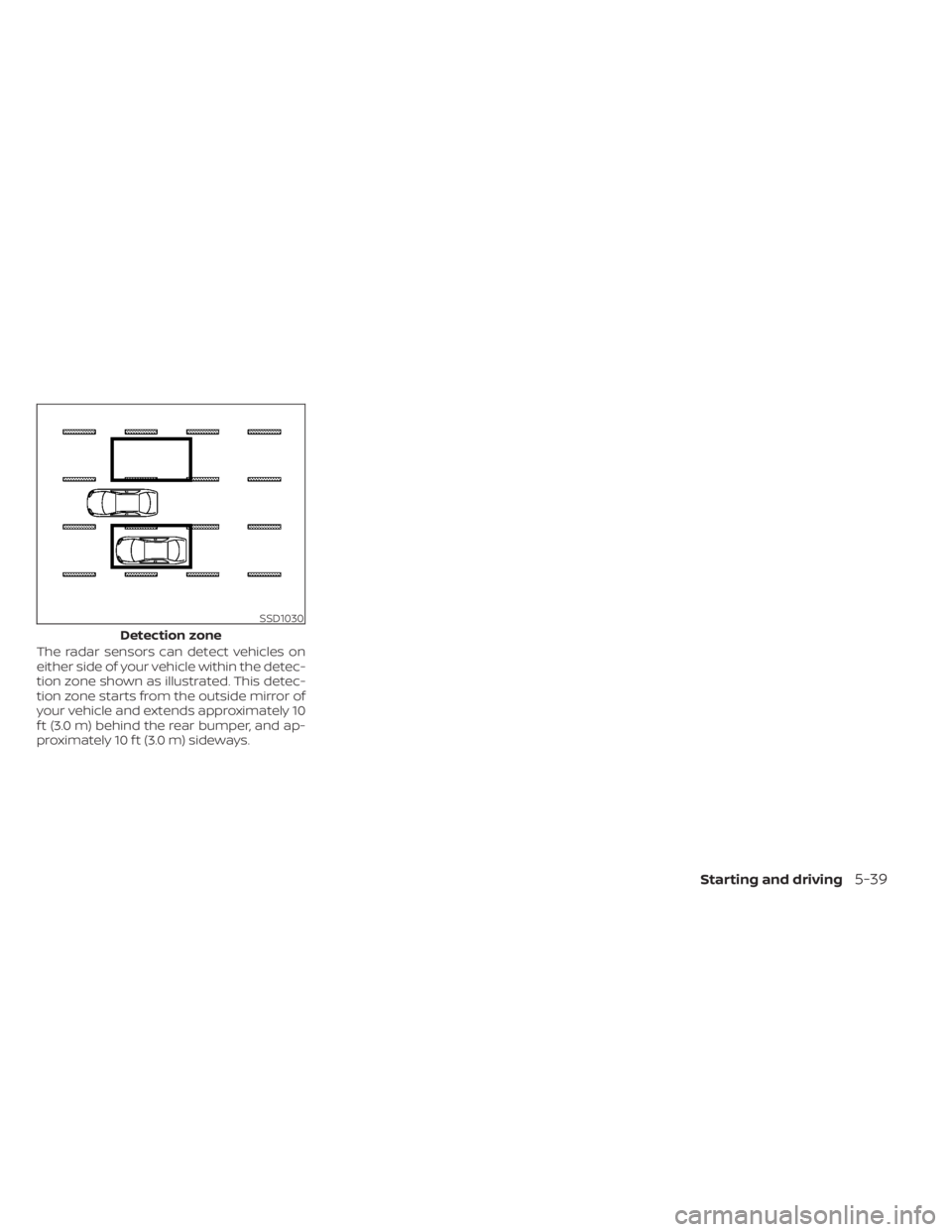
The radar sensors can detect vehicles on
either side of your vehicle within the detec-
tion zone shown as illustrated. This detec-
tion zone starts from the outside mirror of
your vehicle and extends approximately 10
f t (3.0 m) behind the rear bumper, and ap-
proximately 10 f t (3.0 m) sideways.
SSD1030
Detection zone
Starting and driving5-39
Page 304 of 518
For Canada
Applicable law: Canada 310
This device complies with industry Canada
licence-exempt RSS standard(s). Operation
is subject to the following two conditions:
1. This device may not cause interference,and
2. This device must accept any interfer- ence, including interference that may
cause undesired operation of the
device.
Frequency bands: 24.05–24.25GHz
Output power: less than 20 milliwatts
Droit applicable: Canada 310
Le présent appareil est conforme aux CNR
d’Industrie Canada applicables aux appar-
eils radio exempts de licence. L’exploitation
est autorisée aux deux conditions suiv-
antes:
1. L’appareil ne doit pas produire de brouil- lage, et
2. L’utilisateur de l’appareil doit accepter tout brouillage radioélectrique subi,
même si le brouillage est susceptible
d’en compromettre le fonctionnement. Bandes de fréquences: 24.05–24.25GHz
Puissance émise: Moins de 20 milliwattsWARNING
Failure to follow the warnings and in-
structions for proper use of the RCTA
system could result in serious injury or
death.
• The RCTA system is not a replace-
ment for proper driving procedures
and is not designed to prevent con-
tact with vehicles or objects. When
backing out of a parking space, al-
ways use the side and rear mirrors
and turn and look in the direction
your vehicle will move. Never rely
solely on the RCTA system.
The RCTA system will assist you when
backing out from a parking space. When
the vehicle is in reverse, the system is de-
signed to detect other vehicles approach-
ing from the right or lef t of the vehicle. If the
system detects cross traffic, it will alert you.
REAR CROSS TRAFFIC ALERT (RCTA)
(if so equipped)
5-48Starting and driving
Page 339 of 518
System temporarily unavailable
A chime sounds under the following condi-
tions and the control is automatically can-
celed:
• When the vehicle slows down more than8 mph (13 km/h) below the set speed
• When the shif t lever is not in the D (Drive) or manual shif t mode
• When the parking brake is applied
• When the VDC operates (including the traction control system)
• When a wheel slips
When the system is not operating properly,
the chime sounds and the color of the
cruise indicator will change to orange.
Action to take
If the color of the cruise indicator changes
to orange, stop the vehicle in a safe place
and place the shif t lever in the P (Park) po-
sition. Turn the engine off, restart the en-
gine, resume driving, and then perform the
setting again. If it is not possible to set or the indicator
stays on, it may indicate that the system
is malfunctioning. Although the vehicle
is still drivable under normal conditions,
have the vehicle checked. It is recom-
mended that you visit a NISSAN dealer
for this service.
WARNING
Failure to follow the warnings and in-
structions for proper use of the RAB
system could result in serious injury or
death.
• The RAB system is a supplemental
aid to the driver. It is not a replace-
ment for proper driving procedures.
Always use the side and rear mirrors
and turn and look in the direction you
will move before and while backing
up. Never rely solely on the RAB sys-
tem. It is the driver’s responsibility to
stay alert, drive safely, and be in con-
trol of the vehicle at all times.
• There is a limitation to the RAB sys-
tem capability. The RAB system is not
effective in all situations.
The RAB system can assist the driver when
the vehicle is backing up and approaching
objects directly behind the vehicle.
REAR AUTOMATIC BRAKING (RAB) (if
so equipped)
Starting and driving5-83
Page 362 of 518
• Do not cover or attach stickers, or installany accessory near the sensors. This
could block sensor signals and/or cause
failure or malfunction.
• Do not attach metallic objects near the radar sensor (brush guard, etc.). This
could cause failure or malfunction.
• Do not place reflective materials, such as white paper or a mirror, on the instru-
ment panel. The reflection of sunlight
may adversely affect the camera unit's
detection capability.
• Do not alter, remove or paint the front bumper. Before customizing or restoring
the front bumper, it is recommended that
you visit a NISSAN dealer.
Radio frequency statement
For USA
FCC ID OAYARS4B
This device complies with Part 15 of the FCC
Rules. Operation is subject to the following
two conditions:
1. This device may not cause harmful inter- ference, and
2. This device must accept any interfer- ence received, including interference
that may cause undesired operation. FCC Warning
Changes or modifications not expressly
approved by the party responsible for
compliance could void the user’s authority
to operate the equipment.
For Canada
Model: ARS4–B
IC: 4135A-ARS4B
FCC ID: OAYARS4B
This device complies with Part 15 of the FCC
Rules and with Industry Canada licence-
exempt RSS standard(s). Operation is sub-
ject to the following two conditions:
1. This device may not cause interference,
and
2. This device must accept any interfer- ence received, including interference
that may cause undesired operation of
the device.
Le présent appareil est conforme aux CNR
d'Industrie Canada applicables aux appar-
eils radio exempts de licence. L'exploitation
est autorisée aux deux conditions suiv-
antes:
1. L'appareil ne doit pas produire de brouil- lage, et 2. L'utilisateur de l'appareil doit accepter
tout brouillage radioélectrique subi,
même si le brouillage est susceptible
d'en compromettre le fonctionnement.
Radio frequency radiation exposure infor-
mation:
This equipment complies with FCC and IC
radiation exposure limits set forth for an
uncontrolled environment.
This equipment should be installed and
operated with minimum distance of 30 cm
between the radiator and your body.
This transmitter must not be co-located or
operating in conjunction with any other an-
tenna or transmitter.
Cet équipement est conforme aux limites
d'exposition aux rayonnements IC établies
pour un environnement non contrôlé.
Cet équipement doit être installé et utilisé
avec un minimum de 30 cm de distance
entre la source de rayonnement et votre
corps.
FCC Notice
Changes or modifications not expressly
approved by the party responsible for
compliance could void the user’s authority
to operate the equipment.
5-106Starting and driving
Page 443 of 518
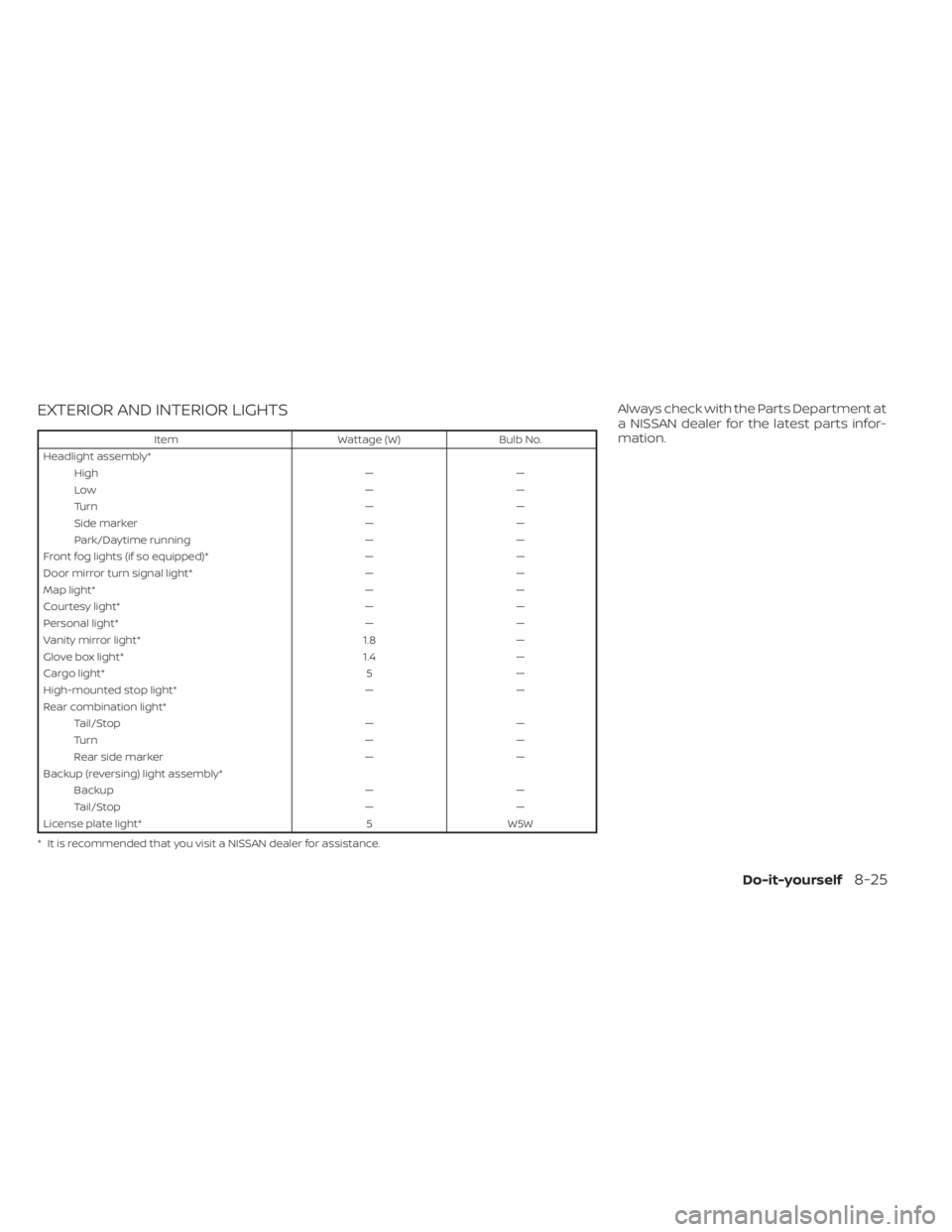
EXTERIOR AND INTERIOR LIGHTS
ItemWattage (W)Bulb No.
Headlight assembly* High ——
Low ——
Tu r n ——
Side marker ——
Park/Daytime running ——
Front fog lights (if so equipped)* ——
Door mirror turn signal light* ——
Map light* ——
Courtesy light* ——
Personal light* ——
Vanity mirror light* 1.8—
Glove box light* 1.4—
Cargo light* 5—
High-mounted stop light* ——
Rear combination light* Tail/Stop ——
Tu r n ——
Rear side marker ——
Backup (reversing) light assembly* Backup ——
Tail/Stop ——
License plate light* 5W5W
* It is recommended that you visit a NISSAN dealer for assistance.
Always check with the Parts Department at
a NISSAN dealer for the latest parts infor-
mation.
Do-it-yourself8-25
Page 444 of 518
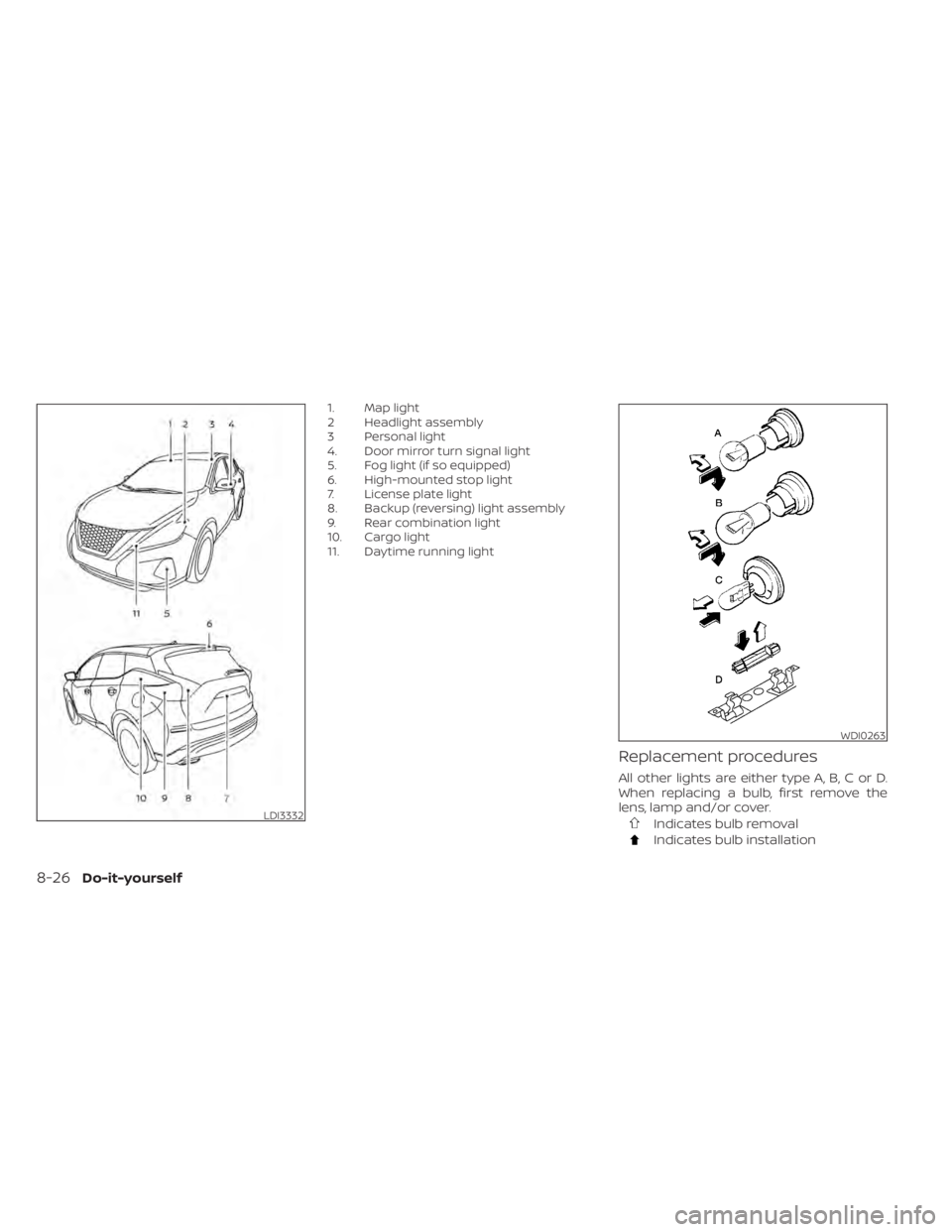
1. Map light
2 Headlight assembly
3 Personal light
4. Door mirror turn signal light
5. Fog light (if so equipped)
6. High-mounted stop light
7. License plate light
8. Backup (reversing) light assembly
9. Rear combination light
10. Cargo light
11. Daytime running light
Replacement procedures
All other lights are either type A, B, C or D.
When replacing a bulb, first remove the
lens, lamp and/or cover.
Indicates bulb removal
Indicates bulb installation
LDI3332
WDI0263
8-26Do-it-yourself
Page 498 of 518
Trailer lights
CAUTION
When splicing into the vehicle electrical
system, a commercially available
power-type module/converter must
be used to provide power for all trailer
lighting. This unit uses the vehicle bat-
tery as a direct power source for all
trailer lights while using the vehicle tail
light, stop light and turn signal circuits
as a signal source. The module/
converter must draw no more than 15
milliamps from the stop and tail lamp
circuits. Using a module/converter that
exceeds these power requirements
may damage the vehicle's electrical
system. It is recommended that you
visit a reputable trailer retailer to ob-
tain the proper equipment and to have
it installed.
Trailer lights should comply with federal
and/or local regulations. For assistance in
hooking up trailer lights, it is recommended
that you contact a NISSAN dealer or repu-
table trailer retailer. Vehicles equipped with
the optional trailer tow package are
equipped with a flat 4-pin connector, an
adapter will be needed to connect the trailer lights to the vehicle. Adapters are
available at auto parts stores and hitch re-
tailers.
Pre-towing tips
• Be certain your vehicle maintains a level
position when a loaded and/or unloaded
trailer is hitched. Do not drive the vehicle if
it has an abnormal nose-up or nose-
down condition; check for improper
tongue load, overload, worn suspension
or other possible causes of either condi-
tion.
• Always secure items in the trailer to pre- vent load shif t while driving.
• Keep the cargo load as low as possible in the trailer to keep the trailer center of
gravity low.
• Load the trailer so approximately 60% of the trailer load is in the front half and 40%
is in the back half. Also make sure the load
is balanced side to side.
• Check your hitch, trailer tire pressure, ve- hicle tire pressure, trailer light operation,
and trailer wheel lug nuts every time you
attach a trailer to the vehicle.
• Be certain your rearview mirrors conform to all federal, state or local regulations. If
not, install any mirrors required for towing
before driving the vehicle. • Determine the overall height of the ve-
hicle and trailer so the required clearance
is known.
Trailer towing tips
In order to gain skill and an understanding
of the vehicle's behavior, you should prac-
tice turning, stopping and backing up in an
area which is free from traffic. Steering sta-
bility and braking performance will be
somewhat different than under normal
driving conditions.
• Always secure items in the trailer to pre-vent load shif t while driving.
• Lock the trailer hitch coupler with a pin or lock to prevent the coupler from inadver-
tently becoming unlatched.
• Avoid abrupt starts, acceleration or stops.
• Avoid sharp turns or lane changes.
• Always drive your vehicle at a moderate speed.
• When backing up, hold the bottom of the steering wheel with one hand. Move your
hand in the direction in which you want
the trailer to go. Make small corrections
and back up slowly. If possible, have
someone guide you when you are back-
ing up.
10-26Technical and consumer information
Page 507 of 518
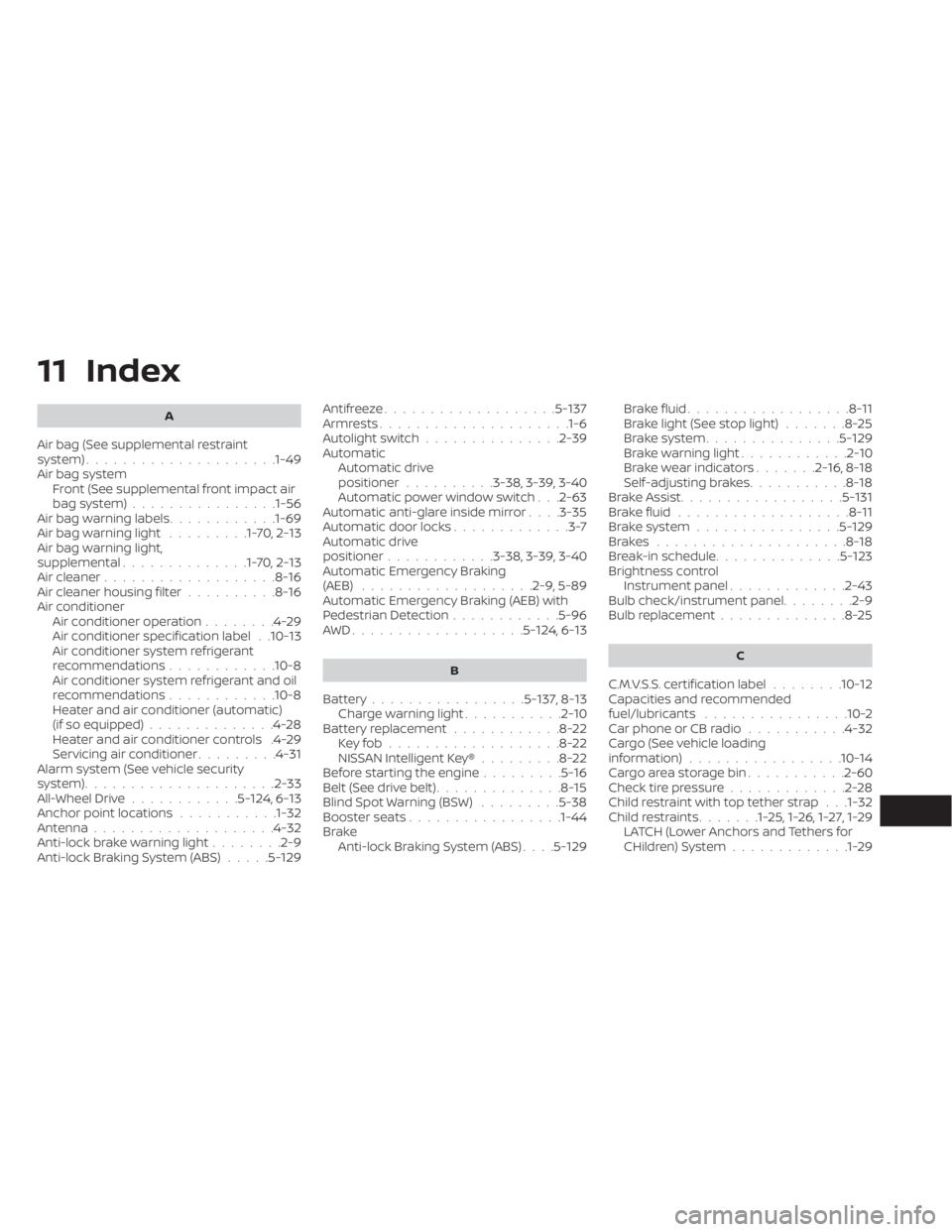
11 Index
A
Air bag (See supplemental restraint
system).....................1-49Air bag system
Front (See supplemental front impact air
bag system)
................1-56Air bag warning labels............1-69Air bag warning light.........1-70,2-13Air bag warning light,
supplemental..............1-70,2-13Air cleaner...................8-16Air cleaner housing filter..........8-16Air conditionerAir conditioner operation........4-29Air conditioner specification label. .10-13Air conditioner system refrigerant
recommendations............10-8Air conditioner system refrigerant and oil
recommendations............10-8Heater and air conditioner (automatic)
(if so equipped)..............4-28Heater and air conditioner controls.4-29Servicing air conditioner.........4-31Alarm system (See vehicle security
system).................... .2-33All-Wheel Drive............5-124, 6-13Anchor point locations...........1-32Antenna................... .4-32Anti-lock brake warning light........2-9Anti-lock Braking System (ABS).....5-129
Antifreeze...................5-137Armrests.................... .1-6Autolight switch...............2-39Automatic
Automatic drive
positioner
..........3-38, 3-39, 3-40Automatic power window switch. . .2-63Automatic anti-glare inside mirror. . . .3-35Automatic door locks.............3-7Automatic drive
positioner............3-38, 3-39, 3-40Automatic Emergency Braking
(AEB).................. .2-9, 5-89Automatic Emergency Braking (AEB) with
Pedestrian Detection............5-96AWD...................5- 124, 6-13
B
Battery.................5-137, 8-13Charge warning light...........2-10Battery replacement............8-22Key fob...................8-22NISSAN Intelligent Key®.........8-22Before starting the engine.........5-16Belt (See drive belt)..............8-15Blind Spot Warning (BSW).........5-38Booster seats.................1-44Brake
Anti-lock Braking System (ABS). . . .5-129
Brake fluid..................8-11Brake light (See stop light).......8-25Brake system...............5-129Brake warning light............2-10Brake wear indicators.......2-16,8-18Self-adjusting brakes...........8-18Brake Assist..................5-131Brake fluid...................8-11Brake system................5-129Brakes.....................8-18Break-in schedule..............5-123Brightness controlInstrument panel.............2-43Bulb check/instrument panel........2-9Bulb replacement..............8-25
C
C.M.V.S.S. certification label........10-12Capacities and recommended
fuel/lubricants................10-2Car phone or CB radio...........4-32Cargo (See vehicle loading
information)................ .10-14Cargo area storage bin...........2-60Check tire pressure.............2-28Child restraint with top tether strap. . .1-32Child restraints.......1-25,1-26,1-27,1-29LATCH (Lower Anchors and Tethers for
CHildren) System.............1-29
Page 508 of 518
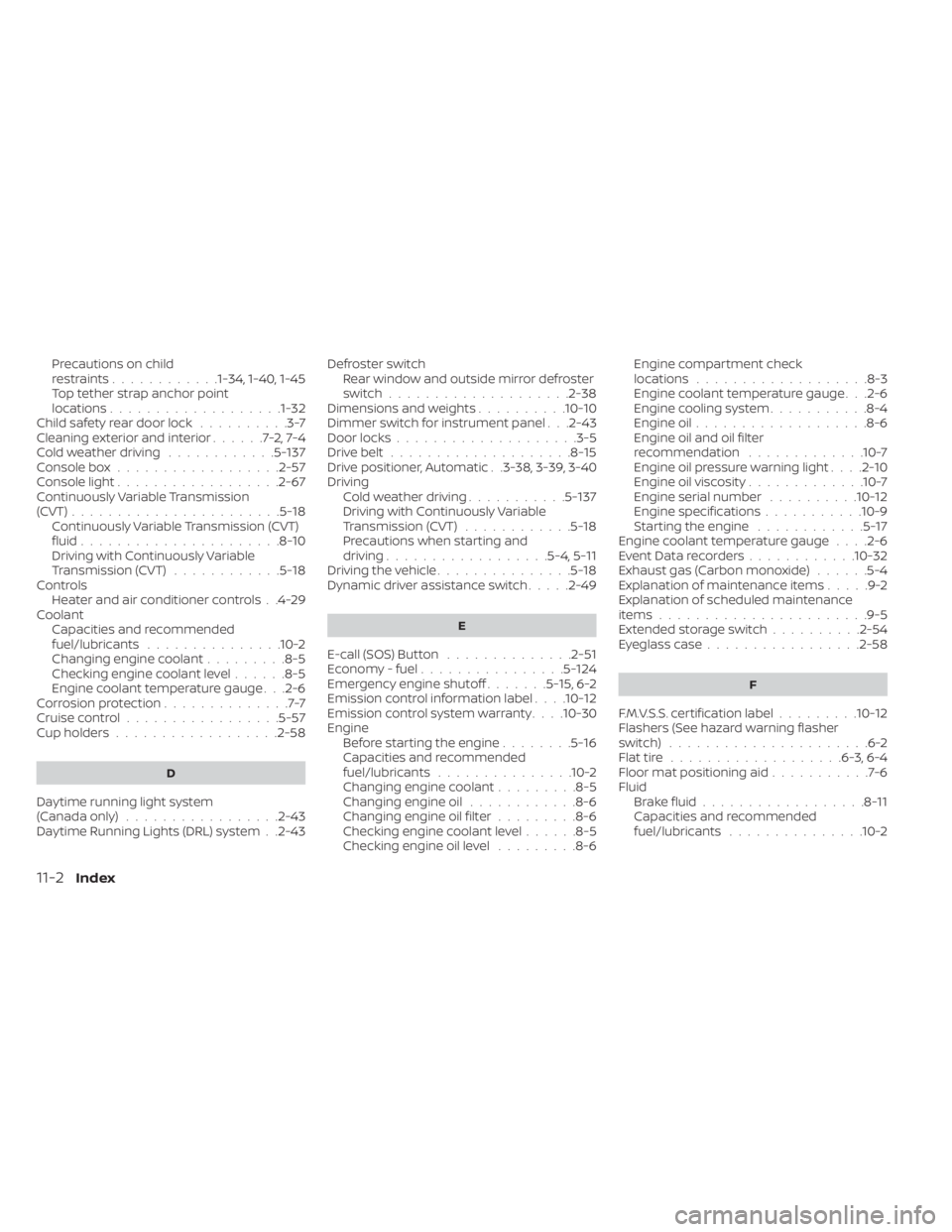
Precautions on child
restraints............1-34, 1-40, 1-45Top tether strap anchor point
locations...................1-32Child safety rear door lock..........3-7Cleaning exterior and interior......7-2,7-4Cold weather driving............5-137Console box..................2-57Console light..................2-67Continuously Variable Transmission
(CVT).......................5-18Continuously Variable Transmission (CVT)
fluid......................8-10Driving with Continuously Variable
Transmission (CVT)............5-18Controls
Heater and air conditioner controls. .4-29CoolantCapacities and recommended
fuel/lubricants
...............10-2Changing engine coolant.........8-5Checking engine coolant level......8-5Engine coolant temperature gauge. . .2-6Corrosion protection..............7-7Cruise control................ .5-57Cup holders................. .2-58
D
Daytime running light system
(Canada only).................2-43Daytime Running Lights (DRL) system. .2-43
Defroster switch
Rear window and outside mirror defroster
switch
................... .2-38Dimensions and weights..........10-10Dimmer switch for instrument panel. . .2-43Door locks....................3-5Drive belt....................8-15Drive positioner, Automatic. .3-38, 3-39, 3-40Driving
Cold weather driving...........5-137Driving with Continuously Variable
Transmission (CVT)............5-18Precautions when starting and
driving................. .5-4, 5-11Driving the vehicle...............5-18Dynamic driver assistance switch.....2-49
E
E-call (SOS) Button..............2-51Economy - fuel................5-124Emergency engine shutoff.......5-15,6-2Emission control information label. . . .10-12Emission control system warranty. . . .10-30Engine
Before starting the engine........5-16Capacities and recommended
fuel/lubricants...............10-2Changing engine coolant.........8-5Changing engine oil............8-6Changing engine oil filter.........8-6Checking engine coolant level......8-5Checking engine oil level.........8-6
Engine compartment check
locations.................. .8-3Engine coolant temperature gauge. . .2-6Engine cooling system...........8-4Engine oil...................8-6Engine oil and oil filter
recommendation.............10-7Engine oil pressure warning light. . . .2-10Engine oil viscosity.............10-7Engine serial number..........10-12Engine specifications...........10-9Starting the engine............5-17Engine coolant temperature gauge. . . .2-6Event Data recorders............10-32Exhaust gas (Carbon monoxide)......5-4Explanation of maintenance items.....9-2Explanation of scheduled maintenance
items...................... .9-5Extended storage switch..........2-54Eyeglass case.................2-58
F
F.M.V.S.S. certification label.........10-12Flashers (See hazard warning flasher
switch)......................6-2Flat tire.................. .6-3, 6-4Floor mat positioning aid...........7-6Fluid
Brake fluid..................8-11Capacities and recommended
fuel/lubricants...............10-2
11-2Index