cruise control NISSAN MURANO 2021 Owner´s Manual
[x] Cancel search | Manufacturer: NISSAN, Model Year: 2021, Model line: MURANO, Model: NISSAN MURANO 2021Pages: 508, PDF Size: 3.5 MB
Page 314 of 508
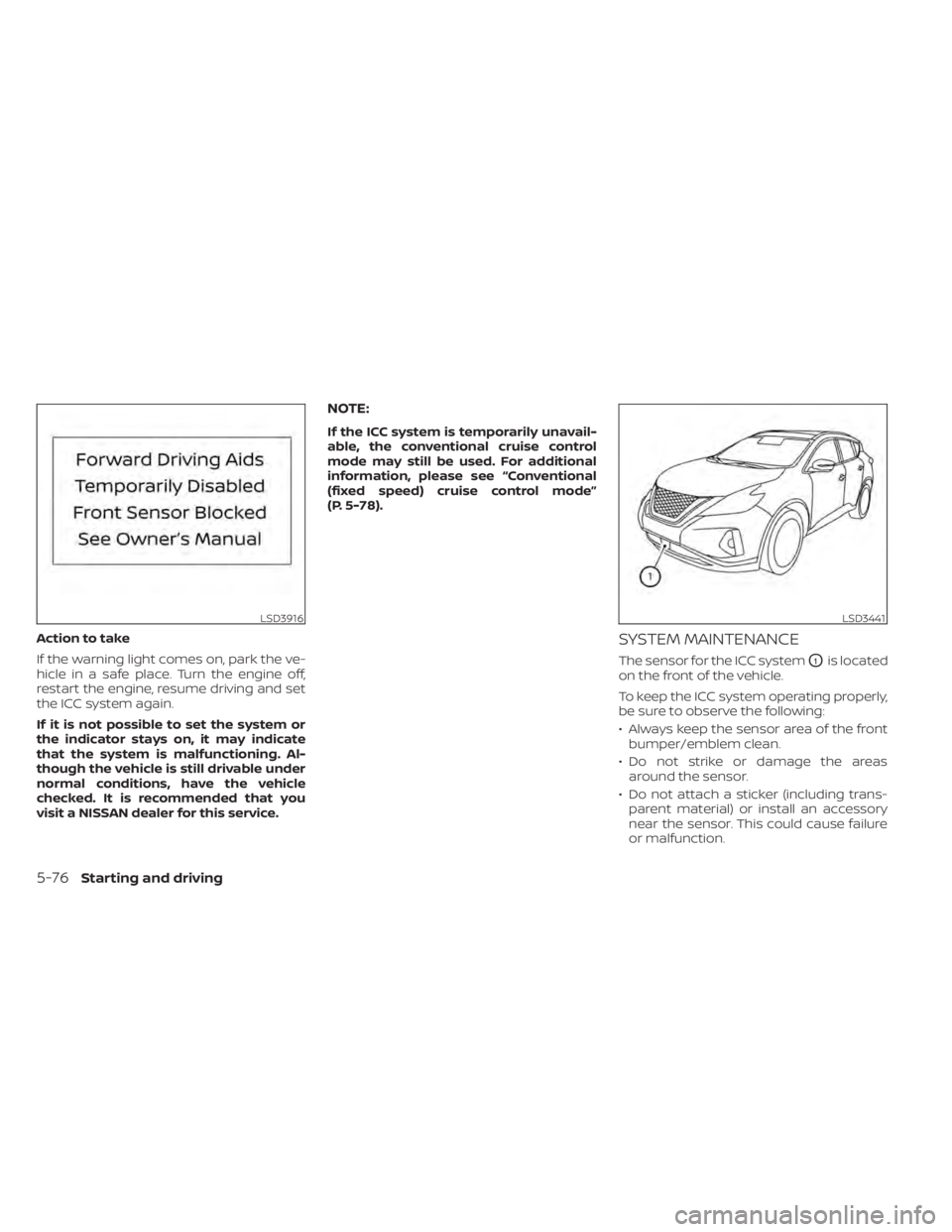
Action to take
If the warning light comes on, park the ve-
hicle in a safe place. Turn the engine off,
restart the engine, resume driving and set
the ICC system again.
If it is not possible to set the system or
the indicator stays on, it may indicate
that the system is malfunctioning. Al-
though the vehicle is still drivable under
normal conditions, have the vehicle
checked. It is recommended that you
visit a NISSAN dealer for this service.
NOTE:
If the ICC system is temporarily unavail-
able, the conventional cruise control
mode may still be used. For additional
information, please see “Conventional
(fixed speed) cruise control mode”
(P. 5-78).
SYSTEM MAINTENANCE
The sensor for the ICC systemO1is located
on the front of the vehicle.
To keep the ICC system operating properly,
be sure to observe the following:
• Always keep the sensor area of the front bumper/emblem clean.
• Do not strike or damage the areas around the sensor.
• Do not attach a sticker (including trans- parent material) or install an accessory
near the sensor. This could cause failure
or malfunction.
LSD3916LSD3441
5-76Starting and driving
Page 316 of 508
CONVENTIONAL (fixed speed)
CRUISE CONTROL MODE
This mode allows driving at a speed be-
tween 25 to 90 mph (40 to 144 km/h) with-
out keeping your foot on the accelerator
pedal.
WARNING
• In the conventional (fixed speed)
cruise control mode, a warning
chime does not sound to warn you if
you are too close to the vehicle
ahead, as neither the presence of the
vehicle ahead nor the vehicle-to-
vehicle distance is detected.
• Pay special attention to the distance
between your vehicle and the vehicle
ahead of you or a collision could
occur.
• Always confirm the setting in the ICC
system display. •
Do not use the conventional (fixed
speed) cruise control mode when
driving under the following condi-
tions:
– When it is not possible to keep the
vehicle at a set speed
– In heavy traffic or in traffic that
varies in speed
– On winding or hilly roads
– On slippery roads (rain, snow, ice,
etc.)
– In very windy areas
• Doing so could cause a loss of vehicle
control and result in an accident.
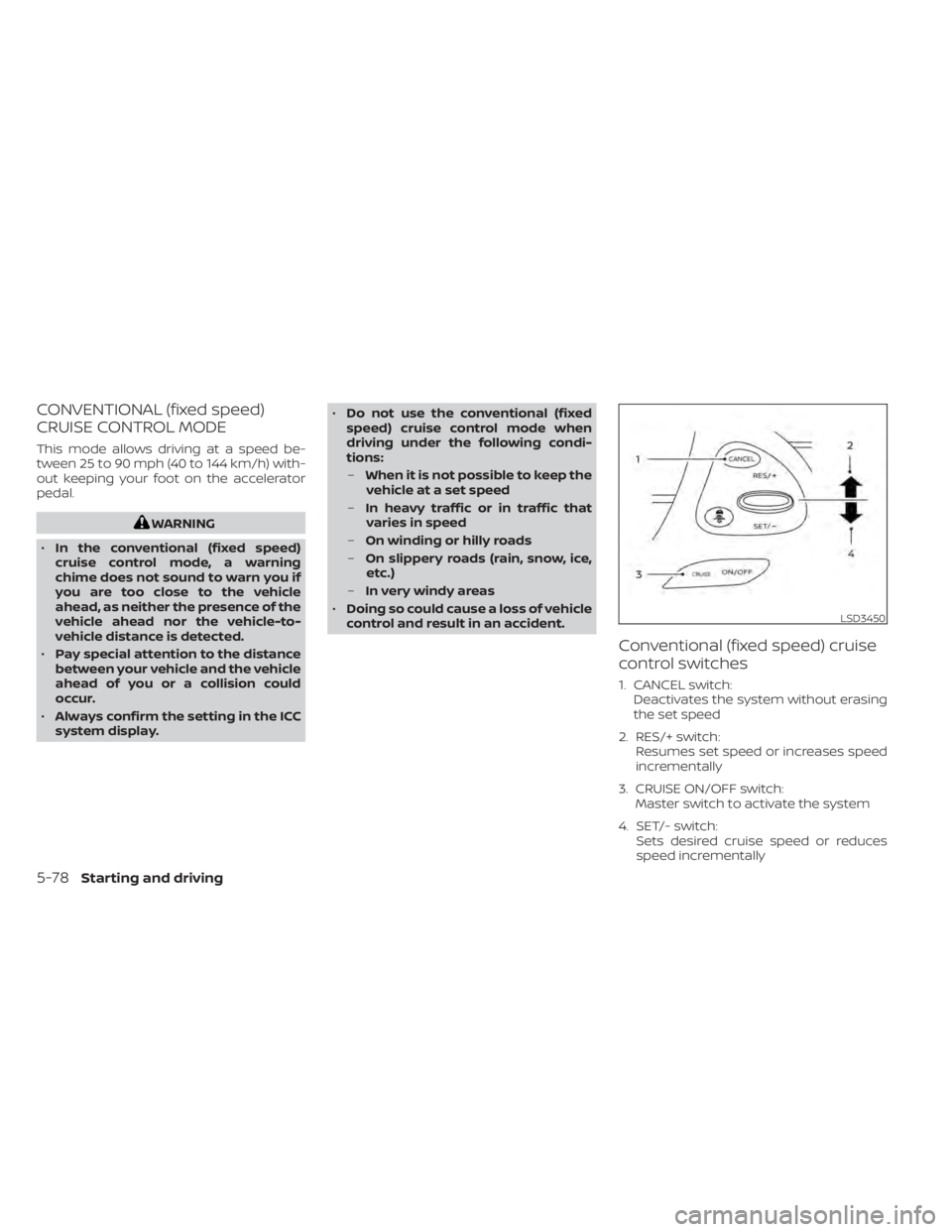
Conventional (fixed speed) cruise
control switches
1. CANCEL switch: Deactivates the system without erasing
the set speed
2. RES/+ switch: Resumes set speed or increases speed
incrementally
3. CRUISE ON/OFF switch: Master switch to activate the system
4. SET/- switch: Sets desired cruise speed or reduces
speed incrementally
LSD3450
5-78Starting and driving
Page 317 of 508
Conventional (fixed speed) cruise
control mode display and
indicators
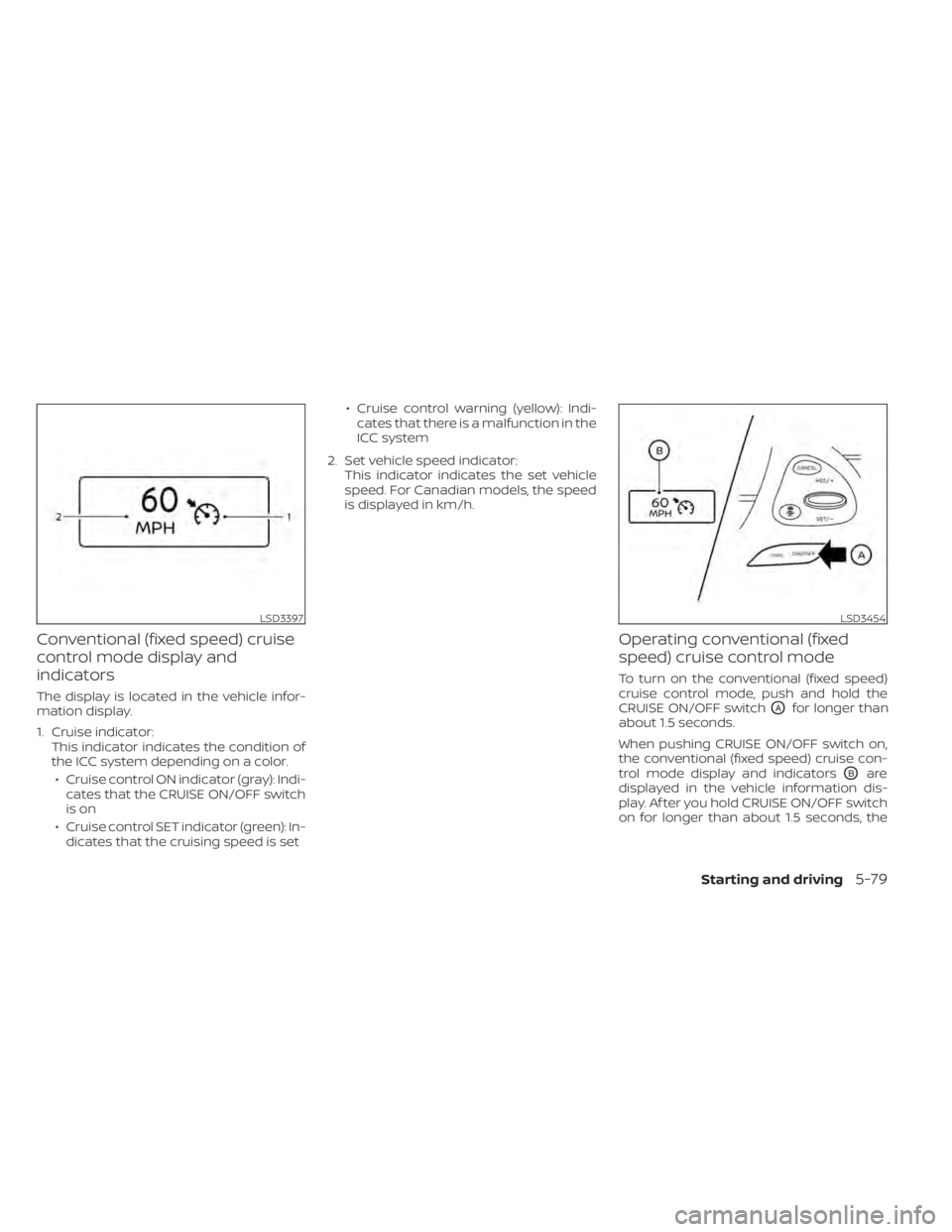
The display is located in the vehicle infor-
mation display.
1. Cruise indicator:This indicator indicates the condition of
the ICC system depending on a color.
• Cruise control ON indicator (gray): Indi- cates that the CRUISE ON/OFF switch
is on
• Cruise control SET indicator (green): In- dicates that the cruising speed is set • Cruise control warning (yellow): Indi-
cates that there is a malfunction in the
ICC system
2. Set vehicle speed indicator: This indicator indicates the set vehicle
speed. For Canadian models, the speed
is displayed in km/h.
Operating conventional (fixed
speed) cruise control mode
To turn on the conventional (fixed speed)
cruise control mode, push and hold the
CRUISE ON/OFF switch
OAfor longer than
about 1.5 seconds.
When pushing CRUISE ON/OFF switch on,
the conventional (fixed speed) cruise con-
trol mode display and indicators
OBare
displayed in the vehicle information dis-
play. Af ter you hold CRUISE ON/OFF switch
on for longer than about 1.5 seconds, the
LSD3397LSD3454
Starting and driving5-79
Page 318 of 508
ICC system display turns off. The cruise in-
dicator appears. You can now set your de-
sired cruising speed. Pushing the CRUISE
ON/OFF switch again will turn the system
completely off. When the ignition switch is
placed in the OFF position, the system is
also automatically turned off.
To use the ICC system again, quickly push
and release the CRUISE ON/OFF switch
(vehicle-to vehicle distance control mode)
or push and hold it (conventional cruise
control mode) again to turn it on.
CAUTION
To avoid accidentally engaging cruise
control, make sure to turn the ICC
switch off when not using the ICC
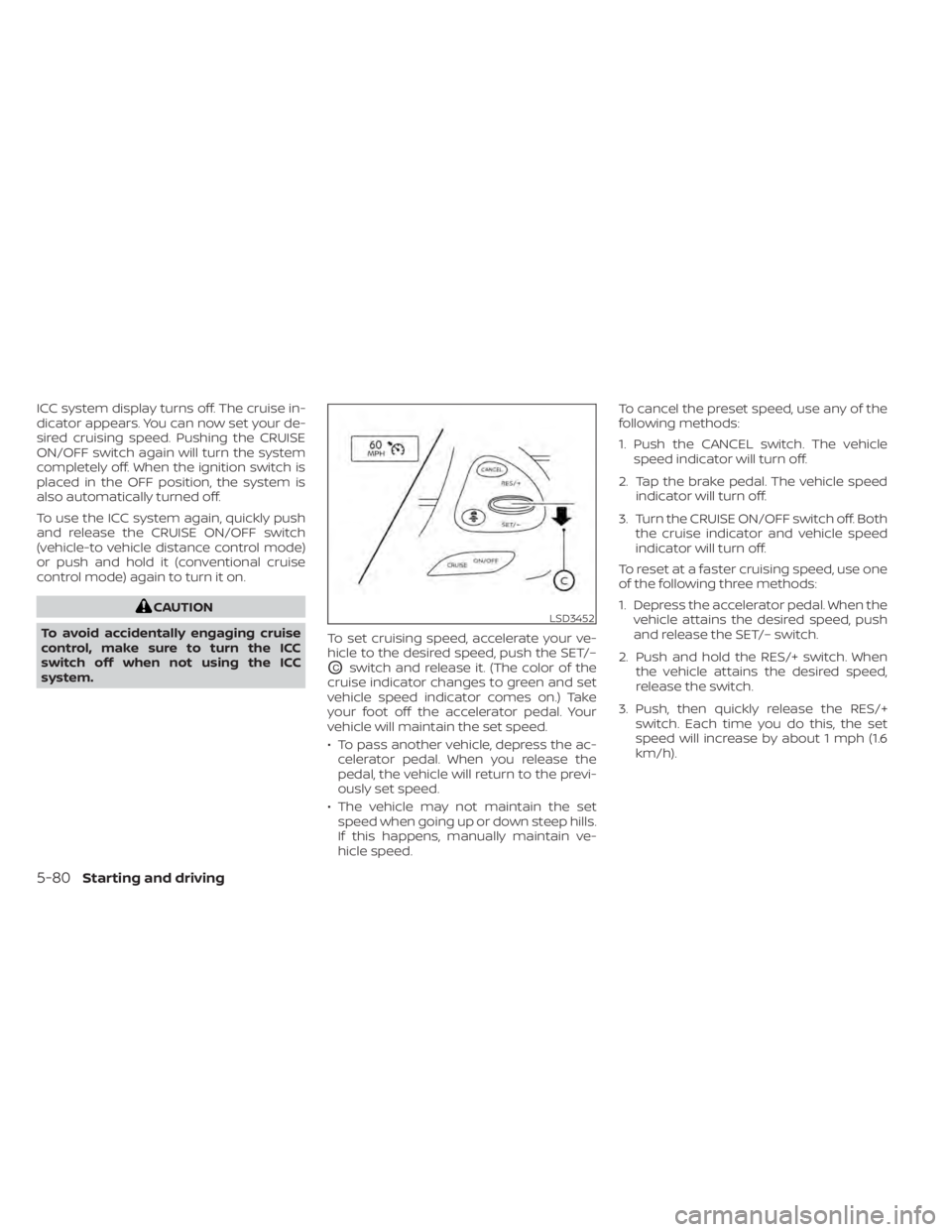
system. To set cruising speed, accelerate your ve-
hicle to the desired speed, push the SET/–
OCswitch and release it. (The color of the
cruise indicator changes to green and set
vehicle speed indicator comes on.) Take
your foot off the accelerator pedal. Your
vehicle will maintain the set speed.
• To pass another vehicle, depress the ac- celerator pedal. When you release the
pedal, the vehicle will return to the previ-
ously set speed.
• The vehicle may not maintain the set speed when going up or down steep hills.
If this happens, manually maintain ve-
hicle speed. To cancel the preset speed, use any of the
following methods:
1. Push the CANCEL switch. The vehicle
speed indicator will turn off.
2. Tap the brake pedal. The vehicle speed indicator will turn off.
3. Turn the CRUISE ON/OFF switch off. Both the cruise indicator and vehicle speed
indicator will turn off.
To reset at a faster cruising speed, use one
of the following three methods:
1. Depress the accelerator pedal. When the vehicle attains the desired speed, push
and release the SET/– switch.
2. Push and hold the RES/+ switch. When the vehicle attains the desired speed,
release the switch.
3. Push, then quickly release the RES/+ switch. Each time you do this, the set
speed will increase by about 1 mph (1.6
km/h).
LSD3452
5-80Starting and driving
Page 320 of 508
• When the parking brake is applied
• When the VDC operates (including thetraction control system)
• When a wheel slips
When the system is not operating properly,
the chime sounds and the color of the
cruise indicator will change to orange.
Action to take
If the color of the cruise indicator changes
to orange, stop the vehicle in a safe place
and place the shif t lever in the P (Park) po-
sition. Turn the engine off, restart the en-
gine, resume driving, and then perform the
setting again.
If it is not possible to set or the indicator
stays on, it may indicate that the system
is malfunctioning. Although the vehicle
is still drivable under normal conditions,
have the vehicle checked. It is recom-
mended that you visit a NISSAN dealer
for this service.WARNING
Failure to follow the warnings and in-
structions for proper use of the RAB
system could result in serious injury or
death.
• The RAB system is a supplemental
aid to the driver. It is not a replace-
ment for proper driving procedures.
Always use the side and rear mirrors
and turn and look in the direction you
will move before and while backing
up. Never rely solely on the RAB sys-
tem. It is the driver’s responsibility to
stay alert, drive safely, and be in con-
trol of the vehicle at all times.
• There is a limitation to the RAB sys-
tem capability. The RAB system is not
effective in all situations.
• Inclement weather or ultrasonic
sources such as an automatic car
wash, a truck’s compressed-air
brakes or a pneumatic drill may af-
fect the function of the system, this
may include reduced performance or
a false activation.
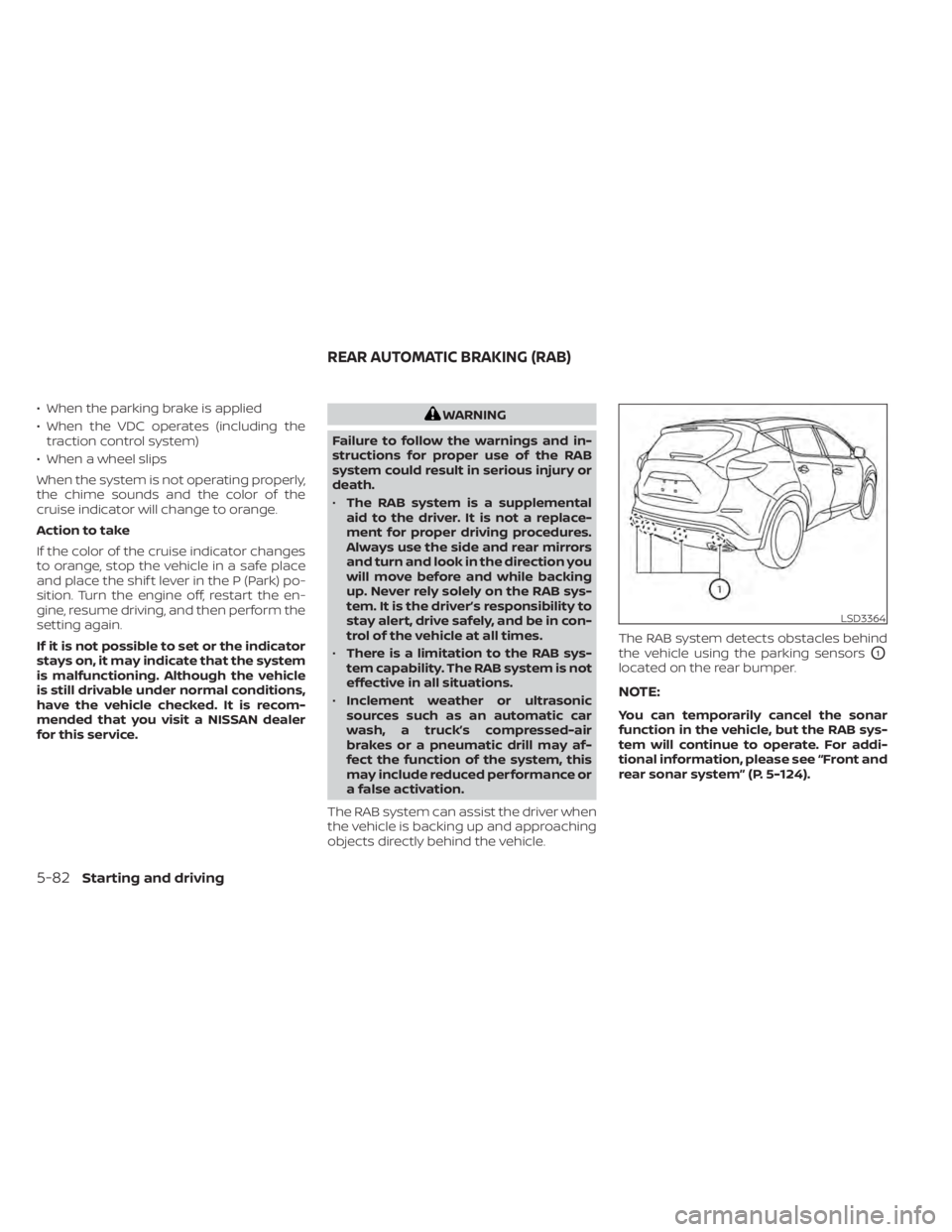
The RAB system can assist the driver when
the vehicle is backing up and approaching
objects directly behind the vehicle. The RAB system detects obstacles behind
the vehicle using the parking sensors
O1
located on the rear bumper.
NOTE:
You can temporarily cancel the sonar
function in the vehicle, but the RAB sys-
tem will continue to operate. For addi-
tional information, please see “Front and
rear sonar system” (P. 5-124).
LSD3364
REAR AUTOMATIC BRAKING (RAB)
5-82Starting and driving
Page 351 of 508
CAUTION
During the first 1,200 miles (2,000 km),
follow these recommendations to ob-
tain maximum engine performance
and ensure the future reliability and
economy of your new vehicle. Failure to
follow these recommendations may
result in shortened engine life and re-
duced engine performance.
• Avoid driving for long periods at constant speed, either fast or slow, and do not run
the engine over 4,000 rpm.
• Do not accelerate at full throttle in any gear.
• Avoid quick starts.
• Avoid hard braking as much as possible.
• Do not tow a trailer for the first 500 miles (805 kilometers). Your engine, axle or
other parts could be damaged. Follow these easy-to-use Fuel Efficient
Driving Tips to help you achieve the most
fuel economy from your vehicle.
1.
Use Smooth Accelerator and Brake
Pedal Application
• Avoid rapid starts and stops.
• Use smooth, gentle accelerator and brake application whenever possible.
• Maintain constant speed while com- muting and coast whenever possible.
2. Maintain Constant Speed
• Look ahead to try and anticipate and minimize stops.
• Synchronizing your speed with traffic lights allows you to reduce your num-
ber of stops.
• Maintaining a steady speed can mini- mize red light stops and improve fuel
efficiency.
3. Use Air Conditioning (A/C) at Higher
Vehicle Speeds
• Below 40 mph (64 km/h), it is more efficient to open windows to cool the
vehicle due to reduced engine load.
• Above 40 mph (64 km/h), it is more efficient to use A/C to cool the vehicle
due to increased aerodynamic drag. • Recirculating the cool air in the cabin
when the A/C is on reduces cooling
load.
4. Drive at Economical Speeds and
Distances
• Observing the speed limit and not ex- ceeding 60 mph (97 km/h) (where le-
gally allowed) can improve fuel effi-
ciency due to reduced aerodynamic
drag.
• Maintaining a safe following distance behind other vehicles reduces unnec-
essary braking.
• Safely monitoring traffic to anticipate changes in speed permits reduced
braking and smooth acceleration
changes.
• Select a gear range suitable to road conditions.
5. Use Cruise Control
• Using cruise control during highway driving helps maintain a steady speed.
• Cruise control is particularly effective in providing fuel savings when driving
on flat terrains.
6. Plan for the Shortest Route
• Utilize a map or navigation system to determine the best route to save time.
BREAK-IN SCHEDULE FUEL EFFICIENT DRIVING TIPS
Starting and driving5-113
Page 366 of 508
•Allow more stopping distance under
these conditions. Braking should be
started sooner than on dry
pavement.
• Allow greater following distances on
slippery roads.
• Watch for slippery spots (glare ice).
These may appear on an otherwise
clear road in shaded areas. If a patch
of ice is seen ahead, brake before
reaching it. Try not to brake while on
the ice, and avoid any sudden steer-
ing maneuvers.
• Do not use the cruise control on slip-
pery roads.
• Snow can trap dangerous exhaust
gases under your vehicle. Keep snow
clear of the exhaust pipe and from
around your vehicle.
5-128Starting and driving
Page 488 of 508
– Do not correct trailer sway by steeringor applying the brakes.
2. When the trailer sway stops, gently apply the brakes and pull to the side of the
road in a safe area.
3. Try to rearrange the trailer load so it is balanced as described in this section.
• Be careful when passing other vehicles. Passing while towing a trailer requires
considerably more distance than normal
passing. Remember, the length of the
trailer must also pass the other vehicle
before you can safely change lanes.
• Downshif t the transmission to a lower gear for engine braking when driving
down steep or long hills. This will help
slow the vehicle without applying the
brakes.
• Avoid holding the brake pedal down too long or too frequently. This could cause
the brakes to overheat, resulting in re-
duced braking efficiency.
• Increase your following distance to allow for greater stopping distances while tow-
ing a trailer. Anticipate stops and brake
gradually.
• NISSAN recommends that the cruise control not be used while towing a trailer. • Some states or provinces have specific
regulations and speed limits for vehicles
that are towing trailers. Obey the local
speed limits.
• Check your hitch, trailer wiring harness connections, and trailer wheel lug nuts
af ter 50 miles (80 km) of travel and at
every break.
• When launching a boat, don't allow the water level to go over the exhaust tail
pipe or rear bumper.
• Make sure you disconnect the trailer lights before backing the trailer into the
water or the trailer lights may burn out.
When towing a trailer, final drive gear oil
should be replaced and transmission oil/
fluid should be changed more fre-
quently. For additional information, see
“Do-it-yourself ” (P. 8-2).
FLAT TOWING FOR ALL–WHEEL
DRIVE VEHICLE (if so equipped)
Towing your vehicle with all four wheels on
the ground is sometimes called flat towing.
This method is sometimes used when
towing a vehicle behind a recreational ve-
hicle, such as a motor home.
CAUTION
• Failure to follow these guidelines can
result in severe transmission
damage.
• Never flat tow your All-Wheel Drive
(AWD) vehicle.
• DO NOT tow your All-Wheel Drive
(AWD) vehicle with any wheels on the
ground. Doing so may cause serious
and expensive damage to the
powertrain.
• For emergency towing procedures
see “Towing recommended by
NISSAN” (P. 6-13).
FLAT TOWING FOR FRONT WHEEL
DRIVE VEHICLE (if so equipped)
Towing your vehicle with all four wheels on
the ground is sometimes called flat towing.
This method is sometimes used when
towing a vehicle behind a recreational ve-
hicle, such as a motor home.
10-28Technical and consumer information
Page 496 of 508
Child safety rear door lock..........3-7Cleaning exterior and interior......7-2,7-4Cold weather driving............5-127Console box..................2-55Console light..................2-65Continuously Variable Transmission
(CVT).......................5-18Continuously Variable Transmission (CVT)
fluid......................8-10Driving with Continuously Variable
Transmission (CVT)............5-18Controls
Heater and air conditioner controls. .4-29CoolantCapacities and recommended
fuel/lubricants
...............10-2Changing engine coolant.........8-5Checking engine coolant level......8-5Engine coolant temperature gauge. . .2-6Corrosion protection..............7-7Cruise control................ .5-55Cup holders................. .2-56
D
Daytime running light system
(Canada only).................2-40Daytime Running Lights (DRL) system. .2-40Defroster switch
Rear window and outside mirror defroster
switch
................... .2-34Dimensions and weights..........10-10Dimmer switch for instrument panel. . .2-40
Door locks....................3-5Drive belt....................8-15Driving
Cold weather driving...........5-127Driving with Continuously Variable
Transmission (CVT)............5-18Precautions when starting and
driving................. .5-4, 5-11Driving the vehicle...............5-18Dynamic driver assistance switch.....2-47
E
E-call (SOS) Button..............2-48Economy - fuel................5-114Emergency engine shutoff.......5-15,6-2Emission control information label. . . .10-12Emission control system warranty. . . .10-30Engine
Before starting the engine........5-16Capacities and recommended
fuel/lubricants...............10-2Changing engine coolant.........8-5Changing engine oil............8-6Changing engine oil filter.........8-6Checking engine coolant level......8-5Checking engine oil level.........8-6Engine compartment check
locations.................. .8-3Engine coolant temperature gauge. . .2-6Engine cooling system...........8-4Engine oil...................8-6
Engine oil and oil filter
recommendation.............10-7Engine oil pressure warning light. . . .2-10Engine oil viscosity.............10-7Engine serial number..........10-12Engine specifications...........10-9Starting the engine............5-17Engine coolant temperature gauge. . . .2-6Event Data recorders............10-32Exhaust gas (Carbon monoxide)......5-4Explanation of maintenance items.....9-2Explanation of scheduled maintenance
items...................... .9-5Extended storage switch..........2-51Eyeglass case.................2-55
F
F.M.V.S.S. certification label.........10-12Flashers (See hazard warning flasher
switch)......................6-2Flat tire.................. .6-3, 6-4Floor mat positioning aid...........7-6Fluid
Brake fluid..................8-11Capacities and recommended
fuel/lubricants...............10-2Continuously Variable Transmission (CVT)
fluid......................8-10Engine coolant................8-4Engine oil.................. .8-6Power steering fluid............8-11Windshield-washer fluid.........8-12
11-2
Page 497 of 508
Fog light switch................2-41Front air bag system
(See supplemental restraint system). . .1-57Front and rear sonar system.......5-124Front power seat adjustment........1-4Front seats....................1-2Front-door pocket..............2-52FuelCapacities and recommended
fuel/lubricants
...............10-2Fuel economy...............5-114Fuel gauge................. .2-6Fuel octane rating.............10-6Fuel recommendation..........10-4Fuel-filler cap................3-29Fuel-filler door lock opener lever. . . .3-29Fuel-filler lid.................3-29Loose fuel cap warning..........2-25Fuel efficient driving tips..........5-113Fuel gauge................... .2-6Fuel-filler door.................3-29Fuses.......................8-19Fusible links..................8-20
G
Garage door opener, HomeLink® Universal
Transceiver........2-66, 2-67, 2-69, 2-70Gas cap.....................3-29Gauge
Engine coolant temperature gauge. . .2-6Fuel gauge................. .2-6Odometer.................. .2-5
Speedometer................2-4Tachometer.................2-5Trip odometer................2-5General maintenance.............9-2Glove box................... .2-54Grocery hooks.................2-58
H
Hazard warning flasher switch........6-2Head restraints.................1-9Headlight and turn signal switch.....2-35Headlight control switch...........2-35Headlights...................8-25Heated rear seats...............2-45Heated seats..............2-42, 2-44Heated steering wheel............2-46Heater
Heater and air conditioner (automatic)
(if so equipped)
...............4-28Heater and air conditioner controls. .4-29Heater operation.............4-30Heater and air conditioner
(automatic)...................4-28Hill start assist system...........5-124HomeLink® Universal
Transceiver........2-66, 2-67, 2-69, 2-70Hood.......................3-21HookLuggage hook...............2-57Horn...................... .2-42
I
Ignition switch
Push-button ignition switch.......5-13Immobilizer system..........2-31, 5-16Important vehicle information label. . .10-12In-cabin microfilter..............8-17Increasing fuel economy..........5-114IndicatorNISSAN Intelligent Key® battery discharge
indicator
...................5-15Indicator lights and audible reminders
(See warning/indicator lights and audible
reminders)
................ .2-9, 2-11Inside automatic anti-glare mirror.3-34, 3-35Instrument brightness control.......2-40Instrument panel.............0-6, 2-2Instrument panel dimmer switch.....2-40Intelligent Around View Monitor......4-10Intelligent Cruise Control (ICC).......5-58Intelligent Drive Alertness (I-DA)......5-109Intelligent Forward Collision Warning
(I-FCW)..................... .5-97Intelligent Key system
Key operating range............3-8Key operation................3-9Mechanical key................3-3Remote keyless entry operation. . . .3-12Troubleshooting guide..........3-16Warning signals...............3-16Intelligent Lane Intervention (I-LI).....5-32Interior light................. .2-64ISOFIX child restraints.............1-29
11-3