service indicator NISSAN MURANO 2021 Owner´s Manual
[x] Cancel search | Manufacturer: NISSAN, Model Year: 2021, Model line: MURANO, Model: NISSAN MURANO 2021Pages: 508, PDF Size: 3.5 MB
Page 269 of 508
–When a sudden change in bright-
ness occurs. (For example, when
the vehicle enters or exits a tunnel
or under a bridge.)
SYSTEM TEMPORARILY
UNAVAILABLE
If the vehicle is parked in direct sunlight
under high temperature conditions (over
approximately 104°F [40°C]) and then
started, the LDW system may be deacti-
vated automatically and the following
message will appear in the vehicle infor-
mation display: “Unavailable: High Cabin
Temperature.”
When the interior temperature is reduced,
the LDW system will resume operating
automatically.
The LDW system is not designed to warn
under the following conditions:
• When you operate the lane change signal and change traveling lanes in the direc-
tion of the signal. (The LDW system will
become operable again approximately 2
seconds af ter the lane change signal is
turned off.)
• When the vehicle speed lowers to less than approximately 37 mph (60 km/h). Af ter the above conditions have finished
and the necessary operating conditions
are satisfied, the LDW functions will resume.
SYSTEM MALFUNCTION
If the LDW system malfunctions, it will can-
cel automatically. The LDW/I—LI indicator
(orange) will illuminate in the display. If the
LDW/I—LI indicator (orange) illuminates in
the display, pull off the road to a safe loca-
tion and stop the vehicle. Turn the engine/
motor off and restart the engine/motor. If
the LDW/I—LI indicator (orange) continues
to illuminate, have the LDW system
checked. It is recommended that you visit a
NISSAN dealer for this service.
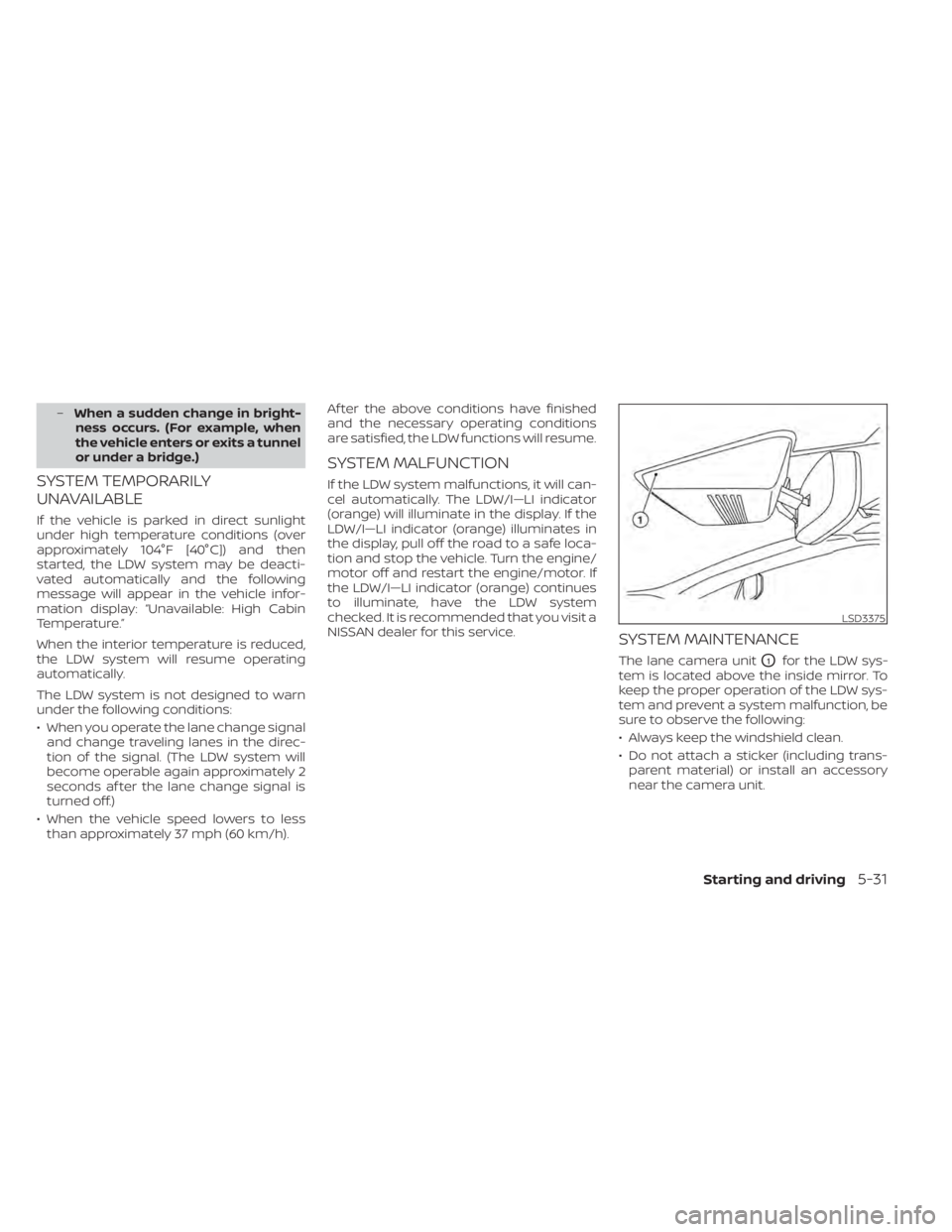
SYSTEM MAINTENANCE
The lane camera unitO1for the LDW sys-
tem is located above the inside mirror. To
keep the proper operation of the LDW sys-
tem and prevent a system malfunction, be
sure to observe the following:
• Always keep the windshield clean.
• Do not attach a sticker (including trans- parent material) or install an accessory
near the camera unit.
LSD3375
Starting and driving5-31
Page 275 of 508
![NISSAN MURANO 2021 Owner´s Manual Temporary disabled status at high
temperature:
If the vehicle is parked in direct sunlight
under high temperature conditions (over
approximately 104°F [40°C]) and then the
I-LI system is turned on,](/img/5/40352/w960_40352-274.png "NISSAN MURANO 2021 Owner´s Manual Temporary disabled status at high
temperature:
If the vehicle is parked in direct sunlight
under high temperature conditions (over
approximately 104°F [40°C]) and then the
I-LI system is turned on,")
Temporary disabled status at high
temperature:
If the vehicle is parked in direct sunlight
under high temperature conditions (over
approximately 104°F [40°C]) and then the
I-LI system is turned on, the I-LI system
may be deactivated automatically and the
following message will appear on the ve-
hicle information display: “Unavailable: High
Cabin Temperature.” When the interior
temperature is reduced, the system will re-
sume operating automatically.
SYSTEM MALFUNCTION
If the I-LI system malfunctions, it will cancel
automatically. The LDW indicator (orange)
will illuminate in the display. If the LDW indi-
cator (orange) illuminates in the display,
pull off the road to a safe location and stop
the vehicle. Turn the engine/motor off and
restart the engine/motor. If the LDW indica-
tor (orange) continues to illuminate, have
the I-LI system checked. It is recom-
mended that you visit a NISSAN dealer for
this service.
SYSTEM MAINTENANCE
The lane camera unitO1for the I-LI system
is located above the inside mirror. To keep
the proper operation of the I-LI system and
prevent a system malfunction, be sure to
observe the following:
• Always keep the windshield clean.
• Do not attach a sticker (including trans- parent material) or install an accessory
near the camera unit. • Do not place reflective materials, such as
white paper or a mirror, on the instru-
ment panel. The reflection of sunlight
may adversely affect the camera unit’s
capability of detecting the lane markers.
• Do not strike or damage the areas around the camera unit. Do not touch the
camera lens or remove the screw located
on the camera unit. If the camera unit is
damaged due to an accident, it is recom-
mended that you visit a NISSAN dealer.
LSD3375
Starting and driving5-37
Page 294 of 508
• If theindicator blinks, turn the cruise
control off and have the system checked.
It is recommended that you visit a NISSAN
dealer for this service.
• The
indicator may blink when the
ON/OFF switch is turned on while push-
ing the RES/+ switch, SET/- switch, or
CANCEL switch. To properly set the cruise
control system, use the following
procedures.
WARNING
Do not use the cruise control when driv-
ing under the following conditions:
• When it is not possible to keep the
vehicle at a set speed.
• In heavy traffic or in traffic that varies
in speed.
• On winding or hilly roads.
• On slippery roads (rain, snow, ice,
etc.).
• In very windy areas.
Doing so could cause a loss of vehicle
control and result in an accident.
CRUISE CONTROL OPERATIONS
The cruise control allows driving at a speed
between 25 - 89 mph (40 - 144 km/h) with-
out keeping your foot on the accelerator
pedal.
To turn on the cruise control, push the
ON/OFF switch on. The
indicator in
the vehicle information display will illumi-
nate. If the Cruise Control Alerts are en-
abled in the Driving Aids menu, then the
“Cruise ON: Press SET to engage speed
control” message will appear in the vehicle
information display.
This message will disappear af ter about 6
seconds, or can be dismissed by pushing
the OK button. Cruise control status will
continue to display in the upper right cor-
ner of the vehicle information display while
the system is on.
To set cruising speed, accelerate the ve-
hicle to the desired speed, push the SET/–
switch and release it. Take your foot off the
accelerator pedal. Your vehicle maintains
the set speed. If the Cruise Control Alerts are enabled in
the Driving Aids menu, then the “Target
Speed SET. Press + or – to adjust” message
will appear in the vehicle information dis-
play when the SET/– switch is pushed. This
message will disappear af ter about 6 sec-
onds, or can be dismissed by pushing the
OK button. Cruise control status will con-
tinue to display in the upper right corner of
the vehicle information display while the
system is on.
•
To pass another vehicle, depress the ac-
celerator pedal. When you release the
pedal, the vehicle returns to the previ-
ously set speed.
• The vehicle may not maintain the set speed when going up or down steep hills.
If this happens, drive without the cruise
control.
To cancel the preset speed, use one of the
following three methods:
• Push the CANCEL switch.
• Tap the brake pedal.
• Push the ON/OFF switch off. The
indicator in the vehicle information dis-
play goes out.
5-56Starting and driving
Page 314 of 508
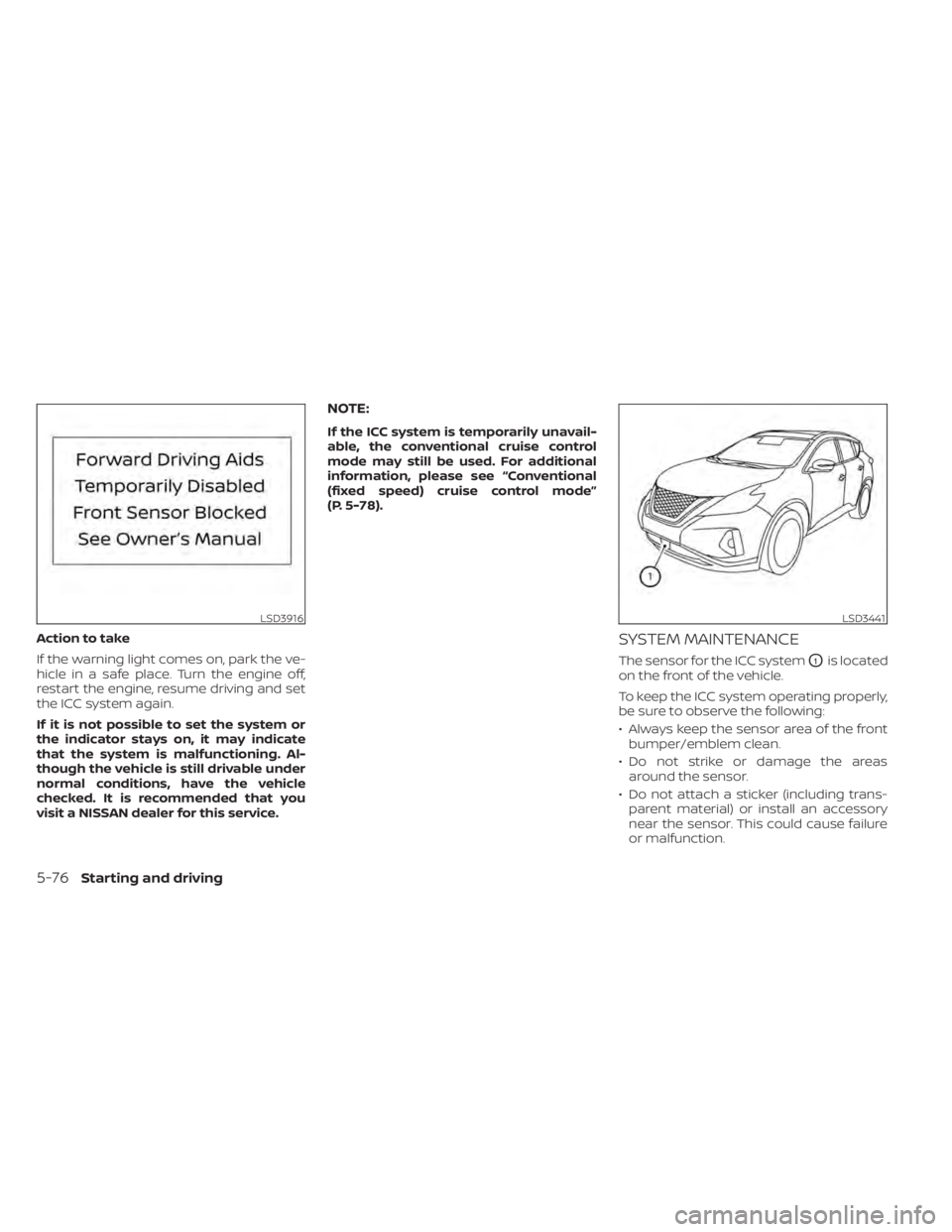
Action to take
If the warning light comes on, park the ve-
hicle in a safe place. Turn the engine off,
restart the engine, resume driving and set
the ICC system again.
If it is not possible to set the system or
the indicator stays on, it may indicate
that the system is malfunctioning. Al-
though the vehicle is still drivable under
normal conditions, have the vehicle
checked. It is recommended that you
visit a NISSAN dealer for this service.
NOTE:
If the ICC system is temporarily unavail-
able, the conventional cruise control
mode may still be used. For additional
information, please see “Conventional
(fixed speed) cruise control mode”
(P. 5-78).
SYSTEM MAINTENANCE
The sensor for the ICC systemO1is located
on the front of the vehicle.
To keep the ICC system operating properly,
be sure to observe the following:
• Always keep the sensor area of the front bumper/emblem clean.
• Do not strike or damage the areas around the sensor.
• Do not attach a sticker (including trans- parent material) or install an accessory
near the sensor. This could cause failure
or malfunction.
LSD3916LSD3441
5-76Starting and driving
Page 320 of 508
• When the parking brake is applied
• When the VDC operates (including thetraction control system)
• When a wheel slips
When the system is not operating properly,
the chime sounds and the color of the
cruise indicator will change to orange.
Action to take
If the color of the cruise indicator changes
to orange, stop the vehicle in a safe place
and place the shif t lever in the P (Park) po-
sition. Turn the engine off, restart the en-
gine, resume driving, and then perform the
setting again.
If it is not possible to set or the indicator
stays on, it may indicate that the system
is malfunctioning. Although the vehicle
is still drivable under normal conditions,
have the vehicle checked. It is recom-
mended that you visit a NISSAN dealer
for this service.WARNING
Failure to follow the warnings and in-
structions for proper use of the RAB
system could result in serious injury or
death.
• The RAB system is a supplemental
aid to the driver. It is not a replace-
ment for proper driving procedures.
Always use the side and rear mirrors
and turn and look in the direction you
will move before and while backing
up. Never rely solely on the RAB sys-
tem. It is the driver’s responsibility to
stay alert, drive safely, and be in con-
trol of the vehicle at all times.
• There is a limitation to the RAB sys-
tem capability. The RAB system is not
effective in all situations.
• Inclement weather or ultrasonic
sources such as an automatic car
wash, a truck’s compressed-air
brakes or a pneumatic drill may af-
fect the function of the system, this
may include reduced performance or
a false activation.
The RAB system can assist the driver when
the vehicle is backing up and approaching
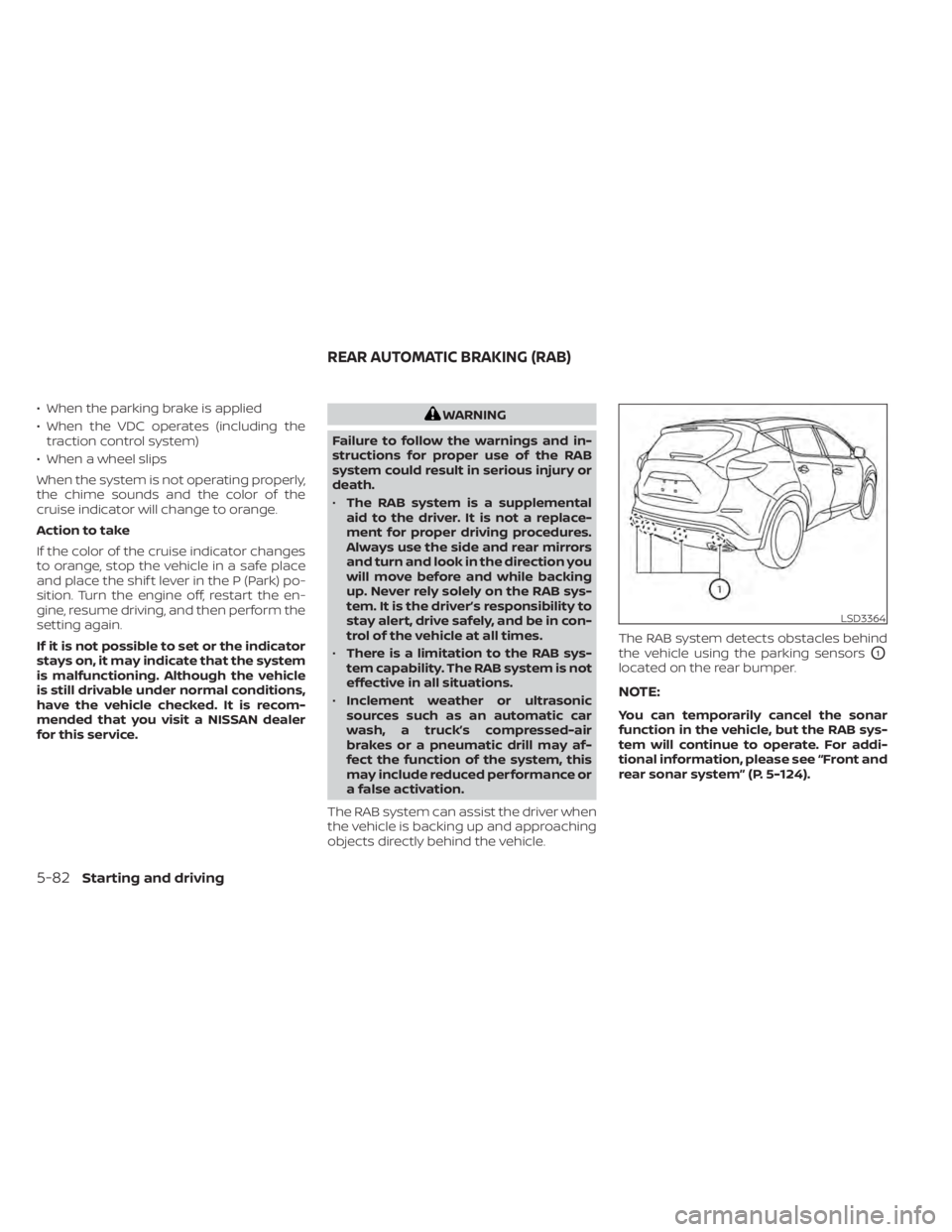
objects directly behind the vehicle. The RAB system detects obstacles behind
the vehicle using the parking sensors
O1
located on the rear bumper.
NOTE:
You can temporarily cancel the sonar
function in the vehicle, but the RAB sys-
tem will continue to operate. For addi-
tional information, please see “Front and
rear sonar system” (P. 5-124).
LSD3364
REAR AUTOMATIC BRAKING (RAB)
5-82Starting and driving
Page 409 of 508
If the brakes do not operate properly, have
the brakes checked. It is recommended
that you visit a NISSAN dealer for this
service.
Self-adjusting brakes
Your vehicle is equipped with self-adjusting
brakes.
The front and rear disc-type brakes self-
adjust every time the brake pedal is
applied.
WARNING
Have your brake system checked if the
brake pedal height does not return to
normal. It is recommended that you
visit a NISSAN dealer for this service.
Brake pad wear indicators
The disc brake pads on your vehicle have
audible wear indicators. When a brake pad
requires replacement, a high pitched
scraping or screeching sound will be heard
when the vehicle is in motion. The noise will
be heard whether or not the brake pedal is
depressed. Have the brakes checked as
soon as possible if the wear indicator
sound is heard. Under some driving or climate conditions,
occasional brake squeak, squeal or other
noise may be heard. Occasional brake
noise during light to moderate stops is nor-
mal and does not affect the function or
performance of the brake system.
Proper brake inspection intervals should
be followed.
For additional information re-
garding brake inspections, refer to the ap-
propriate maintenance schedule informa-
tion in the "Maintenance and schedules"
section of this manual.
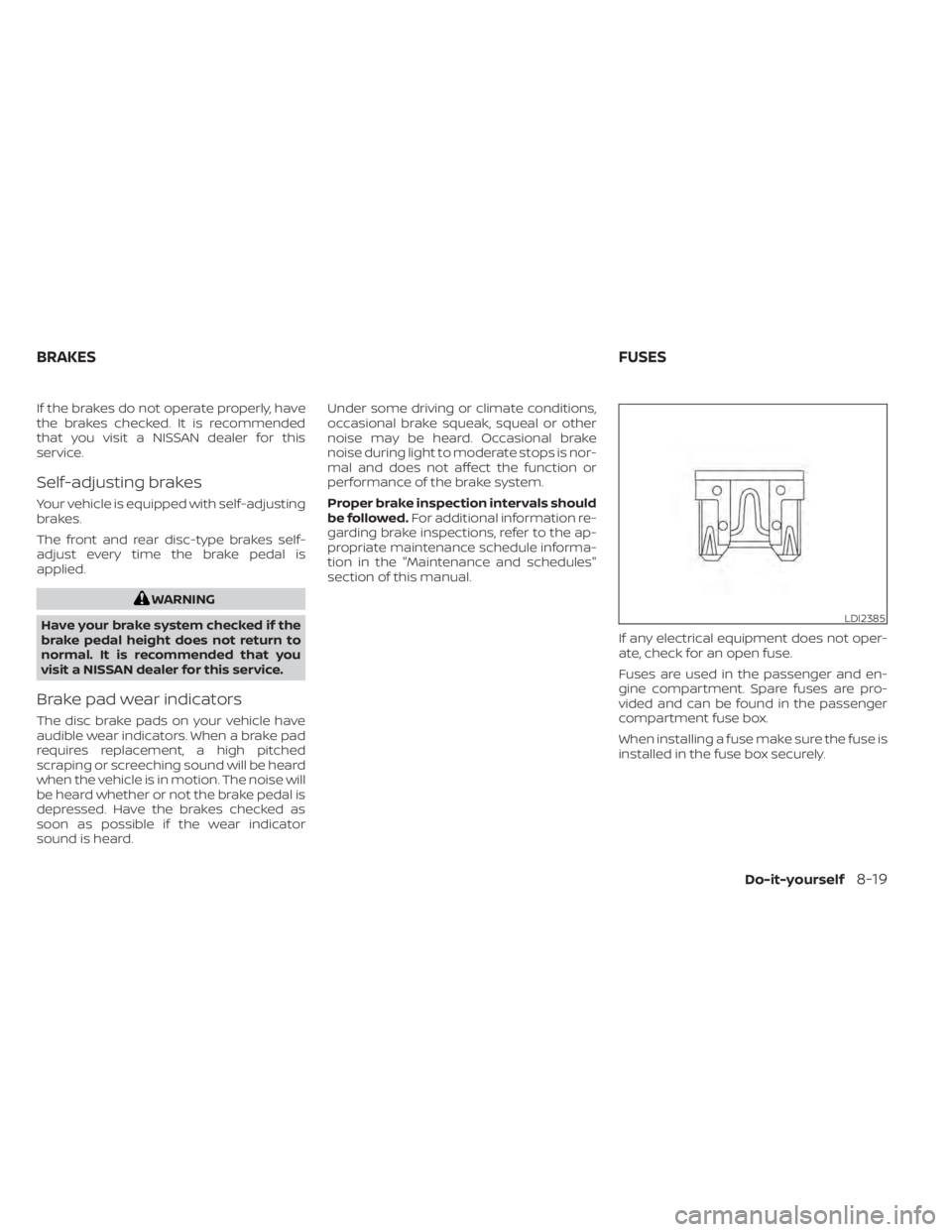
If any electrical equipment does not oper-
ate, check for an open fuse.
Fuses are used in the passenger and en-
gine compartment. Spare fuses are pro-
vided and can be found in the passenger
compartment fuse box.
When installing a fuse make sure the fuse is
installed in the fuse box securely.
LDI2385
BRAKES FUSES
Do-it-yourself8-19
Page 426 of 508
WARNING
• Tires should be periodically in-
spected for wear, cracking,
bulging or objects caught in
the tread. If excessive wear,
cracks, bulging or deep cuts
are found, the tire(s) should be
replaced.
• The original tires have built-in
tread wear indicators. When
the wear indicators are visible,
the tire(s) should be replaced.
• Tires degrade with age and
use. Have tires, including the
spare, over 6 years old checked
by a qualified technician be-
cause some tire damage may
not be obvious. Replace the
tires as necessary to prevent
tire failure and possible per-
sonal injury. •
Improper service of the spare
tire may result in serious per-
sonal injury. If it is necessary to
repair the spare tire, it is rec-
ommended that you visit a
NISSAN dealer for this service.
• For additional information re-
garding tires, refer to “Impor-
tant Tire Safety Information”
(US) or “Tire Safety Informa-
tion” (Canada) in the Warranty
Information Booklet.
Replacing wheels and tires
When replacing a tire, use the same size,
tread design, speed rating and load carry-
ing capacity as originally equipped. For ad-
ditional information, see “Wheels and tires”
(P. 8-27).
WARNING
• The use of tires other than those rec-
ommended or the mixed use of tires
of different brands, construction
(bias, bias-belted or radial), or tread
patterns can adversely affect the
ride, braking, handling, VDC system,
ground clearance, body-to-tire clear-
ance, tire chain clearance, speedom-
eter calibration, headlight aim and
bumper height. Some of these ef-
fects may lead to accidents and
could result in serious personal
injury.
• For 2WD models, if your vehicle was
originally equipped with four tires
that were the same size and you are
only replacing two of the four tires,
install the new tires on the rear axle.
Placing new tires on the front axle
may cause loss of vehicle control in
some driving conditions and cause
an accident and personal injury.
8-36Do-it-yourself
Page 499 of 508
MirrorAutomatic anti-glare inside
mirror
................ .3-34, 3-35Outside mirrors...........3-35, 3-36Rearview.................. .3-34Vanity mirror................3-33Mirrors..................... .3-34Moonroof.................2-62, 7-5Moving Object Detection (MOD)......4-22
N
NISSAN Intelligent Key®..........3-2,3-7NISSAN Intelligent Key® battery discharge
indicator.....................5-15NISSAN Vehicle Immobilizer
System................. .2-31, 5-16NissanConnect® Owner's Manual......4-2
O
Octane rating (See fuel octane rating). .10-6Odometer................... .2-5Oil
Capacities and recommended
fuel/lubricants
...............10-2Changing engine oil............8-6Changing engine oil filter.........8-6Checking engine oil level.........8-6Engine oil.................. .8-6Engine oil and oil filter
recommendation.............10-7Engine oil viscosity.............10-7
Outside mirrors.............3-35, 3-36Overhead sunglasses holder........2-55Overheat
If your vehicle overheats.........6-12Owner's manual order form........10-33Owner's manual/service manual order
information................. .10-33
P
Parking
Parking/parking on hills.........5-117Parking brake.................5-23Personal lights................ .2-66Power
Front seat adjustment...........1-4Power door locks..............3-6Power outlet................2-50Powerrearwindows............2-61Power steering fluid............8-11Power steering system.........5-118Power windows..............2-59Rear power windows...........2-61Power outlet................. .2-50Power steering................5-118Power steering fluid..............8-11Precautions
Maintenance precautions.........8-2On-pavement and off-road driving
precautions................. .5-9Precautions on booster
seats..............1-34, 1-40, 1-45
Precautions on child
restraints............1-34, 1-40, 1-45Precautions on seat belt usage.....1-13Precautions on supplemental restraint
system................... .1-49Precautions when starting and
driving..................5-4, 5-11Push starting..................6-12
R
Radio
Car phone or CB radio..........4-32Readiness for inspection maintenance (I/M)
test...................... .10-32Rear Automatic Braking (RAB). . . .2-15, 5-82Rear center seat belt.............1-20Rear Cross Traffic Alert (RCTA).......5-47Rear Door Alert.........2-24,2-25,2-48Rear power windows.............2-61Rear seat.................... .1-6Rear window and outside mirror defroster
switch..................... .2-34Rear window wiper and washer
switches....................2-33Rearview mirror................3-34RearView Monitor................4-3Recommended Fluids............10-2Recorders
Event Data................ .10-32Refrigerant recommendation.......10-8Registering a vehicle in another
country.................... .10-11
11-5
Page 500 of 508
Remote Engine Start..........3-18,5-17Reporting safety defects (US only). . . .10-31Roof rack....................2-58
S
Safety
Child safety rear door lock.........3-7Child seat belts.....1-27, 1-34, 1-40, 1-45Reporting safety defects (US only). . .10-31Seat
Memory seat................3-37Seat adjustmentFront manual seat adjustment......1-3Front power seat adjustment.......1-4Seat beltChild safety.................1-25Infants and small children.....1-25,1-26Injured person................1-16Larger children...............1-26Precautions on seat belt usage.....1-13Pregnant women..............1-16Rear center seat belt...........1-20Seat belt extenders............1-24Seat belt maintenance..........1-24Seat belts................1-13,7-6Shoulder belt height adjustment. . . .1-23Three-point type with retractor.....1-17Seat belt extenders..............1-24Seat belt warning light.........1-16,2-10Seatback pockets...............2-53SeatsAdjustment..................1-2
Armrests................... .1-6Front seats..................1-2Heated seats............2-42, 2-44Manual front seat adjustment......1-3Rear seat...................1-6Security indicator light............2-10Security system (NISSAN Vehicle Immobilizer
System), engine start..........2-31, 5-16Security systems
Vehicle security system.........2-30Self-adjusting brakes.............8-19Service manual order form........10-33Servicing air conditioner...........4-31Shoulder belt height adjustment......1-23Spark plug replacement...........8-15Spark plugs...................8-15Specifications................ .10-9Speedometer................. .2-4Spotlights (See map light)..........2-65SRS warning label...............1-70Standard maintenance............9-8Starting
Before starting the engine........5-16Jump starting............6-10,8-14Precautions when starting and
driving................. .5-4, 5-11Push starting................6-12Starting the engine............5-17Starting the engine..............5-17Startup display.................2-18Steering
Heated steering wheel..........2-46Power steering fluid............8-11Power steering system.........5-118
Steering wheel................ .3-31Stop light....................8-25Storage.................... .2-52Storage tray..................2-53Sun visors................... .3-33Sunglasses case...............2-55Sunglasses holder..............2-55Sunroof..................2-62, 7-5Sunroof (see Moonroof )...........2-62Supplemental air bag warning labels. . .1-70Supplemental air bag warning
light.....................1-70,2-11Supplemental front impact air bag
system..................... .1-57Supplemental restraint system
Information and warning labels.....1-70Precautions on supplemental restraint
system................... .1-49Supplemental restraint system
(Supplemental air bag system).......1-49Switch
Autolight switch..............2-36Automatic power window switch. . . .2-61Fog light switch...............2-41Hazard warning flasher switch......6-2Headlight and turn signal switch. . . .2-35Headlight control switch.........2-35Instrument brightness control.....2-40Power door lock switch..........3-6Rear window and outside mirror defroster
switch................... .2-34Rear window wiper and washer
switches...................2-33Turn signal switch.............2-41
11-6