sensor NISSAN MURANO 2021 Owner´s Manual
[x] Cancel search | Manufacturer: NISSAN, Model Year: 2021, Model line: MURANO, Model: NISSAN MURANO 2021Pages: 508, PDF Size: 3.5 MB
Page 283 of 508
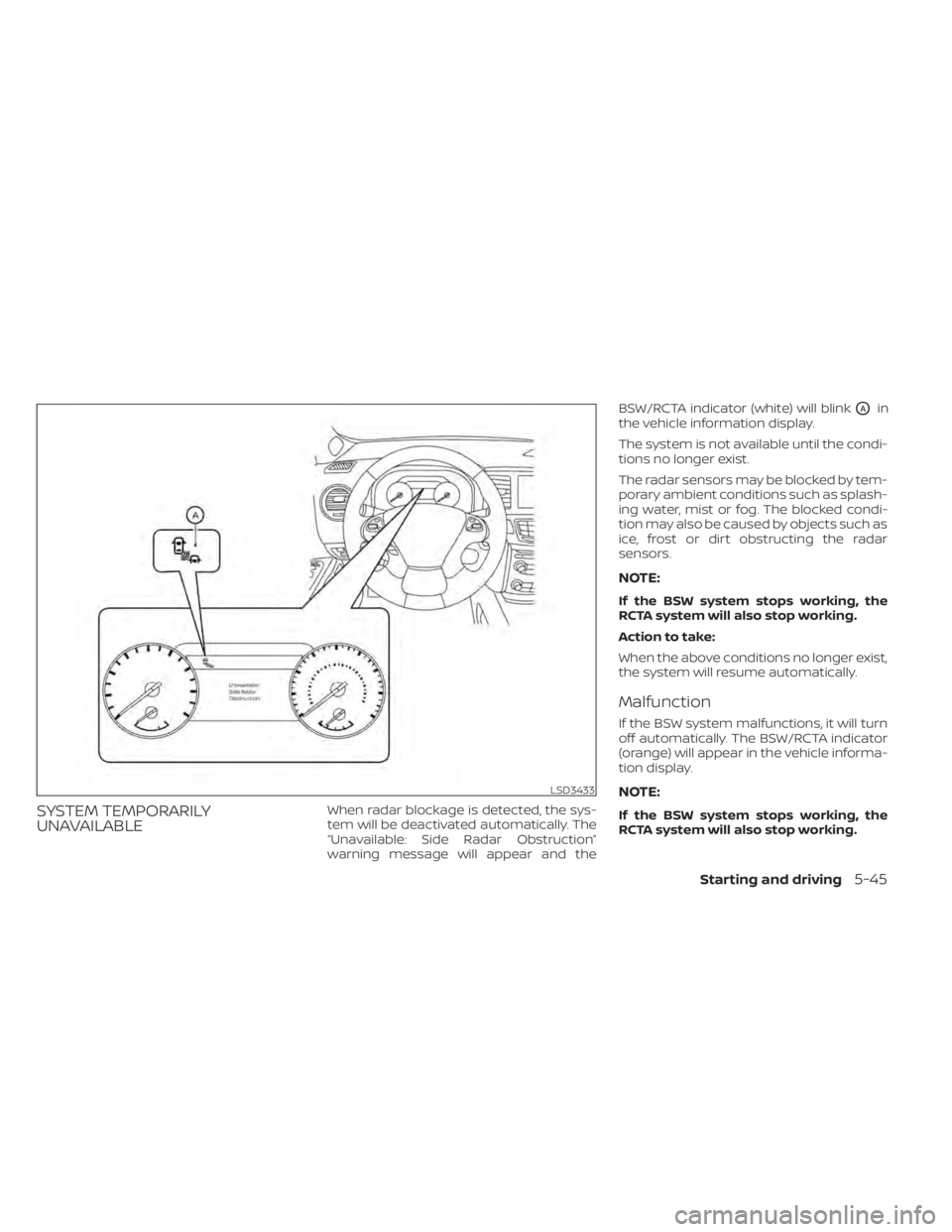
SYSTEM TEMPORARILY
UNAVAILABLEWhen radar blockage is detected, the sys-
tem will be deactivated automatically. The
“Unavailable: Side Radar Obstruction”
warning message will appear and theBSW/RCTA indicator (white) will blink
OAin
the vehicle information display.
The system is not available until the condi-
tions no longer exist.
The radar sensors may be blocked by tem-
porary ambient conditions such as splash-
ing water, mist or fog. The blocked condi-
tion may also be caused by objects such as
ice, frost or dirt obstructing the radar
sensors.
NOTE:
If the BSW system stops working, the
RCTA system will also stop working.
Action to take:
When the above conditions no longer exist,
the system will resume automatically.
Malfunction
If the BSW system malfunctions, it will turn
off automatically. The BSW/RCTA indicator
(orange) will appear in the vehicle informa-
tion display.
NOTE:
If the BSW system stops working, the
RCTA system will also stop working.
LSD3433
Starting and driving5-45
Page 284 of 508
Action to take:
Stop the vehicle in a safe location, place the
vehicle in the P (Park) position, turn the en-
gine off and restart the engine. If the mes-
sage continues to appear, have the system
checked. It is recommended that you visit a
NISSAN dealer for this service.
SYSTEM MAINTENANCE
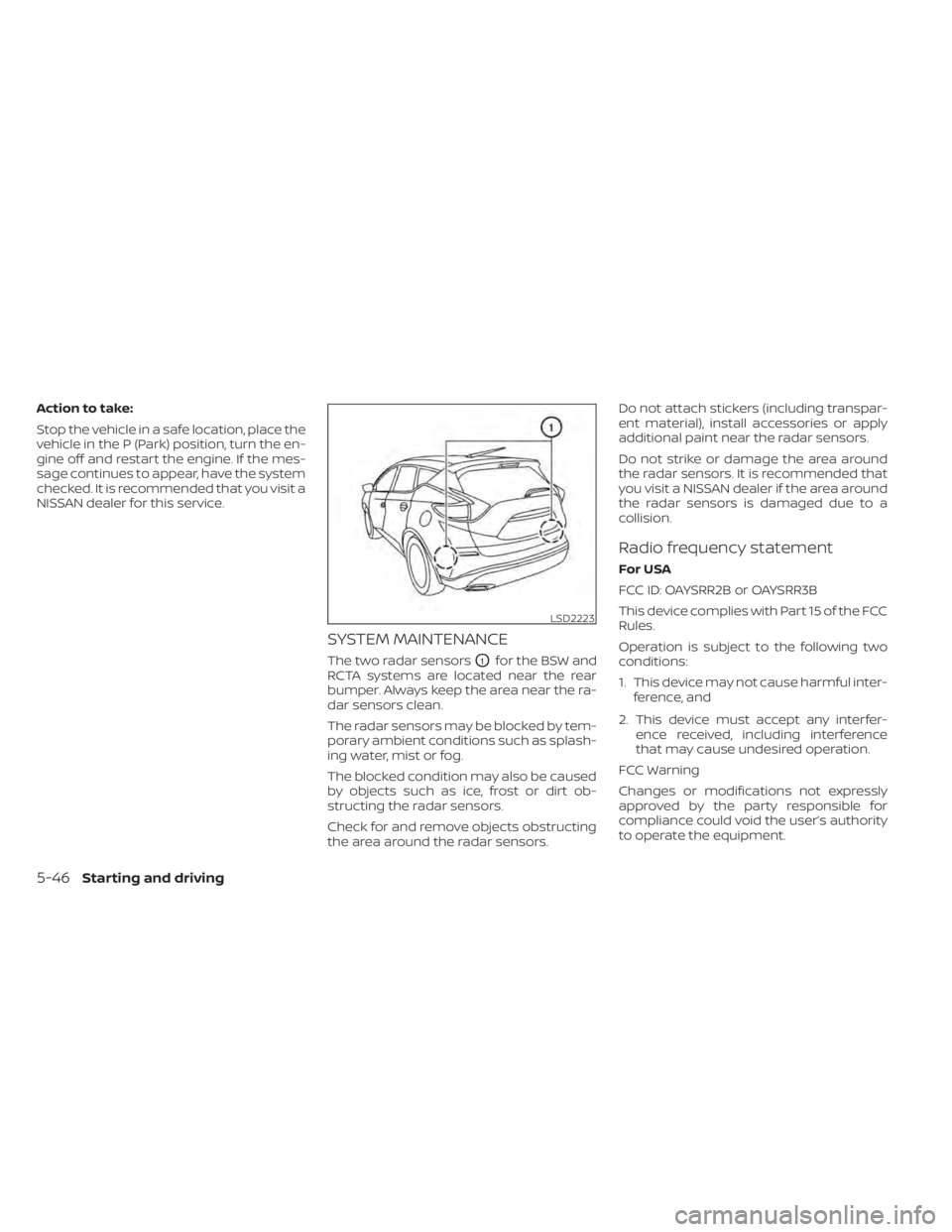
The two radar sensorsO1for the BSW and
RCTA systems are located near the rear
bumper. Always keep the area near the ra-
dar sensors clean.
The radar sensors may be blocked by tem-
porary ambient conditions such as splash-
ing water, mist or fog.
The blocked condition may also be caused
by objects such as ice, frost or dirt ob-
structing the radar sensors.
Check for and remove objects obstructing
the area around the radar sensors. Do not attach stickers (including transpar-
ent material), install accessories or apply
additional paint near the radar sensors.
Do not strike or damage the area around
the radar sensors. It is recommended that
you visit a NISSAN dealer if the area around
the radar sensors is damaged due to a
collision.
Radio frequency statement
For USA
FCC ID: OAYSRR2B or OAYSRR3B
This device complies with Part 15 of the FCC
Rules.
Operation is subject to the following two
conditions:
1. This device may not cause harmful inter-
ference, and
2. This device must accept any interfer- ence received, including interference
that may cause undesired operation.
FCC Warning
Changes or modifications not expressly
approved by the party responsible for
compliance could void the user’s authority
to operate the equipment.
LSD2223
5-46Starting and driving
Page 287 of 508
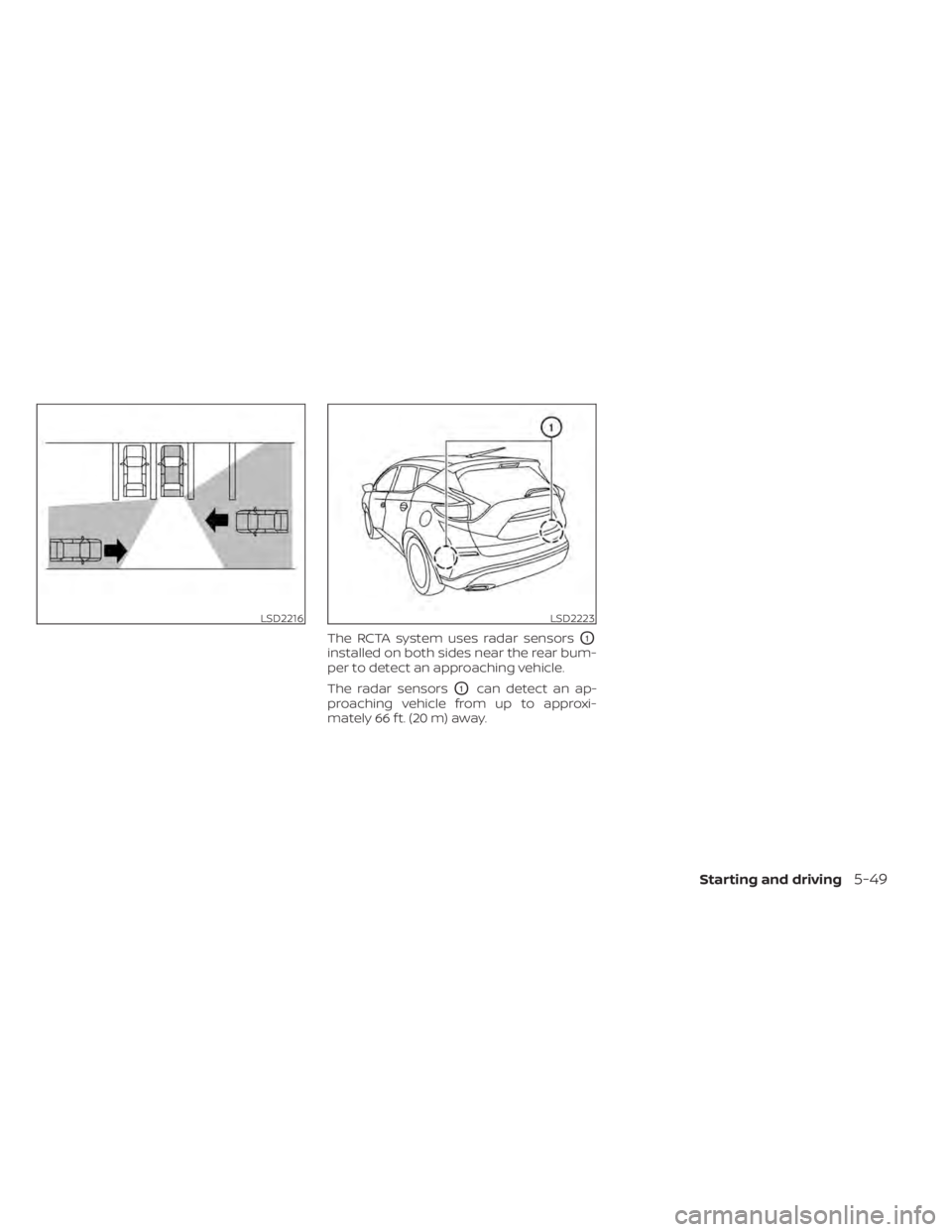
The RCTA system uses radar sensorsO1
installed on both sides near the rear bum-
per to detect an approaching vehicle.
The radar sensors
O1can detect an ap-
proaching vehicle from up to approxi-
mately 66 f t. (20 m) away.
LSD2216LSD2223
Starting and driving5-49
Page 289 of 508
RCTA SYSTEM LIMITATIONSWARNING
Listed below are the system limitations
for the RCTA system. Failure to operate
the vehicle in accordance with these
system limitations could result in seri-
ous injury or death. •
Always check surroundings and turn
to check what is behind you before
backing up. The radar sensors detect
approaching (moving) vehicles. The
radar sensors cannot detect every
object such as:
– Pedestrians, bicycles, motor-
cycles, animals or child-operated
toy vehicles
– A vehicle that is passing at speeds
greater than approximately 19
mph (30 km/h)
– A vehicle that is passing at speeds
lower than approximately 5 mph
(8 km/h)
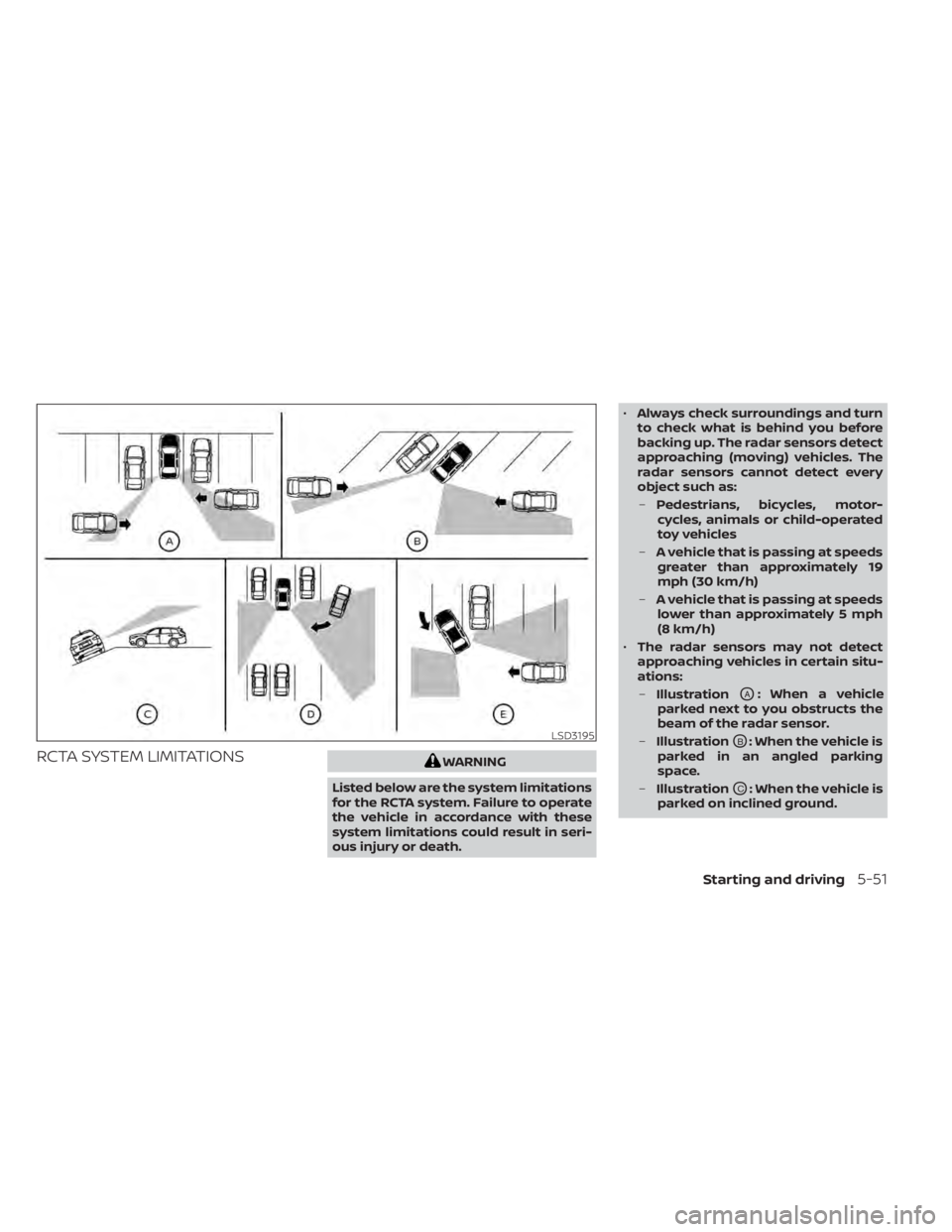
• The radar sensors may not detect
approaching vehicles in certain situ-
ations:
– Illustration
OA: When a vehicle
parked next to you obstructs the
beam of the radar sensor.
– Illustration
OB: When the vehicle is
parked in an angled parking
space.
– Illustration
OC: When the vehicle is
parked on inclined ground.
LSD3195
Starting and driving5-51
Page 290 of 508
–IllustrationOD: When an ap-
proaching vehicle turns into your
vehicle's parking lot aisle.
– Illustration
OE: When the angle
formed by your vehicle and ap-
proaching vehicle is small.
• The following conditions may reduce
the ability of the radar to detect other
vehicles:
– Severe weather
– Road spray
– Ice/frost/snow/dirt build-up on
the vehicle
• Do not attach stickers (including
transparent material), install acces-
sories or apply additional paint near
the radar sensors. These conditions
may reduce the ability of the radar to
detect other vehicles.
• Excessive noise (e.g., audio system
volume, open vehicle window) will in-
terfere with the chime sound, and it
may not be heard.
NOTE:
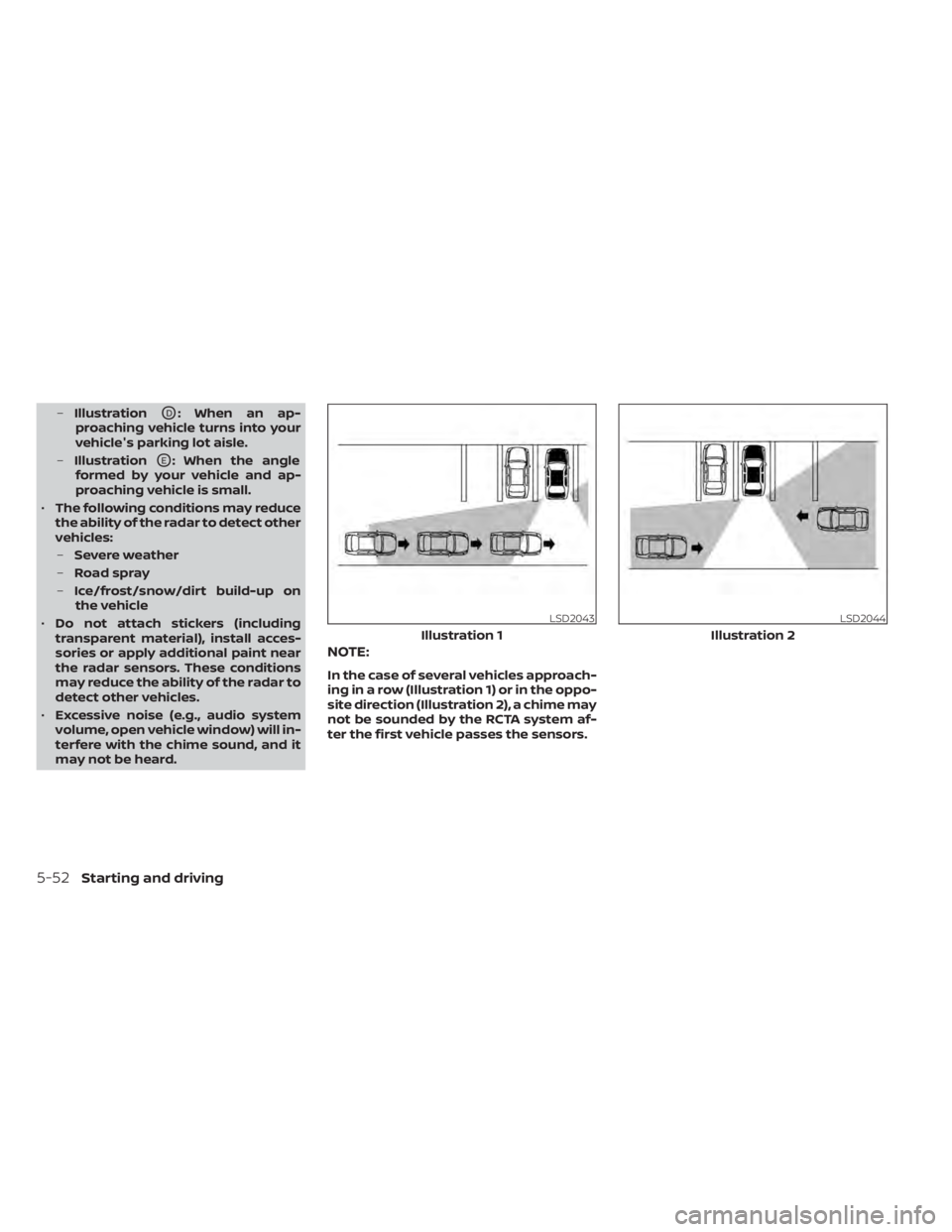
In the case of several vehicles approach-
ing in a row (Illustration 1) or in the oppo-
site direction (Illustration 2), a chime may
not be sounded by the RCTA system af-
ter the first vehicle passes the sensors.
LSD2043
Illustration 1
LSD2044
Illustration 2
5-52Starting and driving
Page 291 of 508
SYSTEM TEMPORARILY
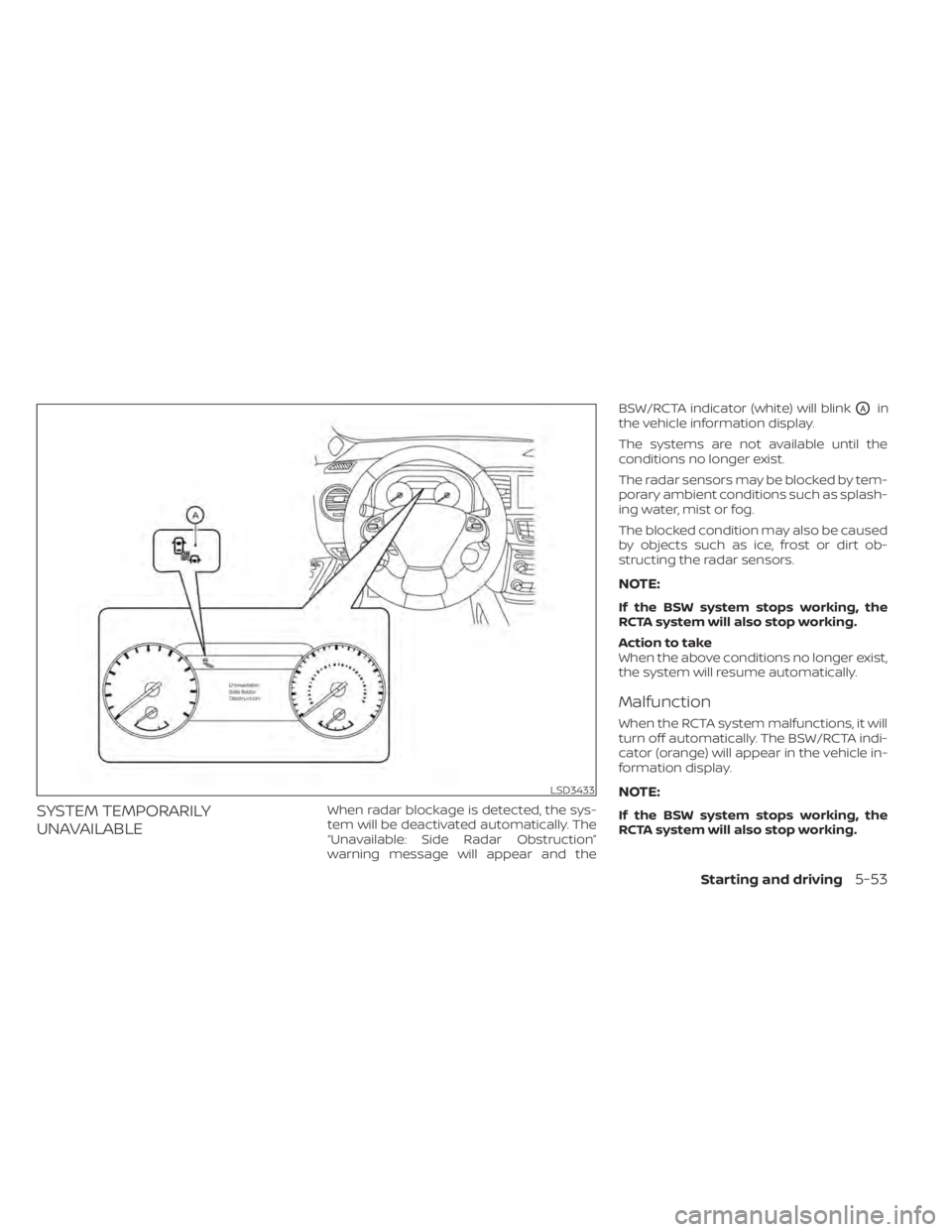
UNAVAILABLEWhen radar blockage is detected, the sys-
tem will be deactivated automatically. The
“Unavailable: Side Radar Obstruction”
warning message will appear and theBSW/RCTA indicator (white) will blink
OAin
the vehicle information display.
The systems are not available until the
conditions no longer exist.
The radar sensors may be blocked by tem-
porary ambient conditions such as splash-
ing water, mist or fog.
The blocked condition may also be caused
by objects such as ice, frost or dirt ob-
structing the radar sensors.
NOTE:
If the BSW system stops working, the
RCTA system will also stop working.
Action to take
When the above conditions no longer exist,
the system will resume automatically.
Malfunction
When the RCTA system malfunctions, it will
turn off automatically. The BSW/RCTA indi-
cator (orange) will appear in the vehicle in-
formation display.
NOTE:
If the BSW system stops working, the
RCTA system will also stop working.
LSD3433
Starting and driving5-53
Page 292 of 508
Action to take
Stop the vehicle in a safe location, place the
vehicle in the P (Park) position, turn the en-
gine off and restart the engine. If the mes-
sage continues to appear, have the system
checked. It is recommended that you visit a
NISSAN dealer for this service.
SYSTEM MAINTENANCE
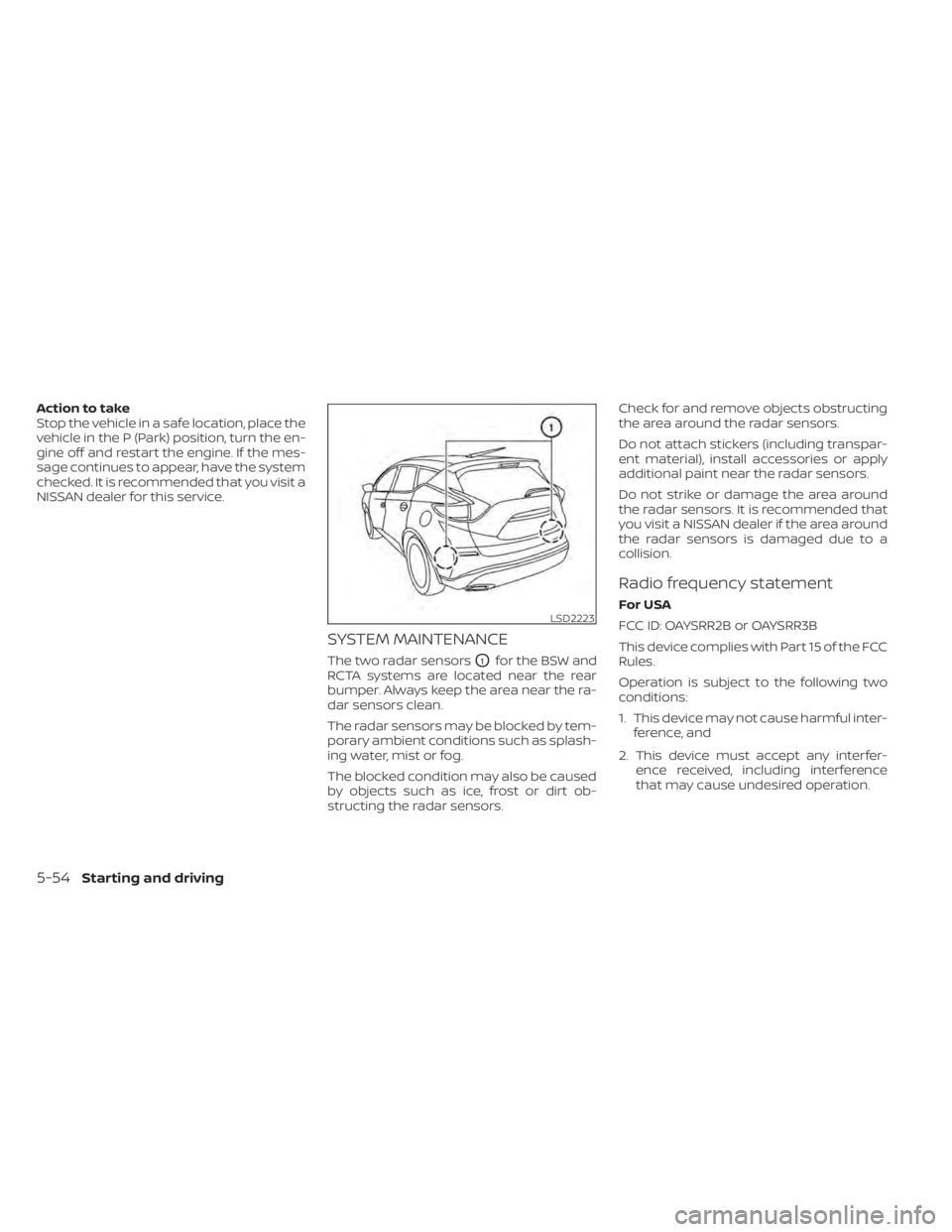
The two radar sensorsO1for the BSW and
RCTA systems are located near the rear
bumper. Always keep the area near the ra-
dar sensors clean.
The radar sensors may be blocked by tem-
porary ambient conditions such as splash-
ing water, mist or fog.
The blocked condition may also be caused
by objects such as ice, frost or dirt ob-
structing the radar sensors. Check for and remove objects obstructing
the area around the radar sensors.
Do not attach stickers (including transpar-
ent material), install accessories or apply
additional paint near the radar sensors.
Do not strike or damage the area around
the radar sensors. It is recommended that
you visit a NISSAN dealer if the area around
the radar sensors is damaged due to a
collision.
Radio frequency statement
For USA
FCC ID: OAYSRR2B or OAYSRR3B
This device complies with Part 15 of the FCC
Rules.
Operation is subject to the following two
conditions:
1. This device may not cause harmful inter-
ference, and
2. This device must accept any interfer- ence received, including interference
that may cause undesired operation.LSD2223
5-54Starting and driving
Page 299 of 508
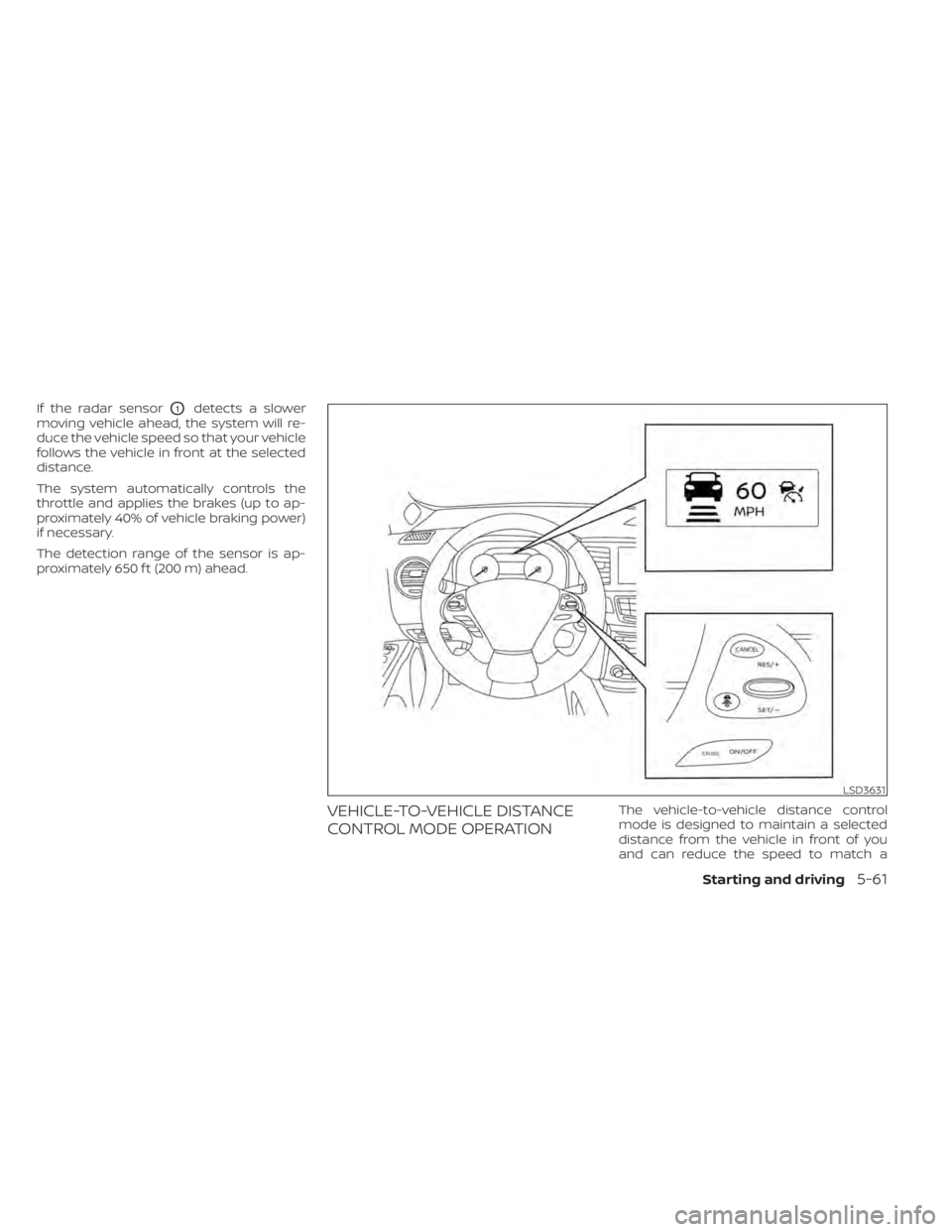
If the radar sensorO1detects a slower
moving vehicle ahead, the system will re-
duce the vehicle speed so that your vehicle
follows the vehicle in front at the selected
distance.
The system automatically controls the
throttle and applies the brakes (up to ap-
proximately 40% of vehicle braking power)
if necessary.
The detection range of the sensor is ap-
proximately 650 f t (200 m) ahead.
VEHICLE-TO-VEHICLE DISTANCE
CONTROL MODE OPERATIONThe vehicle-to-vehicle distance control
mode is designed to maintain a selected
distance from the vehicle in front of you
and can reduce the speed to match a
LSD3631
Starting and driving5-61
Page 307 of 508
![NISSAN MURANO 2021 Owner´s Manual Distance Approximate distance at60 mph (100 km/h)
[f t (m)]
1. Long 200 (60)
2. Middle 150 (45)
3. Short 90 (30)
• The distance to the vehicle ahead will change according to the vehicle speed.
The h](/img/5/40352/w960_40352-306.png "NISSAN MURANO 2021 Owner´s Manual Distance Approximate distance at60 mph (100 km/h)
[f t (m)]
1. Long 200 (60)
2. Middle 150 (45)
3. Short 90 (30)
• The distance to the vehicle ahead will change according to the vehicle speed.
The h")
Distance Approximate distance at60 mph (100 km/h)
[f t (m)]
1. Long 200 (60)
2. Middle 150 (45)
3. Short 90 (30)
• The distance to the vehicle ahead will change according to the vehicle speed.
The higher the vehicle speed, the longer
the distance.
• The distance setting will remain at the current setting even if the engine is
restarted.
Approach warning
If your vehicle comes closer to the vehicle
ahead due to rapid deceleration of that ve-
hicle or if another vehicle cuts in, the sys-
tem warns the driver with the chime and
ICC system display. Decelerate by depress-
ing the brake pedal to maintain a safe ve-
hicle distance if:
• The chime sounds.
• The vehicle ahead detection indicatorblinks.
The warning chime may not sound in
some cases when there is a short distance
between vehicles. Some examples are:
• When the vehicles are traveling at the same speed and the distance between
vehicles is not changing.
• When the vehicle ahead is traveling faster and the distance between vehicles is
increasing.
• When a vehicle cuts in near your vehicle.
The warning chime will not sound when:
• The vehicle approaches other vehicles that are parked or moving slowly.
• The accelerator pedal is depressed, over- riding the system.
NOTE:
The approach warning chime may sound
and the system display may blink when
the ICC sensor detects objects on the
side of the vehicle or on the side of the
road. This may cause the ICC system to
decelerate or accelerate the vehicle. The
ICC sensor may detect these objects
when the vehicle is driven on winding
roads, narrow roads, hilly roads, or when
entering or exiting a curve. In these
cases you will have to manually control
the proper distance ahead of your
vehicle.
Also, the radar sensor sensitivity can be
affected by vehicle operation (steering ma-
neuver or driving position in the lane) or
traffic or vehicle condition (for example, if a
vehicle is being driven with some damage).
Automatic cancellation
A chime sounds under the following condi-
tions and the control is automatically can-
celed:
• When the vehicle ahead is not detectedand your vehicle is traveling below the
speed of 15 mph (24 km/h)
• When the system judges the vehicle is at a standstill
LSD2752
Starting and driving5-69
Page 308 of 508
• When the shif t lever is not in the D (Drive)position, Manual mode.
• When the parking brake system is applied
• When the VDC system is turned off
• When VDC operates
• When distance measurement becomes impaired due to adhesion of dirt or ob-
struction to the sensor
• When a wheel slips
• When the radar signal is temporarily interrupted
VEHICLE-TO-VEHICLE DISTANCE
CONTROL MODE LIMITATIONS
WARNING
Listed below are the system limitations
for the ICC system. Failure to operate
the vehicle in accordance with these
system limitations could result in seri-
ous injury or death.
• The ICC system is primarily intended
for use on straight, dry, open roads
with light traffic. It is not advisable to
use the ICC system in city traffic or
congested areas. •
The ICC system will not adapt auto-
matically to road conditions. This
system should be used in evenly
flowing traffic. Do not use the system
on roads with sharp curves, or on icy
roads, in heavy rain or in fog.
• As there is a performance limit to the
distance control function, never rely
solely on the ICC system. This system
does not correct careless, inattentive
or absentminded driving, or over-
come poor visibility in rain, fog, or
other bad weather. Decelerate the
vehicle speed by depressing the
brake pedal, depending on the dis-
tance to the vehicle ahead and the
surrounding circumstances in order
to maintain a safe distance between
vehicles.
• If the vehicle ahead comes to a stop,
the vehicle decelerates to a standstill
within the limitations of the system.
The system will cancel once it judges
that the vehicle has come to a stand-
still and sound a warning chime. To
prevent the vehicle from moving, the
driver must depress the brake pedal. •
Always pay attention to the opera-
tion of the vehicle and be ready to
manually control the proper follow-
ing distance. The ICC system may not
be able to maintain the selected dis-
tance between vehicles (following
distance) or selected vehicle speed
under some circumstances.
• The system may not detect the ve-
hicle in front of you in certain road or
weather conditions. To avoid acci-
dents, never use the ICC system un-
der the following conditions:
– On roads where the traffic is heavy
or there are sharp curves
– On slippery road surfaces such as
on ice or snow, etc.
– During bad weather (rain, fog,
snow, etc.)
– When rain, snow or dirt adhere to
the bumper around the distance
sensor
– On steep downhill roads (the ve-
hicle may go beyond the set ve-
hicle speed and frequent braking
may result in overheating the
brakes)
– On repeated uphill and downhill
roads
5-70Starting and driving