horn NISSAN MURANO 2021 Owner´s Manual
[x] Cancel search | Manufacturer: NISSAN, Model Year: 2021, Model line: MURANO, Model: NISSAN MURANO 2021Pages: 508, PDF Size: 3.5 MB
Page 14 of 508
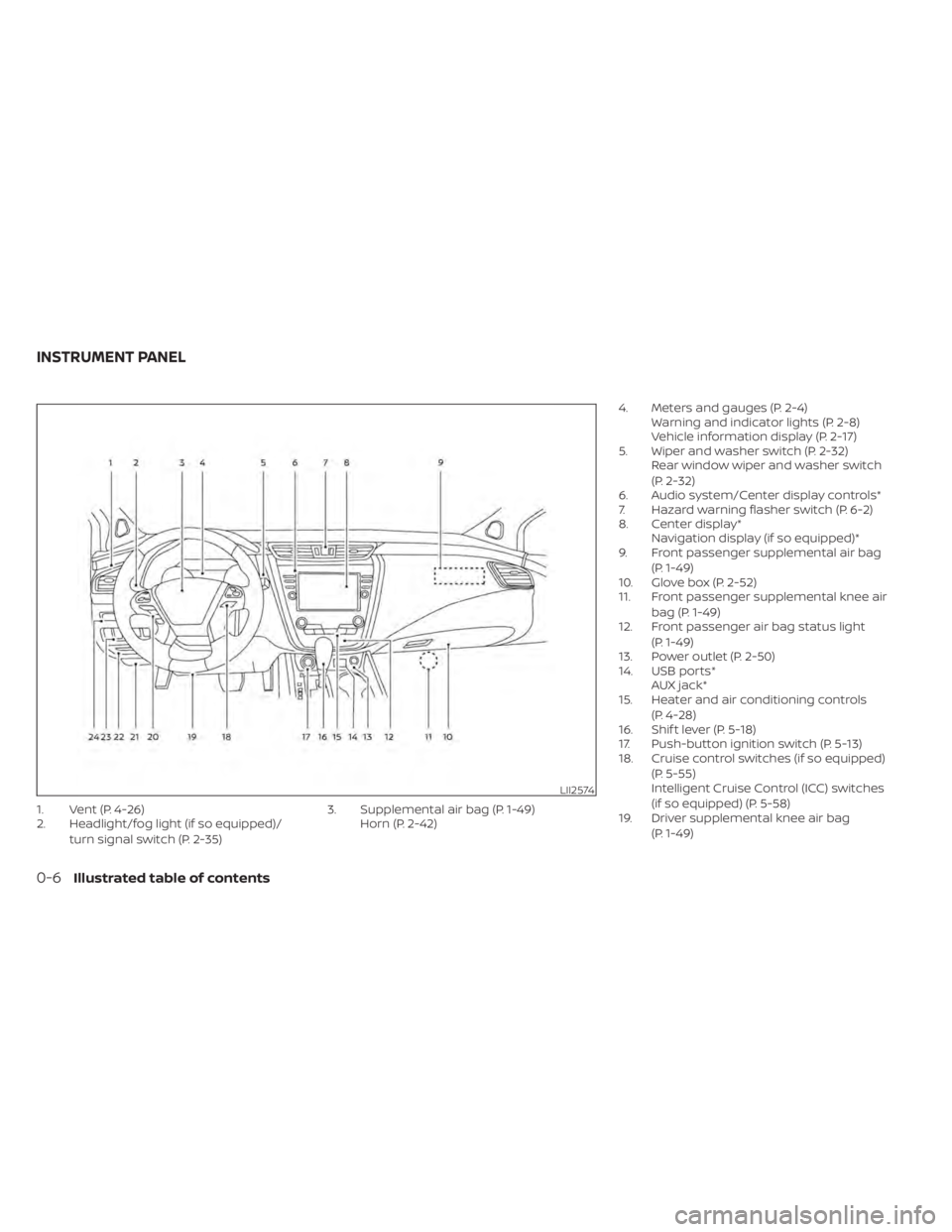
1. Vent (P. 4-26)
2. Headlight/fog light (if so equipped)/turn signal switch (P. 2-35) 3. Supplemental air bag (P. 1-49)
Horn (P. 2-42) 4. Meters and gauges (P. 2-4)
Warning and indicator lights (P. 2-8)
Vehicle information display (P. 2-17)
5. Wiper and washer switch (P. 2-32) Rear window wiper and washer switch
(P. 2-32)
6. Audio system/Center display controls*
7. Hazard warning flasher switch (P. 6-2)
8. Center display* Navigation display (if so equipped)*
9. Front passenger supplemental air bag
(P. 1-49)
10. Glove box (P. 2-52)
11. Front passenger supplemental knee air
bag (P. 1-49)
12. Front passenger air bag status light
(P. 1-49)
13. Power outlet (P. 2-50)
14. USB ports* AUX jack*
15. Heater and air conditioning controls
(P. 4-28)
16. Shif t lever (P. 5-18)
17. Push-button ignition switch (P. 5-13)
18. Cruise control switches (if so equipped)
(P. 5-55)
Intelligent Cruise Control (ICC) switches
(if so equipped) (P. 5-58)
19. Driver supplemental knee air bag
(P. 1-49)
LII2574
INSTRUMENT PANEL
0-6Illustrated table of contents
Page 92 of 508
2 Instruments and controls
Instrument panel................................2-2
Meters and gauges .............................2-4
Speedometer and odometer .................2-4
Tachometer ..................................2-5
Engine coolant temperature gauge ..........2-6
Fuel gauge ...................................2-6
Distance To Empty (DTE) ..................... 2-7
Warning lights, indicator lights and audible
reminders .......................................2-8
Checking lights ...............................2-9
Warning/Indicator lights (red) ................2-9
Warning/Indicator lights (yellow) .............2-11
Warning/Indicator lights (other) .............2-16
Audible reminders ........................... 2-16
Vehicle information display .....................2-17
How to use the vehicle information
display ...................................... 2-17
Startup display .............................. 2-18
Settings ..................................... 2-18
Vehicle information display warnings
and indicators ............................... 2-24
Security systems ............................... 2-30
Vehicle security system .....................2-30
NISSAN Vehicle Immobilizer System .........2-31
Wiper and washer switch .......................2-32
Switch operation ............................ 2-32Rear switch operation
.......................2-33
Rear window and outside mirror
(if so equipped) defroster switch ...............2-34
Headlight and turn signal switch ...............2-35
Headlight control switch ....................2-35
LED Daytime Running Lights (DRL)
system ...................................... 2-40
Instrument brightness control ..............2-40
Turn signal switch ........................... 2-41
Fog light switch (if so equipped) .............2-41
Horn ........................................... 2-42
Climate controlled seat switches
(if so equipped) ................................. 2-42
Heated seat switches (if so equipped) ..........2-44
Heated rear seat switches (if so equipped) .....2-45
Heated steering wheel switch (if so equipped) . . 2-46
Dynamic driver assistance switch ..............2-47
Vehicle Dynamic Control (VDC) OFF switch .....2-47
E-c
all (SOS) button (if so equipped) .............2-48
Rear Door Alert ................................. 2-48
Power outlets .................................. 2-50
12v outlets .................................. 2-50
Extended storage switch .......................2-51
Storage ........................................ 2-52
Front-door pockets ......................... 2-52
Page 94 of 508
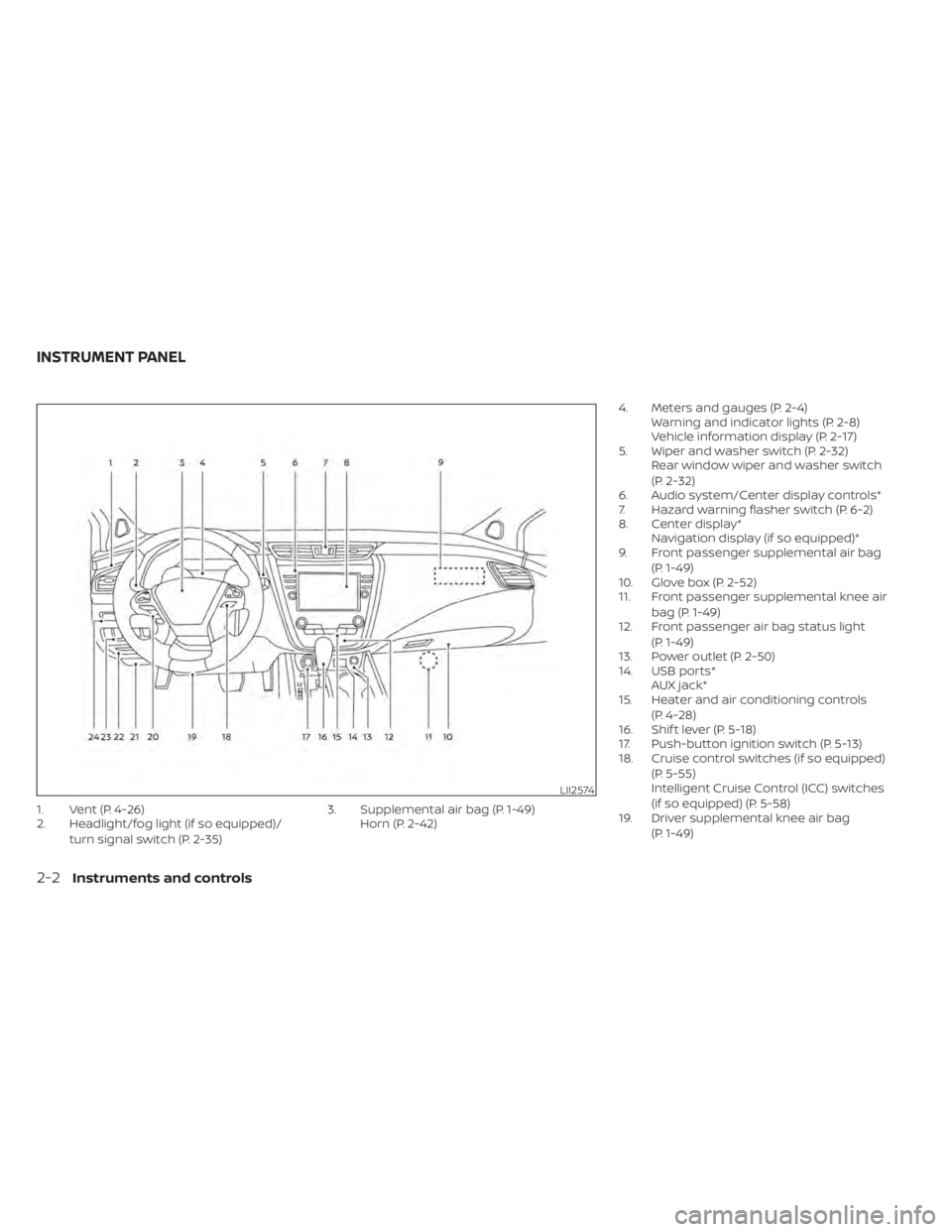
1. Vent (P. 4-26)
2. Headlight/fog light (if so equipped)/turn signal switch (P. 2-35) 3. Supplemental air bag (P. 1-49)
Horn (P. 2-42) 4. Meters and gauges (P. 2-4)
Warning and indicator lights (P. 2-8)
Vehicle information display (P. 2-17)
5. Wiper and washer switch (P. 2-32) Rear window wiper and washer switch
(P. 2-32)
6. Audio system/Center display controls*
7. Hazard warning flasher switch (P. 6-2)
8. Center display* Navigation display (if so equipped)*
9. Front passenger supplemental air bag
(P. 1-49)
10. Glove box (P. 2-52)
11. Front passenger supplemental knee air
bag (P. 1-49)
12. Front passenger air bag status light
(P. 1-49)
13. Power outlet (P. 2-50)
14. USB ports* AUX jack*
15. Heater and air conditioning controls
(P. 4-28)
16. Shif t lever (P. 5-18)
17. Push-button ignition switch (P. 5-13)
18. Cruise control switches (if so equipped)
(P. 5-55)
Intelligent Cruise Control (ICC) switches
(if so equipped) (P. 5-58)
19. Driver supplemental knee air bag
(P. 1-49)
LII2574
INSTRUMENT PANEL
2-2Instruments and controls
Page 113 of 508
Vehicle Settings
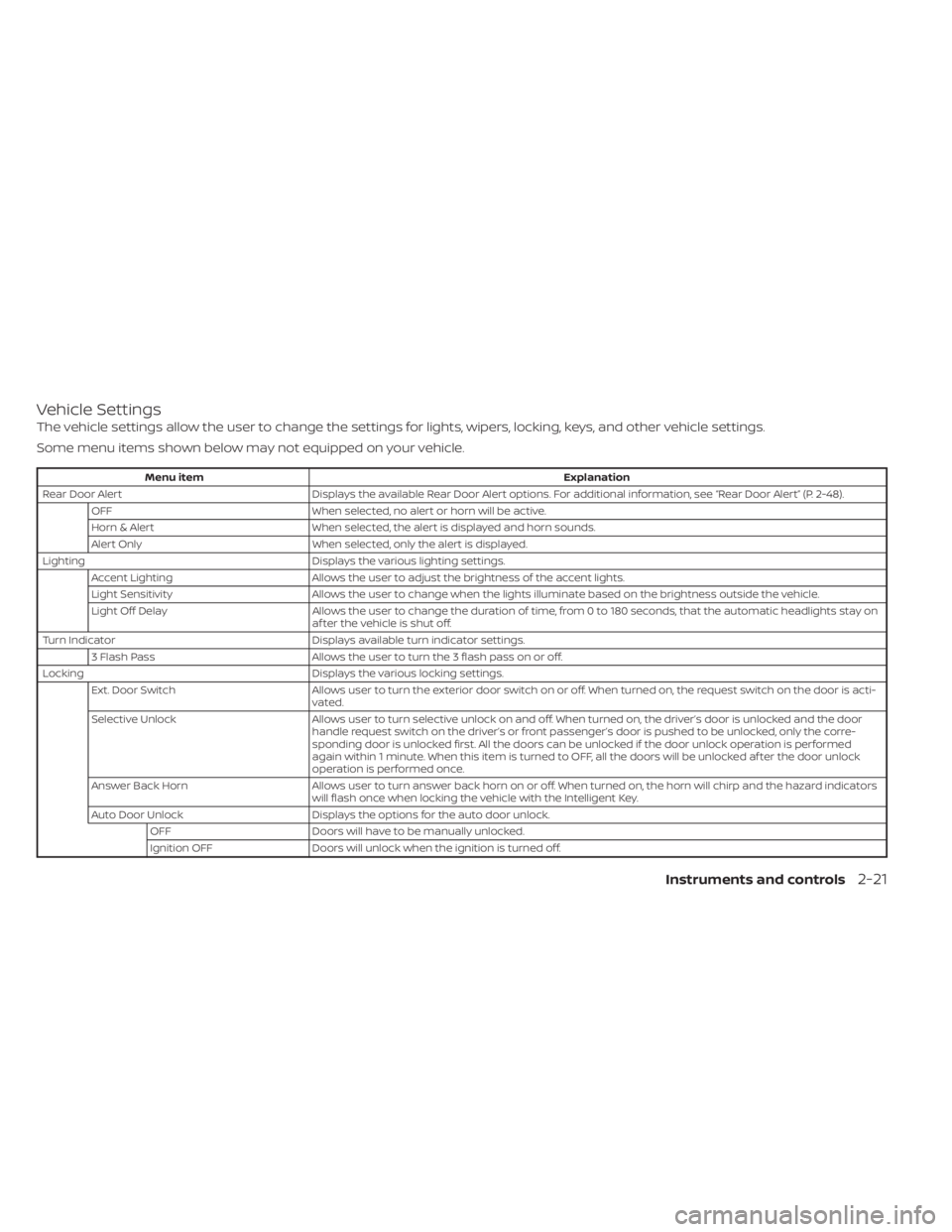
The vehicle settings allow the user to change the settings for lights, wipers, locking, keys, and other vehicle settings.
Some menu items shown below may not equipped on your vehicle.
Menu itemExplanation
Rear Door Alert Displays the available Rear Door Alert options. For additional information, see “Rear Door Alert” (P. 2-48).
OFF When selected, no alert or horn will be active.
Horn & Alert When selected, the alert is displayed and horn sounds.
Alert Only When selected, only the alert is displayed.
Lighting Displays the various lighting settings.
Accent Lighting Allows the user to adjust the brightness of the accent lights.
Light Sensitivity Allows the user to change when the lights illuminate based on the brightness outside the vehicle.
Light Off Delay Allows the user to change the duration of time, from 0 to 180 seconds, that the automatic headlights stay on
af ter the vehicle is shut off.
Turn Indicator Displays available turn indicator settings.
3 Flash Pass Allows the user to turn the 3 flash pass on or off.
Locking Displays the various locking settings.
Ext. Door Switch Allows user to turn the exterior door switch on or off. When turned on, the request switch on the door is acti-
vated.
Selective Unlock Allows user to turn selective unlock on and off. When turned on, the driver’s door is unlocked and the door
handle request switch on the driver’s or front passenger’s door is pushed to be unlocked, only the corre-
sponding door is unlocked first. All the doors can be unlocked if the door unlock operation is performed
again within 1 minute. When this item is turned to OFF, all the doors will be unlocked af ter the door unlock
operation is performed once.
Answer Back Horn Allows user to turn answer back horn on or off. When turned on, the horn will chirp and the hazard indicators
will flash once when locking the vehicle with the Intelligent Key.
Auto Door Unlock Displays the options for the auto door unlock.
OFF Doors will have to be manually unlocked.
Ignition OFF Doors will unlock when the ignition is turned off.
Instruments and controls2-21
Page 116 of 508
VEHICLE INFORMATION DISPLAY
WARNINGS AND INDICATORS
The following messages may appear in
your vehicle information display.
Engine start operation for
Intelligent Key system (if
I-Key battery level is low)
This indicator appears when the battery of
the Intelligent Key is low and when the In-
telligent Key system and the vehicle are not
communicating normally.
If this appears, touch the ignition switch
with the Intelligent Key while depressing
the brake pedal. For additional information,
see “NISSAN Intelligent Key® battery dis-
charge” (P. 5-15).
Key Battery Low
This indicator appears when the Intelligent
Key battery is running out of power.
If this indicator appears, replace the bat-
tery with a new one. For additional infor-
mation, see “Battery replacement” (P. 8-23).
Key ID Incorrect
This warning appears when the ignition
switch is placed from the OFF position and
the Intelligent Key is not recognized by the
system. You cannot start the engine with
an unregistered key.
For additional information, see “NISSAN In-
telligent Key®” (P. 3-7).
Key System Fault See
Owner’s Manual
Af ter the ignition switch is placed in the ON
position, this warning appears for a period
of time and then turns off.
The Key System Fault message warns of a
malfunction with the Intelligent Key sys-
tem. If the warning appears while the en-
gine is stopped, it may be impossible to
start the engine.
If the warning appears while the engine is
running, you can drive the vehicle. However,
in these cases, have the system checked. It
is recommended that you visit a NISSAN
dealer for this service.
No Key Detected
This warning appears when the Intelligent
Key is lef t outside the vehicle with the igni-
tion switch in the ON position. Make sure
the Intelligent Key is inside the vehicle.
For additional information, see “NISSAN In-
telligent Key®” (P. 3-7).
Brightness indicator
This indicator shows the brightness ad-
justment of the instrument panel. For addi-
tional information, see “Instrument bright-
ness control” (P. 2-40).
Rear Door Alert is activated
When the system is enabled, this message
appears when the Rear Door Alert system
is active and can remind the driver to check
the back seat.
• Using the steering wheel switch, a drivercan select “Dismiss Message” to clear the
display for a period of time. If no selection
is made, this message automatically
turns off af ter a period of time.
• Using the steering wheel switch, a driver can select “Disable Alert” to disable the
horn alert for the remainder of the cur-
rent trip.
2-24Instruments and controls
Page 123 of 508
•Even when the driver and/or passen-
gers are in the vehicle, the system will
activate when all the doors, hood and
lif tgate are locked with the ignition
switch placed in the LOCK position.
When placing the ignition switch in the
ACC or ON position, the system will be
released.
Vehicle security system activation
The vehicle security system will give the
following alarm:
• The turn signals blink and the horn sounds intermittently.
• The alarm automatically turns off af ter a period of time. However, the alarm reacti-
vates if the vehicle is tampered with
again. The alarm can be shut off by un-
locking the driver's door or lif tgate by
pressing the
button on the Intelli-
gent Key.
The alarm is activated by:
• Opening the door or lif tgate without us- ing the Intelligent Key (even if the door is
unlocked by releasing the door inside
lock switch).
How to stop an activated alarm
The alarm stops only by unlocking the driv-
er’s door or the lif tgate by pressing the
button on the Intelligent Key or push-
ing the request switch on the driver's or
passenger's door with the Intelligent Key in
range of the door handle.
NISSAN VEHICLE IMMOBILIZER
SYSTEM
The NISSAN Vehicle Immobilizer System
will not allow the engine to start without
the use of a registered key.
Never leave these keys in the vehicle.
FCC Notice:
For USA:
This device complies with Part 15 of the
FCC Rules. Operation is subject to the fol-
lowing two conditions: (1) This device
may not cause harmful interference, and
(2) this device must accept any interfer-
ence received, including interference
that may cause undesired operation.
NOTE:
Changes or modifications not expressly
approved by the party responsible for
compliance could void the user's author-
ity to operate the equipment.
For Canada:
This device complies with Industry
Canada licence-exempt RSS standard(s).
Operation is subject to the following two
conditions: (1) this device may not cause
interference, and (2) this device must ac-
cept any interference received, including
interference that may cause undesired
operation of the device.
Instruments and controls2-31
Page 134 of 508
The headlights must be on and the low
beams selected for the fog lights to oper-
ate. The fog lights automatically turn off
when the high beam headlights are
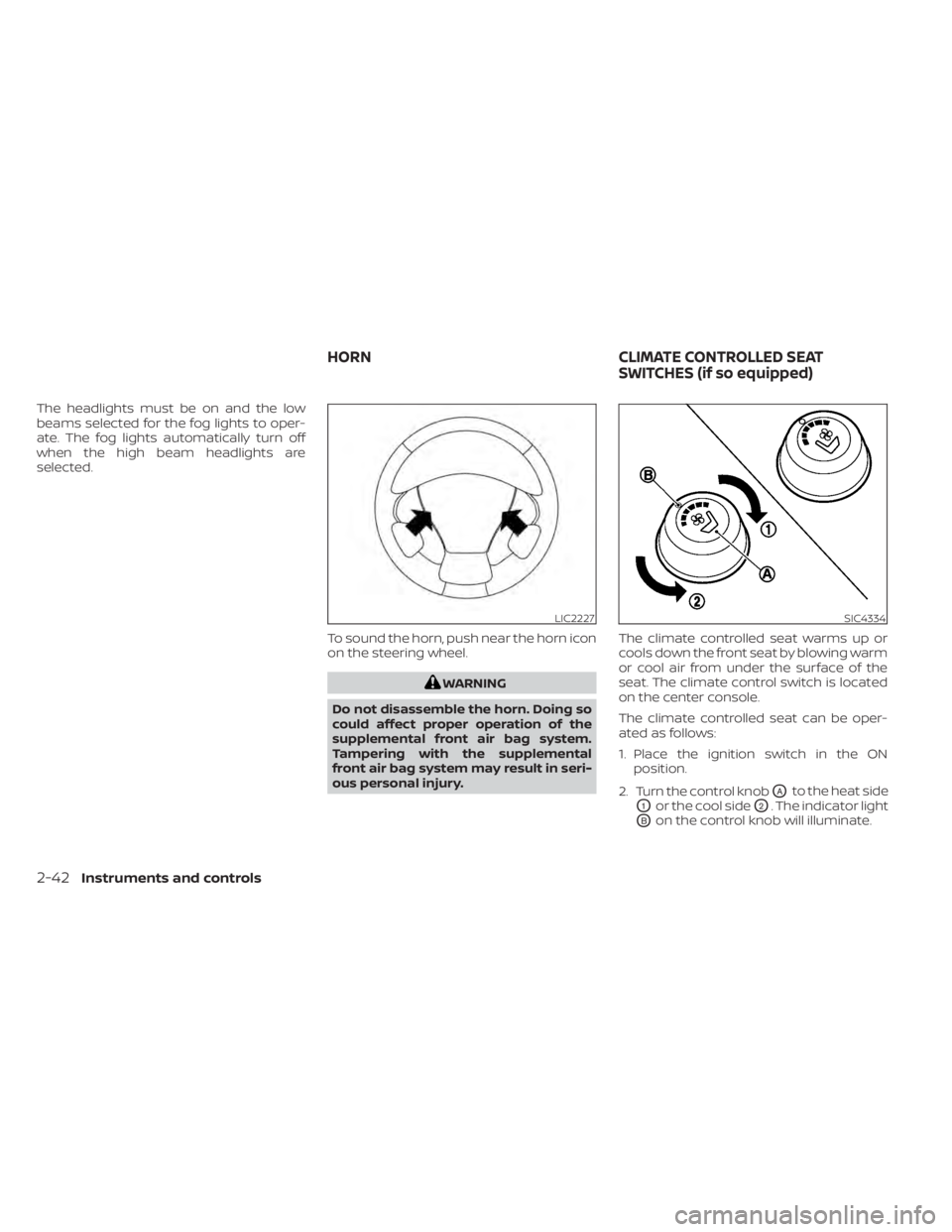
selected.To sound the horn, push near the horn icon
on the steering wheel.
WARNING
Do not disassemble the horn. Doing so
could affect proper operation of the
supplemental front air bag system.
Tampering with the supplemental
front air bag system may result in seri-
ous personal injury. The climate controlled seat warms up or
cools down the front seat by blowing warm
or cool air from under the surface of the
seat. The climate control switch is located
on the center console.
The climate controlled seat can be oper-
ated as follows:
1. Place the ignition switch in the ON
position.
2. Turn the control knob
OAto the heat side
O1or the cool sideO2. The indicator light
OBon the control knob will illuminate.
LIC2227SIC4334
HORN CLIMATE CONTROLLED SEAT
SWITCHES (if so equipped)
2-42Instruments and controls
Page 141 of 508
When the Rear Door Alert system is acti-
vated:
• When the driver puts the vehicle in the P(Park) position, a notification message
appears in the vehicle information dis-
play with the options to “Dismiss Mes-
sage” or “Disable Alert” if desired.• Select “Disable Alert” to temporarily disable for that stop.
• No selection or ‘Dismiss Message” will keep the alert enabled for that stop.
• If the alert is enabled when a driver exits the vehicle, a message will appear in the
vehicle information display that states
“Check Rear Seat for All Articles.”
If “Horn & Alert” setting is selected:
• An audible horn sound will occur af ter a short time unless a rear door is
opened and closed within a short time
to deactivate the alert.
• If the doors are locked before the alert is deactivated by opening a rear door,
the horn will sound.
• If the lif tgate is opened before a rear door is opened, the horn will be de-
layed until af ter the lif tgate is closed.NOTE:
If “Alert Only ” setting is selected, the
message alert will still be shown in the
vehicle information display but the horn
will not sound.
WARNING
• If the driver selects “Disable Alert”, no
audible alert will be provided regard-
less of rear door open/close status.
• There may be times when there is an
object or passenger in the rear
seat(s) but the audible alert does not
sound. For example, this may occur if
rear seat passengers enter or exit the
vehicle during a trip.
• The system does not directly detect
objects or passengers in the rear
seat(s). Instead, it can detect when a
rear door is opened and closed, indi-
cating that there may be something
in the rear seat(s).
NOTE:
There may be times when the horn
sounds but there are no objects or pas-
sengers in the rear seat(s). For additional information, see “Rear Door
Alert is activated” (P. 2-24).
Instruments and controls2-49
Page 178 of 508
3. Press thebutton on the Intelli-
gent Key.
4. The hazard indicator lights flash twice and the horn beeps once.
5. All doors will be locked.
WARNING
Af ter locking the doors using the Intel-
ligent Key, be sure that the doors have
been securely locked by operating the
door handles. Failure to follow these in-
structions may result in inadvertently
unlocking the doors, which may de-
crease the safety and security of your
vehicle.
Unlocking doors
1. Press thebutton on the Intelligent
Key to unlock the driver’s door.
2. The hazard indicator lights flash once and the driver’s door unlocks.
3. Press the
button again within 1
minute to unlock all doors.
NOTE:
The Selective Unlock feature can be
changed using the “Vehicle Settings”
menu on the vehicle information display.
For additional information, see “Vehicle
information display ” (P. 2-17).
All doors will be locked automatically un-
less one of the following operations is per-
formed within 1 minute af ter pressing the
button:
• Opening any doors.
• Pushing the ignition switch.
Using the interior lights
The interior lights illuminate for a period of
time when a door is unlocked and the inte-
rior light switch is in the DOOR position.
The lights can be turned off without waiting
by performing one of the following
operations:
• Placing the ignition switch in the ON position.
• Locking the doors with the Intelligent Key.
• Switching the interior lights switch to the “OFF” position.
For additional information, see “Interior
lights” (P. 2-64).
Opening windows
The Intelligent Key allows you to simultane-
ously open windows equipped with auto-
matic operation.
To open the windows, press and hold the
button on the Intelligent Key for lon-
ger than 3 seconds.
The door windows will lower while holding
down thebutton on the Intelligent Key.
NOTE:
The windows will stop lowering at the
time thebutton is released. How-
ever, the door windows cannot be closed
with the Intelligent Key.
Releasing the rear lif tgate (if so
equipped)
The rear lif tgate can be opened and closed
by performing the following:
• Press the
button for longer than 1
second to open the rear lif tgate.
• Press the
button again for longer
than 1 second to close the rear lif tgate.
When the
button is pressed during
the open or close process, the lif tgate mo-
tors will stop. When the
button is
pressed again for longer than 1 second the
lif tgate will reverse direction.
3-14Pre-driving checks and adjustments
Page 179 of 508
Using the panic alarm
If you are near your vehicle and feel threat-
ened, you may activate the panic alarm to
call attention by pressing and holding the
button on the Intelligent Key forlon-
ger than 0.5 seconds.
The panic alarm and headlights will stay on
for a period of time.
The panic alarm stops when:
• It has run for a period of time.
• Any button is pressed on the Intelligent Key.
• The request switch on the driver or pas- senger door is pushed and the Intelligent
Key is in range of the door handle.
Answer back horn feature
If desired, the answer back horn feature
can be deactivated using the Intelligent
Key. When it is deactivated and the
button is pressed, the hazard indicator
lights flash twice. When thebutton is
pressed, neither the hazard indicator lights
nor the horn operates.
NOTE:
If you change the Answer Back Horn
feature with the Intelligent Key, the
vehicle information display screen
will show the current mode af ter the
ignition switch has been cycled from
the OFF to the ON position. The ve-
hicle information display screen can
also be used to change the answer
back horn mode.
For additional information, see “Ve-
hicle settings” (P. 2-17).
To deactivate:
Press and hold theandbut-
tons for at least 2 seconds. The hazard
indicator lights will flash three times to con-
firm that the answer back horn feature has
been deactivated.
To activate:
Press and hold the
andbut-
tons for at least 2 seconds once more.
The hazard indicator lights will flash once
and the horn will sound once to confirm
that the horn beep feature has been
reactivated.
Deactivating the horn beep feature does
not silence the horn if the alarm is
triggered.
Intelligent Key button operation
light
The light blinks only when you press any
button on the Intelligent Key. The light illu-
mination only signifies that the key fob has
transmitted a signal. You may look and/or
listen to verif y that the vehicle has per-
formed the intended operation. The num-
ber of blinks identifies each registered key
(i.e. 1 blink = 1st key,...,4 blinks = 4th key) for
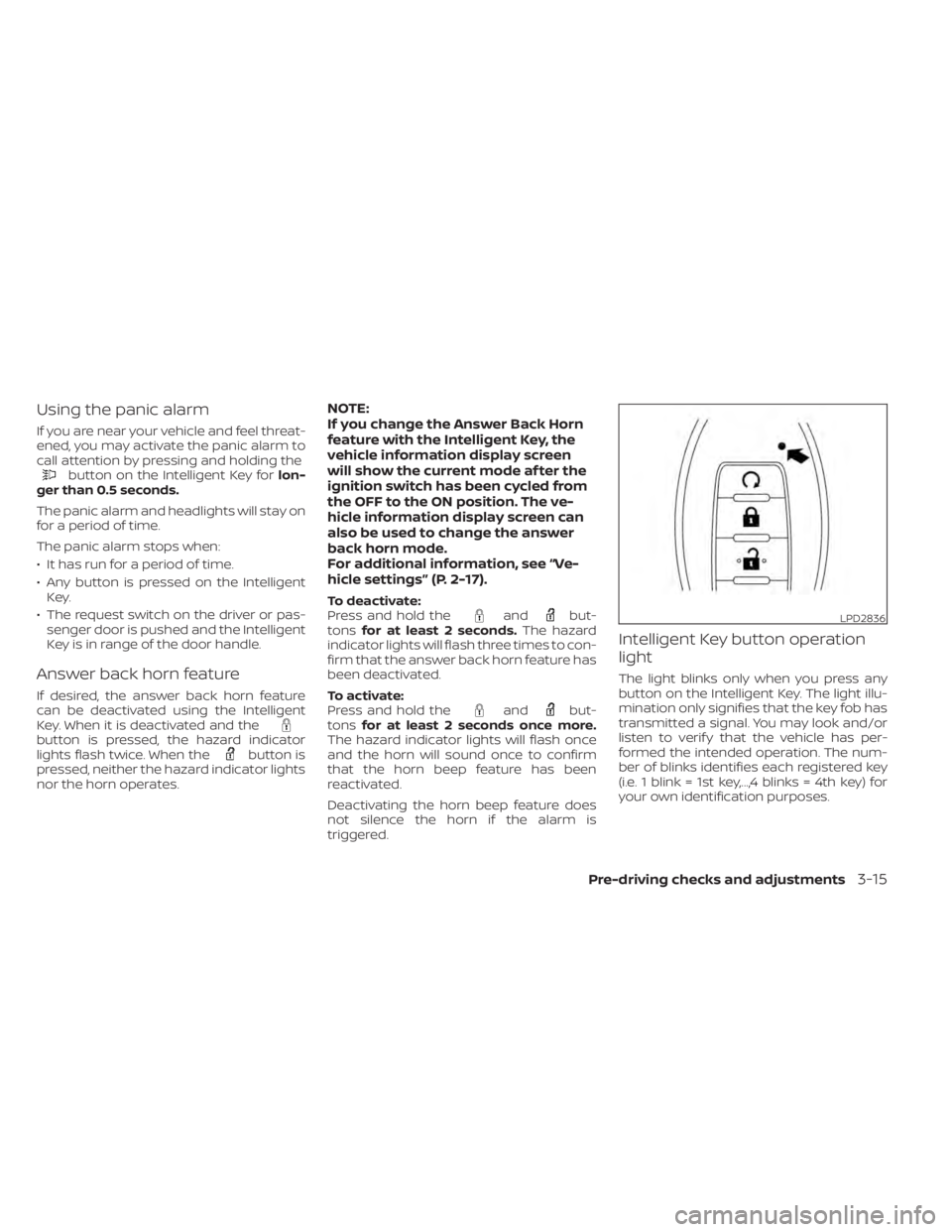
your own identification purposes.
LPD2836
Pre-driving checks and adjustments3-15