warning NISSAN MURANO 2023 Owners Manual
[x] Cancel search | Manufacturer: NISSAN, Model Year: 2023, Model line: MURANO, Model: NISSAN MURANO 2023Pages: 518, PDF Size: 5.46 MB
Page 282 of 518
NOTE:
• When enabling/disabling the system,the system will retain current settings
even if the engine is restarted.
• The RCTA system (if so equipped) is in- tegrated into the BSW system. There is
not a separate selection in the vehicle
information display for the RCTA sys-
tem. When the BSW is disabled, the
RCTA system is also disabled.
• When the BSW system is turned on, the BSW/RCTA indicator (white) in the ve-
hicle information display illuminates.
BSW SYSTEM LIMITATIONS
WARNING
Listed below are the system limitations
for the BSW system. Failure to operate
the vehicle in accordance with these
system limitations could result in seri-
ous injury or death.
• The BSW system cannot detect all ve-
hicles under all conditions.
• The radar sensors may not be able to
detect and activate BSW when cer-
tain objects are present such as:
– Pedestrian, bicycles, animals. –
Vehicles such as motorcycles, low
height vehicles, or high ground
clearance vehicles.
– Oncoming vehicles.
– Vehicles remaining in the detec-
tion zone when you accelerate
from a stop.
– A vehicle merging into an adjacent
lane at a speed approximately the
same as your vehicle.
– A vehicle approaching rapidly
from behind.
– A vehicle which your vehicle over-
takes rapidly.
– A vehicle that passes through the
detection zone quickly.
– When overtaking several vehicles
in a row, the vehicles af ter the first
vehicle may not be detected if
they are traveling close together.
• The radar sensor’s detection zone is
designed based on a standard lane
width. When driving in a wider lane,
the radar sensors may not detect ve-
hicles in an adjacent lane. When driv-
ing in a narrow lane, the radar sen-
sors may detect vehicles driving two
lanes away. •
The radar sensors are designed to ig-
nore most stationary objects; how-
ever, objects such as guardrails,
walls, foliage and parked vehicles
may occasionally be detected. This is
a normal operation condition.
• The following conditions may reduce
the ability of the radar to detect other
vehicles:
– Severe weather
– Road spray
– Ice/frost/snow/dirt build-up on
the vehicle
• Do not attach stickers (including
transparent material), install acces-
sories or apply additional paint near
the radar sensors. These conditions
may reduce the ability of the radar to
detect other vehicles.
• Excessive noise (for example, audio
system volume, open vehicle win-
dow) will interfere with the chime
sound, and it may not be heard.
5-42Starting and driving
Page 286 of 518
SYSTEM TEMPORARILY
UNAVAILABLE
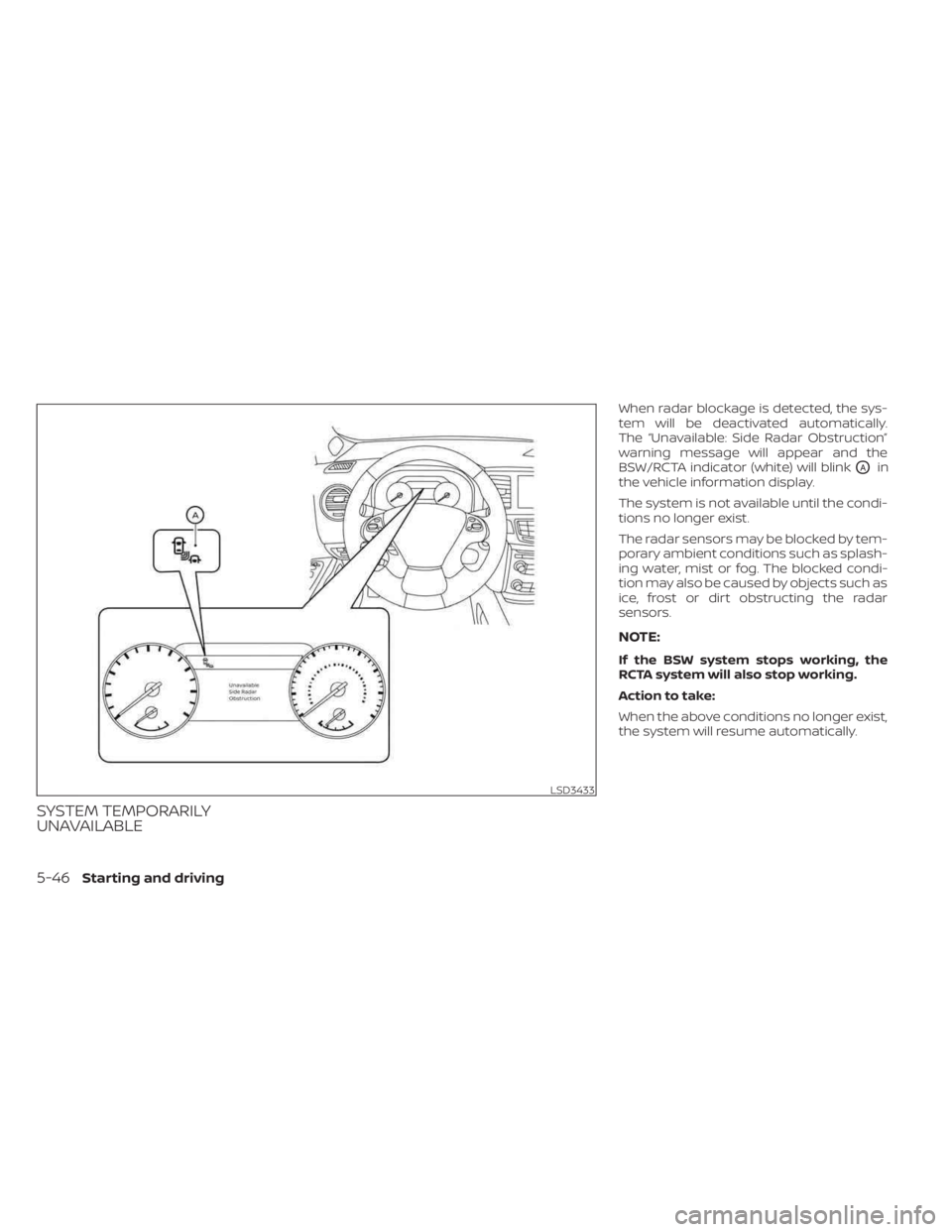
When radar blockage is detected, the sys-
tem will be deactivated automatically.
The “Unavailable: Side Radar Obstruction”
warning message will appear and the
BSW/RCTA indicator (white) will blink
OAin
the vehicle information display.
The system is not available until the condi-
tions no longer exist.
The radar sensors may be blocked by tem-
porary ambient conditions such as splash-
ing water, mist or fog. The blocked condi-
tion may also be caused by objects such as
ice, frost or dirt obstructing the radar
sensors.
NOTE:
If the BSW system stops working, the
RCTA system will also stop working.
Action to take:
When the above conditions no longer exist,
the system will resume automatically.
LSD3433
5-46Starting and driving
Page 288 of 518
FCC Warning
Changes or modifications not expressly
approved by the party responsible for
compliance could void the user’s authority
to operate the equipment.
For Canada
Short Range Radar Sensor SRR3–B
IC ID: 4135A-SRR3B
This device contains licence-exempt
transmitter(s)/receiver(s) that comply with
Innovation, Science and Economic Devel-
opment Canada’s licence-exempt RSS(s).
Operation is subject to the following two
conditions:
1. This device may not cause interference.
2.
This device must accept any interference,
including interference that may cause un-
desired operation of the device.
Radiofrequency radiation exposure infor-
mation:
This equipment complies with radiation
exposure limits set forth for an uncon-
trolled environment. This equipment
should be installed and operated with
minimum distance of 20 cm between the
radiator and the body of any persons, user
or bystander. L’émetteur/récepteur exempt de licence
contenu dans le présent appareil est con-
forme aux CNR d’Innovation, Sciences et
Développement économique Canada ap-
plicables aux appareils radio exempts de
licence. L’exploitation est autorisée aux
deux conditions suivantes:
1. L’appareil ne doit pas produire de
brouillage;
2. L’appareil doit accepter tout brouillage radioélectrique subi, même si le brouil-
lage est susceptible d’en compromettre
le fonctionnement.
Cet équipement est conforme aux limites
d’exposition aux rayonnements établies
pour un enviornnement non contrôlé. Cet
équipement doit être installé et utilisé avec
un minimum de 20 cm de distance entre la
source de rayonnement et votre corps.
WARNING
Failure to follow the warnings and in-
structions for proper use of the RCTA
system could result in serious injury or
death.
• The RCTA system is not a replace-
ment for proper driving procedures
and is not designed to prevent con-
tact with vehicles or objects. When
backing out of a parking space, al-
ways use the side and rear mirrors
and turn and look in the direction
your vehicle will move. Never rely
solely on the RCTA system.
The RCTA system will assist you when
backing out from a parking space. When
the vehicle is in reverse, the system is de-
signed to detect other vehicles approach-
ing from the right or lef t of the vehicle. If the
system detects cross traffic, it will alert you.
REAR CROSS TRAFFIC ALERT (RCTA)
5-48Starting and driving
Page 292 of 518
RCTA SYSTEM LIMITATIONSWARNING
Listed below are the system limitations
for the RCTA system. Failure to operate
the vehicle in accordance with these
system limitations could result in seri-
ous injury or death. •
Always check surroundings and turn
to check what is behind you before
backing up. The radar sensors detect
approaching (moving) vehicles. The
radar sensors cannot detect every
object such as:
– Pedestrians, bicycles, motor-
cycles, animals or child-operated
toy vehicles
– A vehicle that is passing at speeds
greater than approximately 19
mph (30 km/h)
– A vehicle that is passing at speeds
lower than approximately 5 mph
(8 km/h)
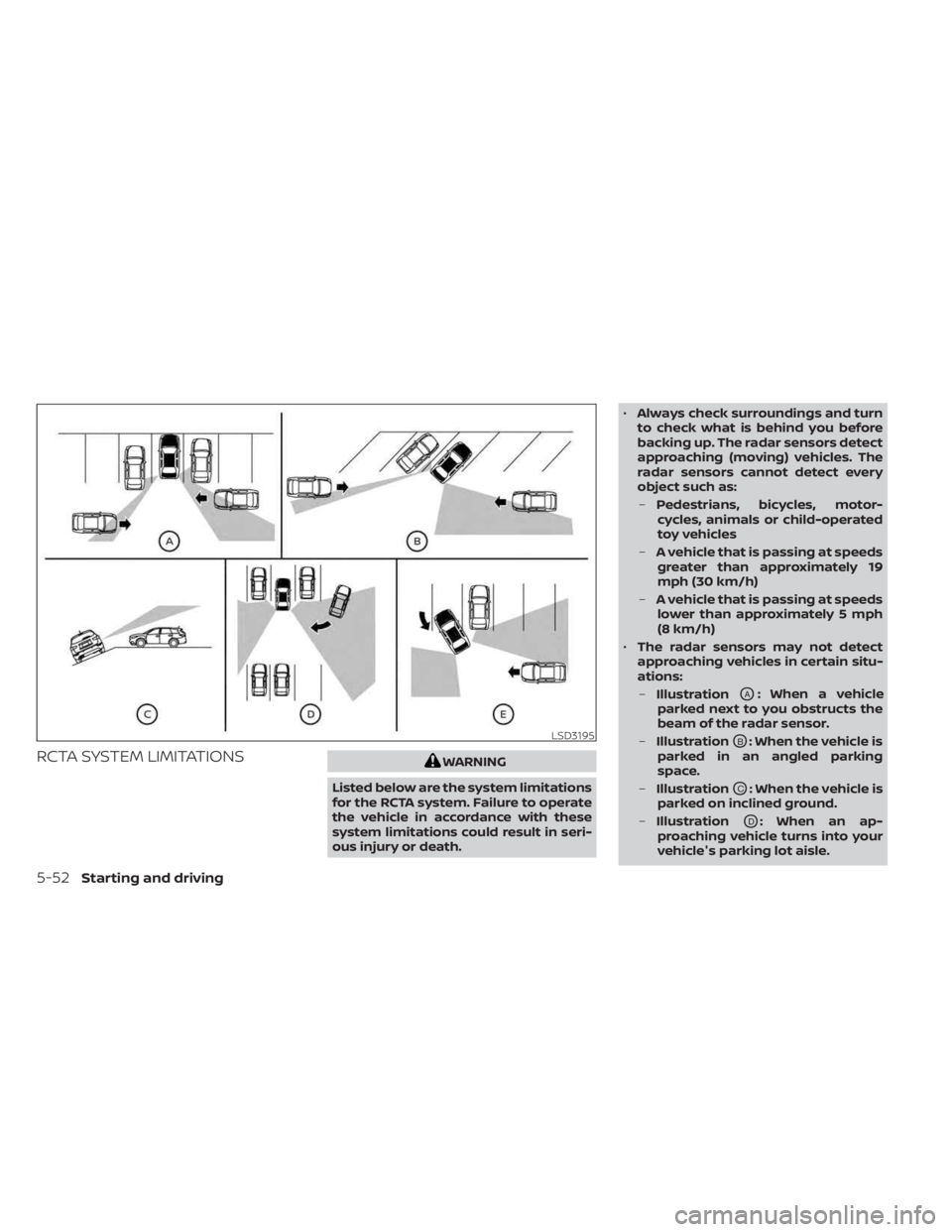
• The radar sensors may not detect
approaching vehicles in certain situ-
ations:
– Illustration
OA: When a vehicle
parked next to you obstructs the
beam of the radar sensor.
– Illustration
OB: When the vehicle is
parked in an angled parking
space.
– Illustration
OC: When the vehicle is
parked on inclined ground.
– Illustration
OD: When an ap-
proaching vehicle turns into your
vehicle's parking lot aisle.
LSD3195
5-52Starting and driving
Page 294 of 518
SYSTEM TEMPORARILY
UNAVAILABLE
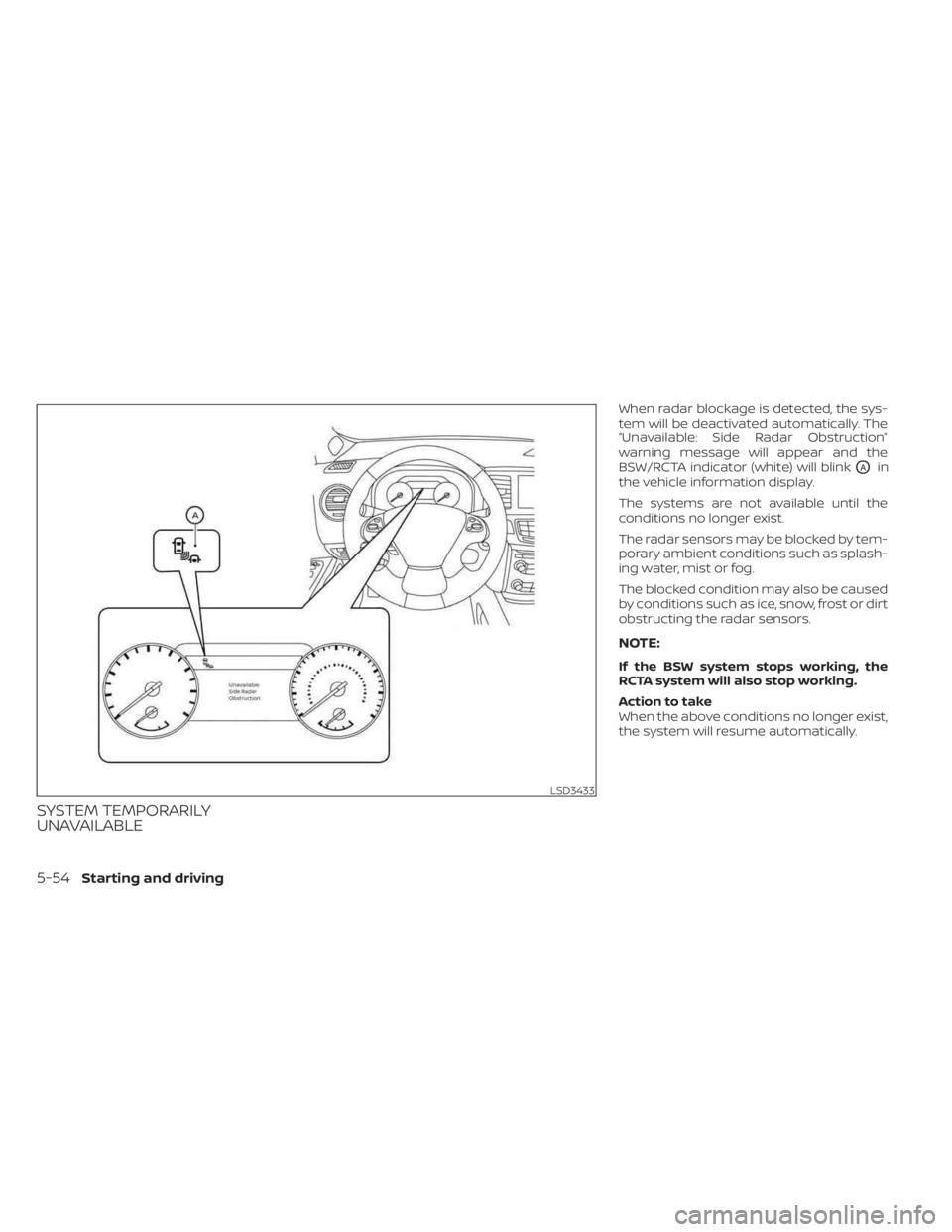
When radar blockage is detected, the sys-
tem will be deactivated automatically. The
“Unavailable: Side Radar Obstruction”
warning message will appear and the
BSW/RCTA indicator (white) will blink
OAin
the vehicle information display.
The systems are not available until the
conditions no longer exist.
The radar sensors may be blocked by tem-
porary ambient conditions such as splash-
ing water, mist or fog.
The blocked condition may also be caused
by conditions such as ice, snow, frost or dirt
obstructing the radar sensors.
NOTE:
If the BSW system stops working, the
RCTA system will also stop working.
Action to take
When the above conditions no longer exist,
the system will resume automatically.
LSD3433
5-54Starting and driving
Page 296 of 518
FCC Warning
Changes or modifications not expressly
approved by the party responsible for
compliance could void the user’s authority
to operate the equipment.
For Canada
Short Range Radar Sensor SRR3–B
IC ID: 4135A-SRR3B
This device contains licence-exempt
transmitter(s)/receiver(s) that comply with
Innovation, Science and Economic Devel-
opment Canada’s licence-exempt RSS(s).
Operation is subject to the following two
conditions:
1. This device may not cause interference.
2.
This device must accept any interference,
including interference that may cause un-
desired operation of the device.
Radiofrequency radiation exposure infor-
mation:
This equipment complies with radiation
exposure limits set forth for an uncon-
trolled environment. This equipment
should be installed and operated with
minimum distance of 20 cm between the
radiator and the body of any persons, user
or bystander. L’émetteur/récepteur exempt de licence
contenu dans le présent appareil est con-
forme aux CNR d’Innovation, Sciences et
Développement économique Canada ap-
plicables aux appareils radio exempts de
licence. L’exploitation est autorisée aux
deux conditions suivantes:
1. L’appareil ne doit pas produire de
brouillage;
2. L’appareil doit accepter tout brouillage radioélectrique subi, même si le brouil-
lage est susceptible d’en compromettre
le fonctionnement.
Cet équipement est conforme aux limites
d’exposition aux rayonnements établies
pour un enviornnement non contrôlé. Cet
équipement doit être installé et utilisé avec
un minimum de 20 cm de distance entre la
source de rayonnement et votre corps.
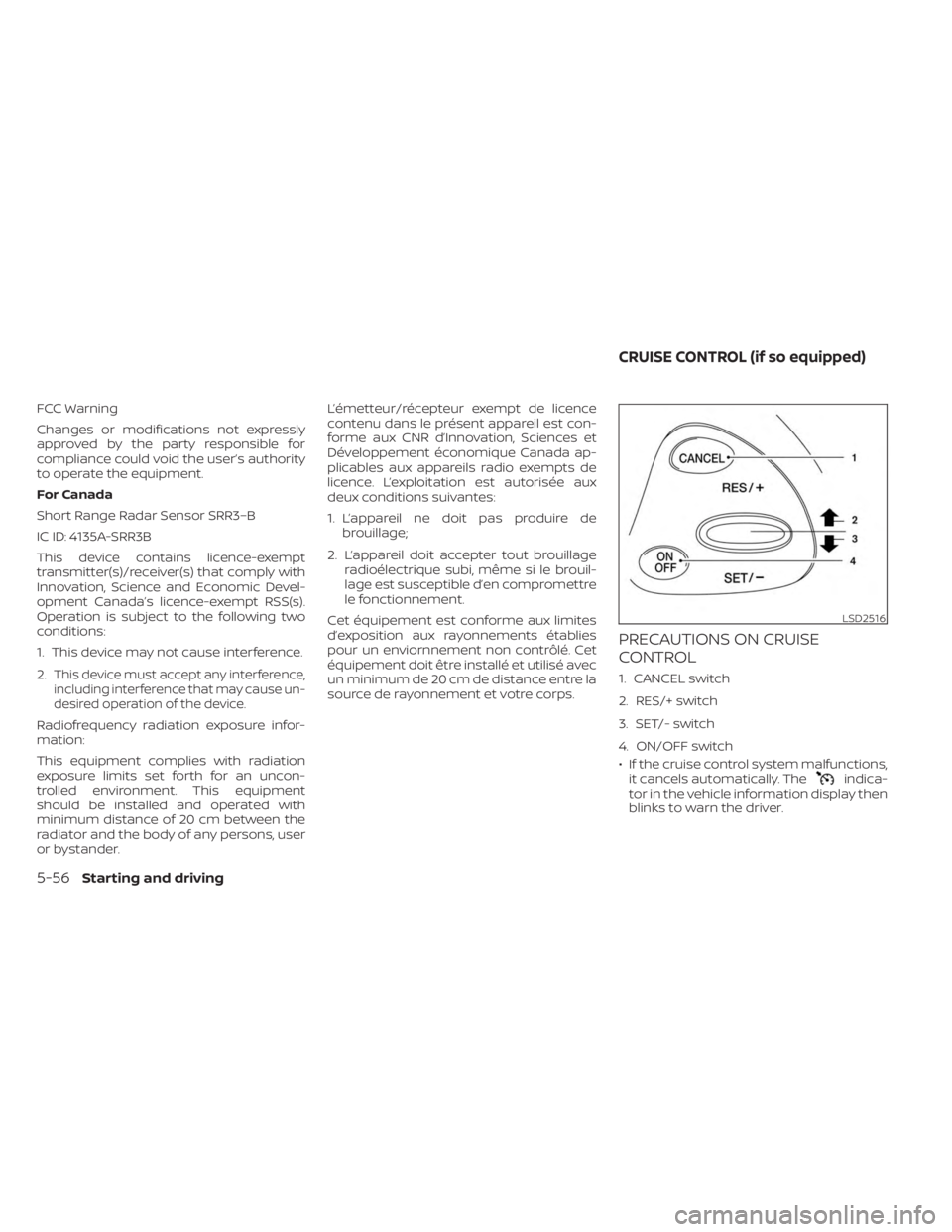
PRECAUTIONS ON CRUISE
CONTROL
1. CANCEL switch
2. RES/+ switch
3. SET/- switch
4. ON/OFF switch
• If the cruise control system malfunctions, it cancels automatically. The
indica-
tor in the vehicle information display then
blinks to warn the driver.
LSD2516
CRUISE CONTROL (if so equipped)
5-56Starting and driving
Page 297 of 518
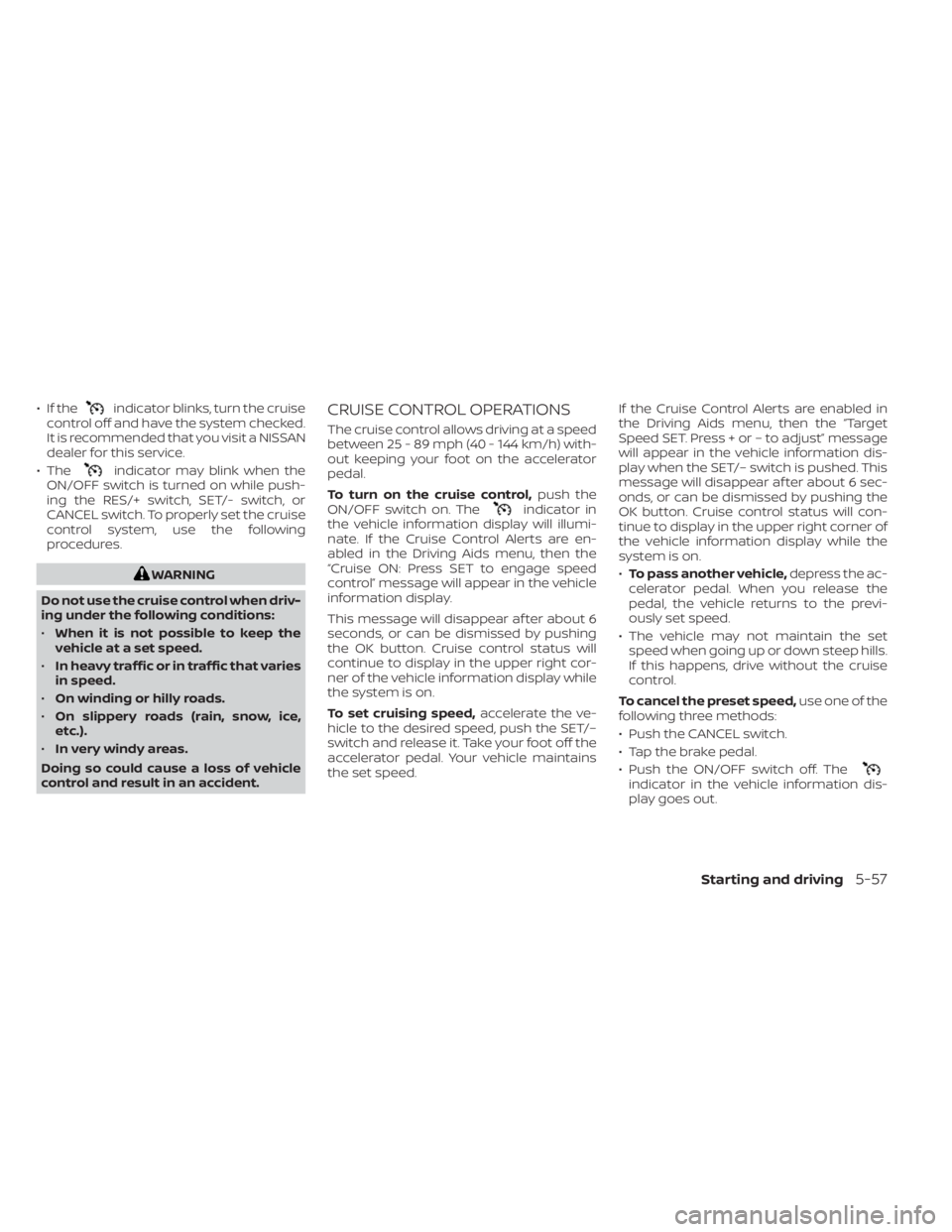
• If theindicator blinks, turn the cruise
control off and have the system checked.
It is recommended that you visit a NISSAN
dealer for this service.
• The
indicator may blink when the
ON/OFF switch is turned on while push-
ing the RES/+ switch, SET/- switch, or
CANCEL switch. To properly set the cruise
control system, use the following
procedures.
WARNING
Do not use the cruise control when driv-
ing under the following conditions:
• When it is not possible to keep the
vehicle at a set speed.
• In heavy traffic or in traffic that varies
in speed.
• On winding or hilly roads.
• On slippery roads (rain, snow, ice,
etc.).
• In very windy areas.
Doing so could cause a loss of vehicle
control and result in an accident.
CRUISE CONTROL OPERATIONS
The cruise control allows driving at a speed
between 25 - 89 mph (40 - 144 km/h) with-
out keeping your foot on the accelerator
pedal.
To turn on the cruise control, push the
ON/OFF switch on. The
indicator in
the vehicle information display will illumi-
nate. If the Cruise Control Alerts are en-
abled in the Driving Aids menu, then the
“Cruise ON: Press SET to engage speed
control” message will appear in the vehicle
information display.
This message will disappear af ter about 6
seconds, or can be dismissed by pushing
the OK button. Cruise control status will
continue to display in the upper right cor-
ner of the vehicle information display while
the system is on.
To set cruising speed, accelerate the ve-
hicle to the desired speed, push the SET/–
switch and release it. Take your foot off the
accelerator pedal. Your vehicle maintains
the set speed. If the Cruise Control Alerts are enabled in
the Driving Aids menu, then the “Target
Speed SET. Press + or – to adjust” message
will appear in the vehicle information dis-
play when the SET/– switch is pushed. This
message will disappear af ter about 6 sec-
onds, or can be dismissed by pushing the
OK button. Cruise control status will con-
tinue to display in the upper right corner of
the vehicle information display while the
system is on.
•
To pass another vehicle, depress the ac-
celerator pedal. When you release the
pedal, the vehicle returns to the previ-
ously set speed.
• The vehicle may not maintain the set speed when going up or down steep hills.
If this happens, drive without the cruise
control.
To cancel the preset speed, use one of the
following three methods:
• Push the CANCEL switch.
• Tap the brake pedal.
• Push the ON/OFF switch off. The
indicator in the vehicle information dis-
play goes out.
Starting and driving5-57
Page 299 of 518
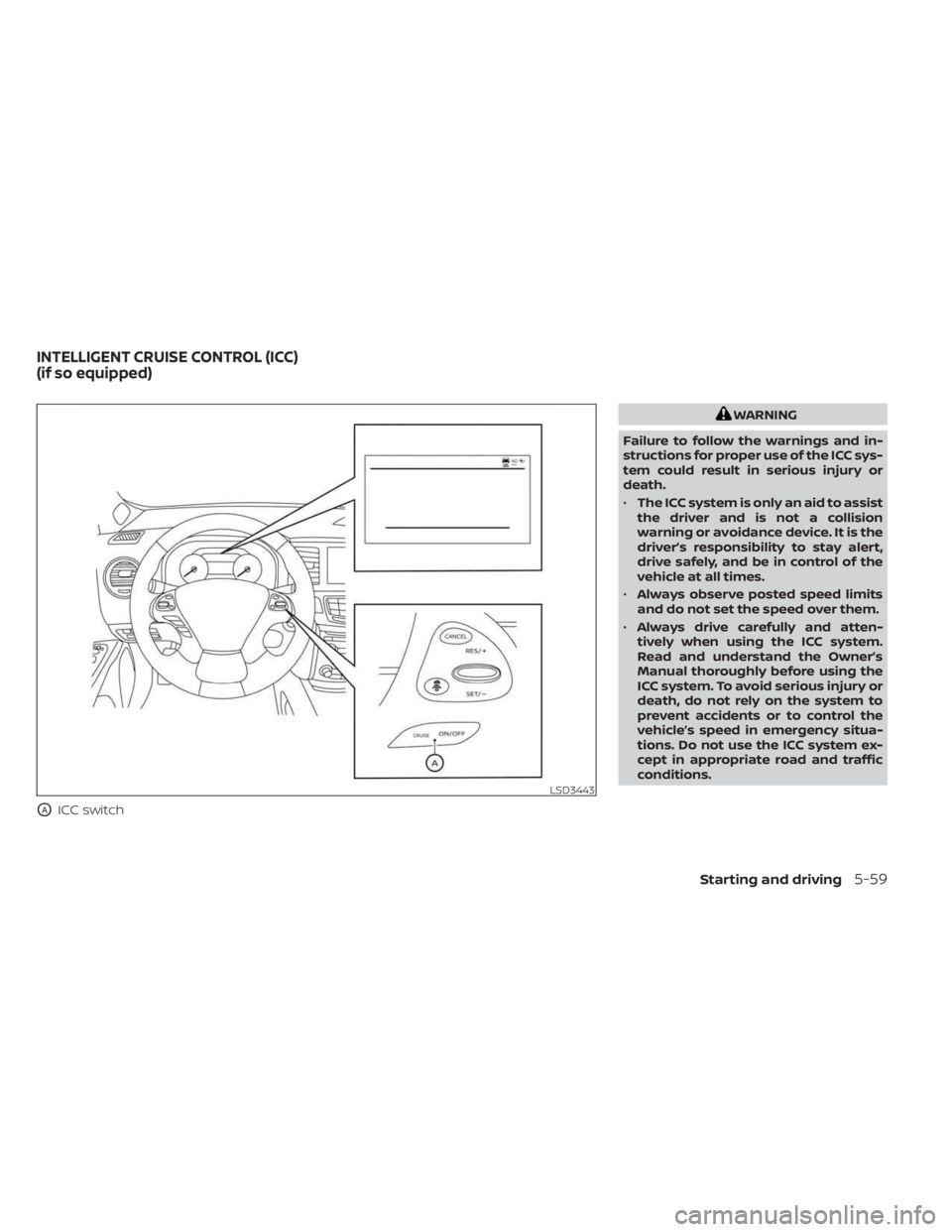
OAICC switch
WARNING
Failure to follow the warnings and in-
structions for proper use of the ICC sys-
tem could result in serious injury or
death.
• The ICC system is only an aid to assist
the driver and is not a collision
warning or avoidance device. It is the
driver’s responsibility to stay alert,
drive safely, and be in control of the
vehicle at all times.
• Always observe posted speed limits
and do not set the speed over them.
• Always drive carefully and atten-
tively when using the ICC system.
Read and understand the Owner’s
Manual thoroughly before using the
ICC system. To avoid serious injury or
death, do not rely on the system to
prevent accidents or to control the
vehicle’s speed in emergency situa-
tions. Do not use the ICC system ex-
cept in appropriate road and traffic
conditions.
LSD3443
INTELLIGENT CRUISE CONTROL (ICC)
(if so equipped)
Starting and driving5-59
Page 300 of 518
•In the conventional (fixed speed)
cruise control mode, a warning
chime will not sound to warn you if
you are too close to the vehicle
ahead. Pay special attention to the
distance between your vehicle and
the vehicle ahead of you or a collision
could occur.
The ICC system maintains a selected dis-
tance from the vehicle in front of you within
the speed range of 0 to 90 mph (0 to 144
km/h) up to the set speed. The set speed
can be selected by the driver between 20 to
90 mph (32 to 144 km/h).
The vehicle travels at a set speed when the
road ahead is clear.
The ICC system can be set to one of two
cruise control modes:
• Vehicle-to-vehicle distance control
mode: For maintaining a selected dis-
tance between your vehicle and the ve-
hicle in front of you up to the preset speed •
Conventional (fixed speed) cruise con-
trol mode: For cruising at a preset speed
Always confirm the setting in the ICC sys-
tem display.
Push the ICC switch
OAto choose the
cruise control mode between the vehicle-
to-vehicle distance control mode and the
conventional (fixed speed) cruise control
mode.
Once a control mode is activated, it cannot
be changed to the other cruise control
mode. To change the mode, push the ICC
switch
OAonce to turn the system off. Then
push the ICC switch
OAagain to turn the
system back on and select the desired
cruise control mode.
For the vehicle-to-vehicle distance control
mode, see “Vehicle-to-vehicle distance
control mode” (P. 5-61).
For the conventional (fixed speed) cruise
control mode, see “Conventional (fixed
speed) cruise control mode” (P. 5-79).
5-60Starting and driving
Page 303 of 518
The vehicle-to-vehicle distance control
mode is designed to maintain a selected
distance from the vehicle in front of you
and can reduce the speed to match a
slower vehicle ahead. The system will de-
celerate the vehicle as necessary and if the
vehicle ahead comes to a stop, the vehicle
decelerates to a standstill. However, the ICC
system can only apply up to 40% of the
vehicle’s total braking power.
This system should only be used when
traffic conditions allow vehicle speeds to
remain fairly constant or when vehicle
speeds change gradually. If a vehicle
moves into the traveling lane ahead or if a
vehicle traveling ahead rapidly decelerates,
the distance between vehicles may be-
come closer because the ICC system can-
not decelerate the vehicle quickly enough.
If this occurs, the ICC system will sound a
warning chime and blink the system dis-
play to notif y the driver to take necessary
action.
The system will cancel and a warning
chime will sound if the speed is below ap-
proximately 15 mph (24 km/h) and a vehicle
is not detected ahead. The system will also
disengage when the vehicle goes above
the maximum set speed.For additional information, see “Approach
warning” (P. 5-70).
The following items are controlled in the
vehicle-to-vehicle distance control mode:
• When there are no vehicles traveling
ahead, the vehicle-to-vehicle distance
control mode maintains the speed set by
the driver. The set speed range is be-
tween approximately 20 and 90 mph
(32 and 144 km/h).
• When there is a vehicle traveling ahead, the vehicle-to-vehicle distance control
mode adjusts the speed to maintain the
distance, selected by the driver, from the
vehicle ahead. If the vehicle ahead comes
to a stop, the vehicle decelerates to a
standstill within the limitations of the sys-
tem. The system will cancel once it judges
a standstill with a warning chime.
• When the vehicle traveling ahead has moved out from its lane of travel, the
vehicle-to-vehicle distance control mode
accelerates and maintains vehicle speed
up to the set speed. The ICC system does not control vehicle
speed or warn you when you approach
stationary and slow moving vehicles. You
must pay attention to vehicle operation to
maintain proper distance from vehicles
ahead when approaching toll gates or traf-
fic congestion.
Starting and driving5-63