cruise control NISSAN MURANO 2023 Owner's Manual
[x] Cancel search | Manufacturer: NISSAN, Model Year: 2023, Model line: MURANO, Model: NISSAN MURANO 2023Pages: 518, PDF Size: 5.46 MB
Page 319 of 518
CONVENTIONAL (fixed speed)
CRUISE CONTROL MODE
This mode allows driving at a speed be-
tween 25 to 90 mph (40 to 144 km/h) with-
out keeping your foot on the accelerator
pedal.
WARNING
• In the conventional (fixed speed)
cruise control mode, a warning
chime does not sound to warn you if
you are too close to the vehicle
ahead, as neither the presence of the
vehicle ahead nor the vehicle-to-
vehicle distance is detected.
• Pay special attention to the distance
between your vehicle and the vehicle
ahead of you or a collision could
occur.
• Always confirm the setting in the ICC
system display.
•
Do not use the conventional (fixed
speed) cruise control mode when driv-
ing under the following conditions:
– When it is not possible to keep the
vehicle at a set speed
– In heavy traffic or in traffic that
varies in speed –
On winding or hilly roads
– On slippery roads (rain, snow, ice,
etc.)
– In very windy areas
• Doing so could cause a loss of vehicle
control and result in an accident.
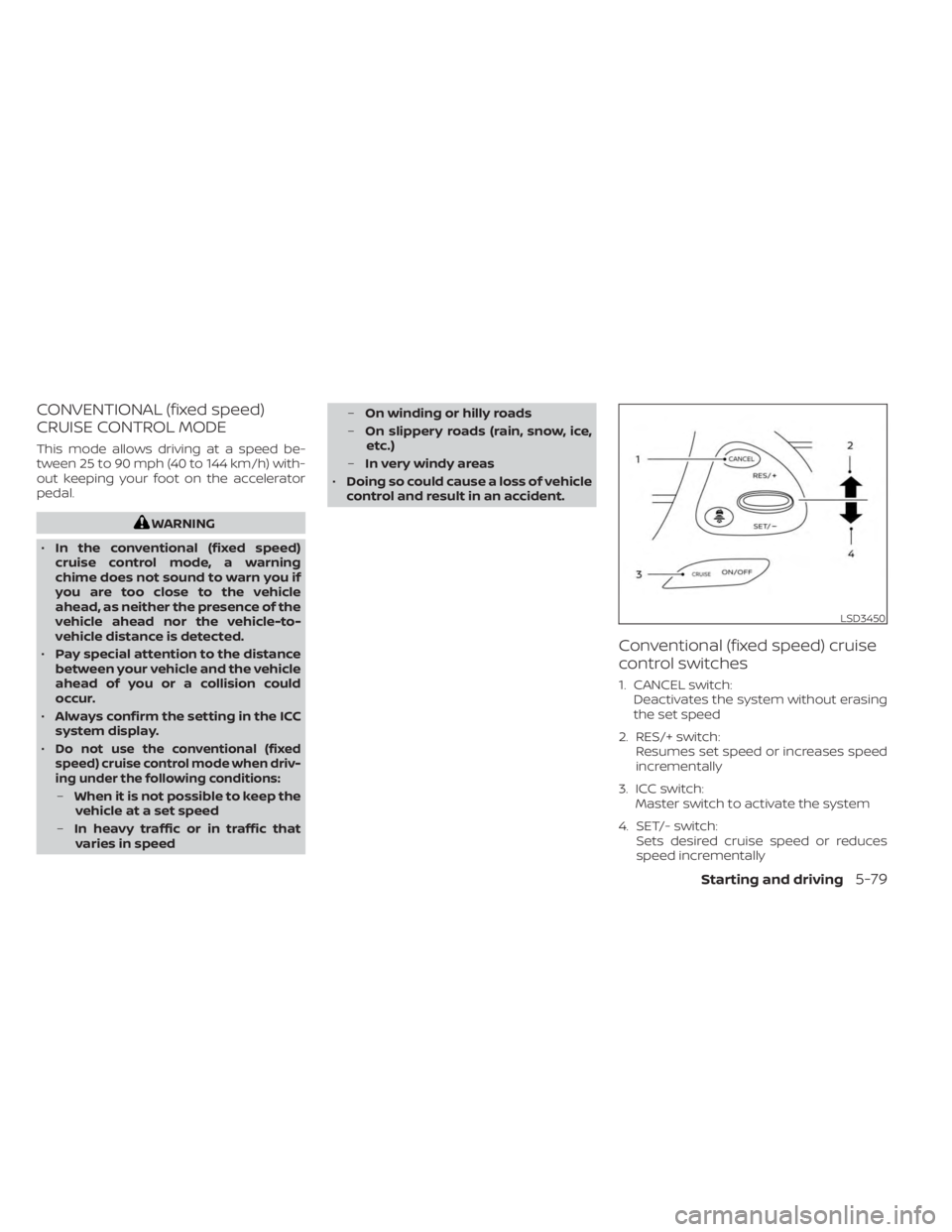
Conventional (fixed speed) cruise
control switches
1. CANCEL switch: Deactivates the system without erasing
the set speed
2. RES/+ switch: Resumes set speed or increases speed
incrementally
3. ICC switch: Master switch to activate the system
4. SET/- switch: Sets desired cruise speed or reduces
speed incrementally
LSD3450
Starting and driving5-79
Page 320 of 518
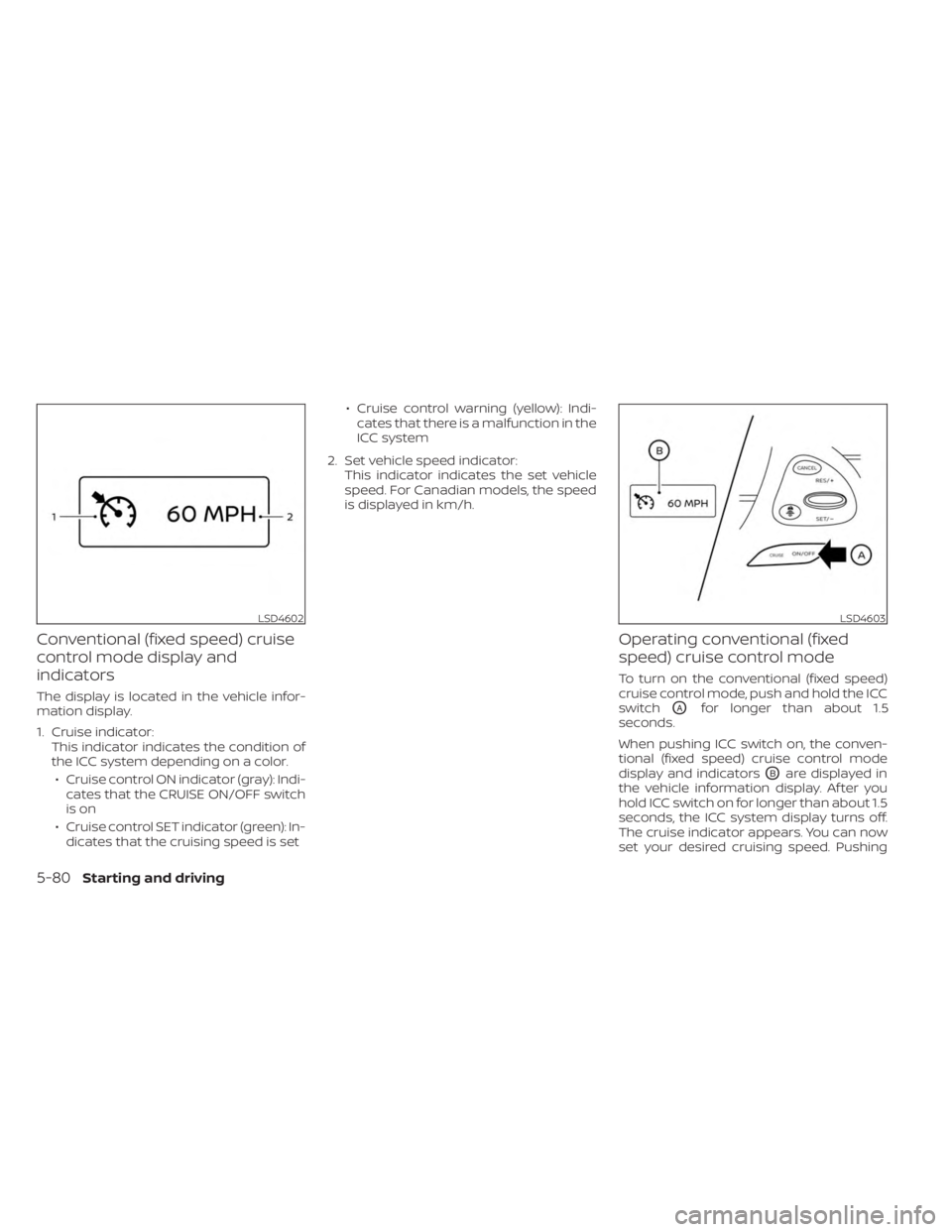
Conventional (fixed speed) cruise
control mode display and
indicators
The display is located in the vehicle infor-
mation display.
1. Cruise indicator:This indicator indicates the condition of
the ICC system depending on a color.
• Cruise control ON indicator (gray): Indi- cates that the CRUISE ON/OFF switch
is on
• Cruise control SET indicator (green): In- dicates that the cruising speed is set • Cruise control warning (yellow): Indi-
cates that there is a malfunction in the
ICC system
2. Set vehicle speed indicator: This indicator indicates the set vehicle
speed. For Canadian models, the speed
is displayed in km/h.
Operating conventional (fixed
speed) cruise control mode
To turn on the conventional (fixed speed)
cruise control mode, push and hold the ICC
switch
OAfor longer than about 1.5
seconds.
When pushing ICC switch on, the conven-
tional (fixed speed) cruise control mode
display and indicators
OBare displayed in
the vehicle information display. Af ter you
hold ICC switch on for longer than about 1.5
seconds, the ICC system display turns off.
The cruise indicator appears. You can now
set your desired cruising speed. Pushing
LSD4602LSD4603
5-80Starting and driving
Page 321 of 518
the ICC switch again will turn the system
completely off. When the ignition switch is
placed in the OFF position, the system is
also automatically turned off.
To use the ICC system again, quickly push
and release the ICC switch (vehicle-to ve-
hicle distance control mode) or push and
hold it (conventional cruise control mode)
again to turn it on.
CAUTION
To avoid accidentally engaging cruise
control, make sure to turn the ICC
switch off when not using the ICC
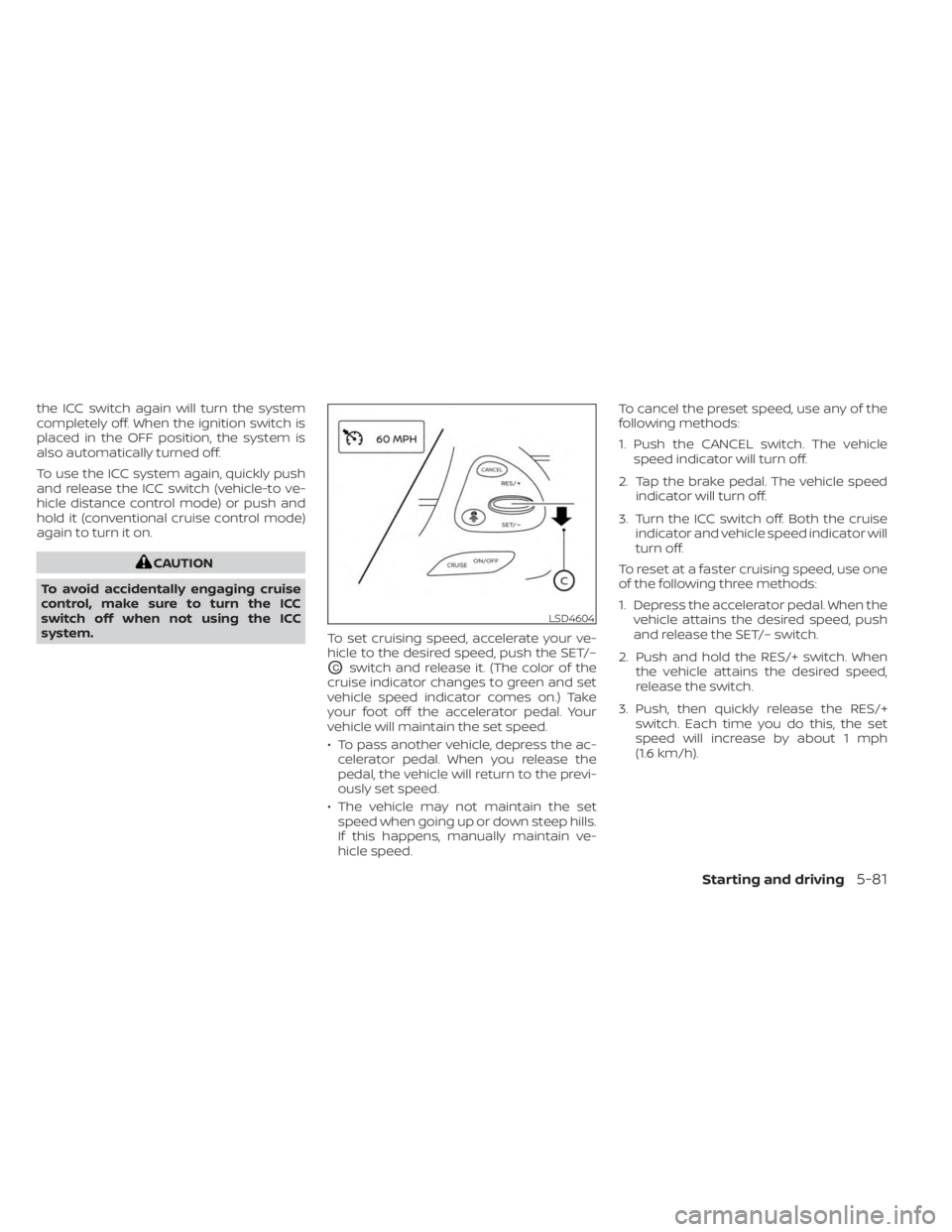
system. To set cruising speed, accelerate your ve-
hicle to the desired speed, push the SET/–
OCswitch and release it. (The color of the
cruise indicator changes to green and set
vehicle speed indicator comes on.) Take
your foot off the accelerator pedal. Your
vehicle will maintain the set speed.
• To pass another vehicle, depress the ac- celerator pedal. When you release the
pedal, the vehicle will return to the previ-
ously set speed.
• The vehicle may not maintain the set speed when going up or down steep hills.
If this happens, manually maintain ve-
hicle speed. To cancel the preset speed, use any of the
following methods:
1. Push the CANCEL switch. The vehicle
speed indicator will turn off.
2. Tap the brake pedal. The vehicle speed indicator will turn off.
3. Turn the ICC switch off. Both the cruise indicator and vehicle speed indicator will
turn off.
To reset at a faster cruising speed, use one
of the following three methods:
1. Depress the accelerator pedal. When the vehicle attains the desired speed, push
and release the SET/– switch.
2. Push and hold the RES/+ switch. When the vehicle attains the desired speed,
release the switch.
3. Push, then quickly release the RES/+ switch. Each time you do this, the set
speed will increase by about 1 mph
(1.6 km/h).
LSD4604
Starting and driving5-81
Page 323 of 518
A chime sounds under the following conditions
and the control is automatically canceled:
• When the vehicle slows down more than8 mph (13 km/h) below the set speed
• When the shif t lever is not in the D (Drive) or manual shif t mode
• When the parking brake is applied
• When the VDC operates (including the traction control system)
• When a wheel slips
When the system is not operating properly,
the chime sounds and the color of the
cruise indicator will change to orange.
Action to take
If the color of the cruise indicator changes
to orange, stop the vehicle in a safe place
and place the shif t lever in the P (Park) po-
sition. Turn the engine off, restart the en-
gine, resume driving, and then perform the
setting again.
If it is not possible to set or the indicator
stays on, it may indicate that the system
is malfunctioning. Although the vehicle
is still drivable under normal conditions,
have the vehicle checked. It is recom-
mended that you visit a NISSAN dealer
for this service.
WARNING
Failure to follow the warnings and in-
structions for proper use of the RAB
system could result in serious injury or
death.
• The RAB system is a supplemental
aid to the driver. It is not a replace-
ment for proper driving procedures.
Always use the side and rear mirrors
and turn and look in the direction you
will move before and while backing
up. Never rely solely on the RAB sys-
tem. It is the driver’s responsibility to
stay alert, drive safely, and be in con-
trol of the vehicle at all times.
• There is a limitation to the RAB sys-
tem capability. The RAB system is not
effective in all situations.
•
Inclement weather or ultrasonic
sources such as an automatic car
wash, a truck’s compressed-air brakes
or a pneumatic drill may affect the
function of the system, this may in-
clude reduced performance or a false
activation.
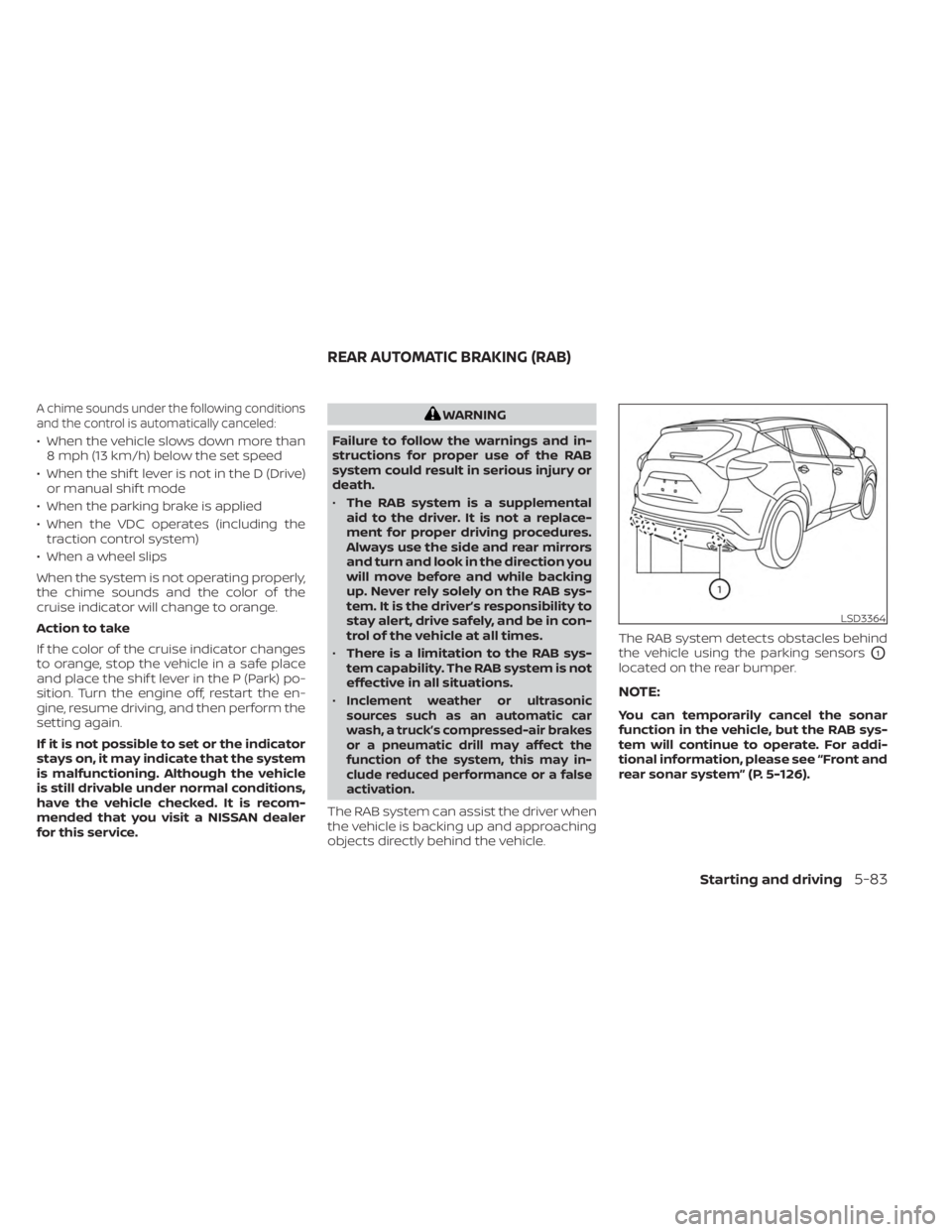
The RAB system can assist the driver when
the vehicle is backing up and approaching
objects directly behind the vehicle. The RAB system detects obstacles behind
the vehicle using the parking sensors
O1
located on the rear bumper.
NOTE:
You can temporarily cancel the sonar
function in the vehicle, but the RAB sys-
tem will continue to operate. For addi-
tional information, please see “Front and
rear sonar system” (P. 5-126).
LSD3364
REAR AUTOMATIC BRAKING (RAB)
Starting and driving5-83
Page 356 of 518
• Recirculating the cool air in the cabinwhen the A/C is on reduces cooling
load.
4. Drive at Economical Speeds and
Distances
• Observing the speed limit and not ex- ceeding 60 mph (97 km/h) (where le-
gally allowed) can improve fuel effi-
ciency due to reduced aerodynamic
drag.
• Maintaining a safe following distance behind other vehicles reduces unnec-
essary braking.
• Safely monitoring traffic to anticipate changes in speed permits reduced
braking and smooth acceleration
changes.
• Select a gear range suitable to road conditions.
5. Use Cruise Control
• Using cruise control during highway driving helps maintain a steady speed.
• Cruise control is particularly effective in providing fuel savings when driving
on flat terrains.
6. Plan for the Shortest Route
• Utilize a map or navigation system to determine the best route to save time. 7.
Avoid Idling
• Shutting off your engine when safe for stops exceeding 30–60 seconds saves
fuel and reduces emissions.
8. Buy an Automated Pass for Toll Roads
• Automated passes permit drivers to use special lanes to maintain cruising
speed through the toll and avoid stop-
ping and starting.
9. Winter Warm Up
• Limit idling time to minimize impact to fuel economy.
• Vehicles typically need no more than 30 seconds of idling at start-up to ef-
fectively circulate the engine oil before
driving.
• Your vehicle will reach its ideal operat- ing temperature more quickly while
driving versus idling.
10. Keeping your Vehicle Cool
• Park your vehicle in a covered parking area or in the shade whenever
possible.
• When entering a hot vehicle, opening the windows will help to reduce the
inside temperature faster, resulting in
reduced demand on your A/C system. • Keep your engine tuned up.
• Follow the recommended scheduled
maintenance.
• Keep the tires inflated to the correct pres- sure. Low tire pressure increases tire
wear and lowers fuel economy.
• Keep all the wheels in correct alignment. Improper alignment increases tire wear
and lowers fuel economy.
• Use the recommended viscosity engine oil. For additional information, see “Engine
oil and oil filter recommendations”
(P. 10-7).
INCREASING FUEL ECONOMY
5-116Starting and driving
Page 372 of 518
SPECIAL WINTER EQUIPMENT
It is recommended that the following items
be carried in the vehicle during winter:
• A scraper and stiff-bristled brush to re-move ice and snow from the windows
and wiper blades.
• A sturdy, flat board to be placed under the jack to give it firm support.
• A shovel to dig the vehicle out of snowdrif ts.
• Extra washer fluid to refill the windshield- washer fluid reservoir.
DRIVING ON SNOW OR ICE
WARNING
• Wet ice (32°F, 0°C and freezing rain),
very cold snow or ice can be slick and
very hard to drive on. The vehicle will
have much less traction or “grip” un-
der these conditions. Try to avoid
driving on wet ice until the road is
salted or sanded.
• Whatever the condition, drive with
caution. Accelerate and slow down
with care. If accelerating or down-
shif ting too fast, the drive wheels will
lose even more traction. •
Allow more stopping distance under
these conditions. Braking should
be started sooner than on dry
pavement.
• Allow greater following distances on
slippery roads.
• Watch for slippery spots (glare ice).
These may appear on an otherwise
clear road in shaded areas. If a patch
of ice is seen ahead, brake before
reaching it. Try not to brake while on
the ice, and avoid any sudden steer-
ing maneuvers.
• Do not use the cruise control on slip-
pery roads.
• Snow can trap dangerous exhaust
gases under your vehicle. Keep snow
clear of the exhaust pipe and from
around your vehicle.
5-132Starting and driving
Page 496 of 518
• Have your vehicle serviced more of tenthan at intervals specified in the recom-
mended Maintenance Schedule in the
“Maintenance and schedules” section of
this manual.
• When making a turn, your trailer wheels will be closer to the inside of the turn than
your vehicle wheels. To compensate for
this, make a larger than normal turning
radius during the turn.
• Crosswinds and rough roads will ad- versely affect vehicle/trailer handling,
possibly causing vehicle sway. When be-
ing passed by larger vehicles, be pre-
pared for possible changes in crosswinds
that could affect vehicle handling.
Do the following if the trailer begins to
sway:
1. Take your foot off the accelerator pedal to allow the vehicle to coast and steer as
straight ahead as the road conditions
allow. This combination will help stabilize
the vehicle
– Do not correct trailer sway by steering or applying the brakes.
2. When the trailer sway stops, gently apply the brakes and pull to the side of the
road in a safe area. 3. Try to rearrange the trailer load so it is
balanced as described in this section.
• Be careful when passing other vehicles. Passing while towing a trailer requires
considerably more distance than normal
passing. Remember, the length of the
trailer must also pass the other vehicle
before you can safely change lanes.
• Downshif t the transmission to a lower gear for engine braking when driving
down steep or long hills. This will help
slow the vehicle without applying the
brakes.
• Avoid holding the brake pedal down too long or too frequently. This could cause
the brakes to overheat, resulting in re-
duced braking efficiency.
• Increase your following distance to allow for greater stopping distances while tow-
ing a trailer. Anticipate stops and brake
gradually.
• NISSAN recommends that the cruise control not be used while towing a trailer.
• Some states or provinces have specific regulations and speed limits for vehicles
that are towing trailers. Obey the local
speed limits. • Check your hitch, trailer wiring harness
connections, and trailer wheel lug nuts
af ter 50 miles (80 km) of travel and at
every break.
• When launching a boat, don't allow the water level to go over the exhaust tail
pipe or rear bumper.
• Make sure you disconnect the trailer lights before backing the trailer into the
water or the trailer lights may burn out.
When towing a trailer, final drive gear oil
should be replaced and transmission oil/
fluid should be changed more fre-
quently. For additional information, see
“Do-it-yourself ” (P. 8-2).
FLAT TOWING FOR ALL–WHEEL
DRIVE VEHICLE (if so equipped)
Towing your vehicle with all four wheels on
the ground is sometimes called flat towing.
This method is sometimes used when
towing a vehicle behind a recreational ve-
hicle, such as a motor home.
10-28Technical and consumer information
Page 504 of 518
Coat hooks.......................2-62
Coldweatherdriving...............5-131
Console box ......................2-59
Console light ......................2-70
Continuously Variable Transmission
(CVT) ............................5-19
Continuously Variable Transmission (CVT)
fluid ..........................8-10
Driving with Continuously Variable
Transmission (CVT) ...............5-19
Controls.........................4-30 Heater and air conditioner controls. . .4-30
Coolant..........................10-2 Capacities and recommended
fuel/lubricants ..................10-2
Changing engine coolant ...........8-5
Checking engine coolant level .......8-5
Engine coolant temperature gauge . . .2-6
Corrosionprotection.................7-7
Cruisecontrol.....................5-56
Cupholders......................2-60
D
Daytime Running Light System ........2-43
Defrosterswitch...................2-37 Rear window and outside mirror defroster
switch.........................2-37
Dimensions and weights ............10-10
Dimmer switch for instrument panel . . .2-43
Door locks ........................3-5
Drivebelt ........................8-16
Drivingthevehicle..................5-18 Driving..........................5
-131
Cold weather driving .............5-131
Driving with Continuously Variable
Transmission (CVT) ...............5-19
Precautions when starting and
driving......................5-4,5-11
Dynamic driver assistance switch ......2-50
E
Eco Drive Report....................2-8
Economy - fuel ...................5 -116
Emergency call (SOS) button ..........2-51
Emergency engine shutoff ...........5-15
Emission control information label .....10-12
Emission control system warranty . . . .10-30
Engine coolant temperature gauge .....2-6
Engine ..........................5-16
Before starting the engine ..........5-16
Capacities and recommended
fuel/lubricants ..................10-2
Changing engine coolant ...........8-5
Changing engine oil filter ...........8-6
Changing engine oil ...............8-6
Checking engine coolant level .......8-5
Checking engine oil level ...........8-6
Engine compartment check
locations .......................8-3
Engine coolant temperature gauge . . .2-6
Engine cooling system .............8-4
Engine oil and oil filter
recommendation ................10-7
Engine oil pressure warning light .....2-11Engine oil viscosity
...............10-7
Engine oil .......................8-6
Engine serial number .............10-12
Engine specifications .............10-9
Starting the engine ...............5-17
EventDatarecorders...............10-32
Exhaust gas (Carbon monoxide) ........5-4
Explanation of maintenance items ......9-2
Explanation of scheduled maintenance
items........................... .9-5
Extended storage switch ............2-55
Eyeglasscase.....................2-59
F
F.M.V.S.S. certification label ...........10-12
Flashers (See hazard warning flasher
switch)...........................6-2
Flattire...........................6-3
Floor mat positioning aid .............7-6
Fluid ............................8-11 Brakefluid......................8-11
Capacities and recommended
fuel/lubricants ..................10-2
Continuously Variable Transmission (CVT)
fluid ..........................8-10
Engine coolant ...................8-4
Engine oil .......................8-6
Powersteeringfluid...............8-11
Windshield-washer fluid ...........8-12
Foglightswitch ...................2-44
Front air bag system (See supplemental
restraintsystem)...................1-56
11-2
Page 505 of 518
Front and rear sonar system.........5-126
Front power seat adjustment ..........1-4
Frontseats....................... .1-2
Front-door pocket .................2-56
Fuelefficientdrivingtips.............5 -115
Fuel gauge ........................2-7
Fuel-filler door ....................3-28
Fuel.............................10-2 Capacities and recommended
fuel/lubricants ..................10-2
Fuel economy ..................5 -116
Fuel gauge ......................2-7
Fueloctanerating................10-6
Fuel recommendation ............10-4
Fuel-filler cap ...................3-29
Fuel-filler door lock opener lever .....3-28
Fuel-filler lid ....................3-29
Loose fuel cap warning ............2-27
Fuses ...........................8-20
Fusiblelinks ......................8-21
G
Garage door opener, HomeLink® Universal
Transceiver .......................2-71
Gascap.........................3-29
Gauge ...........................2-6
Engine coolant temperature gauge . . .2-6
Fuel gauge ......................2-7
Odometer ......................2-5
Speedometer .................2-4,2-5
Tachometer .....................2-6
Trip odometer ...................2-5 General maintenance
................9-2
Glovebox........................2-59
H
Hazard warning flasher switch .........6-2
Headrestraints.................... .1-9
Headlight and turn signal switch .......2-38
Headlightcontrolswitch.............2-38
Headlights.......................8-25
Heatedmirrors................... .3-36
Heatedrearseats..................2-48
Heatedseats.....................2-45
Heated steering wheel ..............2-49
Heater and air conditioner (automatic) . .4-29
Heater..........................4-29 Heater and air conditioner (automatic)
(if so equipped) ..................4-29
Heater and air conditioner controls. . .4-30
Heater operation .................4-31
Hill start assist system ..............5-126
HomeLink® Universal Transceiver.......2-71
Hood ............................3-21
Hook ...........................2-62
Luggage hook ..................2-62
Horn............................2-45
I
Ignition switch .....................5-13
Push-button ignition switch ........5-13
Immobilizer system ................2-34
Important vehicle information label . . . .10-12In-cabinmicrofilter.................8-18
Increasing fuel economy
............5-116
Indicator lights and audible reminders
(See warning/indicator lights and audible
reminders) ...................... .2-10
Indicator.........................5-15 NISSAN Intelligent Key® battery discharge
indicator.......................5-15
Inside automatic anti-glare mirror .....3-34
Instrument brightness control ........2-43
Instrument panel dimmer switch ......2-43
Instrument panel ...................0-6
Intelligent Around View® Monitor .......4-11
Intelligent Cruise Control ............5-59
Intelligent Drive Alertness (I-DA) .......5-112
Intelligent Forward Collision Warning
(I-FCW)..........................5-99
Intelligent Key system ................3-8
Key operating range ...............3-8
Key operation ....................3-9
Mechanical key ...................3-3
Remote keyless entry operation .....3-12
Troubleshooting guide ............3-16
Warning signals ..................3-16
Intelligent Lane Intervention ..........5-33
Interiorlight..................... .2-69
ISOFIX child restraints ...............1-28
J
Jumpstarting.....................6-10
11-3