horn NISSAN MURANO 2023 Owners Manual
[x] Cancel search | Manufacturer: NISSAN, Model Year: 2023, Model line: MURANO, Model: NISSAN MURANO 2023Pages: 518, PDF Size: 5.46 MB
Page 16 of 518
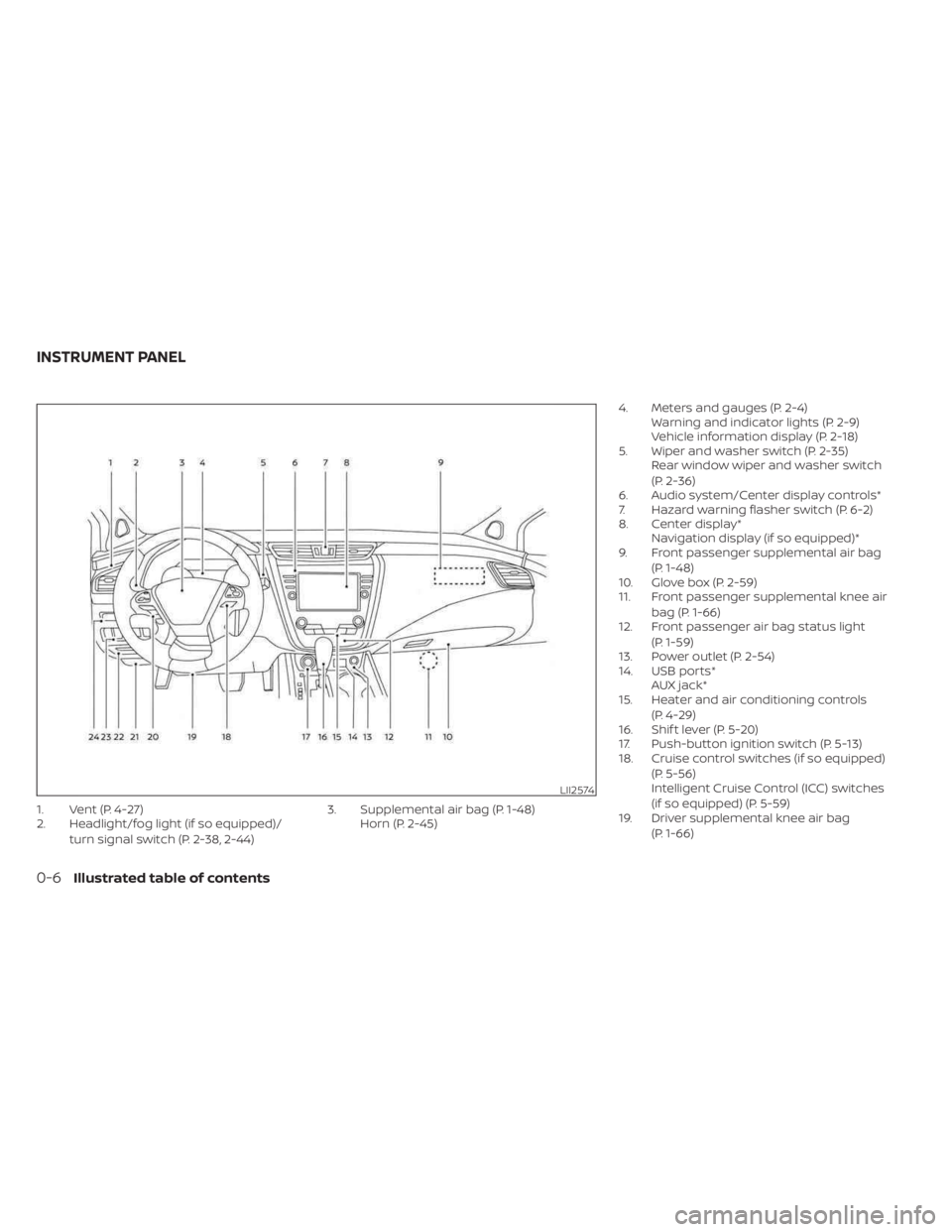
1. Vent (P. 4-27)
2. Headlight/fog light (if so equipped)/turn signal switch (P. 2-38, 2-44) 3. Supplemental air bag (P. 1-48)
Horn (P. 2-45) 4. Meters and gauges (P. 2-4)
Warning and indicator lights (P. 2-9)
Vehicle information display (P. 2-18)
5. Wiper and washer switch (P. 2-35) Rear window wiper and washer switch
(P. 2-36)
6. Audio system/Center display controls*
7. Hazard warning flasher switch (P. 6-2)
8. Center display* Navigation display (if so equipped)*
9. Front passenger supplemental air bag
(P. 1-48)
10. Glove box (P. 2-59)
11. Front passenger supplemental knee air
bag (P. 1-66)
12. Front passenger air bag status light
(P. 1-59)
13. Power outlet (P. 2-54)
14. USB ports* AUX jack*
15. Heater and air conditioning controls
(P. 4-29)
16. Shif t lever (P. 5-20)
17. Push-button ignition switch (P. 5-13)
18. Cruise control switches (if so equipped)
(P. 5-56)
Intelligent Cruise Control (ICC) switches
(if so equipped) (P. 5-59)
19. Driver supplemental knee air bag
(P. 1-66)
LII2574
INSTRUMENT PANEL
0-6Illustrated table of contents
Page 92 of 518
2 Instruments and controls
Instrument panel................................2-2
Meters and gauges .............................2-4
Speedometer and odometer .................2-4
Tachometer ..................................2-6
Engine coolant temperature gauge ..........2-6
Fuel gauge ................................... 2-7
Distance To Empty (DTE) ..................... 2-7
Eco Drive Report (if so equipped) .............2-8
Warning lights, indicator lights and audible
reminders .......................................2-9
Checking lights .............................. 2-10
Warning/Indicator lights (red) ...............2-10
Warning/Indicator lights (yellow) ............2-12
Warning/Indicator lights (other) .............2-17
Audible reminders ........................... 2-17
Vehicle information display .....................2-18
How to use the vehicle information
display ...................................... 2-18
Startup display .............................. 2-19
Settings ..................................... 2-19
Vehicle information display warnings
and indicators ............................... 2-26
Security systems ............................... 2-32
Vehicle security system .....................2-32
NISSAN Vehicle Immobilizer System .........2-34
Wiper and washer switch .......................2-35Switch operation
............................ 2-35
Rear switch operation .......................2-36
Rear window and outside mirror
(if so equipped) defroster switch ...............2-37
Headlight and turn signal switch ...............2-38
Headlight control switch ....................2-38
LED Daytime Running Lights (DRL)
system ...................................... 2-43
Instrument brightness control ..............2-43
Turn signal switch ........................... 2-44
Fog light switch (if so equipped) .............2-44
Horn ........................................... 2-45
Climate controlled seat switches
(if so equipped) ................................. 2-45
Heated seat switches (if so equipped) ..........2-47
Heated rear seat switches (if so equipped) .....2-48
Heated steering wheel switch (if so equipped) . . 2-49
Dynamic
driver assistance switch ..............2-50
Vehicle Dynamic Control (VDC) OFF switch .....2-50
Emergency call (SOS) button (if so equipped) . . . 2-51 Emergency support ......................... 2-51
Rear Door Alert ................................. 2-53
Power outlets .................................. 2-54
12v outlets .................................. 2-54
USB/iPod® charging ports ......................2-55
Page 94 of 518
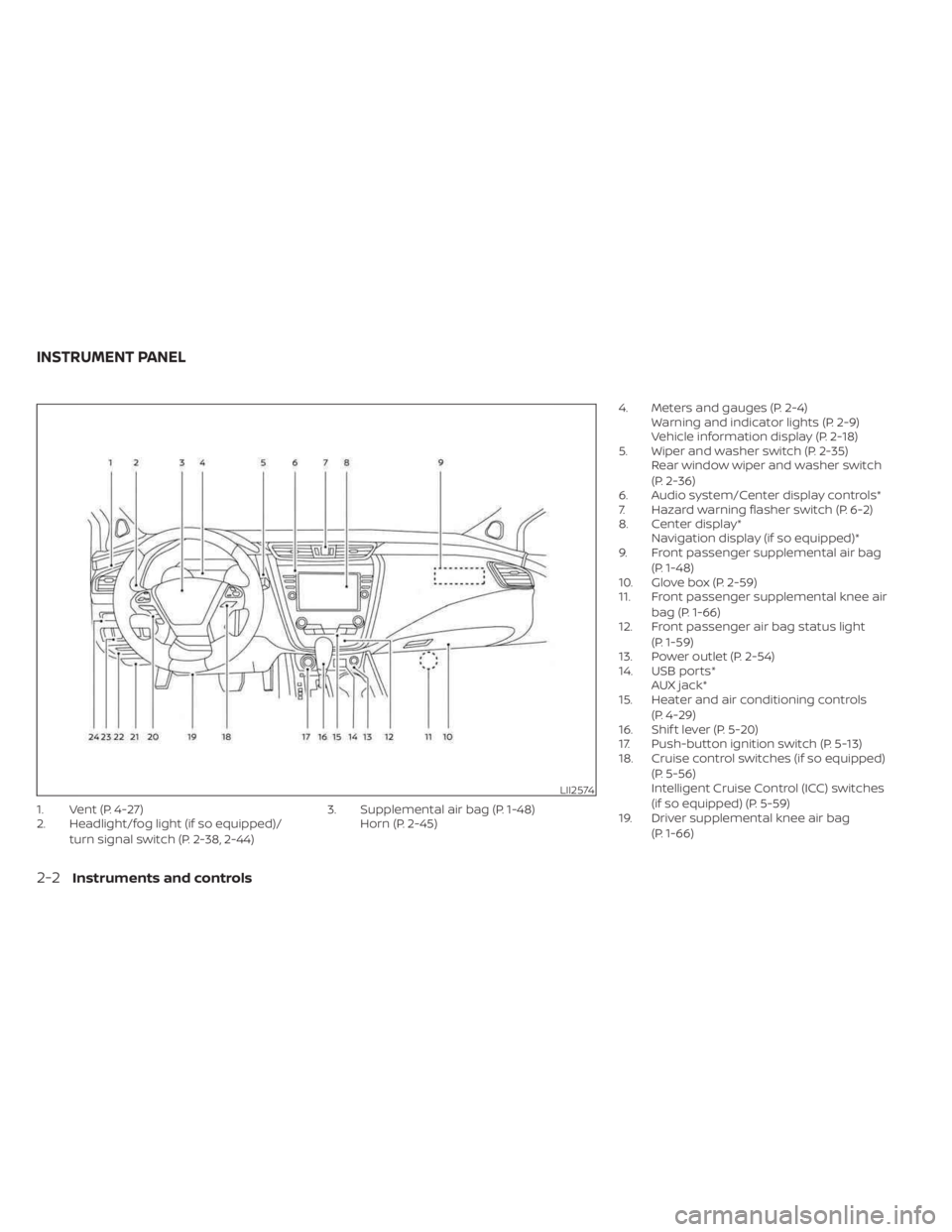
1. Vent (P. 4-27)
2. Headlight/fog light (if so equipped)/turn signal switch (P. 2-38, 2-44) 3. Supplemental air bag (P. 1-48)
Horn (P. 2-45) 4. Meters and gauges (P. 2-4)
Warning and indicator lights (P. 2-9)
Vehicle information display (P. 2-18)
5. Wiper and washer switch (P. 2-35) Rear window wiper and washer switch
(P. 2-36)
6. Audio system/Center display controls*
7. Hazard warning flasher switch (P. 6-2)
8. Center display* Navigation display (if so equipped)*
9. Front passenger supplemental air bag
(P. 1-48)
10. Glove box (P. 2-59)
11. Front passenger supplemental knee air
bag (P. 1-66)
12. Front passenger air bag status light
(P. 1-59)
13. Power outlet (P. 2-54)
14. USB ports* AUX jack*
15. Heater and air conditioning controls
(P. 4-29)
16. Shif t lever (P. 5-20)
17. Push-button ignition switch (P. 5-13)
18. Cruise control switches (if so equipped)
(P. 5-56)
Intelligent Cruise Control (ICC) switches
(if so equipped) (P. 5-59)
19. Driver supplemental knee air bag
(P. 1-66)
LII2574
INSTRUMENT PANEL
2-2Instruments and controls
Page 114 of 518
Vehicle Settings
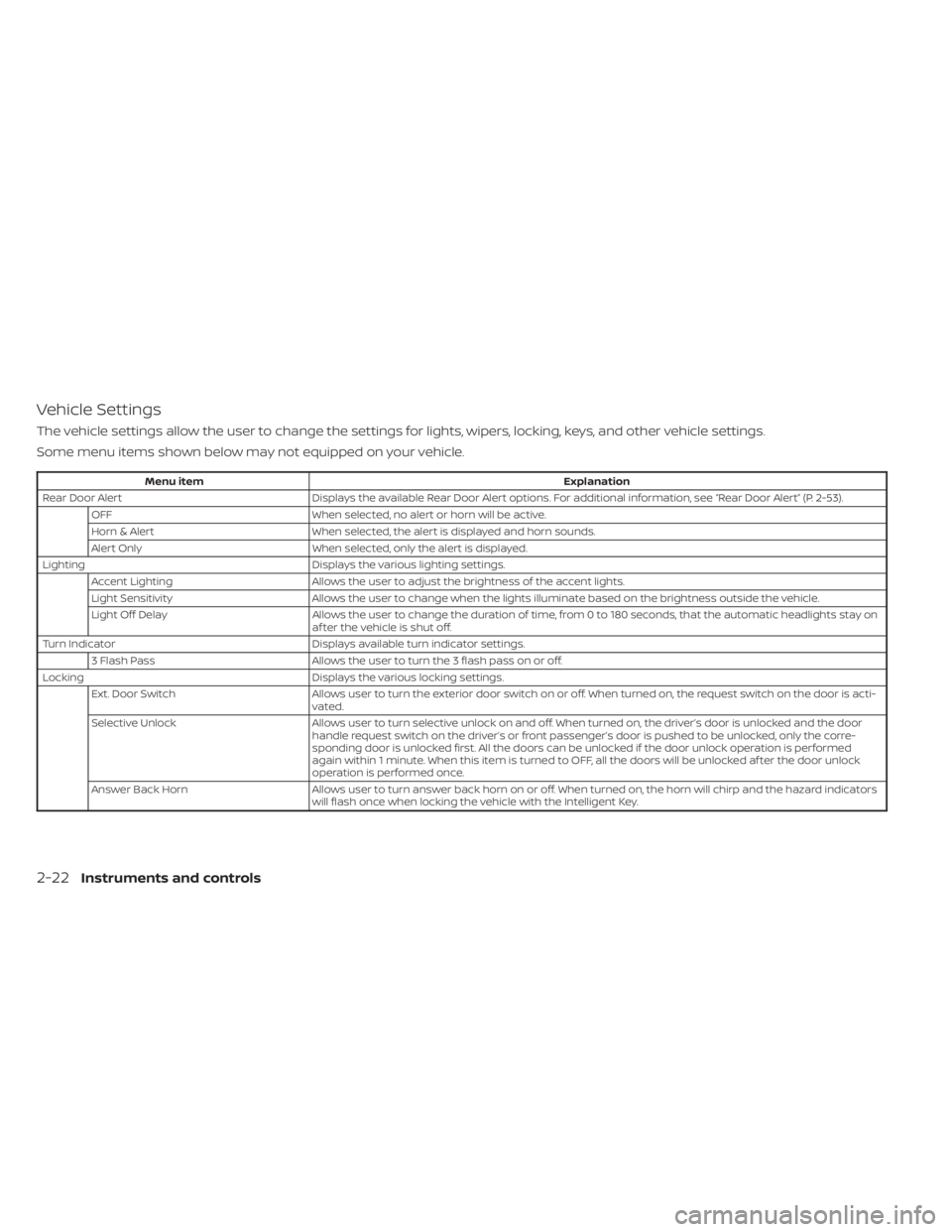
The vehicle settings allow the user to change the settings for lights, wipers, locking, keys, and other vehicle settings.
Some menu items shown below may not equipped on your vehicle.
Menu itemExplanation
Rear Door Alert Displays the available Rear Door Alert options. For additional information, see “Rear Door Alert” (P. 2-53).
OFF When selected, no alert or horn will be active.
Horn & Alert When selected, the alert is displayed and horn sounds.
Alert Only When selected, only the alert is displayed.
Lighting Displays the various lighting settings.
Accent Lighting Allows the user to adjust the brightness of the accent lights.
Light Sensitivity Allows the user to change when the lights illuminate based on the brightness outside the vehicle.
Light Off Delay Allows the user to change the duration of time, from 0 to 180 seconds, that the automatic headlights stay on
af ter the vehicle is shut off.
Turn Indicator Displays available turn indicator settings.
3 Flash Pass Allows the user to turn the 3 flash pass on or off.
Locking Displays the various locking settings.
Ext. Door Switch Allows user to turn the exterior door switch on or off. When turned on, the request switch on the door is acti-
vated.
Selective Unlock Allows user to turn selective unlock on and off. When turned on, the driver’s door is unlocked and the door
handle request switch on the driver’s or front passenger’s door is pushed to be unlocked, only the corre-
sponding door is unlocked first. All the doors can be unlocked if the door unlock operation is performed
again within 1 minute. When this item is turned to OFF, all the doors will be unlocked af ter the door unlock
operation is performed once.
Answer Back Horn Allows user to turn answer back horn on or off. When turned on, the horn will chirp and the hazard indicators
will flash once when locking the vehicle with the Intelligent Key.
2-22Instruments and controls
Page 119 of 518
NOTE:
This system is disabled until a driver en-
ables it using the vehicle information
display. For additional information, see
“How to use the vehicle information dis-
play ” (P. 2-18).
For additional information, see “Rear Door
Alert” (P. 2-53).
Rear Door Alert is activated
When the system is enabled, this message
appears when the Rear Door Alert system
is active and can remind the driver to check
the back seat.
• Using the steering wheel switch, a drivercan select “Dismiss Message” to clear the
display for a period of time. If no selection
is made, this message automatically
turns off af ter a period of time.
• Using the steering wheel switch, a driver can select “Disable Alert” to disable the
horn alert for the remainder of the cur-
rent trip.
WARNING
Selecting “Dismiss Message” during a
stop within a trip temporarily dis-
misses the message for that stop with-
out turning the system off. Alerts can
be provided for other stops during the
trip. Selecting “Disable Alert” turns off
the Rear Door Alert system for the re-
mainder of a trip and no audible alert
will be provided.
NOTE:
This system is disabled until a driver en-
ables it using the vehicle information
display. For additional information, see
“How to use the vehicle information dis-
play ” (P. 2-18).
For additional information, see “Rear Door
Alert” (P. 2-53).
Door/lif tgate Open
This warning appears when a door or the
lif tgate has been opened.
Headlight System Error: See Owner’s
Manual
This warning appears when the LED head-
lights are not functioning properly.
If this warning appears, have your system
checked. It is recommended that you visit a
NISSAN dealer for this service.
Loose Fuel Cap
This warning appears when the fuel-filler
cap is not tightened correctly af ter the ve-
hicle has been refueled. For additional in-
formation, see “Fuel-filler cap” (P. 3-29).
Low Fuel
This warning appears when the fuel level in
the fuel tank is getting low. Refuel as soon
as it is convenient, preferably before the
fuel gauge reaches 0 (Empty). There will be
a small reserve of fuel in the tank when
the fuel gauge needle reaches 0 (Empty).
Low Outside Temperature
This warning appears if the outside tem-
perature is below 37°F (3°C). The tempera-
ture can be changed to display in Celsius or
Fahrenheit. For additional information, see
“Settings” (P. 2-19).
Instruments and controls2-27
Page 125 of 518
The system helps deter vehicle thef t but
cannot prevent it, nor can it prevent the
thef t of interior or exterior vehicle compo-
nents in all situations. Always secure your
vehicle even if parking for a brief period.
Never leave your Intelligent Key in the ve-
hicle, and always lock the vehicle when un-
attended. Be aware of your surroundings,
and park in secure, well-lit areas whenever
possible.
Many devices offering additional protec-
tion, such as component locks, identifica-
tion markers, and tracking systems, are
available at auto supply stores and spe-
cialty shops. A NISSAN dealer may also offer
such equipment. Check with your insur-
ance company to see if you may be eligible
for discounts for various thef t protection
features.
How to arm the vehicle security
system
1.Close all windows and the moonroof (if so
equipped). The system can be armed
even if the windows and moonroof are
open.
2. Remove the Intelligent Key from the vehicle. 3. Close all doors, hood and lif tgate. Lock
all doors. The doors can be locked with
the Intelligent Key, door handle request
switch or power door lock switch.
Key fob operation:
4. Confirm that the
indicator light
comes on. Theindicator stays
illuminated for a period of time indicat-
ing that the system is in the pre-armed
phase.
The
indicator light will blink every
3 seconds once the security system is
armed.
If during the pre-armed phase one of
the following occurs, the system will not
arm:
• A door is opened with the release button with the Intelligent Key on your person.
• The doors are unlocked using the unlock button on the Intelligent Key.
• The ignition switch is placed in the ACC or ON position. •
Even when the driver and/or passen-
gers are in the vehicle, the system will
activate when all the doors, hood and
lif tgate are locked with the ignition
switch placed in the LOCK position.
When placing the ignition switch in the
ACC or ON position, the system will be
released.
Vehicle security system activation
The vehicle security system will give the
following alarm:
• The turn signals blink and the horn sounds intermittently.
• The alarm automatically turns off af ter a period of time. However, the alarm reacti-
vates if the vehicle is tampered with
again. The alarm can be shut off by un-
locking the driver's door or lif tgate by
pressing the
button on the Intelli-
gent Key.
The alarm is activated by:
• Opening the door or lif tgate without us- ing the Intelligent Key (even if the door is
unlocked by releasing the door inside
lock switch).
Instruments and controls2-33
Page 137 of 518
The headlights must be on and the low
beams selected for the fog lights to oper-
ate. The fog lights automatically turn off
when the high beam headlights are
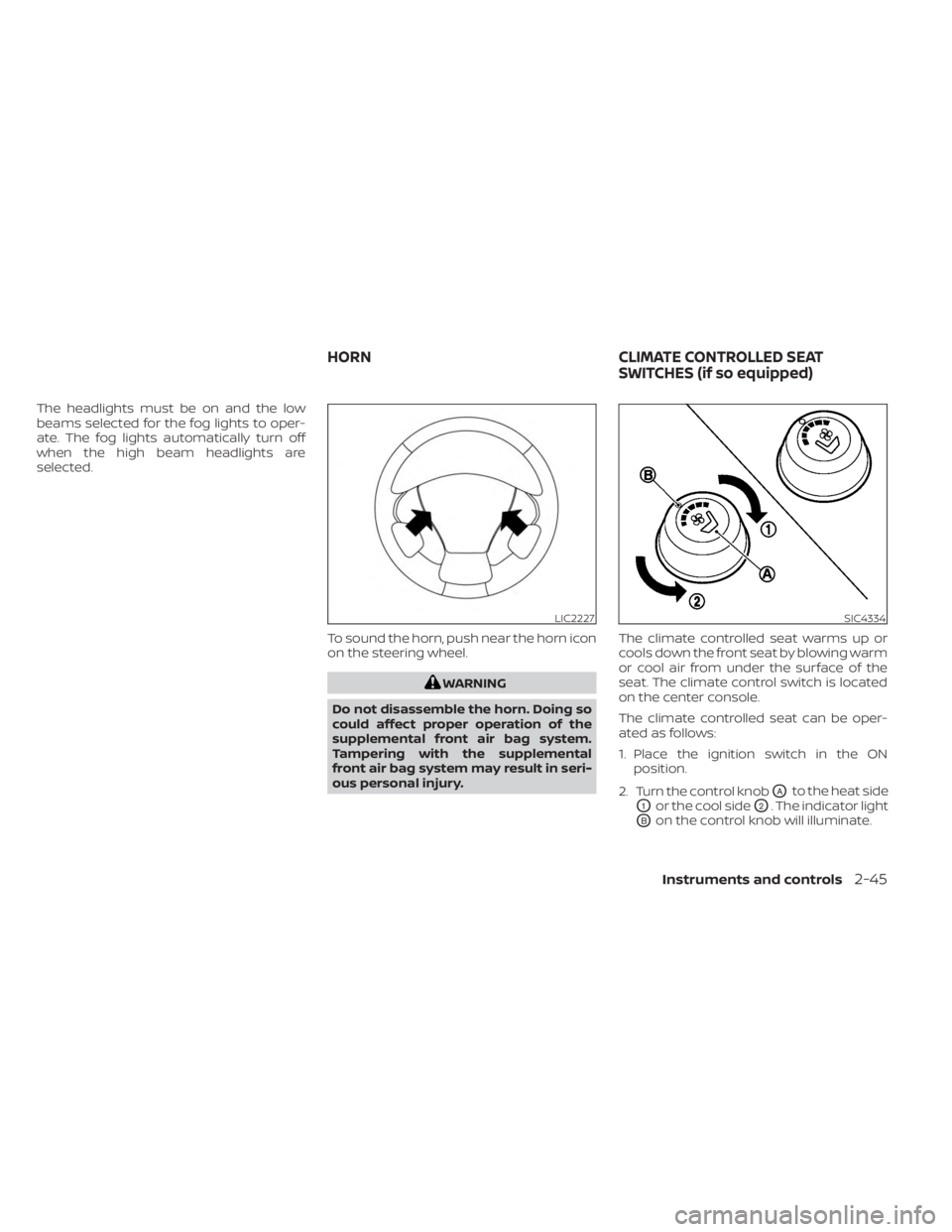
selected.To sound the horn, push near the horn icon
on the steering wheel.
WARNING
Do not disassemble the horn. Doing so
could affect proper operation of the
supplemental front air bag system.
Tampering with the supplemental
front air bag system may result in seri-
ous personal injury. The climate controlled seat warms up or
cools down the front seat by blowing warm
or cool air from under the surface of the
seat. The climate control switch is located
on the center console.
The climate controlled seat can be oper-
ated as follows:
1. Place the ignition switch in the ON
position.
2. Turn the control knob
OAto the heat side
O1or the cool sideO2. The indicator light
OBon the control knob will illuminate.
LIC2227SIC4334
HORN CLIMATE CONTROLLED SEAT
SWITCHES (if so equipped)
Instruments and controls2-45
Page 145 of 518
The Rear Door Alert system functions un-
der certain conditions to indicate there
may be an object or passenger in the rear
seat(s). Check the seat(s) before exiting the
vehicle.
The Rear Door Alert system is initially dis-
abled. The driver can enable the system
using the vehicle information display. For
additional information, see “Vehicle infor-
mation display warnings and indicators”
(P. 2-26).
When the system is enabled:
• The system is activated when a rear dooris opened and closed within 10 minutes of
the vehicle being driven. When the driver
door is closed and the system is acti-
vated, a visual message appears in the
vehicle information display. For additional
information, see “Rear Door Alert is acti-
vated” (P. 2-27).
• If a rear door is opened and closed but the vehicle is not driven within approxi-
mately 10 minutes, the system will not be
activated. A rear door must be opened
and closed and the car driven within 10
minutes for the system to activate. When the Rear Door Alert system is acti-
vated:
• When the driver puts the vehicle in the P
(Park) position, a notification message
appears in the vehicle information dis-
play with the options to “Dismiss Mes-
sage” or “Disable Alert” if desired.• Select “Disable Alert” to temporarily disable for that stop.
• No selection or ‘Dismiss Message” will keep the alert enabled for that stop.
• If the alert is enabled when a driver exits the vehicle, a message will appear in the
vehicle information display that states
“Check Rear Seat for All Articles.”
If “Horn & Alert” setting is selected:
• An audible horn sound will occur af ter a short time unless a rear door is
opened and closed within a short time
to deactivate the alert.
• If the doors are locked before the alert is deactivated by opening a rear door,
the horn will sound.
• If the lif tgate is opened before a rear door is opened, the horn will be de-
layed until af ter the lif tgate is closed.NOTE:
If “Alert Only ” setting is selected, the
message alert will still be shown in the
vehicle information display but the horn
will not sound.
WARNING
• If the driver selects “Disable Alert”, no
audible alert will be provided regard-
less of rear door open/close status.
• There may be times when there is an
object or passenger in the rear
seat(s) but the audible alert does not
sound. For example, this may occur if
rear seat passengers enter or exit the
vehicle during a trip.
• The system does not directly detect
objects or passengers in the rear
seat(s). Instead, it can detect when a
rear door is opened and closed, indi-
cating that there may be something
in the rear seat(s).
NOTE:
There may be times when the horn
sounds but there are no objects or pas-
sengers in the rear seat(s).
For additional information, see “Rear Door
Alert is activated” (P. 2-27).
REAR DOOR ALERT
Instruments and controls2-53
Page 182 of 518
Locking doors
1. Place the ignition switch in the LOCKposition.
2. Close all doors.
3. Press the
button on the Intelli-
gent Key.
4. The hazard indicator lights flash twice and the horn beeps once.
5. All doors will be locked.
WARNING
Af ter locking the doors using the Intel-
ligent Key, be sure that the doors have
been securely locked by operating the
door handles. Failure to follow these in-
structions may result in inadvertently
unlocking the doors, which may de-
crease the safety and security of your
vehicle.
Unlocking doors
1. Press thebutton on the Intelligent
Key to unlock the driver’s door.
2. The hazard indicator lights flash once and the driver’s door unlocks. 3. Press the
button again within 1
minute to unlock all doors.
NOTE:
The Selective Unlock feature can be
changed using the “Vehicle Settings”
menu on the vehicle information display.
For additional information, see “Vehicle
information display ” (P. 2-18).
All doors will be locked automatically un-
less one of the following operations is per-
formed within 1 minute af ter pressing the
button:
• Opening any doors.
• Pushing the ignition switch.
Using the interior lights
The interior lights illuminate for a period of
time when a door is unlocked and the inte-
rior light switch is in the DOOR position.
The lights can be turned off without waiting
by performing one of the following
operations:
• Placing the ignition switch in the ON position.
• Locking the doors with the Intelligent Key.
• Switching the interior lights switch to the “OFF” position. For additional information, see “Interior
lights” (P. 2-69).
Opening windows
The Intelligent Key allows you to simultane-
ously open windows equipped with auto-
matic operation.
To open the windows, press and hold the
button on the Intelligent Key for
lon-
ger than 3 seconds.
The door windows will lower while holding
down the
button on the Intelligent
Key.
NOTE:
The windows will stop lowering at the
time thebutton is released.
3-14Pre-driving checks and adjustments
Page 183 of 518
Closing windows (if so equipped)
WARNING
When the closing feature is operating,
parts of the body could become
trapped in the closing area of the side
window. There is a risk of injury. Ob-
serve the complete closing procedure
when the closing feature is operating.
When closing, make sure that no parts
of the body are in the closing area. No
one/no pets should be lef t in the car
when locking doors, raising windows
and leaving.
The Intelligent Key allows you to simultane-
ously close windows equipped with auto-
matic operation.
All doors must be closed and the key must
be outside the vehicle.
To close the windows, press and hold the
button on the Intelligent Key for lon-
ger than 3 seconds af ter all doors are
locked.
The door windows will close while pressing
the
button on the Intelligent Key.
To interrupt closing of the windows, release
the
button.
Releasing the rear lif tgate (if so
equipped)
The rear lif tgate can be opened and closed
by performing the following:
• Press the
button for longer than 1
second to open the rear lif tgate.
• Press the
button again for longer
than 1 second to close the rear lif tgate.
When the
button is pressed during
the open or close process, the lif tgate
motors will stop. When the
button is
pressed again for longer than 1 second the
lif tgate will reverse direction.
Using the panic alarm
If you are near your vehicle and feel threat-
ened, you may activate the panic alarm to
call attention by pressing and holding the
button on the Intelligent Key for lon-
ger than 0.5 seconds.
The panic alarm and headlights will stay on
for a period of time.
The panic alarm stops when:
• It has run for a period of time.
• Any button is pressed on the Intelligent Key. • The request switch on the driver or pas-
senger door is pushed and the Intelligent
Key is in range of the door handle.
Answer back horn feature
If desired, the answer back horn feature
can be deactivated using the Intelligent
Key. When it is deactivated and the
button is pressed, the hazard indicator
lights flash twice. When thebutton is
pressed, neither the hazard indicator lights
nor the horn operates.
NOTE:
If you change the Answer Back Horn
feature with the Intelligent Key, the ve-
hicle information display screen will
show the current mode af ter the igni-
tion switch has been cycled from the
OFF to the ON position. The vehicle in-
formation display screen can also be
used to change the answer back horn
mode.
For additional information, see “Ve-
hicle settings” (P. 2-18).
Pre-driving checks and adjustments
3-15