light NISSAN MURANO PLATINUM 2015 Service Manual
[x] Cancel search | Manufacturer: NISSAN, Model Year: 2015, Model line: MURANO PLATINUM, Model: NISSAN MURANO PLATINUM 2015Pages: 424, PDF Size: 4.49 MB
Page 282 of 424
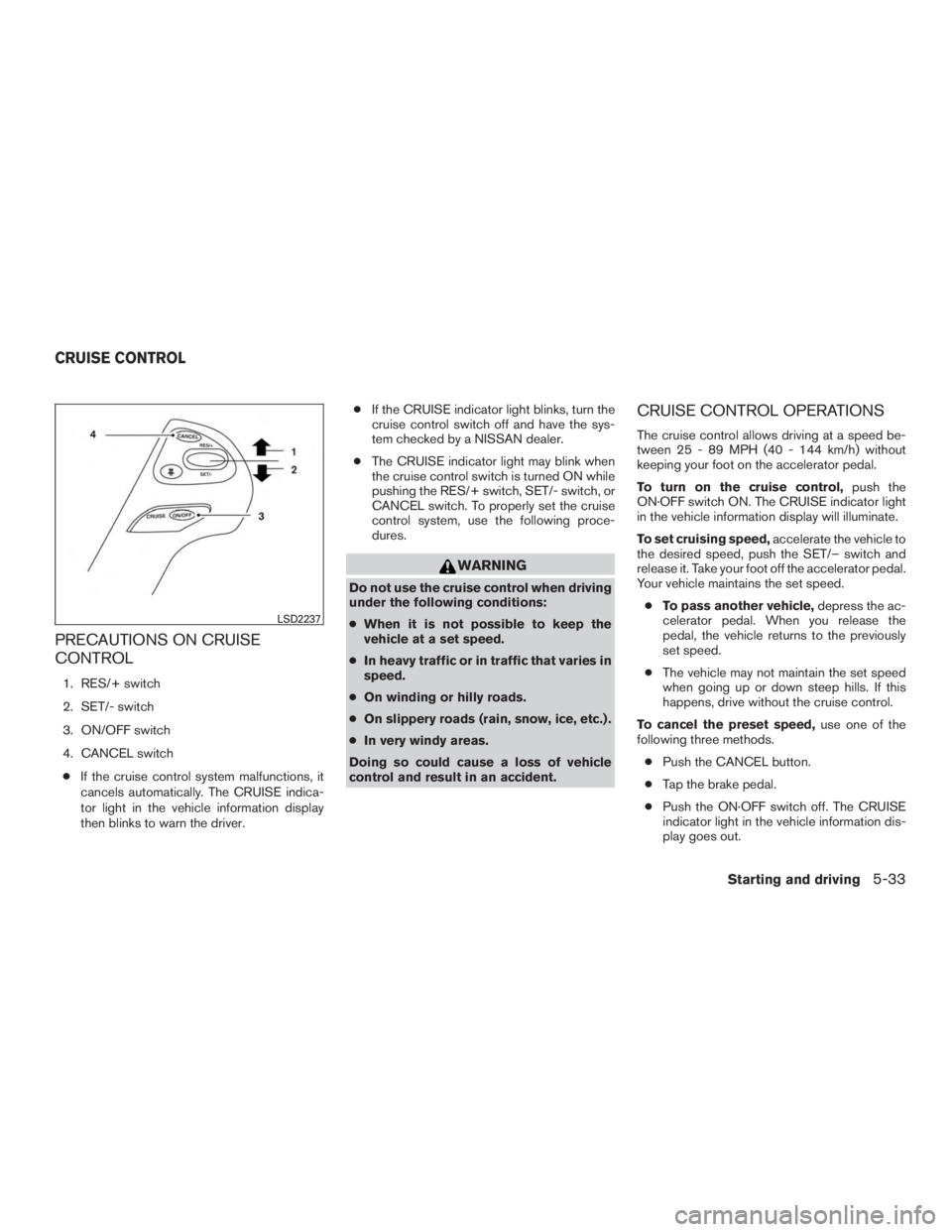
PRECAUTIONS ON CRUISE
CONTROL
1. RES/+ switch
2. SET/- switch
3. ON/OFF switch
4. CANCEL switch● If the cruise control system malfunctions, it
cancels automatically. The CRUISE indica-
tor light in the vehicle information display
then blinks to warn the driver. ●
If the CRUISE indicator light blinks, turn the
cruise control switch off and have the sys-
tem checked by a NISSAN dealer.
● The CRUISE indicator light may blink when
the cruise control switch is turned ON while
pushing the RES/+ switch, SET/- switch, or
CANCEL switch. To properly set the cruise
control system, use the following proce-
dures.
Page 283 of 424
The cruise control is automatically canceled if:● you depress the brake pedal while pushing
the RES/+ or SET/– switch. The preset
speed is deleted from memory.
● the vehicle slows down more than 8 MPH
(13 km/h) below the set speed.
● you move the shift lever to N (Neutral) .
To reset at a faster cruising speed, use one of
the following three methods.
● Depress the accelerator pedal. When the
vehicle attains the desired speed, push and
release the SET/– switch.
● Push and hold the RES/+ switch. When the
vehicle attains the speed you desire, release
the switch.
● Push and release the RES/+ switch. Each
time you do this, the set speed increases by
about 1 MPH (1.6 km/h).
To reset at a slower cruising speed, use one
of the following three methods.
● Lightly tap the brake pedal. When the ve-
hicle attains the desired speed, push the
SET/– switch and release it.
● Push and hold the SET/– switch. Release
the switch when the vehicle slows to the
desired speed. ●
Push and release the SET/– switch. Each
time you do this, the set speed decreases by
about 1 MPH (1.6 km/h).
To resume the preset speed, push and re-
lease the RES/+ switch. The vehicle returns to
the last set cruising speed when the vehicle
speed is over 25 MPH (40 km/h).
To turn off the cruise control, use one of the
following three methods.
● Push the CANCEL button.
● Tap the brake pedal.
● Push the ON·OFF switch off. The CRUISE
indicator light in the vehicle information dis-
play goes out. The ICC system maintains a selected distance
from the vehicle in front of you within the speed
range 0 to 90 MPH (0 to 144 km/h) up to the set
speed. The set speed can be selected by the
driver between 20 to 90 MPH (32 to 144 km/h).
The vehicle travels at a set speed when the road
ahead is clear.
For maintaining a selected distance between
your vehicle and the vehicle in front of you up to
the preset speed.
Page 302 of 424
WARNING
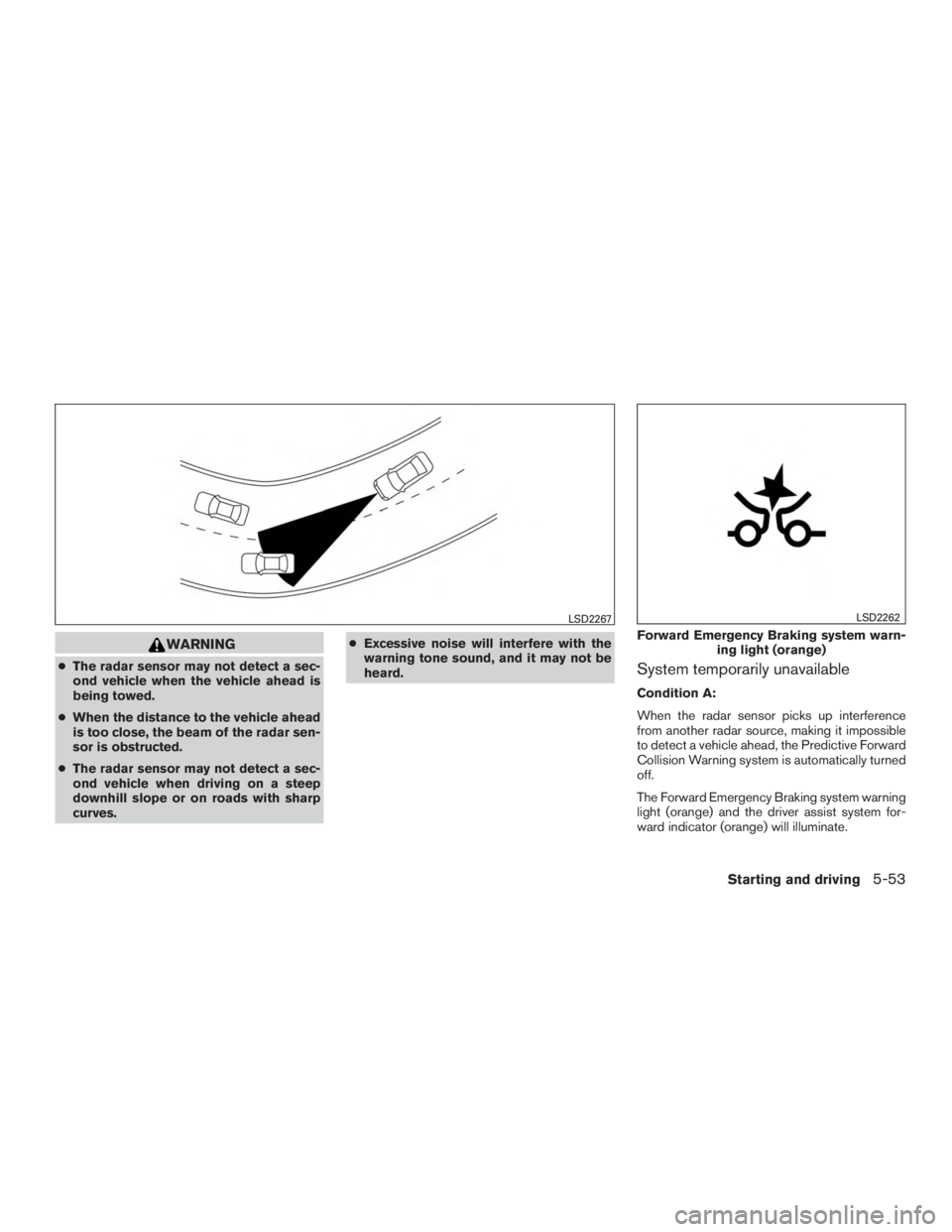
●The radar sensor may not detect a sec-
ond vehicle when the vehicle ahead is
being towed.
● When the distance to the vehicle ahead
is too close, the beam of the radar sen-
sor is obstructed.
● The radar sensor may not detect a sec-
ond vehicle when driving on a steep
downhill slope or on roads with sharp
curves. ●
Excessive noise will interfere with the
warning tone sound, and it may not be
heard.System temporarily unavailable
Condition A:
When the radar sensor picks up interference
from another radar source, making it impossible
to detect a vehicle ahead, the Predictive Forward
Collision Warning system is automatically turned
off.
The Forward Emergency Braking system warning
light (orange) and the driver assist system for-
ward indicator (orange) will illuminate.
Page 305 of 424
WARNING
●The Forward Emergency Braking sys-
tem is a supplemental aid to the driver.
It is not a replacement for the driver’s
attention to traffic conditions or re-
sponsibility to drive safely. It cannot
prevent accidents due to carelessness
or dangerous driving techniques.
● The Forward Emergency Braking sys-
tem does not function in all driving,
traffic, weather and road conditions.
SYSTEM OPERATION
The Forward Emergency Braking system will
function when your vehicle is driven at speeds
above approximately 3 MPH (5 km/h).
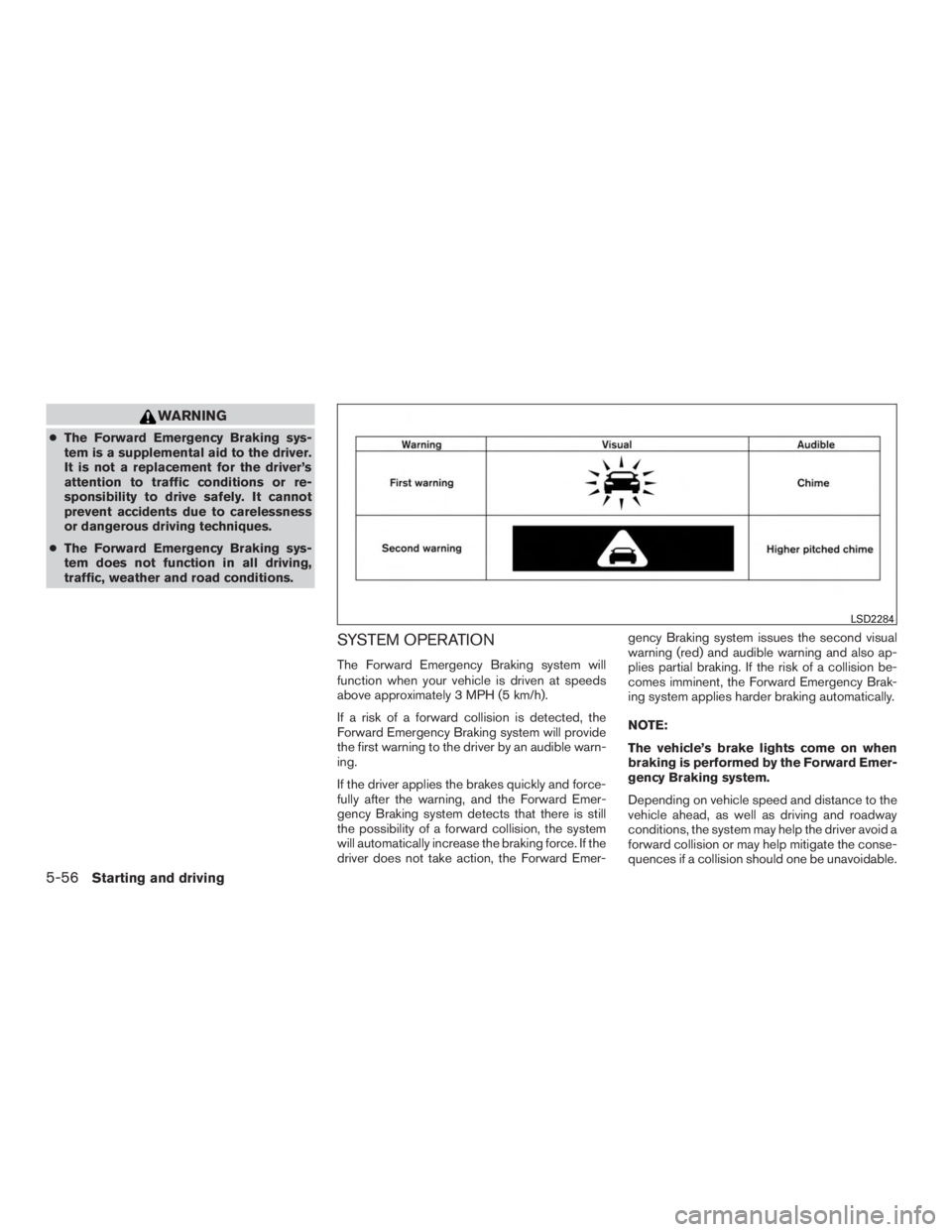
If a risk of a forward collision is detected, the
Forward Emergency Braking system will provide
the first warning to the driver by an audible warn-
ing.
If the driver applies the brakes quickly and force-
fully after the warning, and the Forward Emer-
gency Braking system detects that there is still
the possibility of a forward collision, the system
will automatically increase the braking force. If the
driver does not take action, the Forward Emer- gency Braking system issues the second visual
warning (red) and audible warning and also ap-
plies partial braking. If the risk of a collision be-
comes imminent, the Forward Emergency Brak-
ing system applies harder braking automatically.
NOTE:
The vehicle’s brake lights come on when
braking is performed by the Forward Emer-
gency Braking system.
Depending on vehicle speed and distance to the
vehicle ahead, as well as driving and roadway
conditions, the system may help the driver avoid a
forward collision or may help mitigate the conse-
quences if a collision should one be unavoidable.
Page 308 of 424
Action to take:
If the warning light (orange) comes on, park the
vehicle in a safe location, turn the engine off and
restart the engine. If the warning light continues
to illuminate, have the Forward Emergency Brak-
ing system checked by a NISSAN dealer.
Radar certificate
FCC Notice:
For USA:
User Manual statement according to §15.19:
This device complies with part 15 of the
FCC Rules.
Operation is subject to the following two
conditions:1. This device may not cause harmful in-
terference, and
2. This device must accept any interfer-
ence received, including interference
that may cause undesired operation. For Canada:
This device complies with Industry Canada
license-exempt RSS standard(s) . Operation is
subject to the following two conditions:
1. This device must not cause interfer-
ence, and
2. This device must accept any interfer-
ence, including interference that may
cause undesired operation of the de-
vice.
Le présent appareil est conforme aux CNR
d’Industrie Canada applicables aux appareils ra-
dio exempts de licence. L’exploitation est autori-
sée aux deux conditions suivantes: 1. L’appareil ne doit pas produire de
brouillage, et
2. L’utilisateur de l’appareil doit accepter
tout brouillage radioélectrique subi,
même si le brouillage est susceptible
d’en compromettre le fonctionnement.
Page 317 of 424
WARNING
●If the engine is not running or is turned
off while driving, the power assist for
the steering will not work. Steering will
be harder to operate.
● When the power steering warning light
illuminates with the engine running,
there will be no power assist for the
steering. You will still have control of
the vehicle, but the steering will be
much harder to operate. Have the power
steering system checked by a NISSAN
dealer.
The power steering system is designed to pro-
vide power assistance while driving to operate
the steering wheel with light force.
When the steering wheel is operated repeatedly
or continuously while parking or driving at a very
low speed, the power assist for the steering
wheel will be reduced. This is to prevent over-
heating of the power steering system and protect
it from getting damaged. While the power assist
is reduced, steering wheel operation will become
heavy. If the steering wheel operation is still per-
formed, the power steering may stop and the
power steering warning light will illuminate. In a
safe location, stop the engine and push the igni-
tion switch to the OFF position. The temperature of the power steering system will go down after a
period of time and the power assist level will
return to normal after starting the engine. The
power steering warning light will go off. Avoid
repeating such steering wheel operations that
could cause the power steering system to over-
heat.
You may hear a noise from the front of the vehicle
when the steering wheel is operated. This is a
normal operational noise and is not a malfunction.
If the power steering warning light illuminates
while the engine is running, it may indicate the
power steering system is not functioning properly
and may need servicing. Have the power steering
system checked by a NISSAN dealer.
When the power steering warning light illumi-
nates with the engine running, the power assist
for the steering will cease operation but you will
still have control of the vehicle. At this time,
greater steering efforts are required to operate
the steering wheel, especially in sharp turns and
at low speeds.
The brake system has two separate hydraulic
circuits. If one circuit malfunctions, you will still
have braking at two wheels.
BRAKE PRECAUTIONS
Vacuum assisted brakes
The brake booster aids braking by using engine
vacuum. If the engine stops, you can stop the
vehicle by depressing the brake pedal. However,
greater foot pressure on the brake pedal will be
required to stop the vehicle and stopping dis-
tance will be longer.
Using the brakes
Avoid resting your foot on the brake pedal while
driving. This will overheat the brakes, wear out the
brake pads faster, and reduce gas mileage.
To help reduce brake wear and to prevent the
brakes from overheating, reduce speed and
downshift to a lower gear before going down a
slope or long grade. Overheated brakes may
reduce braking performance and could result in
loss of vehicle control.
POWER STEERING
BRAKE SYSTEM
5-68Starting and driving
Page 318 of 424
WARNING
●While driving on a slippery surface, be
careful when braking, accelerating or
downshifting. Abrupt braking or accel-
erating could cause the wheels to skid
and result in an accident.
● If the engine is not running or is turned
off while driving, the power assist for
the brakes will not work. Braking will be
harder.
Wet brakes
When the vehicle is washed or driven through
water, the brakes may get wet. As a result, your
braking distance will be longer and the vehicle
may pull to one side during braking.
To dry the brakes, drive the vehicle at a safe
speed while lightly pressing the brake pedal to
heat up the brakes. Do this until the brakes return
to normal. Avoid driving the vehicle at high
speeds until the brakes function correctly.
Parking brake break-in
Break-in the parking brake shoes whenever the
effect of the parking brake is weakened or when-
ever the parking brake shoes and/or drum/rotors
are replaced, in order to assure the best brake
performance. This procedure is described in the vehicle service
manual and can be performed by a NISSAN
dealer.
ANTI-LOCK BRAKING SYSTEM
(ABS)
Page 319 of 424
WARNING
Do not pump the brake pedal. Doing so
may result in increased stopping
distances.
Self-test feature
The ABS includes electronic sensors, electric
pumps, hydraulic solenoids and a computer. The
computer has a built-in diagnostic feature that
tests the system each time you start the engine
and move the vehicle at a low speed in forward or
reverse. When the self-test occurs, you may hear
a “clunk” noise and/or feel a pulsation in the brake
pedal. This is normal and does not indicate a
malfunction. If the computer senses a malfunc-
tion, it switches the ABS off and illuminates the
ABS warning light on the instrument panel. The
brake system then operates normally but without
anti-lock assistance.
If the ABS warning light illuminates during the
self-test or while driving, have the vehicle
checked by a NISSAN dealer.
Normal operation
The ABS operates at speeds above3-6MPH(5
- 10 km/h). The speed varies according to road
conditions.When the ABS senses that one or more wheels
are close to locking up, the actuator rapidly ap-
plies and releases hydraulic pressure. This action
is similar to pumping the brakes very quickly. You
may feel a pulsation in the brake pedal and hear a
noise from under the hood or feel a vibration from
the actuator when it is operating. This is normal
and indicates that the ABS is operating properly.
However, the pulsation may indicate that road
conditions are hazardous and extra care is re-
quired while driving.
BRAKE ASSIST
When the force applied to the brake pedal ex-
ceeds a certain level, the brake assist is activated
generating greater braking force than a conven-
tional brake booster even with light pedal force.
Page 325 of 424
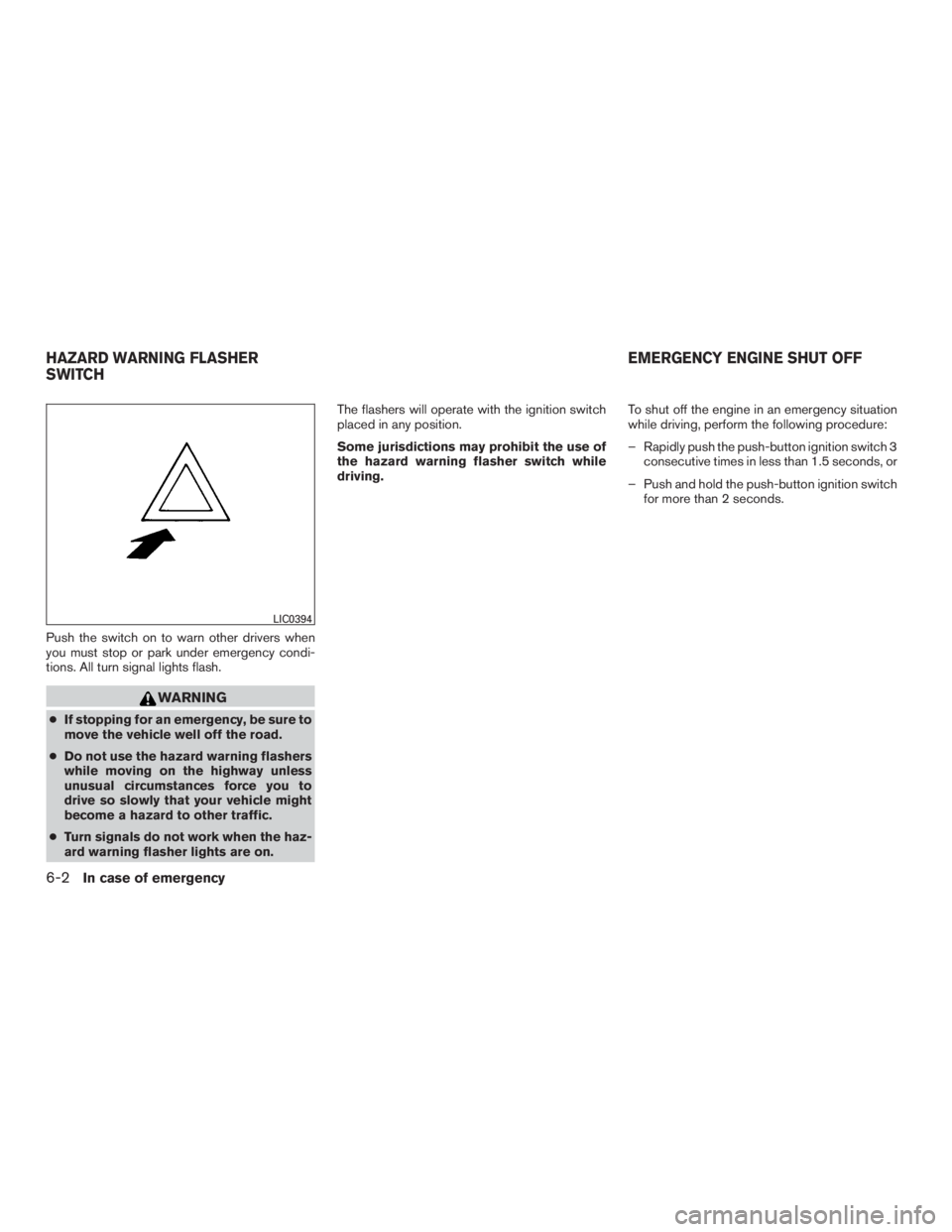
Push the switch on to warn other drivers when
you must stop or park under emergency condi-
tions. All turn signal lights flash.
Page 326 of 424
TIRE PRESSURE MONITORING
SYSTEM (TPMS)
This vehicle is equipped with TPMS. It monitors
tire pressure of all tires except the spare. When
the low tire pressure warning light is lit, and the
Tire Pressure Low - Add Air warning appears in
the vehicle information display, one or more of
your tires is significantly under-inflated. If
equipped, the system also displays pressure of
all tires (except the spare tire) on the display
screen by sending a signal from a sensor that is
installed in each wheel. If the vehicle is being
driven with low tire pressure, the TPMS will acti-
vate and warn you of it by the low tire pressure
warning light. This system will activate only when
the vehicle is driven at speeds above 16 mph
(25 km/h). For additional information, refer to
“Warning/indicator lights and audible reminders”
in the “Instruments and controls” section and
“Tire Pressure Monitoring System (TPMS)” in the
“Starting and driving” section of this manual.