Back seat NISSAN NOTE 2006 User Guide
[x] Cancel search | Manufacturer: NISSAN, Model Year: 2006, Model line: NOTE, Model: NISSAN NOTE 2006Pages: 235, PDF Size: 2.29 MB
Page 41 of 235
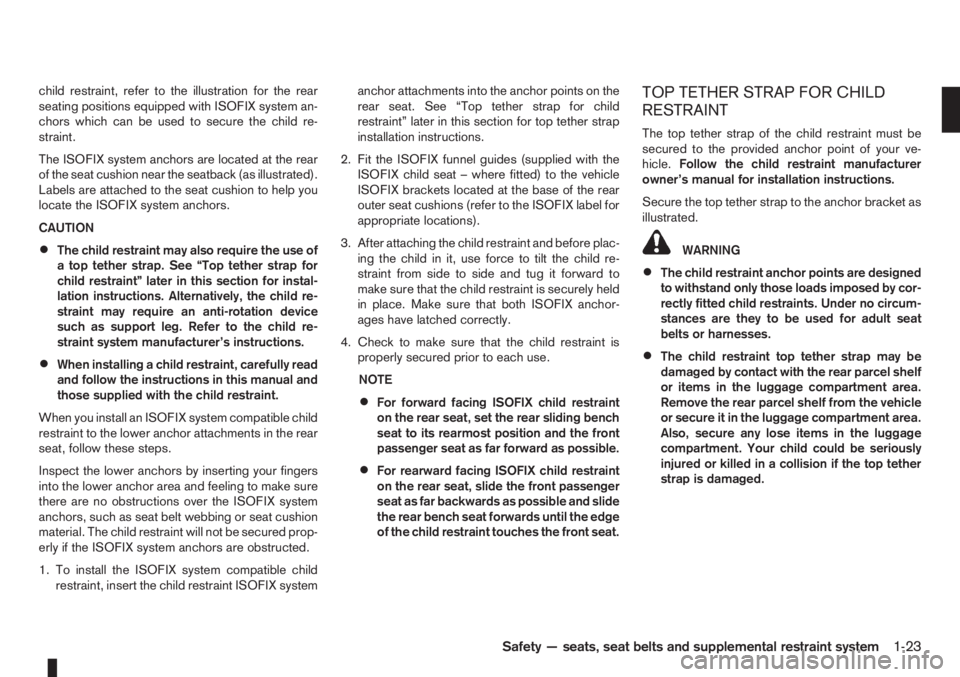
child restraint, refer to the illustration for the rear
seating positions equipped with ISOFIX system an-
chors which can be used to secure the child re-
straint.
The ISOFIX system anchors are located at the rear
of the seat cushion near the seatback (as illustrated).
Labels are attached to the seat cushion to help you
locate the ISOFIX system anchors.
CAUTION
•The child restraint may also require the use of
a top tether strap. See “Top tether strap for
child restraint” later in this section for instal-
lation instructions. Alternatively, the child re-
straint may require an anti-rotation device
such as support leg. Refer to the child re-
straint system manufacturer’s instructions.
•When installing a child restraint, carefully read
and follow the instructions in this manual and
those supplied with the child restraint.
When you install an ISOFIX system compatible child
restraint to the lower anchor attachments in the rear
seat, follow these steps.
Inspect the lower anchors by inserting your fingers
into the lower anchor area and feeling to make sure
there are no obstructions over the ISOFIX system
anchors, such as seat belt webbing or seat cushion
material. The child restraint will not be secured prop-
erly if the ISOFIX system anchors are obstructed.
1. To install the ISOFIX system compatible child
restraint, insert the child restraint ISOFIX systemanchor attachments into the anchor points on the
rear seat. See “Top tether strap for child
restraint” later in this section for top tether strap
installation instructions.
2. Fit the ISOFIX funnel guides (supplied with the
ISOFIX child seat – where fitted) to the vehicle
ISOFIX brackets located at the base of the rear
outer seat cushions (refer to the ISOFIX label for
appropriate locations).
3. After attaching the child restraint and before plac-
ing the child in it, use force to tilt the child re-
straint from side to side and tug it forward to
make sure that the child restraint is securely held
in place. Make sure that both ISOFIX anchor-
ages have latched correctly.
4. Check to make sure that the child restraint is
properly secured prior to each use.
NOTE
•For forward facing ISOFIX child restraint
on the rear seat, set the rear sliding bench
seat to its rearmost position and the front
passenger seat as far forward as possible.
•For rearward facing ISOFIX child restraint
on the rear seat, slide the front passenger
seat as far backwards as possible and slide
the rear bench seat forwards until the edge
of the child restraint touches the front seat.
TOP TETHER STRAP FOR CHILD
RESTRAINT
The top tether strap of the child restraint must be
secured to the provided anchor point of your ve-
hicle.Follow the child restraint manufacturer
owner’s manual for installation instructions.
Secure the top tether strap to the anchor bracket as
illustrated.
WARNING
•The child restraint anchor points are designed
to withstand only those loads imposed by cor-
rectly fitted child restraints. Under no circum-
stances are they to be used for adult seat
belts or harnesses.
•The child restraint top tether strap may be
damaged by contact with the rear parcel shelf
or items in the luggage compartment area.
Remove the rear parcel shelf from the vehicle
or secure it in the luggage compartment area.
Also, secure any lose items in the luggage
compartment. Your child could be seriously
injured or killed in a collision if the top tether
strap is damaged.
Safety — seats, seat belts and supplemental restraint system1-23
Page 42 of 235
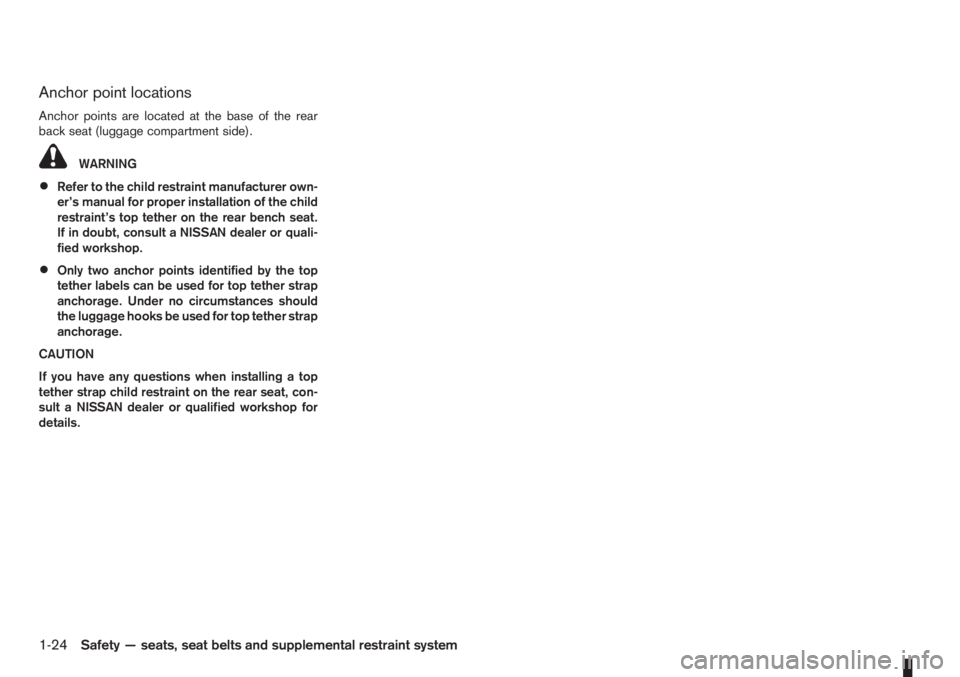
Anchor point locations
Anchor points are located at the base of the rear
back seat (luggage compartment side).
WARNING
•Refer to the child restraint manufacturer own-
er’s manual for proper installation of the child
restraint’s top tether on the rear bench seat.
If in doubt, consult a NISSAN dealer or quali-
fied workshop.
•Only two anchor points identified by the top
tether labels can be used for top tether strap
anchorage. Under no circumstances should
the luggage hooks be used for top tether strap
anchorage.
CAUTION
If you have any questions when installing a top
tether strap child restraint on the rear seat, con-
sult a NISSAN dealer or qualified workshop for
details.
1-24Safety — seats, seat belts and supplemental restraint system
Page 66 of 235
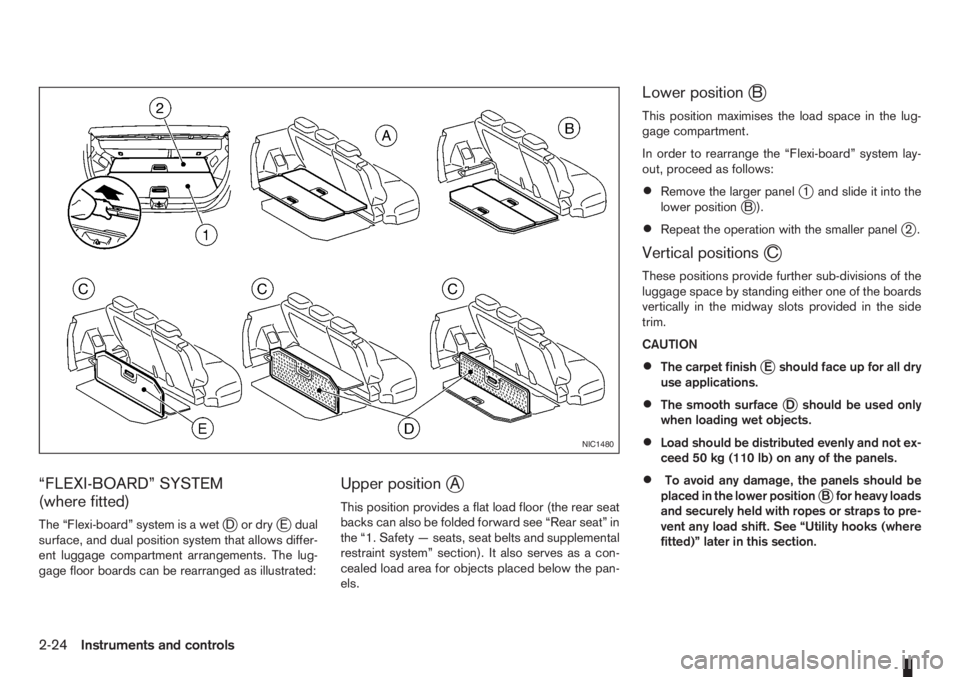
“FLEXI-BOARD” SYSTEM
(where fitted)
The “Flexi-board” system is a wetjDordryjE dual
surface, and dual position system that allows differ-
ent luggage compartment arrangements. The lug-
gage floor boards can be rearranged as illustrated:
Upper positionjA
This position provides a flat load floor (the rear seat
backs can also be folded forward see “Rear seat” in
the “1. Safety — seats, seat belts and supplemental
restraint system” section). It also serves as a con-
cealed load area for objects placed below the pan-
els.
Lower positionjB
This position maximises the load space in the lug-
gage compartment.
In order to rearrange the “Flexi-board” system lay-
out, proceed as follows:
•Remove the larger panelj1 and slide it into the
lower positionjB).
•Repeat the operation with the smaller panelj2.
Vertical positionsjC
These positions provide further sub-divisions of the
luggage space by standing either one of the boards
vertically in the midway slots provided in the side
trim.
CAUTION
•The carpet finishjE should face up for all dry
use applications.
•The smooth surfacejD should be used only
when loading wet objects.
•Load should be distributed evenly and not ex-
ceed 50 kg (110 lb) on any of the panels.
•To avoid any damage, the panels should be
placed in the lower positionjB for heavy loads
and securely held with ropes or straps to pre-
vent any load shift. See “Utility hooks (where
fitted)” later in this section.
NIC1480
2-24Instruments and controls
Page 67 of 235
WARNING
Always secure cargo with ropes or straps to help
prevent it from sliding or shifting. Do not place
cargo higher than the seatbacks. In a sudden
stop or collision, unsecured cargo could cause
personal injury.
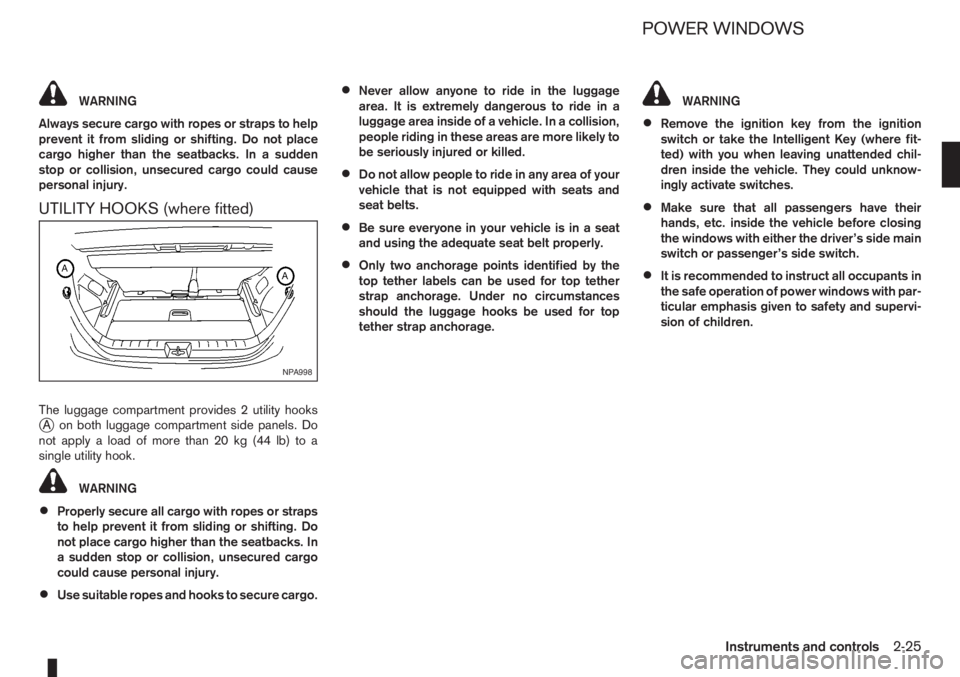
UTILITY HOOKS (where fitted)
The luggage compartment provides 2 utility hooksjA on both luggage compartment side panels. Do
notapplyaloadofmorethan20kg(44lb)toa
single utility hook.
WARNING
•Properly secure all cargo with ropes or straps
to help prevent it from sliding or shifting. Do
not place cargo higher than the seatbacks. In
a sudden stop or collision, unsecured cargo
could cause personal injury.
•Use suitable ropes and hooks to secure cargo.
•Never allow anyone to ride in the luggage
area. It is extremely dangerous to ride in a
luggage area inside of a vehicle. In a collision,
people riding in these areas are more likely to
be seriously injured or killed.
•Do not allow people to ride in any area of your
vehicle that is not equipped with seats and
seat belts.
•Be sure everyone in your vehicle is in a seat
and using the adequate seat belt properly.
•Only two anchorage points identified by the
top tether labels can be used for top tether
strap anchorage. Under no circumstances
should the luggage hooks be used for top
tether strap anchorage.
WARNING
•Remove the ignition key from the ignition
switch or take the Intelligent Key (where fit-
ted) with you when leaving unattended chil-
dren inside the vehicle. They could unknow-
ingly activate switches.
•Make sure that all passengers have their
hands, etc. inside the vehicle before closing
the windows with either the driver’s side main
switch or passenger’s side switch.
•It is recommended to instruct all occupants in
the safe operation of power windows with par-
ticular emphasis given to safety and supervi-
sion of children.
NPA998
POWER WINDOWS
Instruments and controls2-25
Page 84 of 235
WARNING
Never put anything on the rear parcel shelf, no
matter how small. Any object on it could cause
an injury in an accident or when the brakes are
applied suddenly.
CAUTION
The rear parcel shelf flap provides a hide-awayfacility to the luggage compartment whether the
rear seat is at its rearmost position or not. Do not
store objects onto the rear parcel shelf flap as it
may impair the sliding operation of the rear seat.
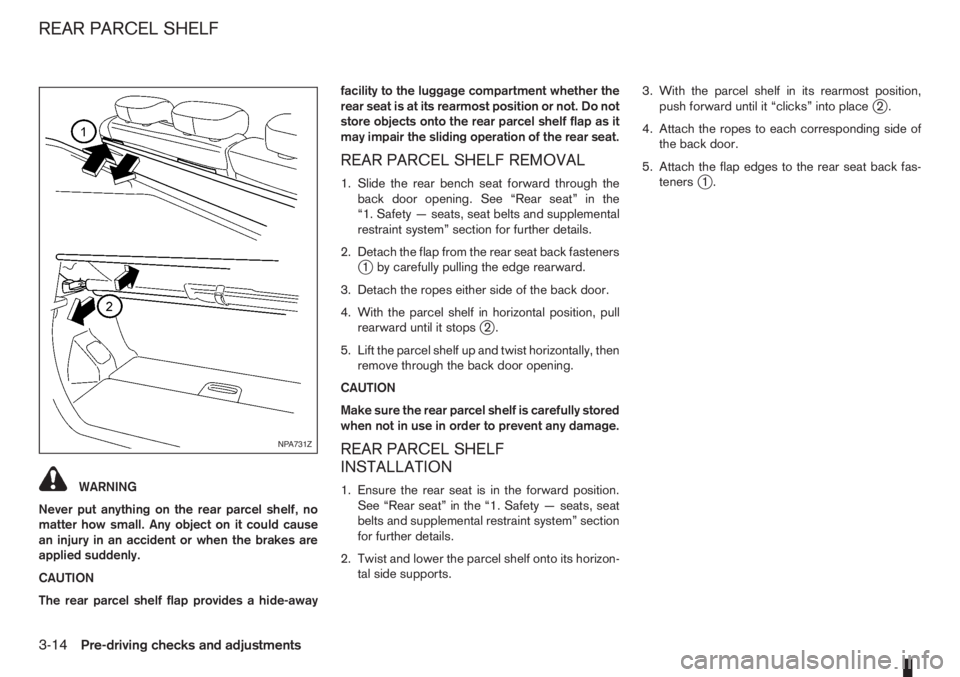
REAR PARCEL SHELF REMOVAL
1. Slide the rear bench seat forward through the
back door opening. See “Rear seat” in the
“1. Safety — seats, seat belts and supplemental
restraint system” section for further details.
2. Detach the flap from the rear seat back fasteners
j1 by carefully pulling the edge rearward.
3. Detach the ropes either side of the back door.
4. With the parcel shelf in horizontal position, pull
rearward until it stops
j2.
5. Lift the parcel shelf up and twist horizontally, then
remove through the back door opening.
CAUTION
Make sure the rear parcel shelf is carefully stored
when not in use in order to prevent any damage.
REAR PARCEL SHELF
INSTALLATION
1. Ensure the rear seat is in the forward position.
See “Rear seat” in the “1. Safety — seats, seat
belts and supplemental restraint system” section
for further details.
2. Twist and lower the parcel shelf onto its horizon-
tal side supports.3. With the parcel shelf in its rearmost position,
push forward until it “clicks” into place
j2.
4. Attach the ropes to each corresponding side of
the back door.
5. Attach the flap edges to the rear seat back fas-
teners
j1.
NPA731Z
REAR PARCEL SHELF
3-14Pre-driving checks and adjustments
Page 96 of 235
•The USB player sometimes cannot function
when the passenger compartment temperature
is extremely high. Decrease the temperature be-
fore use.
•Do not leave USB memory in a place prone to
static electricity or where the air conditioner
blows directly. The data in the USB memory may
be damaged.
•The vehicle is not equipped with a USB memory
stick.
•A USB device cannot be formatted with this sys-
tem. To format a USB device, use a personal
computer.
•Partitioned USB devices may not be played cor-
rectly.
•Some characters used in other languages (Chi-
nese, Japanese, etc.) are not displayed properly
on the vehicle centre screen. Using English lan-
guage characters with a USB device is recom-
mended.
•Do not connect a USB device if a connector or
cable is wet. Allow the cable and/or connectors
to dry completely before connecting the USB
device. If the connector is exposed to fluids other
than water, evaporative residue may cause a
short between the connector pins.
•Large video podcast files cause slow responses
in an iPod®. The display of the audio system
may momentarily black out, but it will soon re-
cover.
•If an iPod® automatically selects large video
podcast files while in the shuffle mode. The dis-
play of the audio system may momentarily black
out, but it will soon recover.
•Some iPod® operations may not be available
with this system.
•At the time of publication, this audio system was
tested with the latest iPod® players available.
Due to the frequent update of consumer devices
like MP3 players, NISSAN cannot guarantee that
all new iPods launched will be compatible with
this audio system.
•Make sure that the iPod® is updated with the lat-
est firmware.
•iPod® is trademarks of Apple Inc., registered in
the U.S. and other countries.
Bluetooth® audio player (where fitted)
•Some Bluetooth® audio devices may not be
used with this system. For detailed information
about Bluetooth® audio devices that are avail-
able for use with this system, contact a NISSAN
dealer or qualified workshop.
•Before using a Bluetooth® audio system, the ini-
tial registration process for the audio device is
necessary.
•Operation of the Bluetooth® audio system may
vary depending on the audio device that is con-
nected. Confirm the operation procedure before
use.
•The playback of Bluetooth® audio will be paused
under the following conditions. The playback will
be resumed after the following conditions are
completed:
– while using a mobile phone.
– while checking a connection with a mobile
phone.
•The in-vehicle antenna for Bluetooth® communi-
cation is built in the audio system. Do not place
the Bluetooth audio device in an area surrounded
by metal, far away from the system, or in a nar-
row space where the device closely contacts the
body or the seat. Otherwise, sound degradation
or connection interference may occur.
•While a Bluetooth® audio device is connected
through the Bluetooth wireless connection, the
battery power of the device may discharge
quicker than usual.
•This system is compatible with the Bluetooth®
AV profile (A2DP and AVRCP ver. 1.3, 1.0 or
earlier).
m
Bluetooth® is a trademark
owned by Bluetooth SIG, Inc.,
and licensed to Daewoo IS
Corp.
4-12Heater and air conditioner, and audio system
Page 127 of 235
WARNING
•Do not leave children or adults who would
normally require the support of others alone
in your vehicle. Pets should also not be left
alone. They could accidentally injure them-
selves or others through inadvertent opera-
tion of the vehicle. Also, on hot, sunny days,
temperatures in a closed vehicle could quickly
become high enough to cause severe or pos-
sibly fatal injuries to people or animals.
•To prevent luggage or packages from sliding
forward during braking, do not stack anything
in the cargo area higher than the seatbacks.
•Secure all cargo with ropes or straps to pre-
vent it from sliding or shifting.
•Failure to follow proper seating instructions
see “Seats” in the “1. Safety — seats, seat
belts and supplemental restraint system” sec-
tion, could result in serious personal injury in
an accident or sudden stop.
EXHAUST GAS (Carbon Monoxide)
WARNING
•Do not breathe exhaust gases; they contain
colourless and odourless carbon monoxide.
Carbon monoxide is a dangerous gas and can
cause unconsciousness or death.
•If you suspect that exhaust fumes are enter-
ing the vehicle, drive with all windows fully
open and have the vehicle inspected immedi-
ately.
•Do not run the engine in closed spaces, such
as a garage, for any longer than is absolutely
necessary.
•Do not park the vehicle with the engine run-
ning for any extended length of time.
•Keep the back door closed while driving, oth-
erwise exhaust gases could be drawn into the
passenger compartment. If you must drive in
this way for some reason, take the following
steps:
1) Open all the windows.
2) Manual air conditioner equipped models:
Move the air intake lever to the
posi-
tion.
Automatic air conditioner equipped mod-
els: Switch on the outside air mode.
3) Set the fan speed control to the maximum
position to circulate the air.
•If electrical wiring or other cable connections
must pass to a trailer through the seal of the
body, follow the manufacturer’s recommen-
dations to prevent carbon monoxide entry into
the vehicle.
•When a vehicle has been stopped in an open
area with its engine running for any significant
length of time, turn the fan on to force outside
air into the vehicle.
•The exhaust system and body should be in-
spected by a NISSAN dealer or qualified work-
shop whenever:
– the vehicle is raised for service.
– you suspect that exhaust fumes are enter-
ing into the passenger compartment.
– you notice a change in the sound of the
exhaust system.
– you have had an accident involving dam-
age to the exhaust system, underbody, or
rear of the vehicle.
PRECAUTIONS WHEN STARTING
AND DRIVING
Starting and driving5-3
Page 160 of 235
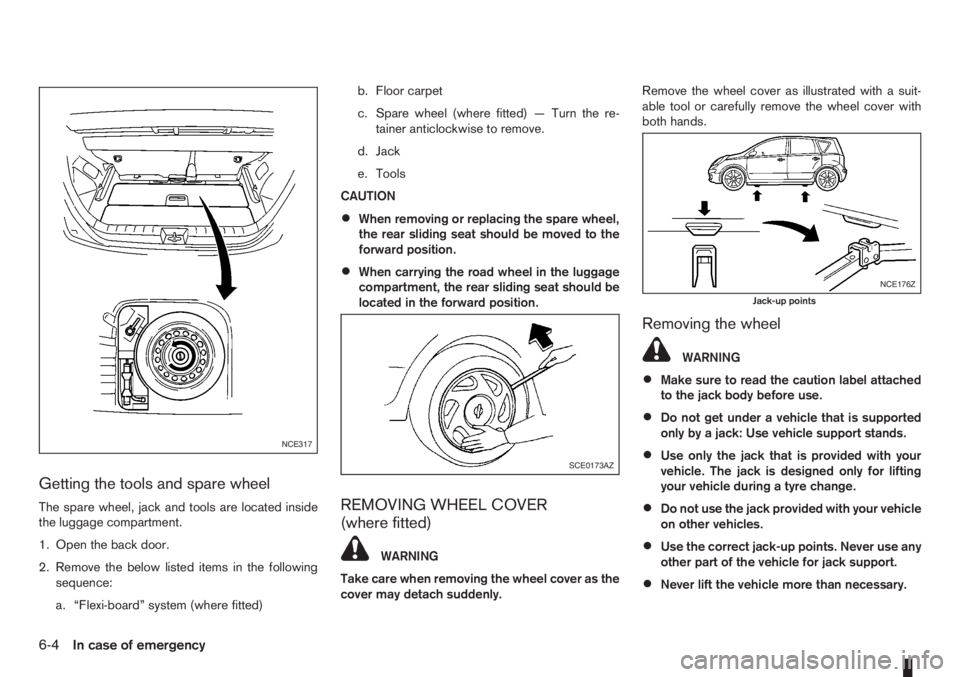
Getting the tools and spare wheel
The spare wheel, jack and tools are located inside
the luggage compartment.
1. Open the back door.
2. Remove the below listed items in the following
sequence:
a. “Flexi-board” system (where fitted)b. Floor carpet
c. Spare wheel (where fitted) — Turn the re-
tainer anticlockwise to remove.
d. Jack
e. Tools
CAUTION
•When removing or replacing the spare wheel,
the rear sliding seat should be moved to the
forward position.
•When carrying the road wheel in the luggage
compartment, the rear sliding seat should be
located in the forward position.
REMOVING WHEEL COVER
(where fitted)
WARNING
Take care when removing the wheel cover as the
cover may detach suddenly.Remove the wheel cover as illustrated with a suit-
able tool or carefully remove the wheel cover with
both hands.
Removing the wheel
WARNING
•Make sure to read the caution label attached
to the jack body before use.
•Do not get under a vehicle that is supported
only by a jack: Use vehicle support stands.
•Use only the jack that is provided with your
vehicle. The jack is designed only for lifting
your vehicle during a tyre change.
•Do not use the jack provided with your vehicle
on other vehicles.
•Use the correct jack-up points. Never use any
other part of the vehicle for jack support.
•Never lift the vehicle more than necessary.
NCE317
SCE0173AZ
NCE176Z
Jack-up points
6-4In case of emergency
Page 180 of 235
Handbrake*:
Confirm that your vehicle is held securely on a fairly
steep hill with only the handbrake applied.
Seats:
Check seat position controls such as seat adjust-
ers, seatback recliner, etc. to ensure they operate
smoothly and all latches lock securely in every posi-
tion. Check that the head restraints move up and
down smoothly and the locks hold securely in all
latched positions.
Seat belts:
Check that all parts of the seat belt system (e.g.
buckles, anchors, adjusters and retractors) operate
properly and smoothly, and are installed securely.
Check the belt webbing for cuts, fraying, wear or
damage. See “Seat belt maintenance” in the
“1. Safety — seats, seat belts and supplemental
restraint system” section for further details.
Steering wheel:
Check for any change in the steering conditions,
such as excessive free play, hard steering or strange
noises.
Warning lights and audible reminders:
Make sure that all warning/indicator lights and au-
dible reminders are operating properly.
Windscreen defogger:
Check that the air comes out of the defogger outlets
properly when operating the heater or air condi-
tioner.Windscreen wiper and washer*:
Check that the wipers and washer operate properly
and that the wipers do not streak.When performing any inspection or maintenance
work on your vehicle, always take care to prevent
serious accidental injury to yourself or damage to
the vehicle. The following are general precautions
which should be closely observed.
•Park the vehicle on a level surface, apply the
handbrake securely and block the wheels to
prevent the vehicle from moving. For a manual
transmission models, move the gear lever to
N (Neutral) position. [For automatic transmis-
sion models, move the selector lever to P
(Park) position.]
•Do not work under the engine bonnet while
the engine is hot. Turn off the engine and wait
until it cools down.
•Be sure to turn the ignition switch to the “OFF”
or LOCK position.
When the ignition switch is in the ON or Acc
position, the cooling fan may start to operate
suddenly even when the engine is not run-
ning. To avoid injury, always disconnect the
negative battery cable before working near
the engine.
•If you must work with the engine running,
keep your hands, clothing, hair and tools away
from moving fans, belts and any other moving
parts.
•It is advisable to remove ties and any jewel-
lery, such as rings, watches, etc. before work-
ing on your vehicle.
MAINTENANCE PRECAUTIONS
8-4Maintenance and do-it-yourself
Page 222 of 235
– Trailer brakes ................................................................ 5-25
C
Capacities and recommended fuel/lubricants ......................... 9-2
– Fuel recommendation ...................................................... 9-4
Car phone or CB radio ........................................................ 4-39
Care when driving ................................................................. 5-5
Changing
– Changing engine coolant ................................................. 8-6
– Changing engine oil ......................................................... 8-9
– Changing engine oil filter ............................................... 8-11
– Changing tyres and wheels ........................................... 8-31
Checking
– Checking brake pedal ................................................... 8-13
– Checking engine coolant level ......................................... 8-6
– Checking engine oil level ................................................. 8-9
– Checking handbrake ..................................................... 8-13
Child restraint anchorage (top tether) .................................. 1-23
Child restraints .................................................................... 1-16
– Installation on front passenger seat ................................ 1-19
– Installation on rear seats ................................................ 1-20
Child safety ........................................................................... 1-7
Cleaning
– Alloy wheels .................................................................... 7-3
– Chrome parts .................................................................. 7-3
– Exterior ............................................................................ 7-2
– Glass ....................................................................... 7-3, 7-4
– Interior ............................................................................ 7-3
– Plastic parts .................................................................... 7-4
– Removing spots ............................................................... 7-2
– Underbody ...................................................................... 7-3
Clock (digital) ........................................................................ 2-5
Clutch fluid .......................................................................... 8-13
Cold weather driving ........................................................... 5-31Coolant
– Changing engine coolant ................................................. 8-6
– Checking engine coolant level ......................................... 8-6
– Engine coolant ............................................................... 5-31
– Engine cooling system ..................................................... 8-6
Corrosion protection .................................................... 5-32, 7-4
– Environmental factors ...................................................... 7-4
Cruise control system .......................................................... 5-18
Cruise control system operations ......................................... 5-19
D
Defogger switch
– Outside mirror defogger ................................................ 2-15
– Rear window defogger .................................................. 2-15
Diesel particulate filter ........................................................... 5-5
Dimensions ........................................................................... 9-6
Door
– Back door lock ................................................................ 3-8
– Child safety rear door lock ............................................... 3-8
– Door locks ....................................................................... 3-6
– Emergency situation – Super Lock system ....................... 3-6
– Locking/unlocking with emergency key or key (vehicle dead
battery situation) .............................................................. 3-7
– Power door lock switch ................................................... 3-7
– Super Lock system .......................................................... 3-6
Drive belts ........................................................................... 8-18
Driving
– Care when driving ........................................................... 5-5
– Cold weather driving ..................................................... 5-31
– Driving on wet road ......................................................... 5-5
– Driving the vehicle ......................................................... 5-11
– Driving under winter conditions ........................................ 5-5
– Driving with automatic transmission ............................... 5-12
– Driving with manual transmission ................................... 5-11
– Precautions when starting and driving .............................. 5-3
10-2Index