passenger NISSAN NOTE 2006 Owner's Manual
[x] Cancel search | Manufacturer: NISSAN, Model Year: 2006, Model line: NOTE, Model: NISSAN NOTE 2006Pages: 235, PDF Size: 2.29 MB
Page 37 of 235
in this position could cause serious injury to
the infant in case of air bag deployment dur-
ing a collision.
•In vehicles equipped with a side air bag sys-
tem, do not let any infants or small children sit
in the front passenger’s seat as the air bag
may cause serious injury in case of deploy-
ment during a collision.
NOTE
Universal child restraints approved to ECE Regu-
lation No. 44.03 are clearly marked “Universal”.
INSTALLATION OF A CHILD
RESTRAINT SYSTEM ON THE FRONT
PASSENGER SEAT
WARNING
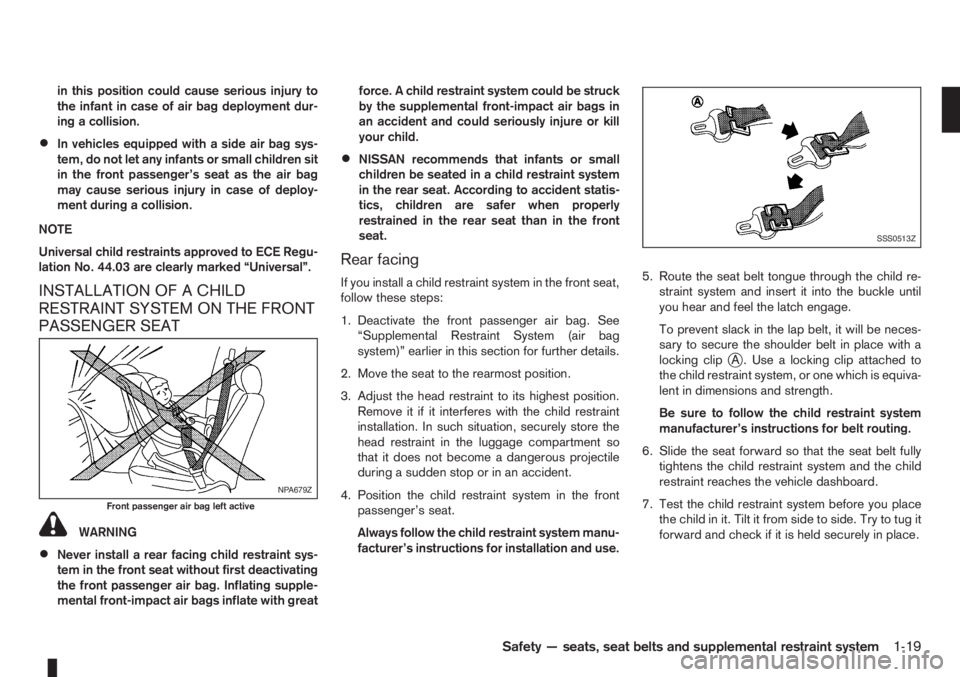
•Never install a rear facing child restraint sys-
tem in the front seat without first deactivating
the front passenger air bag. Inflating supple-
mental front-impact air bags inflate with greatforce. A child restraint system could be struck
by the supplemental front-impact air bags in
an accident and could seriously injure or kill
your child.
•NISSAN recommends that infants or small
children be seated in a child restraint system
in the rear seat. According to accident statis-
tics, children are safer when properly
restrained in the rear seat than in the front
seat.
Rear facing
If you install a child restraint system in the front seat,
follow these steps:
1. Deactivate the front passenger air bag. See
“Supplemental Restraint System (air bag
system)” earlier in this section for further details.
2. Move the seat to the rearmost position.
3. Adjust the head restraint to its highest position.
Remove it if it interferes with the child restraint
installation. In such situation, securely store the
head restraint in the luggage compartment so
that it does not become a dangerous projectile
during a sudden stop or in an accident.
4. Position the child restraint system in the front
passenger’s seat.
Always follow the child restraint system manu-
facturer’s instructions for installation and use.5. Route the seat belt tongue through the child re-
straint system and insert it into the buckle until
you hear and feel the latch engage.
To prevent slack in the lap belt, it will be neces-
sary to secure the shoulder belt in place with a
locking clip
jA . Use a locking clip attached to
the child restraint system, or one which is equiva-
lent in dimensions and strength.
Be sure to follow the child restraint system
manufacturer’s instructions for belt routing.
6. Slide the seat forward so that the seat belt fully
tightens the child restraint system and the child
restraint reaches the vehicle dashboard.
7. Test the child restraint system before you place
the child in it. Tilt it from side to side. Try to tug it
forward and check if it is held securely in place.
NPA679Z
Front passenger air bag left active
SSS0513Z
Safety — seats, seat belts and supplemental restraint system1-19
Page 38 of 235
INSTALLATION OF A CHILD
RESTRAINT SYSTEM ON REAR
SEATS
WARNING
•NISSAN recommends that infants or small
children be seated in a child restraint system.
According to accident statistics, children are
safer when properly restrained in the rear seat
than in the front seat.
•The direction of the child restraint system de-
pends on the type of the child restraint sys-
tem and the size of the child.
Front-facing
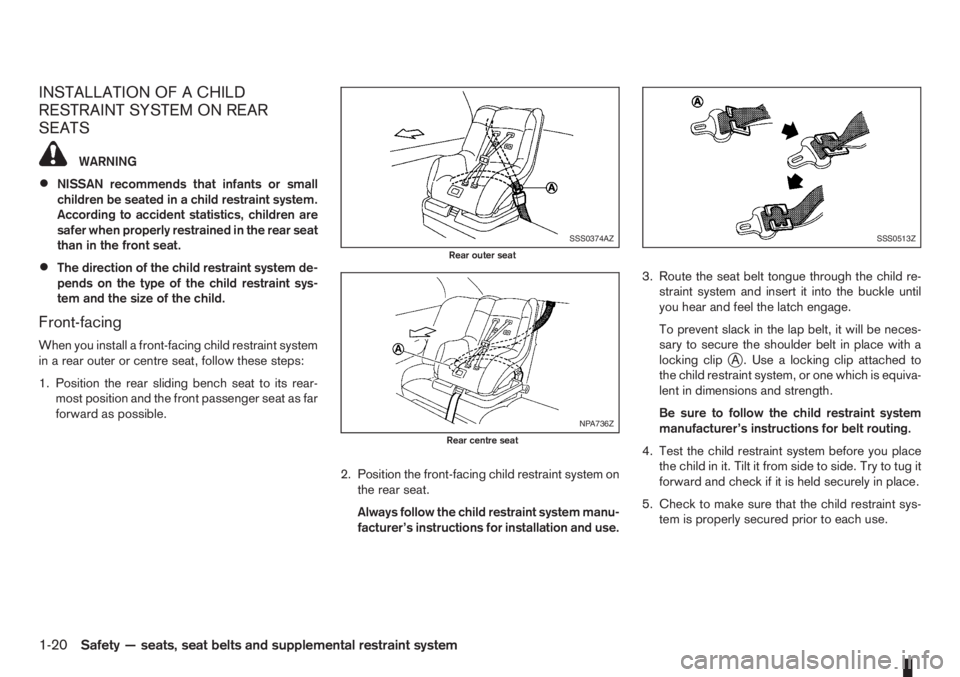
When you install a front-facing child restraint system
in a rear outer or centre seat, follow these steps:
1. Position the rear sliding bench seat to its rear-
most position and the front passenger seat as far
forward as possible.
2. Position the front-facing child restraint system on
the rear seat.
Always follow the child restraint system manu-
facturer’s instructions for installation and use.3. Route the seat belt tongue through the child re-
straint system and insert it into the buckle until
you hear and feel the latch engage.
To prevent slack in the lap belt, it will be neces-
sary to secure the shoulder belt in place with a
locking clipjA . Use a locking clip attached to
the child restraint system, or one which is equiva-
lent in dimensions and strength.
Be sure to follow the child restraint system
manufacturer’s instructions for belt routing.
4. Test the child restraint system before you place
the child in it. Tilt it from side to side. Try to tug it
forward and check if it is held securely in place.
5. Check to make sure that the child restraint sys-
tem is properly secured prior to each use.
SSS0374AZ
Rear outer seat
NPA736Z
Rear centre seat
SSS0513Z
1-20Safety — seats, seat belts and supplemental restraint system
Page 39 of 235
Rear-facing
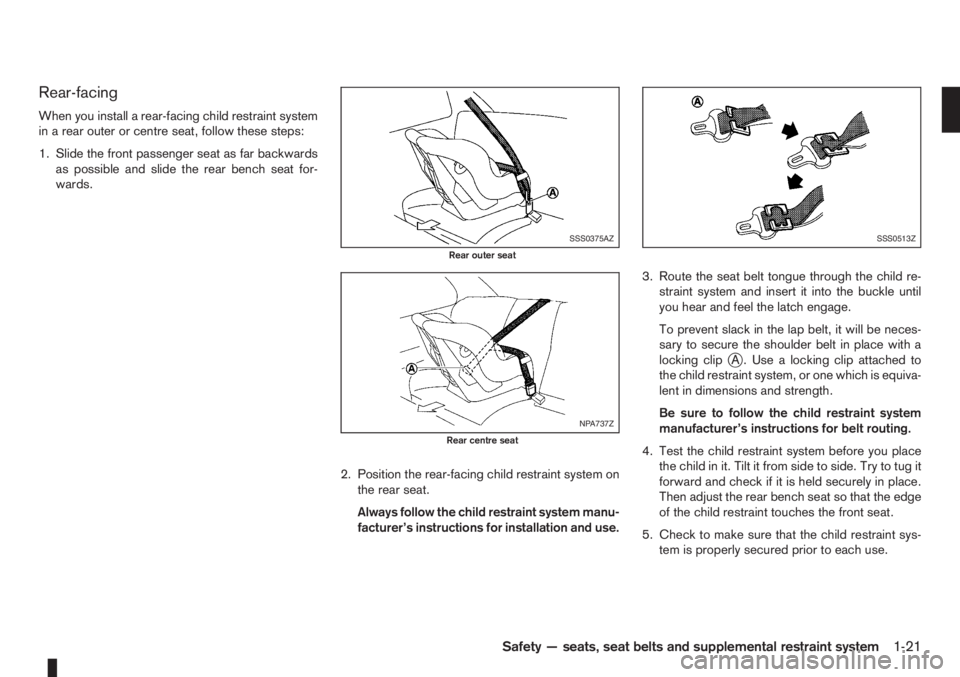
When you install a rear-facing child restraint system
in a rear outer or centre seat, follow these steps:
1. Slide the front passenger seat as far backwards
as possible and slide the rear bench seat for-
wards.
2. Position the rear-facing child restraint system on
the rear seat.
Always follow the child restraint system manu-
facturer’s instructions for installation and use.3. Route the seat belt tongue through the child re-
straint system and insert it into the buckle until
you hear and feel the latch engage.
To prevent slack in the lap belt, it will be neces-
sary to secure the shoulder belt in place with a
locking clip
jA . Use a locking clip attached to
the child restraint system, or one which is equiva-
lent in dimensions and strength.
Be sure to follow the child restraint system
manufacturer’s instructions for belt routing.
4. Test the child restraint system before you place
the child in it. Tilt it from side to side. Try to tug it
forward and check if it is held securely in place.
Then adjust the rear bench seat so that the edge
of the child restraint touches the front seat.
5. Check to make sure that the child restraint sys-
tem is properly secured prior to each use.
SSS0375AZ
Rear outer seat
NPA737Z
Rear centre seat
SSS0513Z
Safety — seats, seat belts and supplemental restraint system1-21
Page 41 of 235
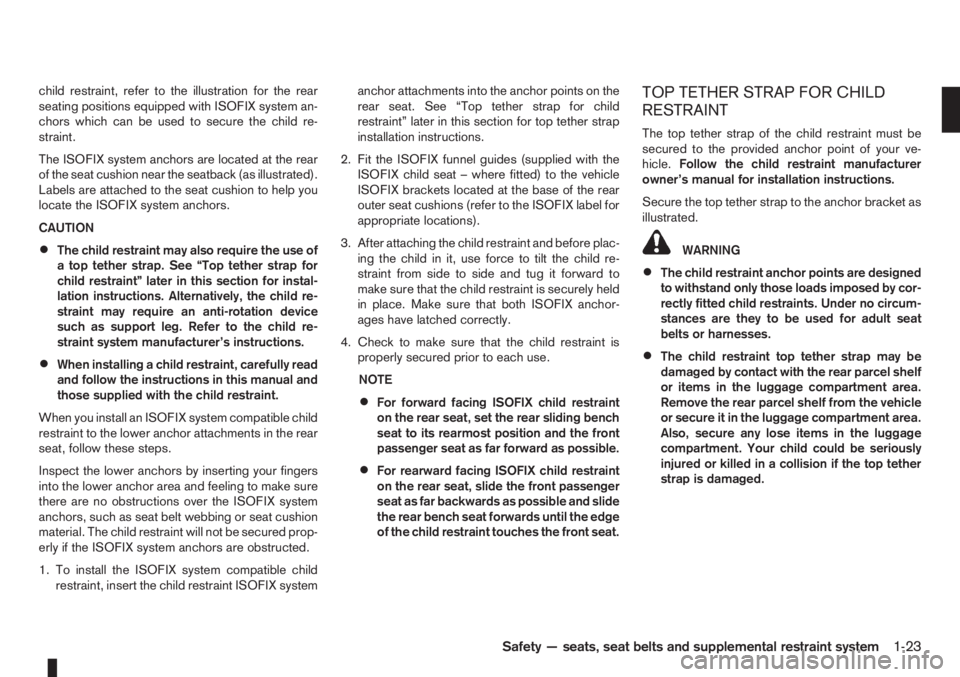
child restraint, refer to the illustration for the rear
seating positions equipped with ISOFIX system an-
chors which can be used to secure the child re-
straint.
The ISOFIX system anchors are located at the rear
of the seat cushion near the seatback (as illustrated).
Labels are attached to the seat cushion to help you
locate the ISOFIX system anchors.
CAUTION
•The child restraint may also require the use of
a top tether strap. See “Top tether strap for
child restraint” later in this section for instal-
lation instructions. Alternatively, the child re-
straint may require an anti-rotation device
such as support leg. Refer to the child re-
straint system manufacturer’s instructions.
•When installing a child restraint, carefully read
and follow the instructions in this manual and
those supplied with the child restraint.
When you install an ISOFIX system compatible child
restraint to the lower anchor attachments in the rear
seat, follow these steps.
Inspect the lower anchors by inserting your fingers
into the lower anchor area and feeling to make sure
there are no obstructions over the ISOFIX system
anchors, such as seat belt webbing or seat cushion
material. The child restraint will not be secured prop-
erly if the ISOFIX system anchors are obstructed.
1. To install the ISOFIX system compatible child
restraint, insert the child restraint ISOFIX systemanchor attachments into the anchor points on the
rear seat. See “Top tether strap for child
restraint” later in this section for top tether strap
installation instructions.
2. Fit the ISOFIX funnel guides (supplied with the
ISOFIX child seat – where fitted) to the vehicle
ISOFIX brackets located at the base of the rear
outer seat cushions (refer to the ISOFIX label for
appropriate locations).
3. After attaching the child restraint and before plac-
ing the child in it, use force to tilt the child re-
straint from side to side and tug it forward to
make sure that the child restraint is securely held
in place. Make sure that both ISOFIX anchor-
ages have latched correctly.
4. Check to make sure that the child restraint is
properly secured prior to each use.
NOTE
•For forward facing ISOFIX child restraint
on the rear seat, set the rear sliding bench
seat to its rearmost position and the front
passenger seat as far forward as possible.
•For rearward facing ISOFIX child restraint
on the rear seat, slide the front passenger
seat as far backwards as possible and slide
the rear bench seat forwards until the edge
of the child restraint touches the front seat.
TOP TETHER STRAP FOR CHILD
RESTRAINT
The top tether strap of the child restraint must be
secured to the provided anchor point of your ve-
hicle.Follow the child restraint manufacturer
owner’s manual for installation instructions.
Secure the top tether strap to the anchor bracket as
illustrated.
WARNING
•The child restraint anchor points are designed
to withstand only those loads imposed by cor-
rectly fitted child restraints. Under no circum-
stances are they to be used for adult seat
belts or harnesses.
•The child restraint top tether strap may be
damaged by contact with the rear parcel shelf
or items in the luggage compartment area.
Remove the rear parcel shelf from the vehicle
or secure it in the luggage compartment area.
Also, secure any lose items in the luggage
compartment. Your child could be seriously
injured or killed in a collision if the top tether
strap is damaged.
Safety — seats, seat belts and supplemental restraint system1-23
Page 43 of 235
2Instruments and controlsInstruments and controls
Meters and gauges .................................................. 2-2
Speedometer...................................................... 2-2
Tachometer ........................................................ 2-2
Fuel gauge ......................................................... 2-2
Combination meter display (LCD) ....................... 2-3
Odometer/twin trip odometer .............................. 2-3
Trip computer (where fitted)................................ 2-3
Outside temperature display ............................... 2-4
Engine oil level information (where fitted)............. 2-4
Digital clock ........................................................ 2-5
Warning/indicator lights and audible reminders ........ 2-7
Checking bulbs .................................................. 2-7
Warning lights .................................................... 2-7
Indicator lights .................................................... 2-11
Audible reminders............................................... 2-12
Wiper and washer switch ........................................ 2-13
Windscreen wiper and washer switch ................. 2-13
Rear window ...................................................... 2-14
Defogger switch ...................................................... 2-15
Rear window defogger ....................................... 2-15
Outside mirror defogger (where fitted) ................ 2-15
Headlight and turn signal switch............................... 2-16
Headlight switch ................................................. 2-16
Turn signal switch ............................................... 2-17
Fog light switch ....................................................... 2-17
Front fog light (where fitted) ................................ 2-17Rear fog light switch ........................................... 2-18
Headlight aiming control .......................................... 2-18
Headlight aiming control switch........................... 2-18
Hazard warning flasher switch ................................. 2-19
Horn ........................................................................ 2-19
Seat heating (where fitted) ....................................... 2-19
Power outlet ............................................................ 2-20
Storage ................................................................... 2-21
Glove box ........................................................... 2-21
Centre console storage box ................................ 2-22
Cup holder ......................................................... 2-22
Rear foldable tables (where fitted)....................... 2-23
Seat pockets (where fitted) ................................. 2-23
Convenience hook (where fitted)......................... 2-23
Under seat storage tray (where fitted) ................. 2-23
“Flexi-board” System (where fitted) ..................... 2-24
Utility hooks (where fitted)................................... 2-25
Power windows ....................................................... 2-25
Driver’s side main switch .................................... 2-26
Passenger’s side switch ..................................... 2-26
Automatic operation ............................................ 2-26
Interior lights ............................................................ 2-27
Room light .......................................................... 2-27
Map light (where fitted) ....................................... 2-28
Luggage compartment light ................................ 2-28
Page 52 of 235
If the warning light remains illuminated after the en-
gine has been started, there will be no power steer-
ing assistance: the vehicle may be driven using the
mechanical steering system although it is not rec-
ommended as the effort to turn the steering wheel
will be significantly increased compared to normal
operation.
WARNING
•If the EPAS warning light illuminates while
driving, stop as soon as safely possible.
•In certain circumstances, factors external to
the EPAS system may contribute to the illumi-
nation of the warning light. If the warning light
illuminates, stop the vehicle as soon as safely
possible if driving, turn the ignition switch to
the “OFF” position for approximately 20 sec-
onds, then turn the ignition switch to the ON
position again. If the light remains illuminated,
we recommend you to contact a NISSAN
dealer or qualified workshop.
See “Power steering system” in the “5. Starting and
driving” section for further details on the EPAS sys-
tem.
Ignition knob warning light
(Intelligent Key system only)
When the ignition knob is turned to the ON position,
the ignition knob warning light illuminates for a few
seconds and then goes off. This means the system
is operational.The ignition knob warning light warns the driver of
the ignition knob position.
MT models:
The warning light blinks and the buzzer sounds twice
when the ignition knob is turned to the “OFF” posi-
tion. Depress the ignition PUSH release button, then
turn the ignition switch to the LOCK position.
AT models:
The warning light blinks and the buzzer sounds twice
when the ignition knob is turned to the “OFF” posi-
tion. Make sure the selector lever is in the P (Park)
position, then turn the ignition switch to the LOCK
position.
See “Ignition knob (where fitted)” in the “5. Starting
and driving” section for further details.
CAUTION
•The steering wheel can only be locked when
the ignition knob is in the LOCK position. Make
sure the ignition knob is in the LOCK position
before leaving the vehicle.
•The emergency key can only be removed at
the LOCK position. Make sure the ignition
knob is in the LOCK position before removing
the emergency key.
•If the ignition knob warning light comes on
while driving, contact a NISSAN dealer or
qualified workshop for repair.
NATS security indicator light
This light blinks whenever the ignition switch is in
the LOCK or Acc position. This function indicates
that your vehicle is equipped with NISSAN Anti-
Theft System (NATS)*.
If NISSAN Anti-Theft System (NATS)* is malfunc-
tioning, this light will remain on while the ignition
switch is in the ON position.
For additional information, see “NISSAN Anti-Theft
System (NATS)” later in this section.
* Immobilizer
Seat belt warning light and
chime
The light reminds the driver to fasten his/her seat
belt. The light comes on whenever the ignition switch
is turned to the ON position. It goes out whenever
the front seat belt is securely fastened. The chime
will sound unless the front seat belt is securely fas-
tened when the vehicle speed exceeds 25 km/h (15
MPH). The chime will stop after approximately 90
seconds.
NOTE
The front passenger seat belt warning light
comes on the centre console. See “Seat belt
warning lights” in the “1. Safety — seats, seat
belts and supplemental restraint system” section.
2-10Instruments and controls
Page 53 of 235
Intelligent Key indicator light and
Intelligent Key warning light
(Intelligent Key system only)
Intelligent Key indicator light (green):
The Intelligent Key indicator light comes on when
the ignition knob is pushed in the LOCK position
while the brake pedal is depressed and the Intelli-
gent Key is in the vehicle. The Intelligent Key indica-
tor light goes out when the ignition switch is turned
to the Acc position.
NOTE
•The Intelligent Key indicator light may start
flashing when the ignition knob is turned from
the “OFF” position to the ON position if the
control unit detects a low battery voltage.
•The Intelligent Key indicator light comes on
as confirmation flash for anti-hijack mode set-
ting procedure. See “Integrated keyfob/re-
mote control system” in the “3. Pre-driving
checks and adjustments” section.
Intelligent Key warning light (red):
When the ignition knob is turned to the ON position,
the Intelligent Key warning light illuminates for a few
seconds and then goes off. This means the system
is operational.
NOTE
•If the Intelligent Key is taken outside of the
vehicle ID recognition zone through an
opened door (driver’s side door, passenger’s
side door, back door) while the ignition knobis in the Acc or ON position, the Intelligent
Key warning light starts flashing and the
buzzer sounds, warning the driver of the situ-
ation. The Intelligent Key warning light will
stop flashing as soon as the Intelligent Key is
placed again in the passenger’s compart-
ment.
•The Intelligent Key warning light comes on as
confirmation flash for convenience mode set-
ting procedure. See “Integrated keyfob/re-
mote control system” in the “3. Pre-driving
checks and adjustments” section.
WARNING
If the Intelligent Key warning light comes on
steady, it may indicate a system malfunction, we
recommend you to contact a NISSAN dealer or
qualified workshop for repair.
See “Ignition knob (where fitted)” in the “5. Starting
and driving” section for further details.
Anti-lock Braking System
warning light
After turning the ignition key to the ON position, the
light will illuminate. The Anti-lock Braking System
warning light will turn off after approximately 1 sec-
ond if the system is operational.
If the light comes on while the engine is running, it
may indicate something is wrong with the anti-lock
portion of the braking system. Have the system
checked by a NISSAN dealer or qualified workshop.Anti-lock Braking System:
The Anti-lock Braking System controls the wheels
so that they will not lock when braking abruptly or
when braking on a slippery road. This will prevent
difficult steering operation and swerving due to
locked wheels.
If an abnormality occurs in the system, the anti-lock
function will cease but the ordinary brakes will con-
tinue to operate normally.
CAUTION
If the light comes on while you are driving, con-
tact a NISSAN dealer or qualified workshop for
repair.
INDICATOR LIGHTS
Electronic Stability Programme
(ESP) OFF indicator light
(where fitted)
The light comes on when the Electronic Stability
Programme (ESP) OFF switch is pushed to the OFF
position. This indicates the Electronic Stability Pro-
gramme is not operating.
Push the Electronic Stability Programme OFF
switch again or restart the engine and the system
will operate normally. See “Electronic Stability Pro-
gramme (ESP) system (where fitted)” in the
“5. Starting and driving” section.
Instruments and controls2-11
Page 64 of 235
CENTRE CONSOLE STORAGE BOX
WARNING
The centre console storage box should not be
used while driving so that full attention may be
given to the driving operation.
CAUTION
Do not leave sunglasses, cigarette lighter, etc. in
the centre console storage box while parking in
direct sunlight. The heat may damage these
items.
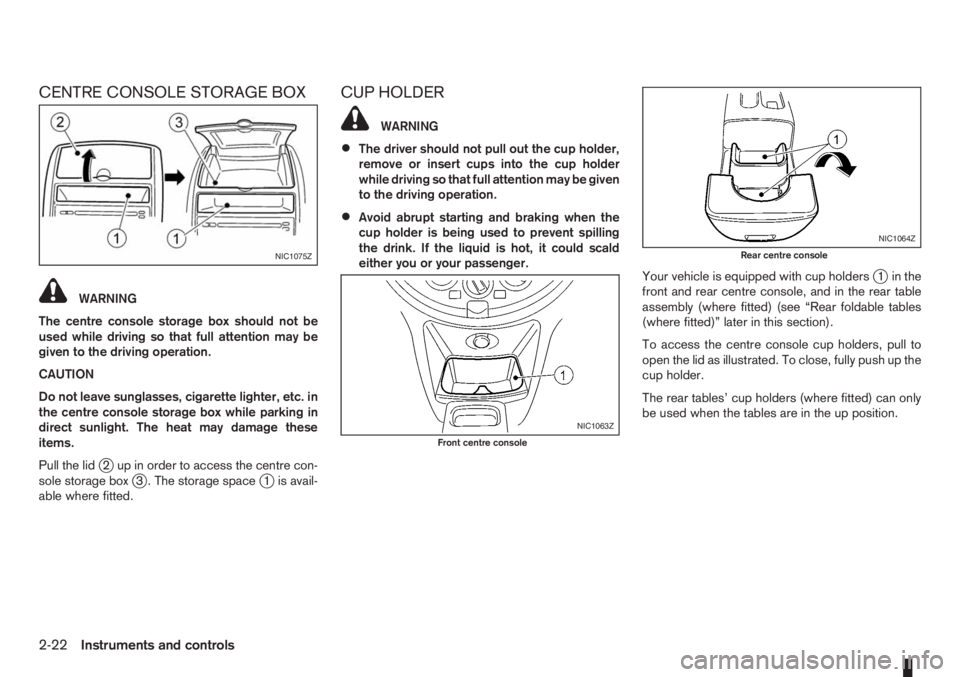
Pull the lid
j2 up in order to access the centre con-
sole storage boxj3 . The storage spacej1 is avail-
able where fitted.
CUP HOLDER
WARNING
•The driver should not pull out the cup holder,
remove or insert cups into the cup holder
while driving so that full attention may be given
to the driving operation.
•Avoid abrupt starting and braking when the
cup holder is being used to prevent spilling
the drink. If the liquid is hot, it could scald
either you or your passenger.
Your vehicle is equipped with cup holders
j1 in the
front and rear centre console, and in the rear table
assembly (where fitted) (see “Rear foldable tables
(where fitted)” later in this section).
To access the centre console cup holders, pull to
open the lid as illustrated. To close, fully push up the
cup holder.
The rear tables’ cup holders (where fitted) can only
be used when the tables are in the up position.
NIC1075Z
NIC1063Z
Front centre console
NIC1064Z
Rear centre console
2-22Instruments and controls
Page 65 of 235
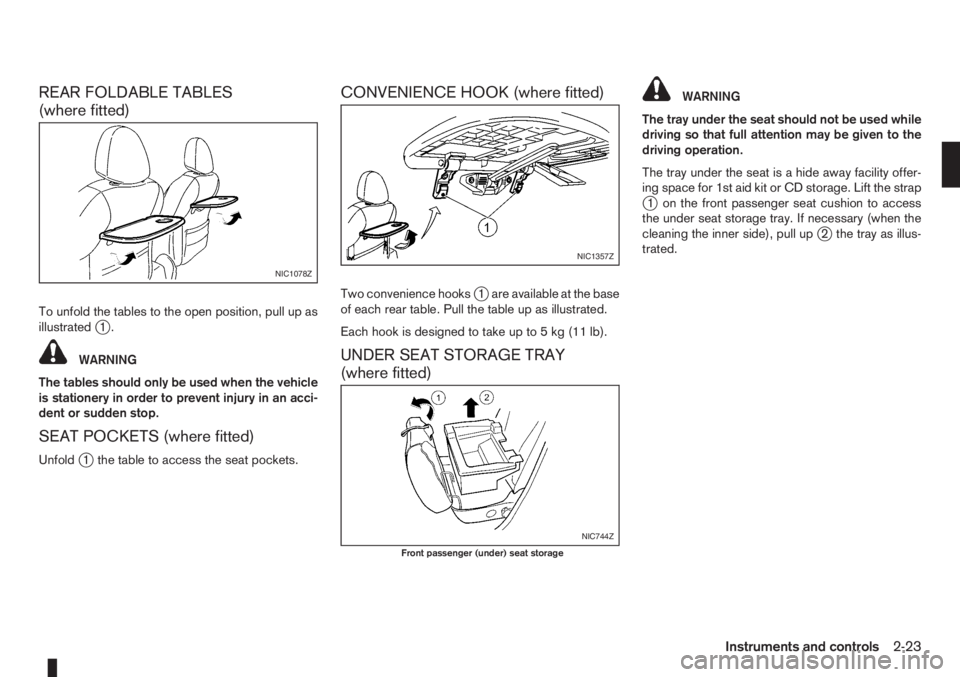
REAR FOLDABLE TABLES
(where fitted)
To unfold the tables to the open position, pull up as
illustratedj1.
WARNING
The tables should only be used when the vehicle
is stationery in order to prevent injury in an acci-
dent or sudden stop.
SEAT POCKETS (where fitted)
Unfoldj1 the table to access the seat pockets.
CONVENIENCE HOOK (where fitted)
Two convenience hooksj1 are available at the base
of each rear table. Pull the table up as illustrated.
Each hook is designed to take up to 5 kg (11 lb).
UNDER SEAT STORAGE TRAY
(where fitted)
WARNING
The tray under the seat should not be used while
driving so that full attention may be given to the
driving operation.
The tray under the seat is a hide away facility offer-
ing space for 1st aid kit or CD storage. Lift the strap
j1 on the front passenger seat cushion to access
the under seat storage tray. If necessary (when the
cleaning the inner side), pull up
j2 the tray as illus-
trated.
NIC1078Z
NIC1357Z
NIC744Z
Front passenger (under) seat storage
Instruments and controls2-23
Page 67 of 235
WARNING
Always secure cargo with ropes or straps to help
prevent it from sliding or shifting. Do not place
cargo higher than the seatbacks. In a sudden
stop or collision, unsecured cargo could cause
personal injury.
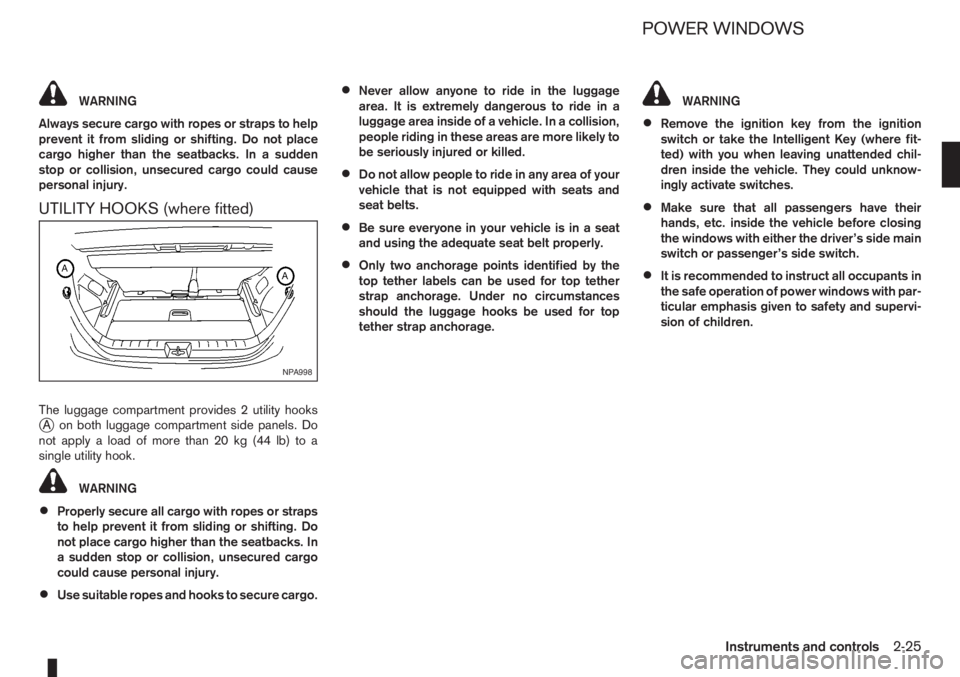
UTILITY HOOKS (where fitted)
The luggage compartment provides 2 utility hooksjA on both luggage compartment side panels. Do
notapplyaloadofmorethan20kg(44lb)toa
single utility hook.
WARNING
•Properly secure all cargo with ropes or straps
to help prevent it from sliding or shifting. Do
not place cargo higher than the seatbacks. In
a sudden stop or collision, unsecured cargo
could cause personal injury.
•Use suitable ropes and hooks to secure cargo.
•Never allow anyone to ride in the luggage
area. It is extremely dangerous to ride in a
luggage area inside of a vehicle. In a collision,
people riding in these areas are more likely to
be seriously injured or killed.
•Do not allow people to ride in any area of your
vehicle that is not equipped with seats and
seat belts.
•Be sure everyone in your vehicle is in a seat
and using the adequate seat belt properly.
•Only two anchorage points identified by the
top tether labels can be used for top tether
strap anchorage. Under no circumstances
should the luggage hooks be used for top
tether strap anchorage.
WARNING
•Remove the ignition key from the ignition
switch or take the Intelligent Key (where fit-
ted) with you when leaving unattended chil-
dren inside the vehicle. They could unknow-
ingly activate switches.
•Make sure that all passengers have their
hands, etc. inside the vehicle before closing
the windows with either the driver’s side main
switch or passenger’s side switch.
•It is recommended to instruct all occupants in
the safe operation of power windows with par-
ticular emphasis given to safety and supervi-
sion of children.
NPA998
POWER WINDOWS
Instruments and controls2-25