100 NISSAN NOTE 2006 Owners Manual
[x] Cancel search | Manufacturer: NISSAN, Model Year: 2006, Model line: NOTE, Model: NISSAN NOTE 2006Pages: 235, PDF Size: 2.29 MB
Page 46 of 235
empty is automatically selected and the digits blink
in order to draw the driver’s attention. Press the
TRIP button/Steering wheel
switch if you wish
to return to the mode that was selected before the
warning occurred.
When the fuel level drops even lower, the distance
to empty will display
along within a
flashing mode.
Average fuel consumption (l/100 km or
mpg)
The average fuel consumption mode shows the av-
erage fuel consumption since the last reset. The dis-
played average fuel consumption can be reset by
pressing the TRIP button/Steering wheel
switch for more than 1 second.
Average speed (km/h or MPH)
The average speed mode shows the average ve-
hicle speed since the last reset. The displayed aver-
age speed can be reset by pressing the TRIP but-
ton/Steering wheel
switch for more than 1
second.
Journey timem
The journey time mode shows the time since the last
reset in minutes and seconds. The displayed time
can be reset by pressing the TRIP button/Steering
wheel
switch for more than 1 second.
Trip computer reset
Pushing the TRIP button/Steering wheelswitch for more than 3 seconds will reset all modes
except Trip A and distance to empty.
OUTSIDE TEMPERATURE DISPLAY
The outside temperature function provides a displayjC of the outside temperature (ºC) when the ignition
switch is in the ON position.
The display of positive temperatures is unsigned
(blank), negative temperatures are prefixed with a
minus sign.
Low temperature warning
Above 4°C the display remains steady.
The display will flash to indicate a low outside air
temperature, and the possibility of icy or slippery
road conditions:
•When the outside temperature drops between
–3°C and 3°C.
•When starting the vehicle below –3°C.
The temperature display will not flash:
•After approximately 20 seconds, when starting
the vehicle and the outside temperature is below
–3°C.
•When the outside temperature rises from below
–3°C into the range between –3°C and 3°C.
•While driving, when the outside temperature
drops below –3°C.CAUTION
Even if the display is not flashing, there is no
guarantee that the road is free of hazards caused
by inclement weather.
NOTE
The outside air temperature sensor is located at
the front of the vehicle. At low speeds the sensor
can be affected by engine heat, heat reflected
from the road surface and exhaust from other
vehicles, these influences can cause the display
to be inaccurate. To compensate, the outside air
temperature display is designed to react slowly
to increasing temperatures, but quickly to falling
temperatures.
ENGINE OIL LEVEL INFORMATION
(where fitted)
When the ignition is turned to the ON position, dis-
tance to oil change informationand oil level sta-
tus are displayed on the LCD displayjE in the fol-
lowing order:
– Distance to oil change (with a wrench symbol
)
– Oil level status (“Oil Good” or “Oil Lo”)
Only for models with HR16DE or K9K engine.
For details, see “HR16DE or K9K engine oil level
status” later in this section.
After the oil level status (where fitted), the LCD dis-
play switches to the last twin trip odometer/trip com-
2-4Instruments and controls
Page 59 of 235
ward you once will activate the headlight for ap-
proximately 30 seconds. After that period of time, it
will automatically switch off.
It is possible to pull the headlight switch up to four
times to increase the lighting period up to 2 minutes.
NOTE
The “Friendly Lighting” function can be cancelled
by switching the ignition switch to the Acc or ON
position again.
Battery save function
The battery save feature prevents your vehicle from
discharging the battery after you have left the exter-
nal lights, map lamps or room lamps on (combina-
tion switch in the
orposition) when exiting
the vehicle. This occurs when the ignition switch or
ignition knob is in the “OFF” or LOCK position.
NOTE
The next time the engine is started the external
lights, map lamps or room lamp will come on
again
Battery save function for external lights:
If the ignition switch is turned to the “OFF” position
but the external lights are accidentally left on, the
external lights will automatically be switched off as
soon as the driver’s door is opened.
It is possible to leave the external lights on perma-
nently by switching them back on using the head-
light switch while the ignition switch is still in theLOCK or “OFF” position. In this case, the light re-
minder chime will sound when the driver’s door is
opened.
Battery save function for interior light:
The interior light will automatically be switched off
after approximately 15 minutes if it has been acci-
dentally left on.
TURN SIGNAL SWITCH
Lane change signal
To signal a lane change, move the lever up or downj1 to the point where lights begin flashing.
Direction indicator
Move the lever up or downj2 to indicate right or
left. When the turn is completed, the turn signal is
automatically cancelled.
FRONT FOG LIGHT (where fitted)
The front fog lights should only be used when visibil-
ity is seriously reduced – generally, to less than 100
m (328 ft).
Turn the headlight switch to the
orposi-
tion and turn the fog light switch to thepositionj1 . The front fog lights and indicator light will come
on. For additional information, see “Warning/indica-
tor lights and audible reminders” earlier in this sec-
tion.
To turn the front fog lights off, turn the fog light
switch to the OFF position.NIC1071Z
NIC1058Z
FOG LIGHT SWITCH
Instruments and controls2-17
Page 60 of 235
A.Type A
B.Type B
REAR FOG LIGHT SWITCH
The rear fog light should be used only when visibility
is seriously reduced – generally, to less than 100 m
(328 ft).Turn the headlight switch to the
orposi-
tion.
TypejA
Turn the switch to thepositionj1 . The rear fog
light and the rear fog indicator light will come on.
For additional information, see “Warning/indicator
lights and audible reminders” earlier in this section.
Note that the fog light switch will return to the
position after you have activated theposition.
To turn the rear fog light off, switch to the
posi-
tionj1 again. The rear fog light indicator light will
switch OFF.
TypejB (where fitted)
Turn the switch to thepositionj2 . The rear
fog light will come on with the front fog lights (both
fog light indicators will come on). Note that the fog
light switch will return to the
positionj1 after
you have activated theposition.
To turn the rear fog light off, switch to the
positionj2 again. The rear fog light indicator will
switch off. For additional information, see “Warn-
ing/indicator lights and audible reminders” earlier in
this section.
When the headlight switch is turned to the OFF
position, the rear fog light switches off.
HEADLIGHT AIMING CONTROL
SWITCH
Note that the above illustration is for LHD models.
Depending on the number of occupants in the ve-
hicle and the load it is carrying, the headlight axis
may be higher than desired. If the vehicle is travel-
ling on a hilly road, the headlights may directly hit the
rear-view mirror of the vehicle ahead or the wind-
screen of an oncoming vehicle. The light axis can be
lowered using the switch located on the driver’s
side of the instrument panel, next to the steering
wheel.
The higher the number designated on the switch,
the lower the axis.
When travelling with no heavy load on a flat road,
select position 0.
NIC1059
NIC1080Z
HEADLIGHT AIMING CONTROL
2-18Instruments and controls
Page 103 of 235
OFF⇔ENHANCE⇔ACOUSTIC⇔LIVE⇔OFF
The EQ indicator comes on when an effect mode
has been selected and goes out when OFF is se-
lected.
Source tone memory
The audio unit memorises at source change, the dif-
ferent level settings of Bass, Treble and Effect as
they have previously been set. However Balance
and Fader are source independent.
RADIO OPERATION
Band select
By pressing the BAND button repeatedly, the re-
ception waveband changes in the following order:
FM1→FM2→FMT→MW→LW→FM1
When the BAND button is pressed for at least 2
seconds, stations are searched automatically in the
FM band and the five stations with the strongest sig-
nals are stored into the preset stations (1 to 5) of the
FMT band. During the search, AS-STORE and AS
indicator appear on the display while the sound is
muted.
Manual up/down tuning:
WARNING
The radio should not be tuned while driving in
order for full attention to be given to the driving
operation.Press these buttons to tune the stations manually.
The frequency increases when the up (
) but-
ton is pressed and decreases when the down
(
) button is pressed.
If either
orbuttons are held down for
longer than 0.5 seconds, the frequency will continu-
ously increase or decrease on the band until the but-
ton is released.
The frequency changes in steps of 100 kHz on the
FMband,9kHzontheMWbandand3kHzonthe
LW band.
Seek up/down tuning:
Press the SEEK tuning (
or) button and
seek tuning begins from high to low, or low to high
frequencies and stops at the next broadcasting sta-
tion.
•When thebutton is pressed once, the fre-
quency increases from the frequency currently
tuned in to the next broadcasting station on that
band. The audio output is muted during seek
tuning.
•When thebutton is pressed once, the fre-
quency decreases from the frequency currently
tuned in to the previous broadcasting station on
that band. The audio output is muted during seek
tuning.
•If no radio station is found in a complete band
cycle, it will then stop at the same frequency/sta-
tion that was set before the seek tuning function
was initiated.Preset station button
j1j2j3j4j5:
Press a preset button for less than 2 seconds to
receive the station preset on that button.
Pressing a preset button for more than 2 seconds
will cause the station currently being received to be
stored in the memory of that button.
•Fifteen stations can be stored in the FM band.
(Five in each of FM1, FM2 and FMT)
•Five stations can be set for both the MW and
LW bands.
Radio data system (RDS) operation
The RDS is a system through which encoded digital
information is transmitted in addition to the normal
FM-broadcasting radio station. The RDS provides
information services such as station’s name, traffic
information, regional news or search for a station
with a certain broadcasting programme type.
NOTE
In some countries or regions, some of these ser-
vices are not available.
Alternative Frequency (AF)
•The AF function operates in the FM (radio) and
CD Mode (if FM was formerly selected in the
radio mode).
•When the AF mode has been set to the ON posi-
tion in the user set up menu mode and the AF
indicator comes on.
Heater and air conditioner, and audio system4-19
Page 109 of 235
– Turn the
– Press the
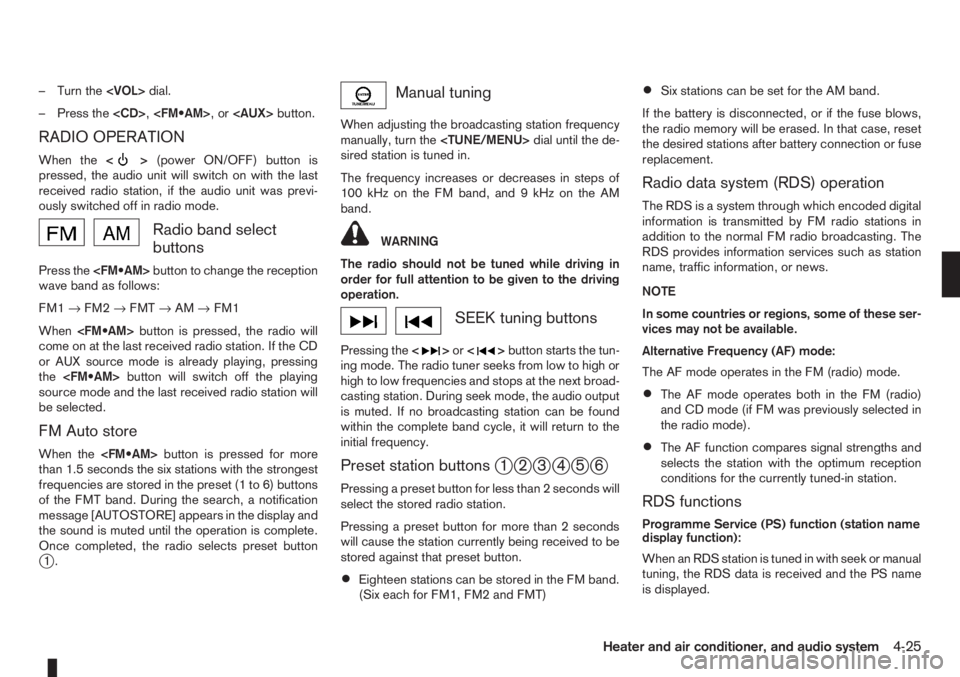
RADIO OPERATION
When the<>(power ON/OFF) button is
pressed, the audio unit will switch on with the last
received radio station, if the audio unit was previ-
ously switched off in radio mode.
Radio band select
buttons
Press the
wave band as follows:
FM1→FM2→FMT→AM→FM1
When
come on at the last received radio station. If the CD
or AUX source mode is already playing, pressing
the
source mode and the last received radio station will
be selected.
FM Auto store
When the
than 1.5 seconds the six stations with the strongest
frequencies are stored in the preset (1 to 6) buttons
of the FMT band. During the search, a notification
message [AUTOSTORE] appears in the display and
the sound is muted until the operation is complete.
Once completed, the radio selects preset button
j1.
Manual tuning
When adjusting the broadcasting station frequency
manually, turn the
sired station is tuned in.
The frequency increases or decreases in steps of
100 kHz on the FM band, and 9 kHz on the AM
band.
WARNING
The radio should not be tuned while driving in
order for full attention to be given to the driving
operation.
SEEK tuning buttons
Pressing the<>or<>button starts the tun-
ing mode. The radio tuner seeks from low to high or
high to low frequencies and stops at the next broad-
casting station. During seek mode, the audio output
is muted. If no broadcasting station can be found
within the complete band cycle, it will return to the
initial frequency.
Preset station buttonsj1j2j3j4j5j6
Pressing a preset button for less than 2 seconds will
select the stored radio station.
Pressing a preset button for more than 2 seconds
will cause the station currently being received to be
stored against that preset button.
•Eighteen stations can be stored in the FM band.
(Six each for FM1, FM2 and FMT)
•Six stations can be set for the AM band.
If the battery is disconnected, or if the fuse blows,
the radio memory will be erased. In that case, reset
the desired stations after battery connection or fuse
replacement.
Radio data system (RDS) operation
The RDS is a system through which encoded digital
information is transmitted by FM radio stations in
addition to the normal FM radio broadcasting. The
RDS provides information services such as station
name, traffic information, or news.
NOTE
In some countries or regions, some of these ser-
vices may not be available.
Alternative Frequency (AF) mode:
The AF mode operates in the FM (radio) mode.
•The AF mode operates both in the FM (radio)
and CD mode (if FM was previously selected in
the radio mode).
•The AF function compares signal strengths and
selects the station with the optimum reception
conditions for the currently tuned-in station.
RDS functions
Programme Service (PS) function (station name
display function):
When an RDS station is tuned in with seek or manual
tuning, the RDS data is received and the PS name
is displayed.
Heater and air conditioner, and audio system4-25
Page 140 of 235
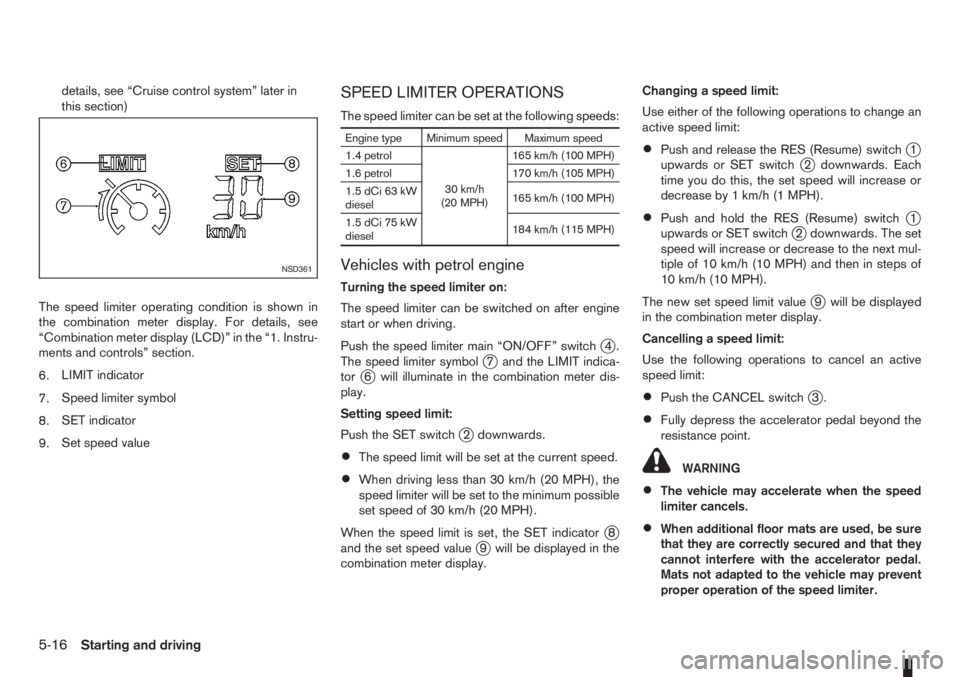
details, see “Cruise control system” later in
this section)
The speed limiter operating condition is shown in
the combination meter display. For details, see
“Combination meter display (LCD)” in the “1. Instru-
ments and controls” section.
6.LIMIT indicator
7.Speed limiter symbol
8.SET indicator
9.Set speed valueSPEED LIMITER OPERATIONS
The speed limiter can be set at the following speeds:
Engine type Minimum speed Maximum speed
1.4 petrol
30 km/h
(20 MPH)165 km/h (100 MPH)
1.6 petrol 170 km/h (105 MPH)
1.5 dCi 63 kW
diesel165 km/h (100 MPH)
1.5 dCi 75 kW
diesel184 km/h (115 MPH)
Vehicles with petrol engine
Turning the speed limiter on:
The speed limiter can be switched on after engine
start or when driving.
Push the speed limiter main “ON/OFF” switch
j4.
The speed limiter symbolj7 and the LIMIT indica-
torj6 will illuminate in the combination meter dis-
play.
Setting speed limit:
Push the SET switch
j2 downwards.
•The speed limit will be set at the current speed.
•When driving less than 30 km/h (20 MPH), the
speed limiter will be set to the minimum possible
set speed of 30 km/h (20 MPH).
When the speed limit is set, the SET indicator
j8
and the set speed valuej9 will be displayed in the
combination meter display.Changing a speed limit:
Use either of the following operations to change an
active speed limit:
•Push and release the RES (Resume) switchj1
upwards or SET switchj2 downwards. Each
time you do this, the set speed will increase or
decrease by 1 km/h (1 MPH).
•Push and hold the RES (Resume) switchj1
upwards or SET switchj2 downwards. The set
speed will increase or decrease to the next mul-
tiple of 10 km/h (10 MPH) and then in steps of
10 km/h (10 MPH).
The new set speed limit value
j9 will be displayed
in the combination meter display.
Cancelling a speed limit:
Use the following operations to cancel an active
speed limit:
•Push the CANCEL switchj3.
•Fully depress the accelerator pedal beyond the
resistance point.
WARNING
•The vehicle may accelerate when the speed
limiter cancels.
•When additional floor mats are used, be sure
that they are correctly secured and that they
cannot interfere with the accelerator pedal.
Mats not adapted to the vehicle may prevent
proper operation of the speed limiter.
NSD361
5-16Starting and driving
Page 143 of 235
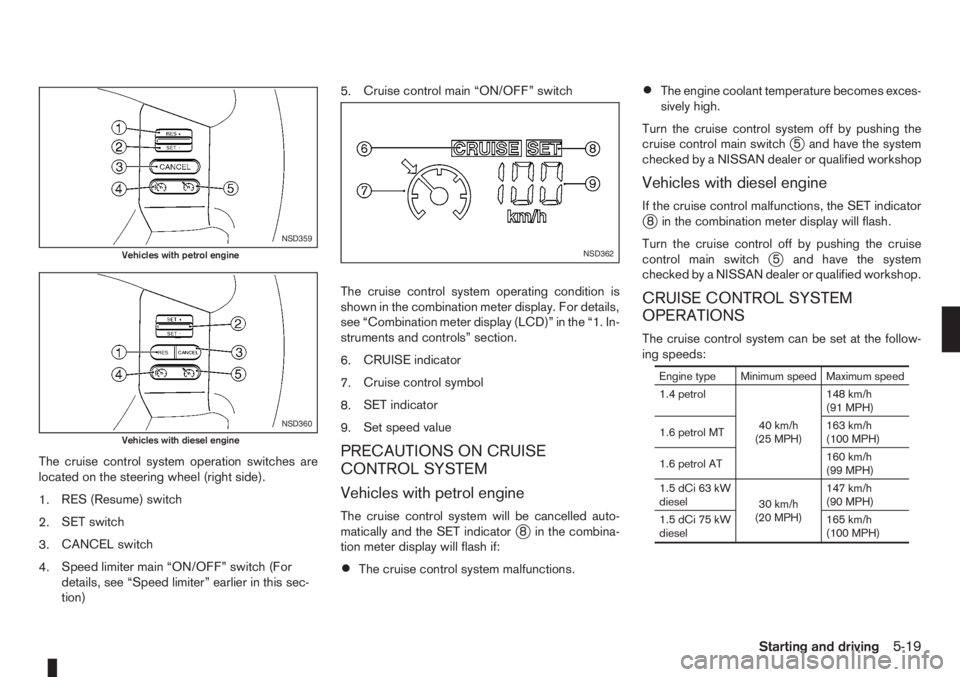
The cruise control system operation switches are
located on the steering wheel (right side).
1.RES (Resume) switch
2.SET switch
3.CANCEL switch
4.Speed limiter main “ON/OFF” switch (For
details, see “Speed limiter” earlier in this sec-
tion)5.Cruise control main “ON/OFF” switch
The cruise control system operating condition is
shown in the combination meter display. For details,
see “Combination meter display (LCD)” in the “1. In-
struments and controls” section.
6.CRUISE indicator
7.Cruise control symbol
8.SET indicator
9.Set speed valuePRECAUTIONS ON CRUISE
CONTROL SYSTEM
Vehicles with petrol engine
The cruise control system will be cancelled auto-
matically and the SET indicatorj8 in the combina-
tion meter display will flash if:
•The cruise control system malfunctions.
•The engine coolant temperature becomes exces-
sively high.
Turn the cruise control system off by pushing the
cruise control main switch
j5 and have the system
checked by a NISSAN dealer or qualified workshop
Vehicles with diesel engine
If the cruise control malfunctions, the SET indicatorj8 in the combination meter display will flash.
Turn the cruise control off by pushing the cruise
control main switch
j5 and have the system
checked by a NISSAN dealer or qualified workshop.
CRUISE CONTROL SYSTEM
OPERATIONS
The cruise control system can be set at the follow-
ing speeds:
Engine type Minimum speed Maximum speed
1.4 petrol
40 km/h
(25 MPH)148 km/h
(91 MPH)
1.6 petrol MT163 km/h
(100 MPH)
1.6 petrol AT160 km/h
(99 MPH)
1.5 dCi 63 kW
diesel
30 km/h
(20 MPH)147 km/h
(90 MPH)
1.5 dCi 75 kW
diesel165 km/h
(100 MPH)
NSD359
Vehicles with petrol engine
NSD360
Vehicles with diesel engine
NSD362
Starting and driving5-19
Page 149 of 235
•Trailer towing requires more fuel than under nor-
mal circumstances because of a considerable
increase in traction power required and resis-
tance.
•When towing a trailer, observe the following re-
stricted towing speeds:
Speed: below 100 km/h (62 MPH)
CAUTION
While towing a trailer, make sure the engine cool-
ant temperature warning light does not come on,
in order to prevent engine overheating.
TYRE PRESSURE
When towing a trailer, inflate the vehicle tyres to the
maximum recommended COLD tyre pressure, as
indicated on the tyre placard (for full loading). Make
sure the trailer tyre pressures are correct.
CAUTION
Do not tow a trailer when the vehicle is installed
with a temporary-use spare tyre.
SAFETY CHAINS
Always use a suitable chain between the vehicle
and trailer. The chain should be attached to the hitch
and not to the vehicle bumper or axle. Be sure to
leave enough slack in the chain to permit turning
corners. The chain should not drag on the ground:
passing the chain across the trailer hitch may be the
best practice depending on your trailer.
TRAILER BRAKES
Ensure that trailer brakes are installed as required
by local regulations. Also check that all other trailer
equipment conforms to local regulations.
TRAILER DETECTION (where fitted)
When towing a trailer and the turn signal switch is
used, the electrical system of the vehicle will detect
an additional electrical load of the trailer lighting. As
a result, the direction indicator tone will sound dif-
ferently.
INSTALLATION OF COUPLING
DEVICE
NISSAN recommends that the coupling device for
trailer towing be installed under the following condi-
tions:
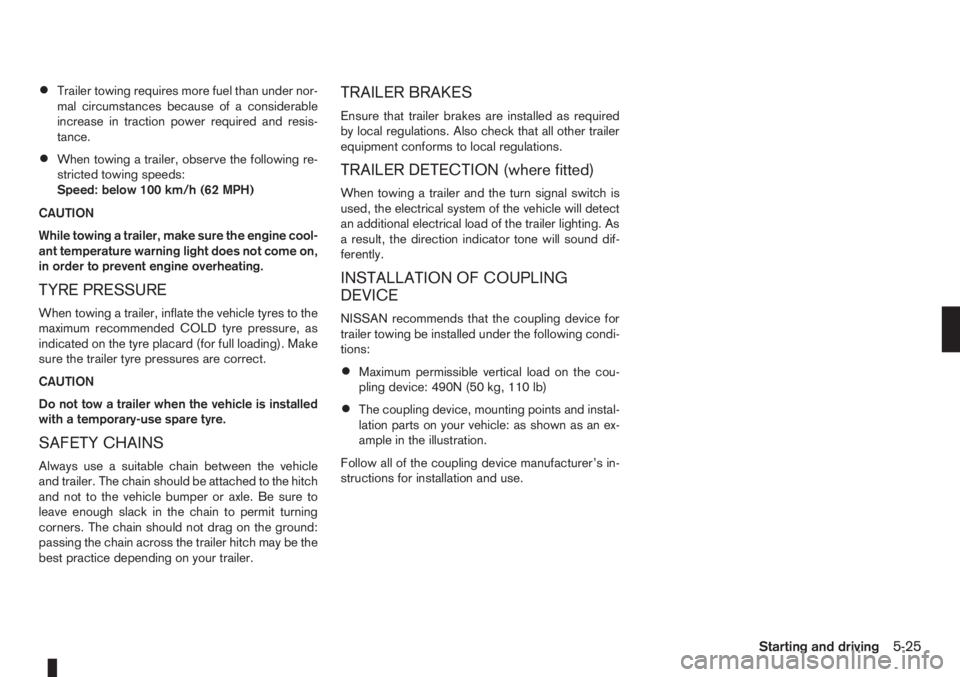
•Maximum permissible vertical load on the cou-
pling device: 490N (50 kg, 110 lb)
•The coupling device, mounting points and instal-
lation parts on your vehicle: as shown as an ex-
ample in the illustration.
Follow all of the coupling device manufacturer’s in-
structions for installation and use.
Starting and driving5-25
Page 197 of 235
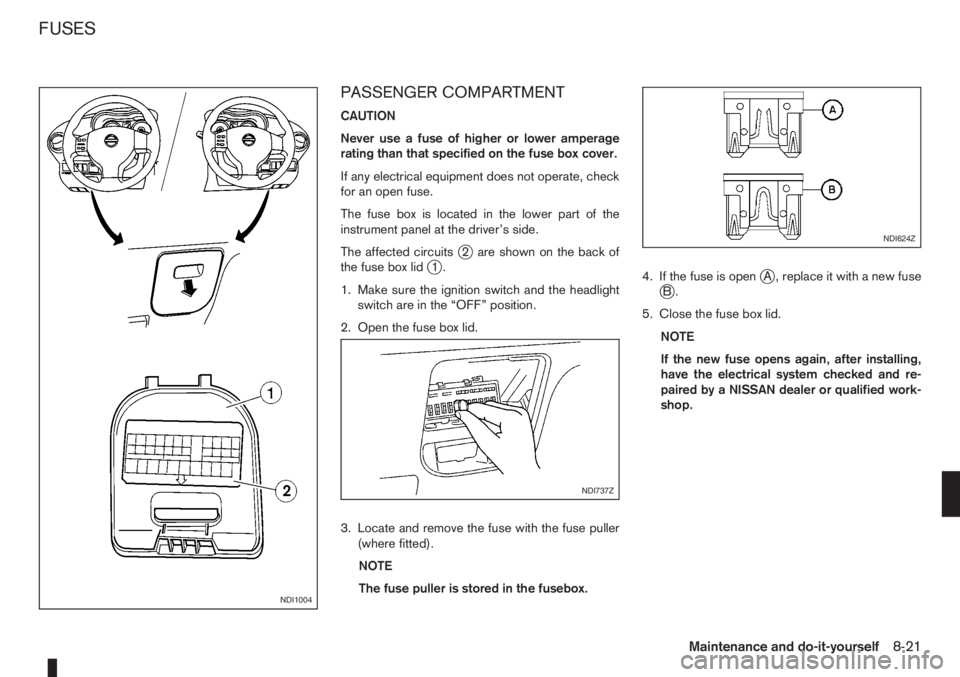
PASSENGER COMPARTMENT
CAUTION
Never use a fuse of higher or lower amperage
rating than that specified on the fuse box cover.
If any electrical equipment does not operate, check
for an open fuse.
The fuse box is located in the lower part of the
instrument panel at the driver’s side.
The affected circuits
j2 are shown on the back of
the fuse box lidj1.
1. Make sure the ignition switch and the headlight
switch are in the “OFF” position.
2. Open the fuse box lid.
3. Locate and remove the fuse with the fuse puller
(where fitted).
NOTE
The fuse puller is stored in the fusebox.4. If the fuse is openjA , replace it with a new fusejB.
5. Close the fuse box lid.
NOTE
If the new fuse opens again, after installing,
have the electrical system checked and re-
paired by a NISSAN dealer or qualified work-
shop.
NDI1004
NDI737Z
NDI624Z
FUSES
Maintenance and do-it-yourself8-21
Page 214 of 235
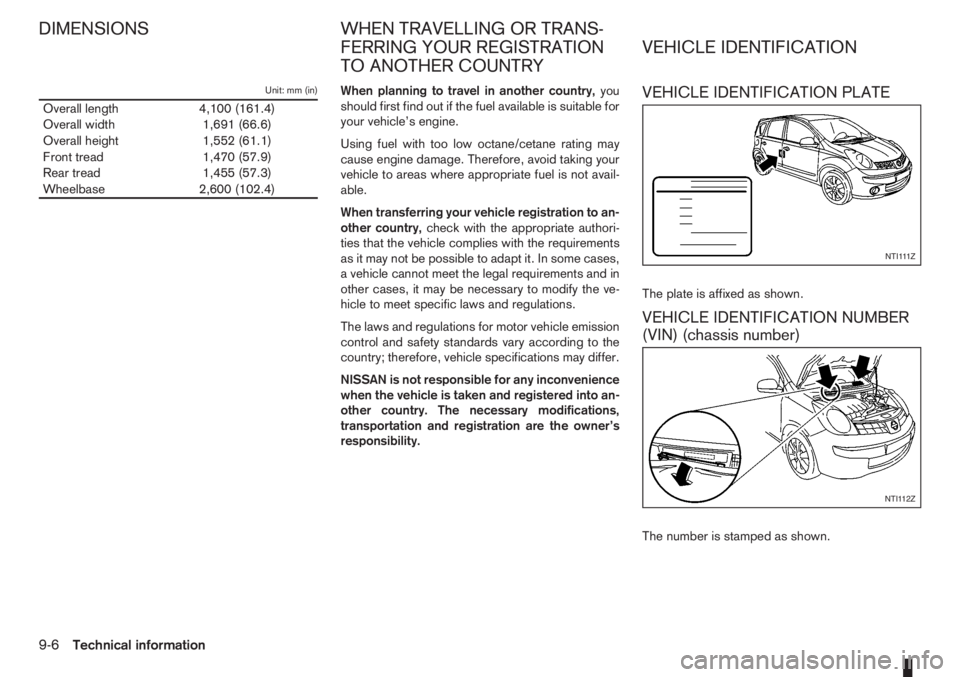
Unit: mm (in)
Overall length 4,100 (161.4)
Overall width 1,691 (66.6)
Overall height 1,552 (61.1)
Front tread 1,470 (57.9)
Rear tread 1,455 (57.3)
Wheelbase 2,600 (102.4)When planning to travel in another country,you
should first find out if the fuel available is suitable for
your vehicle’s engine.
Using fuel with too low octane/cetane rating may
cause engine damage. Therefore, avoid taking your
vehicle to areas where appropriate fuel is not avail-
able.
When transferring your vehicle registration to an-
other country,check with the appropriate authori-
ties that the vehicle complies with the requirements
as it may not be possible to adapt it. In some cases,
a vehicle cannot meet the legal requirements and in
other cases, it may be necessary to modify the ve-
hicle to meet specific laws and regulations.
The laws and regulations for motor vehicle emission
control and safety standards vary according to the
country; therefore, vehicle specifications may differ.
NISSAN is not responsible for any inconvenience
when the vehicle is taken and registered into an-
other country. The necessary modifications,
transportation and registration are the owner’s
responsibility.VEHICLE IDENTIFICATION PLATE
The plate is affixed as shown.
VEHICLE IDENTIFICATION NUMBER
(VIN) (chassis number)
The number is stamped as shown.
NTI111Z
NTI112Z
DIMENSIONS WHEN TRAVELLING OR TRANS-
FERRING YOUR REGISTRATION
TO ANOTHER COUNTRYVEHICLE IDENTIFICATION
9-6Technical information