Button NISSAN NOTE 2007 User Guide
[x] Cancel search | Manufacturer: NISSAN, Model Year: 2007, Model line: NOTE, Model: NISSAN NOTE 2007Pages: 235, PDF Size: 2.29 MB
Page 77 of 235
VEHICLE DEAD BATTERY –
LEFT-HAND SIDE DOOR HANDLE
The left-hand side door can be locked or unlocked
with the door key/emergency key when the vehi-
cle’s battery is dead.
To lock the door with the key/emergency
key
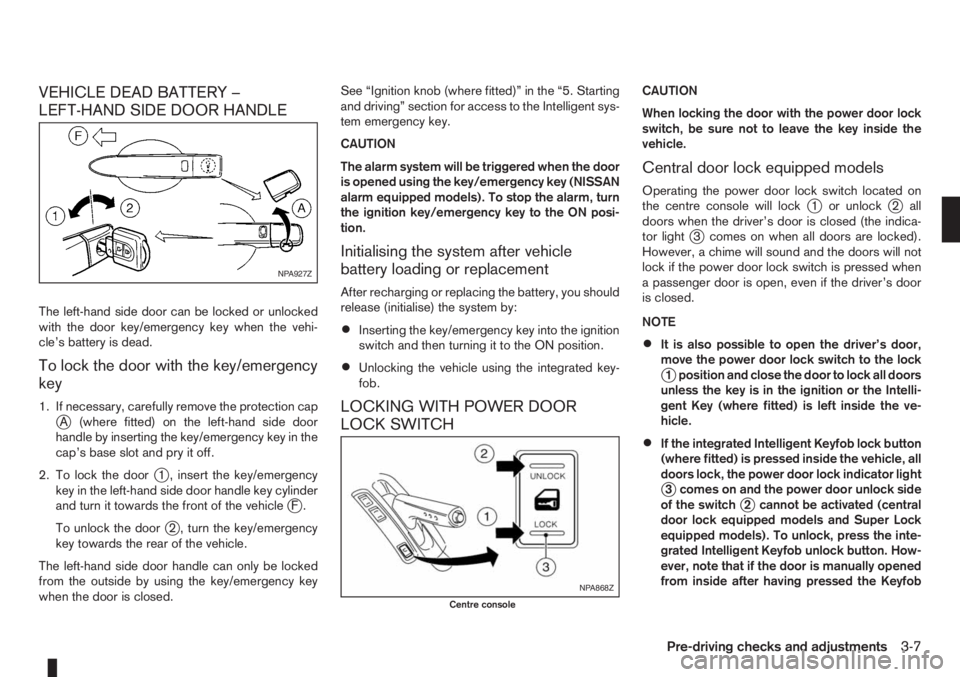
1. If necessary, carefully remove the protection capjA (where fitted) on the left-hand side door
handle by inserting the key/emergency key in the
cap’s base slot and pry it off.
2. To lock the door
j1 , insert the key/emergency
key in the left-hand side door handle key cylinder
and turn it towards the front of the vehicle
jF.
To unlock the door
j2 , turn the key/emergency
key towards the rear of the vehicle.
The left-hand side door handle can only be locked
from the outside by using the key/emergency key
when the door is closed.See “Ignition knob (where fitted)” in the “5. Starting
and driving” section for access to the Intelligent sys-
tem emergency key.
CAUTION
The alarm system will be triggered when the door
is opened using the key/emergency key (NISSAN
alarm equipped models). To stop the alarm, turn
the ignition key/emergency key to the ON posi-
tion.
Initialising the system after vehicle
battery loading or replacement
After recharging or replacing the battery, you should
release (initialise) the system by:
•Inserting the key/emergency key into the ignition
switch and then turning it to the ON position.
•Unlocking the vehicle using the integrated key-
fob.
LOCKING WITH POWER DOOR
LOCK SWITCH
CAUTION
When locking the door with the power door lock
switch, be sure not to leave the key inside the
vehicle.
Central door lock equipped models
Operating the power door lock switch located on
the centre console will lockj1 or unlockj2 all
doors when the driver’s door is closed (the indica-
tor light
j3 comes on when all doors are locked).
However, a chime will sound and the doors will not
lock if the power door lock switch is pressed when
a passenger door is open, even if the driver’s door
is closed.
NOTE
•It is also possible to open the driver’s door,
move the power door lock switch to the lock
j1 position and close the door to lock all doors
unless the key is in the ignition or the Intelli-
gent Key (where fitted) is left inside the ve-
hicle.
•If the integrated Intelligent Keyfob lock button
(where fitted) is pressed inside the vehicle, all
doors lock, the power door lock indicator light
j3 comes on and the power door unlock side
of the switchj2 cannot be activated (central
door lock equipped models and Super Lock
equipped models). To unlock, press the inte-
grated Intelligent Keyfob unlock button. How-
ever, note that if the door is manually opened
from inside after having pressed the Keyfob
NPA927Z
NPA868Z
Centre console
Pre-driving checks and adjustments3-7
Page 78 of 235
lock button (central door lock equipped mod-
els), the indicator lightj3 remains illuminated
and the door unlocks.
•When the power door lock switch is moved to
the lock positionj1 while the driver’s door is
open and the integrated Intelligent Keyfob
(where fitted) is left inside the vehicle, all
doors unlock as the driver’s door is closed
and the buzzer sounds (central door lock
equipped models and Super Lock equipped
models). This is to prevent from locking the
vehicle while the Intelligent Key has been left
inside the vehicle.
Super Lock equipped models
Operating the power door lock switch located on
the centre console will lockj1 or unlockj2all
doors (the indicator lightj3 comes on when all
doors are locked). However, when the Super Lock
is set, it is not possible to unlock the doors with the
power door lock switch
j2 . Note that a chime will
sound and the doors will not lock if the power door
lock switch is pressed when a passenger door is
open, even if the driver’s door is closed.
In order to lock all doors without activating the Su-
per Lock system, open the driver’s door, move the
power door lock switch to the lock position
j1and
close the door.
CAUTION
Note that the above operation will not be pos-sible with a key in the ignition switch or when the
Intelligent Key is left inside the vehicle; a chime
will then sound in order to draw your attention
and the vehicle unlocks.
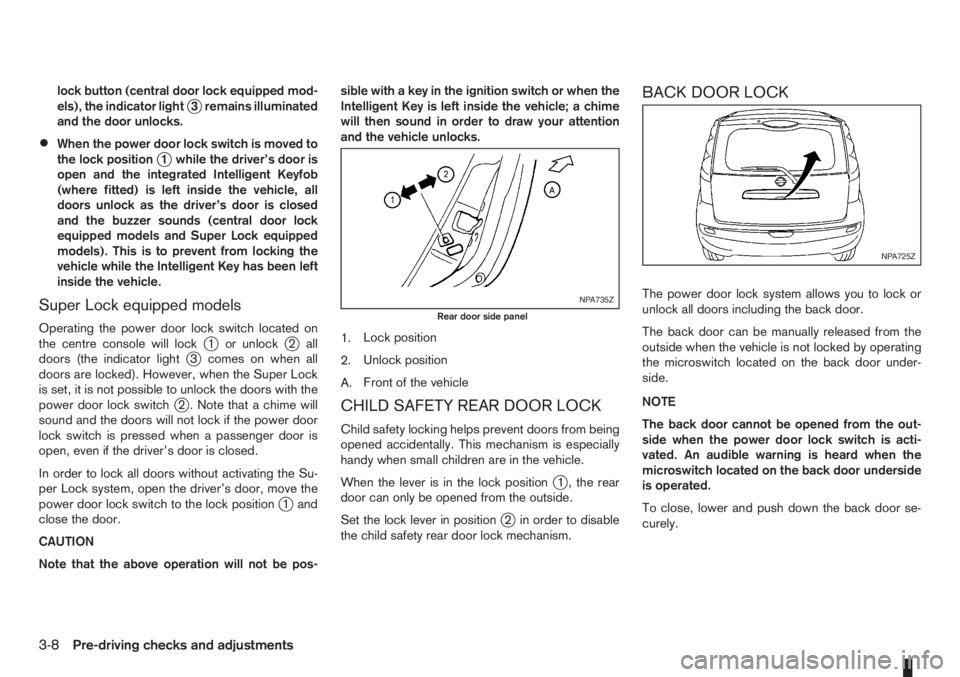
1.Lock position
2.Unlock position
A.Front of the vehicle
CHILD SAFETY REAR DOOR LOCK
Child safety locking helps prevent doors from being
opened accidentally. This mechanism is especially
handy when small children are in the vehicle.
When the lever is in the lock position
j1 , the rear
door can only be opened from the outside.
Set the lock lever in position
j2 in order to disable
the child safety rear door lock mechanism.
BACK DOOR LOCK
The power door lock system allows you to lock or
unlock all doors including the back door.
The back door can be manually released from the
outside when the vehicle is not locked by operating
the microswitch located on the back door under-
side.
NOTE
The back door cannot be opened from the out-
side when the power door lock switch is acti-
vated. An audible warning is heard when the
microswitch located on the back door underside
is operated.
To close, lower and push down the back door se-
curely.NPA735Z
Rear door side panel
NPA725Z
3-8Pre-driving checks and adjustments
Page 83 of 235
Adjusting — Remote control
(where fitted)
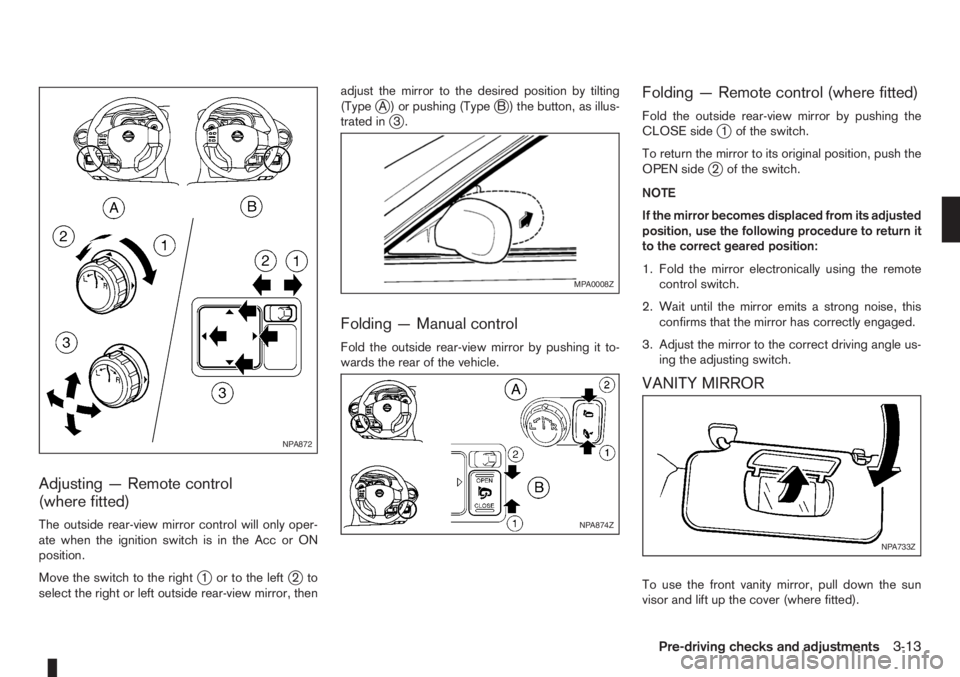
The outside rear-view mirror control will only oper-
ate when the ignition switch is in the Acc or ON
position.
Move the switch to the right
j1 or to the leftj2to
select the right or left outside rear-view mirror, thenadjust the mirror to the desired position by tilting
(Type
jA ) or pushing (TypejB ) the button, as illus-
trated inj3.
Folding — Manual control
Fold the outside rear-view mirror by pushing it to-
wards the rear of the vehicle.
Folding — Remote control (where fitted)
Fold the outside rear-view mirror by pushing the
CLOSE sidej1 of the switch.
To return the mirror to its original position, push the
OPEN side
j2 of the switch.
NOTE
If the mirror becomes displaced from its adjusted
position, use the following procedure to return it
to the correct geared position:
1. Fold the mirror electronically using the remote
control switch.
2. Wait until the mirror emits a strong noise, this
confirms that the mirror has correctly engaged.
3. Adjust the mirror to the correct driving angle us-
ing the adjusting switch.
VANITY MIRROR
To use the front vanity mirror, pull down the sun
visor and lift up the cover (where fitted).
NPA872
MPA0008Z
NPA874Z
NPA733Z
Pre-driving checks and adjustments3-13
Page 85 of 235
4Heater and air conditioner, and audio systemHeater and air conditioner, and audio system
Vents ....................................................................... 4-2
Side vents .......................................................... 4-2
Centre vents ....................................................... 4-2
Heater and air conditioner operation ........................ 4-2
Manual air conditioner......................................... 4-3
Automatic air conditioner (where fitted) ............... 4-8
Audio system ........................................................... 4-10
Audio operation precautions ............................... 4-10
Antenna .............................................................. 4-16
LW-MW-FM radio with CD player (where fitted) ...... 4-16
Anti-theft system ................................................. 4-16
Audio main operation .......................................... 4-17
Radio operation .................................................. 4-19
User set up menu ............................................... 4-21
Compact disc (CD) player operation ................... 4-22
FM AM radio with CD player (where fitted) .............. 4-23
Anti-theft system ................................................. 4-23
Audio main operation .......................................... 4-24
Radio operation .................................................. 4-25SETUP button .................................................... 4-26
Compact Disc (CD) operation ............................ 4-27
AUX socket ........................................................ 4-29
USB Memory operation ...................................... 4-29
iPod® player operation ....................................... 4-30
Bluetooth® operation.......................................... 4-31
Bluetooth® mobile phone feature ........................ 4-33
AM-FM radio with CD player and navigation
(where fitted) ........................................................... 4-34
Audio jack socket (AUX) (where fitted) ..................... 4-34
Mobile phone integration (where fitted) .................... 4-34
Bluetooth® mobile phone feature ........................ 4-34
Hands-free telephone control .............................. 4-36
Steering wheel switches (where fitted) ................ 4-38
Steering wheel switches for audio control (where
fitted) ....................................................................... 4-38
Main operation .................................................... 4-38
Car phone or CB radio ............................................ 4-39
Page 87 of 235
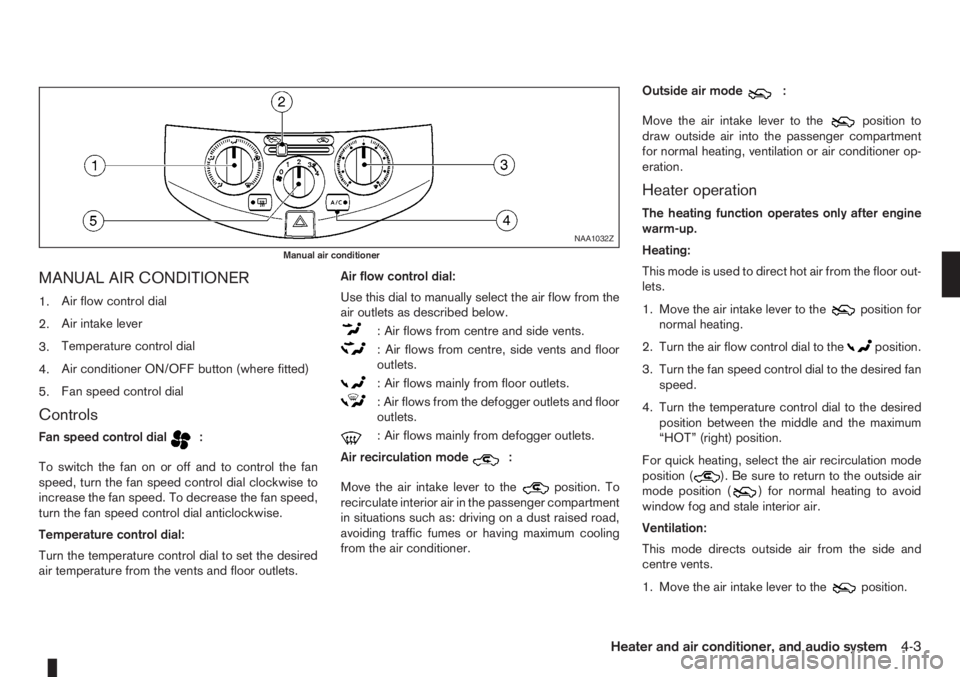
MANUAL AIR CONDITIONER
1.Air flow control dial
2.Air intake lever
3.Temperature control dial
4.Air conditioner ON/OFF button (where fitted)
5.Fan speed control dial
Controls
Fan speed control dialm:
To switch the fan on or off and to control the fan
speed, turn the fan speed control dial clockwise to
increase the fan speed. To decrease the fan speed,
turn the fan speed control dial anticlockwise.
Temperature control dial:
Turn the temperature control dial to set the desired
air temperature from the vents and floor outlets.Air flow control dial:
Use this dial to manually select the air flow from the
air outlets as described below.
: Air flows from centre and side vents.
: Air flows from centre, side vents and floor
outlets.
: Air flows mainly from floor outlets.
: Air flows from the defogger outlets and floor
outlets.
: Air flows mainly from defogger outlets.
Air recirculation mode
m:
Move the air intake lever to the
position. To
recirculate interior air in the passenger compartment
in situations such as: driving on a dust raised road,
avoiding traffic fumes or having maximum cooling
from the air conditioner.Outside air mode
m:
Move the air intake lever to the
position to
draw outside air into the passenger compartment
for normal heating, ventilation or air conditioner op-
eration.
Heater operation
The heating function operates only after engine
warm-up.
Heating:
This mode is used to direct hot air from the floor out-
lets.
1. Move the air intake lever to the
position for
normal heating.
2. Turn the air flow control dial to the
position.
3. Turn the fan speed control dial to the desired fan
speed.
4. Turn the temperature control dial to the desired
position between the middle and the maximum
“HOT” (right) position.
For quick heating, select the air recirculation mode
position (
). Be sure to return to the outside air
mode position () for normal heating to avoid
window fog and stale interior air.
Ventilation:
This mode directs outside air from the side and
centre vents.
1. Move the air intake lever to the
position.
NAA1032Z
Manual air conditioner
Heater and air conditioner, and audio system4-3
Page 88 of 235
2. Turn the air flow control dial to theposition.
3. Turn the fan speed control dial to the desired fan
speed.
4. Turn the temperature control dial to the desired
position.
Defrosting or defogging:
This mode is used to defrost/defog the windows.
1. Move the air intake lever to the
position.
2. Turn the air flow control dial to the
position.
3. Turn the fan speed control dial to speed position
2 or above.
4. Turn the temperature control dial to the desired
position between the middle and the maximum
“HOT” (right) position.
To quickly defrost/defog the windscreen, turn the
fan speed control dial to the maximum position and
the temperature control dial to the maximum “HOT”
(right) position.
Heating and defogging:
This mode heats the interior and defogs the wind-
screen.
1. Move the air intake lever to outside air mode
position (
).
2. Turn the air flow control dial to the
position.
3. Turn the fan speed control dial to speed position
2 or above.4. Turn the temperature control dial between the
middle and the maximum “HOT” (right) position.
Air conditioner operation (where fitted)
Start the engine, turn the fan speed control dial to
the desired fan speed and press the A/C button to
activate the air conditioner. When the air conditioner
is on, cooling and dehumidifying functions will be
added to the heater operation. To switch off the air
conditioner, press the button again.
NOTE
The air conditioner cooling function operates only
when the engine is running.
Cooling:
This mode is used to cool and dehumidify.
1. Move the air intake lever to outside air mode
position (
).
2. Turn the air flow control dial to the
position.
3. Turn the fan speed control dial to the desired fan
speed.
4. Press thebutton and the indicator light
will come on.
5. Turn the temperature control dial to the desired
position.
For quick cooling when the outside temperature is
high, select the air recirculation mode position
(
). Be sure to return to the outside air mode
position () to avoid windows from fogging-up
and interior air from becoming stale.NOTE
A visible mist may be seen coming from the vents
in hot, humid conditions as the air is cooled rap-
idly. This does not indicate a malfunction.
Dehumidified heating:
This mode is used to heat and dehumidify.
1. Move the air intake lever to outside air mode
position (
).
2. Turn the air flow control dial to the
position.
3. Turn on the fan speed control dial to the desired
fan speed.
4. Press thebutton and the indicator light
will come on.
5. Turn the temperature control dial to the desired
position.
Dehumidified defogging:
This mode is used to defog the windows and dehu-
midify.
1. Move the air intake lever to outside air mode
position (
).
2. Turn the air flow control dial to the
position.
3. Turn the fan speed control dial to the desired fan
speed.
4. Press thebutton and the indicator light
will come on.
5. Turn the temperature control dial to the desired
position.
4-4Heater and air conditioner, and audio system
Page 89 of 235
Operating tips
•In order to improve the heater operation, clear
the snow and ice from the wiper blade and air
inlet in front of the windscreen.
•After parking in the sun, drive for two or three
minutes with the windows open to vent hot air
from the passenger compartment. Then close
the windows to allow the acceleration of the air
conditioner’s cooling operation.
•Keep the windows closed while the air condi-
tioner is operating.
•The air conditioning system should be operated
for about 10 minutes, at least once a month. This
helps prevent damage to the system due to lack
of lubrication.
•If the coolant temperature warning light comes
on, turn the air conditioner off. For additional
information, see “Engine overheat” in the “6. In
case of emergency” section.
•If the engine coolant reaches an extremely high
temperature, the air conditioning system will au-
tomatically turn off. This may happen for example
if the engine runs at idle speed for a long time on
a hot day.
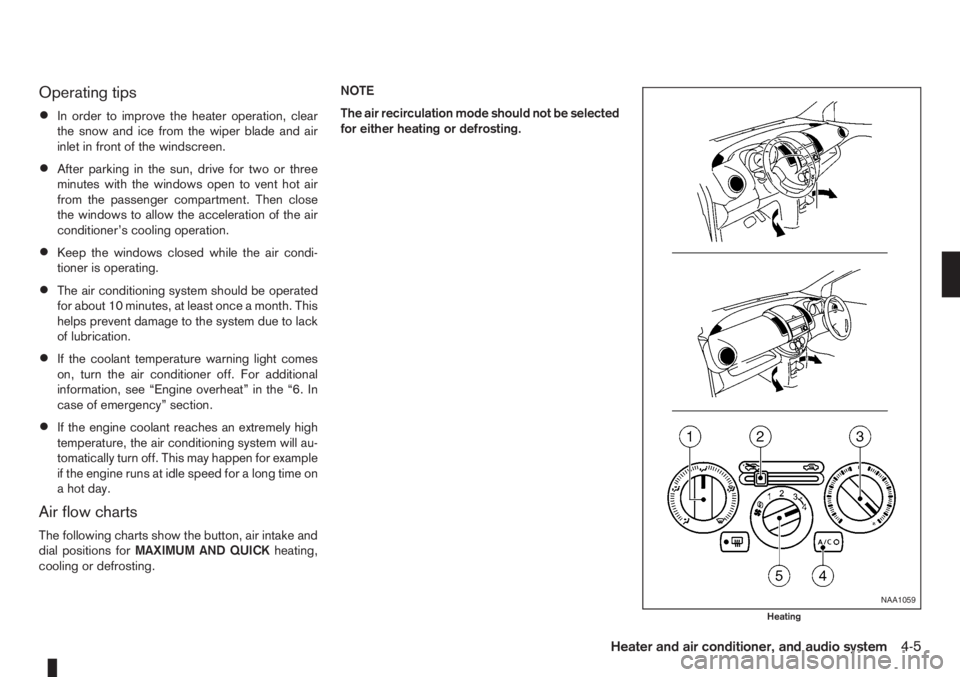
Air flow charts
The following charts show the button, air intake and
dial positions forMAXIMUM AND QUICKheating,
cooling or defrosting.NOTE
The air recirculation mode should not be selected
for either heating or defrosting.
NAA1059
Heating
Heater and air conditioner, and audio system4-5
Page 90 of 235
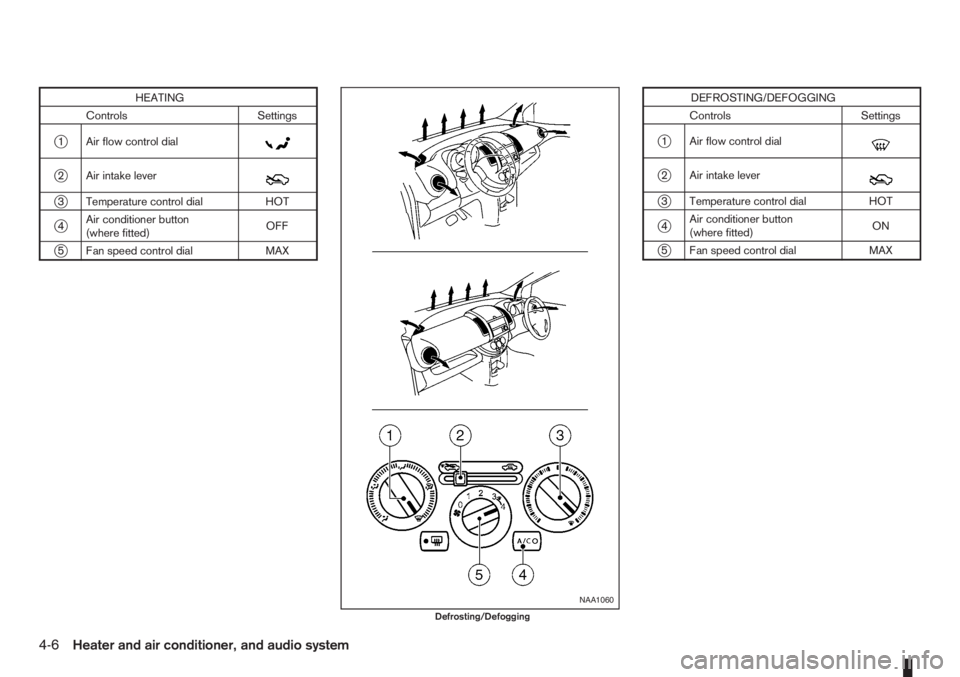
HEATING
Controls Settings
j1 Air flow control dialm
j2 Air intake leverm
j3 Temperature control dial HOT
j4Air conditioner button
(where fitted)OFF
j5 Fan speed control dial MAX
DEFROSTING/DEFOGGING
Controls Settings
j1 Air flow control dialm
j2 Air intake leverm
j3 Temperature control dial HOT
j4Air conditioner button
(where fitted)ON
j5 Fan speed control dial MAX
NAA1060
Defrosting/Defogging
4-6Heater and air conditioner, and audio system
Page 91 of 235
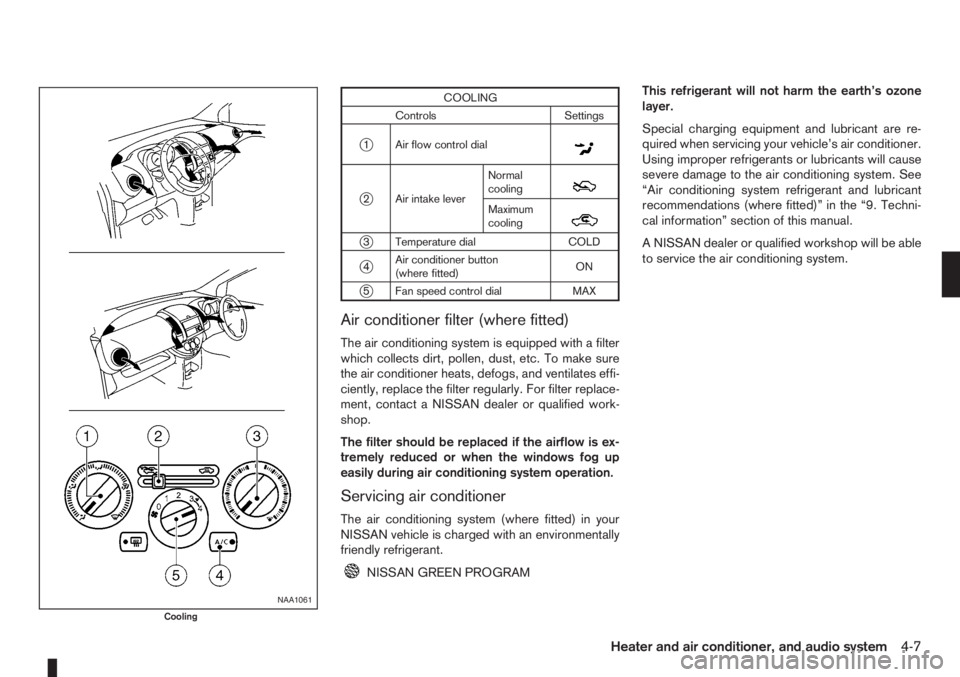
COOLING
Controls Settings
j1 Air flow control dialm
j2 Air intake leverNormal
coolingm
Maximum
coolingm
j3 Temperature dial COLD
j4Air conditioner button
(where fitted)ON
j5 Fan speed control dial MAX
Air conditioner filter (where fitted)
The air conditioning system is equipped with a filter
which collects dirt, pollen, dust, etc. To make sure
the air conditioner heats, defogs, and ventilates effi-
ciently, replace the filter regularly. For filter replace-
ment, contact a NISSAN dealer or qualified work-
shop.
The filter should be replaced if the airflow is ex-
tremely reduced or when the windows fog up
easily during air conditioning system operation.
Servicing air conditioner
The air conditioning system (where fitted) in your
NISSAN vehicle is charged with an environmentally
friendly refrigerant.
NISSAN GREEN PROGRAMThis refrigerant will not harm the earth’s ozone
layer.
Special charging equipment and lubricant are re-
quired when servicing your vehicle’s air conditioner.
Using improper refrigerants or lubricants will cause
severe damage to the air conditioning system. See
“Air conditioning system refrigerant and lubricant
recommendations (where fitted)” in the “9. Techni-
cal information” section of this manual.
A NISSAN dealer or qualified workshop will be able
to service the air conditioning system.
NAA1061
Cooling
Heater and air conditioner, and audio system4-7
Page 92 of 235
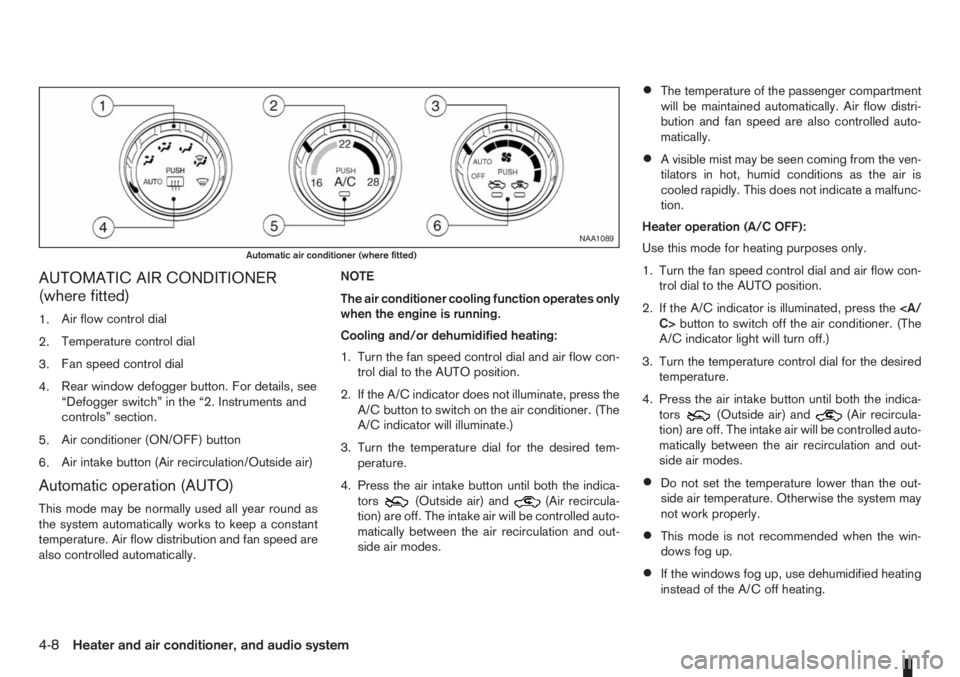
AUTOMATIC AIR CONDITIONER
(where fitted)
1.Air flow control dial
2.Temperature control dial
3.Fan speed control dial
4.Rear window defogger button. For details, see
“Defogger switch” in the “2. Instruments and
controls” section.
5.Air conditioner (ON/OFF) button
6.Air intake button (Air recirculation/Outside air)
Automatic operation (AUTO)
This mode may be normally used all year round as
the system automatically works to keep a constant
temperature. Air flow distribution and fan speed are
also controlled automatically.NOTE
The air conditioner cooling function operates only
when the engine is running.
Cooling and/or dehumidified heating:
1. Turn the fan speed control dial and air flow con-
trol dial to the AUTO position.
2. If the A/C indicator does not illuminate, press the
A/C button to switch on the air conditioner. (The
A/C indicator will illuminate.)
3. Turn the temperature dial for the desired tem-
perature.
4. Press the air intake button until both the indica-
tors(Outside air) and(Air recircula-
tion) are off. The intake air will be controlled auto-
matically between the air recirculation and out-
side air modes.
•The temperature of the passenger compartment
will be maintained automatically. Air flow distri-
bution and fan speed are also controlled auto-
matically.
•A visible mist may be seen coming from the ven-
tilators in hot, humid conditions as the air is
cooled rapidly. This does not indicate a malfunc-
tion.
Heater operation (A/C OFF):
Use this mode for heating purposes only.
1. Turn the fan speed control dial and air flow con-
trol dial to the AUTO position.
2. If the A/C indicator is illuminated, press the
C>button to switch off the air conditioner. (The
A/C indicator light will turn off.)
3. Turn the temperature control dial for the desired
temperature.
4. Press the air intake button until both the indica-
tors
(Outside air) and(Air recircula-
tion) are off. The intake air will be controlled auto-
matically between the air recirculation and out-
side air modes.
•Do not set the temperature lower than the out-
side air temperature. Otherwise the system may
not work properly.
•This mode is not recommended when the win-
dows fog up.
•If the windows fog up, use dehumidified heating
instead of the A/C off heating.
NAA1089
Automatic air conditioner (where fitted)
4-8Heater and air conditioner, and audio system