Phone NISSAN NOTE 2007 User Guide
[x] Cancel search | Manufacturer: NISSAN, Model Year: 2007, Model line: NOTE, Model: NISSAN NOTE 2007Pages: 235, PDF Size: 2.29 MB
Page 120 of 235
For details, see “FM AM radio with CD player
(where fitted)” earlier in this section.
When successfully paired, a notification message
will be displayed. During the connection the follow-
ing status icons will be displayed (top left of dis-
play): Signal strength (
), Battery status (), and
Bluetooth ().
*: If the low battery message comes on, the Blue-
tooth® device must be recharged soon.
HANDS-FREE TELEPHONE
CONTROL
The hands-free mode can be operated using the
telephone<>button on the audio system, or
(where fitted) on the steering wheel.
Initiating a call
A call can be initiated using one of the following
methods:
– Redial
– Phone book
– Manual dialling
– Missed calls
– Dialled calls
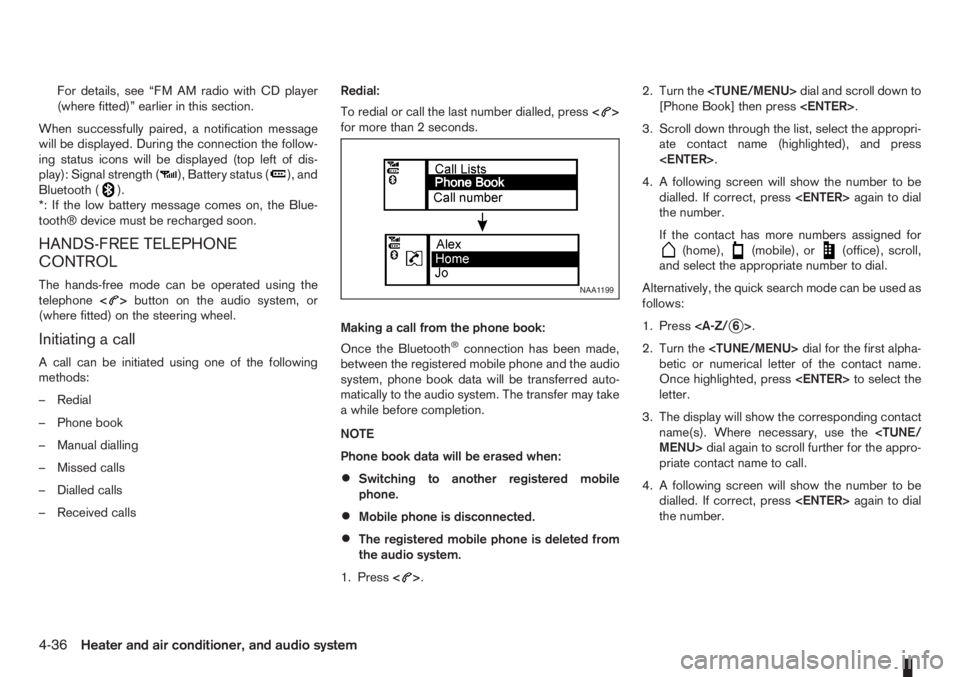
– Received callsRedial:
To redial or call the last number dialled, press<
>
for more than 2 seconds.
Making a call from the phone book:
Once the Bluetooth
®connection has been made,
between the registered mobile phone and the audio
system, phone book data will be transferred auto-
matically to the audio system. The transfer may take
a while before completion.
NOTE
Phone book data will be erased when:
•Switching to another registered mobile
phone.
•Mobile phone is disconnected.
•The registered mobile phone is deleted from
the audio system.
1. Press<
>.2. Turn the
[Phone Book] then press
3. Scroll down through the list, select the appropri-
ate contact name (highlighted), and press
4. A following screen will show the number to be
dialled. If correct, press
the number.
If the contact has more numbers assigned for
(home),(mobile), or(office), scroll,
and select the appropriate number to dial.
Alternatively, the quick search mode can be used as
follows:
1. Press
2. Turn the
betic or numerical letter of the contact name.
Once highlighted, press
letter.
3. The display will show the corresponding contact
name(s). Where necessary, use the
priate contact name to call.
4. A following screen will show the number to be
dialled. If correct, press
the number.
NAA1199
4-36Heater and air conditioner, and audio system
Page 121 of 235
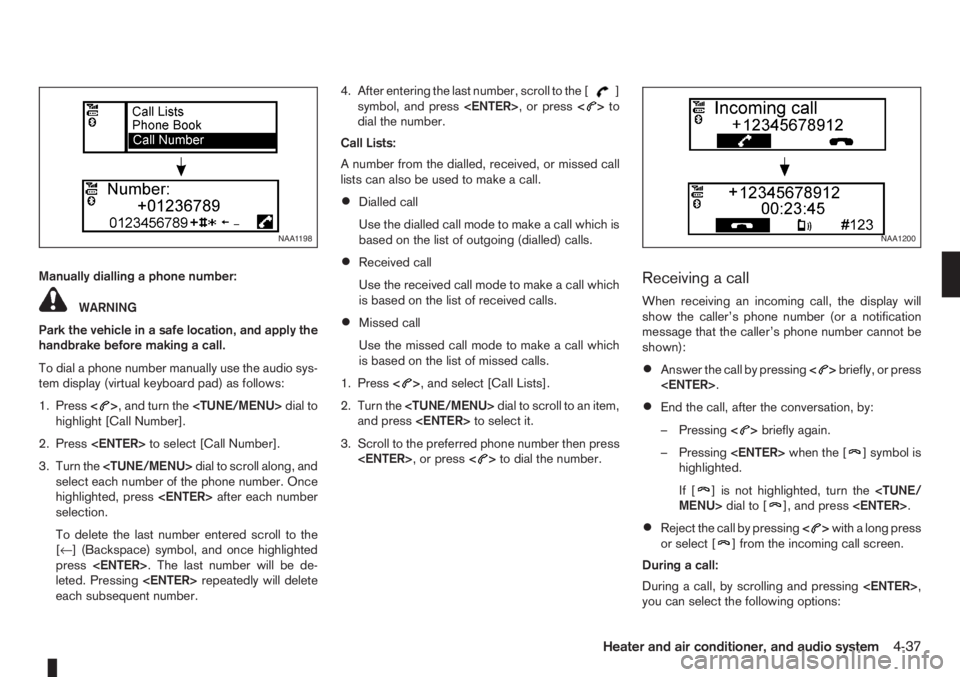
Manually dialling a phone number:
WARNING
Park the vehicle in a safe location, and apply the
handbrake before making a call.
To dial a phone number manually use the audio sys-
tem display (virtual keyboard pad) as follows:
1. Press<
>, and turn the
highlight [Call Number].
2. Press
3. Turn the
select each number of the phone number. Once
highlighted, press
selection.
To delete the last number entered scroll to the
[←] (Backspace) symbol, and once highlighted
press
leted. Pressing
each subsequent number.4. After entering the last number, scroll to the [
]
symbol, and press
dial the number.
Call Lists:
A number from the dialled, received, or missed call
lists can also be used to make a call.
•Dialled call
Use the dialled call mode to make a call which is
based on the list of outgoing (dialled) calls.
•Received call
Use the received call mode to make a call which
is based on the list of received calls.
•Missed call
Use the missed call mode to make a call which
is based on the list of missed calls.
1. Press<
>, and select [Call Lists].
2. Turn the
and press
3. Scroll to the preferred phone number then press
>to dial the number.
Receiving a call
When receiving an incoming call, the display will
show the caller’s phone number (or a notification
message that the caller’s phone number cannot be
shown):
•Answer the call by pressing<>briefly, or press
•End the call, after the conversation, by:
– Pressing<
>briefly again.
– Pressing
] symbol is
highlighted.
If [
] is not highlighted, turn the
•Reject the call by pressing<>with a long press
or select [] from the incoming call screen.
During a call:
During a call, by scrolling and pressing
you can select the following options:
NAA1198NAA1200
Heater and air conditioner, and audio system4-37
Page 122 of 235
![NISSAN NOTE 2007 User Guide •[#123] — Use this item to enter numbers during
a call. For example, if directed by an automated
phone system to dial an extension number the
system will send the tone associated with the
selected](/img/5/56796/w960_56796-121.png "NISSAN NOTE 2007 User Guide •[#123] — Use this item to enter numbers during
a call. For example, if directed by an automated
phone system to dial an extension number the
system will send the tone associated with the
selected")
•[#123] — Use this item to enter numbers during
a call. For example, if directed by an automated
phone system to dial an extension number the
system will send the tone associated with the
selected number.
•[] — Use this item (the transfer handset com-
mand) to transfer the call from the audio system
to your mobile phone.
To transfer the call back to hands-free via the
audio system select [
].
STEERING WHEEL SWITCHES
(where fitted)
j
1Telephone button
j2Volume control buttons
The hands-free mode can be operated using the
steering wheel switches.
Volume control buttons
The volume control buttons allow you to adjust the
volume of the speakers by pressing the<+>or<
—>button.
Telephone button
The phone <> button allows you to:
•Accept an incoming call by pressing<>once.
•Reject an incoming call by pressing<>for
more than 2 seconds during the incoming call.
•End an active call by pressing the<>button
once.
•Redial the last outgoing call by pressing the<>
button for more than 2 seconds.
MAIN OPERATION
A.Source button
B.Volume control buttons
C.
(INFO) button
D.Scrolling switch
A.
(INFO) button
B.Volume control buttons
NAA1020Z
NAA898Z
Type A
NAA1010Z
Type B
STEERING WHEEL SWITCHES
FOR AUDIO CONTROL
(where fitted)
4-38Heater and air conditioner, and audio system
Page 123 of 235
C.Telephone button
D.Scrolling switch
E.Source button
The audio unit can be operated by using the con-
trols on the steering wheel.
To use the steering wheel audio switch, push the
power “ON” button of the audio unit with the ignition
switch in either the Acc or ON position.
mormScrolling switch
– Preset station change (radio mode)
Push the up/down scrolling switch (
or) for
less than 1.5 seconds to select one of the preset
radio stations.
– Seek tuning (radio mode)
Push the up/down scrolling switch (
or) for
more than 1.5 seconds to seek for the next or
previous radio station.
– Track up/down (CD mode)
Push the up/down scrolling switch (
or) for
less than 1.5 seconds to select the next track or
to return to the beginning of the present track.
Push (up/down) several times to skip through or
skip back the tracks.
– DISC change (where fitted, CD mode)
Push the up/down scrolling switch (
or) for
more than 1.5 seconds to change the playing
disc.
mINFO button
For additional information about thebutton,
see “Meters and gauges” in the “2. Instruments and
controls” section.
SOURCE button
When the SRC (or SOURCE) button is pressed
repeatedly, the source will change as follows:
Radio⇒CD⇒AUX *⇒Radio
* where fitted
mTelephone button
For additional information of the telephone button,
see “Mobile phone integration (where fitted)” earlier
in this section.
mVolume control buttons
Press the + or — button to adjust the volume level.When installing large capacity wireless equipment
or a car phone in your NISSAN, be sure to observe
the following as it may adversely affect the Engine
control system and other electronic parts depend-
ing on its installation location.
CAUTION
•Keep the antenna as far as possible away from
the Electric Control Module.
•Also keep the antenna wire more than 20 cm
(8 inches) away from the Electro Injection har-
ness. Do not route the antenna wire next to
any harness.
•Adjust the antenna standing-wave ratio as rec-
ommended by the manufacturer.
•Connect the ground wire from the radio chas-
sis to the body.
For details, consult a NISSAN dealer or qualified
workshop.
CAR PHONE OR CB RADIO
Heater and air conditioner, and audio system4-39
Page 221 of 235
10 Index
A
Air bag system (Supplemental Restraint System) ................. 1-11
Air bag warning labels ......................................................... 1-13
Air bag warning light ............................................................ 1-13
Air cleaner filter ................................................................... 8-19
Air conditioner
– Air conditioner filter ................................................ 4-10, 4-7
– Air conditioner specification label ..................................... 9-7
– Air conditioning system refrigerant and lubricant
recommendations ............................................................ 9-4
– Automatic air conditioner ................................................. 4-8
– Heater and air conditioner ................................................ 4-2
– Manual air conditioner ..................................................... 4-3
– Servicing air conditioner ......................................... 4-10, 4-7
Antenna .............................................................................. 4-16
Anti-lock Braking System (ABS) .......................................... 5-28
Anti-Theft System (NISSAN) .................................................. 3-9
Approval numbers ................................................................. 9-8
Audible reminders
– Warning/indicator lights and audible reminders ................ 2-7
Audio
– AM-FM radio with CD player and navigation (NISSAN
Connect) ....................................................................... 4-34
– Anti-theft system ............................................................ 4-23
– Audio operation precautions .......................................... 4-10
– Audio player operation .................................................. 4-31
– Audio system ................................................................. 4-10
– AUX socket ................................................................... 4-29
– FM AM radio with CD player ......................................... 4-23
– iPod® player operation .................................................. 4-30– Jack socket ................................................................... 4-34
– LW-MW-FM radio with CD player ................................. 4-16
– Steering-wheel switches for audio control ...................... 4-38
– USB Memory operation ................................................. 4-29
Automatic transmission
– Automatic transmission fluid (ATF) ................................. 8-13
– Driving with automatic transmission ............................... 5-12
B
Battery ....................................................................... 5-31, 8-15
– Caution label ................................................................. 8-15
– Integrated keyfob battery replacement ........................... 8-17
– Intelligent Key battery replacement ................................. 8-17
– Reinitialisation procedure after battery reconnection ....... 8-16
– Vehicle battery ............................................................... 8-15
Battery (vehicle)
– Vehicle dead battery – Left-hand side door handle ........... 3-7
Before starting the engine ..................................................... 5-2
Bluetooth®
– Audio player operation ................................................... 4-31
– Bluetooth® mobile phone feature .................................. 4-34
– Bluetooth® settings ....................................................... 4-31
Bonnet release .................................................................... 3-10
Brake .................................................................................. 8-13
– Anti-lock Braking System (ABS) .................................... 5-28
– Brake fluid ..................................................................... 8-13
– Brake precautions ......................................................... 5-27
– Brake system ................................................................ 5-27
– Checking brake pedal ................................................... 8-13
– Checking handbrake ..................................................... 8-13
– Handbrake lever ............................................................ 3-11
Page 222 of 235
– Trailer brakes ................................................................ 5-25
C
Capacities and recommended fuel/lubricants ......................... 9-2
– Fuel recommendation ...................................................... 9-4
Car phone or CB radio ........................................................ 4-39
Care when driving ................................................................. 5-5
Changing
– Changing engine coolant ................................................. 8-6
– Changing engine oil ......................................................... 8-9
– Changing engine oil filter ............................................... 8-11
– Changing tyres and wheels ........................................... 8-31
Checking
– Checking brake pedal ................................................... 8-13
– Checking engine coolant level ......................................... 8-6
– Checking engine oil level ................................................. 8-9
– Checking handbrake ..................................................... 8-13
Child restraint anchorage (top tether) .................................. 1-23
Child restraints .................................................................... 1-16
– Installation on front passenger seat ................................ 1-19
– Installation on rear seats ................................................ 1-20
Child safety ........................................................................... 1-7
Cleaning
– Alloy wheels .................................................................... 7-3
– Chrome parts .................................................................. 7-3
– Exterior ............................................................................ 7-2
– Glass ....................................................................... 7-3, 7-4
– Interior ............................................................................ 7-3
– Plastic parts .................................................................... 7-4
– Removing spots ............................................................... 7-2
– Underbody ...................................................................... 7-3
Clock (digital) ........................................................................ 2-5
Clutch fluid .......................................................................... 8-13
Cold weather driving ........................................................... 5-31Coolant
– Changing engine coolant ................................................. 8-6
– Checking engine coolant level ......................................... 8-6
– Engine coolant ............................................................... 5-31
– Engine cooling system ..................................................... 8-6
Corrosion protection .................................................... 5-32, 7-4
– Environmental factors ...................................................... 7-4
Cruise control system .......................................................... 5-18
Cruise control system operations ......................................... 5-19
D
Defogger switch
– Outside mirror defogger ................................................ 2-15
– Rear window defogger .................................................. 2-15
Diesel particulate filter ........................................................... 5-5
Dimensions ........................................................................... 9-6
Door
– Back door lock ................................................................ 3-8
– Child safety rear door lock ............................................... 3-8
– Door locks ....................................................................... 3-6
– Emergency situation – Super Lock system ....................... 3-6
– Locking/unlocking with emergency key or key (vehicle dead
battery situation) .............................................................. 3-7
– Power door lock switch ................................................... 3-7
– Super Lock system .......................................................... 3-6
Drive belts ........................................................................... 8-18
Driving
– Care when driving ........................................................... 5-5
– Cold weather driving ..................................................... 5-31
– Driving on wet road ......................................................... 5-5
– Driving the vehicle ......................................................... 5-11
– Driving under winter conditions ........................................ 5-5
– Driving with automatic transmission ............................... 5-12
– Driving with manual transmission ................................... 5-11
– Precautions when starting and driving .............................. 5-3
10-2Index
Page 225 of 235
– Power door lock switch ................................................... 3-7
– Steering lock ............................................................ 5-7, 5-8
– Super Lock system .......................................................... 3-6
M
Maintenance
– General maintenance ....................................................... 8-2
– Maintenance precautions ................................................. 8-4
– Maintenance requirements ............................................... 8-2
– Seat belt maintenance ..................................................... 1-9
Manual transmission
– Driving with manual transmission ................................... 5-11
Meters and gauges ............................................................... 2-2
– Digital clock ..................................................................... 2-5
– Fuel gauge ...................................................................... 2-2
– Odometer ........................................................................ 2-3
– Oil change schedule set-up ............................................. 2-4
– Outside temperature display ............................................ 2-4
– Speedometer .................................................................. 2-2
– Tachometer ..................................................................... 2-2
– Trip computer .................................................................. 2-3
– Twin trip odometer .......................................................... 2-3
Mirror .................................................................................. 3-12
– Inside rear-view mirror ................................................... 3-12
– Outside rear-view mirrors .............................................. 3-12
– Vanity mirror .................................................................. 3-13
Mobile phone integration ..................................................... 4-34
N
NISSAN Anti-Theft System (NATS) ................................ 5-7, 5-9
– NATS immobilizer radio approval number ......................... 9-8
– NATS security indicator light ............................................ 3-9O
Odometer ............................................................................. 2-3
– Twin trip .......................................................................... 2-3
Oil
– Changing engine oil ......................................................... 8-9
– Changing engine oil filter ............................................... 8-11
– Checking engine oil level ................................................. 8-9
– Engine oil ........................................................................ 8-8
– Oil change schedule set-up ............................................. 2-4
– Recommended lubricants ................................................ 9-2
– Recommended SAE viscosity number .............................. 9-4
Outside temperature display .................................................. 2-4
Overheat
– Engine overheat ............................................................. 6-11
P
Parking ............................................................................... 5-22
– Ultrasonic parking sensor .............................................. 5-22
Phone
– Bluetooth® .................................................................... 4-34
– Mobile phone integration ............................................... 4-34
Power
– Power steering system .................................................. 5-27
– Power window — Driver’s side (Reinitialisation
procedure) .................................................................... 8-16
Power outlet ........................................................................ 2-20
Power windows ................................................................... 2-25
– Automatic operation ....................................................... 2-26
– Driver’s side main switch ............................................... 2-26
– Passenger’s side switch ................................................ 2-26
Pre-tensioner seat belt system ............................................... 1-9
Precaution
– Seat belt usage ............................................................... 1-6
Index10-5
Page 227 of 235

Starting
– Before starting the engine ................................................ 5-2
– Jump-starting .......................................................... 6-9, 8-16
– Precautions when starting and driving .............................. 5-3
– Push-starting ................................................................. 6-11
– Starting the engine ........................................................ 5-10
Steering
– Power steering system .................................................. 5-27
– Steering lock ............................................................ 5-7, 5-8
– Steering wheel adjustment ............................................. 3-12
– Steering wheel switches for hands-free telephone
control ........................................................................... 4-38
– Steering-wheel switches for audio control ...................... 4-38
– Telephone button ................................................. 4-34, 4-38
– Wheel i switch ................................................................. 2-3
Storage ............................................................................... 2-21
– “Flexi-board” system ...................................................... 2-24
– Centre console box ....................................................... 2-22
– Convenience hooks ....................................................... 2-23
– Cup holder .................................................................... 2-22
– Glove box ...................................................................... 2-21
– Rear foldable tables ....................................................... 2-23
– Seat pockets ................................................................. 2-23
– Under seat storage tray ................................................. 2-23
Supplemental Restraint System (air bag system)
– Air bag system .............................................................. 1-10
– Air bag warning labels ................................................... 1-13
– Air bag warning light ...................................................... 1-13
– Front passenger air bag indicator light ........................... 1-14
Switch
– Defogger switch ............................................................ 2-15
– Fog light switch ............................................................. 2-17
– Headlight and turn signal switch .................................... 2-16
– Wiper and washer switch .............................................. 2-13T
Temporary-use spare tyre ...................................................... 6-2
Three-point type seat belts .................................................... 1-7
Three-way catalyst (Petrol engine models) ............................. 5-4
Tilting steering wheel ........................................................... 3-12
Top tether strap for child restraint ........................................ 1-23
Towing
– Recommended towing .................................................. 6-13
– Tow bar Installation ....................................................... 5-25
– Tow truck towing ........................................................... 6-12
– Towing eye .................................................................... 6-13
– Towing hook/eye ........................................................... 6-14
– Towing precautions ....................................................... 6-12
– Trailer towing ................................................................ 5-24
Trailer
– Trailer brakes ................................................................ 5-25
– Trailer detection ............................................................. 5-25
– Trailer towing ................................................................ 5-24
Transmission
– Automatic transmission (ignition knob) ...................... 5-6, 5-8
– Automatic transmission fluid (ATF) ................................. 8-13
– Driving with automatic transmission ............................... 5-12
– Driving with manual transmission ................................... 5-11
– Manual transmission (ignition knob) ................................. 5-8
– Manual transmission (ignition switch) ............................... 5-6
Travelling or transferring your registration to another country .. 9-6
Turbocharger system (Diesel engine models) ......................... 5-4
Turn signal switch ............................................................... 2-17
Tyre
– Changing tyres and wheels ........................................... 8-31
– Flat tyre ........................................................................... 6-3
– Repairing flat tyre ............................................................ 6-7
– Spare tyre ..................................................................... 8-31
– Temporary-use spare tyre ................................................ 6-2
– Types of tyres ................................................................ 8-29
Index10-7