Emergency NISSAN NOTE 2008 User Guide
[x] Cancel search | Manufacturer: NISSAN, Model Year: 2008, Model line: NOTE, Model: NISSAN NOTE 2008Pages: 235, PDF Size: 2.29 MB
Page 94 of 235
•If the coolant temperature warning light comes
on, turn the air conditioner off. For additional
information, see “Engine overheat” in the “6. In
case of emergency” section.
•If the engine coolant reaches an extremely high
temperature, the air conditioning system will au-
tomatically turn off. This may happen for example
if the engine runs at idle speed for a long time on
a hot day.
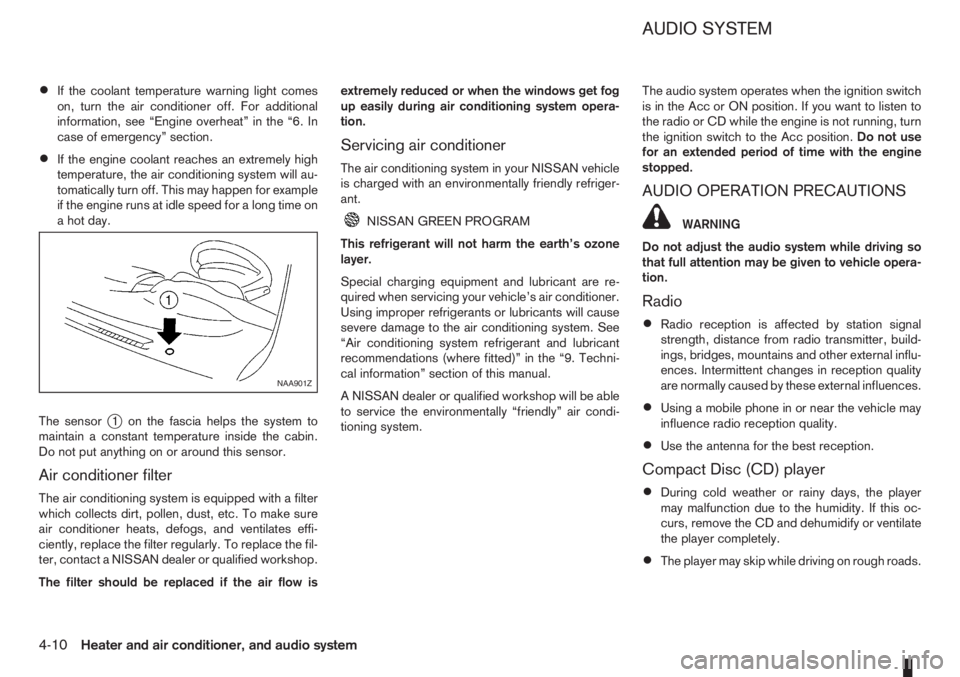
The sensor
j1 on the fascia helps the system to
maintain a constant temperature inside the cabin.
Do not put anything on or around this sensor.
Air conditioner filter
The air conditioning system is equipped with a filter
which collects dirt, pollen, dust, etc. To make sure
air conditioner heats, defogs, and ventilates effi-
ciently, replace the filter regularly. To replace the fil-
ter, contact a NISSAN dealer or qualified workshop.
The filter should be replaced if the air flow isextremely reduced or when the windows get fog
up easily during air conditioning system opera-
tion.
Servicing air conditioner
The air conditioning system in your NISSAN vehicle
is charged with an environmentally friendly refriger-
ant.
NISSAN GREEN PROGRAM
This refrigerant will not harm the earth’s ozone
layer.
Special charging equipment and lubricant are re-
quired when servicing your vehicle’s air conditioner.
Using improper refrigerants or lubricants will cause
severe damage to the air conditioning system. See
“Air conditioning system refrigerant and lubricant
recommendations (where fitted)” in the “9. Techni-
cal information” section of this manual.
A NISSAN dealer or qualified workshop will be able
to service the environmentally “friendly” air condi-
tioning system.The audio system operates when the ignition switch
is in the Acc or ON position. If you want to listen to
the radio or CD while the engine is not running, turn
the ignition switch to the Acc position.Do not use
for an extended period of time with the engine
stopped.
AUDIO OPERATION PRECAUTIONS
WARNING
Do not adjust the audio system while driving so
that full attention may be given to vehicle opera-
tion.
Radio
•Radio reception is affected by station signal
strength, distance from radio transmitter, build-
ings, bridges, mountains and other external influ-
ences. Intermittent changes in reception quality
are normally caused by these external influences.
•Using a mobile phone in or near the vehicle may
influence radio reception quality.
•Use the antenna for the best reception.
Compact Disc (CD) player
•During cold weather or rainy days, the player
may malfunction due to the humidity. If this oc-
curs, remove the CD and dehumidify or ventilate
the player completely.
•The player may skip while driving on rough roads.
NAA901Z
AUDIO SYSTEM
4-10Heater and air conditioner, and audio system
Page 104 of 235

For additional information, see “User set up menu”
later in this section for how to switch this mode on
or off.
The following functions operate when the AF mode
is on:
Automatic switching function
This function compares the strengths of the signals
and selects the station with the optimum reception
conditions.
Enhanced Other Network (EON) data
update (this function also operates when
the AF mode is off.)
When EON data is being received, this enables au-
tomatic retuning of other preset stations on the same
network. Also, network linked services can be used
such as traffic announcement. EON indicator lights
up when receiving RDS EON stations in the FM
waveband.
Programme Service (PS) function
(station name display function)
When an RDS station is tuned in with seek or manual
tuning, the programme station name will be dis-
played immediately after receiving the RDS data.
Emergency broadcast interrupt function
[ALARM INTERRUPTION – EBU
(European Broadcasting Union) SPEC
FOR INFO]
When the radio receives PTY code 31 (an emer-
gency broadcast code), the sound is interrupted,
the emergency broadcast is heard, and ALARM is
displayed. Once the emergency broadcast is fin-
ished, the unit immediately returns to the previous
source.
REG (Regional) mode
When the REG mode is activated in the FM wave-
band and the radio receiver is tuned to a regional
radio station which is transmitting local (regional)
programmes, then it will keep receiving this radio
station without switching to another regional station.
For additional information, see “User set up menu”
later in this section for how to de/activate this mode.
Traffic announcement (TA)
This function operates in both the FM (radio) and
the CD modes.
•The TA mode is selected when the TA button is
pressed. The TA indicator is displayed in the TA
ON mode.
•When the TA mode button is pressed again, the
mode will be switched off and TA indicator dis-
appears from the display.
•When the TA mode is not activated, a T-indica-
tor appears on the display, indicating that the
current radio station broadcasts trafficannouncements. Pressing the TA button will ac-
tivate the TA mode and the indicator changes
fromTtoTA.
NOTE
The TA mode operates regardless of whether the
AF mode is on or off.
Traffic announcement interrupt function
When a traffic announcement is received, the an-
nouncement is tuned in and the volume increases to
the set level. TRAFFIC is displayed and the TA indi-
cator blinks.
Once the traffic announcement is finished, the unit
returns to the source which was set before the traf-
fic announcement started, and the volume returns to
the previous level. For EON stations, the radio is
interrupted by another EON station with traffic an-
nouncements.
The traffic announcement interrupt mode is can-
celled if the TA, BAND or SRC button is pressed
during a traffic announcement. The TA mode re-
turns to the standby mode.
Volume level for traffic announcements
The volume for traffic announcements can be set as
described in the “User set up menu” later in this
section.
NEWS mode
To enable or disable the news mode in the FM band,
press thebutton. When the news mode is
enabled, the NEWS icon will be displayed.
4-20Heater and air conditioner, and audio system
Page 125 of 235
5Starting and drivingStarting and driving
Running-in schedule ................................................ 5-2
Before starting the engine ........................................ 5-2
Precautions when starting and driving ...................... 5-3
Exhaust gas (Carbon Monoxide) ......................... 5-3
Three-way catalyst (Petrol engine models)................ 5-4
To help prevent damage ..................................... 5-4
Turbocharger system (Diesel engine models) ........... 5-4
Diesel particulate filter (where fitted) ........................ 5-5
Care when driving ................................................... 5-5
Engine cold start period ...................................... 5-5
Loading luggage ................................................. 5-5
Driving on wet roads ........................................... 5-5
Driving under winter conditions ........................... 5-5
Ignition switch.......................................................... 5-6
Manual transmission ........................................... 5-6
Automatic transmission ....................................... 5-6
Steering lock ...................................................... 5-7
Key positions ...................................................... 5-7
NISSAN Anti-Theft System (NATS)..................... 5-7
Ignition knob (where fitted)....................................... 5-7
Manual transmission ........................................... 5-8
Automatic transmission ....................................... 5-8
Steering lock ...................................................... 5-8
Ignition knob position .......................................... 5-8
Emergency key – Intelligent Key dead battery
situation .............................................................. 5-9
NISSAN Anti-Theft System (NATS)..................... 5-9
Starting the engine................................................... 5-10
Driving ..................................................................... 5-11
Driving with manual transmission......................... 5-11Driving with automatic transmission..................... 5-12
Speed limiter ........................................................... 5-15
Speed limiter operations ..................................... 5-16
Cruise control system .............................................. 5-18
Precautions on cruise control system .................. 5-19
Cruise control system operations ........................ 5-19
Ultrasonic Parking Sensor (where fitted) .................. 5-22
Parking .................................................................... 5-22
Trailer towing ........................................................... 5-24
Operating precautions ........................................ 5-24
Tyre pressure ..................................................... 5-25
Safety chains ...................................................... 5-25
Trailer brakes...................................................... 5-25
Trailer detection (where fitted) ............................ 5-25
Installation of coupling device ............................. 5-25
Vehicle security........................................................ 5-26
Power steering system............................................. 5-27
Brake system ........................................................... 5-27
Brake precautions .............................................. 5-27
Anti-lock Braking System (ABS).......................... 5-28
Electronic Stability Programme (ESP) system
(where fitted) ........................................................... 5-29
Electronic Stability Programme (ESP) OFF
switch................................................................. 5-30
Cold weather driving................................................ 5-31
Battery ............................................................... 5-31
Engine coolant .................................................... 5-31
Tyre equipment ................................................... 5-31
Special winter equipment.................................... 5-32
Corrosion protection ........................................... 5-32
Page 132 of 235
CAUTION
•Make sure you carry the Intelligent Key with
you when operating the vehicle.
•Never leave the Intelligent Key inside the ve-
hicle when you leave the vehicle.
•If the Intelligent Key is too far away from the
driver, the vehicle may not start.
MANUAL TRANSMISSION
The ignition lock is designed so that the knob can
ONLY be turned to the LOCK position when the
PUSH release button has first been depressed.
NOTE
•The ignition knob warning light () blinks
and the buzzer sounds twice when the igni-
tion knob is turned to the “OFF” position. De-
press the PUSH release button
j2 , then turn
the ignition knob to the LOCK position. See
“Warning/indicator lights and audible
reminders” in the “2. Instruments and
controls” section for further details regarding
the functionality of the ignition knob warning
light.
•When the emergency key is being used, the
PUSH release buttonj2 must be depressed
in order to turn the ignition knob to the LOCK
position although the ignition knob warning
light (
) will not blink and the buzzer will not
sound.
AUTOMATIC TRANSMISSION
The ignition knob is designed so that it cannot be
turned to the LOCK position until the selector lever
is moved to the P (Park) position. The selector lever
can only be moved from the P (Park) position when
the ignition knob is in the ON position and the
footbrake pedal is depressed.
NOTE
The ignition knob warning light (
) blinks and a
buzzer sounds twice when the ignition knob is
turned to the “OFF” position. Make sure that the
selector lever is in the P (Park) position, then turn
the ignition knob to the LOCK position. See
“Warning/indicator lights and audible reminders”
in the “2. Instruments and controls” section for
further details regarding the functionality of the
ignition knob warning light.
STEERING LOCK
To lock the steering wheel
In the LOCK position, turn the steering wheel 1/6 of
a turn from the straight up position.
To unlock the steering wheel
Depress the brake pedal, push the ignition knob and
turn it towards the Acc position while gently rotating
the steering wheel right or left.
IGNITION KNOB POSITION
LOCK (Normal parking position) (0)
The steering lock can be only be locked from this
position.
“OFF” (1)
The engine can be turned off without locking the
steering wheel.
Acc (Accessories) (2)
This position activates electrical accessories, such
as the radio, when the engine is not running.
ON (Normal operating position) (3)
This position turns on the ignition system and the
electrical accessories.
START (4)
The engine starter activates and the engine will start.
As soon as the engine has started, release the knob
immediately. It will return to the ON position.
5-8Starting and driving
Page 133 of 235
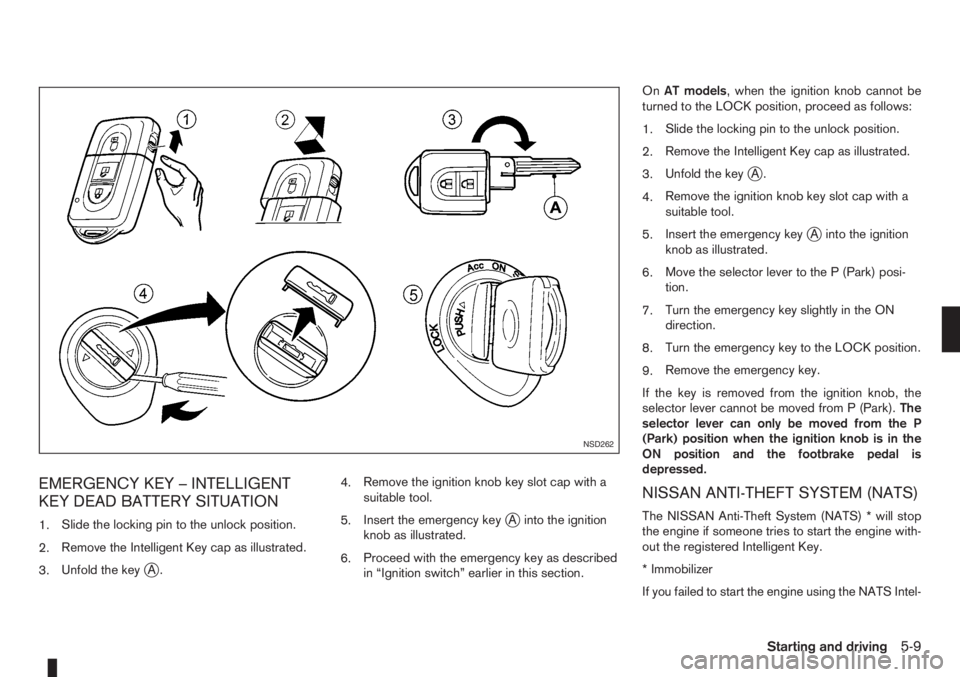
EMERGENCY KEY – INTELLIGENT
KEY DEAD BATTERY SITUATION
1.Slide the locking pin to the unlock position.
2.Remove the Intelligent Key cap as illustrated.
3.Unfold the key
jA.4.Remove the ignition knob key slot cap with a
suitable tool.
5.Insert the emergency key
jA into the ignition
knob as illustrated.
6.Proceed with the emergency key as described
in “Ignition switch” earlier in this section.OnAT models, when the ignition knob cannot be
turned to the LOCK position, proceed as follows:
1.Slide the locking pin to the unlock position.
2.Remove the Intelligent Key cap as illustrated.
3.Unfold the key
jA.
4.Remove the ignition knob key slot cap with a
suitable tool.
5.Insert the emergency key
jA into the ignition
knob as illustrated.
6.Move the selector lever to the P (Park) posi-
tion.
7.Turn the emergency key slightly in the ON
direction.
8.Turn the emergency key to the LOCK position.
9.Remove the emergency key.
If the key is removed from the ignition knob, the
selector lever cannot be moved from P (Park).The
selector lever can only be moved from the P
(Park) position when the ignition knob is in the
ON position and the footbrake pedal is
depressed.
NISSAN ANTI-THEFT SYSTEM (NATS)
The NISSAN Anti-Theft System (NATS) * will stop
the engine if someone tries to start the engine with-
out the registered Intelligent Key.
* Immobilizer
If you failed to start the engine using the NATS Intel-
NSD262
Starting and driving5-9
Page 135 of 235
c. Start the engine with your foot off the ac-
celerator pedal. Release the ignition
switch when the engine starts.
If the engine starts, but fails to run, repeat
the procedure from step a.
CAUTION
•Do not operate the starter for more than 15
seconds at a time. If the engine does not start,
turn the ignition switch to the “OFF” position
and wait 10 seconds (Petrol engine models)
or 20 seconds (Diesel engine models) before
cranking again, otherwise the starter could be
damaged.
•If it becomes necessary to start the engine
with a booster battery and jumper leads, the
instructions and cautions contained in the
“Jump-starting” in the “6. In case of
emergency” section should be carefully fol-
lowed.
7.Warm-up
Allow the engine to idle for at least 30 seconds
after starting. Drive at moderate speed for a short
distance first, especially in cold weather.
WARNING
Do not leave the vehicle unattended while the
engine is warming up.
DRIVING WITH MANUAL
TRANSMISSION
CAUTION
•Do not rest your foot on the clutch pedal while
driving. This may cause clutch damage.
•Stop your vehicle completely before shifting
into the R (Reverse) position.
•When you are shifting from one gear to an-
other, be certain to depress the clutch pedal
all the way to the floor to avoid clashing or
chipping the gears.
•Avoid abrupt starts and acceleration for your
safety.
•When quick acceleration is required for some
reason, shift to a lower gear and accelerate
until the vehicle reaches the maximum speed
in each gear. Do not exceed the speed limit of
any gear. Pay special attention when acceler-
ating or when shifting into a lower gear on
slippery surfaces. Sudden acceleration or
down shifting could cause the wheels to skid
and result in loss of control.
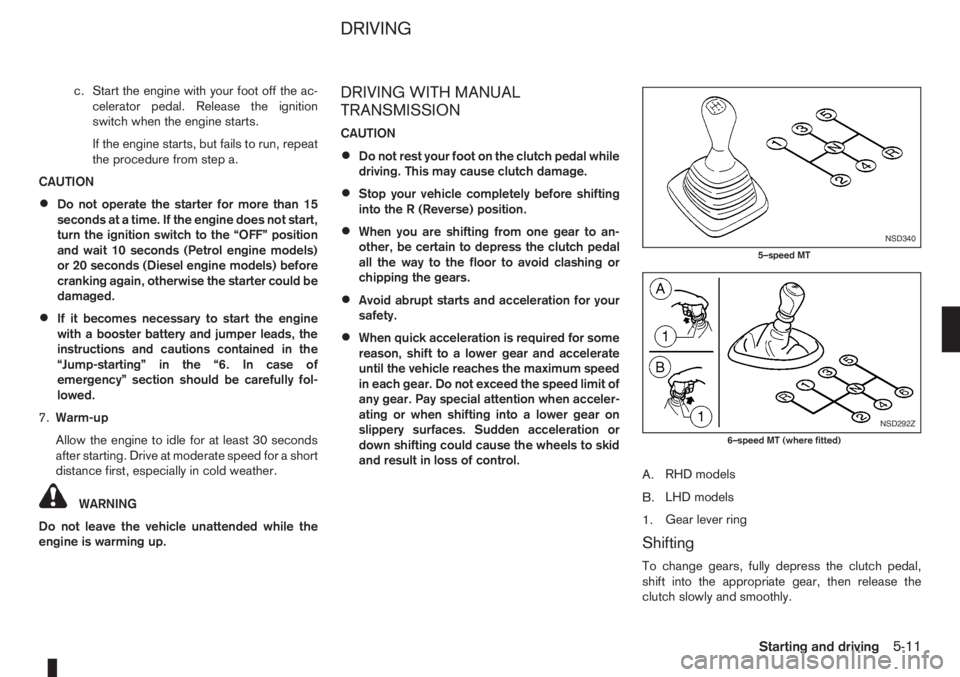
A.RHD models
B.LHD models
1.Gear lever ring
Shifting
To change gears, fully depress the clutch pedal,
shift into the appropriate gear, then release the
clutch slowly and smoothly.
NSD340
5–speed MT
NSD292Z
6–speed MT (where fitted)
DRIVING
Starting and driving5-11
Page 157 of 235
6In case of emergencyIn case of emergency
Spare tyre................................................................ 6-2
Temporary-use spare tyre ................................... 6-2
Flat tyre ................................................................... 6-3
Stopping the vehicle ........................................... 6-3
Changing flat tyre (Models with spare wheel,
where fitted) ....................................................... 6-3
Repairing flat tyre (Models with emergency
tyre puncture repair kit, where fitted) ................... 6-7Jump-starting ........................................................... 6-9
Push-starting ........................................................... 6-11
Engine overheat ....................................................... 6-11
Tow truck towing ..................................................... 6-12
Towing precautions ............................................ 6-12
Recommended towing ........................................ 6-13
Towing eye ......................................................... 6-13
Freeing the vehicle from sand, snow or mud ....... 6-14
Page 158 of 235
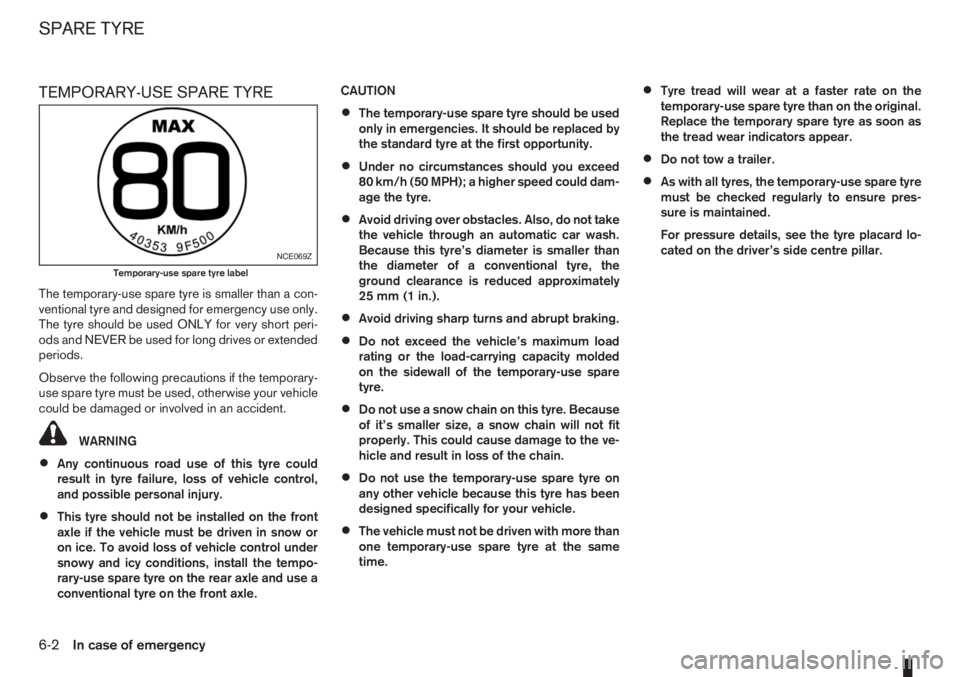
TEMPORARY-USE SPARE TYRE
The temporary-use spare tyre is smaller than a con-
ventional tyre and designed for emergency use only.
The tyre should be used ONLY for very short peri-
ods and NEVER be used for long drives or extended
periods.
Observe the following precautions if the temporary-
use spare tyre must be used, otherwise your vehicle
could be damaged or involved in an accident.
WARNING
•Any continuous road use of this tyre could
result in tyre failure, loss of vehicle control,
and possible personal injury.
•This tyre should not be installed on the front
axle if the vehicle must be driven in snow or
on ice. To avoid loss of vehicle control under
snowy and icy conditions, install the tempo-
rary-use spare tyre on the rear axle and use a
conventional tyre on the front axle.CAUTION
•The temporary-use spare tyre should be used
only in emergencies. It should be replaced by
the standard tyre at the first opportunity.
•Under no circumstances should you exceed
80 km/h (50 MPH); a higher speed could dam-
age the tyre.
•Avoid driving over obstacles. Also, do not take
the vehicle through an automatic car wash.
Because this tyre’s diameter is smaller than
the diameter of a conventional tyre, the
ground clearance is reduced approximately
25 mm (1 in.).
•Avoid driving sharp turns and abrupt braking.
•Do not exceed the vehicle’s maximum load
rating or the load-carrying capacity molded
on the sidewall of the temporary-use spare
tyre.
•Do not use a snow chain on this tyre. Because
of it’s smaller size, a snow chain will not fit
properly. This could cause damage to the ve-
hicle and result in loss of the chain.
•Do not use the temporary-use spare tyre on
any other vehicle because this tyre has been
designed specifically for your vehicle.
•The vehicle must not be driven with more than
one temporary-use spare tyre at the same
time.
•Tyre tread will wear at a faster rate on the
temporary-use spare tyre than on the original.
Replace the temporary spare tyre as soon as
the tread wear indicators appear.
•Do not tow a trailer.
•As with all tyres, the temporary-use spare tyre
must be checked regularly to ensure pres-
sure is maintained.
For pressure details, see the tyre placard lo-
cated on the driver’s side centre pillar.
NCE069Z
Temporary-use spare tyre label
SPARE TYRE
6-2In case of emergency
Page 159 of 235
In case of a flat tyre, follow the instructions as de-
scribed below:
STOPPING THE VEHICLE
WARNING
•Make sure that the handbrake is securely ap-
plied.
•For Manual Transmission (MT) models: Make
sure the gear lever is in the R (Reverse) posi-
tion.
For Automatic Transmission (AT) models:
Make sure that the selector lever is in the P
(Park) position.
•Never change tyres when the vehicle is on a
slope, ice or a slippery area. This is hazard-
ous.
•Never change tyres if oncoming traffic is close
to your vehicle. Wait for professional road as-
sistance.
1. Safely move the vehicle off the road, away from
traffic.
2. Switch on the hazard warning flashers.
3. Park on a level surface.
4. Apply the handbrake.
5. Shift the gear lever (MT models) into the R (Re-
verse) position [AT models, move the selector
lever to the P (Park) position].
6. Turn off the engine.7. Open the bonnet (for details, see “Bonnet
release” in the “3. Pre-driving checks and
adjustments” section) in order to:
•Warn other traffic.
•Signal to professional road assistance that
you require assistance.
8. Have all passengers exit the vehicle and stand in
a safe place, away from traffic and clear of the
vehicle.
CHANGING FLAT TYRE (Models with
spare wheel, where fitted)
Blocking the wheels
WARNING
Make sure to block the appropriate wheel to pre-
vent the vehicle from moving, which may cause
personal injury.
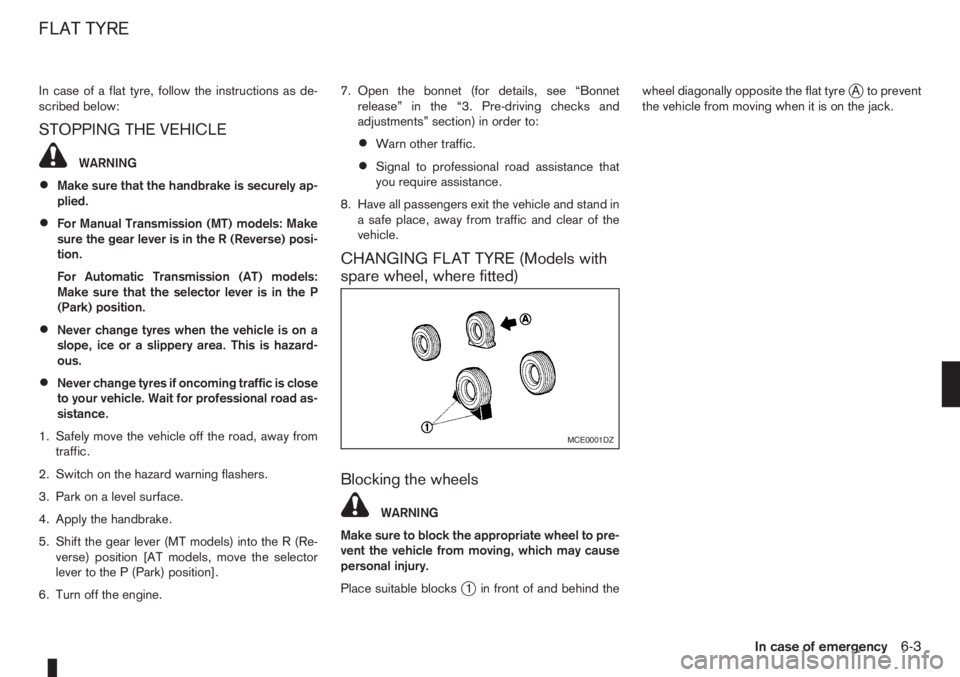
Place suitable blocks
j1 in front of and behind thewheel diagonally opposite the flat tyre
jA to prevent
the vehicle from moving when it is on the jack.
MCE0001DZ
FLAT TYRE
In case of emergency6-3
Page 160 of 235
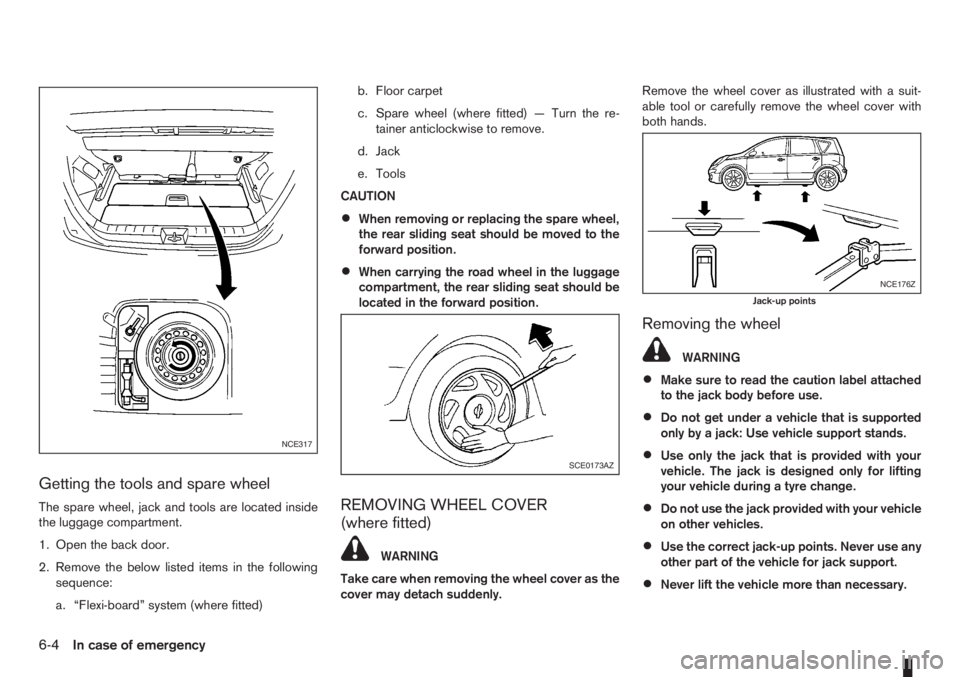
Getting the tools and spare wheel
The spare wheel, jack and tools are located inside
the luggage compartment.
1. Open the back door.
2. Remove the below listed items in the following
sequence:
a. “Flexi-board” system (where fitted)b. Floor carpet
c. Spare wheel (where fitted) — Turn the re-
tainer anticlockwise to remove.
d. Jack
e. Tools
CAUTION
•When removing or replacing the spare wheel,
the rear sliding seat should be moved to the
forward position.
•When carrying the road wheel in the luggage
compartment, the rear sliding seat should be
located in the forward position.
REMOVING WHEEL COVER
(where fitted)
WARNING
Take care when removing the wheel cover as the
cover may detach suddenly.Remove the wheel cover as illustrated with a suit-
able tool or carefully remove the wheel cover with
both hands.
Removing the wheel
WARNING
•Make sure to read the caution label attached
to the jack body before use.
•Do not get under a vehicle that is supported
only by a jack: Use vehicle support stands.
•Use only the jack that is provided with your
vehicle. The jack is designed only for lifting
your vehicle during a tyre change.
•Do not use the jack provided with your vehicle
on other vehicles.
•Use the correct jack-up points. Never use any
other part of the vehicle for jack support.
•Never lift the vehicle more than necessary.
NCE317
SCE0173AZ
NCE176Z
Jack-up points
6-4In case of emergency