rear NISSAN NOTE 2008 Owner's Manual
[x] Cancel search | Manufacturer: NISSAN, Model Year: 2008, Model line: NOTE, Model: NISSAN NOTE 2008Pages: 235, PDF Size: 2.29 MB
Page 37 of 235
in this position could cause serious injury to
the infant in case of air bag deployment dur-
ing a collision.
•In vehicles equipped with a side air bag sys-
tem, do not let any infants or small children sit
in the front passenger’s seat as the air bag
may cause serious injury in case of deploy-
ment during a collision.
NOTE
Universal child restraints approved to ECE Regu-
lation No. 44.03 are clearly marked “Universal”.
INSTALLATION OF A CHILD
RESTRAINT SYSTEM ON THE FRONT
PASSENGER SEAT
WARNING
•Never install a rear facing child restraint sys-
tem in the front seat without first deactivating
the front passenger air bag. Inflating supple-
mental front-impact air bags inflate with greatforce. A child restraint system could be struck
by the supplemental front-impact air bags in
an accident and could seriously injure or kill
your child.
•NISSAN recommends that infants or small
children be seated in a child restraint system
in the rear seat. According to accident statis-
tics, children are safer when properly
restrained in the rear seat than in the front
seat.
Rear facing
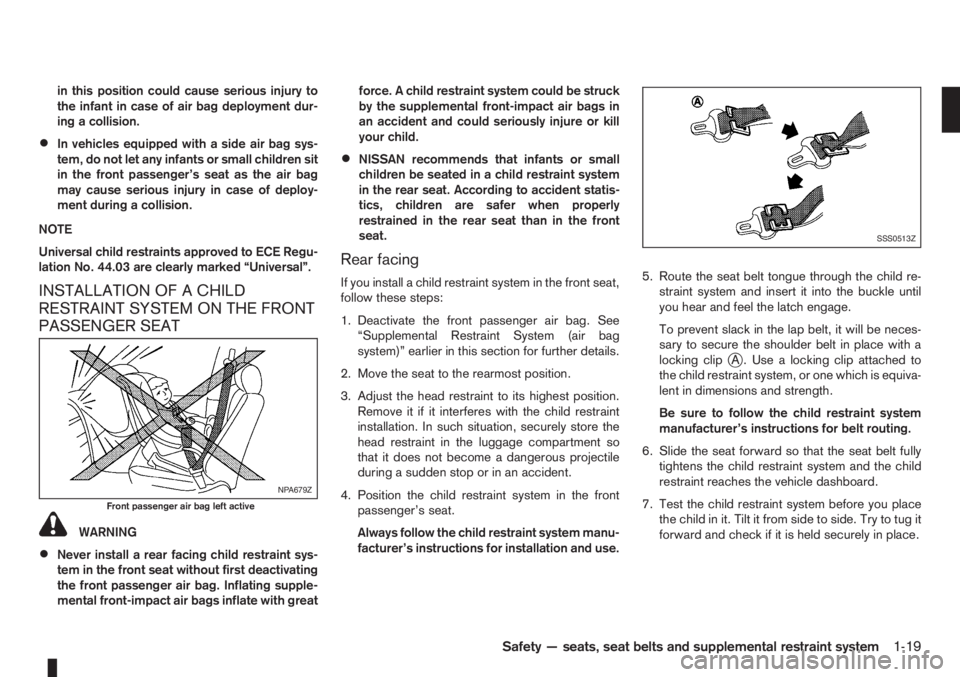
If you install a child restraint system in the front seat,
follow these steps:
1. Deactivate the front passenger air bag. See
“Supplemental Restraint System (air bag
system)” earlier in this section for further details.
2. Move the seat to the rearmost position.
3. Adjust the head restraint to its highest position.
Remove it if it interferes with the child restraint
installation. In such situation, securely store the
head restraint in the luggage compartment so
that it does not become a dangerous projectile
during a sudden stop or in an accident.
4. Position the child restraint system in the front
passenger’s seat.
Always follow the child restraint system manu-
facturer’s instructions for installation and use.5. Route the seat belt tongue through the child re-
straint system and insert it into the buckle until
you hear and feel the latch engage.
To prevent slack in the lap belt, it will be neces-
sary to secure the shoulder belt in place with a
locking clip
jA . Use a locking clip attached to
the child restraint system, or one which is equiva-
lent in dimensions and strength.
Be sure to follow the child restraint system
manufacturer’s instructions for belt routing.
6. Slide the seat forward so that the seat belt fully
tightens the child restraint system and the child
restraint reaches the vehicle dashboard.
7. Test the child restraint system before you place
the child in it. Tilt it from side to side. Try to tug it
forward and check if it is held securely in place.
NPA679Z
Front passenger air bag left active
SSS0513Z
Safety — seats, seat belts and supplemental restraint system1-19
Page 38 of 235
INSTALLATION OF A CHILD
RESTRAINT SYSTEM ON REAR
SEATS
WARNING
•NISSAN recommends that infants or small
children be seated in a child restraint system.
According to accident statistics, children are
safer when properly restrained in the rear seat
than in the front seat.
•The direction of the child restraint system de-
pends on the type of the child restraint sys-
tem and the size of the child.
Front-facing
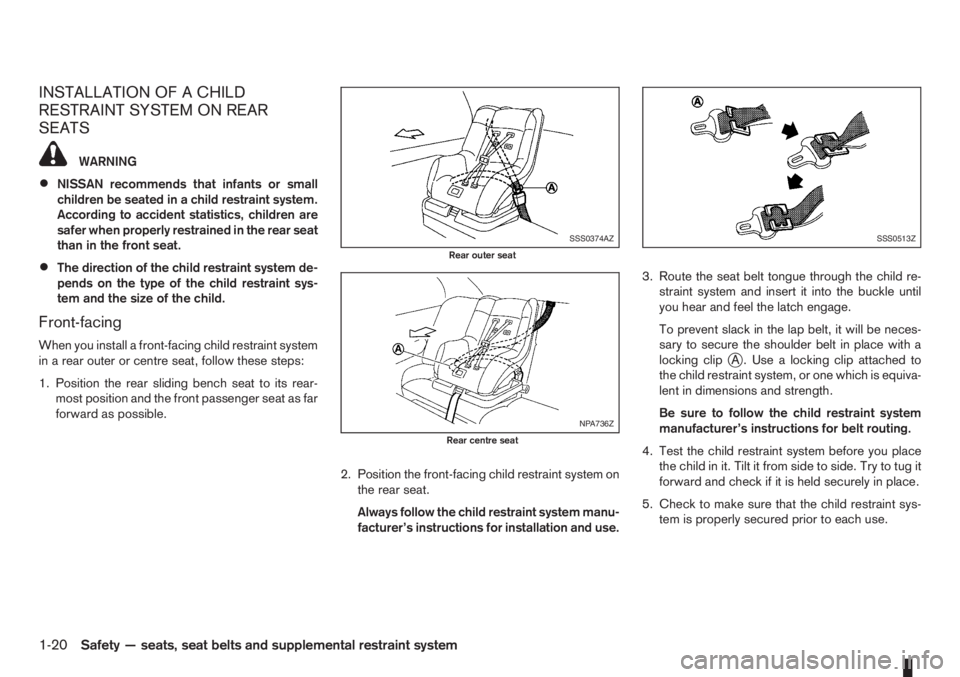
When you install a front-facing child restraint system
in a rear outer or centre seat, follow these steps:
1. Position the rear sliding bench seat to its rear-
most position and the front passenger seat as far
forward as possible.
2. Position the front-facing child restraint system on
the rear seat.
Always follow the child restraint system manu-
facturer’s instructions for installation and use.3. Route the seat belt tongue through the child re-
straint system and insert it into the buckle until
you hear and feel the latch engage.
To prevent slack in the lap belt, it will be neces-
sary to secure the shoulder belt in place with a
locking clipjA . Use a locking clip attached to
the child restraint system, or one which is equiva-
lent in dimensions and strength.
Be sure to follow the child restraint system
manufacturer’s instructions for belt routing.
4. Test the child restraint system before you place
the child in it. Tilt it from side to side. Try to tug it
forward and check if it is held securely in place.
5. Check to make sure that the child restraint sys-
tem is properly secured prior to each use.
SSS0374AZ
Rear outer seat
NPA736Z
Rear centre seat
SSS0513Z
1-20Safety — seats, seat belts and supplemental restraint system
Page 39 of 235
Rear-facing
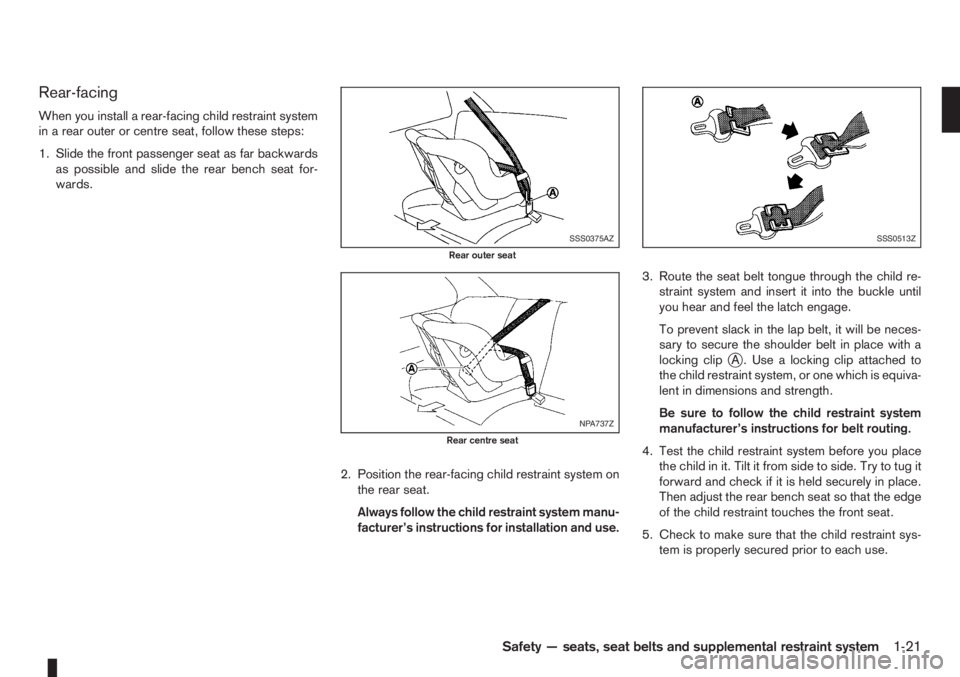
When you install a rear-facing child restraint system
in a rear outer or centre seat, follow these steps:
1. Slide the front passenger seat as far backwards
as possible and slide the rear bench seat for-
wards.
2. Position the rear-facing child restraint system on
the rear seat.
Always follow the child restraint system manu-
facturer’s instructions for installation and use.3. Route the seat belt tongue through the child re-
straint system and insert it into the buckle until
you hear and feel the latch engage.
To prevent slack in the lap belt, it will be neces-
sary to secure the shoulder belt in place with a
locking clip
jA . Use a locking clip attached to
the child restraint system, or one which is equiva-
lent in dimensions and strength.
Be sure to follow the child restraint system
manufacturer’s instructions for belt routing.
4. Test the child restraint system before you place
the child in it. Tilt it from side to side. Try to tug it
forward and check if it is held securely in place.
Then adjust the rear bench seat so that the edge
of the child restraint touches the front seat.
5. Check to make sure that the child restraint sys-
tem is properly secured prior to each use.
SSS0375AZ
Rear outer seat
NPA737Z
Rear centre seat
SSS0513Z
Safety — seats, seat belts and supplemental restraint system1-21
Page 40 of 235
ISOFIX SYSTEM
WARNING
•Attach ISOFIX compatible child restraint sys-
tems only at the locations shown by the la-
bels. If a child restraint is not secured prop-
erly, your child could be seriously injured or
killed in an accident.
•The rear sliding bench seat is equipped with
2 ISOFIX compatible child restraint systems,
on both outer seats ONLY. Do not secure a
child restraint in the rear centre seating posi-
tion using the child restraint lower anchors.
The child restraint will not be secured prop-
erly.
•The ISOFIX system anchors are designed to
withstand only those loads imposed by cor-
rectly fitted child restraints. Under no circum-
stances are they to be used for adult seat
belts or harnesses.
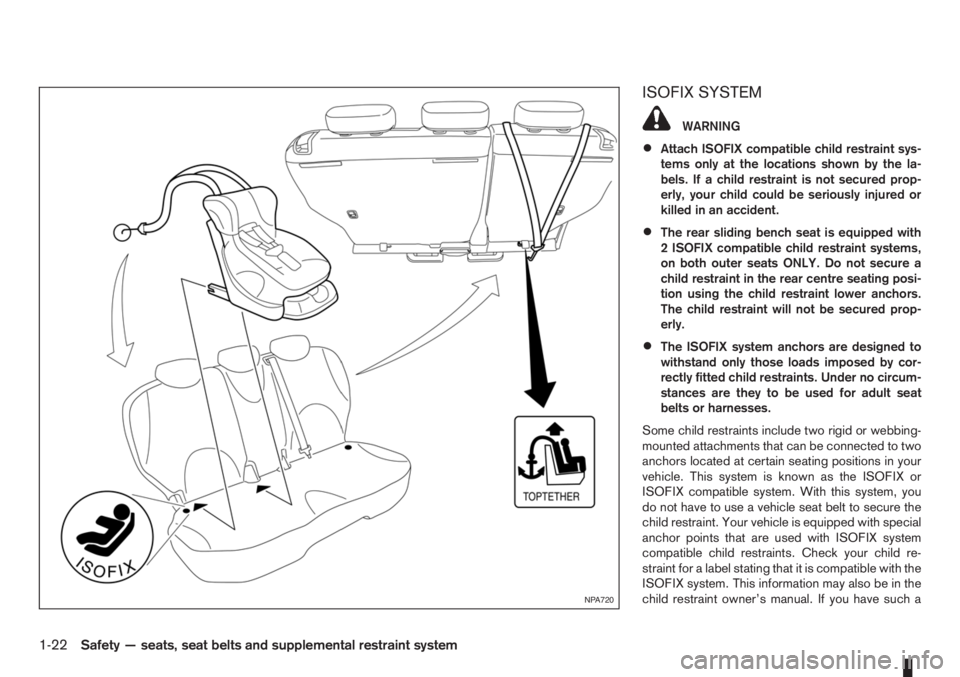
Some child restraints include two rigid or webbing-
mounted attachments that can be connected to two
anchors located at certain seating positions in your
vehicle. This system is known as the ISOFIX or
ISOFIX compatible system. With this system, you
do not have to use a vehicle seat belt to secure the
child restraint. Your vehicle is equipped with special
anchor points that are used with ISOFIX system
compatible child restraints. Check your child re-
straint for a label stating that it is compatible with the
ISOFIX system. This information may also be in the
child restraint owner’s manual. If you have such a
NPA720
1-22Safety — seats, seat belts and supplemental restraint system
Page 41 of 235
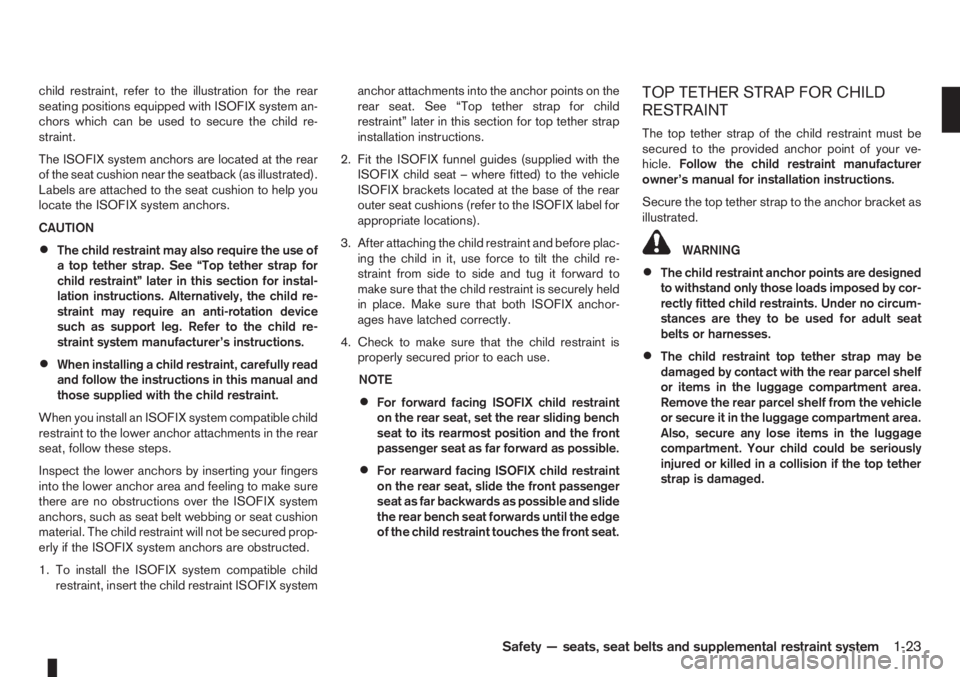
child restraint, refer to the illustration for the rear
seating positions equipped with ISOFIX system an-
chors which can be used to secure the child re-
straint.
The ISOFIX system anchors are located at the rear
of the seat cushion near the seatback (as illustrated).
Labels are attached to the seat cushion to help you
locate the ISOFIX system anchors.
CAUTION
•The child restraint may also require the use of
a top tether strap. See “Top tether strap for
child restraint” later in this section for instal-
lation instructions. Alternatively, the child re-
straint may require an anti-rotation device
such as support leg. Refer to the child re-
straint system manufacturer’s instructions.
•When installing a child restraint, carefully read
and follow the instructions in this manual and
those supplied with the child restraint.
When you install an ISOFIX system compatible child
restraint to the lower anchor attachments in the rear
seat, follow these steps.
Inspect the lower anchors by inserting your fingers
into the lower anchor area and feeling to make sure
there are no obstructions over the ISOFIX system
anchors, such as seat belt webbing or seat cushion
material. The child restraint will not be secured prop-
erly if the ISOFIX system anchors are obstructed.
1. To install the ISOFIX system compatible child
restraint, insert the child restraint ISOFIX systemanchor attachments into the anchor points on the
rear seat. See “Top tether strap for child
restraint” later in this section for top tether strap
installation instructions.
2. Fit the ISOFIX funnel guides (supplied with the
ISOFIX child seat – where fitted) to the vehicle
ISOFIX brackets located at the base of the rear
outer seat cushions (refer to the ISOFIX label for
appropriate locations).
3. After attaching the child restraint and before plac-
ing the child in it, use force to tilt the child re-
straint from side to side and tug it forward to
make sure that the child restraint is securely held
in place. Make sure that both ISOFIX anchor-
ages have latched correctly.
4. Check to make sure that the child restraint is
properly secured prior to each use.
NOTE
•For forward facing ISOFIX child restraint
on the rear seat, set the rear sliding bench
seat to its rearmost position and the front
passenger seat as far forward as possible.
•For rearward facing ISOFIX child restraint
on the rear seat, slide the front passenger
seat as far backwards as possible and slide
the rear bench seat forwards until the edge
of the child restraint touches the front seat.
TOP TETHER STRAP FOR CHILD
RESTRAINT
The top tether strap of the child restraint must be
secured to the provided anchor point of your ve-
hicle.Follow the child restraint manufacturer
owner’s manual for installation instructions.
Secure the top tether strap to the anchor bracket as
illustrated.
WARNING
•The child restraint anchor points are designed
to withstand only those loads imposed by cor-
rectly fitted child restraints. Under no circum-
stances are they to be used for adult seat
belts or harnesses.
•The child restraint top tether strap may be
damaged by contact with the rear parcel shelf
or items in the luggage compartment area.
Remove the rear parcel shelf from the vehicle
or secure it in the luggage compartment area.
Also, secure any lose items in the luggage
compartment. Your child could be seriously
injured or killed in a collision if the top tether
strap is damaged.
Safety — seats, seat belts and supplemental restraint system1-23
Page 42 of 235
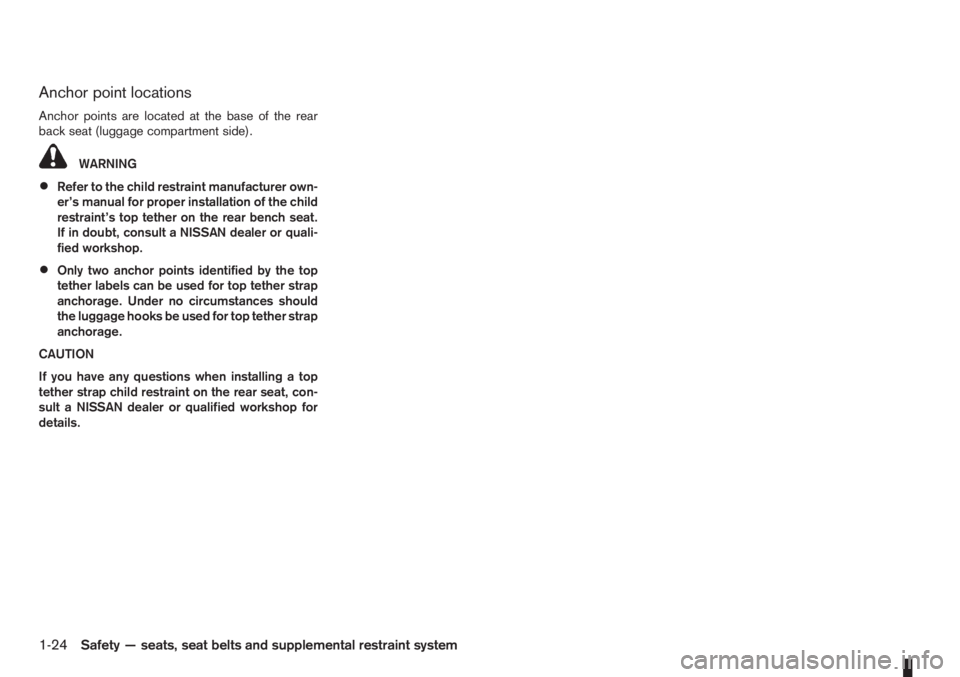
Anchor point locations
Anchor points are located at the base of the rear
back seat (luggage compartment side).
WARNING
•Refer to the child restraint manufacturer own-
er’s manual for proper installation of the child
restraint’s top tether on the rear bench seat.
If in doubt, consult a NISSAN dealer or quali-
fied workshop.
•Only two anchor points identified by the top
tether labels can be used for top tether strap
anchorage. Under no circumstances should
the luggage hooks be used for top tether strap
anchorage.
CAUTION
If you have any questions when installing a top
tether strap child restraint on the rear seat, con-
sult a NISSAN dealer or qualified workshop for
details.
1-24Safety — seats, seat belts and supplemental restraint system
Page 43 of 235
2Instruments and controlsInstruments and controls
Meters and gauges .................................................. 2-2
Speedometer...................................................... 2-2
Tachometer ........................................................ 2-2
Fuel gauge ......................................................... 2-2
Combination meter display (LCD) ....................... 2-3
Odometer/twin trip odometer .............................. 2-3
Trip computer (where fitted)................................ 2-3
Outside temperature display ............................... 2-4
Engine oil level information (where fitted)............. 2-4
Digital clock ........................................................ 2-5
Warning/indicator lights and audible reminders ........ 2-7
Checking bulbs .................................................. 2-7
Warning lights .................................................... 2-7
Indicator lights .................................................... 2-11
Audible reminders............................................... 2-12
Wiper and washer switch ........................................ 2-13
Windscreen wiper and washer switch ................. 2-13
Rear window ...................................................... 2-14
Defogger switch ...................................................... 2-15
Rear window defogger ....................................... 2-15
Outside mirror defogger (where fitted) ................ 2-15
Headlight and turn signal switch............................... 2-16
Headlight switch ................................................. 2-16
Turn signal switch ............................................... 2-17
Fog light switch ....................................................... 2-17
Front fog light (where fitted) ................................ 2-17Rear fog light switch ........................................... 2-18
Headlight aiming control .......................................... 2-18
Headlight aiming control switch........................... 2-18
Hazard warning flasher switch ................................. 2-19
Horn ........................................................................ 2-19
Seat heating (where fitted) ....................................... 2-19
Power outlet ............................................................ 2-20
Storage ................................................................... 2-21
Glove box ........................................................... 2-21
Centre console storage box ................................ 2-22
Cup holder ......................................................... 2-22
Rear foldable tables (where fitted)....................... 2-23
Seat pockets (where fitted) ................................. 2-23
Convenience hook (where fitted)......................... 2-23
Under seat storage tray (where fitted) ................. 2-23
“Flexi-board” System (where fitted) ..................... 2-24
Utility hooks (where fitted)................................... 2-25
Power windows ....................................................... 2-25
Driver’s side main switch .................................... 2-26
Passenger’s side switch ..................................... 2-26
Automatic operation ............................................ 2-26
Interior lights ............................................................ 2-27
Room light .......................................................... 2-27
Map light (where fitted) ....................................... 2-28
Luggage compartment light ................................ 2-28
Page 49 of 235
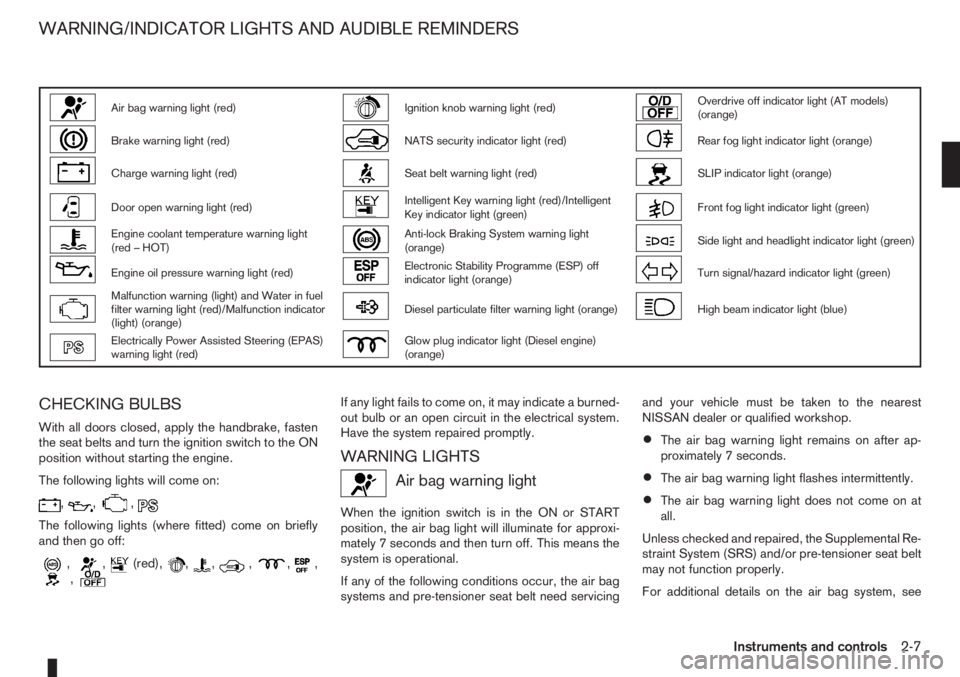
Air bag warning light (red)Ignition knob warning light (red)Overdrive off indicator light (AT models)
(orange)
Brake warning light (red)NATS security indicator light (red)Rear fog light indicator light (orange)
Charge warning light (red)Seat belt warning light (red)SLIP indicator light (orange)
Door open warning light (red)Intelligent Key warning light (red)/Intelligent
Key indicator light (green)Front fog light indicator light (green)
Engine coolant temperature warning light
(red – HOT)Anti-lock Braking System warning light
(orange)Side light and headlight indicator light (green)
Engine oil pressure warning light (red)Electronic Stability Programme (ESP) off
indicator light (orange)Turn signal/hazard indicator light (green)
Malfunction warning (light) and Water in fuel
filter warning light (red)/Malfunction indicator
(light) (orange)Diesel particulate filter warning light (orange)High beam indicator light (blue)
Electrically Power Assisted Steering (EPAS)
warning light (red)Glow plug indicator light (Diesel engine)
(orange)
CHECKING BULBS
With all doors closed, apply the handbrake, fasten
the seat belts and turn the ignition switch to the ON
position without starting the engine.
The following lights will come on:
,,,
The following lights (where fitted) come on briefly
and then go off:
,,(red),,,,,,,
If any light fails to come on, it may indicate a burned-
out bulb or an open circuit in the electrical system.
Have the system repaired promptly.
WARNING LIGHTS
Air bag warning light
When the ignition switch is in the ON or START
position, the air bag light will illuminate for approxi-
mately 7 seconds and then turn off. This means the
system is operational.
If any of the following conditions occur, the air bag
systems and pre-tensioner seat belt need servicingand your vehicle must be taken to the nearest
NISSAN dealer or qualified workshop.
•The air bag warning light remains on after ap-
proximately 7 seconds.
•The air bag warning light flashes intermittently.
•The air bag warning light does not come on at
all.
Unless checked and repaired, the Supplemental Re-
straint System (SRS) and/or pre-tensioner seat belt
may not function properly.
For additional details on the air bag system, see
WARNING/INDICATOR LIGHTS AND AUDIBLE REMINDERS
Instruments and controls2-7
Page 54 of 235
Diesel particulate filter warning
light (where fitted)
When the warning light illuminates, it indicates that
particulate matter has accumulated to the specified
amount of the limit in the diesel particulate filter.
Drive the vehicle at more than approximately 60 km/h
(37.5 MPH) as soon as safely possible until the
warning light turns off. Always conform to local regu-
lations. Particulate matter collected in the filter can-
not be burned under low speed driving conditions.
After having burned the particulate matter com-
pletely, the warning light will turn off.
See “Diesel particulate filter (where fitted)” in the
“5. Starting and driving” section for further details.
Glow plug indicator light (Diesel
engine)
This light comes on when the ignition switch is in the
ON position, and goes out when the glow plugs
have been pre-heated. When the engine is cold, the
glow plug warm-up time will be longer.
CAUTION
If the light remains on, this may indicate a prob-
lem in the glow system. Have the system checked
at a NISSAN dealer or qualified workshop.
Overdrive off indicator light
(automatic transmission)
The overdrive off indicator light illuminates when the
overdrive is turned OFF. See “Driving with auto-
matic transmission” in the “5. Starting and driving”
section.If the vehicle is driven under extreme conditions,
such as excessive wheel spinning and subse-
quent hard braking, the Fail-safe system may be
activated. This will occur even if all electrical cir-
cuits are functioning properly. In this case, turn
the ignition key to the “OFF” position and wait for
3 seconds. Then turn the key back to the ON
position. The vehicle should return to its normal
operating condition. If it does not return to its
normal operating condition have a NISSAN dealer
or qualified workshop check the transmission
and repair if necessary.
Rear fog light indicator light
The light comes on when the rear fog light switch is
turned on.
SLIP indicator light
(where fitted)
This indicator will blink when the ESP system is
operating, thus alerting the driver to the fact that the
road surface is slippery and the vehicle is nearing its
traction limits.
You may feel or hear the system working, this is nor-
mal.
The light will blink for a few seconds after the ESP
system stops limiting wheel spin.
The
indicator light also comes on when you
turn the ignition switch to the ON position. The light
will turn off after approximately 2 seconds if the sys-tem is operational. If the light does not come on
have the system checked by a NISSAN dealer or
qualified workshop.
Front fog light indicator light
(where fitted)
The light comes on when the front fog lights are
switched on.
Side light and headlight indicator
light
The side light and headlight indicator light illumi-
nates when the side light or headlight position is
selected. See “Headlight and turn signal switch”
later in this section for further details.
Turn signal/hazard indicator
lights
The light flashes when the turn signal switch lever or
hazard switch is turned on.
High beam indicator light
This light comes on when the headlight high beam
is on, and goes out when the low beam is selected.
AUDIBLE REMINDERS
Light reminder chime
A chime will sound when the driver’s side door is
opened if the headlight switch is turned on (ignition
switch in the “OFF” or LOCK position). Turn the
headlight switch to OFF or AUTO (where fitted),
2-12Instruments and controls
Page 56 of 235
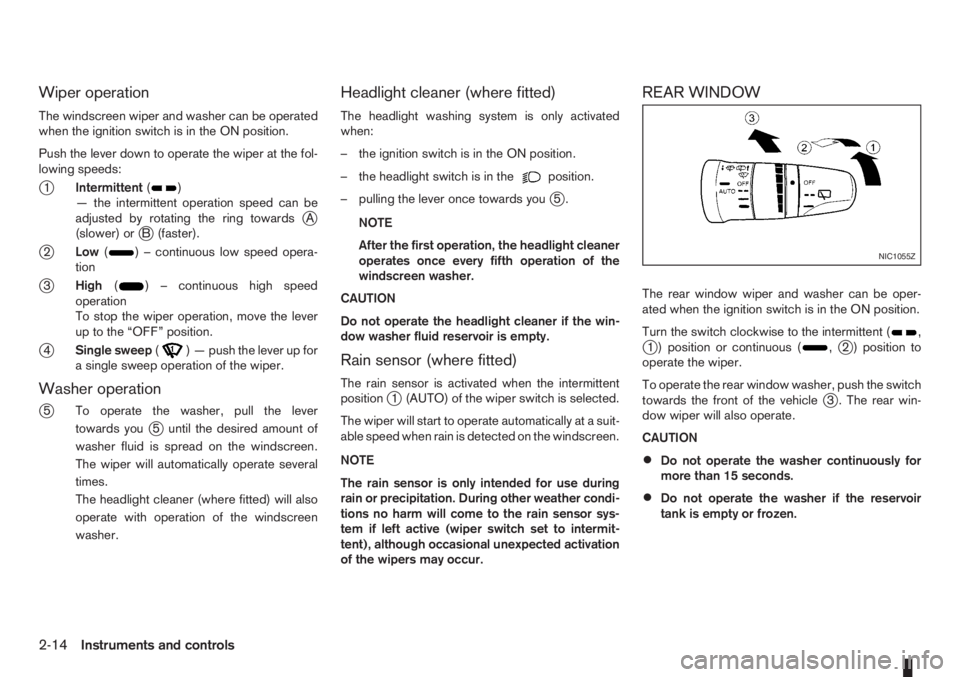
Wiper operation
The windscreen wiper and washer can be operated
when the ignition switch is in the ON position.
Push the lever down to operate the wiper at the fol-
lowing speeds:
j1Intermittent()
— the intermittent operation speed can be
adjusted by rotating the ring towards
jA
(slower) orjB (faster).
j2Low() – continuous low speed opera-
tion
j3High() – continuous high speed
operation
To stop the wiper operation, move the lever
up to the “OFF” position.
j4Single sweep() — push the lever up for
a single sweep operation of the wiper.
Washer operation
j
5 To operate the washer, pull the lever
towards you
j5 until the desired amount of
washer fluid is spread on the windscreen.
The wiper will automatically operate several
times.
The headlight cleaner (where fitted) will also
operate with operation of the windscreen
washer.
Headlight cleaner (where fitted)
The headlight washing system is only activated
when:
– the ignition switch is in the ON position.
– the headlight switch is in the
position.
– pulling the lever once towards you
j5.
NOTE
After the first operation, the headlight cleaner
operates once every fifth operation of the
windscreen washer.
CAUTION
Do not operate the headlight cleaner if the win-
dow washer fluid reservoir is empty.
Rain sensor (where fitted)
The rain sensor is activated when the intermittent
positionj1 (AUTO) of the wiper switch is selected.
The wiper will start to operate automatically at a suit-
able speed when rain is detected on the windscreen.
NOTE
The rain sensor is only intended for use during
rain or precipitation. During other weather condi-
tions no harm will come to the rain sensor sys-
tem if left active (wiper switch set to intermit-
tent), although occasional unexpected activation
of the wipers may occur.
REAR WINDOW
The rear window wiper and washer can be oper-
ated when the ignition switch is in the ON position.
Turn the switch clockwise to the intermittent (
,j1 ) position or continuous (,j2 ) position to
operate the wiper.
To operate the rear window washer, push the switch
towards the front of the vehicle
j3 . The rear win-
dow wiper will also operate.
CAUTION
•Do not operate the washer continuously for
more than 15 seconds.
•Do not operate the washer if the reservoir
tank is empty or frozen.
NIC1055Z
2-14Instruments and controls