jack NISSAN NOTE 2008 Owners Manual
[x] Cancel search | Manufacturer: NISSAN, Model Year: 2008, Model line: NOTE, Model: NISSAN NOTE 2008Pages: 235, PDF Size: 2.29 MB
Page 11 of 235
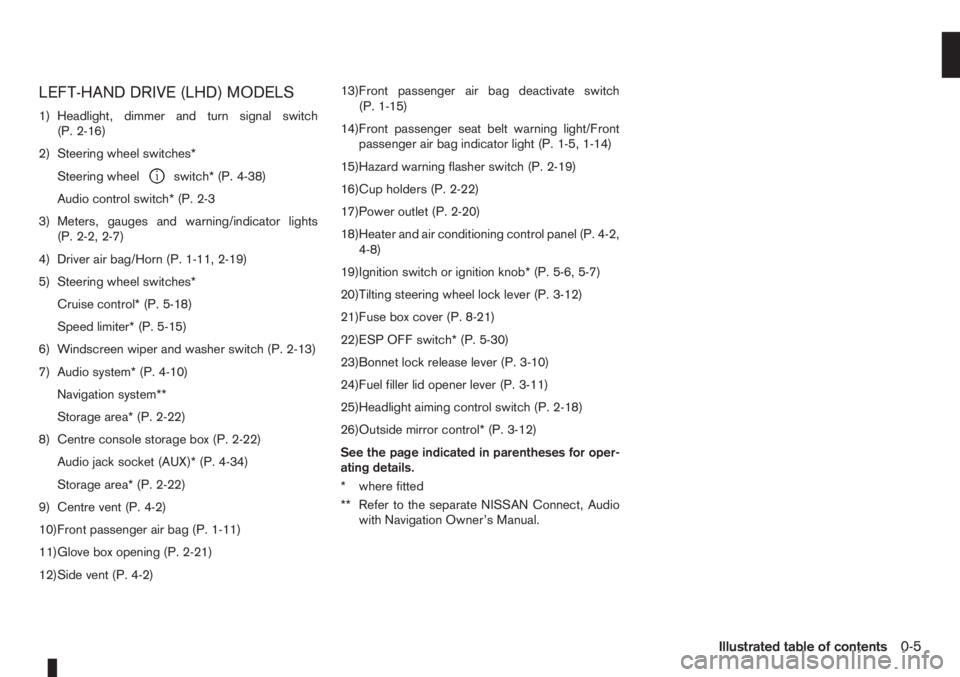
LEFT-HAND DRIVE (LHD) MODELS
1) Headlight, dimmer and turn signal switch
(P. 2-16)
2) Steering wheel switches*
Steering wheel
switch* (P. 4-38)
Audio control switch* (P. 2-3
3) Meters, gauges and warning/indicator lights
(P. 2-2, 2-7)
4) Driver air bag/Horn (P. 1-11, 2-19)
5) Steering wheel switches*
Cruise control* (P. 5-18)
Speed limiter* (P. 5-15)
6) Windscreen wiper and washer switch (P. 2-13)
7) Audio system* (P. 4-10)
Navigation system**
Storage area* (P. 2-22)
8) Centre console storage box (P. 2-22)
Audio jack socket (AUX)* (P. 4-34)
Storage area* (P. 2-22)
9) Centre vent (P. 4-2)
10)Front passenger air bag (P. 1-11)
11)Glove box opening (P. 2-21)
12)Side vent (P. 4-2)13)Front passenger air bag deactivate switch
(P. 1-15)
14)Front passenger seat belt warning light/Front
passenger air bag indicator light (P. 1-5, 1-14)
15)Hazard warning flasher switch (P. 2-19)
16)Cup holders (P. 2-22)
17)Power outlet (P. 2-20)
18)Heater and air conditioning control panel (P. 4-2,
4-8)
19)Ignition switch or ignition knob* (P. 5-6, 5-7)
20)Tilting steering wheel lock lever (P. 3-12)
21)Fuse box cover (P. 8-21)
22)ESP OFF switch* (P. 5-30)
23)Bonnet lock release lever (P. 3-10)
24)Fuel filler lid opener lever (P. 3-11)
25)Headlight aiming control switch (P. 2-18)
26)Outside mirror control* (P. 3-12)
See the page indicated in parentheses for oper-
ating details.
* where fitted
** Refer to the separate NISSAN Connect, Audio
with Navigation Owner’s Manual.
Illustrated table of contents0-5
Page 13 of 235
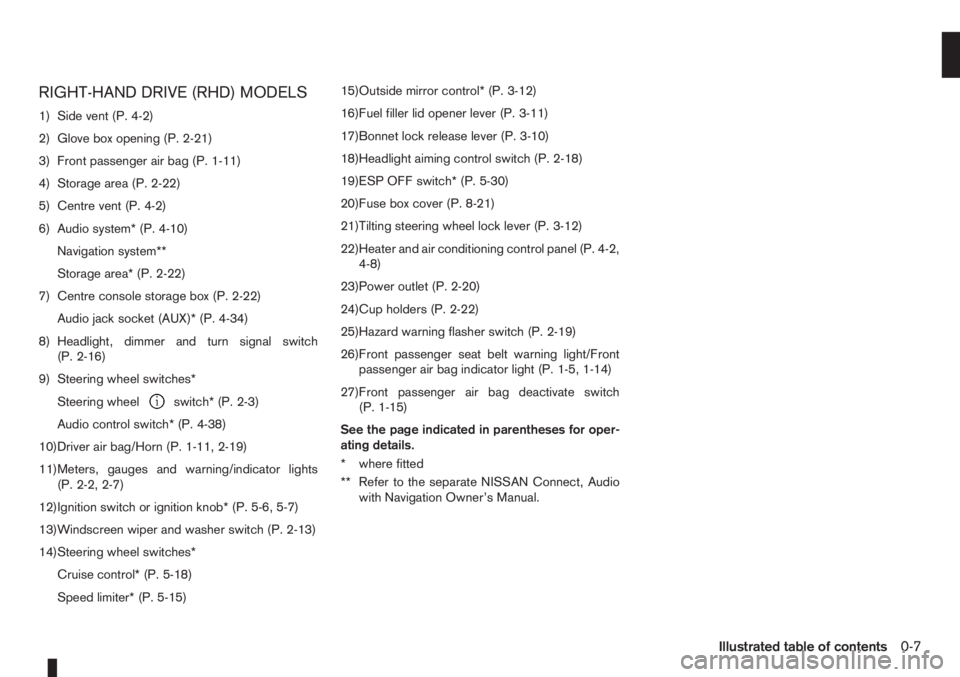
RIGHT-HAND DRIVE (RHD) MODELS
1) Side vent (P. 4-2)
2) Glove box opening (P. 2-21)
3) Front passenger air bag (P. 1-11)
4) Storage area (P. 2-22)
5) Centre vent (P. 4-2)
6) Audio system* (P. 4-10)
Navigation system**
Storage area* (P. 2-22)
7) Centre console storage box (P. 2-22)
Audio jack socket (AUX)* (P. 4-34)
8) Headlight, dimmer and turn signal switch
(P. 2-16)
9) Steering wheel switches*
Steering wheel
switch* (P. 2-3)
Audio control switch* (P. 4-38)
10)Driver air bag/Horn (P. 1-11, 2-19)
11)Meters, gauges and warning/indicator lights
(P. 2-2, 2-7)
12)Ignition switch or ignition knob* (P. 5-6, 5-7)
13)Windscreen wiper and washer switch (P. 2-13)
14)Steering wheel switches*
Cruise control* (P. 5-18)
Speed limiter* (P. 5-15)15)Outside mirror control* (P. 3-12)
16)Fuel filler lid opener lever (P. 3-11)
17)Bonnet lock release lever (P. 3-10)
18)Headlight aiming control switch (P. 2-18)
19)ESP OFF switch* (P. 5-30)
20)Fuse box cover (P. 8-21)
21)Tilting steering wheel lock lever (P. 3-12)
22)Heater and air conditioning control panel (P. 4-2,
4-8)
23)Power outlet (P. 2-20)
24)Cup holders (P. 2-22)
25)Hazard warning flasher switch (P. 2-19)
26)Front passenger seat belt warning light/Front
passenger air bag indicator light (P. 1-5, 1-14)
27)Front passenger air bag deactivate switch
(P. 1-15)
See the page indicated in parentheses for oper-
ating details.
* where fitted
** Refer to the separate NISSAN Connect, Audio
with Navigation Owner’s Manual.
Illustrated table of contents0-7
Page 53 of 235
Intelligent Key indicator light and
Intelligent Key warning light
(Intelligent Key system only)
Intelligent Key indicator light (green):
The Intelligent Key indicator light comes on when
the ignition knob is pushed in the LOCK position
while the brake pedal is depressed and the Intelli-
gent Key is in the vehicle. The Intelligent Key indica-
tor light goes out when the ignition switch is turned
to the Acc position.
NOTE
•The Intelligent Key indicator light may start
flashing when the ignition knob is turned from
the “OFF” position to the ON position if the
control unit detects a low battery voltage.
•The Intelligent Key indicator light comes on
as confirmation flash for anti-hijack mode set-
ting procedure. See “Integrated keyfob/re-
mote control system” in the “3. Pre-driving
checks and adjustments” section.
Intelligent Key warning light (red):
When the ignition knob is turned to the ON position,
the Intelligent Key warning light illuminates for a few
seconds and then goes off. This means the system
is operational.
NOTE
•If the Intelligent Key is taken outside of the
vehicle ID recognition zone through an
opened door (driver’s side door, passenger’s
side door, back door) while the ignition knobis in the Acc or ON position, the Intelligent
Key warning light starts flashing and the
buzzer sounds, warning the driver of the situ-
ation. The Intelligent Key warning light will
stop flashing as soon as the Intelligent Key is
placed again in the passenger’s compart-
ment.
•The Intelligent Key warning light comes on as
confirmation flash for convenience mode set-
ting procedure. See “Integrated keyfob/re-
mote control system” in the “3. Pre-driving
checks and adjustments” section.
WARNING
If the Intelligent Key warning light comes on
steady, it may indicate a system malfunction, we
recommend you to contact a NISSAN dealer or
qualified workshop for repair.
See “Ignition knob (where fitted)” in the “5. Starting
and driving” section for further details.
Anti-lock Braking System
warning light
After turning the ignition key to the ON position, the
light will illuminate. The Anti-lock Braking System
warning light will turn off after approximately 1 sec-
ond if the system is operational.
If the light comes on while the engine is running, it
may indicate something is wrong with the anti-lock
portion of the braking system. Have the system
checked by a NISSAN dealer or qualified workshop.Anti-lock Braking System:
The Anti-lock Braking System controls the wheels
so that they will not lock when braking abruptly or
when braking on a slippery road. This will prevent
difficult steering operation and swerving due to
locked wheels.
If an abnormality occurs in the system, the anti-lock
function will cease but the ordinary brakes will con-
tinue to operate normally.
CAUTION
If the light comes on while you are driving, con-
tact a NISSAN dealer or qualified workshop for
repair.
INDICATOR LIGHTS
Electronic Stability Programme
(ESP) OFF indicator light
(where fitted)
The light comes on when the Electronic Stability
Programme (ESP) OFF switch is pushed to the OFF
position. This indicates the Electronic Stability Pro-
gramme is not operating.
Push the Electronic Stability Programme OFF
switch again or restart the engine and the system
will operate normally. See “Electronic Stability Pro-
gramme (ESP) system (where fitted)” in the
“5. Starting and driving” section.
Instruments and controls2-11
Page 71 of 235
3Pre-driving checks and adjustmentsPre-driving checks and adjustments
Keys ........................................................................ 3-2
Integrated keyfob/remote control system .................. 3-3
Using the remote keyless entry system ................ 3-3
Locking the doors ............................................... 3-3
Unlocking the doors – convenience mode ........... 3-4
Unlocking the doors – anti-hijack mode ............... 3-4
Switching from convenience mode to
anti-hijack mode.................................................. 3-4
Keyfob operation failure ...................................... 3-4
Intelligent Key system (where fitted) ......................... 3-5
Locking/unlocking .............................................. 3-5
Starting the engine with the Intelligent Key .......... 3-6
Door locks ............................................................... 3-6
Super Lock System (Right-hand drive models) .... 3-6
Vehicle dead battery – left-hand side door
handle ................................................................ 3-7
Locking with power door lock switch .................. 3-7Child safety rear door lock .................................. 3-8
Back door lock ................................................... 3-8
Security system ....................................................... 3-9
NISSAN Anti-Theft System (NATS)..................... 3-9
Bonnet release ........................................................ 3-10
Fuel filler lid ............................................................. 3-11
Fuel filler lid opener lever .................................... 3-11
Fuel filler cap ...................................................... 3-11
Handbrake lever ...................................................... 3-11
Tilting steering wheel ............................................... 3-12
Mirrors..................................................................... 3-12
Inside rear-view mirror ........................................ 3-12
Outside rear-view mirrors.................................... 3-12
Vanity mirror ....................................................... 3-13
Rear parcel shelf...................................................... 3-14
Rear parcel shelf removal.................................... 3-14
Rear parcel shelf installation................................ 3-14
Page 73 of 235
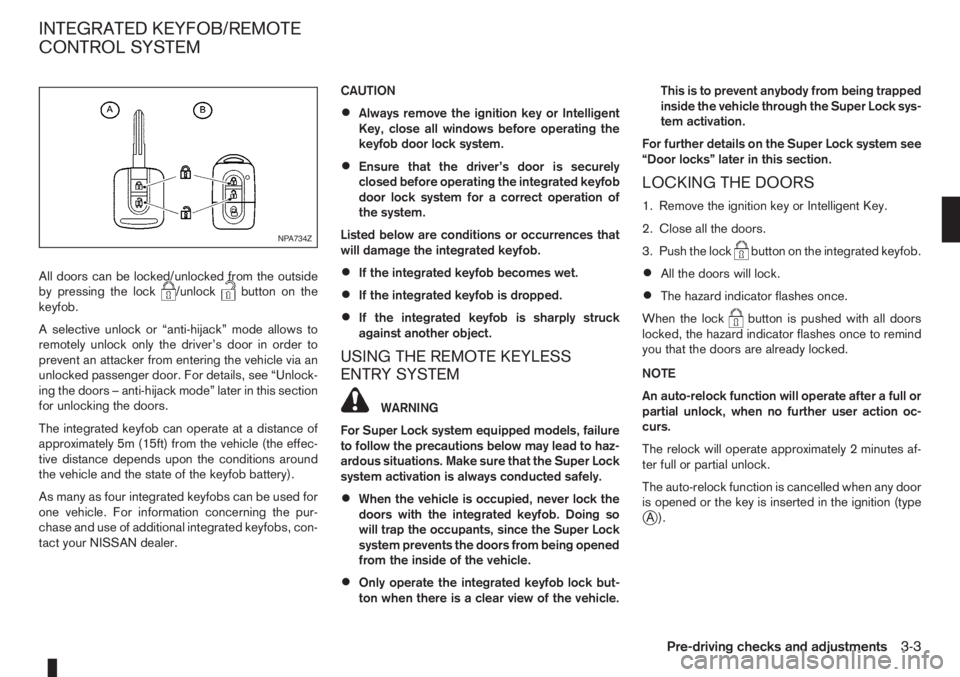
All doors can be locked/unlocked from the outside
by pressing the lock/unlockbutton on the
keyfob.
A selective unlock or “anti-hijack” mode allows to
remotely unlock only the driver’s door in order to
prevent an attacker from entering the vehicle via an
unlocked passenger door. For details, see “Unlock-
ing the doors – anti-hijack mode” later in this section
for unlocking the doors.
The integrated keyfob can operate at a distance of
approximately 5m (15ft) from the vehicle (the effec-
tive distance depends upon the conditions around
the vehicle and the state of the keyfob battery).
As many as four integrated keyfobs can be used for
one vehicle. For information concerning the pur-
chase and use of additional integrated keyfobs, con-
tact your NISSAN dealer.CAUTION
•Always remove the ignition key or Intelligent
Key, close all windows before operating the
keyfob door lock system.
•Ensure that the driver’s door is securely
closed before operating the integrated keyfob
door lock system for a correct operation of
the system.
Listed below are conditions or occurrences that
will damage the integrated keyfob.
•If the integrated keyfob becomes wet.
•If the integrated keyfob is dropped.
•If the integrated keyfob is sharply struck
against another object.
USING THE REMOTE KEYLESS
ENTRY SYSTEM
WARNING
For Super Lock system equipped models, failure
to follow the precautions below may lead to haz-
ardous situations. Make sure that the Super Lock
system activation is always conducted safely.
•When the vehicle is occupied, never lock the
doors with the integrated keyfob. Doing so
will trap the occupants, since the Super Lock
system prevents the doors from being opened
from the inside of the vehicle.
•Only operate the integrated keyfob lock but-
ton when there is a clear view of the vehicle.This is to prevent anybody from being trapped
inside the vehicle through the Super Lock sys-
tem activation.
For further details on the Super Lock system see
“Door locks” later in this section.
LOCKING THE DOORS
1. Remove the ignition key or Intelligent Key.
2. Close all the doors.
3. Push the lock
button on the integrated keyfob.
•All the doors will lock.
•The hazard indicator flashes once.
When the lock
button is pushed with all doors
locked, the hazard indicator flashes once to remind
you that the doors are already locked.
NOTE
An auto-relock function will operate after a full or
partial unlock, when no further user action oc-
curs.
The relock will operate approximately 2 minutes af-
ter full or partial unlock.
The auto-relock function is cancelled when any door
is opened or the key is inserted in the ignition (type
jA).
NPA734Z
INTEGRATED KEYFOB/REMOTE
CONTROL SYSTEM
Pre-driving checks and adjustments3-3
Page 74 of 235
UNLOCKING THE DOORS –
CONVENIENCE MODE
Push the unlockbutton on the integrated keyfob.
•All doors unlock
•The hazard indicator flashes twice.
UNLOCKING THE DOORS –
ANTI-HIJACK MODE
1. Push the unlockbutton on the integrated
keyfob once.
•Only the driver’s door unlocks.
•The hazard indicator flashes twice, quickly.
2. Push the unlock
button on the integrated
keyfob again.
•All doors unlock.
•The hazard indicator flashes twice.
SWITCHING FROM CONVENIENCE
MODE TO ANTI-HIJACK MODE
Type
jA – Integrated keyfob
While in the convenience mode, press the lock/unlockbuttons simultaneously for 5 seconds
to set the anti-hijack mode. Note that the above pro-
cedure must be done with the ignition switch “OFF”.
The hazard indicator flashes once as anti-hijack
mode setting confirmation.The same procedure should be used in order to dis-
able the anti-hijack system and return to conve-
nience mode.
The hazard indicator flashes three times as conve-
nience mode setting confirmation.
TypejB – Intelligent Key keyfob
While in the convenience mode, lock the vehicle
using the integrated keyfob. Press the lock
/unlockbuttons simultaneously for 10 seconds
to set the anti-hijack mode. Then, immediately press
the door lock/unlock switch on the driver’s door
handle. Note that the above procedure must be done
after the ignition knob has been turned from the ON
to the LOCK position. A confirmation flash of the
Intelligent Key indicator light (green) will indicate
that the anti-hijack mode has been properly set.
The same procedure should be used in order to dis-
able the anti-hijack and return to convenience mode.
A confirmation flash of the
Intelligent Key warn-
ing light (red) will indicate that the anti-hijack mode
has been properly disabled.
See “Warning/indicator lights and audible
reminders” in the “2. Instruments and controls” sec-
tion for further details on the
Intelligent Key warn-
ing light/Intelligent Key indicator light.
KEYFOB OPERATION FAILURE
The keyfob may not work properly in several situa-
tions as listed below:
•When the keyfob battery is dead.
•When the locking/unlocking system is used con-
tinuously, an anti lock-abuse system prevents the
lock motors from overheating and disables the
keyfob locking operation for a short period of
time.
•When the door handle is pulled while the keyfob
is being activated.
See “Integrated Keyfob/Intelligent Key battery
replacement” in the “8. Maintenance and
do-it-yourself” section for battery replacement and
requested battery type.
3-4Pre-driving checks and adjustments
Page 75 of 235

The Intelligent Key system is a convenient keyless
entry system that allows you to operate your vehicle
without using an actual key.
WARNING
Radio waves could adversely affect electric medi-
cal equipment. Those who use a pacemaker
should contact the electric medical equipment
manufacturer for the possible influences before
use.
LOCKING/UNLOCKING
The Intelligent Key system allows you to lock/unlock
the driver’s door, the passenger’s door or the back
door without activating the integrated keyfob or us-
ing the emergency key (LH side door handle key cyl-
inder).
When standing next to the vehicle (illustrated by the
grey area), the Intelligent Key sends an ID code that
allows the owner to manually lock/unlock the vehicleby means of pressing the driver’s side door, pas-
senger’s side door or back door handle lock/unlock
switch.
Locking the doors
1. Make sure you have the Intelligent Key with you
when exiting the vehicle.
2. Close all the doors.
3. Press the door/back door handle lock switch.
•All the doors will lock
•The hazard indicator flashes once
CAUTION
Make sure you do not leave the Intelligent Key
duplicate inside the vehicle as the locking proce-
dure logic will be impaired.
NOTE
If the Intelligent Key is left in the vehicle and the
door/back door handle lock switch is pressed,
the buzzer will sound, warning the owner that the
Intelligent Key has been left in the vehicle.
Unlocking the doors
Convenience mode:
Push the door/back door handle lock/unlock switch.
•All doors unlock
•The hazard indicator flashes twiceAnti-hijack mode:
1. Push the door/back door handle lock/unlock
switch.
•Only that particular door unlocks
•The hazard indicator flashes twice quickly.
2. Push the door/back door handle lock/unlock
switch within 5 seconds.
•All doors unlock
•The hazard indicator flashes twice, slowly.
NOTE
When the lock/unlock passenger door handle
switch is pressed, all doors unlock as in conve-
nience mode.
See “Integrated keyfob/remote control system” ear-
lier in this section for further details on the conve-
nience mode and anti-hijack mode.
NOTE
Interferences due to external circumstances may
impair the Intelligent Key operation. In this case,
use the emergency key located in the Intelligent
Key integrated keyfob and lock/unlock the ve-
hicle according to “Door locks” later in this sec-
tion.
CAUTION
•Make sure the Intelligent Key battery is in good
condition. Note that the battery life depends
on variable conditions, amount of time it has
been used, ambient temperature, etc.
NPA881Z
INTELLIGENT KEY SYSTEM
(where fitted)
Pre-driving checks and adjustments3-5
Page 85 of 235
4Heater and air conditioner, and audio systemHeater and air conditioner, and audio system
Vents ....................................................................... 4-2
Side vents .......................................................... 4-2
Centre vents ....................................................... 4-2
Heater and air conditioner operation ........................ 4-2
Manual air conditioner......................................... 4-3
Automatic air conditioner (where fitted) ............... 4-8
Audio system ........................................................... 4-10
Audio operation precautions ............................... 4-10
Antenna .............................................................. 4-16
LW-MW-FM radio with CD player (where fitted) ...... 4-16
Anti-theft system ................................................. 4-16
Audio main operation .......................................... 4-17
Radio operation .................................................. 4-19
User set up menu ............................................... 4-21
Compact disc (CD) player operation ................... 4-22
FM AM radio with CD player (where fitted) .............. 4-23
Anti-theft system ................................................. 4-23
Audio main operation .......................................... 4-24
Radio operation .................................................. 4-25SETUP button .................................................... 4-26
Compact Disc (CD) operation ............................ 4-27
AUX socket ........................................................ 4-29
USB Memory operation ...................................... 4-29
iPod® player operation ....................................... 4-30
Bluetooth® operation.......................................... 4-31
Bluetooth® mobile phone feature ........................ 4-33
AM-FM radio with CD player and navigation
(where fitted) ........................................................... 4-34
Audio jack socket (AUX) (where fitted) ..................... 4-34
Mobile phone integration (where fitted) .................... 4-34
Bluetooth® mobile phone feature ........................ 4-34
Hands-free telephone control .............................. 4-36
Steering wheel switches (where fitted) ................ 4-38
Steering wheel switches for audio control (where
fitted) ....................................................................... 4-38
Main operation .................................................... 4-38
Car phone or CB radio ............................................ 4-39
Page 102 of 235
2) Press and hold buttons 1 and 4 simultaneously.
3) Press the power (
) button and the radio will
switch on.
4) Release all the buttons and the display will show
LANGUAGE.
5) Press the
orbutton and the lan-
guage setting display will change as follows:
ENGLISH⇔FRENCH⇔GERMAN⇔ITALIAN
⇔DUTCH⇔SPANISH⇔POLISH⇔ENGLISH
Once the language has been set, switch off and
switch on again the audio unit by pressing the power
button. For details, contact your NISSAN dealer or
qualified workshop.
Source selector
This button selects the listening source between the
radio, CD and AUX (where fitted). Each time the
button is pressed, the respective mode will change
as follows:
Type A
Radio→CD→Radio
Type B (where fitted)
Radio→CD→AUX *→Radio
*: This mode is only available when a compatible
device is plugged into the AUX audio jack socket.
For details, see “Audio jack socket (AUX) (where
fitted)” later in this section.
If no CD is inserted, the display shows NO CD.
Audio set-up mode
Briefly press the MOD button to enter the audio
menu set-up mode. Each time theorbutton is pressed, the mode changes as follows:
BASS⇔TREBLE⇔BALANCE⇔FADER⇔
EFFECT⇔BASS
After the desired levels have been set, press briefly
on the MOD button to exit the menu or wait for more
than 10 seconds without pressing any buttons.
BASS control
Use this set-up to enhance or attenuate bass re-
sponse.
Press the function adjustment button
orwhile in the bass control mode to adjust the bass.
TREBLE control
Use this set-up to enhance or attenuate the treble.
Press the function adjustment button
orwhile in the treble control mode to adjust the treble.
BALANCE control
Use this set-up to adjust the balance of the volume
between the left and right channels.
Press the function adjustment button
orwhile in the balance control mode to adjust the left/
right balance.
FADER control
Use this set-up to adjust the balance of the volume
between the front and rear (where fitted) speakers.
Press the function adjustment button
orwhile in the fader control mode to adjust the rear/
front balance.
Audio set-up indications and description of opera-
tion.
AUDIO
SET-UPAUDIO CONTROL UP/DOWN BUT-
TON
m
Centre
position
m
BASS
(bass
adjustment)BASS -7 BASS 0 BASS +7
TREBLE
(treble
adjustment)TREBLE -7 TREBLE 0 TREBLE +7
BALANCE
(left/right
balance
adjustment)BAL -9
(BALANCE
Left)BAL 0 BAL +9
(BALANCE
Right)
FADER
(front/rear
balance
adjustmentFADER —9
(FADER
rear)FAD 0 FADER +9
(FADER
front)
EFFECT
Use this set-up to change the preset sound effect.
Press either
orbutton and the mode
changes as follows:
4-18Heater and air conditioner, and audio system
Page 113 of 235
Track details:
A long press on the<
/j5>button will turn the
display into a detailed overview and after a few sec-
onds it returns to the main display, or press
<
/j5>briefly.
CD eject button
CD player:
Press the <
> (eject) button and the CD will be
ejected.
Ejecting CD (with ignition switch in “OFF” or
LOCK):
When the ignition switch is in the “OFF” or LOCK
position it is possible to eject the currently played
CD. However the audio unit will not be activated.
Press the <
> button and the CD will be ejected.
NOTE
•When the CD is ejected and not removed
within 8 seconds, it will automatically retract
into the slot to protect it from damage.
•If an error message appears in the display,
press <> to eject the faulty CD and insert
another CD or check if the ejected CD is in-
serted upside down.
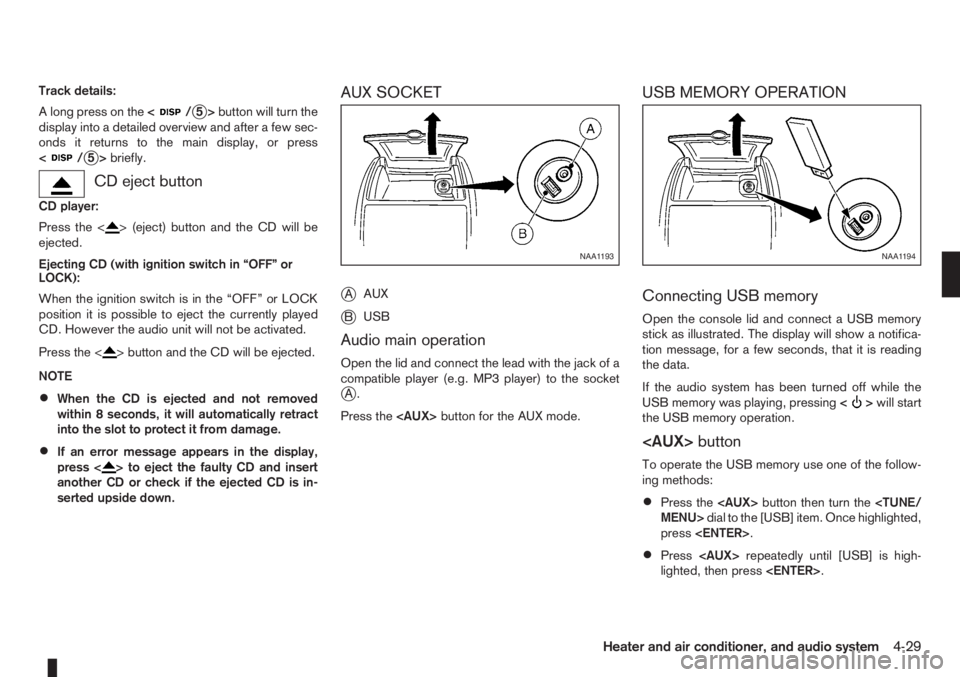
AUX SOCKET
j
AAUX
jBUSB
Audio main operation
Open the lid and connect the lead with the jack of a
compatible player (e.g. MP3 player) to the socket
jA.
Press the
USB MEMORY OPERATION
Connecting USB memory
Open the console lid and connect a USB memory
stick as illustrated. The display will show a notifica-
tion message, for a few seconds, that it is reading
the data.
If the audio system has been turned off while the
USB memory was playing, pressing<
>will start
the USB memory operation.
To operate the USB memory use one of the follow-
ing methods:
•Press the
press
•Press
lighted, then press
NAA1193NAA1194
Heater and air conditioner, and audio system4-29