Drive NISSAN NOTE 2010 User Guide
[x] Cancel search | Manufacturer: NISSAN, Model Year: 2010, Model line: NOTE, Model: NISSAN NOTE 2010Pages: 235, PDF Size: 2.29 MB
Page 27 of 235
the belt operation. Grasp the shoulder belt and pull
quickly forward. The retractor should lock and re-
strict further belt movement.
If the retractor does not lock during these checks or
if you have any questions about the seat belt opera-
tion see a NISSAN dealer or qualified workshop.
SEAT BELT MAINTENANCE
•To clean the seat belt webbings,apply a mild
soap solution or any solution recommended for
cleaning upholstery or carpets. Then brush it,
wipe with a cloth and allow it to dry in the shade.
Do not allow the seat belts to retract until they
are completely dry.
•If dirt builds up in the shoulder belt guide of the
seat belt anchors, the seat belts may retract
slowly. Wipe the shoulder belt guide with a clean,
dry cloth.
•Periodically check to see whether the seat
belt and the metal componentssuch as buck-
les, tongues, retractors, flexible wires and an-
chors work properly. If loose parts, deteriora-
tion, cuts or other damage to the webbing is
found, the entire belt assembly should be re-
placed.
WARNING
•The pre-tensioner seat belt cannot be reused
after activation. It must be replaced together
with the retractor as a unit.
•If the vehicle is involved in a frontal collision
but the pre-tensioner is not activated, be sure
to have the pre-tensioner system checked
and, if necessary, replaced by a NISSAN
dealer or qualified workshop.
•No unauthorised changes should be made to
any components or wiring of the pre-tensioner
seat belt system. This is to prevent accidental
activation of the pre-tensioner seat belt or
damage to the pre-tensioner seat belt opera-
tion. Tampering with the pre-tensioner seat
belt system may result in serious personal in-
jury.
•Work on and around the pre-tensioner system
should be done by an authorised NISSAN
dealer or qualified workshop. Installation of
electrical equipment should also be done by a
NISSAN dealer or qualified workshop. Unau-
thorised electrical test equipment and prob-
ing devices should not be used on the pre-
tensioner seat belt system.
•If you need to dispose of the pre-tensioner or
scrap the vehicle, contact a NISSAN dealer or
qualified workshop. Correct pre-tensioner
disposal procedures are set forth in the ap-propriate NISSAN Service Manual. Incorrect
disposal procedures could cause personal in-
jury.
The front seat pre-tensioner seat belt system is acti-
vated in conjunction with the front air bag system. It
helps tighten the seat belt when the vehicle is in-
volved in certain types of collisions by restraining
the seat occupants via the seat belt retractor.
The pre-tensioner is encased with the seat belt’s
retractor. These seat belts are used in the same way
as conventional seat belts.
Additionally, the driver’s side pre-tensioner seat belt
system is also equipped with a lap pre-tensioner.
Both the retractor pre-tensioner and lap pre-ten-
sioner provide significant protection against injury in
an accident and increase the safety performance of
your vehicle.
When the pre-tensioner seat belt system activates,
smoke is released and a loud noise may be heard.
The smoke is harmless, but care should be taken
not to inhale it as it may cause irritation and choking.
When the ignition switch is in the ON or START
position, the Supplemental Restraint System (SRS)
air bag warning light will illuminate. The SRS air bag
warning light will turn off after approximately 7 sec-
onds if the system is operational. If any of the follow-
ing conditions occur, the air bag and/or pre-ten-
sioner seat belt need servicing and your vehicle must
be taken to the nearest NISSAN dealer or qualified
workshop.
PRE-TENSIONER SEAT BELT
SYSTEM
Safety — seats, seat belts and supplemental restraint system1-9
Page 28 of 235
•The air bag warning light remains on after ap-
proximately 7 seconds.
•The air bag warning light flashes intermittently.
•The air bag warning light does not come on at
all.
Unless checked and repaired, the Supplemental Re-
straint System (SRS) and/or pre-tensioner seat belt
may not function properly. It must be checked and
repaired.
When selling your vehicle, we request that you in-
form the buyer about the pre-tensioner seat belt sys-
tem and guide the buyer to the appropriate sections
in this Owner’s Manual.This Supplemental Restraint System (SRS) section
contains important information concerning the driver
and front passenger air bags, side air bags, curtain
air bags and pre-tensioner seat belt system.
Front air bag system:this system can help cushion
the impact force to the face and chest of the driver
and front passenger in certain frontal collisions.
NOTE
It is possible to disable the front passenger air
bag. See “Front passenger air bag indicator light”
later in this section for further details.
Side air bag system:this system can help cushion
the impact force to the chest area of the driver and
front passenger in certain side impact collisions.
The side air bag is designed to inflate on the side
where the vehicle is impacted.
Curtain air bag system (where fitted):this system
can help cushion the impact force to the head of
occupants in the front and rear outer seating posi-
tion. Curtain air bags are designed to inflate on the
side where the vehicle is impacted.
SRS is designed tosupplementthe crash protec-
tion provided by the driver and front passenger seat
belts and isnot designed to substitutethem. Seat
belts should always be correctly worn and the driver
and front passenger seated a suitable distance away
from the steering wheel, instrument panel and front
door finishers. For additional information, see “Seat
belts” earlier in this section.
After turning the ignition switch to the ON or
START position, the air bag warning light illumi-nates. The air bag warning light will turn off after
approximately 7 seconds if the system is opera-
tional. See “Warning/indicator lights and audible
reminders” in the “2. Instruments and controls”
sectionfor further details.
The air bag will operate only when the ignition
switch is in the ON or START position.
WARNING
Driver and front passenger air bags.
•The air bags ordinarily will not inflate in the
event of a side impact, rear impact, roll over,
or lower severity frontal collision. Always wear
your seat belts to help reduce the risk or se-
verity of injury in various kinds of accidents.
•The seat belts and the air bags are most ef-
fective when you are sitting back and upright
in the seat. Air bags inflate with great force. If
you are unrestrained, leaning forward, sitting
sideways or out of position in any way, you
are at greater risk of injury or death in a crash
and may also receive serious or fatal injuries
from the air bag if you are up against it when
it inflates.
SUPPLEMENTAL RESTRAINT
SYSTEM (air bag system)
1-10Safety — seats, seat belts and supplemental restraint system
Page 29 of 235
WARNING
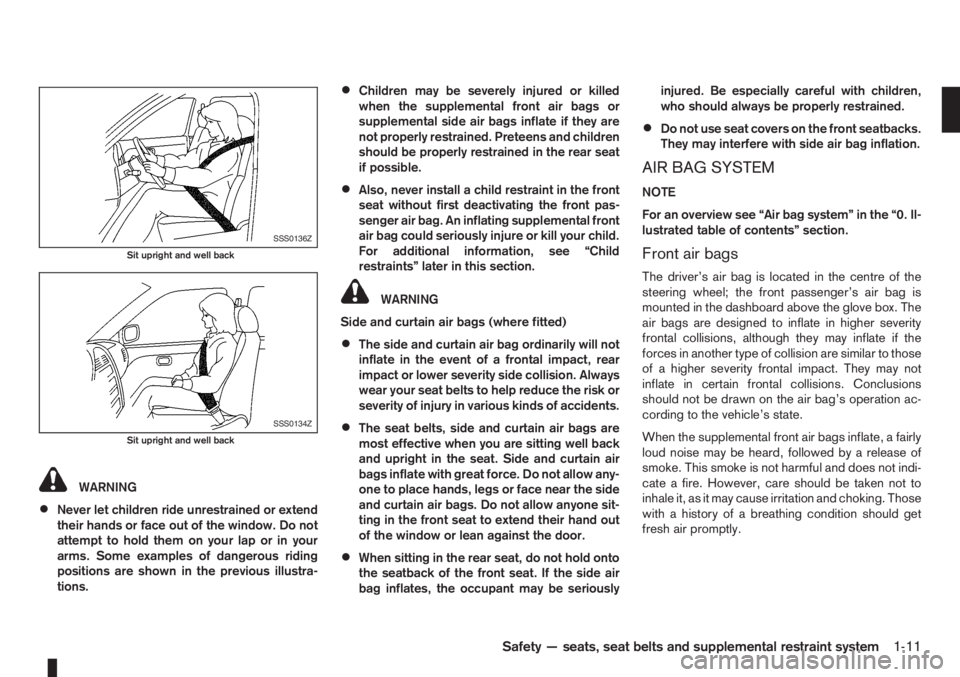
•Never let children ride unrestrained or extend
their hands or face out of the window. Do not
attempt to hold them on your lap or in your
arms. Some examples of dangerous riding
positions are shown in the previous illustra-
tions.
•Children may be severely injured or killed
when the supplemental front air bags or
supplemental side air bags inflate if they are
not properly restrained. Preteens and children
should be properly restrained in the rear seat
if possible.
•Also, never install a child restraint in the front
seat without first deactivating the front pas-
senger air bag. An inflating supplemental front
air bag could seriously injure or kill your child.
For additional information, see “Child
restraints” later in this section.
WARNING
Side and curtain air bags (where fitted)
•The side and curtain air bag ordinarily will not
inflate in the event of a frontal impact, rear
impact or lower severity side collision. Always
wear your seat belts to help reduce the risk or
severity of injury in various kinds of accidents.
•The seat belts, side and curtain air bags are
most effective when you are sitting well back
and upright in the seat. Side and curtain air
bags inflate with great force. Do not allow any-
one to place hands, legs or face near the side
and curtain air bags. Do not allow anyone sit-
ting in the front seat to extend their hand out
of the window or lean against the door.
•When sitting in the rear seat, do not hold onto
the seatback of the front seat. If the side air
bag inflates, the occupant may be seriouslyinjured. Be especially careful with children,
who should always be properly restrained.
•Do not use seat covers on the front seatbacks.
They may interfere with side air bag inflation.
AIR BAG SYSTEM
NOTE
For an overview see “Air bag system” in the “0. Il-
lustrated table of contents” section.
Front air bags
The driver’s air bag is located in the centre of the
steering wheel; the front passenger’s air bag is
mounted in the dashboard above the glove box. The
air bags are designed to inflate in higher severity
frontal collisions, although they may inflate if the
forces in another type of collision are similar to those
of a higher severity frontal impact. They may not
inflate in certain frontal collisions. Conclusions
should not be drawn on the air bag’s operation ac-
cording to the vehicle’s state.
When the supplemental front air bags inflate, a fairly
loud noise may be heard, followed by a release of
smoke. This smoke is not harmful and does not indi-
cate a fire. However, care should be taken not to
inhale it, as it may cause irritation and choking. Those
with a history of a breathing condition should get
fresh air promptly.
SSS0136Z
Sit upright and well back
SSS0134Z
Sit upright and well back
Safety — seats, seat belts and supplemental restraint system1-11
Page 30 of 235
Side and curtain air bags (where fitted)
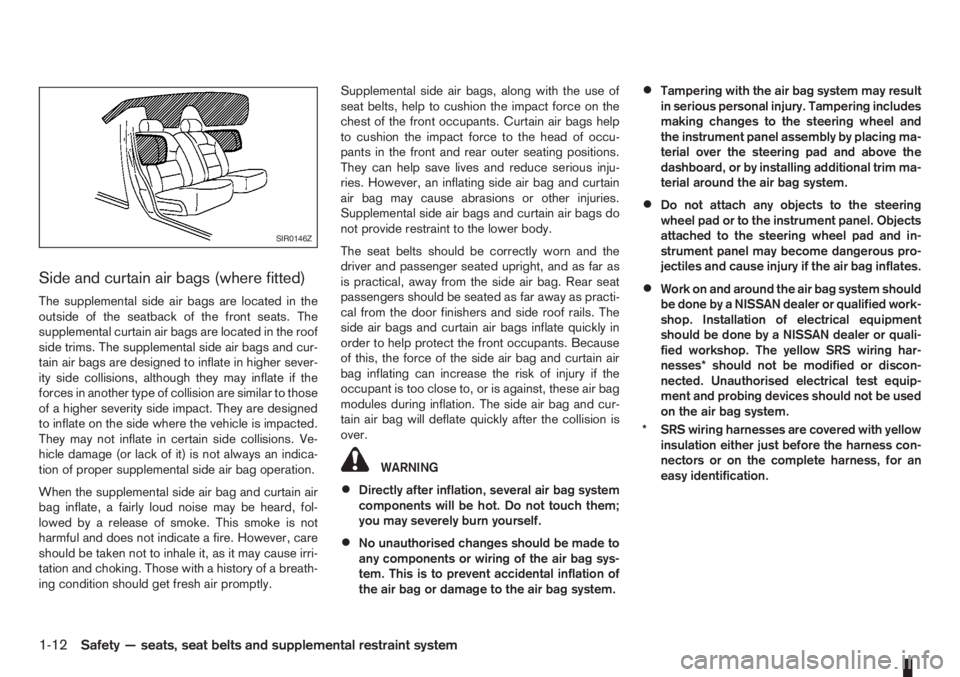
The supplemental side air bags are located in the
outside of the seatback of the front seats. The
supplemental curtain air bags are located in the roof
side trims. The supplemental side air bags and cur-
tain air bags are designed to inflate in higher sever-
ity side collisions, although they may inflate if the
forces in another type of collision are similar to those
of a higher severity side impact. They are designed
to inflate on the side where the vehicle is impacted.
They may not inflate in certain side collisions. Ve-
hicle damage (or lack of it) is not always an indica-
tion of proper supplemental side air bag operation.
When the supplemental side air bag and curtain air
bag inflate, a fairly loud noise may be heard, fol-
lowed by a release of smoke. This smoke is not
harmful and does not indicate a fire. However, care
should be taken not to inhale it, as it may cause irri-
tation and choking. Those with a history of a breath-
ing condition should get fresh air promptly.Supplemental side air bags, along with the use of
seat belts, help to cushion the impact force on the
chest of the front occupants. Curtain air bags help
to cushion the impact force to the head of occu-
pants in the front and rear outer seating positions.
They can help save lives and reduce serious inju-
ries. However, an inflating side air bag and curtain
air bag may cause abrasions or other injuries.
Supplemental side air bags and curtain air bags do
not provide restraint to the lower body.
The seat belts should be correctly worn and the
driver and passenger seated upright, and as far as
is practical, away from the side air bag. Rear seat
passengers should be seated as far away as practi-
cal from the door finishers and side roof rails. The
side air bags and curtain air bags inflate quickly in
order to help protect the front occupants. Because
of this, the force of the side air bag and curtain air
bag inflating can increase the risk of injury if the
occupant is too close to, or is against, these air bag
modules during inflation. The side air bag and cur-
tain air bag will deflate quickly after the collision is
over.
WARNING
•Directly after inflation, several air bag system
components will be hot. Do not touch them;
you may severely burn yourself.
•No unauthorised changes should be made to
any components or wiring of the air bag sys-
tem. This is to prevent accidental inflation of
the air bag or damage to the air bag system.
•Tampering with the air bag system may result
in serious personal injury. Tampering includes
making changes to the steering wheel and
the instrument panel assembly by placing ma-
terial over the steering pad and above the
dashboard, or by installing additional trim ma-
terial around the air bag system.
•Do not attach any objects to the steering
wheel pad or to the instrument panel. Objects
attached to the steering wheel pad and in-
strument panel may become dangerous pro-
jectiles and cause injury if the air bag inflates.
•Work on and around the air bag system should
be done by a NISSAN dealer or qualified work-
shop. Installation of electrical equipment
should be done by a NISSAN dealer or quali-
fied workshop. The yellow SRS wiring har-
nesses* should not be modified or discon-
nected. Unauthorised electrical test equip-
ment and probing devices should not be used
on the air bag system.
* SRS wiring harnesses are covered with yellow
insulation either just before the harness con-
nectors or on the complete harness, for an
easy identification.
SIR0146Z
1-12Safety — seats, seat belts and supplemental restraint system
Page 43 of 235
2Instruments and controlsInstruments and controls
Meters and gauges .................................................. 2-2
Speedometer...................................................... 2-2
Tachometer ........................................................ 2-2
Fuel gauge ......................................................... 2-2
Combination meter display (LCD) ....................... 2-3
Odometer/twin trip odometer .............................. 2-3
Trip computer (where fitted)................................ 2-3
Outside temperature display ............................... 2-4
Engine oil level information (where fitted)............. 2-4
Digital clock ........................................................ 2-5
Warning/indicator lights and audible reminders ........ 2-7
Checking bulbs .................................................. 2-7
Warning lights .................................................... 2-7
Indicator lights .................................................... 2-11
Audible reminders............................................... 2-12
Wiper and washer switch ........................................ 2-13
Windscreen wiper and washer switch ................. 2-13
Rear window ...................................................... 2-14
Defogger switch ...................................................... 2-15
Rear window defogger ....................................... 2-15
Outside mirror defogger (where fitted) ................ 2-15
Headlight and turn signal switch............................... 2-16
Headlight switch ................................................. 2-16
Turn signal switch ............................................... 2-17
Fog light switch ....................................................... 2-17
Front fog light (where fitted) ................................ 2-17Rear fog light switch ........................................... 2-18
Headlight aiming control .......................................... 2-18
Headlight aiming control switch........................... 2-18
Hazard warning flasher switch ................................. 2-19
Horn ........................................................................ 2-19
Seat heating (where fitted) ....................................... 2-19
Power outlet ............................................................ 2-20
Storage ................................................................... 2-21
Glove box ........................................................... 2-21
Centre console storage box ................................ 2-22
Cup holder ......................................................... 2-22
Rear foldable tables (where fitted)....................... 2-23
Seat pockets (where fitted) ................................. 2-23
Convenience hook (where fitted)......................... 2-23
Under seat storage tray (where fitted) ................. 2-23
“Flexi-board” System (where fitted) ..................... 2-24
Utility hooks (where fitted)................................... 2-25
Power windows ....................................................... 2-25
Driver’s side main switch .................................... 2-26
Passenger’s side switch ..................................... 2-26
Automatic operation ............................................ 2-26
Interior lights ............................................................ 2-27
Room light .......................................................... 2-27
Map light (where fitted) ....................................... 2-28
Luggage compartment light ................................ 2-28
Page 45 of 235
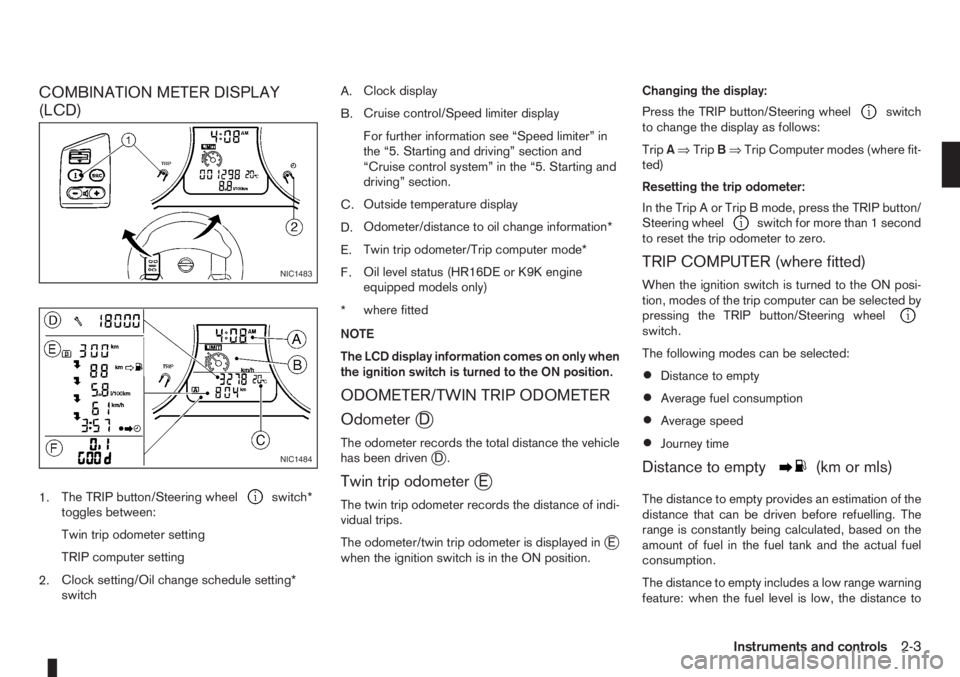
COMBINATION METER DISPLAY
(LCD)
1.The TRIP button/Steering wheelswitch*
toggles between:
Twin trip odometer setting
TRIP computer setting
2.Clock setting/Oil change schedule setting*
switchA.Clock display
B.Cruise control/Speed limiter display
For further information see “Speed limiter” in
the “5. Starting and driving” section and
“Cruise control system” in the “5. Starting and
driving” section.
C.Outside temperature display
D.Odometer/distance to oil change information*
E.Twin trip odometer/Trip computer mode*
F.Oil level status (HR16DE or K9K engine
equipped models only)
*where fitted
NOTE
The LCD display information comes on only when
the ignition switch is turned to the ON position.
ODOMETER/TWIN TRIP ODOMETER
Odometer
jD
The odometer records the total distance the vehicle
has been drivenjD.
Twin trip odometerjE
The twin trip odometer records the distance of indi-
vidual trips.
The odometer/twin trip odometer is displayed in
jE
when the ignition switch is in the ON position.Changing the display:
Press the TRIP button/Steering wheel
switch
to change the display as follows:
TripA⇒TripB⇒Trip Computer modes (where fit-
ted)
Resetting the trip odometer:
In the Trip A or Trip B mode, press the TRIP button/
Steering wheel
switch for more than 1 second
to reset the trip odometer to zero.
TRIP COMPUTER (where fitted)
When the ignition switch is turned to the ON posi-
tion, modes of the trip computer can be selected by
pressing the TRIP button/Steering wheel
switch.
The following modes can be selected:
•Distance to empty
•Average fuel consumption
•Average speed
•Journey time
Distance to emptym(km or mls)
The distance to empty provides an estimation of the
distance that can be driven before refuelling. The
range is constantly being calculated, based on the
amount of fuel in the fuel tank and the actual fuel
consumption.
The distance to empty includes a low range warning
feature: when the fuel level is low, the distance to
NIC1483
NIC1484
Instruments and controls2-3
Page 46 of 235
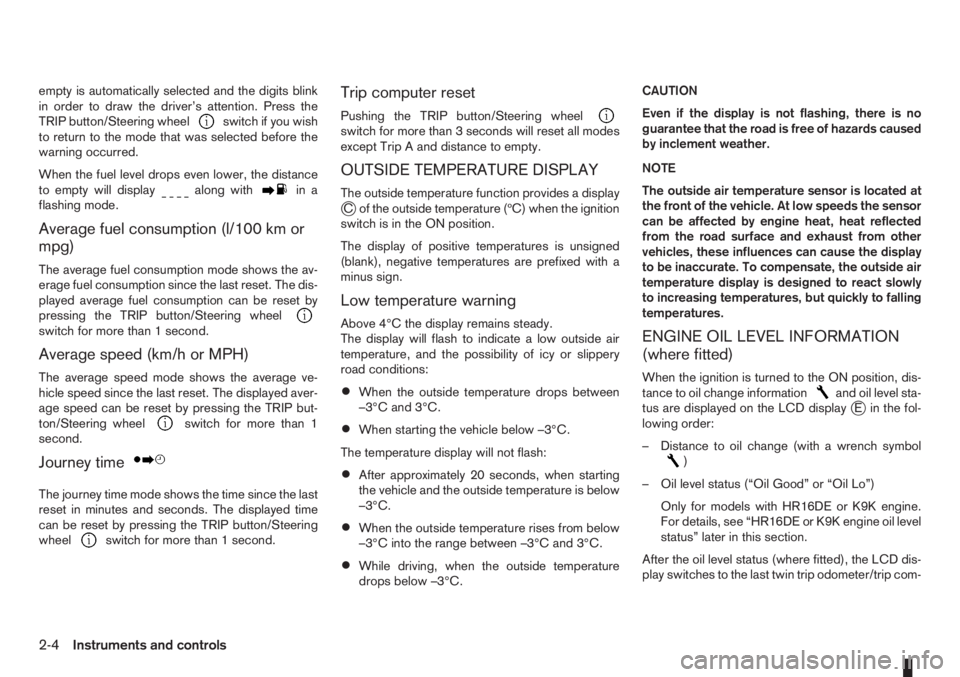
empty is automatically selected and the digits blink
in order to draw the driver’s attention. Press the
TRIP button/Steering wheel
switch if you wish
to return to the mode that was selected before the
warning occurred.
When the fuel level drops even lower, the distance
to empty will display
along within a
flashing mode.
Average fuel consumption (l/100 km or
mpg)
The average fuel consumption mode shows the av-
erage fuel consumption since the last reset. The dis-
played average fuel consumption can be reset by
pressing the TRIP button/Steering wheel
switch for more than 1 second.
Average speed (km/h or MPH)
The average speed mode shows the average ve-
hicle speed since the last reset. The displayed aver-
age speed can be reset by pressing the TRIP but-
ton/Steering wheel
switch for more than 1
second.
Journey timem
The journey time mode shows the time since the last
reset in minutes and seconds. The displayed time
can be reset by pressing the TRIP button/Steering
wheel
switch for more than 1 second.
Trip computer reset
Pushing the TRIP button/Steering wheelswitch for more than 3 seconds will reset all modes
except Trip A and distance to empty.
OUTSIDE TEMPERATURE DISPLAY
The outside temperature function provides a displayjC of the outside temperature (ºC) when the ignition
switch is in the ON position.
The display of positive temperatures is unsigned
(blank), negative temperatures are prefixed with a
minus sign.
Low temperature warning
Above 4°C the display remains steady.
The display will flash to indicate a low outside air
temperature, and the possibility of icy or slippery
road conditions:
•When the outside temperature drops between
–3°C and 3°C.
•When starting the vehicle below –3°C.
The temperature display will not flash:
•After approximately 20 seconds, when starting
the vehicle and the outside temperature is below
–3°C.
•When the outside temperature rises from below
–3°C into the range between –3°C and 3°C.
•While driving, when the outside temperature
drops below –3°C.CAUTION
Even if the display is not flashing, there is no
guarantee that the road is free of hazards caused
by inclement weather.
NOTE
The outside air temperature sensor is located at
the front of the vehicle. At low speeds the sensor
can be affected by engine heat, heat reflected
from the road surface and exhaust from other
vehicles, these influences can cause the display
to be inaccurate. To compensate, the outside air
temperature display is designed to react slowly
to increasing temperatures, but quickly to falling
temperatures.
ENGINE OIL LEVEL INFORMATION
(where fitted)
When the ignition is turned to the ON position, dis-
tance to oil change informationand oil level sta-
tus are displayed on the LCD displayjE in the fol-
lowing order:
– Distance to oil change (with a wrench symbol
)
– Oil level status (“Oil Good” or “Oil Lo”)
Only for models with HR16DE or K9K engine.
For details, see “HR16DE or K9K engine oil level
status” later in this section.
After the oil level status (where fitted), the LCD dis-
play switches to the last twin trip odometer/trip com-
2-4Instruments and controls
Page 49 of 235
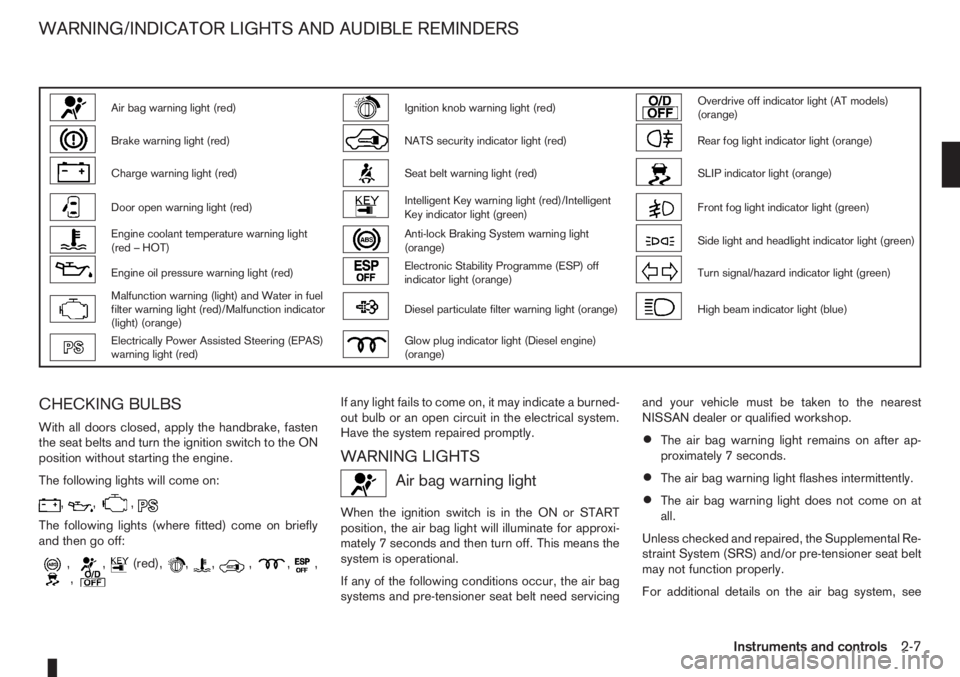
Air bag warning light (red)Ignition knob warning light (red)Overdrive off indicator light (AT models)
(orange)
Brake warning light (red)NATS security indicator light (red)Rear fog light indicator light (orange)
Charge warning light (red)Seat belt warning light (red)SLIP indicator light (orange)
Door open warning light (red)Intelligent Key warning light (red)/Intelligent
Key indicator light (green)Front fog light indicator light (green)
Engine coolant temperature warning light
(red – HOT)Anti-lock Braking System warning light
(orange)Side light and headlight indicator light (green)
Engine oil pressure warning light (red)Electronic Stability Programme (ESP) off
indicator light (orange)Turn signal/hazard indicator light (green)
Malfunction warning (light) and Water in fuel
filter warning light (red)/Malfunction indicator
(light) (orange)Diesel particulate filter warning light (orange)High beam indicator light (blue)
Electrically Power Assisted Steering (EPAS)
warning light (red)Glow plug indicator light (Diesel engine)
(orange)
CHECKING BULBS
With all doors closed, apply the handbrake, fasten
the seat belts and turn the ignition switch to the ON
position without starting the engine.
The following lights will come on:
,,,
The following lights (where fitted) come on briefly
and then go off:
,,(red),,,,,,,
If any light fails to come on, it may indicate a burned-
out bulb or an open circuit in the electrical system.
Have the system repaired promptly.
WARNING LIGHTS
Air bag warning light
When the ignition switch is in the ON or START
position, the air bag light will illuminate for approxi-
mately 7 seconds and then turn off. This means the
system is operational.
If any of the following conditions occur, the air bag
systems and pre-tensioner seat belt need servicingand your vehicle must be taken to the nearest
NISSAN dealer or qualified workshop.
•The air bag warning light remains on after ap-
proximately 7 seconds.
•The air bag warning light flashes intermittently.
•The air bag warning light does not come on at
all.
Unless checked and repaired, the Supplemental Re-
straint System (SRS) and/or pre-tensioner seat belt
may not function properly.
For additional details on the air bag system, see
WARNING/INDICATOR LIGHTS AND AUDIBLE REMINDERS
Instruments and controls2-7
Page 50 of 235
“Supplemental Restraint System (air bag system)”
in the “1. Safety — seats, seat belts and supple-
mental restraint system” section.
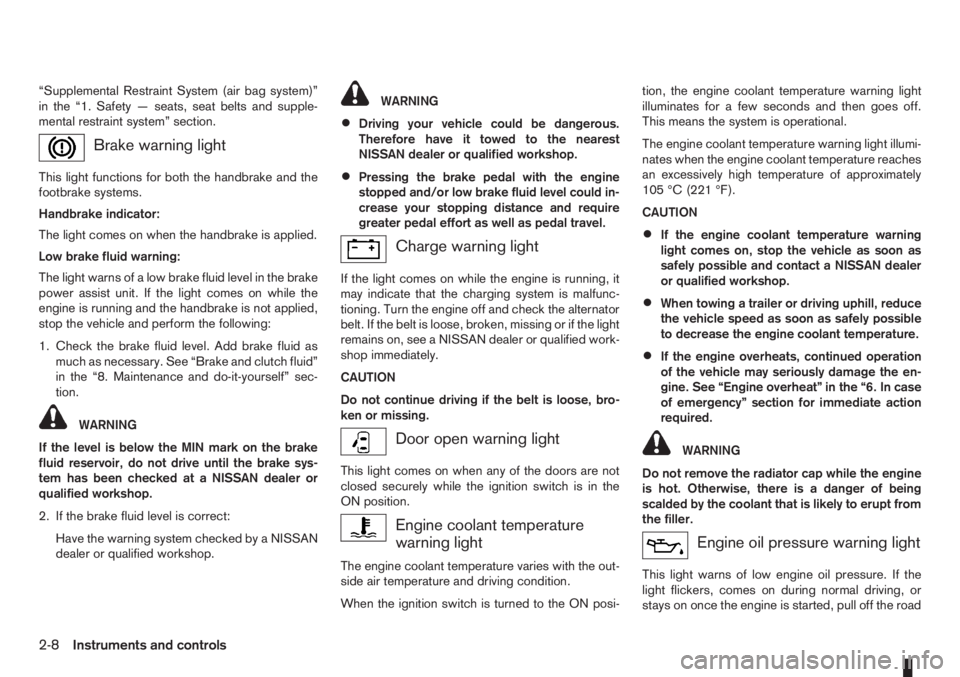
Brake warning light
This light functions for both the handbrake and the
footbrake systems.
Handbrake indicator:
The light comes on when the handbrake is applied.
Low brake fluid warning:
The light warns of a low brake fluid level in the brake
power assist unit. If the light comes on while the
engine is running and the handbrake is not applied,
stop the vehicle and perform the following:
1. Check the brake fluid level. Add brake fluid as
much as necessary. See “Brake and clutch fluid”
in the “8. Maintenance and do-it-yourself” sec-
tion.
WARNING
If the level is below the MIN mark on the brake
fluid reservoir, do not drive until the brake sys-
tem has been checked at a NISSAN dealer or
qualified workshop.
2. If the brake fluid level is correct:
Have the warning system checked by a NISSAN
dealer or qualified workshop.
WARNING
•Driving your vehicle could be dangerous.
Therefore have it towed to the nearest
NISSAN dealer or qualified workshop.
•Pressing the brake pedal with the engine
stopped and/or low brake fluid level could in-
crease your stopping distance and require
greater pedal effort as well as pedal travel.
Charge warning light
If the light comes on while the engine is running, it
may indicate that the charging system is malfunc-
tioning. Turn the engine off and check the alternator
belt. If the belt is loose, broken, missing or if the light
remains on, see a NISSAN dealer or qualified work-
shop immediately.
CAUTION
Do not continue driving if the belt is loose, bro-
ken or missing.
Door open warning light
This light comes on when any of the doors are not
closed securely while the ignition switch is in the
ON position.
Engine coolant temperature
warning light
The engine coolant temperature varies with the out-
side air temperature and driving condition.
When the ignition switch is turned to the ON posi-tion, the engine coolant temperature warning light
illuminates for a few seconds and then goes off.
This means the system is operational.
The engine coolant temperature warning light illumi-
nates when the engine coolant temperature reaches
an excessively high temperature of approximately
105 °C (221 °F).
CAUTION
•If the engine coolant temperature warning
light comes on, stop the vehicle as soon as
safely possible and contact a NISSAN dealer
or qualified workshop.
•When towing a trailer or driving uphill, reduce
the vehicle speed as soon as safely possible
to decrease the engine coolant temperature.
•If the engine overheats, continued operation
of the vehicle may seriously damage the en-
gine. See “Engine overheat” in the “6. In case
of emergency” section for immediate action
required.
WARNING
Do not remove the radiator cap while the engine
is hot. Otherwise, there is a danger of being
scalded by the coolant that is likely to erupt from
the filler.
Engine oil pressure warning light
This light warns of low engine oil pressure. If the
light flickers, comes on during normal driving, or
stays on once the engine is started, pull off the road
2-8Instruments and controls
Page 51 of 235
in a safe area, stop the engineimmediatelyand call
a NISSAN dealer or qualified workshop.
CAUTION
•Running the engine with the engine oil pres-
sure warning light on could cause serious
damage to the engine.
•The engine oil pressure warning light is not
designed to indicate a low oil level. Use the
dipstick to check the oil level.
See “Engine oil level information (where fitted)” ear-
lier in this section and “Engine oil” in the “8. Mainte-
nance and do-it-yourself” section for further details
on engine oil level.
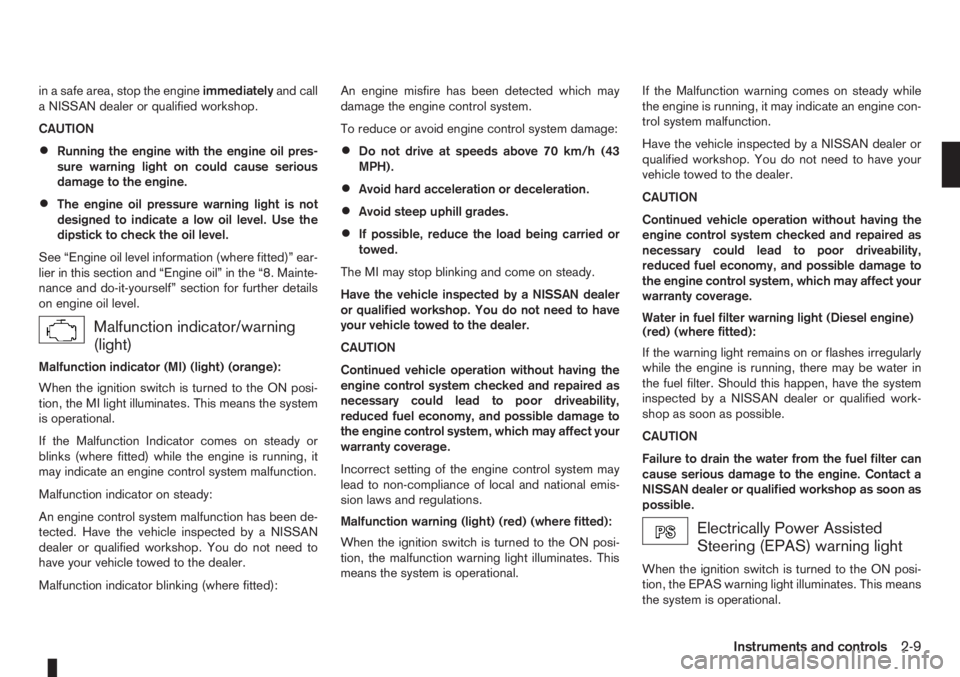
Malfunction indicator/warning
(light)
Malfunction indicator (MI) (light) (orange):
When the ignition switch is turned to the ON posi-
tion, the MI light illuminates. This means the system
is operational.
If the Malfunction Indicator comes on steady or
blinks (where fitted) while the engine is running, it
may indicate an engine control system malfunction.
Malfunction indicator on steady:
An engine control system malfunction has been de-
tected. Have the vehicle inspected by a NISSAN
dealer or qualified workshop. You do not need to
have your vehicle towed to the dealer.
Malfunction indicator blinking (where fitted):An engine misfire has been detected which may
damage the engine control system.
To reduce or avoid engine control system damage:
•Do not drive at speeds above 70 km/h (43
MPH).
•Avoid hard acceleration or deceleration.
•Avoid steep uphill grades.
•If possible, reduce the load being carried or
towed.
The MI may stop blinking and come on steady.
Have the vehicle inspected by a NISSAN dealer
or qualified workshop. You do not need to have
your vehicle towed to the dealer.
CAUTION
Continued vehicle operation without having the
engine control system checked and repaired as
necessary could lead to poor driveability,
reduced fuel economy, and possible damage to
the engine control system, which may affect your
warranty coverage.
Incorrect setting of the engine control system may
lead to non-compliance of local and national emis-
sion laws and regulations.
Malfunction warning (light) (red) (where fitted):
When the ignition switch is turned to the ON posi-
tion, the malfunction warning light illuminates. This
means the system is operational.If the Malfunction warning comes on steady while
the engine is running, it may indicate an engine con-
trol system malfunction.
Have the vehicle inspected by a NISSAN dealer or
qualified workshop. You do not need to have your
vehicle towed to the dealer.
CAUTION
Continued vehicle operation without having the
engine control system checked and repaired as
necessary could lead to poor driveability,
reduced fuel economy, and possible damage to
the engine control system, which may affect your
warranty coverage.
Water in fuel filter warning light (Diesel engine)
(red) (where fitted):
If the warning light remains on or flashes irregularly
while the engine is running, there may be water in
the fuel filter. Should this happen, have the system
inspected by a NISSAN dealer or qualified work-
shop as soon as possible.
CAUTION
Failure to drain the water from the fuel filter can
cause serious damage to the engine. Contact a
NISSAN dealer or qualified workshop as soon as
possible.
Electrically Power Assisted
Steering (EPAS) warning light
When the ignition switch is turned to the ON posi-
tion, the EPAS warning light illuminates. This means
the system is operational.
Instruments and controls2-9