nissan note NISSAN NOTE 2010 User Guide
[x] Cancel search | Manufacturer: NISSAN, Model Year: 2010, Model line: NOTE, Model: NISSAN NOTE 2010Pages: 235, PDF Size: 2.29 MB
Page 72 of 235
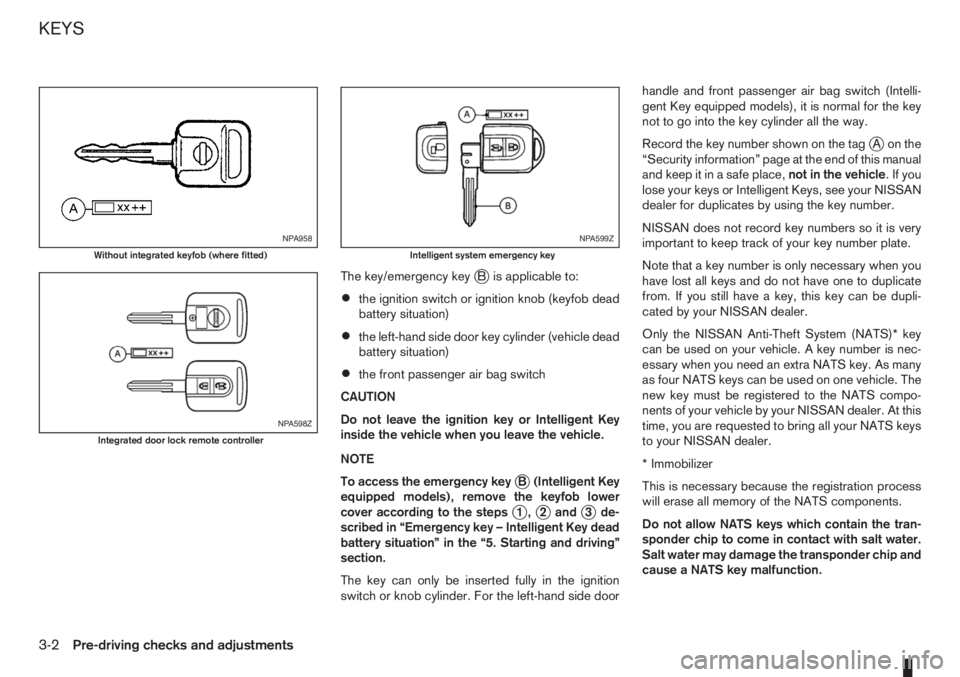
The key/emergency keyjB is applicable to:
•the ignition switch or ignition knob (keyfob dead
battery situation)
•the left-hand side door key cylinder (vehicle dead
battery situation)
•the front passenger air bag switch
CAUTION
Do not leave the ignition key or Intelligent Key
inside the vehicle when you leave the vehicle.
NOTE
To access the emergency key
jB (Intelligent Key
equipped models), remove the keyfob lower
cover according to the steps
j1,j2andj3 de-
scribed in “Emergency key – Intelligent Key dead
battery situation” in the “5. Starting and driving”
section.
The key can only be inserted fully in the ignition
switch or knob cylinder. For the left-hand side doorhandle and front passenger air bag switch (Intelli-
gent Key equipped models), it is normal for the key
not to go into the key cylinder all the way.
Record the key number shown on the tag
jA on the
“Security information” page at the end of this manual
and keep it in a safe place,not in the vehicle.Ifyou
lose your keys or Intelligent Keys, see your NISSAN
dealer for duplicates by using the key number.
NISSAN does not record key numbers so it is very
important to keep track of your key number plate.
Note that a key number is only necessary when you
have lost all keys and do not have one to duplicate
from. If you still have a key, this key can be dupli-
cated by your NISSAN dealer.
Only the NISSAN Anti-Theft System (NATS)* key
can be used on your vehicle. A key number is nec-
essary when you need an extra NATS key. As many
as four NATS keys can be used on one vehicle. The
new key must be registered to the NATS compo-
nents of your vehicle by your NISSAN dealer. At this
time, you are requested to bring all your NATS keys
to your NISSAN dealer.
* Immobilizer
This is necessary because the registration process
will erase all memory of the NATS components.
Do not allow NATS keys which contain the tran-
sponder chip to come in contact with salt water.
Salt water may damage the transponder chip and
cause a NATS key malfunction.
NPA958
Without integrated keyfob (where fitted)
NPA598Z
Integrated door lock remote controller
NPA599Z
Intelligent system emergency key
KEYS
3-2Pre-driving checks and adjustments
Page 73 of 235
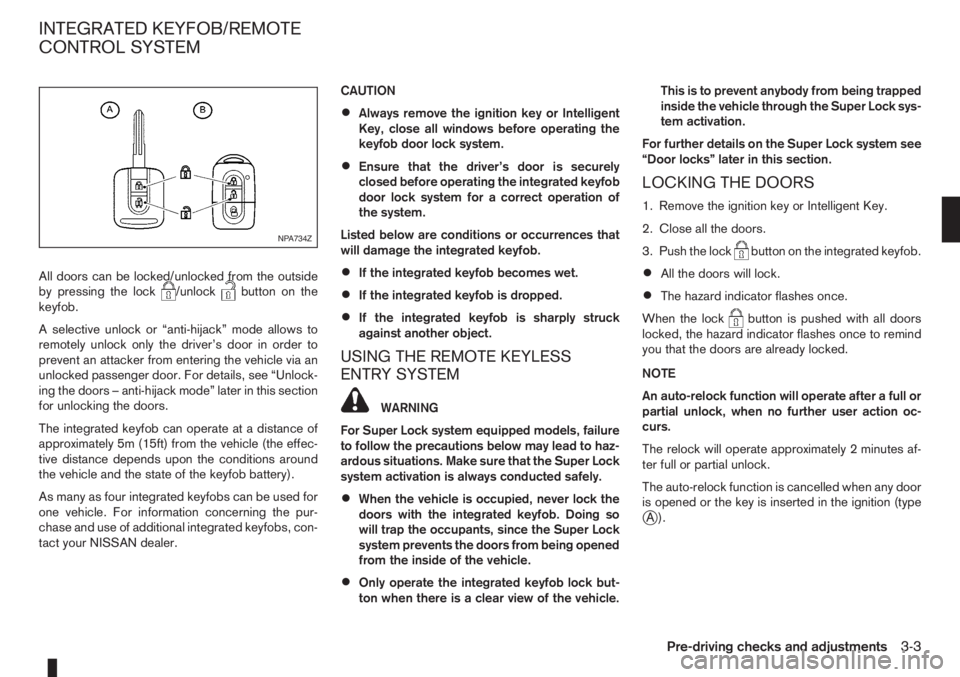
All doors can be locked/unlocked from the outside
by pressing the lock/unlockbutton on the
keyfob.
A selective unlock or “anti-hijack” mode allows to
remotely unlock only the driver’s door in order to
prevent an attacker from entering the vehicle via an
unlocked passenger door. For details, see “Unlock-
ing the doors – anti-hijack mode” later in this section
for unlocking the doors.
The integrated keyfob can operate at a distance of
approximately 5m (15ft) from the vehicle (the effec-
tive distance depends upon the conditions around
the vehicle and the state of the keyfob battery).
As many as four integrated keyfobs can be used for
one vehicle. For information concerning the pur-
chase and use of additional integrated keyfobs, con-
tact your NISSAN dealer.CAUTION
•Always remove the ignition key or Intelligent
Key, close all windows before operating the
keyfob door lock system.
•Ensure that the driver’s door is securely
closed before operating the integrated keyfob
door lock system for a correct operation of
the system.
Listed below are conditions or occurrences that
will damage the integrated keyfob.
•If the integrated keyfob becomes wet.
•If the integrated keyfob is dropped.
•If the integrated keyfob is sharply struck
against another object.
USING THE REMOTE KEYLESS
ENTRY SYSTEM
WARNING
For Super Lock system equipped models, failure
to follow the precautions below may lead to haz-
ardous situations. Make sure that the Super Lock
system activation is always conducted safely.
•When the vehicle is occupied, never lock the
doors with the integrated keyfob. Doing so
will trap the occupants, since the Super Lock
system prevents the doors from being opened
from the inside of the vehicle.
•Only operate the integrated keyfob lock but-
ton when there is a clear view of the vehicle.This is to prevent anybody from being trapped
inside the vehicle through the Super Lock sys-
tem activation.
For further details on the Super Lock system see
“Door locks” later in this section.
LOCKING THE DOORS
1. Remove the ignition key or Intelligent Key.
2. Close all the doors.
3. Push the lock
button on the integrated keyfob.
•All the doors will lock.
•The hazard indicator flashes once.
When the lock
button is pushed with all doors
locked, the hazard indicator flashes once to remind
you that the doors are already locked.
NOTE
An auto-relock function will operate after a full or
partial unlock, when no further user action oc-
curs.
The relock will operate approximately 2 minutes af-
ter full or partial unlock.
The auto-relock function is cancelled when any door
is opened or the key is inserted in the ignition (type
jA).
NPA734Z
INTEGRATED KEYFOB/REMOTE
CONTROL SYSTEM
Pre-driving checks and adjustments3-3
Page 77 of 235
VEHICLE DEAD BATTERY –
LEFT-HAND SIDE DOOR HANDLE
The left-hand side door can be locked or unlocked
with the door key/emergency key when the vehi-
cle’s battery is dead.
To lock the door with the key/emergency
key
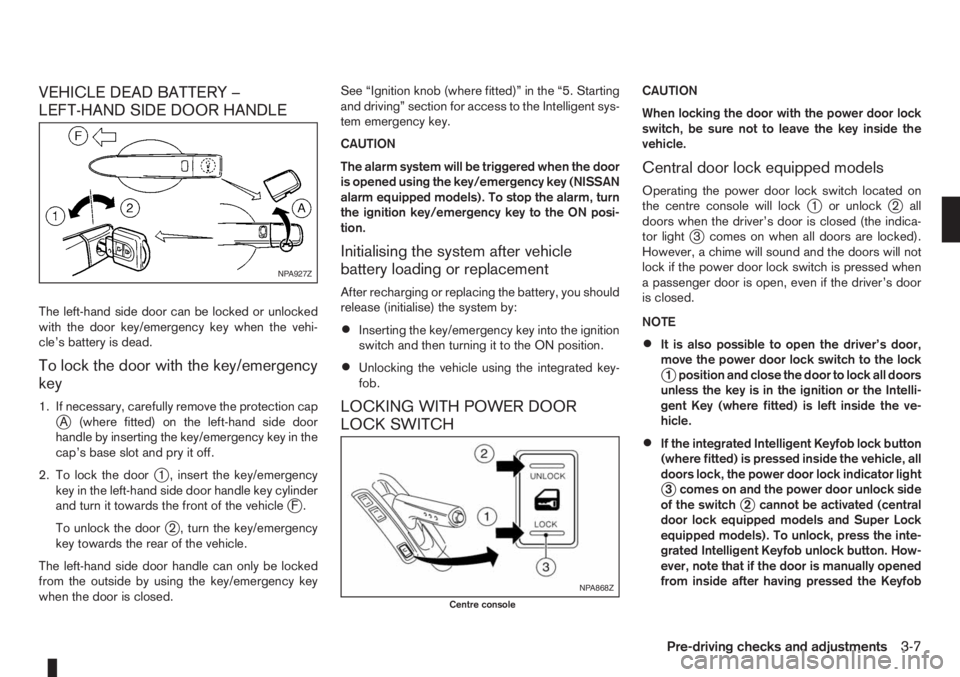
1. If necessary, carefully remove the protection capjA (where fitted) on the left-hand side door
handle by inserting the key/emergency key in the
cap’s base slot and pry it off.
2. To lock the door
j1 , insert the key/emergency
key in the left-hand side door handle key cylinder
and turn it towards the front of the vehicle
jF.
To unlock the door
j2 , turn the key/emergency
key towards the rear of the vehicle.
The left-hand side door handle can only be locked
from the outside by using the key/emergency key
when the door is closed.See “Ignition knob (where fitted)” in the “5. Starting
and driving” section for access to the Intelligent sys-
tem emergency key.
CAUTION
The alarm system will be triggered when the door
is opened using the key/emergency key (NISSAN
alarm equipped models). To stop the alarm, turn
the ignition key/emergency key to the ON posi-
tion.
Initialising the system after vehicle
battery loading or replacement
After recharging or replacing the battery, you should
release (initialise) the system by:
•Inserting the key/emergency key into the ignition
switch and then turning it to the ON position.
•Unlocking the vehicle using the integrated key-
fob.
LOCKING WITH POWER DOOR
LOCK SWITCH
CAUTION
When locking the door with the power door lock
switch, be sure not to leave the key inside the
vehicle.
Central door lock equipped models
Operating the power door lock switch located on
the centre console will lockj1 or unlockj2 all
doors when the driver’s door is closed (the indica-
tor light
j3 comes on when all doors are locked).
However, a chime will sound and the doors will not
lock if the power door lock switch is pressed when
a passenger door is open, even if the driver’s door
is closed.
NOTE
•It is also possible to open the driver’s door,
move the power door lock switch to the lock
j1 position and close the door to lock all doors
unless the key is in the ignition or the Intelli-
gent Key (where fitted) is left inside the ve-
hicle.
•If the integrated Intelligent Keyfob lock button
(where fitted) is pressed inside the vehicle, all
doors lock, the power door lock indicator light
j3 comes on and the power door unlock side
of the switchj2 cannot be activated (central
door lock equipped models and Super Lock
equipped models). To unlock, press the inte-
grated Intelligent Keyfob unlock button. How-
ever, note that if the door is manually opened
from inside after having pressed the Keyfob
NPA927Z
NPA868Z
Centre console
Pre-driving checks and adjustments3-7
Page 81 of 235
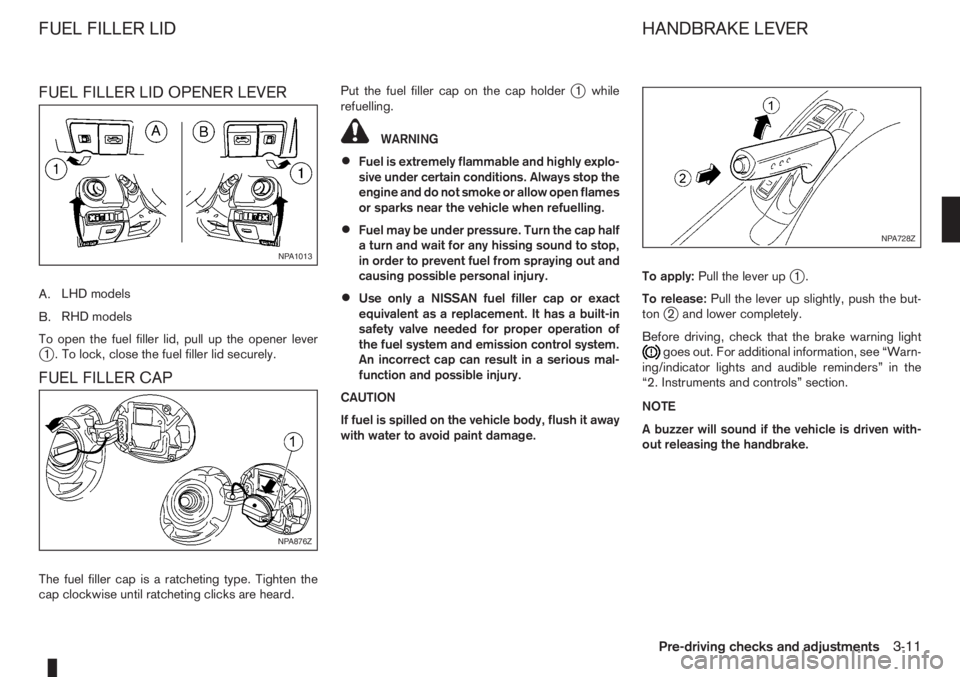
FUEL FILLER LID OPENER LEVER
A.LHD models
B.RHD models
To open the fuel filler lid, pull up the opener lever
j1 . To lock, close the fuel filler lid securely.
FUEL FILLER CAP
The fuel filler cap is a ratcheting type. Tighten the
cap clockwise until ratcheting clicks are heard.Put the fuel filler cap on the cap holder
j1 while
refuelling.
WARNING
•Fuel is extremely flammable and highly explo-
sive under certain conditions. Always stop the
engine and do not smoke or allow open flames
or sparks near the vehicle when refuelling.
•Fuel may be under pressure. Turn the cap half
a turn and wait for any hissing sound to stop,
in order to prevent fuel from spraying out and
causing possible personal injury.
•Use only a NISSAN fuel filler cap or exact
equivalent as a replacement. It has a built-in
safety valve needed for proper operation of
the fuel system and emission control system.
An incorrect cap can result in a serious mal-
function and possible injury.
CAUTION
If fuel is spilled on the vehicle body, flush it away
with water to avoid paint damage.To apply:Pull the lever up
j1.
To release:Pull the lever up slightly, push the but-
ton
j2 and lower completely.
Before driving, check that the brake warning light
goes out. For additional information, see “Warn-
ing/indicator lights and audible reminders” in the
“2. Instruments and controls” section.
NOTE
A buzzer will sound if the vehicle is driven with-
out releasing the handbrake.
NPA1013
NPA876Z
NPA728Z
FUEL FILLER LID HANDBRAKE LEVER
Pre-driving checks and adjustments3-11
Page 101 of 235
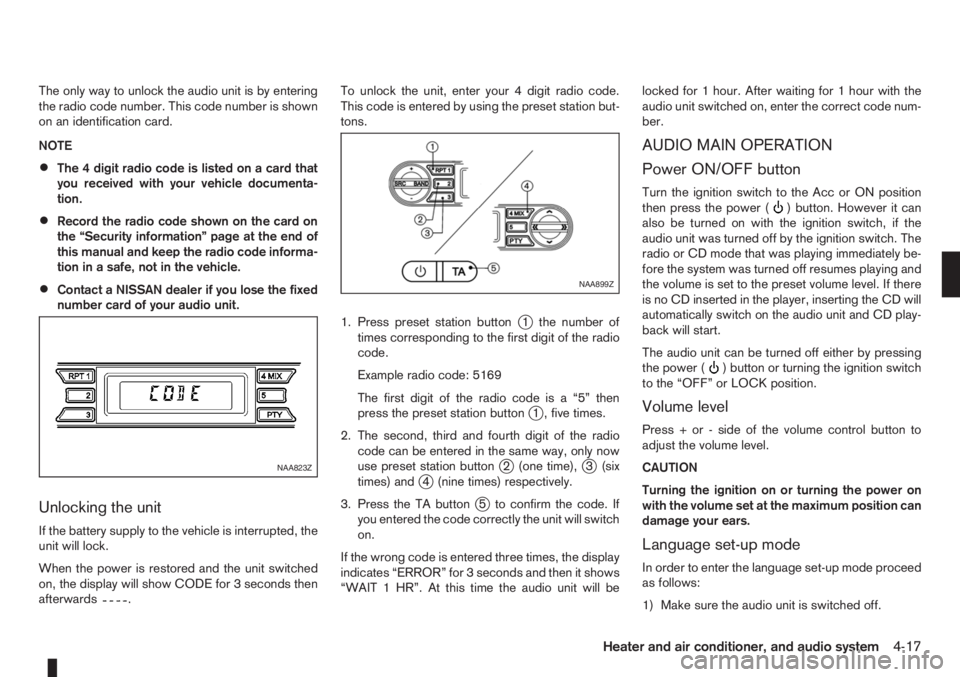
The only way to unlock the audio unit is by entering
the radio code number. This code number is shown
on an identification card.
NOTE
•The 4 digit radio code is listed on a card that
you received with your vehicle documenta-
tion.
•Record the radio code shown on the card on
the “Security information” page at the end of
this manual and keep the radio code informa-
tion in a safe, not in the vehicle.
•Contact a NISSAN dealer if you lose the fixed
number card of your audio unit.
Unlocking the unit
If the battery supply to the vehicle is interrupted, the
unit will lock.
When the power is restored and the unit switched
on, the display will show CODE for 3 seconds then
afterwards
.To unlock the unit, enter your 4 digit radio code.
This code is entered by using the preset station but-
tons.
1. Press preset station button
j1 the number of
times corresponding to the first digit of the radio
code.
Example radio code: 5169
The first digit of the radio code is a “5” then
press the preset station button
j1 , five times.
2. The second, third and fourth digit of the radio
code can be entered in the same way, only now
use preset station button
j2 (one time),j3 (six
times) andj4 (nine times) respectively.
3. Press the TA button
j5 to confirm the code. If
you entered the code correctly the unit will switch
on.
If the wrong code is entered three times, the display
indicates “ERROR” for 3 seconds and then it shows
“WAIT 1 HR”. At this time the audio unit will belocked for 1 hour. After waiting for 1 hour with the
audio unit switched on, enter the correct code num-
ber.
AUDIO MAIN OPERATION
Power ON/OFF button
Turn the ignition switch to the Acc or ON position
then press the power () button. However it can
also be turned on with the ignition switch, if the
audio unit was turned off by the ignition switch. The
radio or CD mode that was playing immediately be-
fore the system was turned off resumes playing and
the volume is set to the preset volume level. If there
is no CD inserted in the player, inserting the CD will
automatically switch on the audio unit and CD play-
back will start.
The audio unit can be turned off either by pressing
the power (
) button or turning the ignition switch
to the “OFF” or LOCK position.
Volume level
Press + or - side of the volume control button to
adjust the volume level.
CAUTION
Turning the ignition on or turning the power on
with the volume set at the maximum position can
damage your ears.
Language set-up mode
In order to enter the language set-up mode proceed
as follows:
1) Make sure the audio unit is switched off.
NAA823Z
NAA899Z
Heater and air conditioner, and audio system4-17
Page 107 of 235
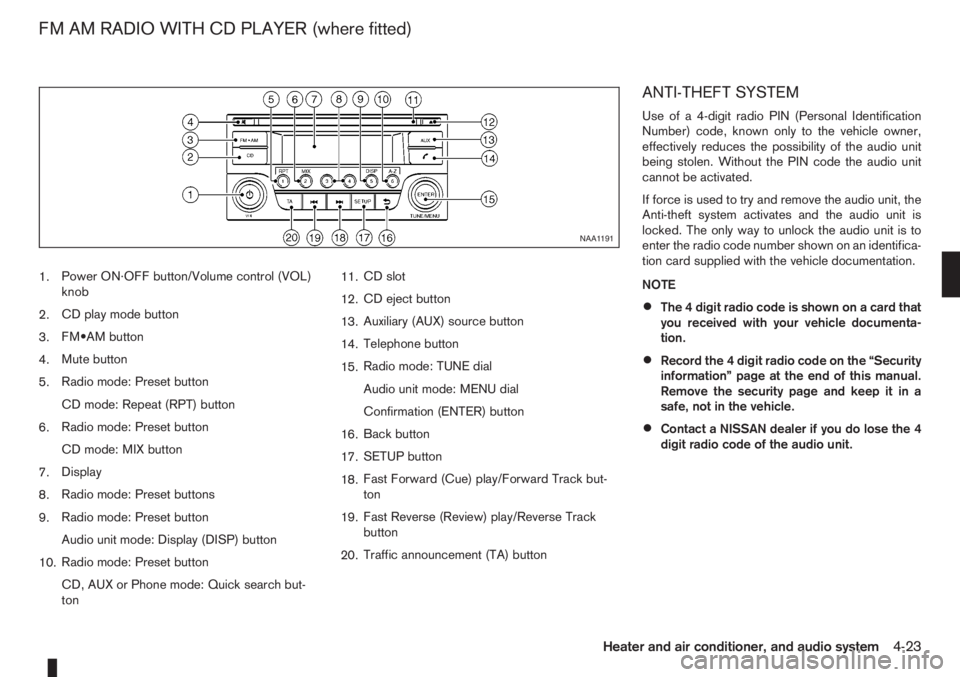
1.Power ON·OFF button/Volume control (VOL)
knob
2.CD play mode button
3.FM•AM button
4.Mute button
5.Radio mode: Preset button
CD mode: Repeat (RPT) button
6.Radio mode: Preset button
CD mode: MIX button
7.Display
8.Radio mode: Preset buttons
9.Radio mode: Preset button
Audio unit mode: Display (DISP) button
10.Radio mode: Preset button
CD, AUX or Phone mode: Quick search but-
ton11.CD slot
12.CD eject button
13.Auxiliary (AUX) source button
14.Telephone button
15.Radio mode: TUNE dial
Audio unit mode: MENU dial
Confirmation (ENTER) button
16.Back button
17.SETUP button
18.Fast Forward (Cue) play/Forward Track but-
ton
19.Fast Reverse (Review) play/Reverse Track
button
20.Traffic announcement (TA) button
ANTI-THEFT SYSTEM
Use of a 4-digit radio PIN (Personal Identification
Number) code, known only to the vehicle owner,
effectively reduces the possibility of the audio unit
being stolen. Without the PIN code the audio unit
cannot be activated.
If force is used to try and remove the audio unit, the
Anti-theft system activates and the audio unit is
locked. The only way to unlock the audio unit is to
enter the radio code number shown on an identifica-
tion card supplied with the vehicle documentation.
NOTE
•The 4 digit radio code is shown on a card that
you received with your vehicle documenta-
tion.
•Record the 4 digit radio code on the “Security
information” page at the end of this manual.
Remove the security page and keep it in a
safe, not in the vehicle.
•Contact a NISSAN dealer if you do lose the 4
digit radio code of the audio unit.
NAA1191
FM AM RADIO WITH CD PLAYER (where fitted)
Heater and air conditioner, and audio system4-23
Page 114 of 235
Audio main operation
The following operations are identical to the audio
main operation of the Compact Disc (CD) opera-
tion. For details, see “Audio main operation” earlier
in this section.
•List view
•Quick search
•,
•MIX (Random play)
•RPT (Repeat track)
•Folder browsing
button
While a track with recorded music information tags
(ID3–tags) is being played, the title of the played
track is displayed. If the tags are not provided then
a notification message is displayed.
When the<
/j5>button is pressed repeat-
edly, further information about the track can be dis-
played along with the track title as follows:
Track time→Artist name→Album title→Folder
name→Track time
Track details:
A long press on the<
/j5>button will turn the
display into a detailed overview and after a few sec-
onds it returns to the main display, or press
<
/j5>briefly.
iPod® PLAYER OPERATION
Connecting iPod®
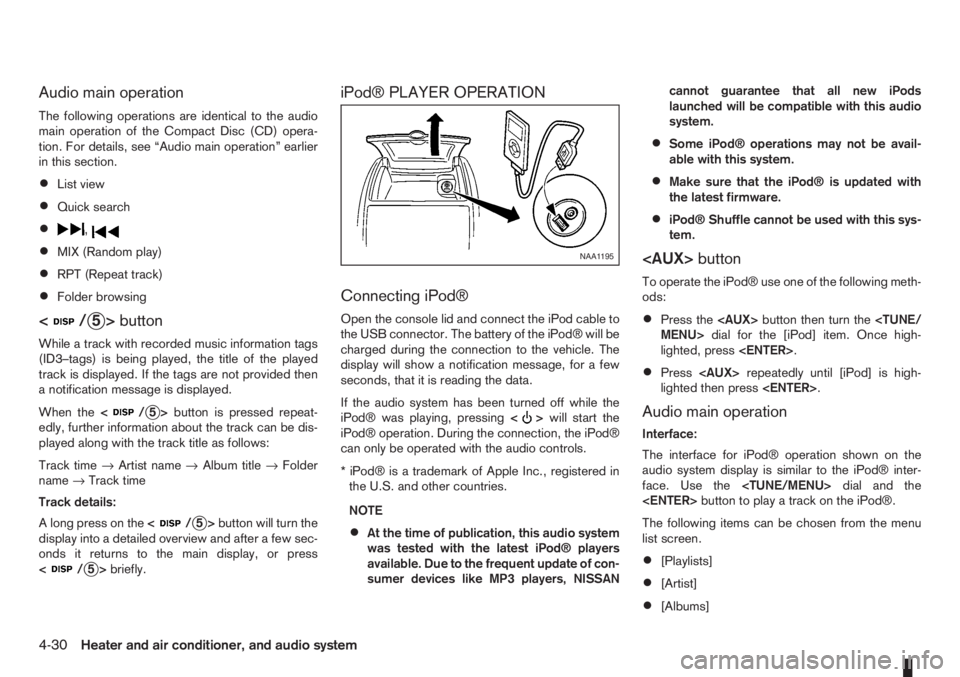
Open the console lid and connect the iPod cable to
the USB connector. The battery of the iPod® will be
charged during the connection to the vehicle. The
display will show a notification message, for a few
seconds, that it is reading the data.
If the audio system has been turned off while the
iPod® was playing, pressing<
>will start the
iPod® operation. During the connection, the iPod®
can only be operated with the audio controls.
* iPod® is a trademark of Apple Inc., registered in
the U.S. and other countries.
NOTE
•At the time of publication, this audio system
was tested with the latest iPod® players
available. Due to the frequent update of con-
sumer devices like MP3 players, NISSANcannot guarantee that all new iPods
launched will be compatible with this audio
system.
•Some iPod® operations may not be avail-
able with this system.
•Make sure that the iPod® is updated with
the latest firmware.
•iPod® Shuffle cannot be used with this sys-
tem.
To operate the iPod® use one of the following meth-
ods:
•Press the
lighted, press
•Press
lighted then press
Audio main operation
Interface:
The interface for iPod® operation shown on the
audio system display is similar to the iPod® inter-
face. Use the
The following items can be chosen from the menu
list screen.
•[Playlists]
•[Artist]
•[Albums]
NAA1195
4-30Heater and air conditioner, and audio system
Page 116 of 235
![NISSAN NOTE 2010 User Guide [Pair Device]:
1. Press the<SETUP>button. Select the [Blue-
tooth] key using the<TUNE/MENU>dial. Then
press the<ENTER>button.
You can register up to 5 different Bluetooth mo-
bile phones. However, you](/img/5/56794/w960_56794-115.png "NISSAN NOTE 2010 User Guide [Pair Device]:
1. Press the<SETUP>button. Select the [Blue-
tooth] key using the<TUNE/MENU>dial. Then
press the<ENTER>button.
You can register up to 5 different Bluetooth mo-
bile phones. However, you")
[Pair Device]:
1. Press the
tooth] key using the
press the
You can register up to 5 different Bluetooth mo-
bile phones. However, you can only use one de-
vice at a time. If you have 5 different Bluetooth
registered devices, a new device can only re-
place one of the 5 existing paired devices. Use
[Delete Device] key to delete one of the existing
paired devices. For details, see “[Delete Device]”
later in this section.
2. Select the [Pair Device] key.
The pairing procedure depends on the
connected device:
•Mobile phone:
The message [Ready to Pair Pin:1234] will
be displayed.
•Audio device without PIN code:
The Bluetooth connection will be automati-
cally connected without any further input.
•Audio device with PIN code:
A new screen will appear. Assign the 4 digit
PIN code by turning the
to each code and press the
to confirm. Then select [Validate] and press
made.
The 4–digit PIN code is provided with the
audio device, see the owner’s manual of the
audio device.
3. On Bluetooth® audio/mobile phone devices.
1) Switch on the Bluetooth® connection, if not
already switched on.
2) Switch on the search mode for Bluetooth®
devices. If the search mode finds a device it
will be shown on the device display.
3) When a device is found use the
to select [My Car].
4) Enter the number code shown on the relevant
device with the device’s own keypad, and
press the confirmation key on the device it-
self. Refer to the relevant Bluetooth® device
owner’s manual for further details.
When successfully paired a notification message
will be displayed, then the audio system displaywill return to the current audio source display.
During connection the following status icons will
be displayed (top left of the display): Signal
strength (), Battery status* () and Blue-
tooth “ON” ().
*: If the low battery message comes on, the
Bluetooth® device must be recharged soon.
The pairing procedure and operation may vary ac-
cording to device type and compatibility. See the
Bluetooth® owner’s manual for further details.
NOTE
•For device details, see your audio/mobile
phone Owner’s Manual.
•For assistance with the Bluetooth® audio/
mobile phone integration, please visit your lo-
cal NISSAN dealer.
[Select Device]:
The paired device list shows which Bluetooth® au-
dio or mobile phone devices have been paired or
registered with the Bluetooth® audio system. If the
list contains devices then select the appropriate de-
vice to connect to the Bluetooth® audio system.
The following symbols (where fitted) indicate the
capability of the registered device:
•: Mobile phone integration
•: Audio streaming (A2DP- Advanced Audio
Distribution Profile)
NAA1202
4-32Heater and air conditioner, and audio system
Page 119 of 235
Bluetooth®is a wireless radio communication stan-
dard. This system offers a hands-free facility for your
mobile telephone to enhance driving comfort.
In order to use your mobile phone with the Blue-
tooth
®of the audio system, the mobile phone must
first be setup. For details, see “BLUETOOTH®
settings” later in this section or “BLUETOOTH®
settings” earlier in this section. Once it has been
setup, the hands-free mode is automatically acti-
vated on the registered mobile phone (via Blue-
tooth
®) when it comes into range.
A notification message appears on the audio display
when the phone is connected, when an incoming
call is being received, as well as when a call is initi-
ated.
When a call is active, the audio system, microphone
(located in the ceiling in front of the rear view mir-
ror), and steering wheel switches enable hands-free
communication.
If the audio system is in use at the time, the radio,
CD, or AUX source mode will be muted and will stay
muted until the active call has ended.
The Bluetooth
®system may be not be able to con-
nect with your mobile phone for the following rea-
sons:
•The mobile phone is too far away from the ve-
hicle.
•The Bluetooth®mode on your mobile phone has
not been activated.
•Your mobile phone has not been paired with the
Bluetooth®system of the audio unit.
•The mobile phone does not support Bluetooth®
technology (BT Core v2.0).
NOTE
•For models with NISSAN Connect (Audio with
Navigation system) see the separately pro-
vided Owner’s Manual.
•For details, see your mobile phone’s Owner’s
Manual.
•For assistance with your mobile phone inte-
gration, please visit your local NISSAN dealer.
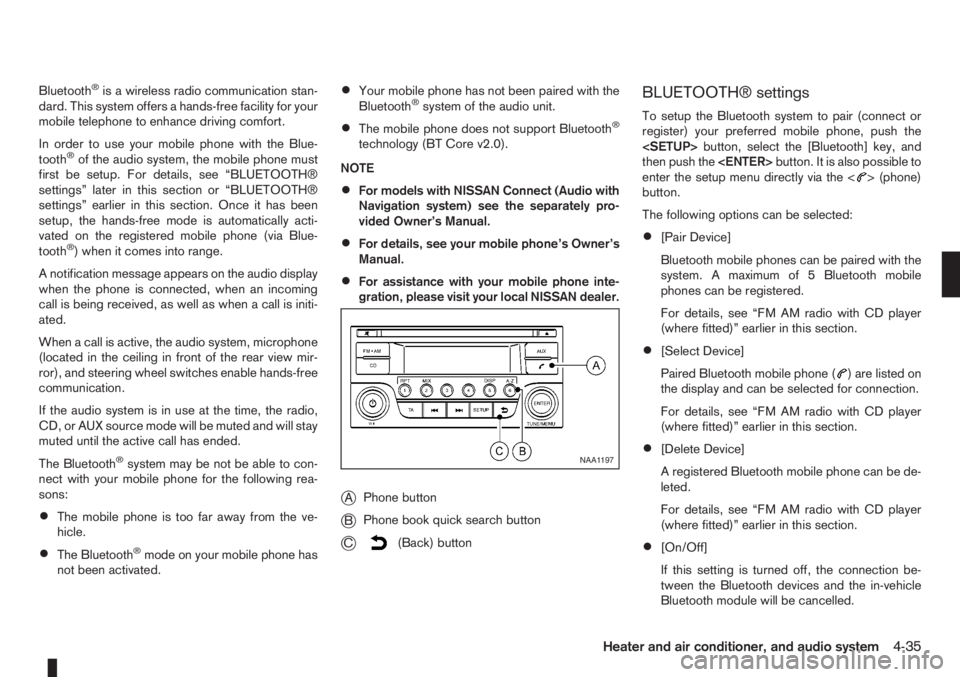
jAPhone button
jBPhone book quick search button
jC(Back) button
BLUETOOTH® settings
To setup the Bluetooth system to pair (connect or
register) your preferred mobile phone, push the
then push the
enter the setup menu directly via the <
> (phone)
button.
The following options can be selected:
•[Pair Device]
Bluetooth mobile phones can be paired with the
system. A maximum of 5 Bluetooth mobile
phones can be registered.
For details, see “FM AM radio with CD player
(where fitted)” earlier in this section.
•[Select Device]
Paired Bluetooth mobile phone (
) are listed on
the display and can be selected for connection.
For details, see “FM AM radio with CD player
(where fitted)” earlier in this section.
•[Delete Device]
A registered Bluetooth mobile phone can be de-
leted.
For details, see “FM AM radio with CD player
(where fitted)” earlier in this section.
•[On/Off]
If this setting is turned off, the connection be-
tween the Bluetooth devices and the in-vehicle
Bluetooth module will be cancelled.
NAA1197
Heater and air conditioner, and audio system4-35
Page 151 of 235
WARNING
•If the Electrically Power Assisted Steering
warning light (EPAS) illuminates while driv-
ing, the power assist for steering will be dis-
abled. Greater steering efforts are required to
operate the steering wheel, especially in
sharp turns and at low speed. Stop the ve-
hicle as soon as safely possible and contact a
NISSAN dealer or qualified workshop for fur-
ther assistance.
•In certain circumstances, factors external to
the EPAS system may contribute to the illumi-
nation of the warning light. If the warning light
illuminates, stop the vehicle as soon as safely
possible if driving. Turn the ignition switch to
the “OFF” position and wait for approximately
20 seconds, then turn the ignition switch to
the ON position again. If the light remains illu-
minated, we recommend you to contact a
NISSAN dealer or qualified workshop. See
“Warning/indicator lights and audible
reminders” in the “2. Instruments and
controls” section for further details regarding
the EPAS warning light.
The EPAS (Electrically Power Assisted Steering)
system is designed to assist steering.
The steering may appear to feel slightly stiff follow-
ing parking manoeuvres including a great deal of
steering. This is not a malfunction; it is caused by a
control system designed to prevent the motor fromoverheating. No servicing is required. The EPAS
system will return to normal operation the next time
the vehicle is driven.
Similarly, the EPAS system may not provide full as-
sistance during periods of reduced battery voltage
but will recover once normal battery voltage is re-
stored.
If the EPAS warning light comes on while the engine
is running, it may indicate that the EPAS system is
not working properly. As result greater steering ef-
forts are required to steer the steering wheel, espe-
cially in sharp turns and at low speeds. Have the
system checked by a NISSAN dealer or qualified
workshop as soon as possible.
NOTE
Incorrectly inflated tyres can lead to poor steer-
ing ability and make the driver suspect a steering
problem: keep the vehicle’s tyres inflated to the
correct pressure at all times.
CAUTION
Any malfunction or accident that could have dam-
aged the steering components (including actual
or attempted theft damage) should be reported
to a NISSAN dealer or qualified workshop.The brake system has two separate hydraulic cir-
cuits. If one circuit malfunctions, you will still have
braking ability with two wheels.
BRAKE PRECAUTIONS
Vacuum assisted brake
The brake booster aids braking by using engine
vacuum. If the engine stops or the drive belt is bro-
ken, you can stop the vehicle by depressing the
brake pedal. However, greater foot pressure on the
brake pedal will be required to stop the vehicle and
the stopping distance will be longer.
Wet brakes
When the vehicle is washed or driven through wa-
ter, the brakes may get wet. As a result, your brak-
ing distance will be longer and the vehicle may pull
to one side during braking.
To dry brakes, drive the vehicle at a safe speed
while lightly pressing the brake pedal to heat up the
brakes. Do this until the brakes return to normal.
Avoid driving the vehicle at high speeds until the
brakes function correctly.
Using the brakes
Avoid resting your foot on the brake pedal while
driving. This will overheat the brakes, wear out the
brake linings and pads faster and reduce fuel
economy performance.
To help reduce brake wear and to prevent the brakes
from overheating, reduce speed and downshift to a
lower gear before going down a slope or long down-
POWER STEERING SYSTEM BRAKE SYSTEM
Starting and driving5-27