AUX NISSAN NOTE 2011 User Guide
[x] Cancel search | Manufacturer: NISSAN, Model Year: 2011, Model line: NOTE, Model: NISSAN NOTE 2011Pages: 235, PDF Size: 2.29 MB
Page 114 of 235
Audio main operation
The following operations are identical to the audio
main operation of the Compact Disc (CD) opera-
tion. For details, see “Audio main operation” earlier
in this section.
•List view
•Quick search
•,
•MIX (Random play)
•RPT (Repeat track)
•Folder browsing
button
While a track with recorded music information tags
(ID3–tags) is being played, the title of the played
track is displayed. If the tags are not provided then
a notification message is displayed.
When the<
/j5>button is pressed repeat-
edly, further information about the track can be dis-
played along with the track title as follows:
Track time→Artist name→Album title→Folder
name→Track time
Track details:
A long press on the<
/j5>button will turn the
display into a detailed overview and after a few sec-
onds it returns to the main display, or press
<
/j5>briefly.
iPod® PLAYER OPERATION
Connecting iPod®
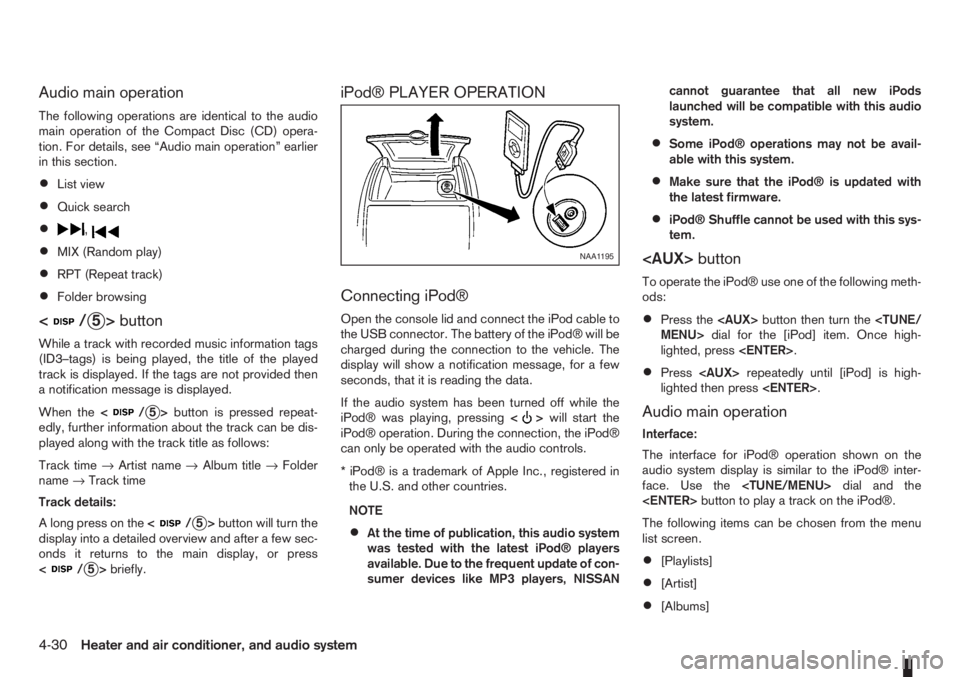
Open the console lid and connect the iPod cable to
the USB connector. The battery of the iPod® will be
charged during the connection to the vehicle. The
display will show a notification message, for a few
seconds, that it is reading the data.
If the audio system has been turned off while the
iPod® was playing, pressing<
>will start the
iPod® operation. During the connection, the iPod®
can only be operated with the audio controls.
* iPod® is a trademark of Apple Inc., registered in
the U.S. and other countries.
NOTE
•At the time of publication, this audio system
was tested with the latest iPod® players
available. Due to the frequent update of con-
sumer devices like MP3 players, NISSANcannot guarantee that all new iPods
launched will be compatible with this audio
system.
•Some iPod® operations may not be avail-
able with this system.
•Make sure that the iPod® is updated with
the latest firmware.
•iPod® Shuffle cannot be used with this sys-
tem.
To operate the iPod® use one of the following meth-
ods:
•Press the
lighted, press
•Press
lighted then press
Audio main operation
Interface:
The interface for iPod® operation shown on the
audio system display is similar to the iPod® inter-
face. Use the
The following items can be chosen from the menu
list screen.
•[Playlists]
•[Artist]
•[Albums]
NAA1195
4-30Heater and air conditioner, and audio system
Page 117 of 235
![NISSAN NOTE 2011 User Guide [Delete Device]:
A registered device can be removed from the Blue-
tooth audio system. Select a registered device then
press<ENTER>to confirm to deletion.
[On/Off]:
If Bluetooth® has been switched of](/img/5/56793/w960_56793-116.png "NISSAN NOTE 2011 User Guide [Delete Device]:
A registered device can be removed from the Blue-
tooth audio system. Select a registered device then
press<ENTER>to confirm to deletion.
[On/Off]:
If Bluetooth® has been switched of")
[Delete Device]:
A registered device can be removed from the Blue-
tooth audio system. Select a registered device then
press
[On/Off]:
If Bluetooth® has been switched off a notification
message [On/Off] appears when you select [Blue-
tooth] from the setup menu screen, or press<
>.
To switch the Bluetooth® signal on, press
and a follow up screen will appear. Then select [On]
and press
tings menu screen.
Bluetooth® audio streaming main
operation
Turn the ignition switch to the Acc or ON position.
If the audio system was turned off while the Blue-
tooth® audio was playing, pressing the<
> but-
ton will start the Bluetooth® audio streaming.
To operate the Bluetooth audio streaming use one
of the following methods:
•Press the
•Press
lighted, then press
The type of display,
jAorjB , shown on the audio
system can vary depending on the Bluetooth® ver-
sion of the device.
Fast Forward (Cue), Fast
Reverse (Review) buttons:
When the<
>(Cue) or<>(Review) button
is pressed continuously, the track will be played at
high speed. When the button is released, the track
will be played at normal playing speed.
Track up/down buttons:
Pressing the <
>or<> button once, the
track will be skipped forward to the next track or
backward to the beginning of the current played
track. Press the<
>or<>button more than
once to skip through the tracks.
Play/Pause:
Press the
press
button (Type B display
screen only)
If the song contains music information tags (ID3–
tags), the title of the played song will be displayed.
If tags are not provided then the display will not
show any messages.
When the<
/j5>button is pressed repeatedly
further information about the song can be displayed
along with the song title.
A long press on<
/j5>will turn the display
into a detailed overview which after a few seconds
returns to the main display; or press<
/j5>
briefly.
BLUETOOTH®MOBILE PHONE
FEATURE
This system offers a hands-free facility for your mo-
bile telephone with Bluetooth® to enhance driving
safety, and comfort.
For details, see “Mobile phone integration (where
fitted)” later in this section.
NAA1203
Heater and air conditioner, and audio system4-33
Page 118 of 235
For details, see the separately provided NISSAN
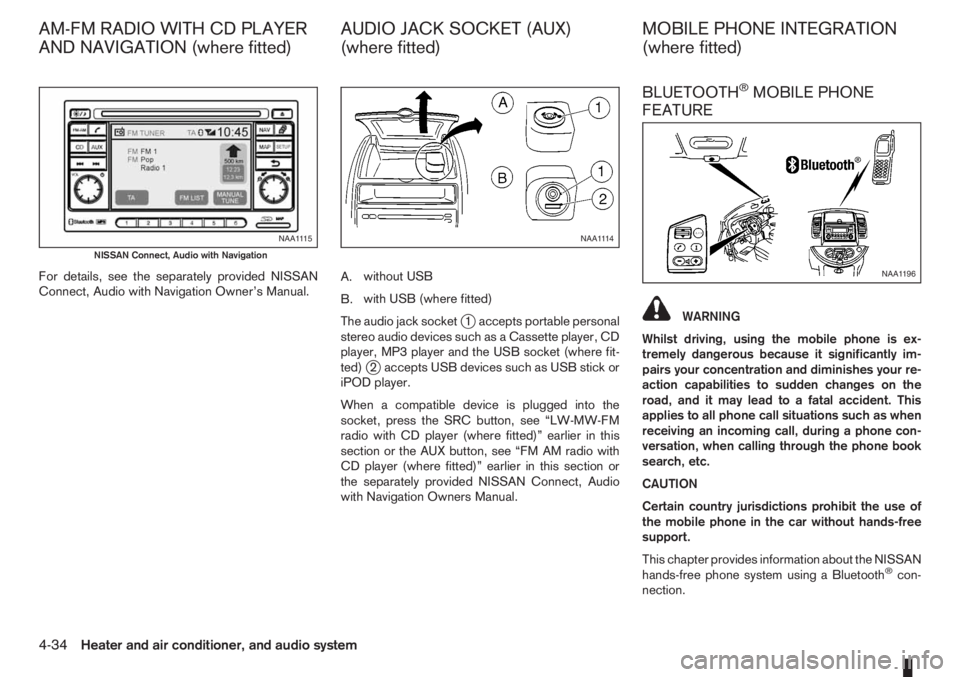
Connect, Audio with Navigation Owner’s Manual.A.without USB
B.with USB (where fitted)
The audio jack socket
j1 accepts portable personal
stereo audio devices such as a Cassette player, CD
player, MP3 player and the USB socket (where fit-
ted)
j2 accepts USB devices such as USB stick or
iPOD player.
When a compatible device is plugged into the
socket, press the SRC button, see “LW-MW-FM
radio with CD player (where fitted)” earlier in this
section or the AUX button, see “FM AM radio with
CD player (where fitted)” earlier in this section or
the separately provided NISSAN Connect, Audio
with Navigation Owners Manual.
BLUETOOTH®MOBILE PHONE
FEATURE
WARNING
Whilst driving, using the mobile phone is ex-
tremely dangerous because it significantly im-
pairs your concentration and diminishes your re-
action capabilities to sudden changes on the
road, and it may lead to a fatal accident. This
applies to all phone call situations such as when
receiving an incoming call, during a phone con-
versation, when calling through the phone book
search, etc.
CAUTION
Certain country jurisdictions prohibit the use of
the mobile phone in the car without hands-free
support.
This chapter provides information about the NISSAN
hands-free phone system using a Bluetooth
®con-
nection.
NAA1115
NISSAN Connect, Audio with Navigation
NAA1114
NAA1196
AM-FM RADIO WITH CD PLAYER
AND NAVIGATION (where fitted)AUDIO JACK SOCKET (AUX)
(where fitted)MOBILE PHONE INTEGRATION
(where fitted)
4-34Heater and air conditioner, and audio system
Page 119 of 235
Bluetooth®is a wireless radio communication stan-
dard. This system offers a hands-free facility for your
mobile telephone to enhance driving comfort.
In order to use your mobile phone with the Blue-
tooth
®of the audio system, the mobile phone must
first be setup. For details, see “BLUETOOTH®
settings” later in this section or “BLUETOOTH®
settings” earlier in this section. Once it has been
setup, the hands-free mode is automatically acti-
vated on the registered mobile phone (via Blue-
tooth
®) when it comes into range.
A notification message appears on the audio display
when the phone is connected, when an incoming
call is being received, as well as when a call is initi-
ated.
When a call is active, the audio system, microphone
(located in the ceiling in front of the rear view mir-
ror), and steering wheel switches enable hands-free
communication.
If the audio system is in use at the time, the radio,
CD, or AUX source mode will be muted and will stay
muted until the active call has ended.
The Bluetooth
®system may be not be able to con-
nect with your mobile phone for the following rea-
sons:
•The mobile phone is too far away from the ve-
hicle.
•The Bluetooth®mode on your mobile phone has
not been activated.
•Your mobile phone has not been paired with the
Bluetooth®system of the audio unit.
•The mobile phone does not support Bluetooth®
technology (BT Core v2.0).
NOTE
•For models with NISSAN Connect (Audio with
Navigation system) see the separately pro-
vided Owner’s Manual.
•For details, see your mobile phone’s Owner’s
Manual.
•For assistance with your mobile phone inte-
gration, please visit your local NISSAN dealer.
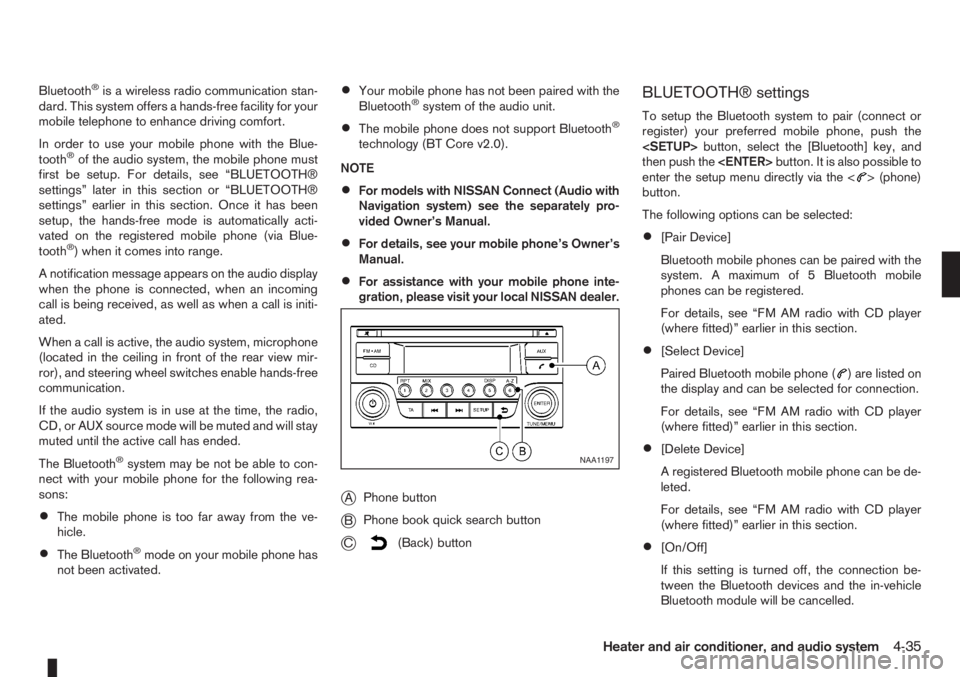
jAPhone button
jBPhone book quick search button
jC(Back) button
BLUETOOTH® settings
To setup the Bluetooth system to pair (connect or
register) your preferred mobile phone, push the
then push the
enter the setup menu directly via the <
> (phone)
button.
The following options can be selected:
•[Pair Device]
Bluetooth mobile phones can be paired with the
system. A maximum of 5 Bluetooth mobile
phones can be registered.
For details, see “FM AM radio with CD player
(where fitted)” earlier in this section.
•[Select Device]
Paired Bluetooth mobile phone (
) are listed on
the display and can be selected for connection.
For details, see “FM AM radio with CD player
(where fitted)” earlier in this section.
•[Delete Device]
A registered Bluetooth mobile phone can be de-
leted.
For details, see “FM AM radio with CD player
(where fitted)” earlier in this section.
•[On/Off]
If this setting is turned off, the connection be-
tween the Bluetooth devices and the in-vehicle
Bluetooth module will be cancelled.
NAA1197
Heater and air conditioner, and audio system4-35
Page 123 of 235
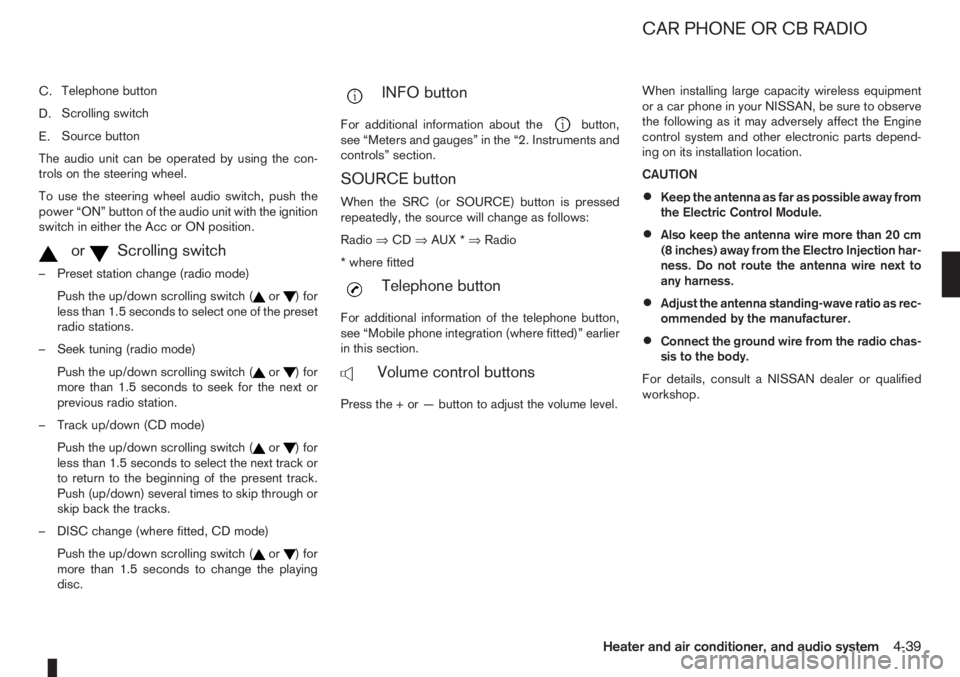
C.Telephone button
D.Scrolling switch
E.Source button
The audio unit can be operated by using the con-
trols on the steering wheel.
To use the steering wheel audio switch, push the
power “ON” button of the audio unit with the ignition
switch in either the Acc or ON position.
mormScrolling switch
– Preset station change (radio mode)
Push the up/down scrolling switch (
or) for
less than 1.5 seconds to select one of the preset
radio stations.
– Seek tuning (radio mode)
Push the up/down scrolling switch (
or) for
more than 1.5 seconds to seek for the next or
previous radio station.
– Track up/down (CD mode)
Push the up/down scrolling switch (
or) for
less than 1.5 seconds to select the next track or
to return to the beginning of the present track.
Push (up/down) several times to skip through or
skip back the tracks.
– DISC change (where fitted, CD mode)
Push the up/down scrolling switch (
or) for
more than 1.5 seconds to change the playing
disc.
mINFO button
For additional information about thebutton,
see “Meters and gauges” in the “2. Instruments and
controls” section.
SOURCE button
When the SRC (or SOURCE) button is pressed
repeatedly, the source will change as follows:
Radio⇒CD⇒AUX *⇒Radio
* where fitted
mTelephone button
For additional information of the telephone button,
see “Mobile phone integration (where fitted)” earlier
in this section.
mVolume control buttons
Press the + or — button to adjust the volume level.When installing large capacity wireless equipment
or a car phone in your NISSAN, be sure to observe
the following as it may adversely affect the Engine
control system and other electronic parts depend-
ing on its installation location.
CAUTION
•Keep the antenna as far as possible away from
the Electric Control Module.
•Also keep the antenna wire more than 20 cm
(8 inches) away from the Electro Injection har-
ness. Do not route the antenna wire next to
any harness.
•Adjust the antenna standing-wave ratio as rec-
ommended by the manufacturer.
•Connect the ground wire from the radio chas-
sis to the body.
For details, consult a NISSAN dealer or qualified
workshop.
CAR PHONE OR CB RADIO
Heater and air conditioner, and audio system4-39
Page 221 of 235

10 Index
A
Air bag system (Supplemental Restraint System) ................. 1-11
Air bag warning labels ......................................................... 1-13
Air bag warning light ............................................................ 1-13
Air cleaner filter ................................................................... 8-19
Air conditioner
– Air conditioner filter ................................................ 4-10, 4-7
– Air conditioner specification label ..................................... 9-7
– Air conditioning system refrigerant and lubricant
recommendations ............................................................ 9-4
– Automatic air conditioner ................................................. 4-8
– Heater and air conditioner ................................................ 4-2
– Manual air conditioner ..................................................... 4-3
– Servicing air conditioner ......................................... 4-10, 4-7
Antenna .............................................................................. 4-16
Anti-lock Braking System (ABS) .......................................... 5-28
Anti-Theft System (NISSAN) .................................................. 3-9
Approval numbers ................................................................. 9-8
Audible reminders
– Warning/indicator lights and audible reminders ................ 2-7
Audio
– AM-FM radio with CD player and navigation (NISSAN
Connect) ....................................................................... 4-34
– Anti-theft system ............................................................ 4-23
– Audio operation precautions .......................................... 4-10
– Audio player operation .................................................. 4-31
– Audio system ................................................................. 4-10
– AUX socket ................................................................... 4-29
– FM AM radio with CD player ......................................... 4-23
– iPod® player operation .................................................. 4-30– Jack socket ................................................................... 4-34
– LW-MW-FM radio with CD player ................................. 4-16
– Steering-wheel switches for audio control ...................... 4-38
– USB Memory operation ................................................. 4-29
Automatic transmission
– Automatic transmission fluid (ATF) ................................. 8-13
– Driving with automatic transmission ............................... 5-12
B
Battery ....................................................................... 5-31, 8-15
– Caution label ................................................................. 8-15
– Integrated keyfob battery replacement ........................... 8-17
– Intelligent Key battery replacement ................................. 8-17
– Reinitialisation procedure after battery reconnection ....... 8-16
– Vehicle battery ............................................................... 8-15
Battery (vehicle)
– Vehicle dead battery – Left-hand side door handle ........... 3-7
Before starting the engine ..................................................... 5-2
Bluetooth®
– Audio player operation ................................................... 4-31
– Bluetooth® mobile phone feature .................................. 4-34
– Bluetooth® settings ....................................................... 4-31
Bonnet release .................................................................... 3-10
Brake .................................................................................. 8-13
– Anti-lock Braking System (ABS) .................................... 5-28
– Brake fluid ..................................................................... 8-13
– Brake precautions ......................................................... 5-27
– Brake system ................................................................ 5-27
– Checking brake pedal ................................................... 8-13
– Checking handbrake ..................................................... 8-13
– Handbrake lever ............................................................ 3-11