bonnet NISSAN NOTE 2012 Owner's Manual
[x] Cancel search | Manufacturer: NISSAN, Model Year: 2012, Model line: NOTE, Model: NISSAN NOTE 2012Pages: 235, PDF Size: 2.29 MB
Page 187 of 235
18. Install the engine compartment undercover
(where fitted).
19. Lower the vehicle carefully to the ground.
20. Close the bonnet.
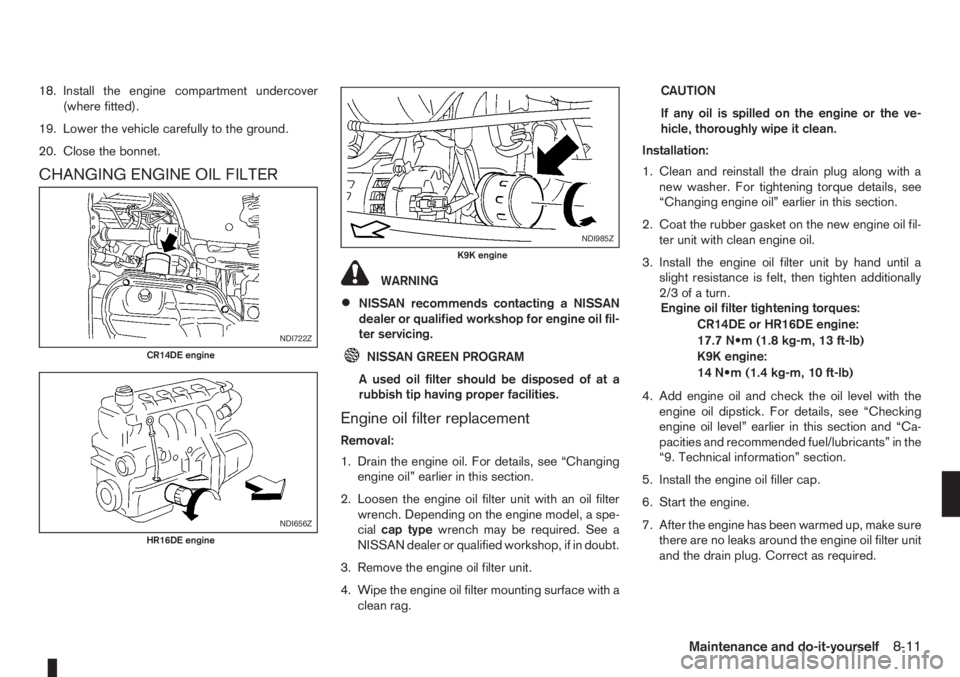
CHANGING ENGINE OIL FILTER
WARNING
•NISSAN recommends contacting a NISSAN
dealer or qualified workshop for engine oil fil-
ter servicing.
NISSAN GREEN PROGRAM
A used oil filter should be disposed of at a
rubbish tip having proper facilities.
Engine oil filter replacement
Removal:
1. Drain the engine oil. For details, see “Changing
engine oil” earlier in this section.
2. Loosen the engine oil filter unit with an oil filter
wrench. Depending on the engine model, a spe-
cialcap typewrench may be required. See a
NISSAN dealer or qualified workshop, if in doubt.
3. Remove the engine oil filter unit.
4. Wipe the engine oil filter mounting surface with a
clean rag.CAUTION
If any oil is spilled on the engine or the ve-
hicle, thoroughly wipe it clean.
Installation:
1. Clean and reinstall the drain plug along with a
new washer. For tightening torque details, see
“Changing engine oil” earlier in this section.
2. Coat the rubber gasket on the new engine oil fil-
ter unit with clean engine oil.
3. Install the engine oil filter unit by hand until a
slight resistance is felt, then tighten additionally
2/3ofaturn.
Engine oil filter tightening torques:
CR14DE or HR16DE engine:
17.7 N•m (1.8 kg-m, 13 ft-lb)
K9K engine:
14 N•m (1.4 kg-m, 10 ft-lb)
4. Add engine oil and check the oil level with the
engine oil dipstick. For details, see “Checking
engine oil level” earlier in this section and “Ca-
pacities and recommended fuel/lubricants” in the
“9. Technical information” section.
5. Install the engine oil filler cap.
6. Start the engine.
7. After the engine has been warmed up, make sure
there are no leaks around the engine oil filter unit
and the drain plug. Correct as required.
NDI722Z
CR14DE engine
NDI656Z
HR16DE engine
NDI985Z
K9K engine
Maintenance and do-it-yourself8-11
Page 188 of 235
8. Turn the engine off and wait several minutes.
Check the oil level and add engine oil, if neces-
sary.
9. Install the engine compartment under cover
(where fitted).
10. Lower the vehicle carefully to the ground.
11. Close the bonnet.
PROTECT THE ENVIRONMENT
NISSAN GREEN PROGRAM
It is illegal to pollute drains, water courses and soil.
Use authorised waste collection facilities, including
civic amenity sites and garages providing facilities
for the disposal of used oil and used oil filters. If in
doubt, contact your local authority for advice on dis-
posal.
The regulations concerning the pollution of the
environment will vary from country to country.
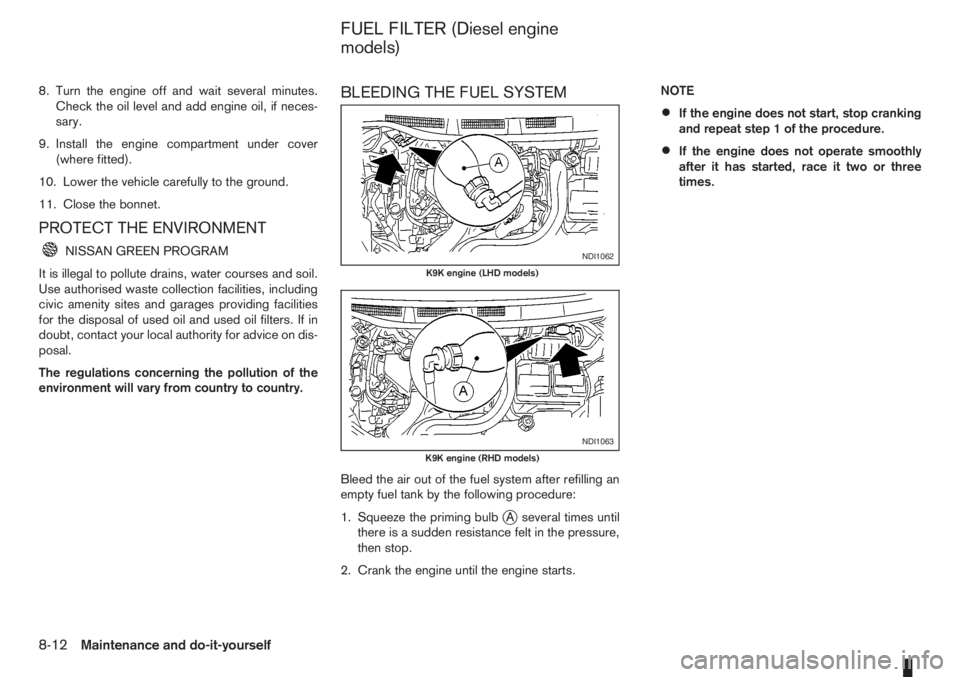
BLEEDING THE FUEL SYSTEM
Bleed the air out of the fuel system after refilling an
empty fuel tank by the following procedure:
1. Squeeze the priming bulb
jA several times until
there is a sudden resistance felt in the pressure,
then stop.
2. Crank the engine until the engine starts.NOTE
•If the engine does not start, stop cranking
and repeat step 1 of the procedure.
•If the engine does not operate smoothly
after it has started, race it two or three
times.
NDI1062
K9K engine (LHD models)
NDI1063
K9K engine (RHD models)
FUEL FILTER (Diesel engine
models)
8-12Maintenance and do-it-yourself
Page 195 of 235
WARNING
•Operating the engine without the air cleaner
filter, can cause you or others to be burned.
The air cleaner filter not only cleans the intake
air, it also stops flame if the engine backfires.
If the air cleaner filter is not installed and the
engine backfires, you could be burned.
•Do not drive without the air cleaner filter.
•Be careful when working on the engine with-
out the air cleaner filter.
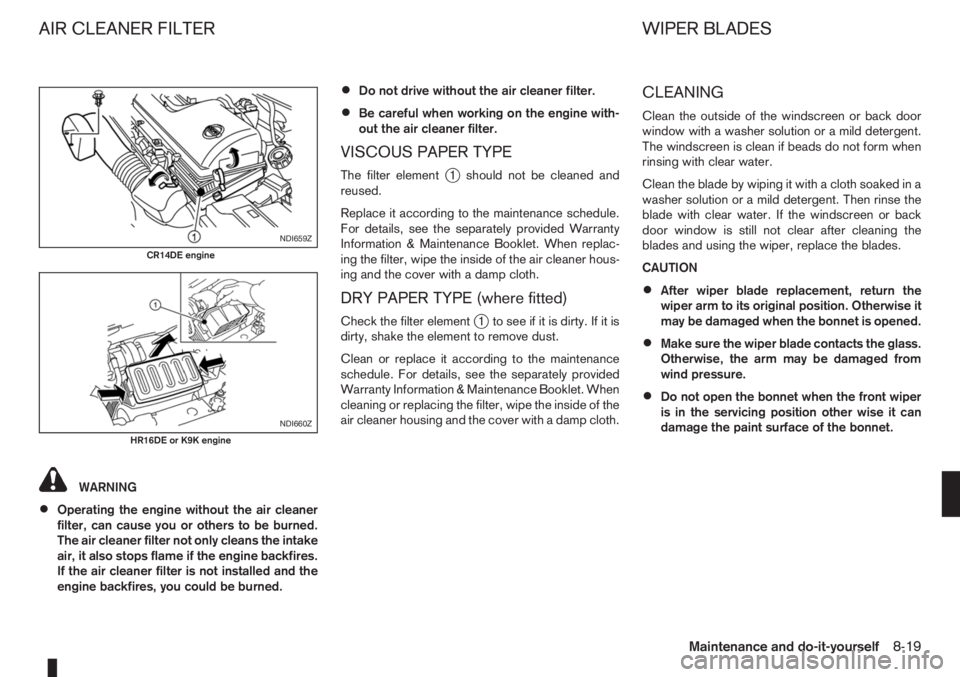
VISCOUS PAPER TYPE
The filter elementj1 should not be cleaned and
reused.
Replace it according to the maintenance schedule.
For details, see the separately provided Warranty
Information & Maintenance Booklet. When replac-
ing the filter, wipe the inside of the air cleaner hous-
ing and the cover with a damp cloth.
DRY PAPER TYPE (where fitted)
Check the filter elementj1 to see if it is dirty. If it is
dirty, shake the element to remove dust.
Clean or replace it according to the maintenance
schedule. For details, see the separately provided
Warranty Information & Maintenance Booklet. When
cleaning or replacing the filter, wipe the inside of the
air cleaner housing and the cover with a damp cloth.
CLEANING
Clean the outside of the windscreen or back door
window with a washer solution or a mild detergent.
The windscreen is clean if beads do not form when
rinsing with clear water.
Clean the blade by wiping it with a cloth soaked in a
washer solution or a mild detergent. Then rinse the
blade with clear water. If the windscreen or back
door window is still not clear after cleaning the
blades and using the wiper, replace the blades.
CAUTION
•After wiper blade replacement, return the
wiper arm to its original position. Otherwise it
may be damaged when the bonnet is opened.
•Make sure the wiper blade contacts the glass.
Otherwise, the arm may be damaged from
wind pressure.
•Do not open the bonnet when the front wiper
is in the servicing position other wise it can
damage the paint surface of the bonnet.
NDI659Z
CR14DE engine
NDI660Z
HR16DE or K9K engine
AIR CLEANER FILTER WIPER BLADES
Maintenance and do-it-yourself8-19
Page 196 of 235
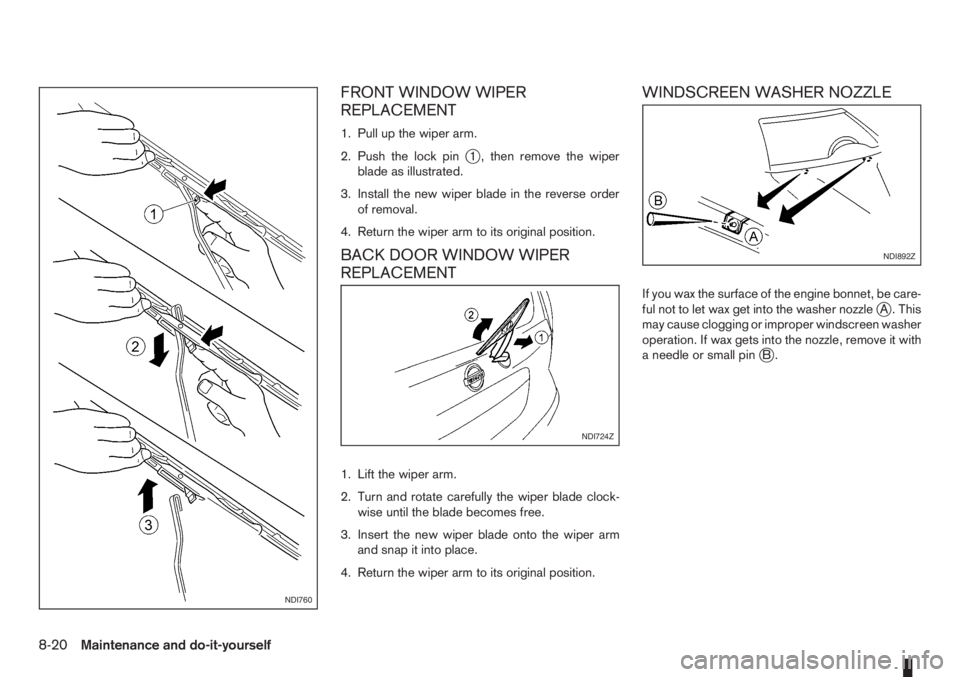
FRONT WINDOW WIPER
REPLACEMENT
1. Pull up the wiper arm.
2. Push the lock pin
j1 , then remove the wiper
blade as illustrated.
3. Install the new wiper blade in the reverse order
of removal.
4. Return the wiper arm to its original position.
BACK DOOR WINDOW WIPER
REPLACEMENT
1. Lift the wiper arm.
2. Turn and rotate carefully the wiper blade clock-
wise until the blade becomes free.
3. Insert the new wiper blade onto the wiper arm
and snap it into place.
4. Return the wiper arm to its original position.
WINDSCREEN WASHER NOZZLE
If you wax the surface of the engine bonnet, be care-
ful not to let wax get into the washer nozzlejA . This
may cause clogging or improper windscreen washer
operation. If wax gets into the nozzle, remove it with
a needle or small pin
jB.
NDI760
NDI724Z
NDI892Z
8-20Maintenance and do-it-yourself
Page 198 of 235
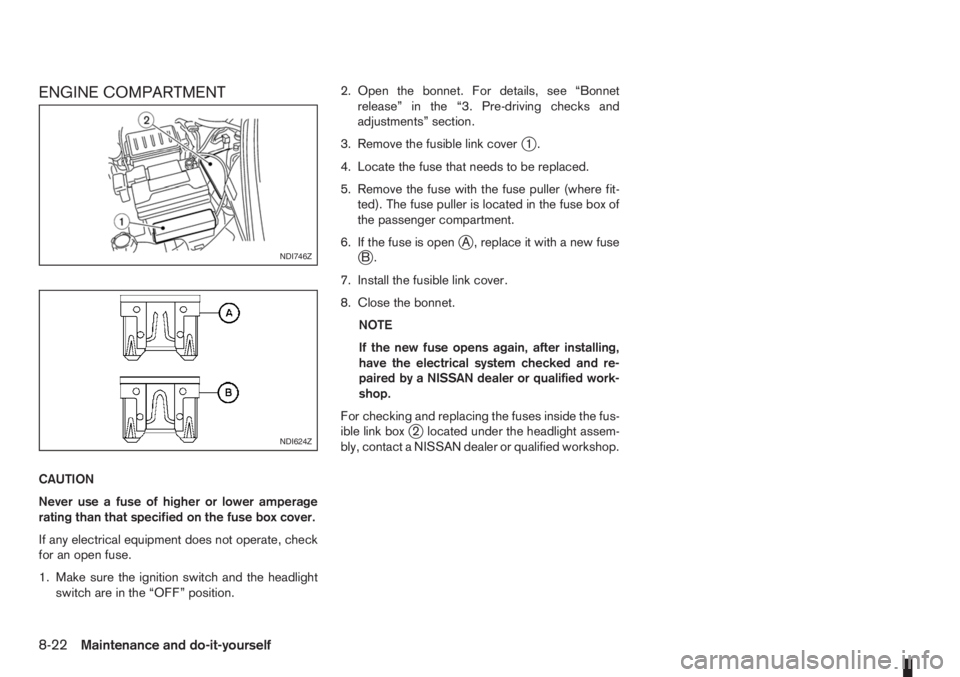
ENGINE COMPARTMENT
CAUTION
Never use a fuse of higher or lower amperage
rating than that specified on the fuse box cover.
If any electrical equipment does not operate, check
for an open fuse.
1. Make sure the ignition switch and the headlight
switch are in the “OFF” position.2. Open the bonnet. For details, see “Bonnet
release” in the “3. Pre-driving checks and
adjustments” section.
3. Remove the fusible link cover
j1.
4. Locate the fuse that needs to be replaced.
5. Remove the fuse with the fuse puller (where fit-
ted). The fuse puller is located in the fuse box of
the passenger compartment.
6. If the fuse is open
jA , replace it with a new fusejB.
7. Install the fusible link cover.
8. Close the bonnet.
NOTE
If the new fuse opens again, after installing,
have the electrical system checked and re-
paired by a NISSAN dealer or qualified work-
shop.
For checking and replacing the fuses inside the fus-
ible link box
j2 located under the headlight assem-
bly, contact a NISSAN dealer or qualified workshop.
NDI746Z
NDI624Z
8-22Maintenance and do-it-yourself
Page 199 of 235
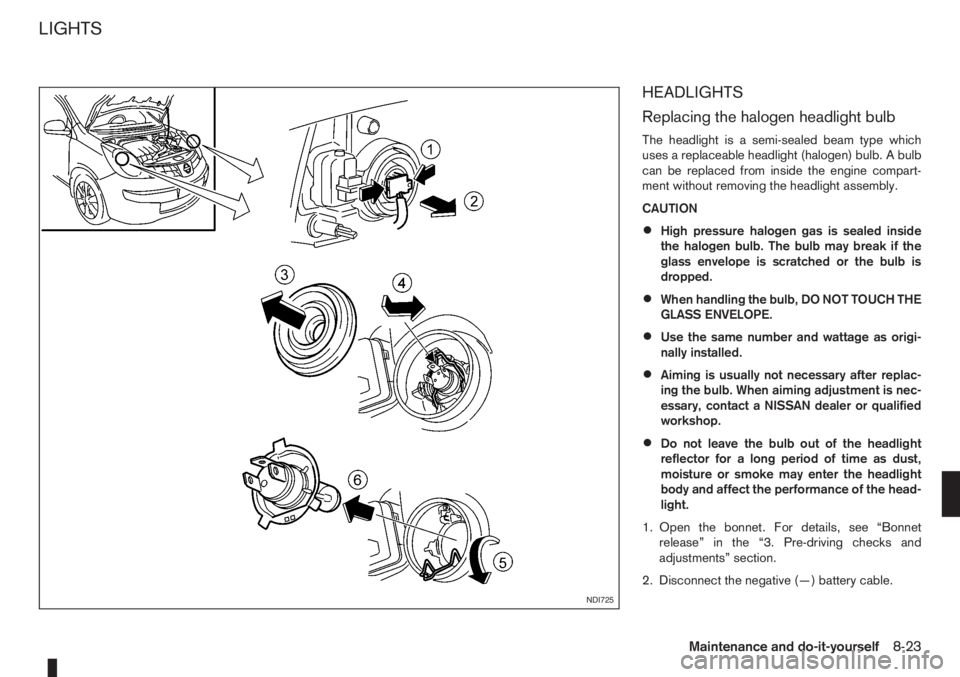
HEADLIGHTS
Replacing the halogen headlight bulb
The headlight is a semi-sealed beam type which
uses a replaceable headlight (halogen) bulb. A bulb
can be replaced from inside the engine compart-
ment without removing the headlight assembly.
CAUTION
•High pressure halogen gas is sealed inside
the halogen bulb. The bulb may break if the
glass envelope is scratched or the bulb is
dropped.
•When handling the bulb, DO NOT TOUCH THE
GLASS ENVELOPE.
•Use the same number and wattage as origi-
nally installed.
•Aiming is usually not necessary after replac-
ing the bulb. When aiming adjustment is nec-
essary, contact a NISSAN dealer or qualified
workshop.
•Do not leave the bulb out of the headlight
reflector for a long period of time as dust,
moisture or smoke may enter the headlight
body and affect the performance of the head-
light.
1. Open the bonnet. For details, see “Bonnet
release” in the “3. Pre-driving checks and
adjustments” section.
2. Disconnect the negative (—) battery cable.
NDI725
LIGHTS
Maintenance and do-it-yourself8-23
Page 200 of 235
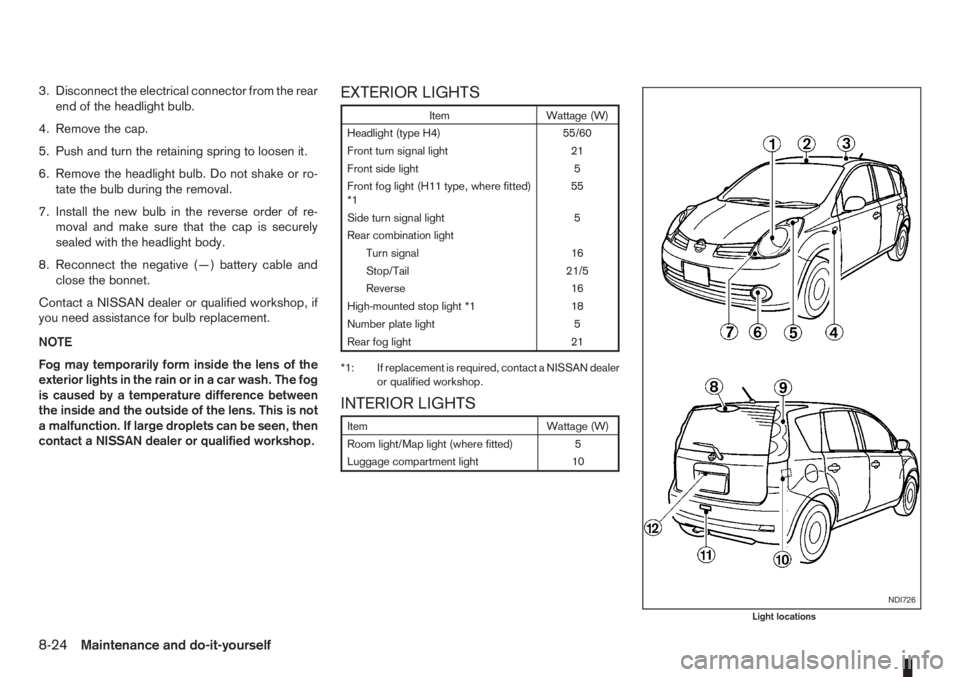
3. Disconnect the electrical connector from the rear
end of the headlight bulb.
4. Remove the cap.
5. Push and turn the retaining spring to loosen it.
6. Remove the headlight bulb. Do not shake or ro-
tate the bulb during the removal.
7. Install the new bulb in the reverse order of re-
moval and make sure that the cap is securely
sealed with the headlight body.
8. Reconnect the negative (—) battery cable and
close the bonnet.
Contact a NISSAN dealer or qualified workshop, if
you need assistance for bulb replacement.
NOTE
Fog may temporarily form inside the lens of the
exterior lights in the rain or in a car wash. The fog
is caused by a temperature difference between
the inside and the outside of the lens. This is not
a malfunction. If large droplets can be seen, then
contact a NISSAN dealer or qualified workshop.EXTERIOR LIGHTS
Item Wattage (W)
Headlight (type H4) 55/60
Front turn signal light 21
Front side light 5
Front fog light (H11 type, where fitted)
*155
Side turn signal light 5
Rear combination light
Turn signal 16
Stop/Tail 21/5
Reverse 16
High-mounted stop light *1 18
Number plate light 5
Rear fog light 21
*1: If replacement is required, contact a NISSAN dealer
or qualified workshop.
INTERIOR LIGHTS
Item Wattage (W)
Room light/Map light (where fitted) 5
Luggage compartment light 10
NDI726
Light locations
8-24Maintenance and do-it-yourself
Page 221 of 235
10 Index
A
Air bag system (Supplemental Restraint System) ................. 1-11
Air bag warning labels ......................................................... 1-13
Air bag warning light ............................................................ 1-13
Air cleaner filter ................................................................... 8-19
Air conditioner
– Air conditioner filter ................................................ 4-10, 4-7
– Air conditioner specification label ..................................... 9-7
– Air conditioning system refrigerant and lubricant
recommendations ............................................................ 9-4
– Automatic air conditioner ................................................. 4-8
– Heater and air conditioner ................................................ 4-2
– Manual air conditioner ..................................................... 4-3
– Servicing air conditioner ......................................... 4-10, 4-7
Antenna .............................................................................. 4-16
Anti-lock Braking System (ABS) .......................................... 5-28
Anti-Theft System (NISSAN) .................................................. 3-9
Approval numbers ................................................................. 9-8
Audible reminders
– Warning/indicator lights and audible reminders ................ 2-7
Audio
– AM-FM radio with CD player and navigation (NISSAN
Connect) ....................................................................... 4-34
– Anti-theft system ............................................................ 4-23
– Audio operation precautions .......................................... 4-10
– Audio player operation .................................................. 4-31
– Audio system ................................................................. 4-10
– AUX socket ................................................................... 4-29
– FM AM radio with CD player ......................................... 4-23
– iPod® player operation .................................................. 4-30– Jack socket ................................................................... 4-34
– LW-MW-FM radio with CD player ................................. 4-16
– Steering-wheel switches for audio control ...................... 4-38
– USB Memory operation ................................................. 4-29
Automatic transmission
– Automatic transmission fluid (ATF) ................................. 8-13
– Driving with automatic transmission ............................... 5-12
B
Battery ....................................................................... 5-31, 8-15
– Caution label ................................................................. 8-15
– Integrated keyfob battery replacement ........................... 8-17
– Intelligent Key battery replacement ................................. 8-17
– Reinitialisation procedure after battery reconnection ....... 8-16
– Vehicle battery ............................................................... 8-15
Battery (vehicle)
– Vehicle dead battery – Left-hand side door handle ........... 3-7
Before starting the engine ..................................................... 5-2
Bluetooth®
– Audio player operation ................................................... 4-31
– Bluetooth® mobile phone feature .................................. 4-34
– Bluetooth® settings ....................................................... 4-31
Bonnet release .................................................................... 3-10
Brake .................................................................................. 8-13
– Anti-lock Braking System (ABS) .................................... 5-28
– Brake fluid ..................................................................... 8-13
– Brake precautions ......................................................... 5-27
– Brake system ................................................................ 5-27
– Checking brake pedal ................................................... 8-13
– Checking handbrake ..................................................... 8-13
– Handbrake lever ............................................................ 3-11