Oil fill NISSAN NOTE 2012 Owners Manual
[x] Cancel search | Manufacturer: NISSAN, Model Year: 2012, Model line: NOTE, Model: NISSAN NOTE 2012Pages: 235, PDF Size: 2.29 MB
Page 15 of 235
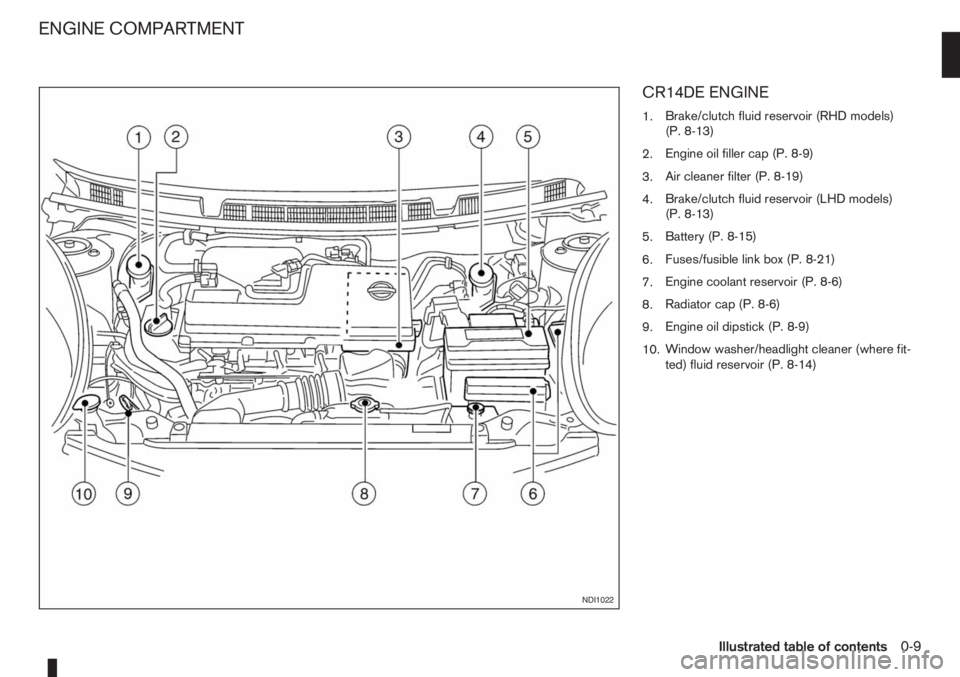
CR14DE ENGINE
1.Brake/clutch fluid reservoir (RHD models)
(P. 8-13)
2.Engine oil filler cap (P. 8-9)
3.Air cleaner filter (P. 8-19)
4.Brake/clutch fluid reservoir (LHD models)
(P. 8-13)
5.Battery (P. 8-15)
6.Fuses/fusible link box (P. 8-21)
7.Engine coolant reservoir (P. 8-6)
8.Radiator cap (P. 8-6)
9.Engine oil dipstick (P. 8-9)
10.Window washer/headlight cleaner (where fit-
ted) fluid reservoir (P. 8-14)
NDI1022
ENGINE COMPARTMENT
Illustrated table of contents0-9
Page 16 of 235
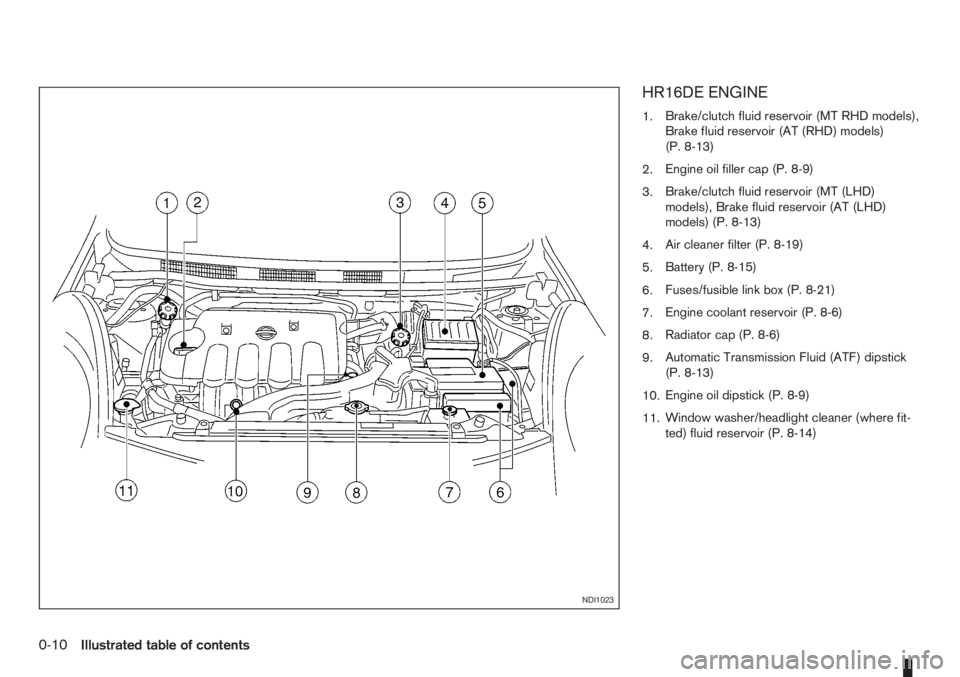
HR16DE ENGINE
1.Brake/clutch fluid reservoir (MT RHD models),
Brake fluid reservoir (AT (RHD) models)
(P. 8-13)
2.Engine oil filler cap (P. 8-9)
3.Brake/clutch fluid reservoir (MT (LHD)
models), Brake fluid reservoir (AT (LHD)
models) (P. 8-13)
4.Air cleaner filter (P. 8-19)
5.Battery (P. 8-15)
6.Fuses/fusible link box (P. 8-21)
7.Engine coolant reservoir (P. 8-6)
8.Radiator cap (P. 8-6)
9.Automatic Transmission Fluid (ATF) dipstick
(P. 8-13)
10.Engine oil dipstick (P. 8-9)
11.Window washer/headlight cleaner (where fit-
ted) fluid reservoir (P. 8-14)
NDI1023
0-10Illustrated table of contents
Page 17 of 235
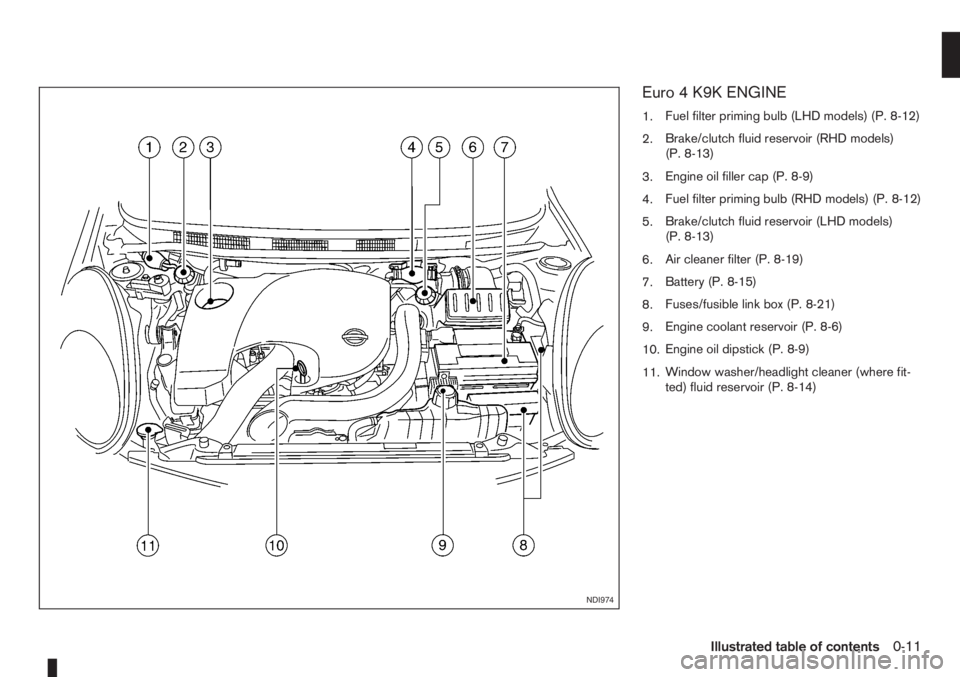
Euro 4 K9K ENGINE
1.Fuel filter priming bulb (LHD models) (P. 8-12)
2.Brake/clutch fluid reservoir (RHD models)
(P. 8-13)
3.Engine oil filler cap (P. 8-9)
4.Fuel filter priming bulb (RHD models) (P. 8-12)
5.Brake/clutch fluid reservoir (LHD models)
(P. 8-13)
6.Air cleaner filter (P. 8-19)
7.Battery (P. 8-15)
8.Fuses/fusible link box (P. 8-21)
9.Engine coolant reservoir (P. 8-6)
10.Engine oil dipstick (P. 8-9)
11.Window washer/headlight cleaner (where fit-
ted) fluid reservoir (P. 8-14)
NDI974
Illustrated table of contents0-11
Page 18 of 235
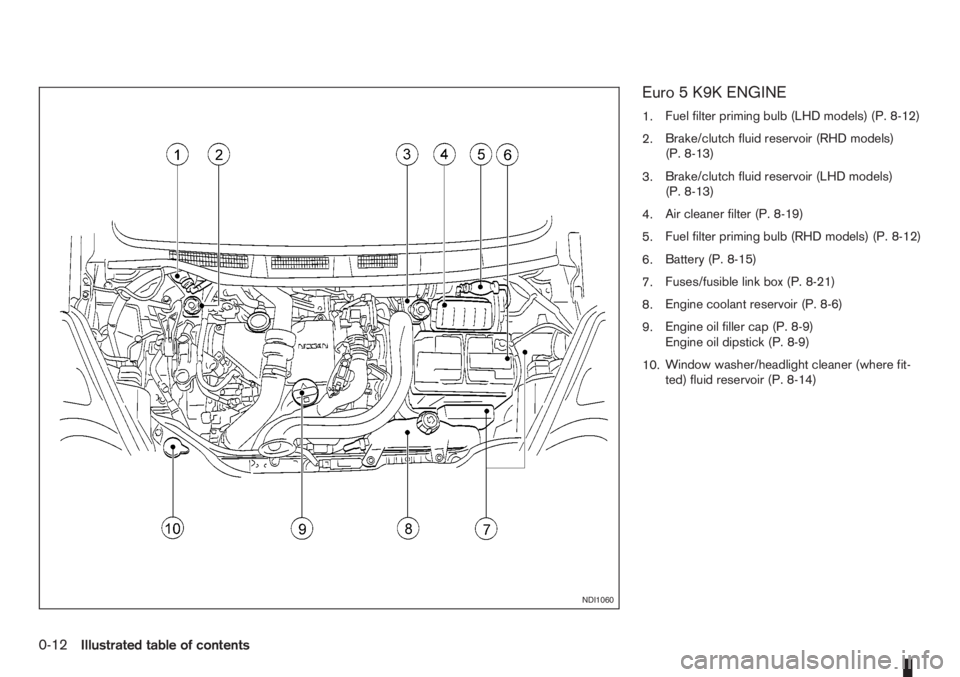
Euro 5 K9K ENGINE
1.Fuel filter priming bulb (LHD models) (P. 8-12)
2.Brake/clutch fluid reservoir (RHD models)
(P. 8-13)
3.Brake/clutch fluid reservoir (LHD models)
(P. 8-13)
4.Air cleaner filter (P. 8-19)
5.Fuel filter priming bulb (RHD models) (P. 8-12)
6.Battery (P. 8-15)
7.Fuses/fusible link box (P. 8-21)
8.Engine coolant reservoir (P. 8-6)
9.Engine oil filler cap (P. 8-9)
Engine oil dipstick (P. 8-9)
10.Window washer/headlight cleaner (where fit-
ted) fluid reservoir (P. 8-14)
NDI1060
0-12Illustrated table of contents
Page 47 of 235
puter (where fitted) mode that was displayed before
the ignition switch was turned to the Acc, “OFF” or
LOCK position.
HR16DE or K9K engine oil level status
The Oil level status provides specific information
regarding the engine oil level.
If the oil level is sufficient, “Oil Good” is displayed
for approximately 10 seconds. If the oil level is low,
“Oil Lo” blinks for approximately 30 seconds in or-
der to draw your attention on necessary action.
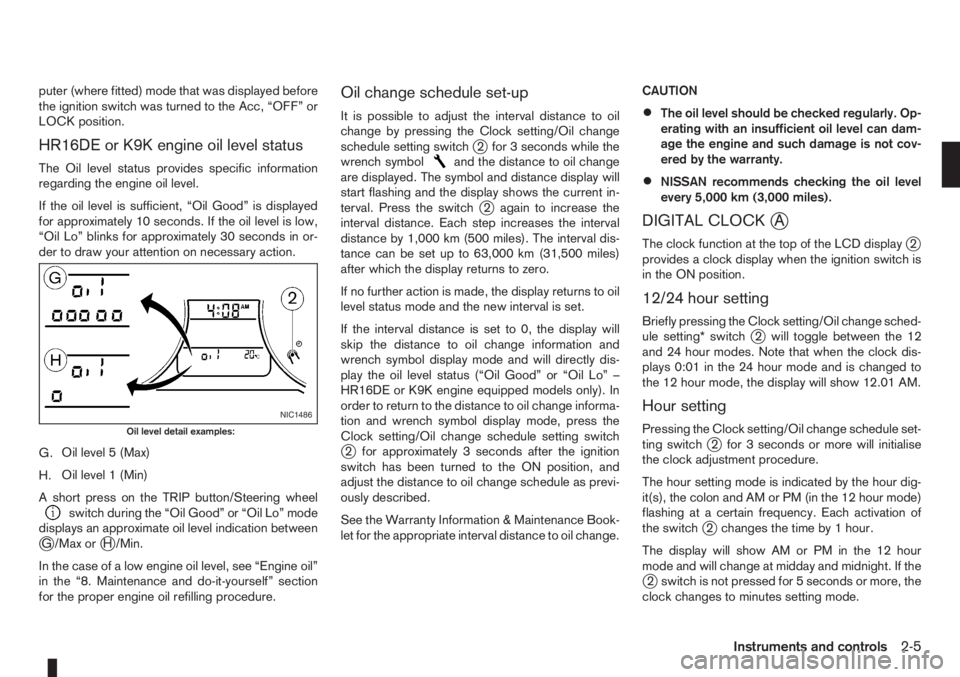
G.Oil level 5 (Max)
H.Oil level 1 (Min)
A short press on the TRIP button/Steering wheel
switch during the “Oil Good” or “Oil Lo” mode
displays an approximate oil level indication between
jG /Max orjH /Min.
In the case of a low engine oil level, see “Engine oil”
in the “8. Maintenance and do-it-yourself” section
for the proper engine oil refilling procedure.
Oil change schedule set-up
It is possible to adjust the interval distance to oil
change by pressing the Clock setting/Oil change
schedule setting switch
j2 for 3 seconds while the
wrench symboland the distance to oil change
are displayed. The symbol and distance display will
start flashing and the display shows the current in-
terval. Press the switch
j2 again to increase the
interval distance. Each step increases the interval
distance by 1,000 km (500 miles). The interval dis-
tance can be set up to 63,000 km (31,500 miles)
after which the display returns to zero.
If no further action is made, the display returns to oil
level status mode and the new interval is set.
If the interval distance is set to 0, the display will
skip the distance to oil change information and
wrench symbol display mode and will directly dis-
play the oil level status (“Oil Good” or “Oil Lo” –
HR16DE or K9K engine equipped models only). In
order to return to the distance to oil change informa-
tion and wrench symbol display mode, press the
Clock setting/Oil change schedule setting switch
j2 for approximately 3 seconds after the ignition
switch has been turned to the ON position, and
adjust the distance to oil change schedule as previ-
ously described.
See the Warranty Information & Maintenance Book-
let for the appropriate interval distance to oil change.CAUTION
•The oil level should be checked regularly. Op-
erating with an insufficient oil level can dam-
age the engine and such damage is not cov-
ered by the warranty.
•NISSAN recommends checking the oil level
every 5,000 km (3,000 miles).
DIGITAL CLOCKjA
The clock function at the top of the LCD displayj2
provides a clock display when the ignition switch is
in the ON position.
12/24 hour setting
Briefly pressing the Clock setting/Oil change sched-
ule setting* switchj2 will toggle between the 12
and 24 hour modes. Note that when the clock dis-
plays 0:01 in the 24 hour mode and is changed to
the 12 hour mode, the display will show 12.01 AM.
Hour setting
Pressing the Clock setting/Oil change schedule set-
ting switchj2 for 3 seconds or more will initialise
the clock adjustment procedure.
The hour setting mode is indicated by the hour dig-
it(s), the colon and AM or PM (in the 12 hour mode)
flashing at a certain frequency. Each activation of
the switch
j2 changes the time by 1 hour.
The display will show AM or PM in the 12 hour
mode and will change at midday and midnight. If the
j2 switch is not pressed for 5 seconds or more, the
clock changes to minutes setting mode.
NIC1486
Oil level detail examples:
Instruments and controls2-5
Page 50 of 235
“Supplemental Restraint System (air bag system)”
in the “1. Safety — seats, seat belts and supple-
mental restraint system” section.
Brake warning light
This light functions for both the handbrake and the
footbrake systems.
Handbrake indicator:
The light comes on when the handbrake is applied.
Low brake fluid warning:
The light warns of a low brake fluid level in the brake
power assist unit. If the light comes on while the
engine is running and the handbrake is not applied,
stop the vehicle and perform the following:
1. Check the brake fluid level. Add brake fluid as
much as necessary. See “Brake and clutch fluid”
in the “8. Maintenance and do-it-yourself” sec-
tion.
WARNING
If the level is below the MIN mark on the brake
fluid reservoir, do not drive until the brake sys-
tem has been checked at a NISSAN dealer or
qualified workshop.
2. If the brake fluid level is correct:
Have the warning system checked by a NISSAN
dealer or qualified workshop.
WARNING
•Driving your vehicle could be dangerous.
Therefore have it towed to the nearest
NISSAN dealer or qualified workshop.
•Pressing the brake pedal with the engine
stopped and/or low brake fluid level could in-
crease your stopping distance and require
greater pedal effort as well as pedal travel.
Charge warning light
If the light comes on while the engine is running, it
may indicate that the charging system is malfunc-
tioning. Turn the engine off and check the alternator
belt. If the belt is loose, broken, missing or if the light
remains on, see a NISSAN dealer or qualified work-
shop immediately.
CAUTION
Do not continue driving if the belt is loose, bro-
ken or missing.
Door open warning light
This light comes on when any of the doors are not
closed securely while the ignition switch is in the
ON position.
Engine coolant temperature
warning light
The engine coolant temperature varies with the out-
side air temperature and driving condition.
When the ignition switch is turned to the ON posi-tion, the engine coolant temperature warning light
illuminates for a few seconds and then goes off.
This means the system is operational.
The engine coolant temperature warning light illumi-
nates when the engine coolant temperature reaches
an excessively high temperature of approximately
105 °C (221 °F).
CAUTION
•If the engine coolant temperature warning
light comes on, stop the vehicle as soon as
safely possible and contact a NISSAN dealer
or qualified workshop.
•When towing a trailer or driving uphill, reduce
the vehicle speed as soon as safely possible
to decrease the engine coolant temperature.
•If the engine overheats, continued operation
of the vehicle may seriously damage the en-
gine. See “Engine overheat” in the “6. In case
of emergency” section for immediate action
required.
WARNING
Do not remove the radiator cap while the engine
is hot. Otherwise, there is a danger of being
scalded by the coolant that is likely to erupt from
the filler.
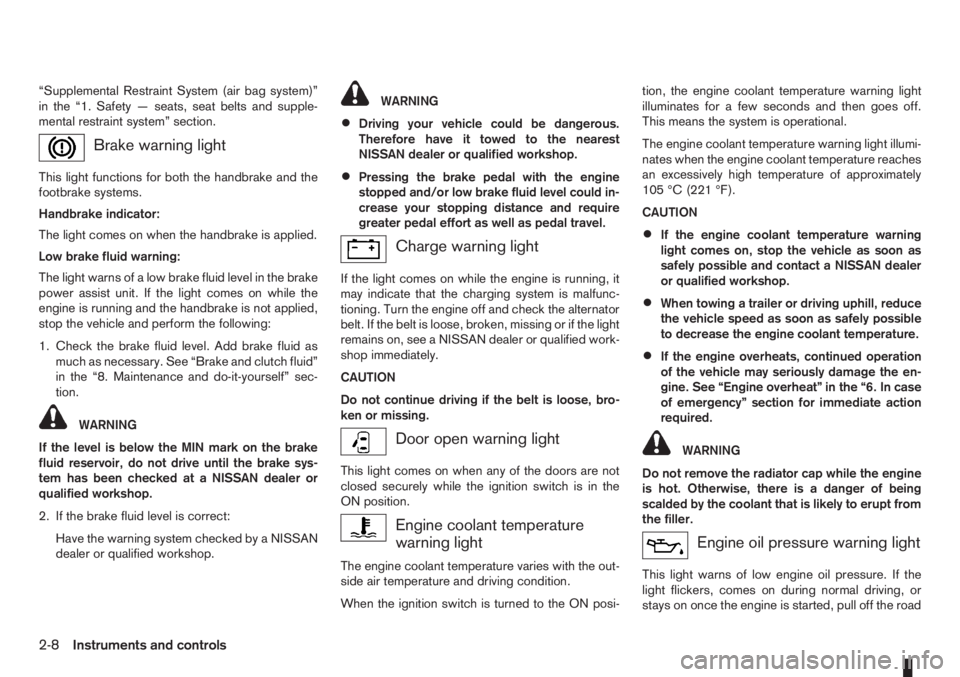
Engine oil pressure warning light
This light warns of low engine oil pressure. If the
light flickers, comes on during normal driving, or
stays on once the engine is started, pull off the road
2-8Instruments and controls
Page 184 of 235
12. Stop the engine and check coolant level, allow
to cool and refill up to the MAX level.
13. Check the radiator lower hose for any signs of
leakage.
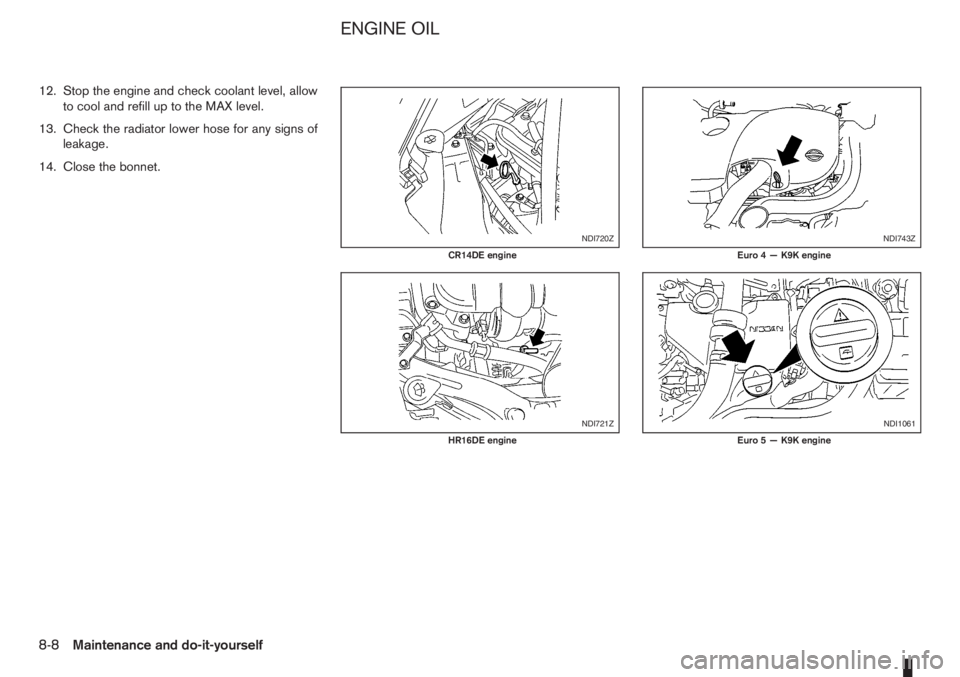
14. Close the bonnet.
NDI720Z
CR14DE engine
NDI721Z
HR16DE engine
NDI743Z
Euro 4 — K9K engine
NDI1061
Euro 5 — K9K engine
ENGINE OIL
8-8Maintenance and do-it-yourself
Page 185 of 235
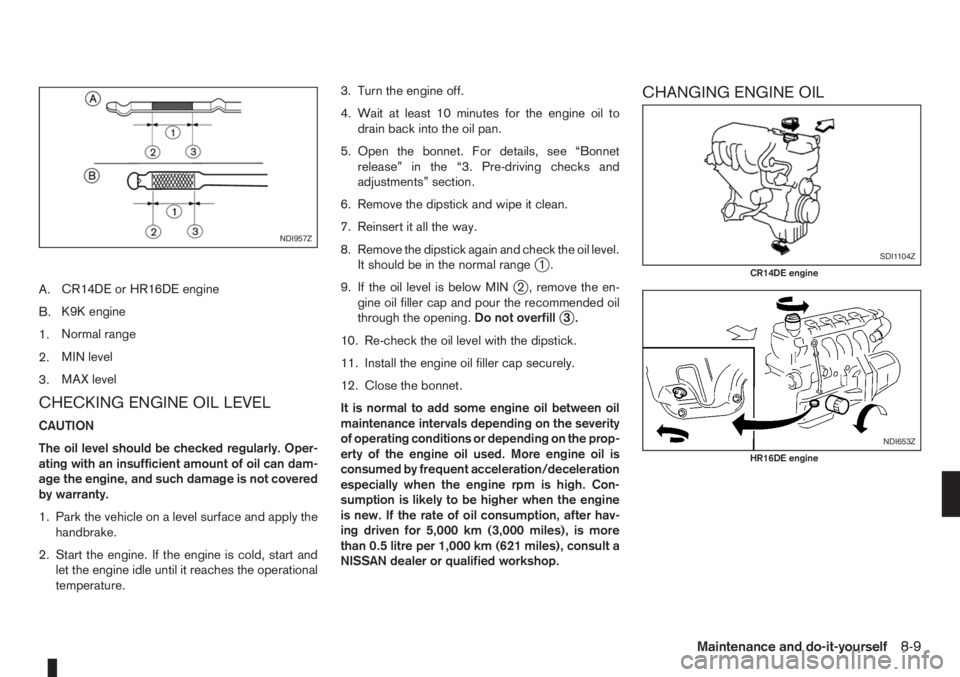
A.CR14DE or HR16DE engine
B.K9K engine
1.Normal range
2.MIN level
3.MAX level
CHECKING ENGINE OIL LEVEL
CAUTION
The oil level should be checked regularly. Oper-
ating with an insufficient amount of oil can dam-
age the engine, and such damage is not covered
by warranty.
1. Park the vehicle on a level surface and apply the
handbrake.
2. Start the engine. If the engine is cold, start and
let the engine idle until it reaches the operational
temperature.3. Turn the engine off.
4. Wait at least 10 minutes for the engine oil to
drain back into the oil pan.
5. Open the bonnet. For details, see “Bonnet
release” in the “3. Pre-driving checks and
adjustments” section.
6. Remove the dipstick and wipe it clean.
7. Reinsert it all the way.
8. Remove the dipstick again and check the oil level.
It should be in the normal range
j1.
9. If the oil level is below MIN
j2 , remove the en-
gine oil filler cap and pour the recommended oil
through the opening.Do not overfill
j3.
10. Re-check the oil level with the dipstick.
11. Install the engine oil filler cap securely.
12. Close the bonnet.
It is normal to add some engine oil between oil
maintenance intervals depending on the severity
of operating conditions or depending on the prop-
erty of the engine oil used. More engine oil is
consumed by frequent acceleration/deceleration
especially when the engine rpm is high. Con-
sumption is likely to be higher when the engine
is new. If the rate of oil consumption, after hav-
ing driven for 5,000 km (3,000 miles), is more
than 0.5 litre per 1,000 km (621 miles), consult a
NISSAN dealer or qualified workshop.
CHANGING ENGINE OIL
NDI957Z
SDI1104Z
CR14DE engine
NDI653Z
HR16DE engine
Maintenance and do-it-yourself8-9
Page 186 of 235
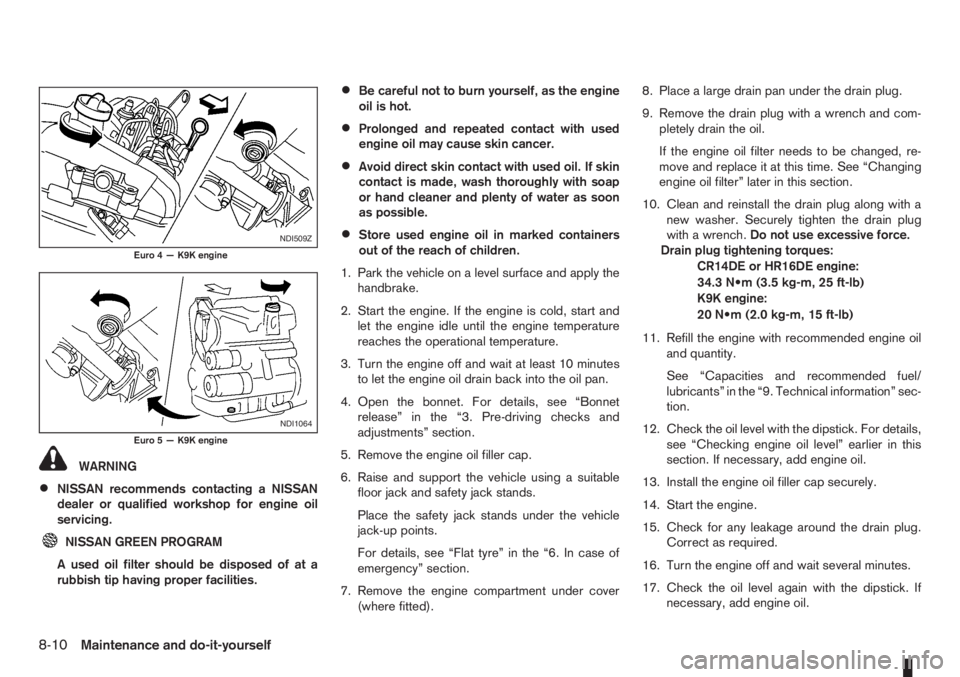
WARNING
•NISSAN recommends contacting a NISSAN
dealer or qualified workshop for engine oil
servicing.
NISSAN GREEN PROGRAM
A used oil filter should be disposed of at a
rubbish tip having proper facilities.
•Be careful not to burn yourself, as the engine
oil is hot.
•Prolonged and repeated contact with used
engine oil may cause skin cancer.
•Avoid direct skin contact with used oil. If skin
contact is made, wash thoroughly with soap
or hand cleaner and plenty of water as soon
as possible.
•Store used engine oil in marked containers
out of the reach of children.
1. Park the vehicle on a level surface and apply the
handbrake.
2. Start the engine. If the engine is cold, start and
let the engine idle until the engine temperature
reaches the operational temperature.
3. Turn the engine off and wait at least 10 minutes
to let the engine oil drain back into the oil pan.
4. Open the bonnet. For details, see “Bonnet
release” in the “3. Pre-driving checks and
adjustments” section.
5. Remove the engine oil filler cap.
6. Raise and support the vehicle using a suitable
floor jack and safety jack stands.
Place the safety jack stands under the vehicle
jack-up points.
For details, see “Flat tyre” in the “6. In case of
emergency” section.
7. Remove the engine compartment under cover
(where fitted).8. Place a large drain pan under the drain plug.
9. Remove the drain plug with a wrench and com-
pletely drain the oil.
If the engine oil filter needs to be changed, re-
move and replace it at this time. See “Changing
engine oil filter” later in this section.
10. Clean and reinstall the drain plug along with a
new washer. Securely tighten the drain plug
with a wrench.Do not use excessive force.
Drain plug tightening torques:
CR14DE or HR16DE engine:
34.3 N•m (3.5 kg-m, 25 ft-lb)
K9K engine:
20 N•m (2.0 kg-m, 15 ft-lb)
11. Refill the engine with recommended engine oil
and quantity.
See “Capacities and recommended fuel/
lubricants” in the “9. Technical information” sec-
tion.
12. Check the oil level with the dipstick. For details,
see “Checking engine oil level” earlier in this
section. If necessary, add engine oil.
13. Install the engine oil filler cap securely.
14. Start the engine.
15. Check for any leakage around the drain plug.
Correct as required.
16. Turn the engine off and wait several minutes.
17. Check the oil level again with the dipstick. If
necessary, add engine oil.NDI509Z
Euro 4 — K9K engine
NDI1064
Euro 5 — K9K engine
8-10Maintenance and do-it-yourself
Page 187 of 235
18. Install the engine compartment undercover
(where fitted).
19. Lower the vehicle carefully to the ground.
20. Close the bonnet.
CHANGING ENGINE OIL FILTER
WARNING
•NISSAN recommends contacting a NISSAN
dealer or qualified workshop for engine oil fil-
ter servicing.
NISSAN GREEN PROGRAM
A used oil filter should be disposed of at a
rubbish tip having proper facilities.
Engine oil filter replacement
Removal:
1. Drain the engine oil. For details, see “Changing
engine oil” earlier in this section.
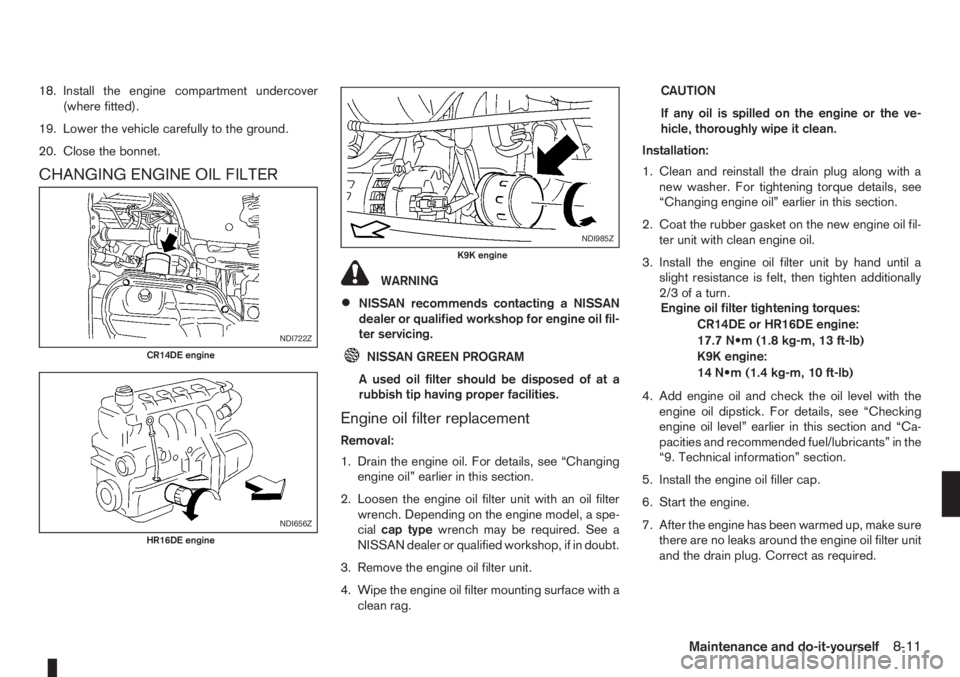
2. Loosen the engine oil filter unit with an oil filter
wrench. Depending on the engine model, a spe-
cialcap typewrench may be required. See a
NISSAN dealer or qualified workshop, if in doubt.
3. Remove the engine oil filter unit.
4. Wipe the engine oil filter mounting surface with a
clean rag.CAUTION
If any oil is spilled on the engine or the ve-
hicle, thoroughly wipe it clean.
Installation:
1. Clean and reinstall the drain plug along with a
new washer. For tightening torque details, see
“Changing engine oil” earlier in this section.
2. Coat the rubber gasket on the new engine oil fil-
ter unit with clean engine oil.
3. Install the engine oil filter unit by hand until a
slight resistance is felt, then tighten additionally
2/3ofaturn.
Engine oil filter tightening torques:
CR14DE or HR16DE engine:
17.7 N•m (1.8 kg-m, 13 ft-lb)
K9K engine:
14 N•m (1.4 kg-m, 10 ft-lb)
4. Add engine oil and check the oil level with the
engine oil dipstick. For details, see “Checking
engine oil level” earlier in this section and “Ca-
pacities and recommended fuel/lubricants” in the
“9. Technical information” section.
5. Install the engine oil filler cap.
6. Start the engine.
7. After the engine has been warmed up, make sure
there are no leaks around the engine oil filter unit
and the drain plug. Correct as required.
NDI722Z
CR14DE engine
NDI656Z
HR16DE engine
NDI985Z
K9K engine
Maintenance and do-it-yourself8-11