ECO mode NISSAN NV PASSENGER VAN 2018 Repair Manual
[x] Cancel search | Manufacturer: NISSAN, Model Year: 2018, Model line: NV PASSENGER VAN, Model: NISSAN NV PASSENGER VAN 2018Pages: 426, PDF Size: 4.52 MB
Page 317 of 426
Occasionally remove loose dust from the
interior trim, plastic parts and seats using a
vacuum cleaner or sof t bristled brush. Wipe
the vinyl and leather surfaces (if so
equipped) with a clean, sof t cloth damp-
ened in mild soap solution, then wipe clean
with a dry, sof t cloth.
Regular care and cleaning is required in
order to maintain the appearance of the
leather (if so equipped).
Before using any fabric protector, read the
manufacturer’s recommendations. Some
fabric protectors contain chemicals that
may stain or bleach the seat material.
Use a cloth dampened only with water to
clean the meter and gauge lens.
CAUTION
∙ Never use benzine, thinner or anysimilar material.
∙ Small dirt particles can be abrasive and damaging to leather surfaces
and should be removed promptly. Do
not use saddle soap, car waxes, pol-
ishes, oils, cleaning fluids, solvents,
detergents or ammonia-based clean-
ers as they may damage the leather’s
natural finish. ∙ Never use fabric protectors unless
recommended by the manufacturer.
∙ Do not use glass or plastic cleaner on meter or gauge lens covers. It may
damage the lens cover.
AIR FRESHENERS
Most air fresheners use a solvent that
could affect the vehicle interior. If you use
an air freshener, take the following precau-
tions:
∙ Hanging-type air fresheners can cause permanent discoloration when they
contact vehicle interior surfaces. Place
the air freshener in a location that al-
lows it to hang free and not contact an
interior surface.
∙ Liquid-type air fresheners typically clip on the vents. These products can cause
immediate damage and discoloration
when spilled on interior surfaces.
Carefully read and follow the manufactur-
er’s instructions before using the air fresh-
eners.
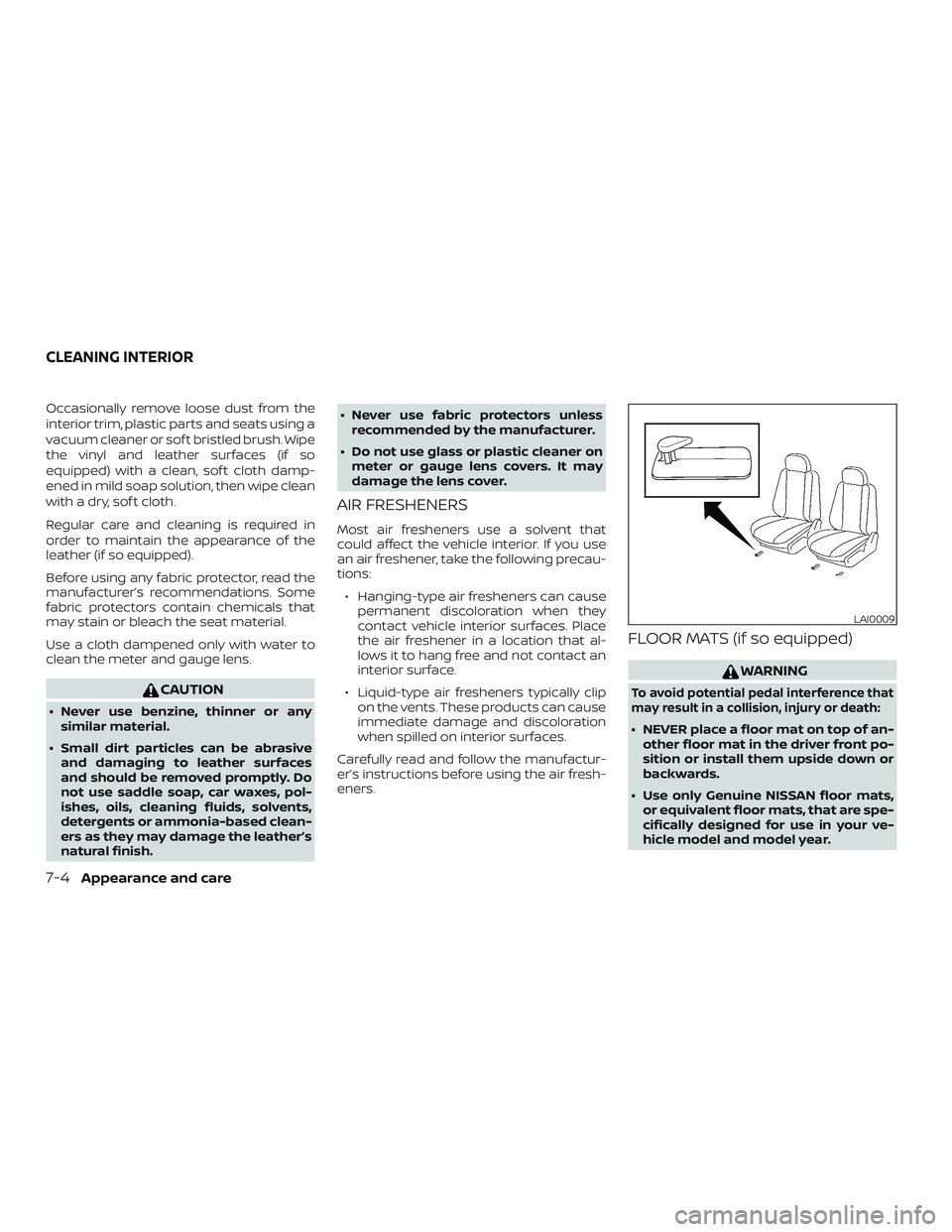
FLOOR MATS (if so equipped)
WARNING
To avoid potential pedal interference that
may result in a collision, injury or death:
∙ NEVER place a floor mat on top of an- other floor mat in the driver front po-
sition or install them upside down or
backwards.
∙ Use only Genuine NISSAN floor mats, or equivalent floor mats, that are spe-
cifically designed for use in your ve-
hicle model and model year.
LAI0009
CLEANING INTERIOR
7-4Appearance and care
Page 323 of 426
When performing any inspection or main-
tenance work on your vehicle, always take
care to prevent serious accidental injury to
yourself or damage to the vehicle. The fol-
lowing are general precautions which
should be closely observed.
WARNING
∙ Park the vehicle on a level surface, ap-ply the parking brake securely and
block the wheels to prevent the ve-
hicle from moving. Move the shif t le-
ver to P (Park).
∙ Be sure the ignition key is in the OFF or LOCK position when performing any
parts replacement or repairs.
∙ If you must work with the engine run- ning, keep your hands, clothing, hair
and tools away from moving fans,
belts and any other moving parts.
∙ It is advisable to secure or remove any loose clothing and remove any jew-
elry, such as rings, watches, etc. be-
fore working on your vehicle.
∙ Always wear eye protection whenever you work on your vehicle. ∙ Your vehicle is equipped with an auto-
matic engine cooling fan. It may come
on at any time without warning, even
if the ignition key is in the OFF position
and the engine is not running. To
avoid injury, always disconnect the
negative battery cable before work-
ing near the fan.
∙ If you must run the engine in an en- closed space such as a garage, be sure
there is proper ventilation for exhaust
gases to escape.
∙ Never get under the vehicle while it is supported only by a jack. If it is neces-
sary to work under the vehicle, sup-
port it with safety stands.
∙ Keep smoking materials, flame and sparks away from the fuel tank and
battery.
∙ On gasoline engine models, the fuel filter or fuel lines should be serviced. It
is recommended that you visit a
NISSAN dealer for this service because
the fuel lines are under high pressure
even when the engine is off.
CAUTION
∙ Do not work under the hood while theengine is hot. Turn the engine off and
wait until it cools down.
∙ Avoid contact with used engine oil and coolant. Improperly disposed en-
gine oil, engine coolant and/or other
vehicle fluids can damage the envi-
ronment. Always conform to local
regulations for disposal of vehicle
fluid.
∙ Never leave the engine or the trans- mission related component harness
connector disconnected while the ig-
nition switch is in the ON position.
∙ Never connect or disconnect the bat- tery or any transistorized component
while the ignition switch is in the ON
position.
∙ DO NOT power wash any interior por- tion of this vehicle to help minimize
liquid intrusion and potential elec-
tronic component damage.
This “Do-it-yourself ” section gives instruc-
tions regarding only those items which are
relatively easy for an owner to perform.
MAINTENANCE PRECAUTIONS
8-2Do-it-yourself
Page 360 of 426
∙ Always use tires of the same type,size, brand, construction and tread
pattern on all four wheels. Failure to
do so may result in a circumference
difference between tires on the front
and rear axles which can cause the
Vehicle Dynamic Control (VDC) system
to malfunction resulting in personal
injury or death, excessive tire wear
and may damage the transmission
and differential gears.
∙ For additional information regarding tires, refer to “Important Tire Safety
Information” (US) or “Tire Safety Infor-
mation” (Canada) in the Warranty In-
formation Booklet.
All season tires
NISSAN specifies All Season tires on some
models to provide good performance all
year, including snowy and icy road condi-
tions. All Season tires are identified by ALL
SEASON and/or M&S on the tire sidewall.
Snow tires have better snow traction than
All Season tires and may be more appropri-
ate in some areas.
Summer tires
NISSAN specifies summer tires on some
models to provide superior performance on dry roads. Summer tire performance is
substantially reduced in snow and ice.
Summer tires do not have the tire traction
rating “M&S” on the tire sidewall.
If you plan to operate your vehicle in snowy
or icy conditions, NISSAN recommends the
use of SNOW tires or ALL SEASON tires on all
four wheels.
Snow tires
If snow tires are needed, it is necessary to
select tires equivalent in size and load rat-
ing to the original equipment tires. If you do
not, it can adversely affect the safety and
handling of your vehicle.
Generally, snow tires have lower speed rat-
ings than factory equipped tires and may
not match the potential maximum vehicle
speed. Never exceed the maximum speed
rating of the tire.
If you install snow tires, they must be the
same size, brand, construction and tread
pattern on all four wheels.
For additional traction on icy roads, stud-
ded tires may be used. However, some U.S.
states and Canadian provinces prohibit
their use. Check local, state and provincial
laws before installing studded tires. Skid
and traction capabilities of studded snowtires on wet or dry surfaces may be poorer
than that of non-studded snow tires.
TIRE CHAINS
Use of tire chains may be prohibited ac-
cording to location. Check the local laws
before installing tire chains. When installing
tire chains, make sure they are the proper
size for the tires on your vehicle and are
installed according to the chain manufac-
turer’s suggestions.
Use only SAE class “S”
chains. Class “S” chains are used on ve-
hicles with restricted tire to vehicle clear-
ance. Vehicles that can use Class “S” chains
are designed to meet the minimum clear-
ances between the tire and the closest ve-
hicle suspension or body component re-
quired to accommodate the use of a
winter traction device (tire chains or
cables). The minimum clearances are de-
termined using the factory equipped tire
size. Other types may damage your vehicle.
Use chain tensioners when recommended
by the tire chain manufacturer to ensure a
tight fit. Loose end links of the tire chain
must be secured or removed to prevent
the possibility of whipping action damage
to the fenders or underbody. If possible,
avoid fully loading your vehicle when using
tire chains. In addition, drive at a reduced
speed. Otherwise, your vehicle may be
Do-it-yourself8-39
Page 362 of 426
∙ For additional information re-garding tires, refer to “Impor-
tant Tire Safety Information”
(US) or “Tire Safety Information”
(Canada) in the Warranty Infor-
mation Booklet.
TPMS sensor reset
Af ter rotating the tires, the TPMS sensor
position needs to be relearned. Contact
the closest NISSAN dealer or follow the
steps below.
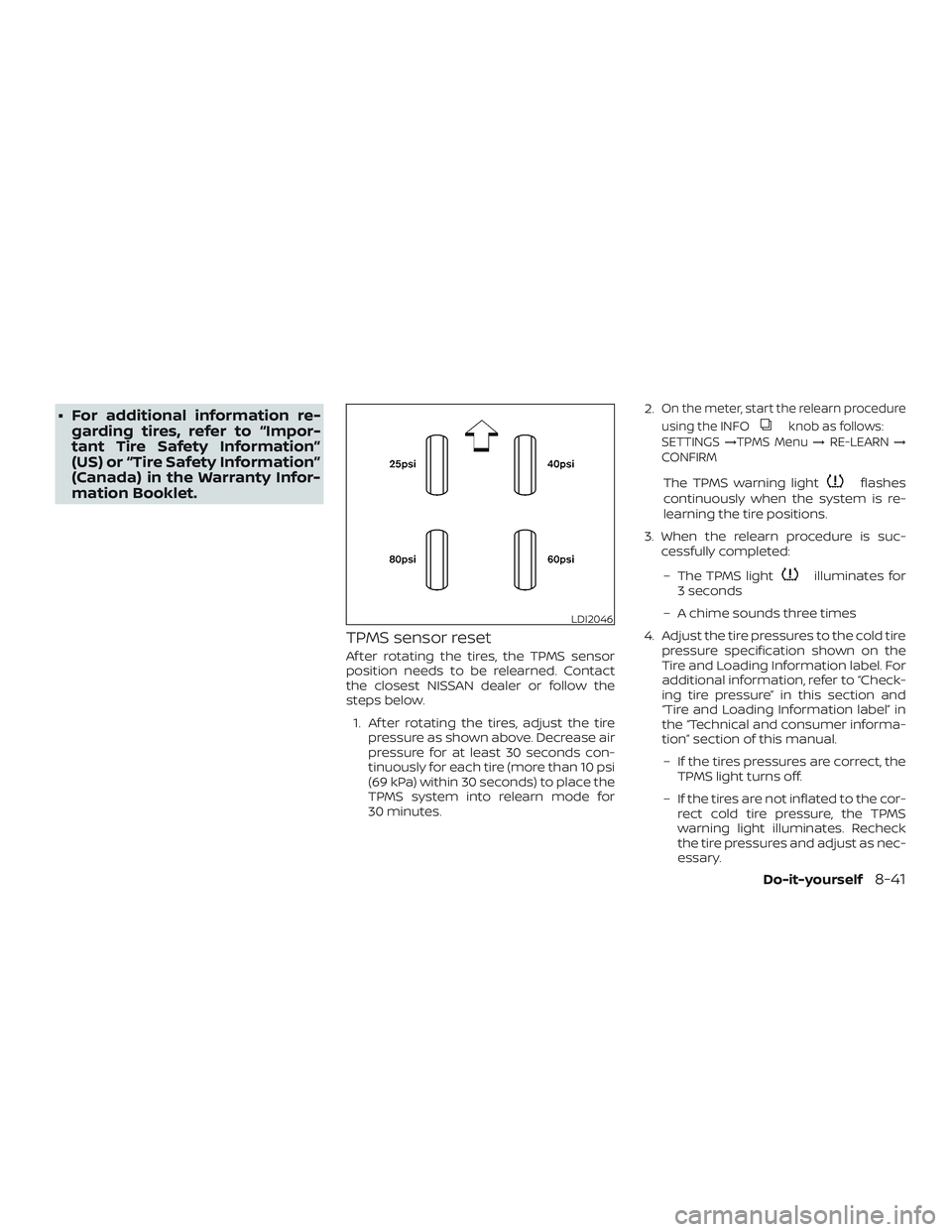
1. Af ter rotating the tires, adjust the tire pressure as shown above. Decrease air
pressure for at least 30 seconds con-
tinuously for each tire (more than 10 psi
(69 kPa) within 30 seconds) to place the
TPMS system into relearn mode for
30 minutes. 2.
On the meter, start the relearn procedure
using the INFO
knob as follows:
SETTINGS →TPMS Menu →RE-LEARN →
CONFIRM
The TPMS warning lightflashes
continuously when the system is re-
learning the tire positions.
3. When the relearn procedure is suc- cessfully completed:
– The TPMS light
illuminates for
3 seconds
– A chime sounds three times
4. Adjust the tire pressures to the cold tire pressure specification shown on the
Tire and Loading Information label. For
additional information, refer to “Check-
ing tire pressure” in this section and
“Tire and Loading Information label” in
the “Technical and consumer informa-
tion” section of this manual.
– If the tires pressures are correct, the TPMS light turns off.
– If the tires are not inflated to the cor- rect cold tire pressure, the TPMS
warning light illuminates. Recheck
the tire pressures and adjust as nec-
essary.
LDI2046
Do-it-yourself8-41
Page 363 of 426
If the relearn procedure does not work,
check the following and retry the pro-
cess:∙ If the relearn procedure is stopped be- fore completion, the new tire positions
are not learned. Redo the complete re-
learn procedure to reset the tire posi-
tions.
∙ You must select “RESET TPMS →RE-
LEARN” from the “SETTINGS” menu to
complete the relearn procedure. Redo
the complete relearn procedure to re-
set the tire positions. Select the TPMS
resetting menu, then continue the re-
maining registration procedure.
∙ Adjust the tire pressures to the relearn pressures before selecting the TPMS re-
setting menu on the display. Redo the
complete relearn procedure to reset
the tire positions.
∙ If the tire pressure cannot be reduced at least 10 psi (69 kPa) to adjust them to
the relearn pressures, inflate the tires to
at least 10 psi (69 kPa) above the speci-
fied pressures. Redo the complete re-
learn procedure starting with step 1. ∙ Devices which emit electronic interfer-
ence should be turned off before start-
ing the relearn procedure. The interfer-
ence may prevent the system from
learning the new tire positions. Turn off
or remove sources of electrical interfer-
ence. If necessary, move the vehicle to
another location, then redo the com-
plete relearn procedure to reset the tire
positions.
∙ If you have retried the procedure sev- eral times and the relearn procedure is
not successfully completed, It is recom-
mended that you visit a NISSAN dealer
for this service.
∙ Use an air pump that is capable of in- flating the tires to the required pressure
specifications. The air pump must be
capable of inflating a tire at least 10 psi
(69 kPa) in 30 seconds.
∙ If the reset TPMS function is uninten- tionally selected, place the ignition
switch in the OFF position then to the
ON position to end the relearn proce-
dure. ∙ If the vehicle is not recognizing the new
tire pressure levels, move the vehicle
forward 40 in (1 m). Place the ignition
switch in the OFF position then to the
ON position. Redo the relearn proce-
dure beginning at step 1. Make sure that
the tire pressures are increased or de-
creased at least 10 psi (69 kPa).
∙ When vehicle is in the relearn mode, the TPMS will not warn of low tire pressures
or detect malfunctions.
∙ If tire pressure is not set to the correct pressure, restart the procedure again.
8-42Do-it-yourself
Page 403 of 426
“Towing load/specification” chart even if
the calculated available tongue weight is
greater than 15%. If the calculated tongue
weight is less than 10%, reduce the total
trailer weight to match the available
tongue weight.
Always verif y that available capacities are
within the required ratings.
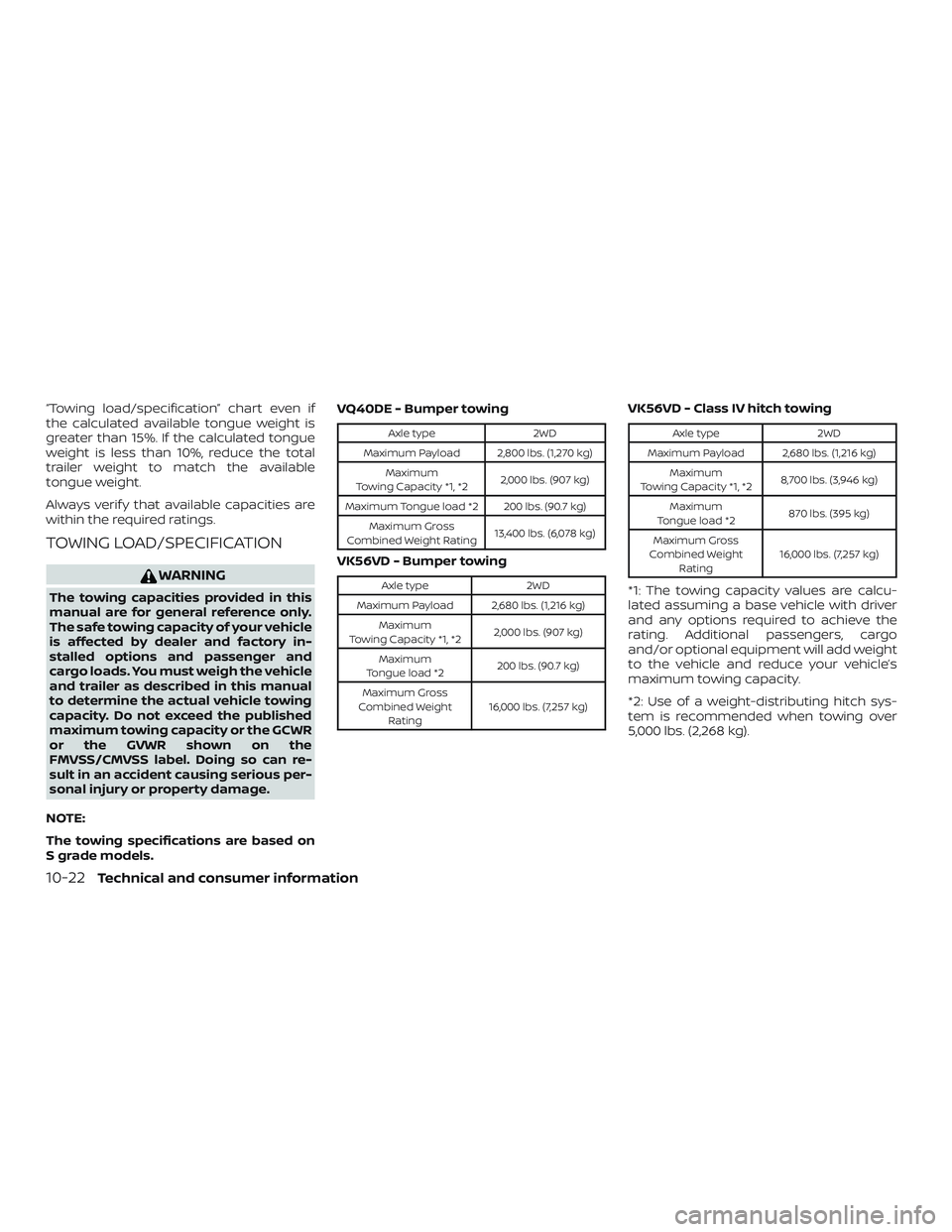
TOWING LOAD/SPECIFICATION
WARNING
The towing capacities provided in this
manual are for general reference only.
The safe towing capacity of your vehicle
is affected by dealer and factory in-
stalled options and passenger and
cargo loads. You must weigh the vehicle
and trailer as described in this manual
to determine the actual vehicle towing
capacity. Do not exceed the published
maximum towing capacity or the GCWR
or the GVWR shown on the
FMVSS/CMVSS label. Doing so can re-
sult in an accident causing serious per-
sonal injury or property damage.
NOTE:
The towing specifications are based on
S grade models. VQ40DE - Bumper towing
Axle type
2WD
Maximum Payload 2,800 lbs. (1,270 kg) Maximum
Towing Capacity *1, *2 2,000 lbs. (907 kg)
Maximum Tongue load *2 200 lbs. (90.7 kg) Maximum Gross
Combined Weight Rating 13,400 lbs. (6,078 kg)
VK56VD - Bumper towing
Axle type
2WD
Maximum Payload 2,680 lbs. (1,216 kg) Maximum
Towing Capacity *1, *2 2,000 lbs. (907 kg)
Maximum
Tongue load *2 200 lbs. (90.7 kg)
Maximum Gross
Combined Weight Rating 16,000 lbs. (7,257 kg)
VK56VD - Class IV hitch towing
Axle type
2WD
Maximum Payload 2,680 lbs. (1,216 kg) Maximum
Towing Capacity *1, *2 8,700 lbs. (3,946 kg)
Maximum
Tongue load *2 870 lbs. (395 kg)
Maximum Gross
Combined Weight Rating 16,000 lbs. (7,257 kg)
*1: The towing capacity values are calcu-
lated assuming a base vehicle with driver
and any options required to achieve the
rating. Additional passengers, cargo
and/or optional equipment will add weight
to the vehicle and reduce your vehicle’s
maximum towing capacity.
*2: Use of a weight-distributing hitch sys-
tem is recommended when towing over
5,000 lbs. (2,268 kg).
10-22Technical and consumer information
Page 409 of 426
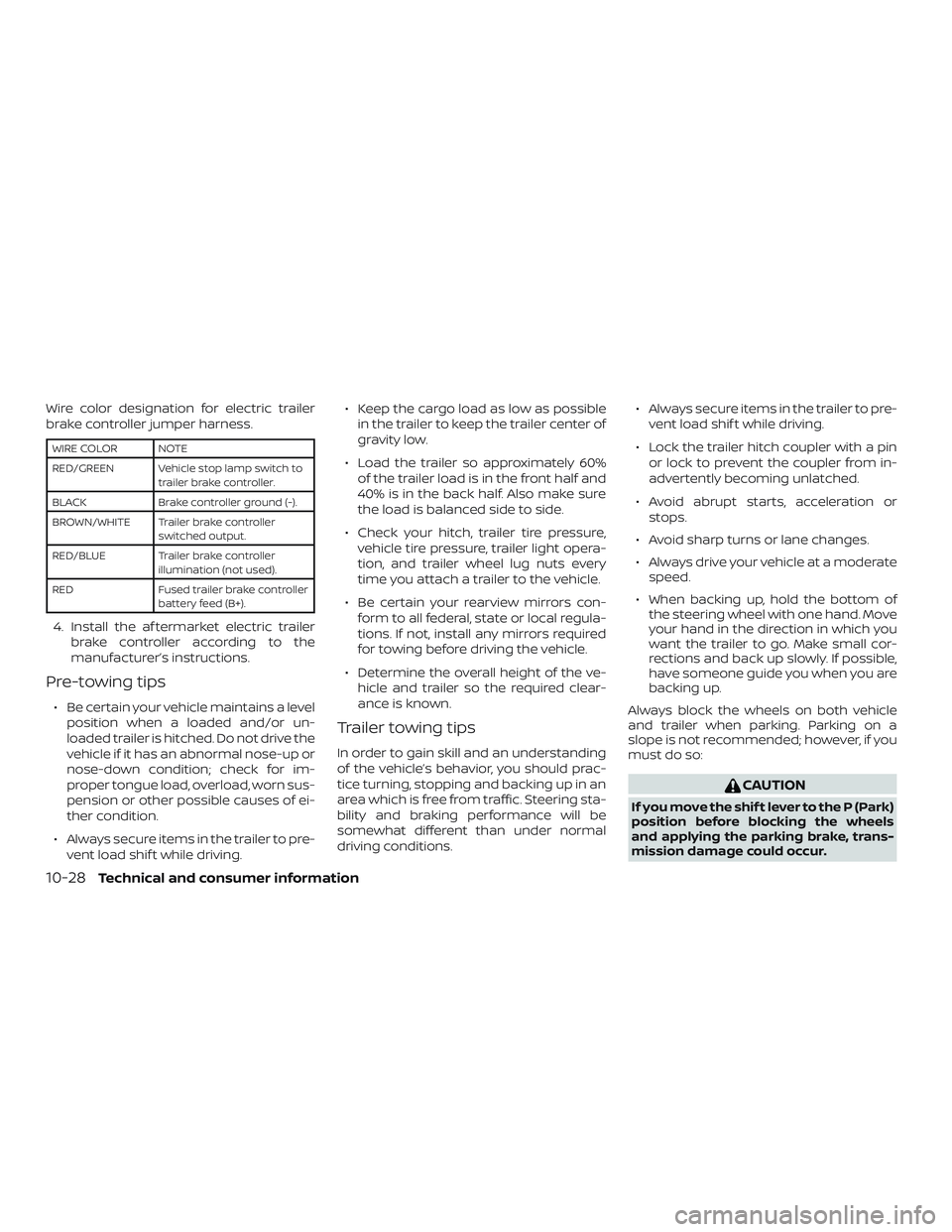
Wire color designation for electric trailer
brake controller jumper harness.
WIRE COLOR NOTE
RED/GREEN Vehicle stop lamp switch totrailer brake controller.
BLACK Brake controller ground (-).
BROWN/WHITE Trailer brake controller switched output.
RED/BLUE Trailer brake controller illumination (not used).
RED Fused trailer brake controller battery feed (B+).
4. Install the af termarket electric trailerbrake controller according to the
manufacturer’s instructions.
Pre-towing tips
∙ Be certain your vehicle maintains a levelposition when a loaded and/or un-
loaded trailer is hitched. Do not drive the
vehicle if it has an abnormal nose-up or
nose-down condition; check for im-
proper tongue load, overload, worn sus-
pension or other possible causes of ei-
ther condition.
∙ Always secure items in the trailer to pre- vent load shif t while driving. ∙ Keep the cargo load as low as possible
in the trailer to keep the trailer center of
gravity low.
∙ Load the trailer so approximately 60% of the trailer load is in the front half and
40% is in the back half. Also make sure
the load is balanced side to side.
∙ Check your hitch, trailer tire pressure, vehicle tire pressure, trailer light opera-
tion, and trailer wheel lug nuts every
time you attach a trailer to the vehicle.
∙ Be certain your rearview mirrors con- form to all federal, state or local regula-
tions. If not, install any mirrors required
for towing before driving the vehicle.
∙ Determine the overall height of the ve- hicle and trailer so the required clear-
ance is known.
Trailer towing tips
In order to gain skill and an understanding
of the vehicle’s behavior, you should prac-
tice turning, stopping and backing up in an
area which is free from traffic. Steering sta-
bility and braking performance will be
somewhat different than under normal
driving conditions. ∙ Always secure items in the trailer to pre-
vent load shif t while driving.
∙ Lock the trailer hitch coupler with a pin or lock to prevent the coupler from in-
advertently becoming unlatched.
∙ Avoid abrupt starts, acceleration or stops.
∙ Avoid sharp turns or lane changes.
∙ Always drive your vehicle at a moderate speed.
∙ When backing up, hold the bottom of the steering wheel with one hand. Move
your hand in the direction in which you
want the trailer to go. Make small cor-
rections and back up slowly. If possible,
have someone guide you when you are
backing up.
Always block the wheels on both vehicle
and trailer when parking. Parking on a
slope is not recommended; however, if you
must do so:
CAUTION
If you move the shif t lever to the P (Park)
position before blocking the wheels
and applying the parking brake, trans-
mission damage could occur.
10-28Technical and consumer information
Page 411 of 426
3. Try to rearrange the trailer load so it isbalanced. For additional information,
refer to “Pre-towing tips” in this section.
∙ Be careful when passing other vehicles. Passing while towing a trailer requires
considerably more distance than nor-
mal passing. Remember, the length of
the trailer must also pass the other ve-
hicle before you can safely change
lanes.
∙ Downshif t the transmission to a lower gear for engine braking when driving
down steep or long hills. This will help
slow the vehicle without applying the
brakes.
∙ Avoid holding the brake pedal down too long or too frequently. This could cause
the brakes to overheat, resulting in re-
duced braking efficiency.
∙ Increase your following distance to al- low for greater stopping distances
while towing a trailer. Anticipate stops
and brake gradually.
∙ NISSAN recommends that the cruise control not be used while towing a
trailer. ∙ Some states or provinces have specific
regulations and speed limits for ve-
hicles that are towing trailers. Obey the
local speed limits.
∙ Check your hitch, trailer wiring harness connections, and trailer wheel lug nuts
af ter 50 miles (80 km) of travel and at
every break.
∙ When launching a boat, don’t allow the water level to go over the exhaust tail
pipe or rear bumper.
∙ Make sure you disconnect the trailer lights before backing the trailer into the
water or the trailer lights may burn out.
When towing a trailer, final drive gear oil
should be replaced and transmission
oil/fluid should be changed more fre-
quently. For additional information, refer
to the “Do-it-yourself ” section in this
manual.
Tow mode (if so equipped)
Using tow mode is recommended when
pulling a heavy trailer or hauling a heavy
load. Press the TOW MODE switch to acti-
vate tow mode. The indicator light on the
TOW MODE switch illuminates when tow
mode is selected. Press the TOW MODE
switch again to turn tow mode off. Tow mode is automatically canceled when
the ignition switch is placed in the OFF
position.
Tow mode includes the following features:
∙ Grade logic — Adjusts transmission shif ts when pulling a trailer or hauling a
load up a grade.
∙ Downhill Speed Control (DSC) — auto- matically downshif ts when driving
down a grade with a trailer or heavy
load to help control vehicle speed.
Driving the vehicle in the tow mode with no
trailer/load or light trailer/light load will not
cause any damage. However, fuel
economy may be reduced and the
transmission/engine driving characteris-
tics may feel unusual.
When towing a trailer, final drive gear oil
should be replaced and transmission
oil/fluid should be changed more fre-
quently. For additional information, refer
to the “Maintenance and schedules” sec-
tion of this manual.
10-30Technical and consumer information
Page 416 of 426
name, gender, age and crash location) are
recorded. However, other parties, such as
law enforcement, could combine the EDR
data with the type of personally identif ying
data routinely acquired during a crash in-
vestigation.
To read data recorded by an EDR, special
equipment is required and access to the
vehicle or the EDR is needed. In addition to
the vehicle manufacturer and NISSAN
dealer, other parties, such as law enforce-
ment, that have the special equipment, can
read the information if they have access to
the vehicle or the EDR. EDR data will only be
accessed with the consent of the vehicle
owner or lessee or as otherwise required or
permitted by law.Genuine NISSAN Service Manuals for this
model year and prior can be purchased. A
Genuine NISSAN Service Manual is the best
source of service and repair information for
your vehicle. This manual is the same one
used by the factory-trained technicians
working at NISSAN dealerships. Genuine
NISSAN Owner’s Manuals can also be pur-
chased.
For USA
For current pricing and availability of
Genuine
NISSAN Service Manuals,
contact:
www.nissan-techinfo.com
For current pricing and availability of
Genuine NISSAN Owner’s Manuals,
contact:
1-800-247-5321
For Canada
To purchase a copy of a Genuine NISSAN
Service Manual or Owner’s Manual, for this
model year and prior, please contact your
nearest NISSAN dealer. For the phone num-
ber and location of a NISSAN dealer in your
area, call the NISSAN Information Center at
1-800-387-0122 and a bilingual NISSAN rep-
resentative will assist you.
OWNER’S MANUAL/SERVICE
MANUAL ORDER INFORMATION
Technical and consumer information10-35
Page 419 of 426
Brakewarninglight............2-20
Brakewearindicators.......2-26,8-21
Parking brake operation.........5-18
Self-adjustingbrakes...........8-21
Brake assist ...................5-25
Brakefluid....................8-13
Brakes......................8-21
Brake system ..................5-24
Break-in schedule ...............5-20
Brightness/contrast button .........4-10
Brightness control Instrument panel .............2-33
Bulb replacement ...............8-30
C
Capacities and recommended
fuel/lubricants.................10-2
Cargolight...................2-53
Cargo (See
vehicle loading information) ........10-14
Car phone or CB radio ............4-74
CDcareandcleaning.............4-72
CD player (See
audio system) ...........4-45,4-51,4-58
Check engine indicator light
(See malfunction indicator lamp) .....2-24
Checking bulbs .................2-19
Check tire pressure ..............2-13
Childrestraints........1-29, 1-30, 1-32, 1-34 LATCH (Lower Anchors and Tethers
forCHildren)System ...........1-34
Precautions on child
restraints.........1-32, 1-40, 1-46, 1-52 Top tether strap anchor point
locations..................
.1-37
Child restraint with top tether strap . . . .1-37
Child safety sliding door lock .........3-8
Chimes, audible reminders .........2-26
Cleaningexteriorandinterior......7-2,7-4
Clock setting (models with
NavigationSystem)...............4-7
Clock setting (models without
NavigationSystem)....4-43,4-44,4-48,4-50
C.M.V.S.S. certification label .........10-12
Cold weather driving .............5-32
Compact disc (CD) player . . .4-45, 4-51, 4-58
Compass ....................2-14
Console box ..................2-44
Control panel buttons .............4-4
Back button .................4-7
Brightness/contrast button .......4-10
Settingbutton................4-7
Withnavigationsystem..........4-5
Controls Audio controls (steering wheel) .....4-72
Heater and air conditioner
controls................4-19,4-28
Rear seat air conditioner .........4-31
Coolant Capacities and recommended
fuel/lubricants...............10-2
Changing engine coolant .........8-7
Checking engine coolant level ......8-7
Engine coolant temperature gauge . .2-6
Corrosionprotection..............7-6
Cruisecontrol...........5-18,5-18,5-19
Cupholders...................2-47
Curtain side-impact and rollover
airbag..................... .1-63D
Daytime Running Lights (DRL) system . .2-32
Defroster switch Rear window and outside mirror
defrosterswitch..............2-30
Dimensions and weights ..........10-10
Dimmer switch for instrument panel . . .2-33
Display controls (see
control panel buttons) .............4-4
Door locks ....................3-3
Door open warning light ...........2-20
Drivebelt.....................8-17
Driving Coldweatherdriving...........5-32
Driving with automatic
transmission ................5-13
Precautions when starting
anddriving.............. .5-2, 5-3
Driving the vehicle ...............5-12
E
Economy - fuel .................5-22
Emission control information label . . . .10-12
Emission control system warranty . . . .10-32
Engine Before starting the engine ........5-10
C
apacities and recommended
fuel/lubricants...............10-2
Changing engine coolant .........8-7
Changing engine oil ............8-9
Changing engine oil filter .........8-11
Checking engine coolant level ......8-7
Checking engine oil level .........8-8
11-2