bluetooth NISSAN NV200 2016 Owners Manual
[x] Cancel search | Manufacturer: NISSAN, Model Year: 2016, Model line: NV200, Model: NISSAN NV200 2016Pages: 312, PDF Size: 6.65 MB
Page 5 of 312
CALIFORNIA PROPOSITION 65
WARNING
WARNING
Engine exhaust, some of its constituents,
and certain vehicle components contain or
emit chemicals known to the State of
California to cause cancer and birth de-
fects or other reproductive harm. In addi-
tion, certain fluids contained in vehicles
and certain products of component wear
contain or emit chemicals known to the
State of California to cause cancer and
birth defects or other reproductive harm.
CALIFORNIA PERCHLORATE
ADVISORY
Some vehicle parts, such as lithium batter-
ies, may contain perchlorate material. The
following advisory is provided: “Perchlorate
Material – special handling may apply, See
www.dtsc.ca.gov/hazardouswaste/perchlorate/”.
BLUETOOTH® is a
trademark owned by
Bluetooth SIG, Inc.
and licensed to
Bosch.
SiriusXM® services
require a subscription
after trial period and
are sold separately or
as a package. The
satellite service is
available only in the
48 contiguous USA
and DC.
© Nissan Mexicana, S. A. de C. V.
All rights reserved. No part of this Owner’s
Manual may be reproduced or stored in a retrieval
system, or transmitted in any form, or by any
means, electronic, mechanical, photocopying,
recording or otherwise, without the prior written
permission of Nissan Mexicana, S. A. de C. V.
Page 131 of 312
4 Monitor, climate, audio, phone and voice
recognition systems
Control Panel Buttons – Color Screen With
Navigation System.................................4-2
How to use the touch-screen . . ..................4-3
How to use the BACK button ....................4-5
How to use the
button ...................4-5
button...................................4-7
How to use the CAMERA button .................4-7
RearView Monitor .................................4-8
How to read the displayed lines ..................4-9
Difference between predicted and actual
distances ......................................4-9
Adjusting the screen ........................... 4-12
Operating tips ................................. 4-12
Vents ........................................... 4-13
Heater and air conditioner (manual) .................4-14
Controls ...................................... 4-15
Heater operation .............................. 4-16
Air conditioner operation .......................4-17
Air flow charts ................................. 4-18
Rear seat air conditioner .......................4-21
Servicing air conditioner ........................... 4-22
Audio system .................................... 4-22
Radio ........................................ 4-22FM radio reception
............................ 4-22
AM radio reception ............................ 4-23
Satellite radio reception ........................ 4-23
Audio operation precautions ....................4-23
FM/AM/SAT radio with compact disc (CD)
player ........................................ 4-30
USB (Universal Serial Bus) Connection Port ......4-37
iPod®* player operation ........................ 4-39
Bluetooth® streaming audio ....................4-42
CD care and cleaning .......................... 4-43
Steering wheel switch for audio control ..........4-44
Antenna ...................................... 4-45
NissanConnect
SMMobile Apps .................... 4-45
Registering with NissanConnectSMMobile
Apps ......................................... 4-45
Connect Phone ............................... 4-45
Application Download .......................... 4-46
Car phone or CB radio ............................ 4-46
Intercom System ................................. 4-47
Activation ..................................... 4-47
Speaking ..................................... 4-47
Bluetooth® Hands-Free Phone System with
Navigation System ................................ 4-47
Regulatory Information ......................... 4-49
Page 132 of 312
Voice commands.............................. 4-49
Connecting Procedure ......................... 4-50
Vehicle phonebook ............................ 4-50
Making a call .................................. 4-51
Receiving a call ............................... 4-51
During a call .................................. 4-51
Ending a call .................................. 4-51
Text messaging ................................ 4-51
Bluetooth® settings ........................... 4-53
Phone settings ................................ 4-54
NISSAN Voice Recognition System .................4-55Using the system
.............................. 4-55
System features ............................... 4-56
Bluetooth® Hands-Free Phone System
voice commands .............................. 4-57
Navigation System voice commands .............4-57
Audio system voice commands ..................4-58
Information voice commands ....................4-58
My Apps Voice Commands .....................4-58
Help voice commands ......................... 4-58
Troubleshooting guide ......................... 4-59
Page 134 of 312
9. NAV button*
* For additional information regarding the Naviga-
tion system control buttons, refer to the separate
Navigation System Owner’s Manual.
** For additional information regarding the
Bluetooth® Hands-Free Phone System control
button, refer to “Bluetooth® Hands-Free Phone
System with Navigation System” in this section.
When you use this system, make sure the engine
is running.
If you use the system with the engine not
running (ignition ON or ACC) for a long
time, it will discharge the battery, and the
engine will not start.
Reference symbols:
“Example” — Words marked in quotes refer to a
key shown only on the display. These keys can be
selected by touching the screen.
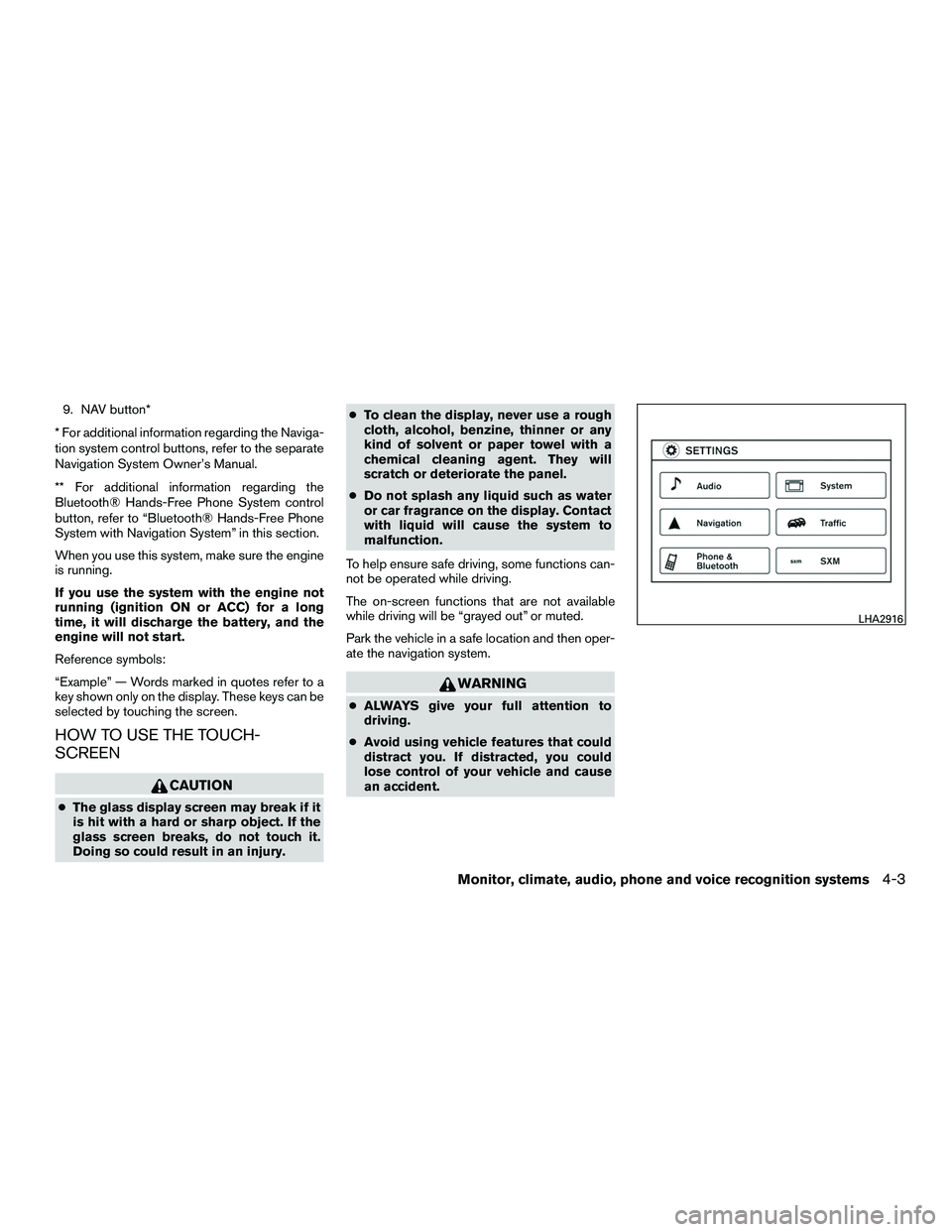
HOW TO USE THE TOUCH-
SCREEN
CAUTION
● The glass display screen may break if it
is hit with a hard or sharp object. If the
glass screen breaks, do not touch it.
Doing so could result in an injury. ●
To clean the display, never use a rough
cloth, alcohol, benzine, thinner or any
kind of solvent or paper towel with a
chemical cleaning agent. They will
scratch or deteriorate the panel.
● Do not splash any liquid such as water
or car fragrance on the display. Contact
with liquid will cause the system to
malfunction.
To help ensure safe driving, some functions can-
not be operated while driving.
The on-screen functions that are not available
while driving will be “grayed out” or muted.
Park the vehicle in a safe location and then oper-
ate the navigation system.
WARNING
● ALWAYS give your full attention to
driving.
● Avoid using vehicle features that could
distract you. If distracted, you could
lose control of your vehicle and cause
an accident.
LHA2916
Monitor, climate, audio, phone and voice recognition systems4-3
Page 137 of 312
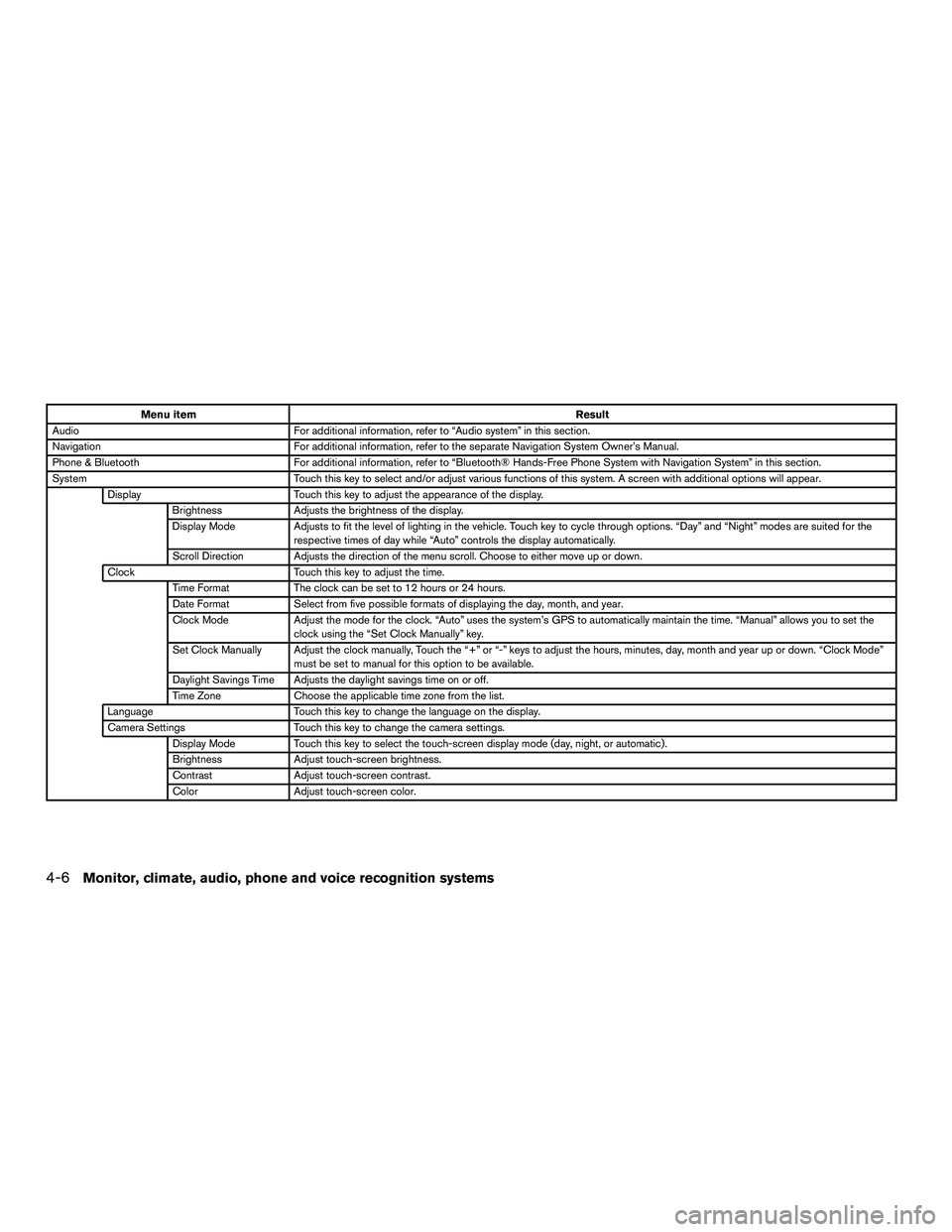
Menu itemResult
Audio For additional information, refer to “Audio system” in this section.
Navigation For additional information, refer to the separate Navigation System Owner’s Manual.
Phone & Bluetooth For additional information, refer to “Bluetooth® Hands-Free Phone System with Navigation System” in this section.
System Touch this key to select and/or adjust various functions of this system. A screen with additional options will appear.
Display Touch this key to adjust the appearance of the display.
Brightness Adjusts the brightness of the display.
Display Mode Adjusts to fit the level of lighting in the vehicle. Touch key to cycle through options. “Day” and “Night” modes are suited for the
respective times of day while “Auto” controls the display automatically.
Scroll Direction Adjusts the direction of the menu scroll. Choose to either move up or down.
Clock Touch this key to adjust the time.
Time Format The clock can be set to 12 hours or 24 hours.
Date Format Select from five possible formats of displaying the day, month, and year.
Clock Mode Adjust the mode for the clock. “Auto” uses the system’s GPS to automatically maintain the time. “Manual” allows you to set the
clock using the “Set Clock Manually” key.
Set Clock Manually Adjust the clock manually, Touch the “+” or “-” keys to adjust the hours, minutes, day, month and year up or down. “Clock Mode” must be set to manual for this option to be available.
Daylight Savings Time Adjusts the daylight savings time on or off.
Time Zone Choose the applicable time zone from the list.
Language Touch this key to change the language on the display.
Camera Settings Touch this key to change the camera settings.
Display Mode Touch this key to select the touch-screen display mode (day, night, or automatic) .
Brightness Adjust touch-screen brightness.
Contrast Adjust touch-screen contrast.
Color Adjust touch-screen color.
4-6Monitor, climate, audio, phone and voice recognition systems
Page 160 of 312
Bluetooth® streaming audio
●Some Bluetooth® audio devices may not be
recognized by the in-vehicle audio system.
● It is necessary to set up the wireless con-
nection between a compatible Bluetooth®
audio device and the in-vehicle Bluetooth®
module before using the Bluetooth® audio.
● Operating procedure of the Bluetooth® au-
dio will vary depending on the devices. Make
sure how to operate your audio device be-
fore using it with this system.
● The Bluetooth® audio may be stopped un-
der the following conditions:
● Receiving a call on the Hands-Free
Phone System.
● Checking the connection to the hands-
free phone.
● Do not place the Bluetooth® audio device in
an area surrounded by metal or far away from
the in-vehicle Bluetooth® module to prevent
tone quality degradation and wireless con-
nection disruption. ●
While an audio device is connected through
the Bluetooth® wireless connection, the
battery power of the device may discharge
quicker than usual.
● This system supports the Bluetooth® Audio
Distribution Profile (A2DP, AVRCP) .
BLUETOOTH® is a
trademark owned by
Bluetooth SIG, Inc.
and licensed to
Bosch.
Monitor, climate, audio, phone and voice recognition systems4-29
Page 161 of 312
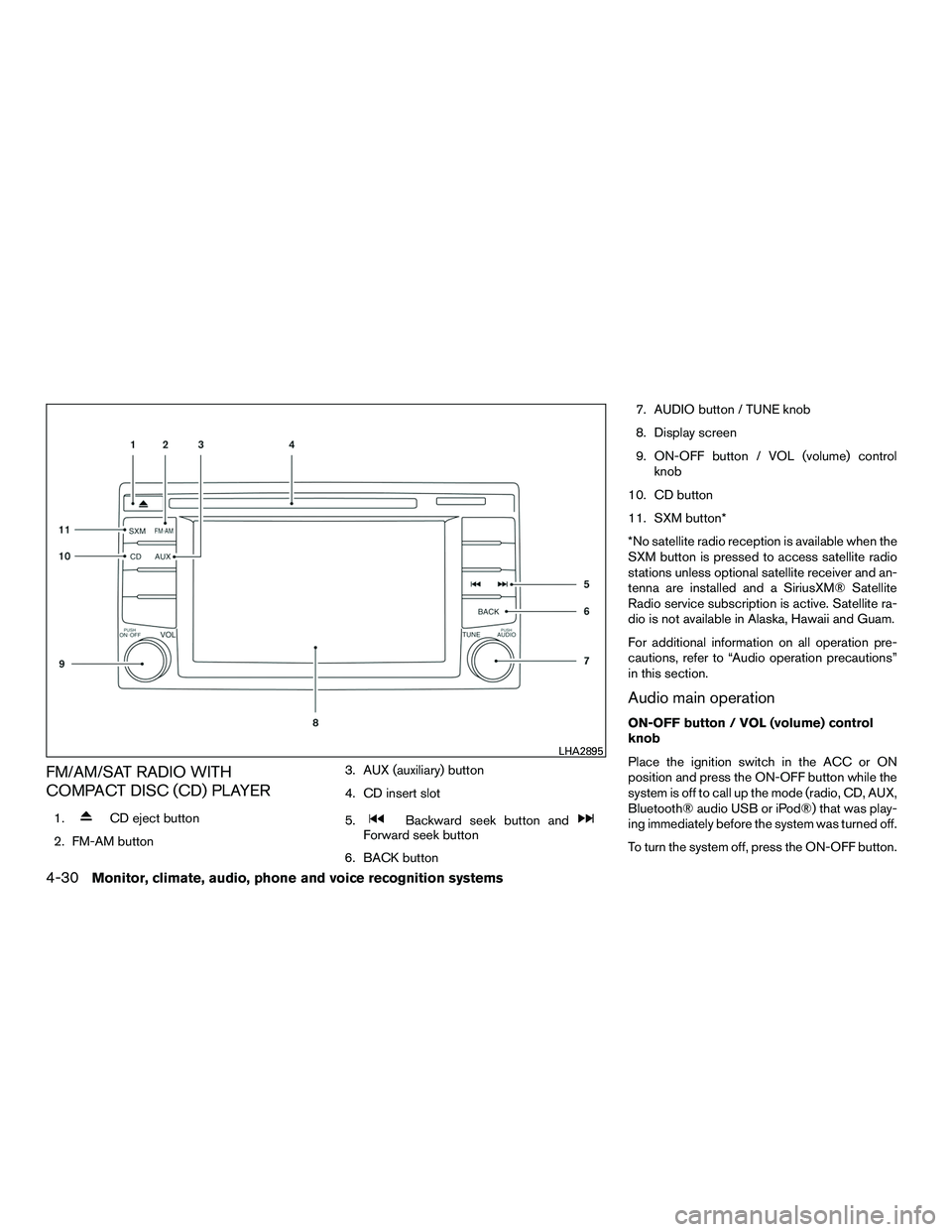
FM/AM/SAT RADIO WITH
COMPACT DISC (CD) PLAYER
1.CD eject button
2. FM-AM button 3. AUX (auxiliary) button
4. CD insert slot
5.Backward seek button andForward seek button
6. BACK button 7. AUDIO button / TUNE knob
8. Display screen
9. ON-OFF button / VOL (volume) control
knob
10. CD button
11. SXM button*
*No satellite radio reception is available when the
SXM button is pressed to access satellite radio
stations unless optional satellite receiver and an-
tenna are installed and a SiriusXM® Satellite
Radio service subscription is active. Satellite ra-
dio is not available in Alaska, Hawaii and Guam.
For additional information on all operation pre-
cautions, refer to “Audio operation precautions”
in this section.
Audio main operation
ON-OFF button / VOL (volume) control
knob
Place the ignition switch in the ACC or ON
position and press the ON-OFF button while the
system is off to call up the mode (radio, CD, AUX,
Bluetooth® audio USB or iPod®) that was play-
ing immediately before the system was turned off.
To turn the system off, press the ON-OFF button.
LHA2895
4-30Monitor, climate, audio, phone and voice recognition systems
Page 168 of 312
SEEK (Reverse or FastForward) buttons
Press and hold the seek buttons
orfor 1.5 seconds while the compact disc is playing
to reverse or fast forward the track being played.
The compact disc plays at an increased speed
while reversing or fast forwarding. When the but-
ton is released, the compact disc returns to nor-
mal play speed.
SEEK buttons
Press the SEEK button
while a CD or
MP3/WMA CD is playing to return to the begin-
ning of the current track. Press the SEEK
button
several times to skip backward sev-
eral tracks.
Press the SEEK button
while a CD or
MP3/WMA CD is playing to advance one track.
Press the SEEK button
several times to
skip forward several tracks. If the last track on a
CD is skipped, the first track on the disc is played.
If the last track in a folder of an MP3/WMA CD is
skipped, the first track of the next folder is played. AUX button
The AUX IN audio input jack accepts any stan-
dard analog audio input such as from a portable
cassette tape/CD player, MP3 player or a laptop
computer. Press the AUX button to play a com-
patible device plugged into the AUX IN jack.
EJECT button
When the
button is pressed with a com-
pact disc loaded, the compact disc will eject and
the last source will be played.
If the disc is not removed within 10 seconds, the
disc will reload.
Additional features
For additional information about the iPod® player
available with this system, refer to “iPod® player
operation” in this section.
For additional information about the USB Con-
nection Port, refer to “USB (Universal Serial Bus)
Connection Port” in this section.
For additional information about the Bluetooth®
audio interface available with this system, refer to
“Bluetooth® streaming audio” in this section.USB (Universal Serial Bus)
CONNECTION PORT
Connecting a device to the USB
connection port
WARNING
Do not connect, disconnect or operate the
USB device while driving. Doing so can be
a distraction. If distracted you could lose
control of your vehicle and cause an acci-
dent or serious injury.
LHA2584
Monitor, climate, audio, phone and voice recognition systems4-37
Page 173 of 312
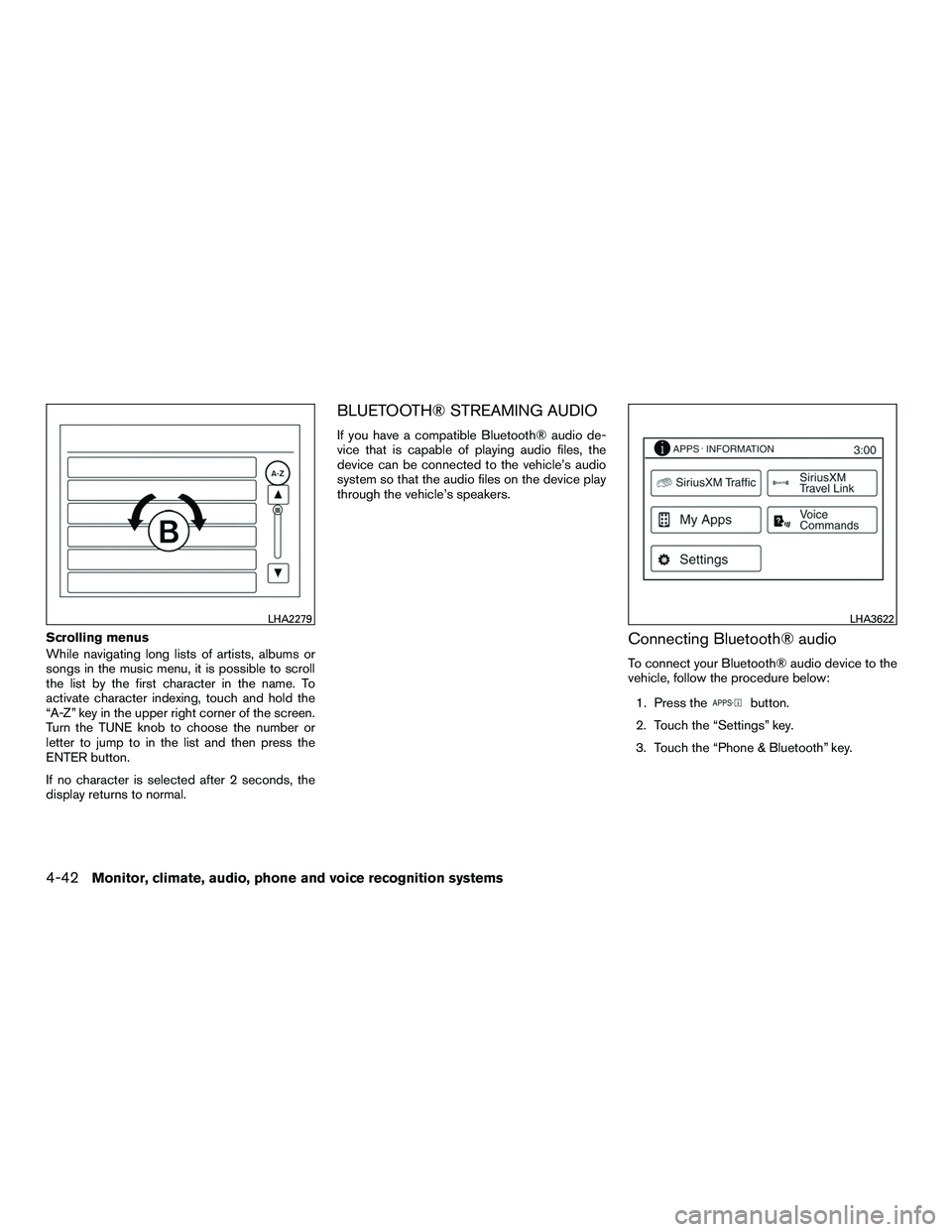
Scrolling menus
While navigating long lists of artists, albums or
songs in the music menu, it is possible to scroll
the list by the first character in the name. To
activate character indexing, touch and hold the
“A-Z” key in the upper right corner of the screen.
Turn the TUNE knob to choose the number or
letter to jump to in the list and then press the
ENTER button.
If no character is selected after 2 seconds, the
display returns to normal.
BLUETOOTH® STREAMING AUDIO
If you have a compatible Bluetooth® audio de-
vice that is capable of playing audio files, the
device can be connected to the vehicle’s audio
system so that the audio files on the device play
through the vehicle’s speakers.
Connecting Bluetooth® audio
To connect your Bluetooth® audio device to the
vehicle, follow the procedure below:1. Press the
button.
2. Touch the “Settings” key.
3. Touch the “Phone & Bluetooth” key.
LHA2279LHA3622
4-42Monitor, climate, audio, phone and voice recognition systems
Page 174 of 312
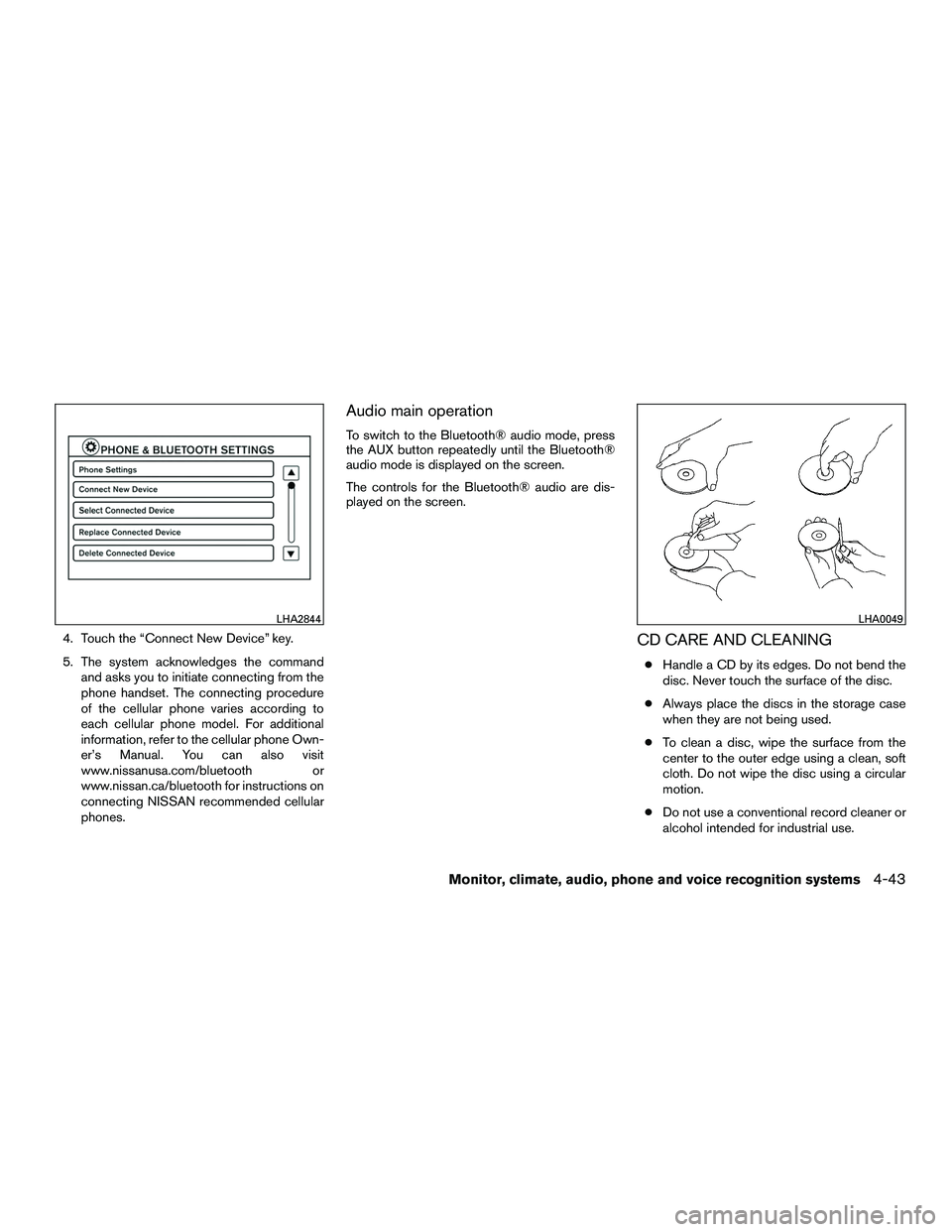
4. Touch the “Connect New Device” key.
5. The system acknowledges the commandand asks you to initiate connecting from the
phone handset. The connecting procedure
of the cellular phone varies according to
each cellular phone model. For additional
information, refer to the cellular phone Own-
er’s Manual. You can also visit
www.nissanusa.com/bluetooth or
www.nissan.ca/bluetooth for instructions on
connecting NISSAN recommended cellular
phones.
Audio main operation
To switch to the Bluetooth® audio mode, press
the AUX button repeatedly until the Bluetooth®
audio mode is displayed on the screen.
The controls for the Bluetooth® audio are dis-
played on the screen.
CD CARE AND CLEANING
●Handle a CD by its edges. Do not bend the
disc. Never touch the surface of the disc.
● Always place the discs in the storage case
when they are not being used.
● To clean a disc, wipe the surface from the
center to the outer edge using a clean, soft
cloth. Do not wipe the disc using a circular
motion.
● Do not use a conventional record cleaner or
alcohol intended for industrial use.
LHA2844LHA0049
Monitor, climate, audio, phone and voice recognition systems4-43