ECO mode NISSAN PATHFINDER 1998 R50 / 2.G Owners Manual
[x] Cancel search | Manufacturer: NISSAN, Model Year: 1998, Model line: PATHFINDER, Model: NISSAN PATHFINDER 1998 R50 / 2.GPages: 249, PDF Size: 2.14 MB
Page 2 of 249

MODIFICATION OF YOUR
VEHICLEThis vehicle should not be modified. Modi-
fication could affect its performance,
safety or durability, and may even violate
governmental regulations. In addition,
damage or performance problems result-
ing from modification may not be covered
under NISSAN warranties.WHEN READING THE MANUALThis manual includes information for all
options available on this model. Therefore,
you may find some information that does
not apply to your vehicle.
All information, specifications and illustrations
in this manual are those in effect at the time of
printing. NISSAN reserves the right to change
specifications or design at any time without
notice.
IMPORTANT INFORMATION
ABOUT THIS MANUALYou will see various symbols in this manual.
They are used in the following ways:This is used to indicate the presence of a
hazard that could cause death or serious
personal injury. To avoid or reduce the
risk, the procedures must be followed
precisely.This is used to indicate the presence of a
hazard that could cause minor or moder-
ate personal injury or damage to your
vehicle. To avoid or reduce the risk, the
procedures must be followed carefully.If you see this symbol, it meansDo not do
thisorDo not let this happen.
1997 NISSAN MOTOR CO., LTD.
TOKYO, JAPAN
All rights reserved. No part of this Owner's Manual may
be reproduced or stored in a retrieval system, or trans-
mitted in any form, or by any means, electronic, me-
chanical, photocopying, recording or otherwise, without
the prior written permission of Nissan Motor Co., Ltd.
SIC0697
Z
01.1.31/R50-D
X
Page 3 of 249
Welcome To The World Of NISSANYour new NISSAN is the result of our dedication
to produce the finest in safe, reliable and eco-
nomical transportation. Your vehicle is the prod-
uct of a successful worldwide company that
manufactures cars and trucks in over 17 coun-
tries and distributes them in 170 nations.
NISSAN vehicles are designed and manufac-
tured by Nissan Motor Co., Ltd. which was
founded in Tokyo, Japan in 1933, and NISSAN
affiliates world wide, collectively growing to be-
come the fifth largest automaker in the world. In
addition to cars and trucks, NISSAN also makes
textile machinery, fork-lift trucks, marine engines,
boats and other products.
NISSAN has made a substantial and growing
investment in North America, starting with the
opening of Nissan Motor Corporation U.S.A. in
1960 and continuing with the production of somecars and trucks at one of the world's most
modern manufacturing facilities, Nissan Motor
Manufacturing Corporation U.S.A. in Smyrna,
Tennessee, vehicle styling at Nissan Design
International in San Diego, California, and engi-
neering at Nissan Research and Development in
Farmington Hills, Michigan.
Nissan Motor Corporation U.S.A. and its dealers
indirectly employ about 60,000 Americans.
NISSAN is also a substantial contributor to the
Canadian economy. Nissan Canada Inc., its sup-
pliers and over 170 dealers employ approxi-
mately 4,500 people. These include company
employees and the staffs of NISSAN dealers all
across Canada. In addition, many Canadians
work for companies that supply NISSAN and
NISSAN dealers with materials and services
ranging from operation of port facilities andtransportation services to the supply of lubri-
cants, parts and accessories.
NISSAN pioneered the use of electronics and
computers in automobiles, and has led the indus-
try in improving both performance and fuel effi-
ciency through new engine designs and the use
of synthetic materials to reduce vehicle weight.
The company has also developed ways to build
quality into its vehicles at each stage of the
production process, both through extensive use
of automation and Ð most importantly Ð
through an awareness thatpeopleare the cen-
tral element in quality control.
From the time the parts arrived from our suppli-
ers until you took delivery of your new Nissan,
dozens of checks were made to ensure that only
the best job was being done in producing and
delivering your vehicle. NISSAN also takes great
care to ensure that when you take your NISSAN
to your dealer for maintenance, the service tech-
nician will perform his work according to the
quality standards that have been established by
the factory.
Safety has also been built into your NISSAN. As
you know, seat belts are an integral part of the
safety systems that will help protect you and your
passengers in the event of a sudden stop or an
accident. We urge you to use the seat belts every
time you drive the vehicle.
The NISSAN story of growth and achievement
reflects our major goal: to provide you, our
customer, with a vehicle that is built with quality
and craftsmanship Ð a product that we can be
proud to build and you can be proud to own.
AFW0001
Z
01.1.31/R50-D
X
Page 43 of 249
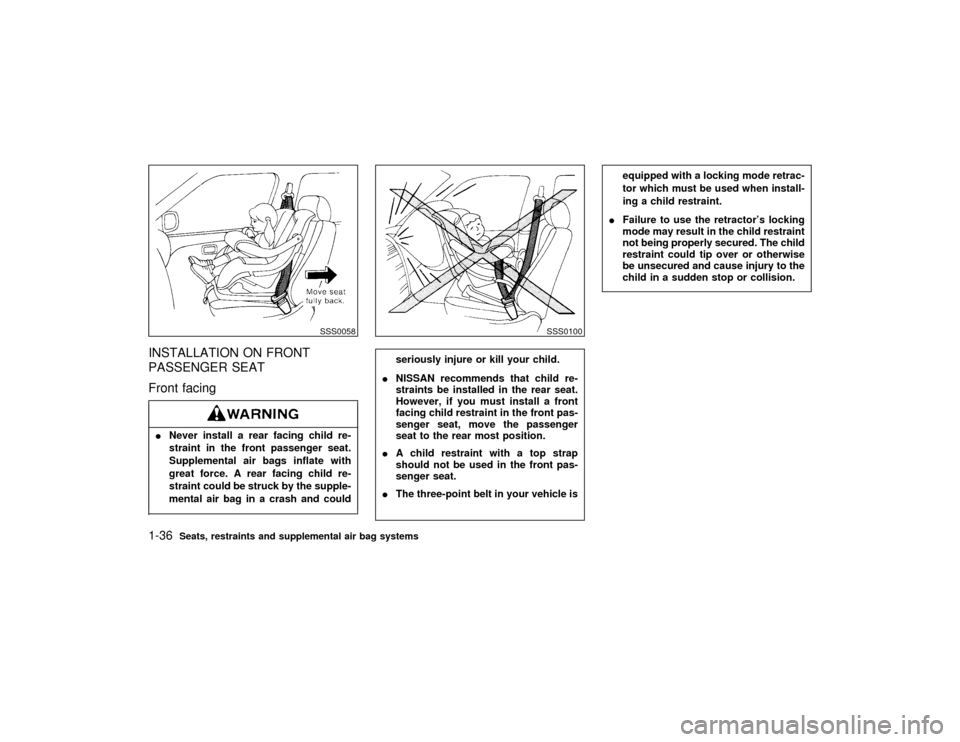
INSTALLATION ON FRONT
PASSENGER SEAT
Front facingINever install a rear facing child re-
straint in the front passenger seat.
Supplemental air bags inflate with
great force. A rear facing child re-
straint could be struck by the supple-
mental air bag in a crash and could
seriously injure or kill your child.
INISSAN recommends that child re-
straints be installed in the rear seat.
However, if you must install a front
facing child restraint in the front pas-
senger seat, move the passenger
seat to the rear most position.
IA child restraint with a top strap
should not be used in the front pas-
senger seat.
IThe three-point belt in your vehicle is
equipped with a locking mode retrac-
tor which must be used when install-
ing a child restraint.
IFailure to use the retractor's locking
mode may result in the child restraint
not being properly secured. The child
restraint could tip over or otherwise
be unsecured and cause injury to the
child in a sudden stop or collision.
SSS0058
SSS0100
1-36
Seats, restraints and supplemental air bag systems
Z
01.1.31/R50-D
X
Page 57 of 249

Automatic transmission oil
temperature warning light
(
model)
This light comes on when the automatic trans-
mission oil temperature is too high. If the light
comes on while driving, reduce the vehicle
speed as soon as safely possible until the light
turns off.
Continued vehicle operation when the A/T
oil temperature warning light is on may
damage the automatic transmission.
Tire carrier open warning light
(if so equipped)
This light comes on when the tire carrier is not
closed securely while the ignition key is ON.INDICATOR LIGHTS
Overdrive off indicator light
This light comes on during driving when the
overdrive switch is pressed to prevent over-
drive operation.
The O/D OFF indicator light comes on for two
seconds each time the ignition key is turned
ON. This shows the light is functioning prop-
erly.If the O/D OFF indicator light blinks forapproximately 8 seconds after coming on for
2 seconds, have your NISSAN dealer check
the transmission and repair it if necessary.
The automatic transmission is equipped with
an electronic Fail-Safe mode. This system
allows the vehicle to be driven even in the
event of damage to the electrical circuits. If this
occurs, the gears automatically engage and
lock into 3rd gear.
See ªDriving the vehicleº in the ª5. Starting
and drivingº section for failsafe before vis-
iting your NISSAN dealer.
Turn signal/hazard indicator
lights
The light flashes when the turn signal switch
lever or hazard switch is turned on.
High beam indicator light
(Blue)
This light comes on when the headlight high
beam is on, and goes out when the low beams
are selected.
CRUISE indicator light
The light comes on while the vehicle speed is
controlled by the cruise control system.
If the light flickers while the engine is running,it may indicate there is something wrong with
the cruise control system. Have the system
checked by your NISSAN dealer.
Malfunction indicator light
(MIL)
If the Malfunction indicator light comes on
steady or blinks while the engine is running, it
may indicate a potential emission control prob-
lem.
The Malfunction indicator light will come on in
one of two ways:
IMalfunction indicator light on steady Ð An
emission control system malfunction has
been detected. Have the vehicle inspected
by an authorized NISSAN dealer. You do
not need to have your vehicle towed to the
dealer.
IMalfunction indicator light blinking Ð An
engine misfire has been detected which
may damage the emission control system.
To reduce or avoid emission control system
damage:
* do not drive at speeds above 45 MPH (72
km/h).
* avoid hard acceleration or deceleration.
* avoid steep uphill grades.
* if possible, reduce the amount of cargo
2-12
Instruments and controls
Z
01.1.31/R50-D
X
Page 79 of 249
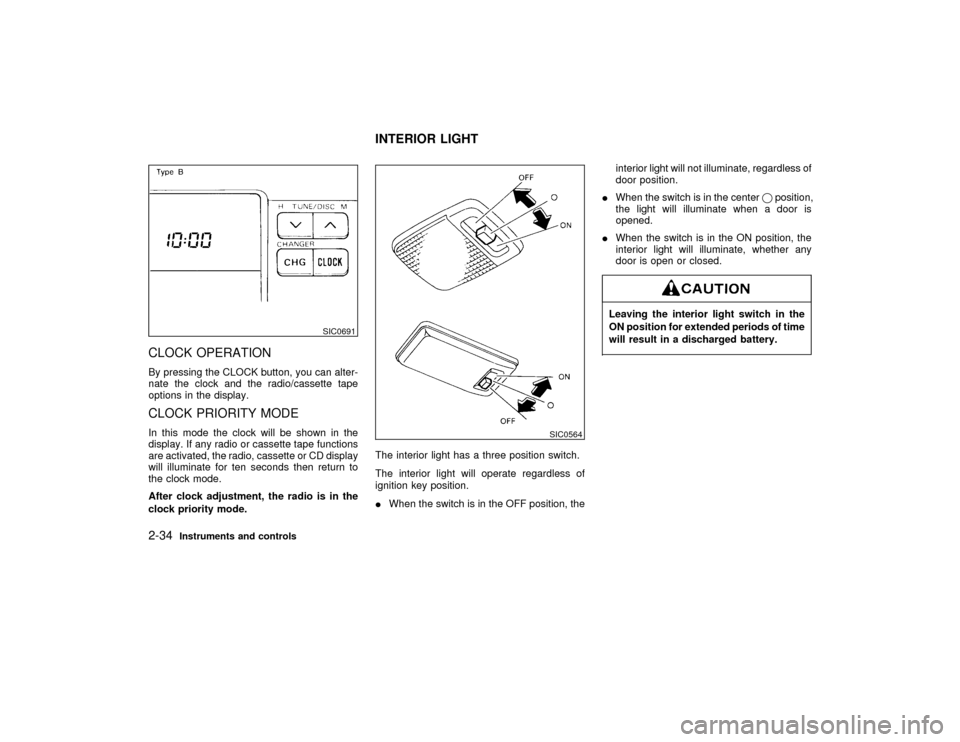
CLOCK OPERATIONBy pressing the CLOCK button, you can alter-
nate the clock and the radio/cassette tape
options in the display.CLOCK PRIORITY MODEIn this mode the clock will be shown in the
display. If any radio or cassette tape functions
are activated, the radio, cassette or CD display
will illuminate for ten seconds then return to
the clock mode.
After clock adjustment, the radio is in the
clock priority mode.The interior light has a three position switch.
The interior light will operate regardless of
ignition key position.
IWhen the switch is in the OFF position, theinterior light will not illuminate, regardless of
door position.
IWhen the switch is in the centerqposition,
the light will illuminate when a door is
opened.
IWhen the switch is in the ON position, the
interior light will illuminate, whether any
door is open or closed.
Leaving the interior light switch in the
ON position for extended periods of time
will result in a discharged battery.
SIC0691
SIC0564
INTERIOR LIGHT
2-34
Instruments and controls
Z
01.1.31/R50-D
X
Page 82 of 249

6. Hold down both buttons until the
red indicator light on the Integrated
HomeLink
Transmitter flashes rapidly
(This may take 1 to 90 seconds). Then
release both buttons. The rapid flashing
means that the transmitter has been suc-
cessfully programmed to match your hand-
held transmitter. You can now use the
Integrated HomeLink
Transmitter instead
of your hand-held transmitter.
Note to Canadian users:
Prior to 1992, D.O.C. regulations required
many hand-held transmitters to stop transmit-
ting after one or two seconds, even though you
continue to hold down the button. If you think
you have one of these hand-held transmitters,
you should press and re-press the transmitter
button every 2 seconds without ever releasing
the integrated HomeLinkTransmitter button.
The indicator light on the Integrated
HomeLink
Transmitter should blink rapidly
indicating a successful programming proce-
dure. If it returns to the slow blink of program
mode, continue to periodically reactivate your
hand-held transmitter until a successful pro-
gramming procedure is indicated by the rapidly
flashing indicator light.
OPERATING THE TRANSMITTERTo operate, simply press the appropriate but-
ton on the Integrated HomeLink
Transmitter.
The red indicator light illuminates while the
signal is being transmitted. The effective trans-
mission range of the Integrated HomeLink
Transmitter may differ from your hand-held
transmitter.PROGRAMMING PROBLEM
DIAGNOSISBe sure to keep your original hand-held trans-
mitter for possible reprogramming if neces-
sary.
IMake sure batteries in the hand-held trans-
mitter are fully charged.
IHold your hand-held transmitter against the
bottom surface of the Integrated
HomeLink
Transmitter so that you can still
see the red indicator light.
IHold buttons for duration of the program-
ming without interruption.IRotate your hand-held transmitter end-
over-end and program again. For best re-
sults, place the end opposite the battery
compartment against the Integrated
HomeLink
Transmitter when program-
ming.Instruments and controls
2-37
Z
01.1.31/R50-D
X
Page 104 of 249
IThe air conditioner cooling function
operates only when the engine is run-
ning.
IDo not leave children, unreliable
adults, or pets alone in your vehicle.
On hot, sunny days, temperatures in
a closed vehicle could quickly be-
come high enough to cause severe or
possibly fatal injuries to people or
animals.IDo not use the recirculation mode for
long periods as it may cause the
interior air to become stale and the
windows to fog up.
IPositioning of the heating or air con-
ditioning controls should not be done
while driving, in order that full atten-
tion may be given to the driving
operation.
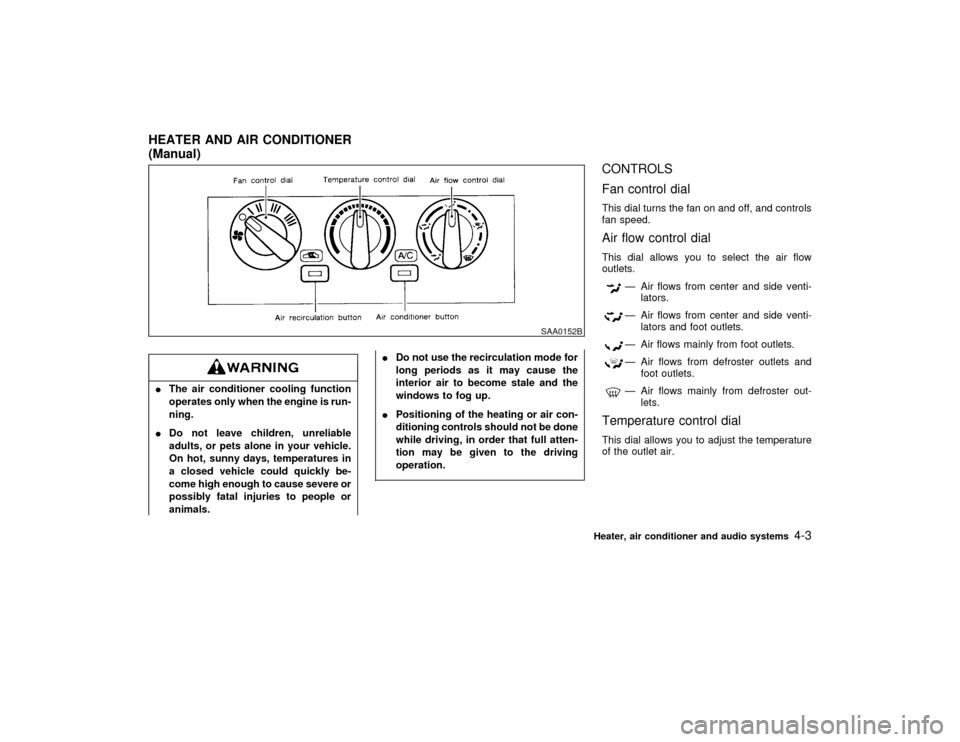
CONTROLS
Fan control dialThis dial turns the fan on and off, and controls
fan speed.Air flow control dialThis dial allows you to select the air flow
outlets.
Ð Air flows from center and side venti-
lators.Ð Air flows from center and side venti-
lators and foot outlets.Ð Air flows mainly from foot outlets.Ð Air flows from defroster outlets and
foot outlets.Ð Air flows mainly from defroster out-
lets.
Temperature control dialThis dial allows you to adjust the temperature
of the outlet air.
SAA0152B
HEATER AND AIR CONDITIONER
(Manual)
Heater, air conditioner and audio systems
4-3
Z
01.1.31/R50-D
X
Page 110 of 249
IThe air conditioner cooling function
operates only when the engine is run-
ning.
IDo not leave children, unreliable
adults, or pets alone in your vehicle.
On hot, sunny days, temperatures in
a closed vehicle could quickly be-
come high enough to cause severe or
possibly fatal injuries to people or
animals.IDo not use the recirculation mode for
long periods as it may cause the
interior air to become stale and the
windows to fog up.
IPositioning of the heating or air con-
ditioning controls should not be done
while driving, in order that full atten-
tion may be given to the driving
operation.
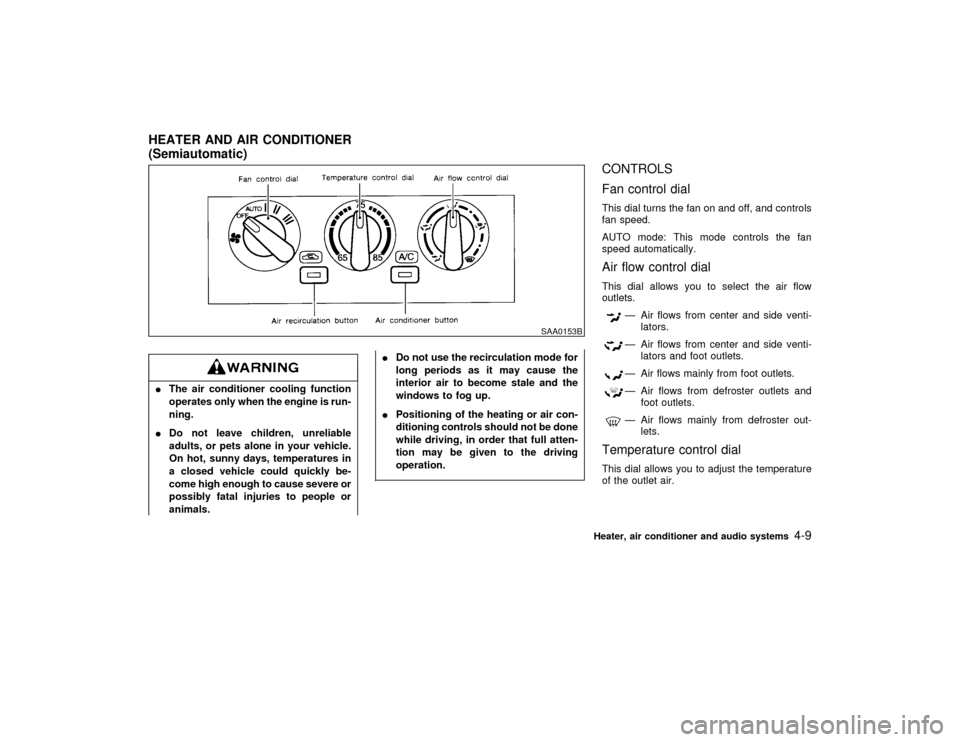
CONTROLS
Fan control dialThis dial turns the fan on and off, and controls
fan speed.
AUTO mode: This mode controls the fan
speed automatically.Air flow control dialThis dial allows you to select the air flow
outlets.
Ð Air flows from center and side venti-
lators.Ð Air flows from center and side venti-
lators and foot outlets.Ð Air flows mainly from foot outlets.Ð Air flows from defroster outlets and
foot outlets.Ð Air flows mainly from defroster out-
lets.
Temperature control dialThis dial allows you to adjust the temperature
of the outlet air.
SAA0153B
HEATER AND AIR CONDITIONER
(Semiautomatic)
Heater, air conditioner and audio systems
4-9
Z
01.1.31/R50-D
X
Page 116 of 249

FM-AM RADIO WITH CASSETTE
PLAYER
Audio main operationPower/Volume control:
Turn the ignition key to ACC or ON, then push
the Power/Volume control knob. The mode
(radio or cassette) which was playing immedi-
ately before the system was turned off re-
sumes playing. When no cassette is loaded,
the radio comes on. Pushing the
Power/Volume button again turns the system
off.
Turn the Power/Volume control knob to adjust
the volume.
Adjusting tone quality and speaker
balance:
To adjust BASS×TREB×FADER×BAL (Bass,
Treble, Fader, Balance), press the AUDIO
button until the desired mode (BAS, TRE, FAD
or BAL) appears in the display.
Press the
or
button to adjust Bass
(BAS) and Treble (TRE) to the desired level.
Use the
or
button to adjust Fader
or Balance modes. Fader adjusts the sound
level between the front and rear speakers and
Balance (BAL) adjusts the sound level be-
tween the right and left speakers.After 10 seconds, the radio or cassette tape
display reappears. Once the sound quality is
set to the desired level, press the AUDIO
button repeatedly until the radio or cassette
tape display appears.
Clock operation:
Pressing the CLOCK button alternates the
clock and the radio/cassette tape options in
the display.
Radio/Cassette tape priority mode:In this mode, the radio station illuminates in the
display during radio operation. During cassette
tape operation, TAPE illuminates in the dis-
play.FM-AM radio operation
FM-AM band select:
Pushing the FM×AM band select button will
change the band FM on AM.
The FM stereo indicator, ST illuminates during
FM stereo reception. When the stereo broad-
cast signal is weak, the radio automatically
changes from stereo to monaural reception.
SAA0260
Heater, air conditioner and audio systems
4-15
Z
01.1.31/R50-D
X
Page 117 of 249
TUNE (Tuning):
The radio should not be tuned while
driving in order that full attention may be
given to the driving operation.Push either manual tuning button
or
.SEEK/SCAN tuning:
Push the SEEK/SCAN tuning button
for less than 1.5 seconds. SEEK tuning begins
from low to high frequencies and stops at the
next broadcasting station. Pushing the button
again continues the SEEK function. Once the
highest broadcasting station is reached, the
radio continues in the SEEK mode at the
lowest broadcast station.
Push the SEEK/SCAN tuning buttonfor more than 1.5 seconds. SCAN illuminates
in the display window. SCAN tuning begins
from low to high frequencies and stops at each
broadcasting station for 5 seconds. Pushing
the button again during this 5 second period
stops SCAN tuning and the radio remains
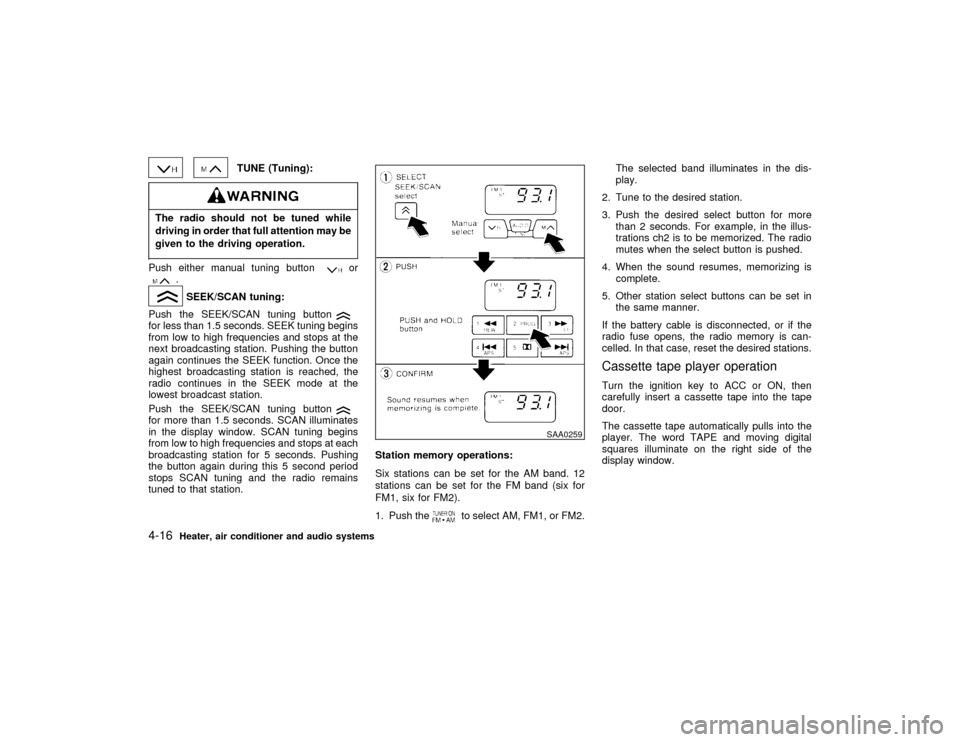
tuned to that station.Station memory operations:
Six stations can be set for the AM band. 12
stations can be set for the FM band (six for
FM1, six for FM2).
1. Push the
to select AM, FM1, or FM2.The selected band illuminates in the dis-
play.
2. Tune to the desired station.
3. Push the desired select button for more
than 2 seconds. For example, in the illus-
trations ch2 is to be memorized. The radio
mutes when the select button is pushed.
4. When the sound resumes, memorizing is
complete.
5. Other station select buttons can be set in
the same manner.
If the battery cable is disconnected, or if the
radio fuse opens, the radio memory is can-
celled. In that case, reset the desired stations.
Cassette tape player operationTurn the ignition key to ACC or ON, then
carefully insert a cassette tape into the tape
door.
The cassette tape automatically pulls into the
player. The word TAPE and moving digital
squares illuminate on the right side of the
display window.
SAA0259
4-16
Heater, air conditioner and audio systems
Z
01.1.31/R50-D
X