engine NISSAN PATHFINDER 2000 R50 / 2.G User Guide
[x] Cancel search | Manufacturer: NISSAN, Model Year: 2000, Model line: PATHFINDER, Model: NISSAN PATHFINDER 2000 R50 / 2.GPages: 265, PDF Size: 2.2 MB
Page 65 of 265

WARNING
If the supplemental air bag warning light
is on, it could mean that the supplemen-
tal front air bag system or supplemental
side air bag system (if so equipped) will
not operate in an accident.
Tire carrier open warning light
(if so equipped)
This light comes on when the tire carrier is not
closed securely while the ignition key is ON.INDICATOR LIGHTS
Cruise indicator light lamp (if
so equipped)
The light comes on while the vehicle speed is
controlled by the cruise control system.
If the light flickers while the engine is running,
it may indicate there is something wrong with
the cruise control system. Have the system
checked by your NISSAN dealer.
4WD indicator light
This light comes on when the transfer shiftcontrol lever is in the 4H or 4L position.
High beam indicator light
This light comes on when the headlight high
beam is on, and goes out when the low beams
are selected.
Malfunction indicator lamp
(MIL)
If the Malfunction indicator lamp comes on
steady or blinks while the engine is running, it
may indicate a potential emission control prob-
lem.
The Malfunction indicator lamp may also come
on steady or blink if the fuel filler cap has not
been closed tightly or if the fuel tank is nearly
empty. Check to make sure the fuel cap is
secure and that you have at least 3 US gallons
(14 liters) of fuel in the fuel tank.
After driving for a while, the lamp should
remain off if no other potential emission control
system problem exists.
Operation
The Malfunction indicator lamp will come on in
one of two ways:
IMalfunction indicator lamp on steady Ð An
emission control system malfunction has
been detected. Have the vehicle inspectedby an authorized NISSAN dealer. You do
not need to have your vehicle towed to the
dealer.
IMalfunction indicator lamp blinking Ð An
engine misfire has been detected which
may damage the emission control system.
To reduce or avoid emission control system
damage:
* do not drive at speeds above 45 MPH (72
km/h).
* avoid hard acceleration or deceleration.
* avoid steep uphill grades.
* if possible, reduce the amount of cargo
being hauled or towed.
The malfunction indicator lamp may stop blink-
ing and come on steady.
Have the vehicle inspected by an authorized
NISSAN dealer. You do not need to have your
vehicle towed to the dealer.
CAUTION
Continued vehicle operation without
having the emission control system
checked and repaired as necessary
could lead to poor driveability, reduced
2-12
Instruments and controls
Z
00.1.17/R50-D/V5
X
Page 68 of 265

opened by releasing the door inside lock
knob, the alarm is activated.)
IOpening the hood. (Even if the hood is
opened by the hood release handle, the
alarm is activated.)
IOpening the back door glass hatch. (Even if
the back door glass hatch is opened by the
opener switch, the alarm is activated.)
IConnecting the battery connector after it
has been disconnected from the battery for
more than 1 second.
How to stop alarmThe alarm will stop only by unlocking a door or
back door with the key or multi-remote control-
ler. The alarm will not stop if the ignition switch
is turned to ACC.
If the system does not operate as de-
scribed above, have it checked by your
NISSAN dealer.NISSAN VEHICLE IMMOBILIZER
SYSTEMThe Nissan Vehicle Immobilizer System will
not allow the engine to start without the use of
the registered Nissan Vehicle Immobilizer Sys-
tem key.
If the engine fails to start using the registeredNissan Vehicle Immobilizer System key (for
example, when interference is caused by an-
other Nissan Vehicle Immobilizer System key,
an automated toll road device or automated
payment device on the key ring), restart the
engine using the following procedures:
1. Leave the ignition switch in the ON position
for approximately 5 seconds.
2. Turn the ignition switch to the OFF or LOCK
position, and wait approximately 5 seconds.
3. Repeat step 1 and 2.
4. Restart the engine while holding the device
(which may have caused the interference)
separate from the registered Nissan Ve-
hicle Immobilizer System key.
If the no start condition re-occurs, NISSAN
recommends placing the registered Nissan
Vehicle Immobilizer System key on a separate
key ring to avoid interference from other de-
vices.
Statement related to section 15 of FCC
rules for Nissan Vehicle Immobilizer Sys-
tem
(CONT ASSY - IMMOBILIZER)
This device complies with part 15 of the
FCC Rules and RSS-210 of IndustryCanada. Operation is subject to the follow-
ing two conditions;
(1) This device may not cause harmful
interference, and (2) this device must ac-
cept any interference received, including
interference that may cause undesired op-
eration of the device.
CHANGES OR MODIFICATIONS NOT EX-
PRESSLY APPROVED BY THE MANUFAC-
TURE RESPONSIBLE FOR COMPLIANCE
COULD VOID THE USER'S AUTHORITY TO
OPERATE THE EQUIPMENT.
Security indicator lightThis light blinks whenever the ignition switch is
in the LOCK, OFF or ACC position. This
function indicates the security systems
equipped on the vehicle are operational.
If the Nissan Vehicle Immobilizer System is
malfunctioning, this light will remain on while
the ignition key is in the ON position.
If the light still remains on and/or the en-
gine will not start, see your NISSAN dealer
for Nissan Vehicle Immobilizer System ser-
vice as soon as possible. Please bring all
Nissan Vehicle Immobilizer System keys
that you have when visiting your NISSAN
dealer for service.
Instruments and controls
2-15
Z
00.1.17/R50-D/V5
X
Page 70 of 265
CAUTION
IDo not operate the washer continu-
ously for more than 30 seconds.
IDo not operate the washer if reservoir
tank is empty.
IThe rear window wiper will not operate
when the glass hatch is open.
The rear window wiper will not operate if
the glass hatch is closed with the wiper
switch on. To operate the window wiper,
turn the switch to off and then to on.
IThe glass hatch will not open while the
rear window wiper is operating.
WARNING
In freezing temperatures the washer so-
lution may freeze on the glass hatch and
obscure your vision. Warm the glass
hatch with the defroster before you
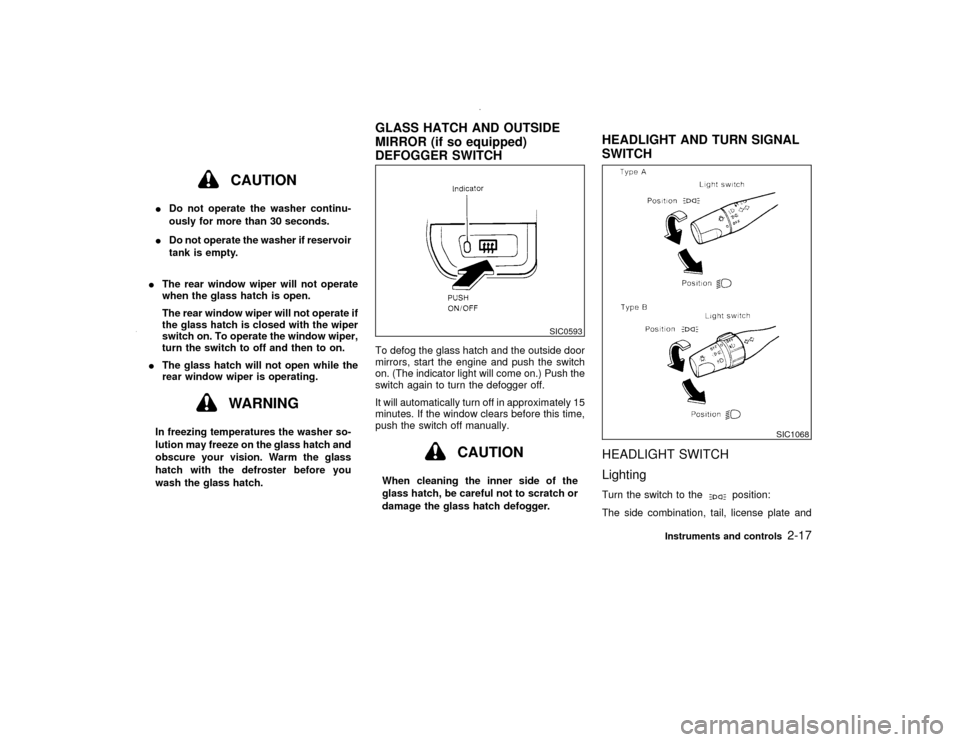
wash the glass hatch.To defog the glass hatch and the outside door
mirrors, start the engine and push the switch
on. (The indicator light will come on.) Push the
switch again to turn the defogger off.
It will automatically turn off in approximately 15
minutes. If the window clears before this time,
push the switch off manually.
CAUTION
When cleaning the inner side of the
glass hatch, be careful not to scratch or
damage the glass hatch defogger.
HEADLIGHT SWITCH
LightingTurn the switch to the
position:
The side combination, tail, license plate and
SIC0593
SIC1068
GLASS HATCH AND OUTSIDE
MIRROR (if so equipped)
DEFOGGER SWITCHHEADLIGHT AND TURN SIGNAL
SWITCH
Instruments and controls
2-17
Z
00.1.17/R50-D/V5
X
Page 71 of 265

instrument lights will come on.
Turn the switch to the
position:
Headlights will come on and all the other lights
remain on.
Battery saver systemIWhen the headlight switch is in the
or
position while the ignition switch is in
the ON position, the lights (including the
front fog light) will automatically turn off 45
seconds after the ignition switch has been
turned to the OFF position.
IWhen you open either the driver's or front
passenger's door, the lights turn off within
the 45 seconds.
IWhen the headlight switch remains in theor
position after the lights auto-
matically turn off, the lights will turn on
when the ignition switch is turned to the ON
position from the OFF position.CAUTION
IWhen you turn on the headlight
switch after the lights automatically
turn off, the lights will not turn offautomatically. Be sure to turn the
light switch to the OFF position when
you leave the vehicle for extended
periods of time, otherwise the battery
will go dead.
INever leave the light switch on when
the engine is not running for ex-
tended periods of time.
Instrument brightness controlThe instrument brightness control operates
when the light switch is in the
or
position.
Turn the control to adjust the brightness of
instrument panel lights and power window
switch lights.
When the control is turned to the right until a
click sound is heard, the light intensity will be
at maximum. When the control is turned to the
left until a click sound is heard, the light will be
turned off.
SIC0052
2-18
Instruments and controls
Z
00.1.17/R50-D/V5
X
Page 72 of 265

Headlight beam selectTo select the high beam, push the lever for-
ward. Pull it back to select the low beam.
Passing signalPulling the lever toward you will turn on the
passing signal even when the headlight switch
is off.Daytime running light system
(Canada only)The headlights automatically illuminate at a
reduced intensity when the engine is started
with the parking brake released. The daytime
running lights operate with the headlight switch
in the off position or in the
position. Turn
the headlight switch to theposition for
full illumination when driving at night.
If the parking brake is applied before the
engine is started, the daytime running lights do
not illuminate. The daytime running lights illu-
minate once the parking brake is released.
The daytime running lights will remain on until
the ignition switch is turned off.
WARNING
When the daytime running light system
is active, tail lights on your vehicle are
not on. It is necessary at dusk to turn on
your headlights. Failure to do so could
cause an accident injuring yourself and
others.
SIC1069
Instruments and controls
2-19
Z
00.1.17/R50-D/V5
X
Page 75 of 265

The front seat(s) are warmed by built-in heat-
ers. The switches located on the instrument
panel can be operated independently of each
other.
1. Start the engine.
The battery could run down if the heater is
operated while the engine is not running.
2. Push the
(Low) or
(High) po-
sition of the switch, as desired, depending
on the temperature. The indicator light in
the switch will illuminate.
The heater is controlled by a thermostat,
automatically turning the heater on and off.The indicator light will remain on as long as
the switch is on.
3. When the vehicle's interior is warmed or
before you leave the vehicle, be sure to turn
the switch off.
CAUTION
IThe battery could run down if the seat
heater is operated while the engine is
not running.
IDo not use the seat heater for ex-
tended periods or when no one is
using the seat.
IDo not put anything on the seat which
insulates heat, such as a blanket,
cushion, seat cover, etc. Otherwise,
the seat may become overheated.
IDo not place anything hard or heavy
on the seat or pierce it with a pin or
similar object. This may result in
damage to the heater.
IAny liquid spilled on the heating seat
should be removed immediately with
a dry cloth.IWhen cleaning the seat, never use
gasoline, thinner, or any similar ma-
terials.
IIf any abnormalities are found or the
heating seat does not operate, turn
the switch off and have the system
checked by your NISSAN dealer.
SIC0684
HEATED SEATS (if so equipped)2-22
Instruments and controls
Z
00.1.17/R50-D/V5
X
Page 76 of 265

The power outlet is for powering electrical
accessories such as cellular telephones.
CAUTION
IUse caution as the outlet and plug
may be hot during or immediately
after use.
IThis power outlet is not designed for
use with a cigarette lighter unit.
IDo not use with accessories that ex-
ceed a 12 volt, 120W (10A) powerdraw. Do not use double adapters or
more than one electrical accessory.
IUse this power outlet with the engine
running. (If the engine is stopped,
this could result in a discharged bat-
tery.)
IAvoid using when the air conditioner,
headlights or rear window defogger
is on.
IBefore inserting or disconnecting a
plug, be sure to turn off the power
switch of electrical accessory being
used or the ACC power of the vehicle.
IPush the plug in as far as it will go. If
good contact is not made, the plug
may overheat or the internal tempera-
ture fuse may blow.
IWhen not in use, be sure to close the
cap. Do not allow water to contact the
socket.
SIC1313
SIC0685A
POWER OUTLET
CIGARETTE LIGHTER AND
ASHTRAY (Accessory)
Instruments and controls
2-23
Z
00.1.17/R50-D/V5
X
Page 88 of 265

The ceiling light will stay on for about 30
seconds when:
IThe driver's door is unlocked by the multi-
remote controller or a key when all doors
are locked.
IThe driver's door is unlocked while the key
is removed from the ignition switch.
IThe key is removed from the ignition switch
and the driver's door is opened and then
closed.
IThe key is removed from the ignition switch
while all doors are closed.
The light will turn off while the 30 second timer
is activated when:
IThe driver's door is locked either with the
multi-remote controller, a key, the door lock
knob or the lock-unlock switch.
IThe ignition switch is turned ON.
When the interior light or the personal light
switch is in the ON position, the interior,
personal, and vanity mirror lights will auto-
matically turn off 10 minutes after the igni-
tion switch has been turned to the OFF
position. To turn on the light again, insert
the key into the ignition switch and move it
to the ON position.After the above procedure, the interior, per-
sonal, or vanity mirror lights will automatically
turn off 10 minutes after the latest operation of
the following:
IOpening or closing any door
ILocking or unlocking the driver's door
IInserting or removing a key from the ignition
switch
These lights will turn on again when any of the
above operations is performed after the lights
have turned off automatically. (The lights will
turn off 10 minutes after the latest operation of
the above as well.)
CAUTION
ITurn off the interior, personal and
vanity mirror lights when you leave
the vehicle.
IDo not use for extended periods of
time with the engine stopped. This
could result in a discharged battery.When the interior light or the personal light
switch is in the ON position, the interior,
personal, and vanity mirror lights will auto-
matically turn off 10 minutes after the igni-
tion switch has been turned to the OFF
position. To turn on the light again, insert
the key into the ignition switch and move it
to the ON position.
After the above procedure, the interior, per-
sonal, or vanity mirror lights will automatically
turn off 10 minutes after the latest operation of
the following:
IOpening or closing any door
ILocking or unlocking the driver's door
SIC0565
PERSONAL LIGHTS
Instruments and controls
2-35
Z
00.1.17/R50-D/V5
X
Page 89 of 265

IInserting or removing a key from the ignition
switch
These lights will turn on again when any of the
above operations is performed after the lights
have turned off automatically. (The lights will
turn off 10 minutes after the latest operation of
the above as well.)
CAUTION
ITurn off the interior, personal and
vanity mirror lights when you leave
the vehicle.
IDo not use for extended periods of
time with the engine stopped. This
could result in a discharged battery.The light on the vanity mirror will turn on when
the cover on the vanity mirror is opened.The Integrated HomeLink
Universal Trans-
ceiver provides a convenient way to consoli-
date the functions of up to three individual
hand-held transmitters into one built-in device.
Integrated HomeLink
Universal Transceiver:
IWill operate most Radio Frequency (RF)
devices such as garage doors, gates, home
and office lighting, entry door locks and
security systems.
IIs powered by your vehicle's battery. No
separate batteries are required. If the vehi-
cle's battery is discharged or is discon-
nected, HomeLinkwill retain all program-
ming.
Once the Integrated HomeLink
Universal
Transceiver is programmed, retain the
original transmitter for future programming
procedures (i.e., new vehicle purchases).
Upon sale of the vehicle, the programmed
Integrated HomeLink
Universal Trans-
ceiver buttons should be erased for secu-
rity purposes. For additional information,
refer to ªProgramming the Integrated
HomeLink
Universal Transceiverº later in
this section.
SIC0186
VANITY MIRROR LIGHT (if so
equipped)INTEGRATED HomeLink
UNIVERSAL TRANSCEIVER (if so
equipped)
2-36
Instruments and controls
Z
00.1.17/R50-D/V5
X
Page 90 of 265

WARNING
IDo not use the Integrated HomeLink
Universal Transceiver with any ga-
rage door opener that lacks safety
stop and reverse features as required
by federal safety standards. (These
standards became effective for
opener models manufactured after
April 1, 1982.) A garage door opener
which cannot detect an object in the
path of a closing garage door and
then automatically stop and reverse,
does not meet current federal safety
standards. Using a garage door
opener without these features in-
creases the risk of serious injury or
death.
IDuring programming, your garage
door or gate may open or close. Make
sure that people and objects are clear
of the garage door or gate that you
are programming.
IYour vehicle's engine should be
turned off while programming the In-tegrated HomeLink
Universal Trans-
ceiver.
PROGRAMMING HomeLink1. With the ignition key in the OFF position,
press and hold the two outside buttons, and
release when the indicator light begins to
flash (approximately 20 seconds). This pro-
cedure erases the factory set default codes
and does not have to be followed when
programming additional hand-held trans-
mitters.
2. Hold the end of the hand-held transmitter
(from the device you wish to train) approxi-
mately 2 to 5 inches (50 to 127 mm) away
from the surface of HomeLink
keeping the
indicator light in view.SPA0609A
Instruments and controls
2-37
Z
00.1.17/R50-D/V5
X