start NISSAN PATHFINDER 2001 R50 / 2.G Owner's Manual
[x] Cancel search | Manufacturer: NISSAN, Model Year: 2001, Model line: PATHFINDER, Model: NISSAN PATHFINDER 2001 R50 / 2.GPages: 289, PDF Size: 2.45 MB
Page 135 of 289
be guided automatically into the slot and start
playing.
After loading the disc, the number of tracks on
the disc and the play time will appear on the
display.
If the radio or tape is already operating, it will
automatically turn off and the compact disc will
play.
CAUTION
Do not force the compact disc into the
slot. This could damage the player.
If the system has been turned off while the
compact disc was playing, pushing the
ON×OFF/VOL control knob will start the com-
pact disc.
8 cm diameter compact discs can also be used
without an adapter.
PLAY:
When the CD/CHG button is pushed with the
system off and the compact disc loaded, the
system will turn on and the compact disc will
start to play.
When the CD/CHG button is pushed with the
compact disc loaded but the tape or the radioplaying, the tape or radio will automatically be
turned off and the compact disc will start to
play.
FF (Fast Forward), REW
(Rewind):
When the(fast forward) or
(rewind)
button is pushed while the compact disc is
being played, the compact disc will play while
fast forwarding or rewinding. When the button
is released, the compact disc will return to
normal play speed.
APS (Automatic Program
Search) FF, APS REW:
When the(APS FF) button is pushed
while the compact disc is being played, the
program next to the present one will start to
play from its beginning. Push several times to
skip through programs. The compact disc will
advance the number of times the button is
pushed. (When the last program on the com-
pact disc is skipped through, the first program
will be played.) When the
(APS REW)
button is pushed, the program being played
returns to its beginning. Push several times to
skip back through programs. The compact disc
will go back the number of times the button is
pushed.
PROG (Program):
When the PROG button is pushed while the
compact disc is being played, the play pattern
will change as follows:
no mark: All the programs will be played
repeatedly in sequence.
1: Only one program (the one being played
when the PROG button is pushed) will be
repeated.
RANDOM: Programs will be played at random,
not following the sequence on the compact
disc. The same program may be repeated
twice.
When the compact disc is ejected, the
play pattern will automatically change to
no mark.
CD EJECT:
When the CD EJECT button is pushed with the
compact disc loaded, the compact disc will be
ejected.
When the button is pushed twice consecutively
the compact disc will be ejected further than
when pushed once.
When this button is pushed while the compact
disc is being played, the compact disc will
come out and the system will turn off.
4-18
Heater, air conditioner and audio systems
Z
00.1.10/R50-D/V5
X
Page 141 of 289
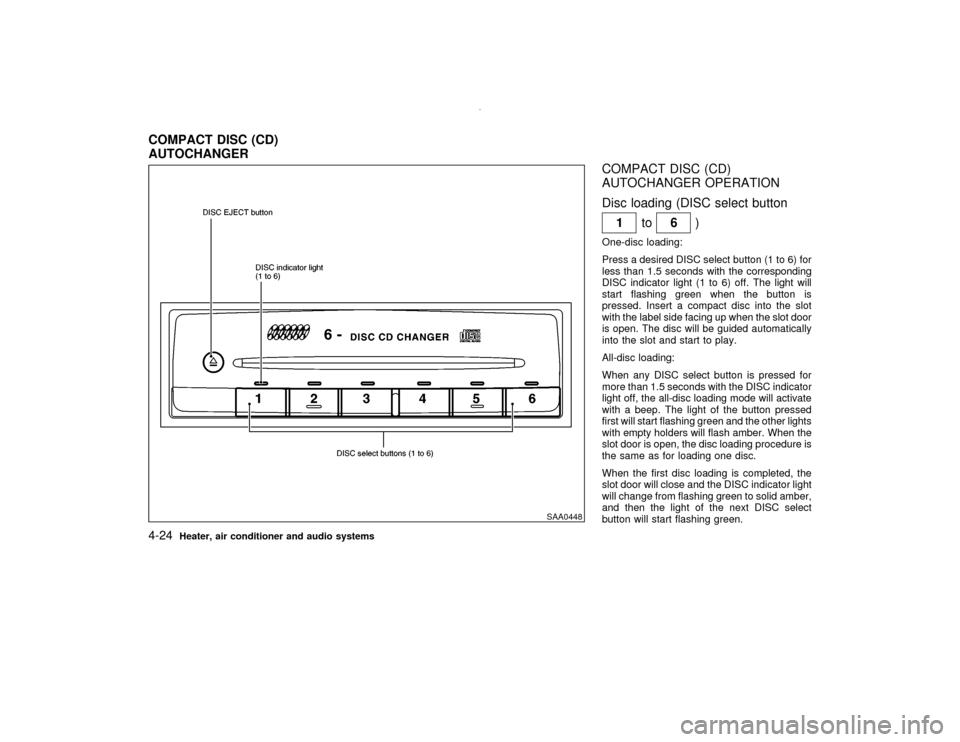
COMPACT DISC (CD)
AUTOCHANGER OPERATION
Disc loading (DISC select button
1to
6)
One-disc loading:
Press a desired DISC select button (1 to 6) for
less than 1.5 seconds with the corresponding
DISC indicator light (1 to 6) off. The light will
start flashing green when the button is
pressed. Insert a compact disc into the slot
with the label side facing up when the slot door
is open. The disc will be guided automatically
into the slot and start to play.
All-disc loading:
When any DISC select button is pressed for
more than 1.5 seconds with the DISC indicator
light off, the all-disc loading mode will activate
with a beep. The light of the button pressed
first will start flashing green and the other lights
with empty holders will flash amber. When the
slot door is open, the disc loading procedure is
the same as for loading one disc.
When the first disc loading is completed, the
slot door will close and the DISC indicator light
will change from flashing green to solid amber,
and then the light of the next DISC select
button will start flashing green.
SAA0448
COMPACT DISC (CD)
AUTOCHANGER4-24
Heater, air conditioner and audio systems
Z
00.1.10/R50-D/V5
X
Page 142 of 289

The disc loading procedure is the same as
above, and so continue on.
When all the discs are set or no more discs are
loaded for about 15 seconds after the slot door
is open, the first disc loaded will start to play.
CAUTION
When loading, wait for green light at the
CD slot and insert only one disc at a
time. Forcing in the compact disc could
damage the player.
Hold the disc only on the edges and center
hole. Never touch the surface of the disc.Disc eject (DISC EJECT button
)
One-disc eject:
When the DISC EJECT button is pressed for
less than 1.5 seconds while a disc is playing or
stopped, the current or last disc played will be
ejected.
When the DISC EJECT button is pressed, the
DISC indicator light will start flashing amber
until the disc is ready to be ejected. The light
will turn off when the disc is ejected.To select a disc to eject, press the DISC
EJECT button within 3 seconds after a DISC
select button is pressed, or do it in reverse
order.
All-disc eject:
When the DISC EJECT button is pressed for
more than 1.5 seconds while any disc is play-
ing or stopped, the all-disc eject mode will
activate with a beep.
When the DISC EJECT button is pressed, the
all DISC indicator lights of the disc stored
holder will start flashing amber. Each light will
turn off when the disc is ejected. When the disc
is released from the slot and then the slot door
is closed, the unit will start to eject the next
disc, and so on continuously upto full disc
eject. After all discs are ejected, the all DISC
indicator lights will turn off.The audio system can be operated using the
controls on the steering wheel.
With the ignition key turned to the ACC or ON
position, turn the audio system ON or OFF.
MODE select switchPush the mode select switch to change the
mode in the sequence of AM, FM1, FM2,
Tape, CD and CD autochanger (if so
equipped).Volume control switchPush the upper or lower side switch to in-
crease or decrease the volume.
SAA0474A
STEERING WHEEL SWITCH FOR
AUDIO CONTROL (if so equipped)
Heater, air conditioner and audio systems
4-25
Z
00.1.10/R50-D/V5
X
Page 146 of 289

5 Starting and drivingPrecautions when starting and driving ...................... 5-2
Exhaust gas (Carbon monoxide).......................... 5-2
Three way catalyst ............................................... 5-3
On-pavement and offroad driving precautions ..... 5-3
Avoiding collision and rollover .............................. 5-4
Drinking alcohol/drugs and driving ....................... 5-4
Driving safety precautions .................................... 5-4
Ignition switch............................................................ 5-6
Automatic transmission ........................................ 5-6
Manual transmission ............................................ 5-7
Key positions ........................................................ 5-8
Nissan vehicle immobilizer system ...................... 5-8
Before starting the engine ......................................... 5-9
Starting the engine .................................................... 5-9
Driving the vehicle ................................................... 5-10
Automatic transmission ...................................... 5-10
Manual transmission .......................................... 5-14
Parking brake .......................................................... 5-16
Cruise control (if so equipped) ................................ 5-17
Precautions on cruise control ............................. 5-17
Cruise control operations ................................... 5-17Break-in schedule ................................................... 5-19
Increasing fuel economy ......................................... 5-19
Using part time four wheel drive (4WD) ................. 5-20
Transfer case shifting procedures ...................... 5-21
Using all-mode four wheel drive (4WD) .................. 5-23
Transfer case shifting procedures ...................... 5-23
Parking/parking on hills ........................................... 5-30
Power steering ........................................................ 5-31
Brake system .......................................................... 5-32
Braking precautions............................................ 5-32
Anti-lock brake system (ABS) ............................ 5-32
Cold weather driving ............................................... 5-34
Freeing a frozen door lock ................................. 5-34
Anti-freeze .......................................................... 5-34
Battery ................................................................ 5-34
Draining of coolant water ................................... 5-34
Tire equipment ................................................... 5-34
Special winter equipment ................................... 5-35
Driving on snow or ice ....................................... 5-35
Engine block heater (if so equipped) ................. 5-35
Z
00.1.10/R50-D/V5
X
Page 147 of 289

WARNING
IDo not leave children, impaired
adults, or pets alone in your vehicle.
They could accidentally injure them-
selves or others through inadvertent
operation of the vehicle. Also, on hot,
sunny days, temperatures in a closed
vehicle could quickly become high
enough to cause severe or possibly
fatal injuries to people or animals.
IProperly secure all cargo to help pre-
vent it from sliding or shifting. Do not
place cargo higher than the seat-
backs. In a sudden stop or collision,
unsecured cargo could cause per-
sonal injury.
EXHAUST GAS (Carbon monoxide)
WARNING
Do not breathe exhaust gases; they con-
tain colorless and odorless carbon mon-
oxide. Carbon monoxide is a dangerous.
It can cause unconsciousness or death.
IIf you suspect that exhaust fumes are
entering the vehicle, drive with all
windows fully open, and have the
vehicle inspected immediately.
IDo not run the engine in closed
spaces such as a garage.
IDo not park the vehicle with the en-
gine running for any extended length
of time.
IKeep the back door and glass hatch
closed while driving, otherwise ex-
haust gases could be drawn into the
passenger compartment. If you must
drive with the back door on glass
hatch open, follow these precautions:
1. Open all the windows.2. Set the air recirculation switch
OFF and the fan control at 4 (high)
to circulate the air.
IIf electrical wiring or other cable con-
nections must pass to a trailer
through the seal on the back door or
the body, follow the manufacturer's
recommendation to prevent carbon
monoxide entry into the vehicle.
IIf a special body or other equipment
is added for recreational or other us-
age, follow the manufacturer's rec-
ommendation to prevent carbon
monoxide entry into the vehicle.
(Some recreational vehicle appli-
ances such as stoves, refrigerator,
heaters, etc. may also generate car-
bon monoxide.)
IThe exhaust system and body should
be inspected by a qualified mechanic
whenever:
a. The vehicle is raised for service.
b. You suspect that exhaust fumes
are entering into the passenger
PRECAUTIONS WHEN STARTING
AND DRIVING5-2
Starting and driving
Z
00.1.10/R50-D/V5
X
Page 148 of 289

compartment.
c. You notice a change in the sound
of the exhaust system.
d. You have had an accident involv-
ing damage to the exhaust system,
underbody, or rear of the vehicle.
THREE WAY CATALYSTThe three way catalyst is an emission control
device, installed in the exhaust system. In the
converter, exhaust gases are burned at high
temperatures to help reduce pollutants.
WARNING
IThe exhaust gas and the exhaust sys-
tem are very hot. Keep people, ani-
mals or flammable materials away
from the exhaust system compo-
nents.
IDo not stop or park the vehicle over
flammable materials, such as dry
grass, waste paper or rags. They may
ignite and cause a fire.
CAUTION
IDo not use leaded gasoline. Deposits
from leaded gasoline seriously re-
duce the three way catalyst's ability
to help reduce exhaust pollutants.
IKeep your engine tuned up. Malfunc-
tions in the ignition, fuel injection, or
electrical systems can cause over-
rich fuel flow into the three way cata-
lyst, causing it to overheat. Do not
keep driving if the engine misfires, or
if noticeable loss of performance or
other unusual operating conditions
are detected. Have the vehicle in-
spected promptly by an authorized
NISSAN dealer.
IAvoid driving with an extremely low
fuel level. Running out of fuel could
cause the engine to misfire, damag-
ing the three way catalyst.
IDo not race the engine while warming
it up.IDo not push or tow your vehicle to
start the engine.
ON-PAVEMENT AND OFFROAD
DRIVING PRECAUTIONSUtility vehicles have a significantly higher
rollover rate than other types of vehicles.
They have higher ground clearance than pas-
senger cars to make them capable of perform-
ing in a variety of on-pavement and offroad
applications. This gives them a higher center
of gravity than ordinary cars. An advantage of
higher ground clearance is a better view of the
road, allowing you to anticipate problems.
However, they are not designed for cornering
at the same speeds as conventional two-wheel
drive vehicles any more than low-slung sports
cars are designed to perform satisfactorily
under offroad conditions. If at all possible,
avoid sharp turns or abrupt maneuvers, par-
ticularly at high speeds. As with other vehicles
of this type, failure to operate this vehicle
correctly may result in loss of control or vehicle
rollover.
Be sure to read the driving safety precautions
later in this section.
Starting and driving
5-3
Z
00.1.10/R50-D/V5
X
Page 149 of 289

AVOIDING COLLISION AND
ROLLOVER
WARNING
Failure to operate this vehicle in a safe
and prudent manner may result in loss
of control or an accident.
Be alert and drive defensively at all times.
Obey all traffic regulations. Avoid excessive
speed, high speed cornering, or sudden steer-
ing maneuvers, because these driving prac-
tices could cause you to lose control of your
vehicle.As with any vehicle, a loss of con-
trol could result in a collision with other
vehicles or objects, or cause the vehicle to
rollover, particularly if the loss of control
causes the vehicle to slide sideways.Be
attentive at all times, and avoid driving when
tired. Never drive when under the influence of
alcohol or drugs (including prescription or
over-the-counter drugs which may cause
drowsiness). Always wear your seat belt as
outlined in the ª1. Seats, restraints and supple-
mental air bag systemsº section of this
manual, and also instruct your passengers to
do so. Seat belts help reduce the risk of injury
in collisions and rollovers.In a rollover crash,an unbelted person is significantly more
likely to die than a person wearing a seat
belt.
DRINKING ALCOHOL/DRUGS AND
DRIVING
WARNING
Never drive under the influence of alco-
hol or drugs. Alcohol in the bloodstream
reduces coordination, delays reaction
time and impairs judgement. Driving af-
ter drinking alcohol increases the likeli-
hood of being involved in an accident
injuring yourself and others. Addition-
ally, if you are injured in the accident,
alcohol can increase the severity of the
injury.
Nissan is committed to safe driving. But, you
must choose not to drive under the influence of
alcohol. Every year thousands of people are
injured or killed in alcohol related accidents.
Although the local laws vary on what is con-
sidered to be legally intoxicated, the fact is that
alcohol affects all people differently and most
people underestimate the effects of alcohol.Remember, drinking and driving don't mix!
And that's true for drugs too (over the counter,
prescription, and illegal drugs). Don't drive if
your ability to operate your vehicle is impaired
by alcohol, drugs, or some other physical
condition.
DRIVING SAFETY PRECAUTIONSYour NISSAN is designed for both normal and
offroad use. However, avoid driving in deep
water or mud as your NISSAN is mainly de-
signed for leisure use, unlike a conventional
offroad vehicle.
Remember that two wheel drive models are
less capable than four wheel drive models for
rough road driving and extrication when stuck
in deep snow or mud, or the like.
Please observe the following precautions:
WARNING
IDrive carefully when off the road and
avoid dangerous areas. Every person
who drives or rides in this vehicle
should be seated with their seat belt
5-4
Starting and driving
Z
00.1.10/R50-D/V5
X
Page 150 of 289

fastened. This will keep you and your
passengers in position when driving
over rough terrain.
IBefore driving up or down grades,
check the road surface for bumps or
potholes. Be sure to climb a gentle
slope and descend a gentle slope.
IDo not drive across steep slopes.
Instead drive either straight up or
straight down the slopes. Off-road
vehicles can tip over sideways much
more easily than they can forward or
backward.
IMany hills are too steep for any ve-
hicle. If you drive up them, you may
stall. If you drive down them, you may
not be able to control your speed. If
you drive across them, you may roll
over.
IDo not shift gears while driving on
downhill grades as this could cause
loss of control of the vehicle.
IBe sure to use the engine brake. The
foot brake performance may be re-duced, resulting in a possible acci-
dent.
IStay alert when driving to the top of a
hill. At the top there could be a drop-
off or other hazard that could cause
an accident.
IStay alert when driving to the top of a
hill. At the top there could be a drop-
off or other hazard that could cause
an accident.
IIf your engine stalls or you cannot
make it to the top of a steep hill, never
attempt to turn around. Your vehicle
could tip or roll over. Always back
straight down in R (Reverse) gear.
Never back down in N (Neutral) or
with the clutch depressed (manual
transmission vehicles), using only
the brake, as this could cause loss of
control.
IHeavy braking going down a hill
could cause your brakes to overheat
and fade, resulting in loss of control
and an accident. Apply brakes lightlyand use a low gear to control your
speed.
IUnsecured cargo can be thrown
around when driving over rough ter-
rain. Properly secure all cargo so it
will not be thrown forward and cause
injury to you or your passengers.
ITo avoid raising the center of gravity
excessively, do not exceed the rated
capacity of the roof rack and evenly
distribute the load. Secure heavy
loads in the cargo area as far forward
and as low as possible. Do not equip
the vehicle with tires larger than
specified in this manual. This could
cause your vehicle to roll over.
IDo not grip the inside or spokes of
the steering wheel when driving of-
froad. The steering wheel could move
suddenly and injure your hands. In-
stead drive with your fingers and
thumbs on the outside of the rim.
IBefore operating the vehicle, ensure
that the driver and all passengers
Starting and driving
5-5
Z
00.1.10/R50-D/V5
X
Page 151 of 289

have their seat belts fastened.
IAlways drive with the floor mats in
place as the floor may become hot.
ILower your speed when encounter-
ing strong crosswinds. With a higher
center of gravity, your NISSAN is
more affected by strong side winds.
Slower speeds ensure better vehicle
control.
IDo not drive beyond the performance
of the tires, even with 4WD engaged.
Accelerating quickly, sharp steering
maneuvers or sudden braking may
cause loss of control.
IIf at all possible, avoid sharp turning
maneuvers, particularly at high
speeds. Your NISSAN four wheel
drive vehicle has a higher center of
gravity than a two wheel drive ve-
hicle. The vehicle is not designed for
cornering at the same speeds as con-
ventional two wheel drive vehicles.
Failure to operate this vehicle cor-
rectly could result in loss of controland/or a roll over accident.
IAlways use tires of the same type,
size, brand, construction (bias, bias-
belted or radial), and tread pattern on
all four wheels. Install tire chains on
the rear wheels when driving on slip-
pery roads and drive carefully.
IBe sure to check the brakes immedi-
ately after driving in mud or water.
See ªBrake systemº later in this sec-
tion for wet brakes.
IAvoid parking your vehicle on steep
hills. If you get out of the vehicle and
it rolls forward, backward or side-
ways, you could be injured.
IWhenever you drive off-road through
sand, mud or water as deep as the
wheel hub, more frequent mainte-
nance may be required. See ªPeriodic
maintenanceº in the ª9. Mainte-
nanceº section of this manual.
AUTOMATIC TRANSMISSIONOn automatic transmission models, the igni-
tion lock is designed so that the key cannot be
turned to LOCK and removed until the selector
lever is moved to the P (Park) position.
When removing the key from the ignition,
make sure the selector lever is in the P (Park)
position.
If the selector lever is not returned to P (Park),
the key cannot be moved toward LOCK.
When the key cannot be turned toward the
LOCK position, proceed as follows to remove
the key:
SSD0083
IGNITION SWITCH
5-6
Starting and driving
Z
00.1.10/R50-D/V5
X
Page 152 of 289

1) Move the selector lever into the P (Park)
position.
2) Turn the ignition key slightly in the ON
direction.
3) Turn the key toward the LOCK position.
4) Remove the key.
If the key is removed from the ignition switch,
the selector lever cannot be moved from P
(Park).The selector lever can be moved if
the ignition switch is in the ON position and
the foot brake pedal is depressed.
There is an OFF position in between LOCK
and ACC, although it does not show on the
lock cylinder. When the ignition is in OFF the
steering wheel is not locked.
In order for the steering wheel to be locked, it
must be turned about 1/6 of a turn clockwise
from the straight up position.
To lock the steering wheel, turn the key to
the LOCK position. Remove the key. To
unlock the steering wheel, insert the key
and turn it gently while rotating the steer-
ing wheel slightly right and left.
WARNING
Never remove or turn the key to the
LOCK position while driving. The steer-
ing wheel will lock. This may cause the
driver to lose control of the vehicle and
could result in serious vehicle damage
or personal injury.
MANUAL TRANSMISSIONThe switch includes an anti-theft steering lock
device.
The ignition key can only be removed when
the switch is in the LOCK position.
On manual transmission models, to turn the
ignition key to LOCK from ACC or ON, first turn
the key to OFF and turn the key to LOCK while
pushing the key in.
In order for the steering wheel to be locked, it
must be turned about 1/6 of a turn clockwise
from the straight up position.
To lock the steering wheel, turn the key to
SSD0082C
Starting and driving
5-7
Z
00.1.10/R50-D/V5
X