ignition NISSAN PATHFINDER 2001 R50 / 2.G Owner's Guide
[x] Cancel search | Manufacturer: NISSAN, Model Year: 2001, Model line: PATHFINDER, Model: NISSAN PATHFINDER 2001 R50 / 2.GPages: 289, PDF Size: 2.45 MB
Page 103 of 289

LOCKING WITH POWER DOOR
LOCK SWITCH (if so equipped)Operating the lock-unlock switch will lock or
unlock all doors including the back door simul-
taneously.
All door locks will be engaged when the power
door lock switch is moved to the LOCK posi-
tion with the driver's or front passenger's door
open. Then close the door and all doors will be
locked.
When the power door lock switch is moved to
the LOCK position while any front doors is
open and a key is in the ignition switch, alldoors will lock once and then unlock automati-
cally.
CHILD SAFETY REAR DOOR
LOCKChild safety locking helps prevent doors from
being opened accidentally, especially when
small children are in the vehicle.
When the lever is in the lock position, the
rear door can be opened only from the
outside.
SPA0944
SPA0841
3-4
Pre-driving checks and adjustments
Z
00.1.10/R50-D/V5
X
Page 104 of 289

It is possible to lock/unlock all doors and
activate the panic alarm by using the remote
controller from outside the vehicle.
Before locking the doors, make sure the
key is not left in the vehicle.
The remote controller can operate at a dis-
tance of approximately 33 ft (10 m) from the
vehicle. (The effective distance depends upon
the conditions around the vehicle.)
As many as four remote controllers can be
used with one vehicle. For information con-
cerning the purchase and use of additional
remote controllers, contact your NISSAN
dealer.
The multi-remote controller will not function
when:
Ithe battery is dead,
Ithe distance between the vehicle and the
remote controller is over 33 ft (10 m).
The panic alarm will not activate when the
key is in the ignition switch.
CAUTION
The following conditions or occurrences
will damage the remote controller.IDo not allow the remote controller to
become wet.
IDo not drop the remote controller.
IDo not strike the remote controller
sharply against another object.
IDo not place the remote controller for
an extended period in an area where
temperatures exceed 140ÉF (60ÉC).
If a multi-remote controller is lost or
stolen, NISSAN recommends erasing
the ID code of that controller. This will
prevent the controller from unautho-
rized use to unlock the vehicle. For in-
formation regarding the erasing proce-
dure, please contact an authorized
NISSAN dealer.
HOW TO USE MULTI-REMOTE
CONTROL SYSTEM
Setting hazard indicator and horn
modeThis vehicle is set in hazard indicator and horn
mode when you first receive the vehicle.In hazard indicator and horn mode, when the
LOCK button is pushed, the hazard indicator
flashes twice and the horn chirps once. When
the UNLOCK button is pushed, the hazard
indicator flashes once.
If hazard indicator and horn mode is not nec-
essary, you can switch to hazard indicator only
mode by following the switching procedure
below.
In hazard indicator only mode, when the LOCK
button is pushed, the hazard indicator flashes
twice. When the UNLOCK button is pushed,
neither the hazard indicator nor the horn oper-
ates.
(Switching procedure)
Press and hold the LOCK and UNLOCK but-
tons on the multi-remote controller simulta-
neously for at least 2 seconds to switch from
one mode to the other.
When pushing the buttons to set hazard indi-
cator only mode, the hazard indicator flashes 3
times.
When pushing the buttons to set hazard indi-
cator and horn mode, the hazard indicator
flashes once and the horn chirps once.
MULTI-REMOTE CONTROL
SYSTEM
Pre-driving checks and adjustments
3-5
Z
00.1.10/R50-D/V5
X
Page 105 of 289

Locking doors1. Remove the ignition key.*1
2. Close all the doors.*2
3. Push the LOCK button on the multi-remote
controller.
4. All the doors will lock.
All of the doors will lock when the LOCK
button on the multi-remote controller is
pushed even though a door remains open
and/or the ignition key is in the ON posi-
tion.5. The hazard indicator flashes twice and the
horn chirps once.
IWhen the LOCK button is pushed with all
doors locked, the hazard indicator flashes
twice and the horn chirps once as a re-
minder that the doors are already locked.
*1: Doors lock with the remote controller while
a key is in the ignition switch. However, the
panic alarm will not activate when the
ignition switch is in the ACC or ON posi-
tion.
*2: Doors lock with the remote controller while
any door is open. However, hazard indica-tor and horn mode will not function.
SPA1260
3-6
Pre-driving checks and adjustments
Z
00.1.10/R50-D/V5
X
Page 106 of 289

Unlocking doors1. Push the UNLOCK button on the multi-
remote controller once.
IOnly the driver's door unlocksIThe interior light turns on and the light timer
activates for 30 seconds when the switch is
in the centerqposition.
IThe hazard indicator flashes once if all
doors are completely closed with the igni-tion switch in the LOCK, OFF or ACC
position.
All doors will unlock if you keep depressing the
button for more than 5 seconds.
2. Keep pushing the UNLOCK button on the
multi-remote controller or push the button
again within 5 seconds.
IAll doors unlock
IThe hazard indicator flashes once if all
doors are completely closed.
IThe interior light will turn on if the ignition
switch is in the LOCK, OFF or ACC posi-
tion.
IIf the following operations are not carried
out within 5 minutes after pressing the
UNLOCK button, all doors will lock auto-
matically:
Iany door is opened,
Ia key is inserted into the ignition switch
and
Ithe key is turned to the ON position.
The interior light can be turned off without
waiting for 30 seconds by inserting the key into
the ignition or by locking the doors with the
multi-remote controller.
SPA0943
Pre-driving checks and adjustments
3-7
Z
00.1.10/R50-D/V5
X
Page 114 of 289
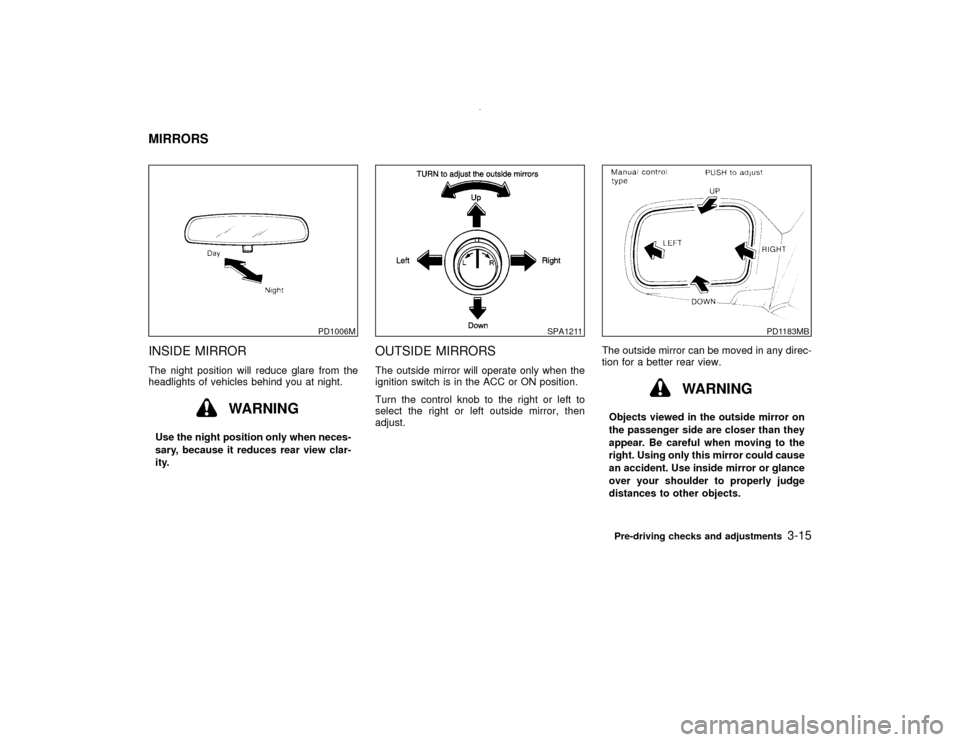
INSIDE MIRRORThe night position will reduce glare from the
headlights of vehicles behind you at night.
WARNING
Use the night position only when neces-
sary, because it reduces rear view clar-
ity.
OUTSIDE MIRRORSThe outside mirror will operate only when the
ignition switch is in the ACC or ON position.
Turn the control knob to the right or left to
select the right or left outside mirror, then
adjust.The outside mirror can be moved in any direc-
tion for a better rear view.
WARNING
Objects viewed in the outside mirror on
the passenger side are closer than they
appear. Be careful when moving to the
right. Using only this mirror could cause
an accident. Use inside mirror or glance
over your shoulder to properly judge
distances to other objects.
PD1006M
SPA1211
PD1183MB
MIRRORS
Pre-driving checks and adjustments
3-15
Z
00.1.10/R50-D/V5
X
Page 115 of 289

Foldable outside mirrorsPush the mirror backward to fold it.
AUTOMATIC SEAT POSITIONER
OPERATIONThis system is designed so that the driver's
seat will automatically move when the auto-
matic transmission selector lever is in the P
(Park) position. This allows the driver to get
into and out of the driver's seat more easily.
When one of the following conditions is met,
the driver's seat will slide backward:
IWhen the key is removed from the ignition
switch.
IWhen the driver's door is opened with the
key turned to ACC or LOCK.
IWhen the key is turned from ON to LOCK
with the driver's door open.
When one of the following conditions is met,
the driver's seat will return to the positions
before being set.
IWhen the key is inserted into the ignition
switch.
IWhen the driver's door is closed with the
key turned to ACC or LOCK.
IWhen the key is turned to ON.Procedure for storing memoryTwo positions can be stored in the automaticdrive positioner memory.Follow these proce-
dures to use the memory system.
1. Set the automatic transmission selector le-
ver to the P (Park) position.
2. Turn the ignition ON.
3. Adjust the driver's seat and steering column
to the desired positions by manually oper-
ating each adjusting switch. For additional
information, see ªSeatsº in the ª1. Seats,
restraints and supplemental air bag sys-
temsº section and ªSteering wheelº earlier
in this section.
During this step, do not turn the ignition to
M008
SPA1164
AUTOMATIC SEAT POSITIONER
(if so equipped)
3-16
Pre-driving checks and adjustments
Z
00.1.10/R50-D/V5
X
Page 116 of 289

any positions other than ON.
4. Push the SET switch and, within 5 seconds,
push the memory switch 1 or 2 fully for at
least 1 second.
The indicator light for the pushed memory
switch will come on and stay on for approxi-
mately 5 seconds after pushing the switch.
After the indicator light goes off, the se-
lected positions are stored in the selected
memory (1 or 2).
If memory is stored in the same memory
switch, the previous memory will be de-
leted.
Confirming memory storageITurn the ignition ON and push the SET
switch. If the main memory has not been
stored, the indicator light will come on for
approximately 0.5 seconds. When the
memory has stored the position, the indica-
tor light will stay on for approximately 5
seconds.
IIf the battery cable is disconnected, or if the
fuse blows, the memory will be canceled. In
such a case, reset the desired positions
using the following procedures.
1. Open and close the driver's door more thantwo times with the ignition key in the LOCK
position.
2. Reset the desired position using the previ-
ous procedure.
Selecting the memorized position1. Set the automatic transmission selector le-
ver to the P (Park) position.
2. Turn the ignition ON.
3. Push the memory switch 1 or 2 fully for at
least 1 second.
The driver's seat will move to the memo-
rized position with the indicator light flash-
ing, and then the light will stay on for
approximately 5 seconds.
When the memory switch 1 or 2 is pushed with
the driver's door open and then the key in-
serted into the ignition switch within approxi-
mately 1 minute, the driver's seat will move to
the memorized position.System operationThe automatic drive positioner system will not
work or will stop operating under the following
conditions:
Iwhen the vehicle speed is above 4 MPH (7
km/h).Iwhen any two or more of the memory
switches are simultaneously pressed while
the automatic drive positioner is operating.
Iwhen the adjusting switch for the driver's
seat is turned on while the automatic drive
positioner is operating.
Iwhen the cancel switch located on the
instrument panel is pushed to cancel.
Iwhen the memory switch 1 or 2 is not
pushed for at least 1 second.
Iwhen the seat has been already moved to
the memorized position.
Iwhen no seat position is stored in the
memory switch.
Pre-driving checks and adjustments
3-17
Z
00.1.10/R50-D/V5
X
Page 128 of 289

Turn the ignition key to ACC or ON and press
the power on switch to turn on the radio. If you
listen to the radio with the engine not running,
the key should be turned to the ACC position.
Radio reception is affected by station signal
strength, distance from radio transmitter, build-
ings, bridges, mountains and other external
influences. Intermittent changes in reception
quality normally are caused by these external
influences.
Using a cellular phone in or near the ve-
hicle may influence radio reception quality.Radio receptionYour radio system is equipped with state-of-
the-art electronic circuits to enhance radio
reception. These circuits are designed to ex-
tend reception range, and to enhance the
quality of that reception.
However there are some general characteris-
tics of both FM and AM radio signals that can
affect radio reception quality in a moving ve-
hicle, even when the finest equipment is used.
These characteristics are completely normal in
a given reception area, and do not indicate any
malfunction in your radio system.
Remember that a moving vehicle is not the
ideal place to listen to a radio. Because of the
movement, reception conditions will constantlychange. Buildings, terrain, signal distance and
interference from other vehicles can work
against ideal reception. Described below are
some of the factors that can affect your radio
reception.
FM RADIO RECEPTIONRange: FM range is normally limited to 25 to
30 miles (40 to 48 km), with monaural (single
channel) FM having slightly more range than
stereo FM. External influences may some-
times interfere with FM station reception even
if the FM station is within 25 miles (40 km). The
strength of the FM signal is directly related to
the distance between the transmitter and re-
ceiver. FM signals follow a line-of-sight path,
exhibiting many of the same characteristics as
light. For example they will reflect off objects.
Fade and drift: As your vehicle moves away
SAA0306
AUDIO SYSTEM
Heater, air conditioner and audio systems
4-11
Z
00.1.10/R50-D/V5
X
Page 131 of 289

FM-AM RADIO WITH CASSETTE
PLAYER AND COMPACT DISC
(CD) PLAYER
Audio main operationHead unit
The tape deck employs a permalloy head
which allows for improved reproduction of high
frequency ranges. Noise is also greatly re-
duced by the combined use of the Dolby NR
(Noise Reduction) system. The auto loudness
circuit enhances the low frequency range au-
tomatically in tape and CD playback.
Power/Volume control:
Turn the ignition key to ACC or ON, and then
push the Power/Volume control dial while the
system is off to call up the mode (radio, tape or
CD) which was playing immediately before the
system was turned off. When no CD or tape is
loaded, the radio will come on. While the
system is on, pushing the Power/Volume con-
trol dial turns the system off.
To turn the radio off, press the Power/Volume
control dial.
Turn the Power/Volume control dial to adjust
the volume.
SAA0473
4-14
Heater, air conditioner and audio systems
Z
00.1.10/R50-D/V5
X
Page 132 of 289
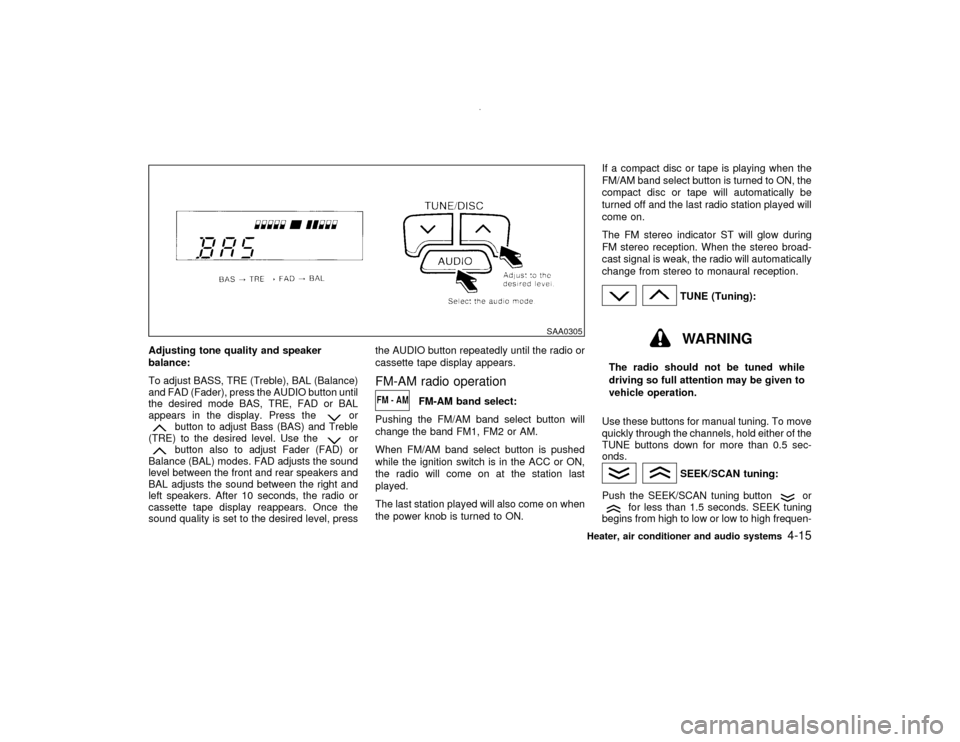
Adjusting tone quality and speaker
balance:
To adjust BASS, TRE (Treble), BAL (Balance)
and FAD (Fader), press the AUDIO button until
the desired mode BAS, TRE, FAD or BAL
appears in the display. Press the
or
button to adjust Bass (BAS) and Treble
(TRE) to the desired level. Use the
or
button also to adjust Fader (FAD) or
Balance (BAL) modes. FAD adjusts the sound
level between the front and rear speakers and
BAL adjusts the sound between the right and
left speakers. After 10 seconds, the radio or
cassette tape display reappears. Once the
sound quality is set to the desired level, pressthe AUDIO button repeatedly until the radio or
cassette tape display appears.
FM-AM radio operation
FM-AM band select:
Pushing the FM/AM band select button will
change the band FM1, FM2 or AM.
When FM/AM band select button is pushed
while the ignition switch is in the ACC or ON,
the radio will come on at the station last
played.
The last station played will also come on when
the power knob is turned to ON.If a compact disc or tape is playing when the
FM/AM band select button is turned to ON, the
compact disc or tape will automatically be
turned off and the last radio station played will
come on.
The FM stereo indicator ST will glow during
FM stereo reception. When the stereo broad-
cast signal is weak, the radio will automatically
change from stereo to monaural reception.
TUNE (Tuning):WARNING
The radio should not be tuned while
driving so full attention may be given to
vehicle operation.
Use these buttons for manual tuning. To move
quickly through the channels, hold either of the
TUNE buttons down for more than 0.5 sec-
onds.
SEEK/SCAN tuning:
Push the SEEK/SCAN tuning button
or
for less than 1.5 seconds. SEEK tuning
begins from high to low or low to high frequen-
SAA0305
Heater, air conditioner and audio systems
4-15
Z
00.1.10/R50-D/V5
X